Our readers keep the lights on and my smoothie glass nicely filled. As an Amazon Associate, I earn from qualifying purchases.
Mobile gaming has outgrown touchscreen taps. Whether you are grinding out a ranked match in Call of Duty, exploring Hyrule on an emulator, or streaming Forza from your Xbox, a dedicated gamepad transforms your phone into a true handheld console. The difference between winning and losing often comes down to the feel of the thumbsticks and the latency of the connection — elements that a cheap, unbranded clip-on simply cannot provide.
I’m Mohammad Maruf — the founder and writer behind WellFizz. I’ve spent hundreds of hours combing through customer reviews, testing build materials, and analyzing the Hall-effect versus TMR sensor debate to isolate the hardware decisions that actually matter for mobile gamers.
Whether you prioritize a compact travel form factor, full-size grips for long sessions, or pro-grade thumbsticks that never drift, this guide helps you find the best controller for phone that matches your specific gaming habits and device.
How To Choose The Best Controller For Phone
Not all phone controllers are created equal. A model that feels fantastic for a quick Minecraft session might cause hand fatigue during a two-hour Genshin Impact session. Before you buy, consider these four factors that define the real-world performance of any mobile gamepad.
Connection Type: USB-C vs Bluetooth
A USB-C telescopic controller connects directly to your phone’s port, delivering near-zero latency and drawing power from the device itself — no batteries to charge. This is the gold standard for competitive games where every millisecond counts. Bluetooth controllers offer convenience and work with cases or devices where the USB-C port is awkwardly positioned, but they introduce a small but measurable lag and require their own internal battery. Many premium models now offer both modes, giving you the best of both worlds.
Thumbstick Technology: Hall-Effect vs TMR vs Carbon Film
Standard carbon-film joysticks degrade over time and develop the dreaded stick drift that ruins your aim. Hall-effect sensors use magnets to detect position, completely eliminating physical wear and drift. The newer TMR (Tunneling Magnetoresistance) sensors offer even higher precision and lower power consumption. Any controller in the premium tier should use one of these magnetic technologies — carbon-film sticks are a red flag on a modern phone gamepad.
Ergonomics and Grip Size
Phone controllers fall into two camps: compact, pocket-friendly designs that sacrifice hand comfort, and full-size controllers that mimic the bulk of an Xbox or PlayStation gamepad. If you play in short bursts on your commute, a lightweight telescopic model is fine. For hour-long sessions or tablet use, prioritize larger handles, textured grips, and a wider stretch that keeps your wrists at a natural angle.
Software and Compatibility
A controller is only as good as the games it supports. Some models rely on a companion app to remap buttons or activate virtual controller mode for touch-screen-only games. Check that the controller supports the specific services you use — Xbox Cloud Gaming, Steam Link, PS Remote Play, or native Android/iOS titles. Android generally offers broader compatibility than iOS, especially when it comes to button mapping and vibration support.
Quick Comparison
On smaller screens, swipe sideways to see the full table.
| Model | Category | Best For | Key Spec | Amazon |
|---|---|---|---|---|
| Razer Kishi V3 Pro | Premium | AAA mobile & tablet gaming | TMR thumbsticks + Sensa HD Haptics | Amazon |
| Razer Kishi Ultra | Premium | PC Remote Play & iPad Mini | Mecha-tactile D-pad + passthrough | Amazon |
| abxylute S9 | Premium | Emulation & tablet use | Full-size grip + 3 D-pad options | Amazon |
| KICKDOT MC500 | Mid-Range | All-device compatibility | 15-hour battery + Gyro + Back buttons | Amazon |
| 8BitDo Ultimate Mobile | Mid-Range | Android cloud gaming | Hall triggers + Ultimate Software V2 | Amazon |
| Mocagen MC1 | Mid-Range | Gamers who keep their case on | 600mAh battery + 5M-cycle lifespan | Amazon |
| GameSir X5 Lite | Entry-Level | Budget USB-C gaming | 135g weight + Hall sticks + Turbo | Amazon |
In‑Depth Reviews
1. Razer Kishi V3 Pro

The Razer Kishi V3 Pro sits at the very top of the mobile controller hierarchy for good reason. It swaps Hall-effect sensors for the newer TMR (Tunneling Magnetoresistance) thumbsticks, which deliver even greater precision and anti-drift performance while drawing less power. The full-size form factor extends to fit an iPad Mini or Android tablets up to 8 inches, making it the only controller on this list that can genuinely replace a dedicated handheld for AAA gaming on a larger screen. The included swappable thumbstick caps let you trade speed for accuracy depending on the genre.
Build quality is where this model truly separates itself from the competition. The dual mouse-click back buttons and claw-grip bumpers provide the same tactile feedback Razer uses in its top-tier PC mice, and the Sensa HD Haptics deliver vibration detail that surpasses traditional console rumble. The Razer Nexus app offers a polished launcher interface, control customization, and game recording — something most rivals lack. Passthrough USB-C charging and a 3.5mm audio jack mean you never have to compromise on sound or battery during long sessions.
The V3 Pro’s innovative USB-C island design offers class-leading case compatibility, accommodating thicker phone cases that force most telescopic controllers into a bare-phone requirement. It works with iPhone 15, 16, and 17 series, plus a wide range of Android flagships. The only trade-off is the lack of Bluetooth connectivity — this is a wired-only controller — and the premium price that puts it out of reach for casual gamers. For anyone who wants the absolute best phone gaming experience, this is the benchmark.
Why it’s great
- TMR thumbsticks offer next-gen drift protection with superior precision
- Extends to fit tablets up to 8 inches; class-leading case compatibility
- Sensa HD Haptics provide console-quality vibration feedback
- Mouse-click back buttons and claw-grip bumpers for extra control
Good to know
- Wired-only connection — no Bluetooth mode for detached use
- Premium pricing places it firmly in enthusiast territory
- Heavier than most competitors; best suited for home or bag carry
2. Razer Kishi Ultra

The Kishi Ultra is Razer’s answer to the demand for a full-sized console controller that integrates directly with your phone or iPad Mini. Its standout feature is the esports-grade mecha-tactile 8-way D-pad and action buttons, which provide a distinct, satisfying click with every press — a detail that makes precise platforming and fighting-game combos feel significantly more responsive than membrane-based alternatives. The Hall-effect triggers are fully adjustable for dead zones and can switch between analog and digital input, which is critical for racing sims versus shooters.
For cloud gamers and remote play enthusiasts, this controller is an absolute weapon. It supports seamless plug-and-play connectivity with Xbox Cloud Gaming, GeForce NOW, and Steam Link via USB-C, and it includes a Virtual Controller Mode for Android that remaps touchscreen controls to physical inputs, opening up titles that normally reject hardware gamepads. The Chroma RGB lighting is fully addressable and adds a premium aesthetic, while the Razer Nexus app provides a centralized game launcher with recording and sharing features. The Sensa HD Haptics, exclusive to Android, offer nuanced vibration that traditional controllers cannot match.
The Kishi Ultra fits the iPad Mini 6 and 7 with a case, as well as the iPhone 15 Pro Max and 16 series, though you may need a thin case for a snug fit. The build is robust, with a weight that feels substantial without being cumbersome. On the downside, it lacks the newer TMR sticks found in the V3 Pro, and the programmable back buttons sit on the rear face rather than behind the grips where they’d be more intuitive. At this price point, it is a serious investment, but for anyone who regularly streams PC games to their phone, it is the most capable tool available.
Why it’s great
- Mecha-tactile D-pad and buttons offer best-in-class tactile feel
- Virtual Controller Mode adds compatibility for touch-only Android games
- Adjustable Hall-effect triggers with analog/digital switching
- Fits iPad Mini with case; Chroma RGB lighting
Good to know
- No Bluetooth — USB-C only for zero-latency connection
- Heavier and bulkier than telescopic alternatives
- Virtual Controller Mode not available on iOS
3. abxylute S9

The abxylute S9 solves a problem most telescopic controllers ignore: they feel like toys. Unlike the cramped, narrow grips that dominate the mid-range, the S9 offers a true full-size gamepad design with handles that match the width and contour of a standard console controller. This makes a dramatic difference during hour-long emulation sessions of PPSSPP or Dolphin, where hand cramping is the usual enemy. It includes three interchangeable D-pads and two different joystick heights in the box, letting you fine-tune the feel for fighting games versus third-person shooters.
The hardware spec sheet is dense for the price point. Hall-effect joysticks and Hall-effect triggers eliminate drift while providing smooth analog input. Dual rotor vibration motors, a 6-axis gyroscope, and two programmable back buttons bring it to parity with controllers costing significantly more. It supports both USB-C and Bluetooth modes, so you can play in wired mode for competitive titles or connect wirelessly when you want to keep your phone in a case. The abxy companion app (available on Android and iOS, with limitations on Apple) allows button mapping, joystick sensitivity adjustments, and trigger dead-zone tuning.
The S9 extends up to 216mm, which is enough to accommodate tablets up to 8.8 inches. It fits the iPad Mini 6 and 7 comfortably, and the included silicone spacers prevent accidental volume-button presses when using a naked device. The pass-through charging supports 5V 1A, allowing uninterrupted play. The main drawback is build-quality inconsistency — some units have been reported with sticky thumbstick rings or a weak phone holder spring. For emulation enthusiasts and tablet gamers who prioritize ergonomics over portability, the S9 is an exceptional value.
Why it’s great
- True full-size grips eliminate hand fatigue during long sessions
- Interchangeable D-pads and joystick heights for genre-specific tuning
- USB-C and Bluetooth dual-mode connectivity
- Companion app offers deep customization of controls and dead zones
Good to know
- Build quality can be inconsistent on early units
- iOS app has limited functionality compared to Android version
- Heavier than telescopic-only alternatives; less pocketable
4. KICKDOT MC500
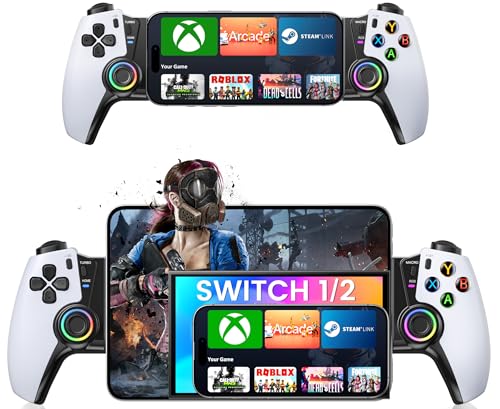
KICKDOT’s MC500 is a Bluetooth telescopic controller that punches above its weight class in terms of raw features. It includes Hall-effect joysticks, a 6-axis gyroscope, dual vibration motors, programmable back buttons (M1/M2), turbo function, and RGB lighting — all for a mid-range price. The gyroscope is particularly useful for racing games and shooters where tilt aiming adds a layer of precision that thumbsticks alone cannot provide. The 15-hour battery life means you can go days between charges even with heavy use.
Compatibility is the MC500’s strongest suit. It works with iPhone, Android, iPad Mini, Steam Link, GeForce NOW, Xbox Cloud Gaming, and even the Nintendo Switch (1, 2, OLED). The Xbox-style button layout feels natural to anyone coming from a console, and the textured, non-slip grips hold phones securely even with a basic case attached. The telescopic bridge stretches from 4.13 to 7.87 inches, covering all but the largest phablets and tablets. Setup is truly plug-and-play via Bluetooth — the controller remembers paired devices for quick reconnection.
On the downside, the MC500 has no USB-C passthrough charging, meaning you rely entirely on the internal battery. Some users report that the RGB lighting can drain the battery faster than expected, and a small number have experienced occasional input lag in crowded wireless environments. The plastic build feels sturdy but does not match the premium heft of Razer or abxylute models. For gamers who play across multiple platforms and devices and want a single controller to rule them all, the MC500 is a compelling choice.
Why it’s great
- Gyroscope and Hall sticks for drift-free, precision aiming
- 15-hour battery life supports multi-day gaming sessions
- Broad device compatibility including Switch and cloud services
- Programmable back buttons and turbo function for competitive play
Good to know
- No USB-C passthrough charging; relies on internal battery
- RGB lighting can reduce effective battery life significantly
- Build feels slightly lighter than premium competition
5. 8BitDo Ultimate Mobile Gaming Controller
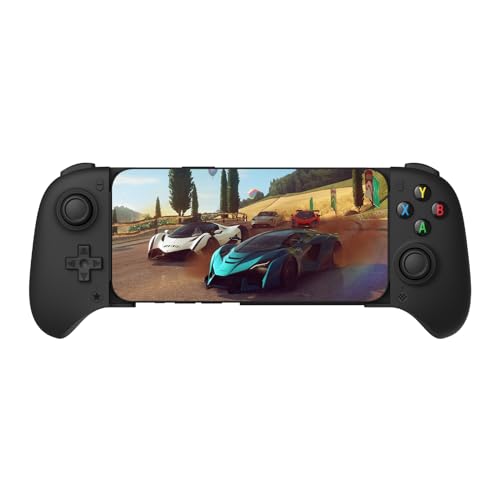
8BitDo has built a reputation for making some of the best retro-inspired controllers on the market, and the Ultimate Mobile is their focused play for Android cloud gaming. It uses Hall-effect joysticks and Hall-effect triggers, ensuring zero drift and consistent analog feel for years. The refined bumpers and D-pad carry the same light, tactile feel that 8BitDo fans know from their console controllers, and the two pro back paddle buttons give you competitive flexibility without cluttering the face.
The controller connects exclusively via Bluetooth to Android devices, fitting phones between 100mm and 170mm in length. It is lightweight at just 50 grams and extremely pocketable, making it ideal for gamers who want to toss a controller in a bag for impromptu Xbox Cloud Gaming sessions. The 8BitDo Ultimate Software V2 (teal icon) allows for deep customization of button mapping, joystick sensitivity, trigger dead zones, and turbo settings. The profile button lets you switch between saved configurations on the fly, which is a godsend for players who jump between shooters and RPGs.
One notable limitation is the lack of charging passthrough — since it is Bluetooth-only, you rely on its internal battery, and there is no way to charge your phone while the controller is attached. The fit is snug for phones with thick cases; an OtterBox on a Galaxy S23 barely fits. The D-pad has been noted by some users to occasionally miss right-inputs, which could be frustrating for precise platformers. For Android users who primarily stream games from the cloud and want a portable, high-quality controller at a reasonable price, the Ultimate Mobile is a smart pick.
Why it’s great
- Hall-effect joysticks and triggers provide drift-free, long-lasting performance
- Extremely lightweight at 50 grams; highly portable
- Ultimate Software V2 offers deep customization with on-the-fly profile switching
- Excellent build quality from a trusted controller brand
Good to know
- Bluetooth-only — no wired mode; no charging passthrough
- Android exclusive — does not support iOS natively
- Tight fit with thicker phone cases; D-pad may miss occasional inputs
6. Mocagen MC1
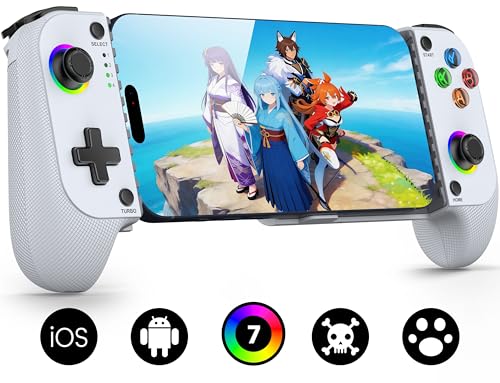
The Mocagen MC1 is designed for the gamer who refuses to take their phone case off. It supports cases up to 0.47 inches (12mm) thick, and the left side features a 0.2-inch recess to accommodate protruding camera bumps without scratching the lens. This alone sets it apart from many telescopic controllers that require a bare phone. The Hall-effect joysticks are rated for 5 million cycles — 2.5 times the lifespan of standard carbon-film sticks — giving you years of drift-free operation.
Bluetooth pairing is straightforward: hold the Home button for three seconds, then select “XBOX Wireless Controller” from your phone’s Bluetooth menu. The controller supports Xbox Game Pass, GeForce NOW, Apple Arcade, and native mobile games. The ergonomic handles feature a laser-engraved texture that provides a secure grip even during intense sessions, and the 7-color RGB light ring on the joysticks adds a custom flair (the ABXY button lights are not adjustable). The 600mAh battery provides up to 6 hours of play in lighting mode, which covers a full day of travel or a long gaming session.
One area where the MC1 shines is its feature density at the mid-range price point. It includes 3-level turbo (5/12/20 shots per second), dual vibration motors with adjustable intensity via the KeyLinker app, and software customization for button mapping and trigger sensitivity. The main downsides are that the battery discharges slowly even when the controller is off, so you will need to charge it before each session if you do not use it daily. The button layout follows the Nintendo/Switch pattern (B on the right, A on the bottom), which may confuse players accustomed to Xbox layout, but this can be remapped in the app.
Why it’s great
- Fits cases up to 12mm thick; camera bump protection built in
- Hall-effect joysticks with 5M-cycle lifespan for long-term reliability
- 3-level turbo and dual vibration motors enhance immersion
- KeyLinker app enables full button remapping and sensitivity adjustment
Good to know
- Battery drains slowly when idle; needs pre-session charging
- Nintendo-style button layout may require remapping for Xbox users
- No USB-C passthrough; relies on internal battery for all play
7. GameSir X5 Lite

The GameSir X5 Lite proves that you do not need to spend much to get a solid mobile gaming controller. At just 135 grams, it is one of the lightest telescopic controllers on the market, making it ideal for tossing in a backpack or coat pocket. It uses a USB-C connection that draws power directly from your phone, meaning there is no battery to charge and no Bluetooth pairing to fuss with — plug it in, and it is ready to play. The telescopic bridge fits phones from 105mm to 213mm in length, covering most Android flagships and the iPhone 15/16 series as well as the iPad Mini 7.
Despite the low price point, GameSir did not cut corners on the most important component: the thumbsticks. The X5 Lite uses Hall-effect sticks that provide 360-degree pinpoint control with zero drift, and the cushioned membrane triggers and buttons operate quietly — a welcome detail for anyone who plays in shared spaces or late at night. The Turbo function supports customizable settings for the A/B/X/Y/LB/RB/LT/RT buttons, enabling faster input in shooters and action games. The laser-engraved textured grips ensure the controller stays secure in your hands even during sweaty sessions.
The GameSir companion app (available on Android) allows for button mapping and sensitivity adjustments, though the iOS version is limited. One important note for Apple users: the controller defaults to Android mode, so you may need to look up the button combination to switch to iPhone controls. The pass-through charging works reliably, so you can game while your phone charges simultaneously. Larger hands may find the compact form factor slightly cramped during long sessions, but for the price, the X5 Lite delivers an astonishing amount of performance and durability.
Why it’s great
- Extremely lightweight at 135g; highly portable
- Hall-effect thumbsticks provide drift-free precision at a budget price
- USB-C passthrough charging lets you play while charging your phone
- Quiet membrane triggers and turbo function for competitive gaming
Good to know
- App customization limited on iOS; defaults to Android control scheme
- Smaller grips may feel cramped for gamers with larger hands
- Membrane triggers lack the tactile snap of mechanical alternatives
FAQ
Will a controller for my phone work with a thick OtterBox case?
Can I use a phone controller with PS Remote Play?
Do Hall-effect joysticks ever need calibration?
Will a USB-C controller work with an iPad Mini?
Final Thoughts: The Verdict
For most users, the best controller for phone winner is the Razer Kishi V3 Pro because its TMR thumbsticks, full-size ergonomics, and Razer Nexus software integration set a new standard for mobile gaming. If you want a versatile all-rounder with gyro and broad compatibility, grab the KICKDOT MC500. And for budget-conscious gamers who refuse to compromise on Hall-effect precision, nothing beats the GameSir X5 Lite.

Mo Maruf
I created WellFizz to bridge the gap between vague wellness advice and actionable solutions. My mission is simple: to decode the research and give you practical tools you can actually use.
Beyond the data, I am a passionate traveler. I believe that stepping away from the screen to explore new environments is essential for mental clarity and physical vitality.