Our readers keep the lights on and my smoothie glass nicely filled. As an Amazon Associate, I earn from qualifying purchases.
Specs are compiled from manufacturer listings and verified buyer reviews and can change over time — please confirm the key details on the product page before buying.
You load into a ranked Valorant match. A split-second delay on your aim could cost you the round. That is why the right controller for pc gaming is defined by just two specs: the polling rate (how often the controller tells the PC where your thumbs are) and the joystick type (hall-effect magnetic sensors that never wear out versus traditional physical contacts that do). This guide breaks down five real options at different price levels so you can pick the one that actually fits your game library and your hands.
I’m Mohammad Maruf — the founder and writer behind WellFizz. This guide is built by comparing the manufacturers’ published specifications and the patterns across verified customer reviews, so you get each pick’s real strengths and trade-offs instead of marketing spin.
After comparing wired and wireless options from eight brands across polling rates, button counts, and joystick durability, here is the straight read on finding the right controller that matches your style without overspending on features you do not actually need.
Quick Picks
- GameSir G7 Pro 8K PC Wireless Controller, Aimlabs Edition — Best Overall
- AKNES 8BitDo Ultimate 2C Wireless 2.4G Controller — Best Value
- Turtle Beach Afterglow Wave Wired RGB Gaming Controller — RGB Showcase
- Turtle Beach Rematch Advanced Wired Gaming Controller — Budget Wired
How To Choose The Best Controller For PC Gaming
Finding the right controller means matching your game genres and your tolerance for wires against a few key specs. Here is what to look at first.
Polling Rate and Latency
Polling rate is how many times per second the controller tells your PC where the joysticks and buttons are. A standard controller runs at 250Hz (250 reports per second). A competitive controller hits 1000Hz or even 8000Hz. Higher polling means smoother aim, faster trigger response, and less delay between your input and what happens on screen. This matters most in fighting games, racing sims, and competitive shooters where a single frame decides the outcome.
Joystick Type: Hall Effect vs. Traditional
Traditional analog sticks use physical contacts that wear down over time, causing the dreaded stick drift (the camera or character moves on its own). Hall-effect joysticks use magnets and sensors with no physical contact, so they resist wear and do not develop drift over years of use. If you plan to keep your controller for multiple gaming generations, hall-effect sticks are a strong reason to choose one model over another.
Connectivity: Wired, 2.4G, or Bluetooth
Wired connections (USB-C) give you the lowest latency and never need charging, but the cable can be annoying. 2.4G wireless (using a USB dongle) is essentially as fast as wired with total freedom of movement. Bluetooth is convenient for switching between a PC and a phone or tablet, but it introduces slightly higher latency. For competitive play, stick with wired or 2.4G. For casual gaming across multiple devices, Bluetooth is fine.
Quick Comparison
| Model | Best For | Polling Rate | Joystick Type | Buttons | Amazon |
|---|---|---|---|---|---|
| GameSir G7 Pro 8K | Competitive esports | 8000Hz | TMR Hall-Effect | 18+ | Amazon |
| AKNES 8BitDo Ultimate 2C | Value + wireless freedom | 1000Hz | Hall Effect | 20 | Amazon |
| Xbox Wireless Controller | Plug-and-play PC + Xbox | 250Hz | Traditional | 19 | Amazon |
| Turtle Beach Afterglow Wave | RGB + adjustable triggers | 250Hz | Traditional | 16 | Amazon |
| Turtle Beach Rematch Advanced | Budget wired with extra buttons | 250Hz | Traditional | 14 | Amazon |
In‑Depth Reviews
1. GameSir G7 Pro 8K PC Wireless Controller, Aimlabs Edition
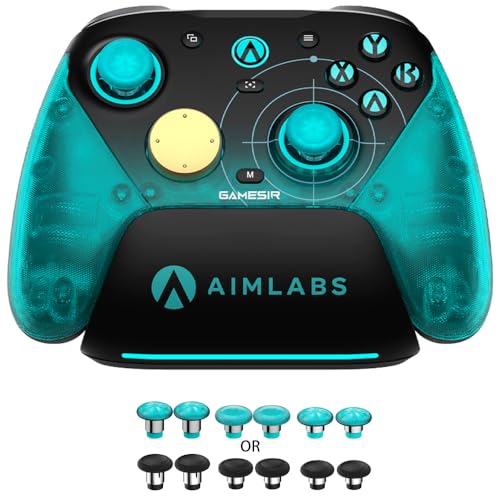
The fastest-talking controller in this lineup: it sends 8,000 position reports per second to your PC.
You want the lowest possible lag in games like Valorant, Street Fighter, or Forza. The GameSir G7 Pro 8K delivers that with an 8000Hz polling rate — at 8000Hz compared to the Xbox controller’s 250Hz — on both wired USB and 2.4G wireless (a connection using a USB dongle for near-wired speed). That translates to near-zero input delay, so your aim adjustment shows up on screen an instant earlier. The controller also uses GameSir Mag-Res TMR Sticks Gen-2 (a magnetic sensor tech, a more precise form of hall-effect), which means no physical contacts to wear down and no stick drift over time. Reviewers confirm the joysticks have 0.0% stick drift from the start.
Beyond latency, the controller packs optical ABXY buttons with micro switches for instant actuation, a mechanical D-pad that feels crisp for fighting-game inputs, and dual-mode trigger stops that let you switch between analog Hall Effect triggers (for smooth acceleration in racing) and clicky micro switch triggers (for instant firing in shooters). Four remappable macro buttons (two lockable back buttons and two mini bumpers) support up to 32-step macro recording each — so you can assign a complex combo in a fighting game to a single press. The built-in 6-axis gyroscope (a motion sensor) adds motion aiming for shooters that support it. One reviewer coming from an Xbox Elite Series 2 said this controller “destroyed” the Elite 2 for build quality and performance at a fraction of the cost.
The only common trade-off mentioned is the internal battery (you cannot swap in external packs), and a few reviewers noted the L5/R5 bumpers and control sticks feel slightly plastic-y — not fragile, but not as premium as the rest of the controller. Still, even those reviewers said it was not a deal breaker given the feature set.
Competitive Edge
- 8000Hz polling rate wired and 2.4G — lowest latency in this lineup
- TMR hall-effect sticks guarantee zero drift over time
- Dual-mode triggers (analog + clicky micro switch) cover every genre
- 4 remappable buttons with 32-step macro recording
Things to Note
- Internal battery means no hot-swappable packs
- L5/R5 bumpers and stick material feel slightly less premium than the rest
Reach for this if: You play competitive shooters, fighting games, or racing sims and want the absolute lowest latency and most durable joysticks without spending on a modular pro controller.
Think twice if: You prefer removable battery packs or need a controller primarily for Xbox consoles — this is a PC-first device.
2. AKNES 8BitDo Ultimate 2C Wireless 2.4G Controller
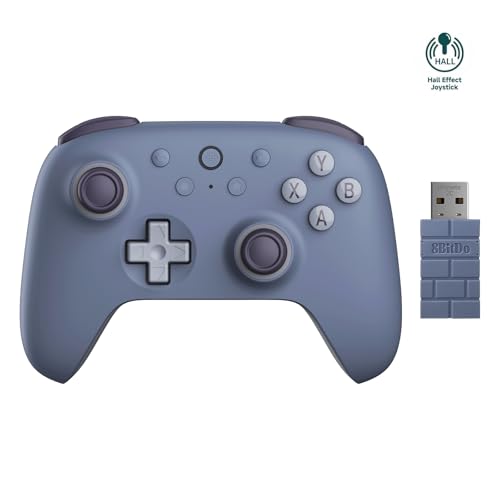
Hall-effect sticks and a 1000Hz polling rate at a budget price — a 1000Hz polling rate compared to an Xbox pad’s 250Hz.
At a price that undercuts most traditional controllers, the AKNES 8BitDo Ultimate 2C delivers hall-effect joysticks and triggers — the same wear-resistant magnetic tech that prevents drift — plus a 1000Hz polling rate on both its 2.4G wireless and wired connections. That polling rate is 1000Hz compared to the Xbox controller’s 250Hz, so you get noticeably snappier response in fast games without spending esports money. The controller has 20 buttons total, which is 20 buttons total, compared to 14 on the Turtle Beach Rematch, including two customizable fast bumpers (L4/R4) that you can remap without any software.
The 480mAh rechargeable battery powers long sessions, and reviewers report the battery life is “very long” and charges quickly. Multiple buyers — including a Rocket League player who “puts controllers through hell” — said this is their favorite controller ever, praising the sturdy feel and instant PC connection with zero disconnect issues. Another reviewer noted it feels “almost better than my PS5 controller” and works great for both small hands and adult-sized hands. The 2.4G wireless dongle gives you lag-free range, while Bluetooth handles Android devices if you want to game on a tablet or phone.
The honest catch: a few reviewers mentioned the D-pad is not as precise as an Xbox controller’s — one said it is too easy to accidentally press up or down while pressing left or right. Another reviewer reported a squeaky trigger spring developing after a week and a half. Those are real build-quality nits at this price point. Still, for the combination of hall-effect sticks, 1000Hz polling, and 20 remappable buttons, this is the best value in the guide for a PC gamer who wants wireless freedom without latency compromise.
Why It Wins on Value
- Hall-effect joysticks and triggers at a budget price — no drift risk
- 1000Hz polling rate for low-latency wireless play
- 20 buttons including remappable L4/R4 bumpers
- Works with PC, Android, and Steam Deck via Bluetooth
Minor Compromises
- D-pad is less accurate than an Xbox controller’s for fighting games
- Some units develop a squeaky trigger spring after a couple of weeks
Grab this for: A PC gamer on a budget who wants hall-effect durability and a fast wireless connection without paying premium prices.
Look elsewhere if: You need a perfect D-pad for fighting games or are sensitive to squeaky triggers and want zero potential QC issues.
3. Xbox Wireless Gaming Controller (Deep Pink)
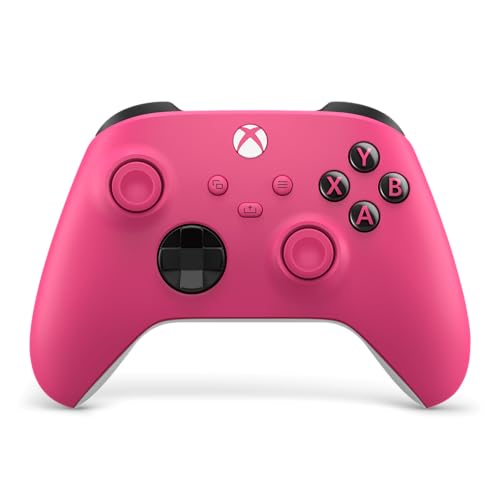
The plug-and-play benchmark: connects to Windows instantly and feels solid in your hands.
The Xbox Wireless Controller is the baseline that every other PC controller gets measured against, and for good reason: it connects to Windows via Bluetooth or the Xbox Wireless adapter with plug-and-play simplicity, supports a 3.5mm headphone jack for direct audio, and lets you remap buttons through the Xbox Accessories app. The modernized design has sculpted surfaces and a hybrid D-pad that handles both platformers and shooters reliably. With 19 buttons — including a dedicated Share button for screenshots — it covers everything a casual or mid-level PC gamer needs without any learning curve. This Deep Pink variant keeps the same internals; buyers report the color is “bright, bold, and super clean” in person with a nice matte finish that hides fingerprints even from kids.
One reviewer has had theirs for about a year with “literally zero problems,” and another noted the triggers have held up well. The controller weighs 0.85 pounds and measures 6.91 x 5.61 x 2.76 inches — weighs 0.85 pounds versus the Turtle Beach Afterglow Wave’s 0.66 pounds. That extra weight gives it a solid, premium feel in the hands, and the textured grip on triggers, bumpers, and back case helps keep your hands planted during long sessions. Built-in audio support means you plug a headset directly into the 3.5mm jack for game chat without needing an adapter.
The trade-off is clear: this controller uses traditional analog sticks (not hall-effect), so stick drift is a possibility over time — it is the nature of physical contact sensors. The polling rate is also standard 250Hz, not the 1000Hz or 8000Hz you get from the GameSir or 8BitDo options. For competitive gamers who need every millisecond, that matters. But for the vast majority of PC gamers who just want a controller that works instantly, stays comfortable for hours, and looks great on the desk, this is still a top-tier pick.
Why It’s a Classic
- True plug-and-play with Windows — no dongle or software required for basic use
- Textured grips and hybrid D-pad for comfortable long sessions
- 3.5mm headphone jack built in for direct audio
- Remappable buttons via the Xbox Accessories app
The Limits
- Standard 250Hz polling rate — not competitive-grade
- Traditional joysticks can develop stick drift over time
- Requires batteries or a separate play-and-charge kit for wireless use
Perfect for: A PC gamer who wants a reliable, comfortable controller with zero setup hassle, especially if you also play on Xbox.
Consider something else if: You need hall-effect sticks for long-term durability or a high polling rate for competitive shooters.
4. Turtle Beach Afterglow Wave Wired RGB Gaming Controller
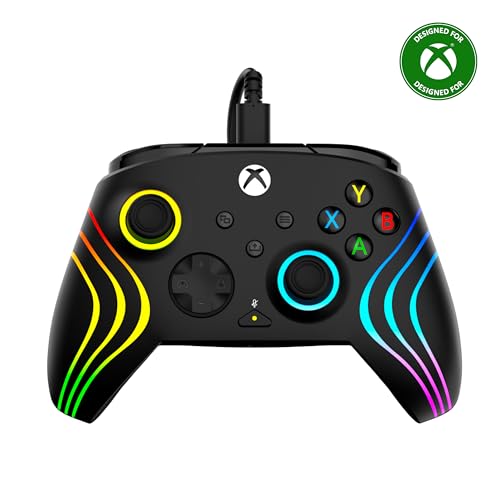
A wired controller with 8-zone RGB lighting and 3-stop adjustable triggers that shine on the desk.
The Turtle Beach Afterglow Wave gives you a feature set that sits right between a basic controller and a pro-grade device. It has 16 buttons including two remappable quick-action buttons on the back, Hall-Effect 3-stop adjustable triggers (you can set the trigger depth for faster reaction times in shooters or longer pulls for racing games), and 8-zone customizable RGB lighting that reveals internal gears when plugged in — a look reviewers call “beautiful.” The controller also includes audio controls for game/chat mix, master volume, and a dedicated mic mute button, all within easy reach.
At 0.66 pounds and 2.6 x 6.3 x 4.7 inches, it weighs 0.66 pounds versus the Xbox controller’s 0.85 pounds. Owners mention that the controller feels like first-party Xbox quality, not cheap plastic, and that the buttons and bumpers are clicky and responsive. The dual rumble motors and impulse triggers provide strong vibration feedback that one reviewer noted is “great” for immersion. The Control Hub Companion App lets you customize button mapping and RGB lighting, though a few buyers mention the software can be slow.
The biggest drawback: the Afterglow Wave does not have true hair-trigger mode — you can adjust the physical trigger depth, but the trigger pull still feels linear, not a short click. One reviewer comparing it to the Turtle Beach Ignite noted that the Afterglow is better for racing games but not ideal for competitive shooters where you want a tight digital trigger press. The D-pad also lacks a mechanical upgrade, making it less satisfying for fighting games and action titles. And because it is wired only (USB-A), you are tethered to your desk.
RGB and Adjustability
- 8-zone customizable RGB lighting with internal gear reveal
- Hall-effect 3-stop adjustable triggers for different game genres
- Two mappable back buttons and full audio controls
- Solid build quality that feels like first-party Xbox
The Catch
- Wired only (USB-A) — no wireless option
- No true hair-trigger mode; trigger pull feels linear
- D-pad lacks mechanical upgrade for fighting games
Choose this for: A PC gamer who wants an RGB-lit controller with adjustable triggers for varied game genres, and who does not mind a wired connection.
skip it if: You need a high polling rate for competitive shooters, want wireless freedom, or prefer a mechanical D-pad for fighters.
5. Turtle Beach Rematch Advanced Wired Gaming Controller
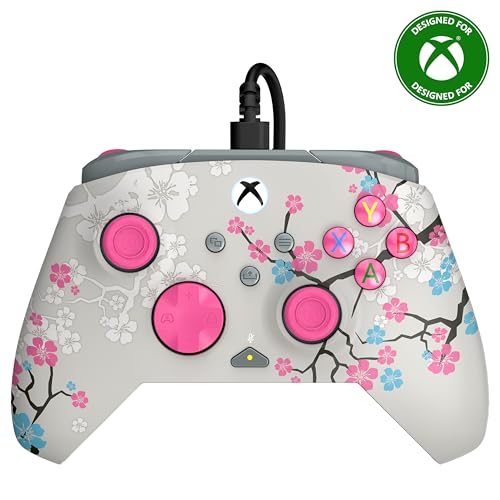
A low-cost wired controller with extra back buttons, but a documented durability risk on the thumbsticks.
The Turtle Beach Rematch Advanced is the most affordable wired option here, offering 14 buttons, two mappable quick-action back buttons, hall-effect hair triggers, and dual rumble motors for rich feedback. It also has a unique design that glows in the dark when exposed to UV light — a fun feature if you game in a dim room. The 8ft / 2.5m detachable USB-C cable gives you plenty of reach to your PC, and the laser-etched texture on the thumbsticks, triggers, and grips helps keep your fingers planted during intense sessions. The Control Hub App lets you configure button mapping and diagnose the controller.
The controller measures 2.82 x 6.9 x 6.9 inches — which is notably deeper than the Afterglow Wave (which is 2.6 inches deep) — and weighs 13.76 ounces. Reviewers generally say it feels comfortable and works great for the price, with one buyer calling it “perfect for Mortal Kombat” due to the responsive controls. Another noted the thumb sticks were initially stiff but loosened up with use, and that the Xbox app supports button swapping easily. The hall-effect hair triggers offer faster reaction times in shooters compared to standard triggers.
The durability issue here is real and well-documented. One buyer mentioned a “design flaw: sharp plastic under thumb grips tears rubber grips within 17 days” while playing Rocket League. The same reviewer noted that the armature is not standard, so finding replacement thumbsticks is unclear. Another buyer mentioned the controller does not actually glow in the dark as expected, despite the marketing. For a budget controller, these are significant failure points. If you play games that require aggressive thumbstick movement (Rocket League, fighting games, shooters with heavy aiming), the rubber grip tearing could be a dealbreaker. For lighter use or as a secondary controller, it is serviceable at the price, but the Turtle Beach Afterglow Wave or the AKNES 8BitDo are stronger choices for a few dollars more.
Budget Value
- Two mappable back buttons for extra inputs
- Hall-effect hair triggers for faster shooting
- 8ft detachable USB-C cable gives good reach
- Laser-etched texture for grip during play
Durability Concerns
- Sharp plastic under thumb grips can tear rubber within weeks of heavy use
- Some units do not actually glow in the dark as advertised
- Non-standard armature makes replacement parts unclear
Consider this if: You need an ultra-budget wired controller with extra buttons and do not play aggressive thumbstick games like Rocket League or competitive shooters.
Definitely skip if: You play games with heavy thumbstick use — the rubber grip tearing issue is a real risk based on reviews.
Understanding the Specs
Polling Rate (Hz)
Think of polling rate as how often the controller whispers to your PC where your thumbs are. A standard controller whispers 250 times per second (250Hz). A competitive controller like the GameSir G7 Pro 8K whispers 8,000 times per second. More whispers means less lag between your movement and what you see on screen — critical for aiming in FPS games, pulling off combos in fighters, and nailing tight turns in racing sims. If you play fast-paced games, aim for at least 1000Hz.
Hall-Effect Joysticks vs Traditional
Traditional joysticks use little metal brushes that rub together. Over time, that rubbing wears the brushes down, and you get stick drift (your character walks left when you are not touching the stick). Hall-effect joysticks use magnets to sense position — no physical contact, no wear, no drift. If you want a controller that lasts years without developing drift, hall-effect is the feature to look for. The GameSir G7 Pro 8K and the AKNES 8BitDo Ultimate 2C both have hall-effect sticks; the Xbox and Turtle Beach controllers use traditional sticks.
FAQ
Will any Xbox controller work on PC?
What is the difference between 2.4G wireless and Bluetooth for a PC controller?
What does a higher polling rate actually do in games?
What is stick drift and how do I avoid it?
How many buttons do I really need on a PC controller?
Is a wired controller better than wireless for PC gaming?
What are hall-effect triggers and do I need them?
Can I use a PS5 DualSense controller on PC?
How do I remap buttons on a PC controller?
What is the best PC controller for Rocket League?
Final Thoughts: The Verdict
Across the board, the controller for pc gaming winner is the GameSir G7 Pro 8K because it delivers esports-grade 8000Hz polling, zero-drift TMR sticks, and dual-mode triggers in a comfortable package that outperforms controllers costing three times as much. If you want the best value hall-effect controller with wireless freedom and a 1000Hz polling rate, grab the AKNES 8BitDo Ultimate 2C. And for the most familiar plug-and-play experience with Xbox ecosystem support, the standout is the Xbox Wireless Controller.
How We Picked
We do not accept paid placement. Every pick is matched to a real buyer and a real use-case; we do not hands-on test units.
Sources & Methodology
Specifications: manufacturer listings and product documentation. Review insights: verified customer reviews, as of July 2026. Pricing: not shown on this page (it changes often); check the current price via the retailer link.
As an Amazon Associate, WellFizz earns from qualifying purchases. This does not affect which products we feature.
Related Guides

Mo Maruf
I created WellFizz to bridge the gap between vague wellness advice and actionable solutions. My mission is simple: to decode the research and give you practical tools you can actually use.
Beyond the data, I am a passionate traveler. I believe that stepping away from the screen to explore new environments is essential for mental clarity and physical vitality.