Our readers keep the lights on and my smoothie glass nicely filled. As an Amazon Associate, I earn from qualifying purchases.
Using a standard gamepad for flight simulation is like trying to thread a needle with a sledgehammer. The finesse required for a smooth crosswind landing or an aerial refueling simply demands hardware designed for the task, not repurposed thumbsticks. The difference between a good landing and a great one often comes down to the quality of the controller translating your inputs.
I’m Mohammad Maruf — the founder and writer behind WellFizz. I’ve spent countless hours analyzing the gimbal mechanisms, sensor resolutions, and build materials that separate a toy from a sim-grade tool.
This guide breaks down the nuances of the market to help you find the absolute best controller for flight sim that matches your specific cockpit needs and budget.
How To Choose The Best Controller For Flight Sim
The right flight controller hinges on the type of flying you do. A WWII dogfighter needs a responsive stick with many hat switches, while a long-haul airliner pilot craves a solid yoke and a configurable throttle quadrant. Matching the controller to your primary sim genre is the first filter. After that, sensor technology and build quality determine whether your gear lasts for years or starts drifting after a few months.
Sensor Technology: Hall Effect vs. Potentiometer
The single most important spec is the sensor type on the main axes. Hall Effect sensors use magnetic fields to detect position, meaning no physical contact and zero wear over time. Potentiometers are cheaper but degrade with use, developing jitter and dead zones. For any controller you plan to use long-term, prioritize Hall Effect sensors on the roll and pitch axes.
Gimbal Design and Build Quality
The gimbal is the mechanical heart of any joystick or yoke. A premium design uses metal bearings and springs for smooth, consistent resistance across the entire throw. Cheaper designs use plastic-on-plastic contact, which can feel gritty and develop slop over time. The Honeycomb Foxtrot’s advanced gimbal, for instance, uses glass-fiber reinforced materials for a truly linear feel that cheaper sticks cannot match.
Buttons, Axes, and Modularity
Count both the physical buttons and the number of axes (movement dimensions). A basic joystick might have 4 axes and 8 buttons, while a full HOTAS can double that. More importantly, consider modularity. A system that allows you to swap out the stick grip, add a separate throttle quadrant, or integrate rudder pedals later will grow with you as your sim setup evolves.
Quick Comparison
On smaller screens, swipe sideways to see the full table.
| Model | Category | Best For | Key Spec | Amazon |
|---|---|---|---|---|
| Thrustmaster TCA Captain Pack X Airbus Edition | Sidestick + Quadrant | Airbus airliner immersion | 1:1 scale Airbus replica | Amazon |
| Honeycomb Aeronautical Bravo Throttle Quadrant | Throttle Quadrant | Multi-engine GA / Commercial | Configurable 4-lever setup | Amazon |
| Thrustmaster TCA Yoke PACK Boeing Edition | Yoke + Quadrant | Boeing airliner enthusiasts | PENDUL_R yoke mechanism | Amazon |
| Logitech G Saitek X52 Pro Flight Control System | HOTAS | Space & Combat sims | LCD multi-function display | Amazon |
| Honeycomb Foxtrot Aviation Stick | Joystick | Precision GA flying | 16-bit Hall Effect sensors | Amazon |
| IFR-1 Compact Cockpit Panel | Radio/Autopilot Panel | VR simmers & IFR procedures | Dual-axis rotary encoder | Amazon |
| Turtle Beach VelocityOne Flightstick | Joystick | Xbox & PC versatility | OLED Flight Management Display | Amazon |
| Logitech G Pro Flight Rudder Pedals | Rudder Pedals | Realistic ground handling | Adjustable tension dial | Amazon |
| Flight Sim Stuff TPM + Flaps Controller | Throttle Quadrant | Budget GA throttles | 3D-printed, 1.5 lbs | Amazon |
In‑Depth Reviews
1. Thrustmaster TCA Captain Pack X Airbus Edition

The TCA Captain Pack X delivers the most complete out-of-box experience for airliner simmers. The sidestick uses a realistic spring-loading mechanism that mimics the Airbus feel, while the separate throttle quadrant includes a built-in thrust reverser, autobrake, and landing gear controls. This is a true modular ecosystem, connecting through a single USB cable via the Ergonomics Hub.
With 31 action buttons on the quadrant alone and 14 more on the joystick, you can map nearly every function of an A320 without touching your keyboard. The stick features a rudder twist axis, which is handy for those not yet ready to invest in pedals. Build quality is substantial, though some buttons have a slight plastic feel that lacks the premium click of higher-end metal switches.
Setup on MSFS 2024 can require some research to map everything perfectly, but once configured, the immersion is unmatched at this tier. The Hall Effect sensors on the sidestick ensure no drift, and the overall package feels like a genuine cockpit component rather than a peripheral.
Why it’s great
- Comprehensive all-in-one bundle including sidestick and throttle
- Realistic thrust reverser and autobrake controls
- Single USB cable setup for clean installation
Good to know
- Some buttons feel slightly plasticky
- Setup in MSFS 2024 can be time-consuming initially
2. Honeycomb Aeronautical Bravo Throttle Quadrant

The Bravo Throttle Quadrant is the gold standard for throttle control in the sim community. Its core feature is the fully configurable lever setup: you can install any combination of single, dual, or quad levers to represent anything from a Cessna 172 to a Boeing 747. The included autopilot panel with altitude, heading, and speed controls reduces reliance on mouse clicks.
Build quality is excellent, featuring an aluminum chassis and metal throttle detents that provide a solid, satisfying click at each position. The landing gear lever with integrated LED indicator lights is a nice touch, adding visual feedback for gear status. The trim wheel is smooth and allows for precise adjustments during approach.
Setting up profiles for different aircraft in MSFS does take time, but once saved, switching between planes is seamless. The bundled 4-port USB 3.0 hub is a practical addition, letting you connect other peripherals directly through the quadrant without reaching for your PC’s ports.
Why it’s great
- Swappable lever configuration for any aircraft type
- Integrated autopilot and trim controls
- Solid aluminum build with metal detents
Good to know
- Requires careful initial profile setup per aircraft
- Premium investment for a single component
3. Thrustmaster TCA Yoke PACK Boeing Edition
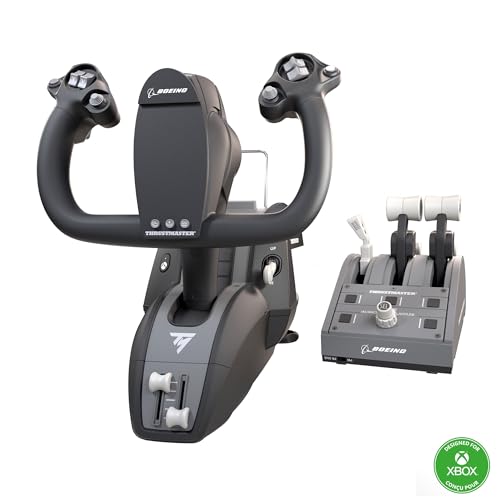
Officially licensed by Boeing, this yoke pack brings the Dreamliner experience home. The standout feature is the PENDUL_R mechanism, which uses a suspended weight to create a realistic pendular motion that feels distinctly different from a spring-loaded yoke. The 8.3-inch throw range provides plenty of travel for smooth pitch and roll inputs.
The yoke itself is crafted with a 100% metal internal structure, giving it a weighty, premium feel that inspires confidence. The 35 action buttons across the yoke and quadrant offer substantial mapping potential. The included throttle quadrant features a Boeing-style autopilot function for controlling altitude, airspeed, and heading directly from the hardware.
One common critique is that the throttle levers can feel slightly wobbly compared to the rock-solid yoke. The autopilot knobs also operate with a digital, stepped feel rather than a smooth analog rotation. Despite this, the yoke is widely considered superior to many alternatives for its realistic motion and Hall Effect sensors that eliminate potentiometer maintenance.
Why it’s great
- Unique PENDUL_R mechanism for realistic yoke feel
- 100% metal internal structure for durability
- Works natively on Xbox Series X|S and PC
Good to know
- Throttle levers have some lateral play
- Autopilot knob rotation is not completely smooth
4. Logitech G Saitek X52 Pro Flight Control System
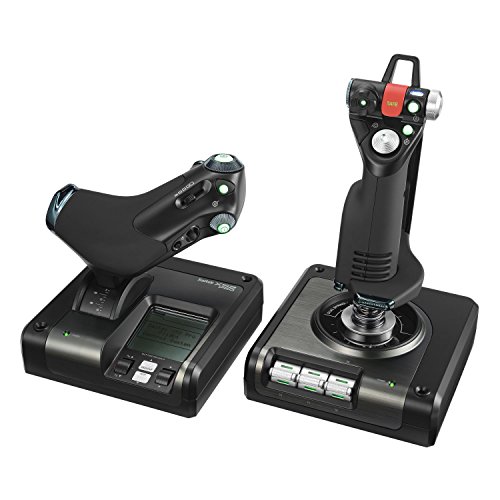
The X52 Pro is an iconic HOTAS system that has been a staple in the sim community for years. The throttle features a progressive resistance adjustment with detents for idle and afterburner, which is great for military jet sims. The stick itself uses a non-contact technology on the X and Y axes, which is effectively a Hall Effect sensor, ensuring long-term precision.
The standout feature is the integrated LCD multi-function display on the throttle, which can show key flight data or game-specific information. The soft-touch, contoured grip and 5-position handle adjustment mean it fits a wide range of hand sizes comfortably. The 16 buttons and multiple hat switches provide solid control for complex aircraft systems.
Some users report a need to apply lubricant to the gimbal out of the box to eliminate a slight grinding feel. Driver installation can also be finicky, requiring a manual download from Logitech’s site rather than relying on Windows Update. Once dialed in, however, the X52 Pro remains a reliable and capable combat-focused HOTAS.
Why it’s great
- Iconic HOTAS design with integrated LCD display
- Adjustable hand rest and progressive throttle
- Non-contact sensor technology on main axes
Good to know
- Gimbal may require lubrication for smoothest operation
- Driver installation can be more complex than plug-and-play
5. Honeycomb Foxtrot Aviation Stick
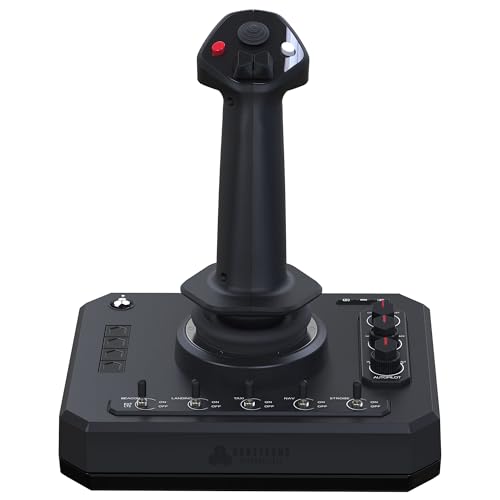
The Foxtrot stick is all about the gimbal. Honeycomb’s advanced design uses a glass-fiber reinforced mechanism that delivers linear, detent-free movement with adjustable resistance. This translates into exceptional control authority, especially during the critical phases of flight like flare and touchdown. The 16-bit Hall Effect sensors provide extremely high resolution, capturing even the smallest input variations.
The stick features an ambidextrous grip, making it equally usable for left- or right-handed pilots. It includes five two-way switches, four programmable buttons, dual hat switches, a rotary panel, and a rudder twist axis. The grip is ergonomically contoured for long sessions, and the overall build quality is a clear step above plastic-centric consumer sticks.
A few early units have reported trigger button failures, but these appear to be isolated rather than systemic. It is worth noting that the Foxtrot is a standalone stick with no integrated throttle, so you will need to pair it with a separate throttle quadrant for a full HOTAS experience. For pure stick performance, though, this is a top contender.
Why it’s great
- Superior gimbal design with glass-fiber reinforcement
- Ultra-precise 16-bit Hall Effect sensors
- Comfortable ambidextrous grip for all pilots
Good to know
- Cannot be used as a standalone setup; requires a throttle
- Some isolated reports of trigger durability issues
6. Octavi IFR-1 Compact Cockpit Panel

The IFR-1 is not a joystick or throttle — it is a specialized panel that eliminates the need to use your mouse for radio, navigation, and autopilot tasks. Its dual-axis rotary encoder allows you to control COM/NAV frequencies, altimeter setting, transponder codes, and heading bugs with a satisfying tactile click. This is a massive efficiency gain for VR simmers who cannot see their keyboard.
Build quality is exceptional for its size, with a compact footprint of just 4.4 x 2.9 inches that sits neatly on any desk. The LED-backlit buttons are clear and responsive, and the device is truly plug-and-play with MSFS 2020/2024 and X-Plane 11/12. It communicates directly with the sim’s G1000 and steam gauge instruments without additional software.
There is a learning curve for some autopilot mode combinations, as the limited button count requires multi-function presses. Some third-party aircraft may require a MobiFlight profile for full compatibility, but the included default profiles cover most stock and popular add-on planes. For the immersion-to-cost ratio, this panel is outstanding.
Why it’s great
- Removes mouse dependency for radio and autopilot tasks
- Super compact size perfect for VR setups
- Premium dual-axis rotary encoder feel
Good to know
- Learning curve for multi-function button combos
- Some third-party aircraft require custom profiles
7. Turtle Beach VelocityOne Flightstick
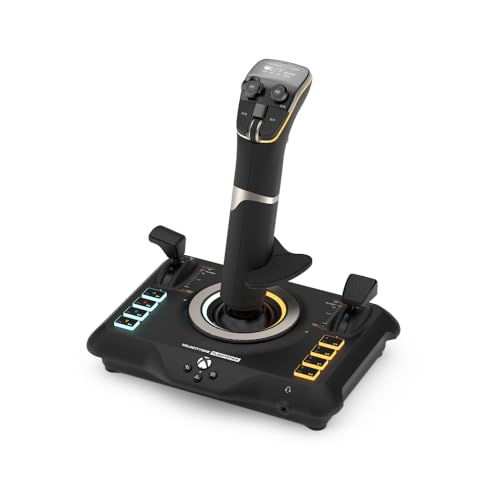
The VelocityOne is a refreshingly modern joystick with a unique set of features for its price point. The integrated OLED display allows you to configure profiles, adjust sensitivity curves, and view flight parameters directly on the stick. The dual throttles on the base are modular, offering flexibility between single-engine GA and twin-engine aircraft.
The stick is ambidextrous by design, with a swappable hand rest and palm height adjustment, making it a rare find for left-handed simmers. The 27 programmable buttons, 8 axes, and rapid-fire trigger provide ample control for both civilian and combat sims. The touchpad navigation sensor for cursor control is a clever addition, though it can be overly sensitive.
The main axes use non-contact sensors for reliability. However, the stick is notably stiff out of the box, requiring some break-in time or a desk mount to prevent lifting. On Xbox, functionality outside of MSFS can be limited. For PC users looking for a feature-rich, ambidextrous stick under a certain budget, this is a strong contender.
Why it’s great
- Built-in OLED screen for on-the-fly adjustments
- Fully ambidextrous with adjustable palm rest
- Modular dual throttles on the base
Good to know
- Stick is very stiff initially and may need a mount
- Touchpad sensor can be too sensitive for some users
8. Logitech G Pro Flight Rudder Pedals

The Logitech G Pro pedals are the de facto standard for budget-conscious simmers who need a dedicated rudder solution. The self-centering mechanism provides a predictable neutral point, and the adjustable tension dial lets you switch between the lighter feel of a Cessna and the heavier resistance of a jet transport. The pedal spacing replicates real aircraft dimensions, aiding muscle memory.
The differential toe brakes are a critical feature for ground handling and taxiing, allowing you to brake one wheel independently for tighter turns. The pedals are robust, with a steel base plate that keeps them stable on carpet, though some users add weights to prevent sliding during aggressive maneuvers. They connect via USB and are recognized immediately by MSFS and X-Plane.
The resolution is 9-bit for the rudder axis and 7-bit for the toe brakes, which is lower than some premium pedals, but more than adequate for flight simulation. The plastic pedal faces are durable but can feel a bit slippery with socks. For a first pedal purchase, these offer a reliable, no-nonsense entry into full rudder control.
Why it’s great
- Realistic pedal spacing and self-centering feel
- Adjustable tension for different aircraft types
- Essential differential toe brakes for ground handling
Good to know
- Lower resolution compared to high-end pedals
- May require additional weight to prevent sliding
9. Flight Sim Stuff TPM + Flaps Controller
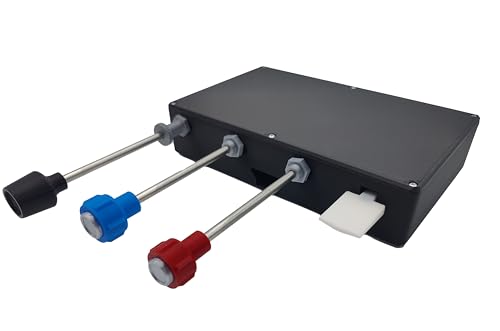
This is a handmade, 3D-printed throttle quadrant designed purely for general aviation flying. It provides three push-pull controls for throttle, propeller, and mixture, plus a toggle switch for flaps up/down. The friction lock nut on the throttle is a thoughtful touch, allowing you to set a cruise power and lock it in place.
Build quality from early reviews is surprisingly solid for a 3D-printed item. The throttle movement is smooth and snug, and the detailed instructions make setup straightforward. It is plug-and-play with no driver installation required, working seamlessly with MSFS 2020 and 2024. The compact footprint of 9.25 x 5.75 inches fits neatly on any desk.
The main limitation is the lack of a base mount: the unit is not pre-drilled for bolts, so you will need to add your own mounting solution if you want to screw it into a sim rig. It works only on PC and Mac, not consoles. For simmers on a tight budget building a basic GA cockpit, this provides essential controls without the complexity or cost of a full quadrant.
Why it’s great
- Cost-effective entry into dedicated throttle controls
- Friction lock nut for stable cruise power
- Genuinely plug-and-play with no drivers needed
Good to know
- 3D-printed construction may not suit all tastes
- No pre-installed mounting holes for rigs
FAQ
Can I use an Xbox controller for flight simulator on PC?
What is the difference between a HOTAS and a Yoke system?
Do I need rudder pedals for flight simulation?
Can flight sim controllers be used across different simulator platforms?
What does the bit depth of a sensor mean for flying?
Final Thoughts: The Verdict
For most users, the controller for flight sim winner is the Thrustmaster TCA Captain Pack X Airbus Edition because it delivers the most complete, immersive out-of-box experience for airliner enthusiasts, combining an authentic sidestick with a fully featured throttle quadrant. If you want to build a modular system around the best throttle on the market, grab the Honeycomb Bravo Throttle Quadrant. And for pure, uncompromised stick precision in general aviation, nothing beats the Honeycomb Foxtrot Aviation Stick.

Mo Maruf
I created WellFizz to bridge the gap between vague wellness advice and actionable solutions. My mission is simple: to decode the research and give you practical tools you can actually use.
Beyond the data, I am a passionate traveler. I believe that stepping away from the screen to explore new environments is essential for mental clarity and physical vitality.