Our readers keep the lights on and my smoothie glass nicely filled. As an Amazon Associate, I earn from qualifying purchases.
Specs are compiled from manufacturer listings and verified buyer reviews and can change over time — please confirm the key details on the product page before buying.
You will land more combos and drop fewer supers when your hands feel the inputs, not fight them. That is why many top players are swapping their joystick for a leverless (or “all-button”) design — it replaces the stick with four directional buttons so your fingers stay on flat surfaces. The best controller for fighting games depends on if you want a traditional arcade stick or a leverless pad, but one thing stays true: the right controller turns sloppy execution into crisp sequences.
I’m Mohammad Maruf — the founder and writer behind WellFizz. This guide is built by comparing the manufacturers’ published specifications and the patterns across verified customer reviews, so you get each pick’s real strengths and trade-offs instead of marketing spin.
You will find a range of options from entry-level to pro-tier, each matched to a specific playstyle or platform need, in this roundup of the controller for fighting games that actually earns its spot in your setup.
Quick Picks
- Razer Kitsune All-Button Arcade Controller — Best Overall
- HORI PlayStation 5 Fighting Stick Alpha — Best Stick
- Victrix Pro FS Fight Stick Arcade Controller — Premium Pick
- GuileKeys GK-18 Leverless Arcade Stick — Best Value
- MAYFLASH Arcade Stick F300 Elite — Multi-Platform
How To Choose The Best Controller For Fighting Games
Fighting game controllers break into two main formats: a traditional arcade stick with a joystick or a leverless pad with buttons for every direction. Your choice depends on what feels natural, which consoles you own, and how much you want to customize. Here are the three specs that matter most.
Leverless vs. Traditional Stick
A leverless layout replaces the joystick with four dedicated directional buttons. This eliminates the physical throw of a stick, reducing input errors on moves like quarter-circles and charge motions. If you already play on keyboard, a leverless controller will feel immediately familiar. Traditional sticks still dominate for fans who prefer the tactile snap of a joystick gate.
Button Quantity and Switch Type
Most fight sticks have around 8 to 10 action buttons. Leverless controllers often pack 16 to 18 keys, giving you extra room for macros or less-used inputs. The switch type under the button determines feel: low-profile optical switches (like the ones on the Razer Kitsune) offer a very short actuation distance for speed, while Sanwa full-size buttons deliver the classic arcade click. Hot-swappable switches let you change the feel without soldering.
Platform Compatibility
Not every controller works on every console from the start. Native PS5 support is the hardest requirement to meet — some premium sticks have it built in, while mid-range models need a separate adapter like the Brook Wingman or Magic-S Ultimate. PC support is nearly universal. If you play across multiple consoles, check the compatibility list carefully before buying.
Quick Comparison
| Model | Best For | Layout | Button Count | PS5 Native | Amazon |
|---|---|---|---|---|---|
| Razer Kitsune | Premium leverless | Leverless | 8 | Yes | Amazon |
| HORI Fighting Stick Alpha | Mod-friendly stick | Stick | 17 | Yes | Amazon |
| Victrix Pro FS | Pro tournament use | Stick | 8 | Yes | Amazon |
| GuileKeys GK-18 | Entry leverless | Leverless | 18 | Needs converter | Amazon |
| MAYFLASH F300 Elite | Multi-platform stick | Stick | 9 | Needs adapter | Amazon |
In‑Depth Reviews
1. Razer Kitsune All-Button Arcade Controller

The slim leverless that slides into a backpack and delivers tournament-ready precision.
The Kitsune uses low-profile linear optical switches (a type of button that registers your press with a very short travel distance and no loud click) so your inputs feel instant and quiet. The body is impressively thin at just 0.76 inches tall. This makes it the easiest controller on this list to carry to a local tournament or store under a couch.
Buyers report that after 200+ hours on Street Fighter 6, the Kitsune feels premium and is excellent for lap play on PS5 — one reviewer specifically praised its native PS5 support and responsive buttons. The trade-off is that the factory keycaps attract fingerprints and oil, and the buttons are not truly hot-swappable without modding the keycaps. This is a serious investment, but the Razer Kitsune is the gold standard for players who want a leverless controller that works flawlessly on both PS5 and PC right from the start.
One reviewer noted the cable security clasp and tournament lock switch are genuinely useful for preventing accidental disconnects and disqualified inputs during a match. The detachable USB-C cable removes the need for constant uncoiling, a small detail that matters when you are packing up between sets.
Reasons to buy
- Incredibly slim and portable form factor at 0.76 inches
- Near-silent low-profile optical switches for fast, quiet inputs
- Native PS5 support with a toggle for Xinput on PC
Reasons to reconsider
- Factory keycaps are oil magnets and show grime quickly
- Not fully hot-swappable without aftermarket keycaps
- High cost for a dedicated leverless controller
Who should reach for it: The PS5 fighting game player who wants a portable, quiet, native leverless with zero adapter fuss.
A real limitation: The matte black finish picks up skin oils and dust faster than any other controller here — keep a microfiber cloth handy.
2. HORI PlayStation 5 Fighting Stick Alpha

The officially licensed PS5 stick that makes modding feel like a hobby, not a chore.
The HORI Fighting Stick Alpha comes with Hayabusa buttons and joystick — a lever (the joystick mechanism inside) that uses a 35mm handle-to-plate measurement and 35mm plate-to-base depth, according to buyers who measured theirs. The clamshell design opens easily for customization without tools, and the replaceable top-panel artwork lets you personalize the look. It weighs 1500 grams (about 3.3 pounds).
Unlike the GuileKeys GK-18 which requires a converter for PS5, the HORI Alpha natively supports PS5, PS4, and PC, so you do not need extra dongles. Owners mention the stock Hayabusa lever feels satisfying but the stick throw is slightly long — easily fixed by swapping the lever. One reviewer called it their favorite among four fightsticks, praising the lightweight plexi body that somehow does not feel cheap.
The top-panel artwork is held in place by the buttons, so changing the art requires removing them — a minor annoyance that modders quickly get used to. For anyone who wants a native PS5 stick with easy modding access, this is the mid-range balance.
Modder’s pick: Easiest stick to open and customize in this lineup, with native PS5 compatibility and replaceable artwork.
Best suited for: The fighting game fan who plans to swap buttons, upgrade the lever, or design custom art over time.
Not for you if: You need a leverless layout — this is a traditional stick with a joystick gate, not directional buttons.
3. Victrix Pro FS Fight Stick Arcade Controller

The heavy-duty aluminum stick built for the competitive circuit, weighing in at 7.76 pounds.
The Victrix Pro FS is carved from a single piece of aircraft-grade aluminum, making it the heaviest and most durable controller in this roundup. It uses genuine 30mm Sanwa Denshi buttons and a Link 2 Detachable Joystick on a Sanwa JLF Base — the same components used in many arcade cabinets. The integrated 6.28-degree wrist slope and built-in foam lap pad make long sessions more comfortable, especially when resting the stick on your lap during tournament play.
The Victrix at 7.76 pounds feels solidly planted on a table or lap, with zero sliding. The quick-access back panel opens with an included Allen wrench for internal mods. One buyer received a unit with a defective “up” direction on the stick, though the replacement worked flawlessly — a QC concern at this price point, but the build quality otherwise earns consistent praise. Customers note the stock Sanwa buttons are loud but easy to swap, and the detachable lever is convenient for packing.
This is a significant investment meant for serious competitors who want a no-compromise stick with native PS5 support. The Victrix Pro FS provides excellent build quality and lap ergonomics for players who prefer a traditional joystick over a leverless layout.
Strengths
- Aircraft-grade aluminum body is extremely durable and heavy
- Detachable joystick makes tournament transport easier
- Foam lap pad and wrist slope for comfortable lap play
Weaknesses
- Heaviest controller here at 7.76 pounds
- High price point limits it to dedicated competitors
- Some units have had QC issues on arrival
Who it is for: The competitive player who wants a premium metal fight stick with native PS5 support and a classic Sanwa feel.
Who should look elsewhere: Budget-conscious buyers or anyone who wants a leverless layout — this is a traditional stick only.
4. GuileKeys GK-18 Leverless Arcade Stick
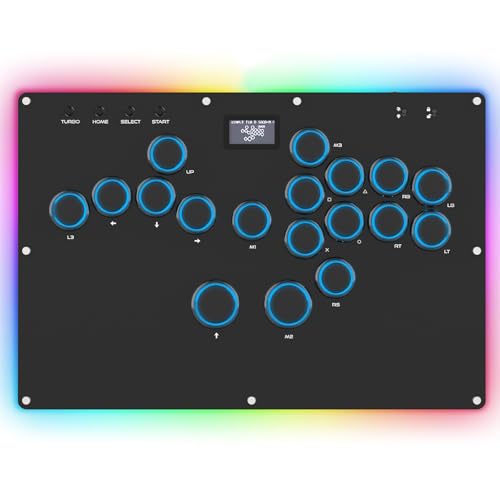
The budget leverless that packs 18 hot-swappable keys and an OLED screen for under.
The GuileKeys GK-18 is an all-button controller with 18 keys, compared to the MAYFLASH F300 Elite which has 9 buttons. It uses Kailh Choc low-profile switches (a short, quiet switch type similar to what the Razer Kitsune uses) and an RP2040 controller chip with GP2040-CE firmware, delivering input latency under 1ms in all modes. The built-in web configurator lets you remap everything, and the OLED screen shows your current input mode and button layout at a glance.
Reviewers point out the included converter disconnects every 3 minutes, which makes PS4/PS5 play unreliable without a separate Brook Wingman adapter. For PC and Switch use, however, it works perfectly and reviewers call it “best value leverless on the market.” One owner mentioned the acrylic base creaks but is quiet in use, and that the extra space between directional and action buttons fits natural hand placement better than some pricier models.
The GK-18 also has per-key RGB lighting (14 colors, 5 modes) and a Tournament Lock to disable unwanted inputs mid-match. The switches and keycaps are hot-swappable without soldering, so you can experiment with different feels. This is the ideal entry point for anyone curious about leverless fighting on PC without spending Razer-level money.
Entry point done right: Full customization, low latency, and 18 buttons for a fraction of the price of premium leverless controllers.
Reach for this if: You want to try leverless on PC or Switch without a big investment, and you are comfortable using a third-party adapter for consoles.
Look elsewhere if: You need a low-maintenance PS5 experience — the included converter has known disconnect issues that require buying a Brook Wingman separately.
5. MAYFLASH Arcade Stick F300 Elite

The beginner-friendly stick that works on nearly every platform from the start.
The MAYFLASH F300 Elite ships with Sanwa buttons and a Sanwa joystick — the same high-quality parts found in arcade cabinets — making it a step above generic entry-level sticks. It is compatible with Switch, PS4, PS3, Xbox Series S/X, Xbox One, PC, macOS, and Android. For PS5 and Xbox Series X, you will need the MAYFLASH Magic-S Ultimate Adapter. The stick measures 11.81 x 8.86 x 2.2 inches, making it among the most compact traditional sticks in this lineup.
Shoppers say a minor setup issue where an internal wire was missing, but Mayflash support sent a replacement free — proof of their customer service. One buyer mentioned the Sanwa buttons feel amazing and the long USB cord is appreciated for tournament setups.
The interior is accessible for modding, so you can swap the joystick and buttons as your preferences evolve. Some players find the stick slightly small and light, but it remains sturdy during use. Unlike the GuileKeys GK-18, the F300 Elite uses a traditional joystick gate — choose this if you prefer the snap of a stick over the precision of leverless buttons.
What works
- Compatible with a wide range of consoles and PC natively
- Sanwa parts deliver authentic arcade feel
- Easy to mod for customization
What is tricky
- Needs an adapter for PS5 and Xbox Series X
- Small and light compared to premium sticks
- Only 9 buttons may feel limited for some players
Best for: A player who owns multiple consoles (Switch, PS4, Xbox) and wants one affordable stick that works with all of them using the included compatibility.
Not for: PS5 or Series X owners who want native support without buying a separate adapter, or anyone set on a leverless layout.
Understanding the Specs
Leverless vs. Arcade Stick
Leverless controllers replace the joystick with four directional buttons (up, down, left, right). This design eliminates the physical throw distance of a stick, which reduces input errors and speeds up charge motions. Traditional sticks use a joystick with a gate (square or octagonal) that provides tactile feedback. Neither is inherently better — leverless suits players who prefer keyboard-style inputs, while sticks appeal to those who love the arcade feel.
Input Latency and Switch Types
Input latency is the delay between pressing a button and the action appearing on screen. Fighting game controllers often use optical switches (which use light to register a press) or mechanical switches (which use a physical metal contact). The GuileKeys GK-18 claims latency under 1ms using its RP2040 chip and GP2040-CE firmware. The Razer Kitsune uses low-profile linear optical switches for a shorter actuation distance. Hot-swappable switches let you change the feel without soldering.
FAQ
Will a leverless controller work with my PS5?
Are leverless controllers allowed in tournaments?
What does SOCD cleaning mean?
How many buttons do I actually need for fighting games?
Can I use a fight stick on Xbox Series X?
What is the difference between Sanwa and Hayabusa parts?
Do I need a fight stick to be competitive in fighting games?
How long does a fight stick last?
Can I customize the artwork on my fight stick?
What is a Tournament Lock switch?
Final Thoughts: The Verdict
For most buyers, the best controller for fighting games is the Razer Kitsune because it combines a portable leverless design, native PS5 support, and ultra-responsive optical switches in a package that fits in any backpack. If you prefer a traditional joystick and want easy modding, grab the HORI Fighting Stick Alpha. And for the budget-conscious PC player eager to try leverless, the GuileKeys GK-18 delivers excellent build quality and full customization for a fraction of the cost.
How We Picked
We do not accept paid placement. Every pick is matched to a real buyer and a real use-case; we do not hands-on test units.
Sources & Methodology
Specifications: manufacturer listings and product documentation. Review insights: verified customer reviews, as of July 2026. Pricing: not shown on this page (it changes often); check the current price via the retailer link.
As an Amazon Associate, WellFizz earns from qualifying purchases. This does not affect which products we feature.
Related Guides

Mo Maruf
I created WellFizz to bridge the gap between vague wellness advice and actionable solutions. My mission is simple: to decode the research and give you practical tools you can actually use.
Beyond the data, I am a passionate traveler. I believe that stepping away from the screen to explore new environments is essential for mental clarity and physical vitality.