Our readers keep the lights on and my smoothie glass nicely filled. As an Amazon Associate, I earn from qualifying purchases.
A muddy, distant, or echoey recording can tank a video, a stream, or a podcast before the content even gets a chance. The gap between a laptop’s built-in mic and a dedicated external microphone is night and day — the difference between sounding like an amateur and sounding like you know what you’re doing. Every content creator eventually reaches this audio ceiling, and the fix requires understanding polar patterns, capsule types, and connectivity rather than just picking the most popular model on the shelf.
I’m Mohammad Maruf — the founder and writer behind WellFizz. I’ve spent hundreds of hours analyzing frequency response charts, polar pattern diagrams, and real-user feedback across condenser and dynamic capsules to build a guide that focuses on what actually moves the needle for creators.
Whether you’re recording voiceovers, hosting a co-hosted podcast, or live-streaming to an audience, selecting the right best content creator mic comes down to matching your room’s acoustics and your workflow’s connectivity demands with the capsule’s strengths.
How To Choose The Best Content Creator Mic
The ideal microphone for a creator depends on three core variables: your room’s acoustic treatment (or lack thereof), your workflow’s tolerance for background noise (keyboard clicks, fans, room echo), and whether you need a simple USB plug-and-play solution or an XLR-based setup for future expandability. Ignoring these factors leads to purchasing a mic that sounds good in reviews but fails in your specific space.
Capsule Type: Condenser vs. Dynamic
Condenser capsules (found in the Blue Yeti, Audio-Technica AT2020USB-X, and Elgato Wave:3) are incredibly sensitive and capture a wide frequency range with high detail. This is excellent for controlled studio environments but problematic in untreated rooms — they’ll pick up every PC fan hum, echo, and mouse click. Dynamic capsules (found in the RØDE PodMic and Shure MV7+) are less sensitive, require closer speaking proximity, and naturally reject ambient noise, making them the superior choice for live streaming and untreated spaces.
Pickup Pattern: The Direction of Sound Capture
Cardioid is the standard for solo creators, capturing sound from directly in front while rejecting sound from the rear. A supercardioid pattern (found on the Logitech G Yeti GX) offers even tighter side rejection but introduces a small rear pickup lobe. For multi-person roundtable podcasts, an omni or bidirectional pattern (available on the Blue Yeti) becomes necessary. Choosing the wrong pattern forces you to battle background noise with software filters, which always degrades vocal quality.
Connectivity: USB Simplicity vs. XLR Flexibility
USB mics (majority of this list) offer true plug-and-play — connect the cable, select the device in your operating system’s audio settings, and record. XLR mics like the RØDE PodMic require a separate audio interface, adding cost and complexity but allowing for higher-quality preamps, gain staging, and multi-mic setups. The Shure MV7+ uniquely offers both USB-C and XLR outputs in one unit, letting you start with USB and upgrade to an XLR interface later without replacing the microphone.
Quick Comparison
On smaller screens, swipe sideways to see the full table.
| Model | Category | Best For | Key Spec | Amazon |
|---|---|---|---|---|
| Shure MV7+ | Dynamic | Pro streaming & podcasting | 48 kHz / 24-bit, USB-C + XLR | Amazon |
| Elgato Wave:3 MK.2 | Condenser | Studio-quality vocals & streaming | 24-bit / 96 kHz onboard DSP | Amazon |
| Audio-Technica AT2020USB-X | Condenser | Home studio recording & voiceover | 24-bit / 96 kHz A/D converter | Amazon |
| HyperX QuadCast 2 | Condenser | Gaming & streaming versatility | 20 Hz – 20 kHz frequency range | Amazon |
| Logitech G Yeti GX | Dynamic | Gaming with RGB sync | Supercardioid dynamic capsule | Amazon |
| Logitech Blue Yeti | Condenser | Entry-level multi-pattern content | 4 pickup patterns (3-capsule array) | Amazon |
| RØDE PodMic | Dynamic | Untreated room podcasting | XLR only, cardioid dynamic | Amazon |
In‑Depth Reviews
1. Shure MV7+

The Shure MV7+ represents a near-perfect fusion of professional broadcast heritage with modern creator convenience. Its dynamic capsule delivers the same smooth, mid-forward warmth that made the SM7B a studio legend, but wraps it in a package that connects via both USB-C and XLR — a rare dual-connectivity design that lets you start recording immediately without an interface while keeping the option to plug into a pro mixer later. The OBS certification means seamless integration with streaming software, and the built-in DSP automatically adjusts gain based on your distance from the mic, which solves the biggest headache for solo streamers who move around while recording.
The custom LED touch panel with 16.8 million color options gives you instant visual feedback for mute status, gain levels, and audio peaking. The real-time denoiser built into the DSP filters out ambient fan noise and room echo without making your voice sound hollow — a common problem with software-based noise gates. Users report that the digital pop filter eliminates plosives effectively, and the internal shock mount reduces desk vibrations better than most aftermarket solutions. The included adjustable desktop stand is surprisingly solid for a bundled accessory, though the overall weight of 3.57 pounds means you’ll want a sturdy boom arm if you plan to keep it out of frame.
Where the MV7+ truly excels is in chaotic environments. Multiple reviewers noted that background noise like barking dogs or typing sounds simply disappeared from recordings, while their voice remained full and present. The Auto Level Mode is genuinely useful — it adjusts sensitivity in real time so you don’t clip when you lean in or go quiet when you lean back. The only real tradeoff is price, which places it firmly in premium territory, but the combination of USB convenience, XLR expandability, professional-grade DSP, and Shure’s legendary build quality makes it the most future-proof investment on this list.
Why it’s great
- Dual USB-C / XLR outputs work with any setup from beginner to studio
- Auto Level Mode prevents clipping without manual tweaking
- Built-in real-time denoiser and pop filter eliminate ambient noise
- Solid metal construction with customizable LED touch panel
- OBS certified for plug-and-play streaming integration
Good to know
- Premium price point near the top of the market
- Requires ShurePlus MOTIV app for full DSP customization
- Heavy unit may need a robust boom arm for off-desk placement
2. Elgato Wave:3 MK.2
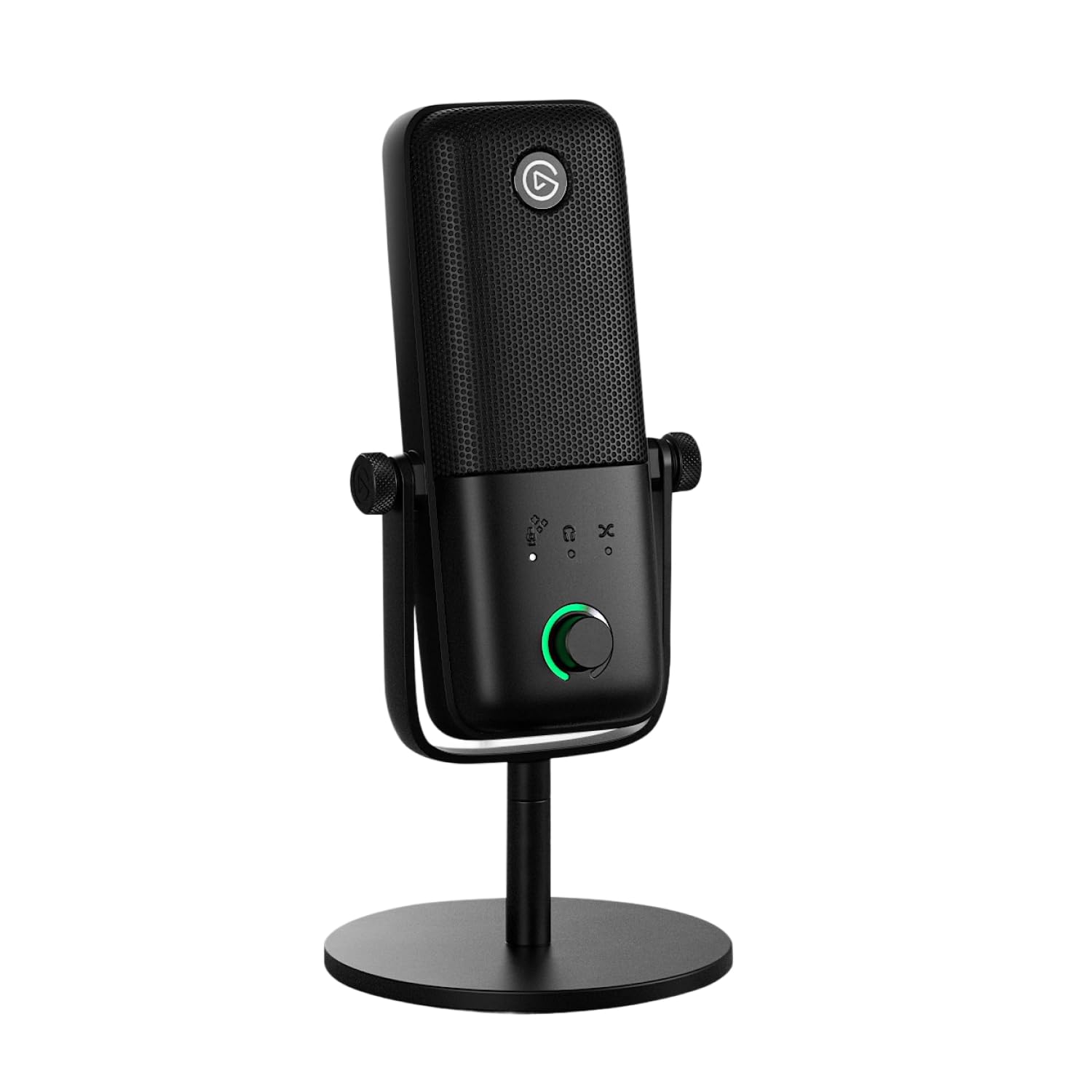
The Elgato Wave:3 MK.2 builds on the original’s strong foundation by adding a dedicated Wave FX Processor that unifies onboard DSP effects and VST plugins into a single signal chain. This matters because it drastically reduces the CPU load on your computer — instead of running multiple audio processing plugins in your streaming software, the Wave:3 handles compression, EQ, and de-essing inside the microphone itself. The premium condenser capsule delivers a focused cardioid pattern that captures warm, studio-quality vocals while rejecting off-axis noise like keyboard clicks and mouse movement. Clipguard 2.0, Elgato’s proprietary anti-distortion system, uses a secondary signal path that kicks in before clipping occurs, making it nearly impossible to record a distorted take.
On the hardware side, the multifunction control dial on the front lets you adjust headphone volume, monitor mix, and gain with tactile clicks, while the tap-to-mute sensor is responsive enough to use mid-sentence without causing audible thumps. The integrated headphone jack provides zero-latency monitoring, which is crucial for voiceover work where timing matters. Users consistently praise the Wave Link software’s routing flexibility — you can separate game audio, music, and voice into different virtual channels, then control each one’s volume independently during a live stream. The included desk stand is compact and stable, though the microphone’s 8.4-inch height may block a monitor’s bottom edge if placed too close.
Real-world feedback from creators highlights the Wave:3 MK.2’s ability to maintain clarity at a distance. Multiple reviewers noted that the mic captured clean audio from two feet away at a 45-degree angle — a significant advantage over many condenser mics that require you to eat the capsule. The built-in de-esser tames sibilance without the need for post-processing, and the voice enhancer preset delivers a radio-ready sound with one click. The tradeoff is that the condenser capsule is less forgiving in untreated rooms compared to dynamic mics, so you’ll want to address echo and background hum before expecting pro results. For creators who stream or record in a semi-treated space and want studio-level warmth with advanced DSP onboard, the Wave:3 MK.2 is an excellent mid-range choice.
Why it’s great
- Onboard Wave FX Processor handles EQ, compression, and de-essing without taxing your CPU
- Clipguard 2.0 makes it nearly impossible to clip during loud moments
- Wave Link app offers unmatched audio routing for game/voice/music separation
- Zero-latency headphone monitoring for timing-sensitive recording
- Clear vocal capture at up to two feet away
Good to know
- Condenser capsule picks up room echo in untreated spaces
- Tall form factor can block monitor screens on crowded desks
- Requires Elgato software for full feature access
3. Audio-Technica AT2020USB-X

The Audio-Technica AT2020USB-X takes the legendary AT2020 studio condenser and re-engineers it with a high-resolution 24-bit / 96 kHz A/D converter, which captures more sonic detail than typical 48 kHz USB mics. The cardioid polar pattern focuses on sound directly in front of the capsule while rejecting noise from the rear and sides — a design that works well in treated home studios but demands careful positioning to avoid picking up room reflections. The stainless steel mesh grille and metal body give it a robust feel that matches its pro-audio lineage, while the soft-touch capacitive mute button on the front enables silent muting without a mechanical click traveling through the microphone.
A major advantage of the AT2020USB-X is its built-in headphone jack with direct monitoring. Unlike some USB microphones that route audio through the computer and introduce latency, the AT2020USB-X sends your voice directly to the headphones with zero delay. The two-state LED indicator ring lights blue when powered and red when muted, providing clear visual confirmation without needing to check software. The package includes a custom desk stand, a USB-C to USB-A cable, and a USB-A to USB-C adapter — covering connectivity for modern laptops and older desktops alike.
User feedback consistently praises the audio clarity, with professional engineers noting that the AT2020USB-X performs surprisingly well for both vocals and acoustic instruments. However, the condenser capsule’s sensitivity is a double-edged sword — several reviewers mentioned that it picked up furnace vents and PC fan noise that required post-production cleanup. The LED ring staying illuminated even when the computer is powered off is a minor annoyance for those who keep the mic on their desk overnight. For voiceover artists and musicians who work in a quiet, treated room and prioritize sample rate fidelity, the AT2020USB-X delivers studio-grade specs at a mid-range price point.
Why it’s great
- High-resolution 24-bit / 96 kHz A/D converter captures exceptional detail
- Zero-latency headphone monitoring for timing-accurate recording
- Stainless steel grille and metal body feel built to last
- Capacitive mute button prevents mechanical noise
- Includes USB-C cable and adapter for broad compatibility
Good to know
- Extremely sensitive condenser requires a quiet, treated room
- LED ring stays lit when device is powered off
- No onboard DSP or EQ controls — processing required in post
4. HyperX QuadCast 2

The HyperX QuadCast 2 refines the original’s design with an all-aluminum chassis that reduces weight while increasing durability. It operates as a stereo condenser microphone with a 20 Hz to 20 kHz frequency response that covers the full human hearing range, delivering clear, crisp audio for gaming, streaming, and podcasting. The built-in anti-vibration shock mount is integrated directly into the body — you don’t need to attach a separate spider mount — and effectively isolates the capsule from desk bumps and keyboard vibrations. The tap-to-mute sensor on top responds instantly, and the LED ring provides a clear mute indicator visible from across the room.
Connectivity is handled via USB-C, with the included cable measuring just under 10 feet, giving enough slack for most desk configurations without needing an extension. The mic’s base is weighted and stable enough to sit on a desk without wobbling, yet light enough at 335 grams to mount on a budget boom arm without sagging. User reviews highlight the mic’s plug-and-play reliability — it works on PC, Mac, PS5, and PS4 without any driver installation. The sound quality is consistently described as clear and professional for the price tier, with one reviewer noting that after a year of daily use, the only change was a slight dimming of the red LED ring over time.
Where the QuadCast 2 falls short of premium options is in flexibility — it lacks onboard DSP, custom EQ profiles, or multi-software routing features found on the Wave:3 or Yeti GX. The red LED ring is non-adjustable in brightness, which can clash with blue or white themed RGB setups. For creators who want a straightforward, reliable USB microphone with a premium aluminum feel and a built-in shock mount that requires zero assembly, the QuadCast 2 is a solid mid-range pick that prioritizes build quality and ease of use over software customization.
Why it’s great
- All-aluminum body feels premium while keeping weight low
- Integrated anti-vibration shock mount needs no assembly
- Tap-to-mute with clear LED indicator works instantly
- Works on PC, Mac, PS5, and PS4 without drivers
- Light enough for budget boom arms
Good to know
- No onboard DSP or EQ — post-processing required
- Red LED is non-adjustable and may clash with RGB themes
- Wide condenser pattern picks up room noise in untreated spaces
5. Logitech G Yeti GX

The Logitech G Yeti GX breaks from Blue’s traditional condenser design by introducing a custom broadcast-style dynamic capsule with a supercardioid pickup pattern. This is a meaningful shift for gamers and streamers because supercardioid offers tighter side rejection than standard cardioid, meaning it picks up less keyboard clatter and mouse clicking from the sides while still capturing your voice cleanly from the front. The dynamic capsule is inherently less sensitive than condensers, which works to your advantage in untreated rooms with bare walls and hard floors. Dual RGB zones powered by LIGHTSYNC let you sync lighting effects with other Logitech G peripherals through G HUB software.
Blue VO!CE software integration provides access to Smart Audio Lock, an analog limiter and downward expander combo that prevents clipping during loud moments and reduces ambient noise when you stop speaking. This is effectively a hardware-level noise gate that doesn’t require third-party VST plugins. The mic’s form factor is notably smaller than the original Yeti, with a 616-gram weight that feels substantial without being obtrusive. The gooseneck design allows for flexible positioning adjustment, and the included stand folds the mic forward for an angled desktop position. One reviewer with extensive prior experience using budget microphones reported being shocked by the jump in clarity and crispness after switching to the Yeti GX.
Where the Yeti GX differentiates itself from the HyperX QuadCast 2 is in its dynamic capsule — the QuadCast 2’s condenser is more sensitive to ambient noise, while the Yeti GX’s dynamic design naturally filters out background distractions without any software intervention. The tradeoff is that dynamic mics require you to stay closer to the capsule for full body, so leaning back in your chair may cause a noticeable volume drop. The included software is necessary to unlock the mic’s full capabilities, and without tweaking presets, the default sound profile can feel a bit thin. For streamers who prioritize background noise rejection and RGB synchronization with their Logitech ecosystem, the Yeti GX delivers a focused, purpose-built solution in the mid-range.
Why it’s great
- Supercardioid dynamic capsule naturally rejects keyboard and mouse noise
- Smart Audio Lock prevents clipping and reduces ambient noise automatically
- Dual RGB zones sync with Logitech G HUB for immersive lighting
- Compact form factor fits easily under monitors
- Blue VO!CE presets offer broadcast-style audio with one click
Good to know
- Dynamic capsule requires close proximity — voice drops off with distance
- Default sound profile needs G HUB tweaking for optimal tone
- 3.5 mm headphone jack, not USB-C for audio passthrough
6. Logitech Blue Yeti

The Blue Yeti remains the most recognizable USB microphone in the creator space for good reason — its custom three-capsule array enables four distinct pickup patterns (cardioid, omni, bidirectional, and stereo) that would normally require multiple microphones to achieve. For a content creator who records solo voiceovers, interviews another person face-to-face, and occasionally captures ambient room sound, the Yeti eliminates the need to swap hardware between sessions. The adjustable desktop stand lets you tilt the mic toward the sound source, and the zero-latency headphone output allows real-time monitoring during recording. The metal grille and base construction give it a weighty, durable feel that has survived years of desk bumps in countless home studios.
The Blue VO!CE software adds another layer of versatility — effects like broadcast vocal presets, HD audio samples, and advanced modulation can be applied during streaming to engage audiences without requiring a separate mixer. The onboard controls for headphone volume, pattern selection, mute, and mic gain are all physical knobs and buttons, meaning you never have to open software to make real-time adjustments during a live stream. Multiple user reviews confirm that the Yeti delivers clear, professional audio for YouTube videos, Twitch streams, Zoom meetings, and music recording, with one reviewer specifically highlighting its performance for ASMR and social media content where clarity is paramount.
However, the Blue Yeti’s condenser capsule is extremely sensitive — it will pick up every PC fan hum, echoing room sound, and background conversation unless your space is treated. The mic’s larger footprint compared to newer options can also be a problem on cluttered desks. Some users note that the Yeti is not suitable for heavy rock recording due to its sensitivity to plosives and handling noise, though a foam windscreen or pop filter largely solves this. For beginners entering the content creation space on a budget who need a single mic that can handle diverse recording scenarios, the Blue Yeti is the most versatile entry-level option available, despite its age and sensitivity challenges.
Why it’s great
- Four pickup patterns from a single capsule array cover solo, interview, and ambient recording
- Physical gain, mute, and pattern knobs allow hardware-level control during streaming
- Blue VO!CE software adds broadcast effects without external hardware
- Sturdy metal construction has proven durability over years of use
- Zero-latency headphone monitoring built into the mic
Good to know
- Condenser capsule picks up room echo, fan noise, and background conversations
- Large footprint takes up significant desk real estate
- Requires windscreen or pop filter to manage plosives during close recording
7. RØDE PodMic

The RØDE PodMic is a broadcast-grade dynamic microphone that uses an XLR connection — it does not plug directly into your computer via USB. This distinction is critical because it means you must pair the PodMic with an audio interface (like the RØDECaster Pro II, AI-1, or a third-party XLR interface) that provides phantom power and preamp gain. The tradeoff for this additional hardware investment is professional-grade sound quality: the cardioid dynamic capsule delivers a warm, rich vocal tone that naturally rejects room noise, keyboard clicks, and ambient echo without any software filtering. The internal pop filter and integrated swing-mount eliminate the need for most external accessories, and the all-metal chassis feels built for a decade of daily use.
The PodMic’s frequency response is tailored specifically for the human voice, with a slight presence boost around 3-5 kHz that enhances speech intelligibility without sounding harsh. This makes it an excellent choice for podcasting, broadcast work, and live streaming where vocal clarity is the priority. The dynamic capsule requires you to stay within a few inches of the mic for full body, which naturally enforces good mic technique and prevents the inconsistent volume levels that plague condenser users who lean back. Multiple reviewers describe the sound as “broadcast-quality” and “professional radio tone,” with one user noting that pairing the PodMic with a FetHead in-line preamp provides a clean 27 dB gain boost that brings out even more warmth and presence.
The main barrier for new creators is the XLR requirement. If you don’t already own an audio interface, the combined cost of the PodMic plus an interface puts it in the same price range as the USB-capable Shure MV7+. The lack of a headphone jack on the microphone itself means you need your interface to handle monitoring, and the low output level of the dynamic capsule requires a clean preamp with adequate gain staging. For creators who plan to eventually build a multi-mic setup for co-hosted podcasts or who already own an XLR interface, the PodMic offers professional build and sound quality at a mid-range price. For beginners who want a simple plug-and-play solution, the RØDE PodMic USB version is the appropriate alternative.
Why it’s great
- Broadcast-grade dynamic capsule naturally rejects all room noise and echo
- All-metal chassis with integrated pop filter and swing-mount requires no add-ons
- Tailored frequency response enhances vocal intelligibility for speech
- Designed for professional multi-mic podcasting workflows
- Rugged construction built for daily heavy use
Good to know
- XLR only — requires a separate audio interface, adding cost and complexity
- Low output level needs a clean preamp or in-line booster for optimal performance
- No headphone jack or USB connectivity for monitoring
FAQ
Should I choose a condenser or dynamic mic for streaming in an untreated room?
What is the advantage of a supercardioid pattern over standard cardioid?
Can I use an XLR microphone like the RØDE PodMic without an audio interface?
Why does my USB microphone sound quiet or distorted on certain software?
Final Thoughts: The Verdict
For most users, the best content creator mic winner is the Shure MV7+ because it combines a professional dynamic capsule with both USB-C and XLR outputs, onboard DSP that handles gain and noise reduction automatically, and a rock-solid build that will last through years of daily streaming and podcasting. If you want studio-level detail with onboard effects processing and multi-software routing, grab the Elgato Wave:3 MK.2. And for the best value entry point that covers solo voiceovers, interviews, and ambient recording from a single device, nothing beats the Logitech Blue Yeti.

Mo Maruf
I created WellFizz to bridge the gap between vague wellness advice and actionable solutions. My mission is simple: to decode the research and give you practical tools you can actually use.
Beyond the data, I am a passionate traveler. I believe that stepping away from the screen to explore new environments is essential for mental clarity and physical vitality.