Our readers keep the lights on and my smoothie glass nicely filled. As an Amazon Associate, I earn from qualifying purchases.
Specs are compiled from manufacturer listings and verified buyer reviews and can change over time — please confirm the key details on the product page before buying.
You sit down for a shift, put on your headset, and suddenly the customer sounds like they are underwater. The loud office hum. You turn the volume up, but now your voice cracks through the static.. It blocks out the noise around you and makes your voice clear so you never have to repeat yourself..
I’m Mohammad Maruf — the founder and writer behind WellFizz. This guide is built by comparing the manufacturers’ published specifications and the patterns across verified customer reviews, so you get each pick’s real strengths and trade-offs instead of marketing spin.
To find the best contact center headsets, you need clear transmission, all-day comfort, and a connection that works the instant you plug it in. These five models balance those demands across different buyers and budgets..
Quick Picks
- Yealink UH44 Teams Certified USB Wired Headset — Best Overall
- Jabra 2400 II USB Duo CC Wired Call Center Headset — Premium Pick
- Poly Blackwire 5220 Wired Headset — Most Versatile
- Yealink UH37 USB Headset with Noise Cancelling Microphone — Comfort Champion
- Yealink UH42 USB-C/A Mono Headset with Mic for PC Computer — Budget-Friendly Mono
How To Choose The Best Contact Center Headsets
Picking a headset for your desk is not like picking headphones for your commute. In a call center or work-from-home setup, the person on the other end of the line cares a lot more about how YOU sound than how you hear them. That single fact changes what specs you should prioritize.
Noise-Cancelling Microphone vs. Noise-Isolating Ear Cups
These two features do completely different jobs. A noise-cancelling microphone filters out background sounds — like your keyboard clacking or a coworker chatting — so your voice is the only thing the caller hears. Noise-isolating ear cups, on the other hand, use padding to block room noise from reaching your ears. For a contact center, start with the microphone: if your headset does not have a noise-cancelling mic, the person on the call hears everything around you.
Wired Connection and Platform Certification
Almost every serious contact center headset uses a wired USB connection because it never drops out and needs no batteries. Look for one that includes both USB-C and USB-A adapters so it works with older and newer computers. The “certified for Teams” or “certified for Zoom” label means the headset has been tested to work with that platform’s specific call controls — mute, answer, end call — often with a single button press. If you use a different app like RingCentral or Google Meet, any headset that lists “plug and play” usually works fine.
Comfort for Long Shifts
You will likely wear a contact center headset for four, six, or even eight hours straight. Light weight — under 6 ounces — and soft ear cushions (often leather or leatherette) make a big difference. A flexible or rotating microphone boom lets you position the mic on whichever side feels natural, and a metal headband tends to hold its shape better than plastic over months of daily use.
Quick Comparison
| Model | Best For | Driver Size | Microphone Type | Connection | Amazon |
|---|---|---|---|---|---|
| Yealink UH44 | Overall balance & dual-mic clarity | 35mm | Dual noise-cancelling | USB-C / USB-A | Amazon |
| Jabra 2400 II | Ultra-light premium build | — | Ultra noise-cancelling | USB-A | Amazon |
| Poly Blackwire 5220 | Multi-device flexibility | — | Noise-cancelling boom mic | USB-C / USB-A / 3.5mm | Amazon |
| Yealink UH37 | Comfort & solid noise cancellation | 32mm | Dual noise-cancelling | USB-C / USB-A | Amazon |
| Yealink UH42 | Budget-friendly mono headset | 35mm | Noise-cancelling (single) | USB-C / USB-A | Amazon |
In‑Depth Reviews
1. Yealink UH44 Teams Certified USB Wired Headset
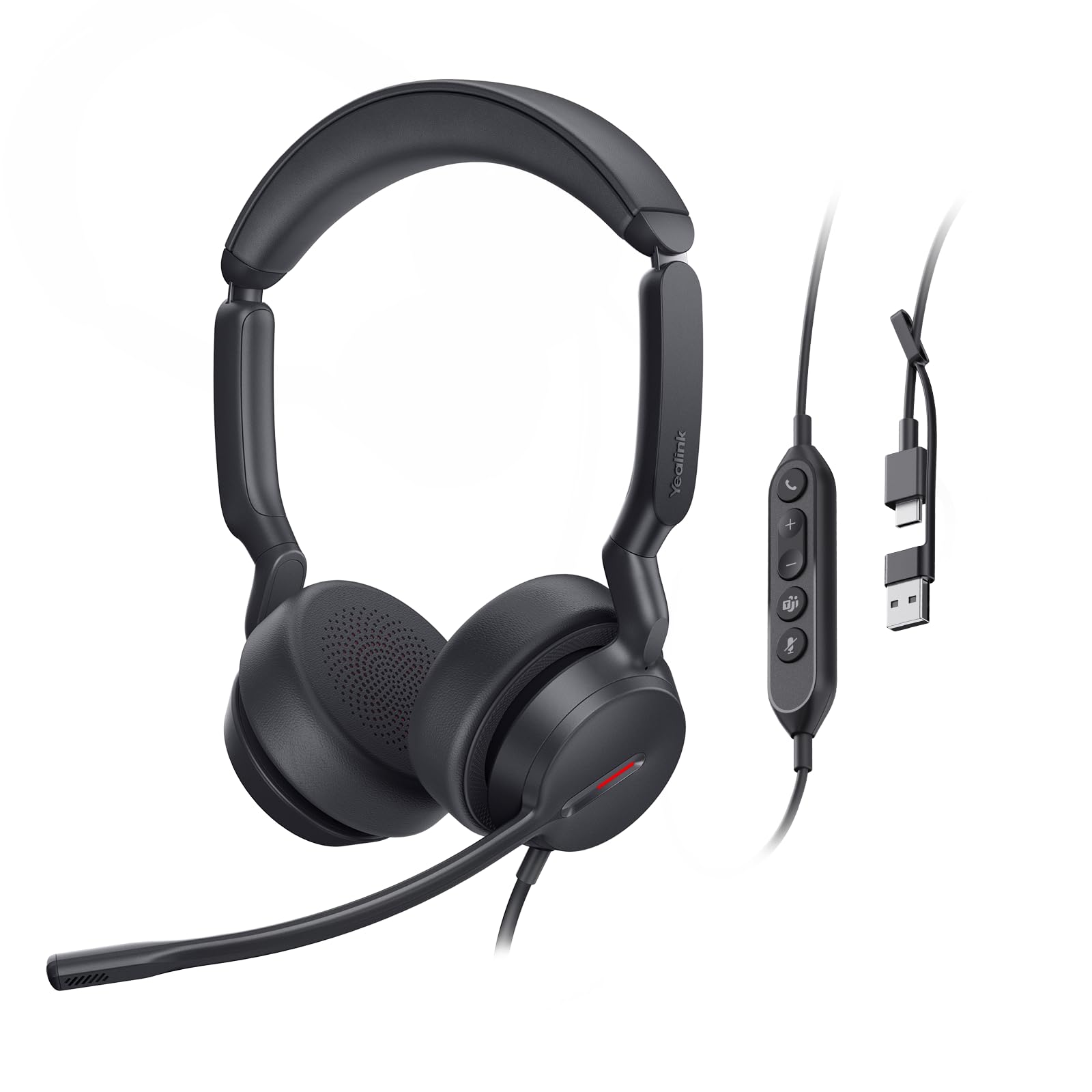
Its dual-microphone array cancels more background noise than single-mic headsets, so callers hear only your voice.
This headset uses two noise-cancelling microphones instead of one. It filters out keyboard clatter and background chatter by comparing two audio inputs and subtracting the room noise. The driver is 35 millimeters (the tiny speaker in each ear cup), versus 32mm in the UH37, which gives your voice a fuller, warmer tone during calls. At just 5.7 ounces, the frame stays light enough for long shifts, and the rotatable ear cups are designed to fit 99% of head shapes for 12 hours.
Buyers report it “greatly reduces background noise, clearer voice” and call it “good for the price.” The inline controller handles volume, mute, and call answer, and the busy indicator light turns red during a call so coworkers know not to interrupt. One reviewer noted a fuzzy sound issue possibly linked to the USB attachment, but most found it reliable for work-from-home setups right from the start. It is plug-and-play for work setups right from the start.
The included USB-C to USB-A adapter makes it easy to swap between a modern laptop and an older desktop without fiddling with dongles.
What stands out
- Dual-microphone array filters background noise better than single-mic headsets
- Lightweight 5.7 oz frame and dual-ear pads support all-day wear
- Busy indicator light and flip-to-mute function keep calls professional
The trade-offs
- A few buyers reported fuzzy sound from the USB adapter attachment
- Ear cups might feel snug for larger head shapes after several hours
Reach for this if: you want the best all-around blend of clear voice pickup, comfortable weight, and platform certification for Teams or Zoom at a mid-range price.
Look elsewhere if: you need a detachable cable or a mono single-ear design for a loud office floor.
2. Jabra 2400 II USB Duo CC Wired Call Center Headset

Its featherlight design puts almost no pressure on your head, so you forget you are wearing it during eight-hour shifts.
Jabra claims this model is lightweight, and buyers confirm the featherlight feel — buyers repeatedly call it “extremely lightweight” and say they forget they are wearing it after a few minutes. The headband rests mostly on your ears, which means there is almost no top-of-head pressure. For anyone who gets headaches from heavier gear, this alone makes it worth a look.
The ultra noise-cancelling microphone uses a breath-resistant design to eliminate background noise for clear HD voice transmission.. Owners mention cleaner call quality than employer-provided headsets and say clients no longer complain about sounding “like I’m in a tunnel.” One long-term reviewer noted that after eight months of heavy use — 70 hours per week — the headset started cutting out and eventually died, so durability is a real question for extended shifts. The reinforced cord and larger leatherette ear cushions provide passive noise protection, though a few users wish the ear muffs cupped more around the ears for a tighter seal.
Programmable buttons let you set functions like Push-to-Talk without reaching for your keyboard, and the 360-degree flexible boom arm positions the mic exactly where you need it.
Why it stands out
- Very lightweight design eliminates top-of-head pressure during long shifts
- Breath-resistant microphone with ultra noise cancellation for clear voice pickup
- Programmable buttons enable quick actions like Push-to-Talk
The catch
- Some units have shown durability issues after 8–12 months of heavy daily use
- Uses USB-A connection — not USB-C — may require an adapter for modern laptops
Best suited for: users who prioritize feather-light comfort and clear speech transmission, especially if you are prone to headaches from heavier headsets.
Beware if: you need a USB-C connection or plan to run this headset 70+ hours a week long-term — the durability record is mixed.
3. Poly Blackwire 5220 Wired Headset

It connects to your PC, your laptop, and your phone from the same cable — no need for extra dongles.
The Blackwire 5220 has a built-in USB-C cord that comes with a tethered USB-A adapter, and it also includes a 3.5mm audio jack. That means you can plug into a modern laptop, an older desktop, or even a mobile phone or tablet — all from the same headset without carrying extra dongles. The noise-cancelling boom mic and conforming ear cushions create passive noise isolation (no batteries needed), and the Dynamic EQ automatically adjusts the sound profile between calls and music.
Poly is a well-known name in office headsets, and this model is certified for both Microsoft Teams and Zoom, giving you plug-and-play call controls. The ergonomic over-ear design focuses on all-day wear, though actual customer reviews were not available in the provided data to confirm long-term comfort or durability. Given the multi-device flexibility, this is the pick for anyone who frequently switches between a work computer, a personal laptop, and a phone during the workday.
The included carrying case keeps everything organized if you move desks or take the headset home.
What makes it flexible
- Three connection options — USB-C, USB-A, and 3.5mm — cover nearly any device
- Dynamic EQ automatically tunes sound for calls vs. music
- Certified for Teams and Zoom with plug-and-play controls
Consider this
- No customer reviews available in the source data to confirm real-world durability
- Priced at a premium tier compared to the Yealink UH44 with similar features
Grab this for: the flexibility if you switch between a computer and a phone throughout the day or work across multiple desks.
skip it if: you prefer a budget-friendly option or need verified long-term feedback from other buyers before purchasing.
4. Yealink UH37 USB Headset with Noise Cancelling Microphone

Soft leather ear cups and a steel headband hold up to long days when you barely leave your desk.
This model has a 32-millimeter driver (the tiny speaker inside the ear cup, slightly smaller than the 35mm in the UH44) and dual noise-cancelling microphones that customers note do an “excellent” job blocking out dogs barking and TVs playing in the background. The ear cups are made from soft breathable leather, and the headband uses a metal frame that feels solid and holds its shape. Several reviewers called the fit “comfortable with adjustable fit,” though one noted “slight earlobe fatigue and moisture” after extended wear.
The real standout feature here is the durability feedback — the steel headband and “solid build” get high marks, but multiple reviewers point out that the non-detachable cable frays at the USB-C connector after about a year and becomes unreliable. One reviewer with 18 months of use said the cord was “near breaking at the headset connection.” For the price range, the audio quality and noise cancellation are considered “good value,” but the fixed cable is a genuine weak point. The flip-to-mute function and easy-access ear shell controls let you adjust volume or mute without fumbling.
It is Teams certified and supports USB-C and USB-A connections from the start, so setup is truly plug-and-play on any computer.
Two sides of the coin: The UH37 is praised for its excellent noise cancellation and comfortable leather ear cups for long calls, but the non-detachable cable that frays after a year is the single biggest durability worry across multiple verified reviews.
Ideal for: call center workers who want soft ear cups and reliable noise cancellation at a reasonable price, and who plan to treat the cable gently.
Not for: anyone who expects a headset to last more than two years without a cable replacement — the cord is the weak link here.
5. Yealink UH42 USB-C/A Mono Headset with Mic for PC Computer
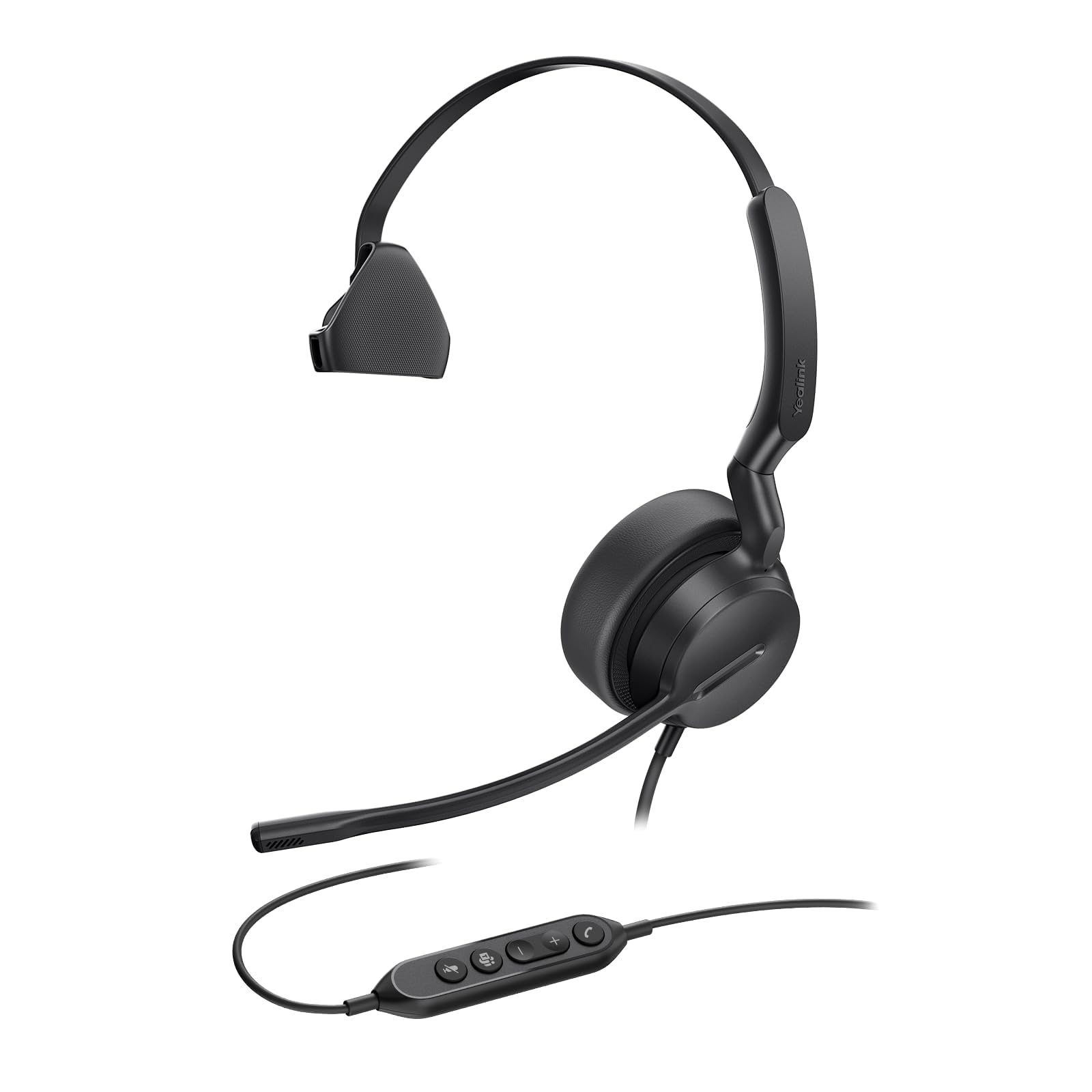
A single-ear headset that keeps one ear free so you hear your surroundings on a busy call floor.
This is the only mono (single-ear) headset on the list, which is deliberate: some contact center environments want agents to hear ambient noise — a manager calling their name, a door opening — while still talking to a customer. The 280-degree rotatable microphone boom can be positioned on either ear, and the 35-millimeter driver (the same size as the UH44) delivers clear call audio. The 7-foot tangle-resistant cable gives you room to stand or walk a few steps during a call.
The catch, and many buyers flag this: the noise cancellation is not strong enough for a loud room. One verified review says “Not noise cancelling; very low volume requiring near-max setting” and returned the headset. Another buyer who works from home found the noise-cancelling mic excellent and calls “clear.” So the performance here depends heavily on your environment — quiet office? Fine. Open-plan call center with 50 people talking? You may need to crank the volume past what is comfortable. The inline controls with LED mute indicator work well, and it is ready for quick setup.
For the price, you get a functional mono headset with a flexible boom, but the mixed noise-cancelling feedback means it is best suited for quieter spaces.
What works
- Single-ear mono design lets you stay aware of your physical surroundings
- 35mm driver matches the larger UH44 for clearer sound
- 7-foot braided cable and 280° boom provide flexible positioning
The real issue
- Multiple shoppers say volume is too low and noise cancellation is weak in busy environments
- No stereo sound — calls only, not good for music or multimedia
Good for: someone who works in a reasonably quiet space, needs a single-ear headset to hear surroundings, and wants a budget-friendly option from a reliable brand.
Pass on it if: you work in a loud call center environment where strong noise cancellation and higher volume are non-negotiable.
Understanding the Specs
Audio Driver Size (mm)
The audio driver is the tiny speaker inside each ear cup that produces sound. It is measured in millimeters (mm). A larger driver — like 35mm compared to 32mm — moves more air, giving your voice a fuller, warmer tone during calls.. For contact center headsets, a bigger driver means clearer speech reproduction, so callers understand you on the first try..
Noise-Cancelling Microphone
This is the mic’s ability to filter out background sounds — typing, office chatter, a TV in the next room — so only your voice reaches the caller. A single-microphone design does the basics. A dual-microphone array (like on the Yealink UH44) can intelligently cancel more noise because it compares two audio inputs and subtracts the background. For contact center work, this is the single most important spec that determines whether you sound professional or distracting.
FAQ
Will a Teams-certified headset work with Zoom or Google Meet?
Can I use a stereo headset for call center work, or is mono better?
Why is the Jabra 2400 II only USB-A, not USB-C?
How long should a contact center headset last with daily use?
Is the Yealink UH42 loud enough for a busy call center?
What does “plug and play” mean for a wired headset?
Which headset is best for someone who wears glasses all day?
Can I move around my desk during calls with these wired headsets?
Are there any headsets here with a detachable cable?
What is the difference between a noise-cancelling microphone and noise-isolating ear cups?
Final Thoughts: The Verdict
For the majority of shoppers, the best contact center headsets winner is the Yealink UH44 because it delivers the clearest voice pickup from its dual-microphone array, a comfortable 5.7-ounce frame, and Teams/Zoom certification at a price that does not break the bank. If you want the lightest possible feel for all-day use, grab the Jabra 2400 II. And for the flexibility to switch between a PC, laptop, and phone without different cables, choose the Poly Blackwire 5220.
How We Picked
We do not accept paid placement. Every pick is matched to a real buyer and a real use-case; we do not hands-on test units.
Sources & Methodology
Specifications: manufacturer listings and product documentation. Review insights: verified customer reviews, as of July 2026. Pricing: not shown on this page (it changes often); check the current price via the retailer link.
As an Amazon Associate, WellFizz earns from qualifying purchases. This does not affect which products we feature.

Mo Maruf
I created WellFizz to bridge the gap between vague wellness advice and actionable solutions. My mission is simple: to decode the research and give you practical tools you can actually use.
Beyond the data, I am a passionate traveler. I believe that stepping away from the screen to explore new environments is essential for mental clarity and physical vitality.