Our readers keep the lights on and my smoothie glass nicely filled. As an Amazon Associate, I earn from qualifying purchases.
Specs are compiled from manufacturer listings and verified buyer reviews and can change over time — please confirm the key details on the product page before buying.
Every consumer 3D scanner promises to turn a physical object into a digital model — but the real question is whether the scan will actually look like the thing you put in front of it, or like a lumpy video-game asset from 2004. The answer depends on three things: how accurate it is (measured in millimeters), what kind of light it uses (a light source like infrared or blue LED), and whether the software finishes the job or crashes halfway through. This guide walks you through the best consumer 3D scanners across every price tier, from an entry-level unit that punches well above its weight to an all-in-one system with a built-in computer, each one picked for how well it handles real objects — including the dark, shiny, and reflective stuff that ruins most budget scans.
I’m Mohammad Maruf — the founder and writer behind WellFizz. This guide is built by comparing the manufacturers’ published specifications and the patterns across verified customer reviews, so you get each pick’s real strengths and trade-offs instead of marketing spin.
if you need to reverse-engineer car parts, create precise models for 3D printing (a process that builds a solid object layer by layer from a digital file), or digitize heirlooms, the right consumer 3d scanner depends on matching the typical size of your objects, your computer’s horsepower, and your patience for a learning curve that every single model in this category shares.
Our Picks at a Glance



How To Choose The Best Consumer 3D Scanner
Choosing a first 3D scanner means learning three key specs: accuracy, light source, and PC requirements.
Accuracy vs. Precision: The Numbers That Actually Matter
A scanner with 0.02mm accuracy (that means the model’s dimensions are within 0.02 millimeters of the real object) can pick up fine dents and edge details that a 0.1mm model will smooth into nothing. That gap — a 5.0x difference in some cases — matters enormously for small mechanical parts or jewelry. For larger objects like car panels or furniture, 0.1mm is often perfectly fine, so number plates or a chair’s curve are captured cleanly enough for a 3D print.
Light Source Determines What You Can Scan
Blue LED light (400–500nm wavelength) projects the finest structured light patterns (a mesh of lines that a camera reads to calculate shape), giving the highest accuracy on light-colored objects. NIR (near-infrared) light penetrates better on dark surfaces but at a slight resolution cost. Structured light with infrared lasers can handle reflective surfaces without spray. The trade-off is that no single source works perfectly on every material — black, shiny, transparent, and hair-thin objects give every scanner trouble.
The Hidden Cost: Your Computer
Virtually every tethered scanner (one that must be plugged into a PC and relies on it for processing) in this category demands an i7 Gen7+ CPU (Central Processing Unit), 16GB+ RAM (Random Access Memory), and a dedicated GPU (Graphics Processing Unit). Running one on a standard office laptop results in crashes, freezes, and useless scans. A few standalone models pack their own computer, which changes the equation entirely if your PC is underpowered.
Quick Comparison
| Model | Best For | Accuracy | Light Source | Weight | Amazon |
|---|---|---|---|---|---|
| Creality CR-Scan Otter★ Best Overall | Large object scanning | — | Infrared + White LED | 3.6 lb | Amazon |
| Revopoint POP 3 PlusAlso Great | Best Overall — mid-size objects | 0.04 mm | Structured Light (Infrared) | 190 g | Amazon |
| 3DMakerpro Seal LiteHighest Precision | Highest precision for small objects | 0.02 mm | Blue LED | 1.54 lb | Amazon |
| Revopoint INSPIRE 2 | Challenging materials (no spray needed) | 0.05 mm (accuracy) / 0.03 mm (precision) | Infrared Structured Light + Laser | 190 g | Amazon |
| EinScan SE V2 Desktop | Desktop turntable scanning | 0.1 mm | Structured Light | 8.8 lb | Amazon |
| EINSTAR 2 | Wireless portable scanning | — | 17 Parallel Lines Blue Laser + VCSEL Infrared | 5.72 lb | Amazon |
| Creality CR-Scan Ferret Pro | Entry-level value pick | 0.1 mm | — | 105 g | Amazon |
| 3DMakerpro Moose Lite | Medium-format NIR scanning | 0.05 mm | NIR | 1.72 lb | Amazon |
| Shining 3D Einstar Vega | Standalone all-in-one (no PC needed) | — | VCSEL + MEMS Infrared | 6.45 lb | Amazon |
In‑Depth Reviews
1. Creality CR-Scan Otter 3D Scanner
A 10 mm coin to a 2,000 mm car — dual focal lenses let the Otter span the widest object range in this lineup.
The Otter’s headline feature is its four-lens stereo vision system (two cameras that see depth like human eyes) with both long-focal and short-focal lenses, giving it a scanning range from 10 x 10 x 10 mm up to 2,000 x 2,000 x 2,000 mm — from a coin to a full car. It uses eight infrared LEDs, two white LEDs, four stereo depth cameras, and one RGB (Red-Green-Blue, or standard color) camera to produce 24-bit full-color scans at up to 20 fps (frames per second). The One-Shot 3D imaging technology and anti-shake tracking are designed to reduce tracking loss during long sweeps around large objects. The built-in RGB camera plus a color mapping algorithm captures colors and textures faithfully, and the unit scans black metal objects like car parts and tires without spray. The matching consumer complaint is that the software has been rocky — the initial release was “terrible” per owner reports — and the Bridge accessory (a device for wireless connection) reduces frame rates to 8-9 fps with frequent hangs. Marker tracking mode is the only reliable method; features/textures tracking (where the scanner uses object patterns instead of stickers) drops out regularly. It weighs 3.6 lb, a full 2.8 lb heavier than the smaller Revopoint options, which matters during extended scans.
big object scanning: The Otter’s dual-lens range is class-leading for anyone who needs to scan both a gear knob and a bumper with the same device, but the software maturity and wireless performance still trail the hardware quality.
2. Revopoint POP 3 Plus 3D Scanner
The mid-weight champion that balances accuracy, speed, and a software ecosystem that actually keeps improving.
The POP 3 Plus delivers refined precision — the maker claims 20% more accuracy than its predecessor, with a fused point distance (the gap between individual measurement points in the digital model) of 0.05 mm and an overall precision of 0.04 mm. That means the calibration board uses photolithographic processes to keep the scanner within 20 microns (0.02 mm) of true geometry. The projector’s optical zoom (1.5x and 2x magnification) pulls 30% more point cloud detail (the dense collection of measured points that forms the digital shape) out of small surfaces, which is the kind of spec that turns a so-so scan of a coin into a usable CAD (Computer-Aided Design) asset.
what separates it in daily use is the 9-axis IMU — a small motion sensor that locks onto the object’s position and stops shaky hands from ruining your scan — paired with a scanning speed up to 18 fps (frames per second). It connects over Wi-Fi 6 (the latest fastest version of wireless internet) or USB Type-C to Windows, macOS, Android, and iOS, and the free Revo Scan software gets regular updates (a recent one added Global marker tracking mode, which dramatically improves the reliability of scans that use reference stickers). The kit itself is generous: a turntable, tripod, gimbal, tilt table, and tracking stickers arrive in the box. The flip side is that the scan quality is mixed in owner reports — black and reflective surfaces need spray, and the learning curve means your first few scans will look rough. One common complaint among buyers is that the mobile app is noticeably slower and less reliable than the PC version for processing scans.
smart all-rounder: This is the pick if you want one scanner for medium-sized objects (20 mm to 2 meters), do not mind a little practice, and value responsive customer support over a perfect out-of-box experience.
the catch: reflective and black surfaces still need scanning spray, and the mobile app lags behind the PC software in processing power.
3. 3DMakerpro 3D Scanner Seal Lite
The detail freak’s choice — 0.02mm accuracy that out-resolves every other scanner in this lineup by a 5.0x gap against the Ferret Pro.
The Seal Lite uses a blue LED light source (400–500nm wavelength), which projects finer structured light (a more detailed pattern of lines) than infrared-based units. That shorter wavelength is what open up the 0.02mm accuracy — enough to capture tiny dents, edge textures, and surface wear that 0.1mm scanners simply smooth away. It is specifically designed for small-format scanning (objects 10 mm to 300 mm) with a recommended working distance of 180–280 mm indoors, so a gear or a ring gets sharp geometry. The trade-off is inevitable: blue LED struggles mightily with shiny and dark materials, and buyers report that the documentation is thin enough that setup becomes a trial-and-error exercise. It captures mono texture only (meaning black-and-white surface color, not full color), so your models lack color data. The JMStudio software is clean and approachable for beginners, and it supports OBJ, STL, PLY, and ASC export formats (common 3D file types for printing and design). One owner summed it up directly: “great little scanner — needs to be tethered to a high powered computer to work.”
go here for fine detail: If your world is small mechanical parts, jewelry molds, or miniatures where 0.02mm makes the difference between a usable model and a paperweight, this is your scanner. skip it if you need color scans, you scan objects bigger than 300mm, or your computer lacks a 65W-capable port and a modern GPU.
4. Revopoint INSPIRE 2 3D Scanner

Dual scanning modules — infrared structured light plus 11 infrared laser lines — tackle reflective and dark surfaces without spray.
The INSPIRE 2 is built for the frustrating scenario every scanner owner hits: a glossy car part, a dark plastic housing, or a shiny metal bracket that the single-mode units simply cannot lock onto. Its dual scanning modules let you switch between infrared structured light (for general medium-sized objects) and multi-line laser mode (for reflective or dark surfaces), and the maker claims no scanning spray is needed for those tough materials. Accuracy is rated at 0.05 mm with a precision of 0.03 mm, and the high-precision calibration board is said to boost point cloud accuracy by 75%. Wireless scanning over Wi-Fi 6 works with iOS and Android devices for on-the-go capture, and the optical zoom (1.5x and 2x magnification) helps with mixed-geometry surfaces. The trade-off is a steep system requirement — Windows needs at least an i7 13th Gen or Ryzen 7 5800 with 16GB RAM and an RTX 3060 — and the turntable that arrives in the box has a reputation for marker dots that peel off quickly. Owner reports divide sharply between those who praise its detail and those who describe long sessions with no usable scan.
best for difficult surfaces: If you regularly scan glossy, dark, or reflective objects and want to skip the spray can, the dual-module approach here is genuinely different from any other sub- scanner. Know this going in: the calibration dots in the box are poor quality — budget for replacements — and the steep PC requirement is non-negotiable.
5. EinScan SE V2 Desktop 3D Scanner

A desktop turntable system that trades portability for repeatable, hands-free accuracy at 0.1mm — the easiest path to a watertight (no holes or gaps) mesh (the digital surface model).
Unlike every handheld scanner in this comparison, the EinScan SE V2 sits on a desk with a turntable. You place the object on the platform, and the scanner automatically rotates and captures in Auto Scan mode — or you lock it into Fixed Scan mode for a single high-detail frame. Accuracy is rated at 0.1 mm with a point distance of 0.17–0.2 mm, and the ExScan software handles hole-filling, sharpening, and direct upload to Sketchfab or a 3D printer. The fixed scan mode is ideal for small objects (30 mm minimum in auto mode), and the process eliminates the tracking-loss frustration that plagues handheld scanning. The downside is an 8.8 lb weight and a stationary workflow — you are not walking around a car with this unit. Reliability receives mixed feedback from owners; a few report units arriving with signs of prior use, and customer support responsiveness has been inconsistent. When it works, however, the results are described as “amazing” by owners who used it for CNC (computer numerical control, a method for automated machining) toolpath generation.
perfect for product digitizati: If you scan small-to-medium objects on a regular basis and want repeatable results without waving your arm around, the turntable workflow is unbeatable at this price point. The catch: this scanner stays on your desk — there is no wireless mode and no battery, and moving it is a deliberate act.
6. EINSTAR 2 Wireless 3D Scanner
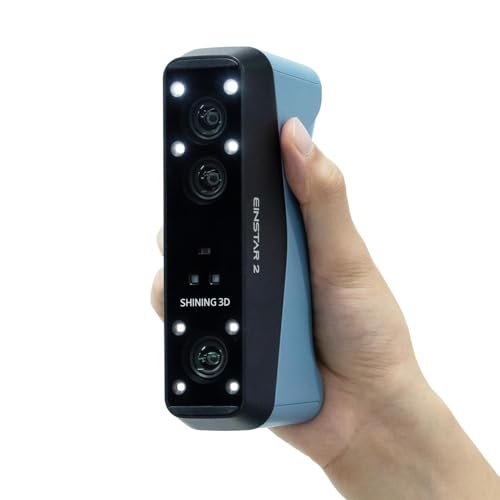
Seventeen parallel blue laser lines on one end and VCSEL infrared (a type of laser diode that emits light from the surface) on the other — a dual-source scanner with a swappable battery for true cable-free operation.
The EINSTAR 2 uses 17 parallel lines of blue laser for high-resolution detail capture on small objects at up to 90 fps, then switches to VCSEL infrared for large-object scanning at up to 20 fps. The blue laser mode specifically improves performance on reflective and metallic surfaces and includes tune deep-hole scanning. The swappable built-in battery delivers up to 3 hours of continuous scanning per charge, and a second battery is included in the box — so you can keep scanning while one charges. The wireless range is reported at 10–13 feet through obstacles. The EXStar Hub PC software handles the workflow, but the system demands a beefy PC (owners mention using i7-12700KF with 32GB RAM and an RTX 4060 Ti as a comfortable baseline). The marker preparation for larger objects is time-consuming, and early adopters mention that the included instructions are sparse and occasionally wrong. The hardware itself draws praise for accuracy and speed from automotive hobbyists who scan interior car parts.
wireless freedom: The swappable battery and dual laser/IR system make this the most genuinely portable scanner in the lineup, but the PC requirement and marker prep mean it is not a grab-and-go device in practice.
7. Creality 3D Scanner CR-Scan Ferret Pro

At 105g it is the lightest scanner in the field — a featherweight entry point that trades resolution for portability and a lower price.
The Ferret Pro weighs just 105 grams, which is roughly the weight of a smartphone, making it the most comfortable option for extended handheld scanning sessions. It uses Wi-Fi 6 for wireless scanning across Windows, macOS, Android, and iOS, and the included kit bundles a Wi-Fi box, tripod, power bank, phone holder, and carrying case. Accuracy is rated at 0.1 mm with 24-bit full-color scanning (16.7 million possible colors), and it handles objects from 50 mm to 2,000 mm. The Ferret Pro includes a battery handle and built-in Wi-Fi, enabling wireless scanning with all platforms. The real-world experience is rougher than the spec sheet suggests. Scanning performance and tracking are the most-mentioned negatives in owner feedback — the scanner visibly struggles with red, white, and black objects, with one owner reporting only 75% scan coverage on black. The software receives mixed marks, and some owners note it does not work on computers with AMD graphics hardware, crashing immediately. The crowd favorite verdict among buyers who got it working is that it is a reasonable starter device if you keep expectations in check.
lightest entry into 3d scannin: If you are curious about the category, own a reasonably modern PC (Intel i5 Gen8+ with 8GB RAM minimum), and plan to scan lighter-colored objects, the Ferret Pro is the cheapest way in. Dark and metallic surfaces are a real problem — if your main objects are black, shiny, or small, look at the Seal Lite for 0.02mm precision or the INSPIRE 2 for spray-free scanning instead.
8. 3DMakerpro 3D Scanner Moose Lite
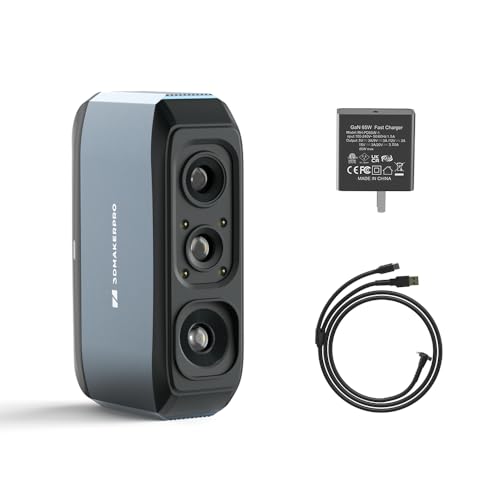
NIR light source reaches 0.05mm accuracy across medium objects up to 1,500mm — a niche bridge between small‑format precision and full-car scanning.
The Moose Lite uses an NIR (near-infrared) light source (light just beyond the visible spectrum) paired with advanced algorithms to achieve 0.05 mm accuracy and 0.1 mm resolution, designed for medium-format objects ranging from 15 mm to 1,500 mm. The recommended working distance is 150–400 mm, and it captures mono texture only (black-and-white surface). The 10 fps scanning speed with scan-back and anti-shake features helps stabilize the capture, but the learning curve is explicitly noted by the manufacturer — “like learning to drive” is how they describe it. The JMStudio software (free, lifetime updates) provides visual tracking, error correction, and auto-alignment, exporting to OBJ, STL, PLY, and ASC. The hardware quality earns positive marks from owners who succeeded, but the failure rate in reviews is higher than average for this category. One owner described taking a full day to scan a single glass with wrong results. The scanner also cannot “see” dark objects, and returns for that reason are common. The price point undercuts the POP 3 Plus, but the lower rating and reliability reports make it a clear trade-off.
A cost-conscious option for medium objects: If your budget is firm and you need to scan objects up to 1.5 meters with 0.05mm accuracy, the Moose Lite is the only option — but be ready for a steeper learning curve and a higher chance of returns than anything else at this price.
9. Shining 3D Einstar Vega Wireless 3D Scanner

An 8-core CPU and 32GB of RAM built into the scanner handle — no PC required, just pick it up and scan.
The Einstar Vega is the only scanner in this lineup that is a computer in its own right. Inside the handheld body lives an 8-core 2.4GHz CPU, 32GB of RAM, and a 512GB SSD (solid state drive for storage), plus a 6.4-inch 2K AMOLED (a high-contrast, bright display type) screen. That means you can scan, process, and save entirely on the device — no laptop, no cables, no software installation. It uses two scanning technologies: VCSEL infrared for fast long-range scans (up to 20 fps at 270–1,500 mm distance) and MEMS (Micro-Electro-Mechanical Systems, a tiny mirror that directs the laser) for high-detail short-range scans (up to 15 fps at 100–350 mm). The infrared light source is eye-safe, works in direct sunlight, and handles dark surfaces and human scanning without spray. The wireless transfer goes through the SHINING 3D Cloud with 5GB free storage, and the screen can cast to a second display for real-time viewing. The quality is the most-praised aspect among owners, but the performance is where reviews split — the unit can struggle with black or shiny objects despite the infrared light claims, and the battery life is reported as a weak point (just over one hour per charge). Owner feedback calls the UI (user interface) sparse compared to the MIRACO sibling model.
the ultimate portable workstat: If you need to scan in the field — a crash site, a remote workshop, a client’s location — with zero PC tether, the Vega is the only real option and it handles dark surfaces better than most. The premium price comes with caveats: battery life under two hours and mixed results on very shiny objects mean this is a specialist tool, not a universal replacement for a tethered unit.
Understanding the Specs
Accuracy & Resolution
Accuracy (measured in mm) tells you how close the scanned model’s dimensions are to the real object. A 0.02mm scanner can pick up fine surface wear and tool marks that a 0.1mm unit will smooth into a featureless plane. The distinction matters most for small objects under 100mm — for large objects like car panels, the difference is often invisible in the final print.
Light Source Types
Blue LED (400–500nm) projects the finest patterns for the highest accuracy on light-colored objects, but it struggles with dark and shiny surfaces. NIR (near-infrared) penetrates dark surfaces better but at slightly lower resolution. Structured light with infrared lasers handles a wider range of materials including reflective ones without spray. Dual-source scanners (like the INSPIRE 2 and EINSTAR 2) give you both options in one device.
FAQ
Will a consumer 3D scanner work with my 3D printer?
Can a 3D scanner capture black or shiny objects without spray?
How much computer power do I really need?
Can I scan a person’s face or body with these scanners?
What is the actual difference between 0.02mm and 0.1mm accuracy?
Can I scan outdoors in sunlight?
How long does it take to learn to use a consumer 3D scanner well?
What file formats do these scanners export for CAD software?
Is a turntable scanner like the EinScan SE V2 better than a handheld?
Final Thoughts: The Verdict
For the majority of shoppers, the best consumer 3D scanner is the Revopoint POP 3 Plus because it delivers the strongest balance of 0.04mm precision, a generous accessory kit, free software that actually gets updated, and responsive customer support — all at a mid-range price point that undercuts the true professional units while still producing usable results. If your main goal is scanning small mechanical parts where every 0.02mm counts, the 3DMakerpro Seal Lite is the one to reach for. And if you scan a mix of glossy and dark objects and want to skip the can of spray, the Revopoint INSPIRE 2 with its dual scanning modules covers more material types than anything else at its price.
How We Picked
We do not accept paid placement. Every pick is matched to a real buyer and a real use-case; we do not hands-on test units.
Sources & Methodology
Specifications: manufacturer listings and product documentation. Review insights: verified customer reviews, as of July 2026. Pricing: not shown on this page (it changes often); check the current price via the retailer link.
As an Amazon Associate, WellFizz earns from qualifying purchases. This does not affect which products we feature.
Related Guides

Mo Maruf
I created WellFizz to bridge the gap between vague wellness advice and actionable solutions. My mission is simple: to decode the research and give you practical tools you can actually use.
Beyond the data, I am a passionate traveler. I believe that stepping away from the screen to explore new environments is essential for mental clarity and physical vitality.