You want a 3D printer that actually makes things without wasting your weekend on troubleshooting. The current market splits into two camps: fast single-color workhorses and multi-color systems that add complexity. This guide compares seven top desktop printers using their published specs and real buyer reports, so you know exactly what you are getting — and what trade-off each model asks you to accept — before you spend a cent.
I’m Mohammad Maruf — the co-founder and writer behind WellFizz. This guide is built by comparing the manufacturers’ published specifications and the patterns across verified customer reviews, so you get each pick’s real strengths and trade-offs instead of marketing spin.
If you are a complete beginner, a parent buying for a curious kid, or a maker looking to upgrade, this article helps you find the right consumer 3d printer by explaining what specs matter in daily use and which models deliver on their promises.
How To Choose The Best Consumer 3D Printer
Many first-time buyers chase a high print-speed number without checking what else comes with it. Speed matters, but reliability — consistent, good-looking prints out of the box — matters more. Here are the real decision points.
Print Speed vs. Real Throughput
An advertised 600mm/s (millimeters per second — how fast the print head can travel) is only part of the story. Acceleration, how quickly the nozzle reaches that speed, matters just as much. Look for acceleration figures above 10,000mm/s² (millimeters per second squared) alongside the top speed. A printer that hits top speed quickly finishes a standard Benchy test boat in under 20 minutes, while a slow-accelerating machine might take 40 minutes even with the same peak speed.
Auto Bed Leveling — Not All Systems Are Equal
Automatic bed leveling means the printer measures small variations in your build plate and compensates for them. The cheapest systems use a simple switch; better ones like the CR Touch sensor on the Ender-3 V3 KE use a probe to map dozens of points. The best systems, like the LeviQ 3.0 on the Anycubic Kobra X, use 49-point calibration and an advanced algorithm to ensure a perfect first layer every time — so you never need to adjust screws by hand.
Multi-Color and Multi-Material
Multi-color printing uses an AMS (Automatic Material System) to switch filaments mid-print. The catch is material waste — the system purges 30-40% of the filament during color changes. If you print functional parts in one color, skip multi-color. If you want detailed models with multiple colors, the Bambu Lab and Anycubic systems make it reliable. Printers that support multi-material also let you use dissolvable support material, which is a standout for complex overhangs.
Build Volume and Footprint
The standard build volume for consumer printers is about 220mm x 220mm x 250mm (roughly 8.6 x 8.6 x 9.8 inches). That fits most small parts, figures, and tools. Going larger means a bigger desk footprint. The Anycubic Kobra X offers a spacious 260mm³ cube, while the Flashforge Adventurer 5M Pro has a compact 220mm³ volume — enough for most projects but too small for helmets or large vases.
Nozzle Temperature and Material Range
Most consumers print PLA (polylactic acid — a biodegradable, easy-to-use plastic). For that, a nozzle reaching 300°C is plenty. If you want stronger materials like ABS (acrylonitrile butadiene styrene — used for durable parts) or carbon-fiber-infused filament, you need a nozzle that hits at least 300°C and an enclosed printer body. The ELEGOO Centauri Carbon reaches 320°C and has a fully enclosed chamber, making it one of the few consumer-level printers that can handle advanced composites.
Quick Comparison
On smaller screens, swipe sideways to see the full table.
| Model | Category | Best For | Key Spec | Amazon |
|---|---|---|---|---|
| Bambu Lab P1S Combo | Premium | Serious hobbyists wanting 16-color prints | 500mm/s, 48.2 lbs | Amazon |
| Anycubic Kobra X Multicolor | Best Overall | Beginners who want multi-color without complexity | 600mm/s, 49-point leveling | Amazon |
| Bambu Lab A1 Mini Combo | Compact | Small desks, first-time multi-color buyers | 10,000mm/s² acceleration, ≤48dB | Amazon |
| ELEGOO Centauri Carbon | Enclosed | Printing strong materials like carbon-fiber filament | 320°C nozzle, 38.5 lbs | Amazon |
| FLASHFORGE Adventurer 5M Pro | Enclosed | Health-conscious users wanting air filtration | 600mm/s, HEPA + carbon filter | Amazon |
| Creality K2 SE | Budget | Kids and absolute beginners on a tighter budget | 600mm/s, 27.5 lbs | Amazon |
| Creality Ender-3 V3 KE | Value | Hobbyists who like community mods and support | 500mm/s, CR Touch auto-leveling | Amazon |
In‑Depth Reviews
1. Bambu Lab P1S Combo

The Bambu Lab P1S Combo prints at 500mm/s with an acceleration of 20,000mm/s², but the real headline is the included AMS that handles up to 16 colors. This is the closest thing to a no-compromise machine for a serious hobbyist: multi-color prints, auto bed leveling via a sensor probe, and a fully enclosed body so you can print ABS and ASA without them cracking.
Buyers report a 95% success rate over about 100 prints, with failures mostly due to user error, not the printer. The enclosed design keeps temperature stable for advanced filaments and cuts noise compared to open-frame printers. It weighs 48.2 pounds, so it stays planted on a desk even at high speeds.
The downside is the footprint: at 18.72 x 23.01 x 18.72 inches, it needs a dedicated space, and the AMS adds more bulk. But if you want one machine that prints everything from beginner PLA figurines to nylon automotive parts without compromises, this is it.
Why it’s great
- 16-color multi-material printing is genuinely reliable out of the box.
- 500mm/s with high acceleration finishes most prints in under an hour.
- Fully enclosed body lets you print advanced filaments like ABS and nylon.
Good to know
- Large footprint requires a dedicated desk or table.
- AMS system creates filament waste during color changes — expect some purging.
- Carbon and glass-filled filaments are not recommended by the manufacturer.
2. Anycubic Kobra X Multicolor 3D Printer

This printer beats the top pick Bambu P1S on speed (600mm/s vs 500mm/s) and comes with native 4-color printing right in the box, no separate add-on required. It also offers a larger print volume at 260mm³ versus the P1S’s roughly 256mm³, so you can print bigger models like helmet halves or functional brackets. The 49-point LeviQ 3.0 auto-leveling system is one of the most sophisticated on a consumer printer — it measures the build plate at 49 points so your first layer sticks every time without manual fiddling.
After 265 hours of printing, one reviewer noted exactly one failure caused by user error, not the machine. The built-in AI camera detects spaghetti failures (tangled filament blobs that look like a mess of spaghetti) and foreign objects, so you don’t lose a whole spool on an overnight print that goes wrong. It runs at just 45dB (decibels — quieter than a typical conversation), making it comfortable in a shared room or home office.
The trade-off for that speed and size is weight: at 20.9 pounds it is 32% lighter than heavier premium printers, which makes it easier to move but slightly less stable on a wobbly desk. The Gen 2 ACE system (the swappable filament unit) is not compatible with older ACE Pro units, so check before buying add-ons if you want to expand to the maximum 19 colors. This is the pick for a first-time multi-color buyer who wants speed and ease over the P1S’s extra complexity and larger footprint.
Where it shines
- 600mm/s speed with native 4-color multi-material printing included.
- AI camera with spaghetti detection saves wasted filament on failed prints.
- 49-point auto bed leveling takes all the guesswork out of first-layer adhesion.
Worth noting
- Gen 2 ACE system is not compatible with older ACE Pro units — check compatibility before buying add-ons.
- Lighter build means more vibration shake at top speeds on lighter tables.
- Some buyers found minor instruction booklet errors during assembly.
3. Bambu Lab A1 Mini Combo

If you want multi-color prints but your desk is the size of a postage stamp, the Bambu Lab A1 Mini Combo measures just 16.77 x 14.82 x 19.5 inches with the AMS lite attached — small enough for a standard desk corner where a full-size P1S would never fit. It still delivers full-auto calibration and active flow rate compensation (a system that adjusts filament extrusion in real-time to prevent blobs or gaps), so your first print is as good as your hundredth.
One buyer mentioned the A1 Mini “exceeds expectations” for its small footprint, and the automatic calibration makes it truly plug-and-play — you unbox it, run calibration, and print a perfect benchy in about 20 minutes. The noise level stays at or below 48dB, which is quieter than a typical household dishwasher. The acceleration of 10,000mm/s² is lower than the P1S’s 20,000mm/s², so small parts print quickly but large ones take a bit longer — a fair trade for the tiny size.
The real limitation is build volume: at roughly 180mm³ (about 7 inches cubed), you cannot print helmets, large vases, or functional brackets. The AMS lite also wastes more filament during color changes than the enclosed P1S system because it purges more material per switch. This printer is perfect for figurines, toys, and small parts — skip it if you plan to make anything bigger than your hand. It delivers full-auto calibration and active flow rate compensation in a footprint smaller than a standard desk corner.
What stands out
- Smallest footprint among multi-color printers — fits on any desk corner.
- Full-auto calibration means zero manual leveling for first-time users.
- Active flow rate compensation prevents extrusion issues during fast prints.
The trade-offs
- AMS lite wastes more filament per color change than full-size AMS systems.
- Small build volume (~180mm³) limits what you can print.
- Shakes noticeably on carpeted surfaces — needs a solid desk for best results.
4. ELEGOO Centauri Carbon 3D Printer

The single most important number in the Centauri Carbon is 320°C — the nozzle temperature, 20°C hotter than most consumer printers. That extra headroom lets you print carbon-fiber-reinforced filaments and other advanced composites that would clog a standard 300°C hotend. If you plan to make functional parts — drone frames, automotive brackets, jigs — this printer can handle them where many others cannot.
What you accept with that capability is weight and rigidity: at 38.5 pounds with a die-cast aluminum frame, it is heavy enough to absorb vibration at 500mm/s. The CoreXY layout and enclosed chamber keep heat stable for warp-prone materials like ABS. One reviewer who logged 300-400 hours on a replacement unit reported zero errors and excellent bed adhesion. The built-in camera and LED lighting let you watch prints remotely, and the dual-sided PEI (polyetherimide, a high-adhesion surface) plate has a special PLA side that sticks well at lower bed temperatures.
The reliability question is real — that same reviewer noted their first unit died after 6 days (a USB-C cable design issue), and getting a replacement took 7 weeks of back-and-forth with support. When it works, it is the best value for engineering-grade materials, but the quality control lottery means it is not for someone who needs dependability on day one. pass on it if you cannot afford a possible multi-week wait for a warranty fix; pick the Flashforge Adventurer 5M Pro instead if you want a more proven enclosed machine.
The upsides
- 320°C nozzle handles carbon-fiber and other advanced filaments that standard printers cannot.
- 38.5-pound die-cast frame stays rock-solid at high speeds for consistent layer quality.
- Fully pre-assembled and pre-calibrated — no tinkering needed out of the box.
Keep in mind
- First-unit failure rate appears higher than average based on early buyer reports.
- Customer support can take weeks for replacement parts or warranty service.
- No multi-color option — single material only unless you add an external system.
5. FLASHFORGE Adventurer 5M Pro 3D Printer

What you actually get at this lower price is the only printer in this lineup with a HEPA and carbon filtration system as a core feature, making it the smart choice if you print ABS or other fume-producing materials in a bedroom or small office. It also matches the class speed leader at 600mm/s with 20,000mm/s² acceleration, and the nozzle heats from cold to 200°C in just 35 seconds — so you are not waiting between prints.
What you get for that filtration and speed is a slightly smaller build volume at 220mm³ compared to the Kobra X’s 260mm³, and a weight of 32.1 pounds that makes it stable but not portable. One owner reported that the HEPA filter works well but the doors do not seal tightly, meaning some fumes can still escape — it reduces them, not eliminates them. The 1-click auto printing system is genuinely simple: no rafts, no Z-axis calibration, and the dual-sided PEI platform pops prints off without tools.
The standout here is material compatibility: it supports PLA, ABS, PETG, TPU, PC, and even carbon-fiber-infused filaments (PLA-CF and PETG-CF) thanks to the 280°C all-metal hotend. No other enclosed printer at this tier covers that range without upgrades. it’s not for you if you need multi-color — this is single-material only — but for a fume-conscious hobbyist, it is the safest choice in the mid-range, making it the exact budget buyer it is perfect for.
Why we’d pick it
- HEPA and carbon filtration system reduces fumes from ABS and other materials.
- 600mm/s with 35-second nozzle heat-up means very fast print starts.
- Supports a wide range of filaments including carbon-fiber-infused PLA and PETG.
A few caveats
- Filtration system is not fully sealed — some fumes may still escape around the doors.
- 220mm³ build volume is smaller than some competitors at a similar price.
- Initial firmware or software setup requires a phone or tablet for the FlashMaker app.
6. Creality K2 SE 3D Printer
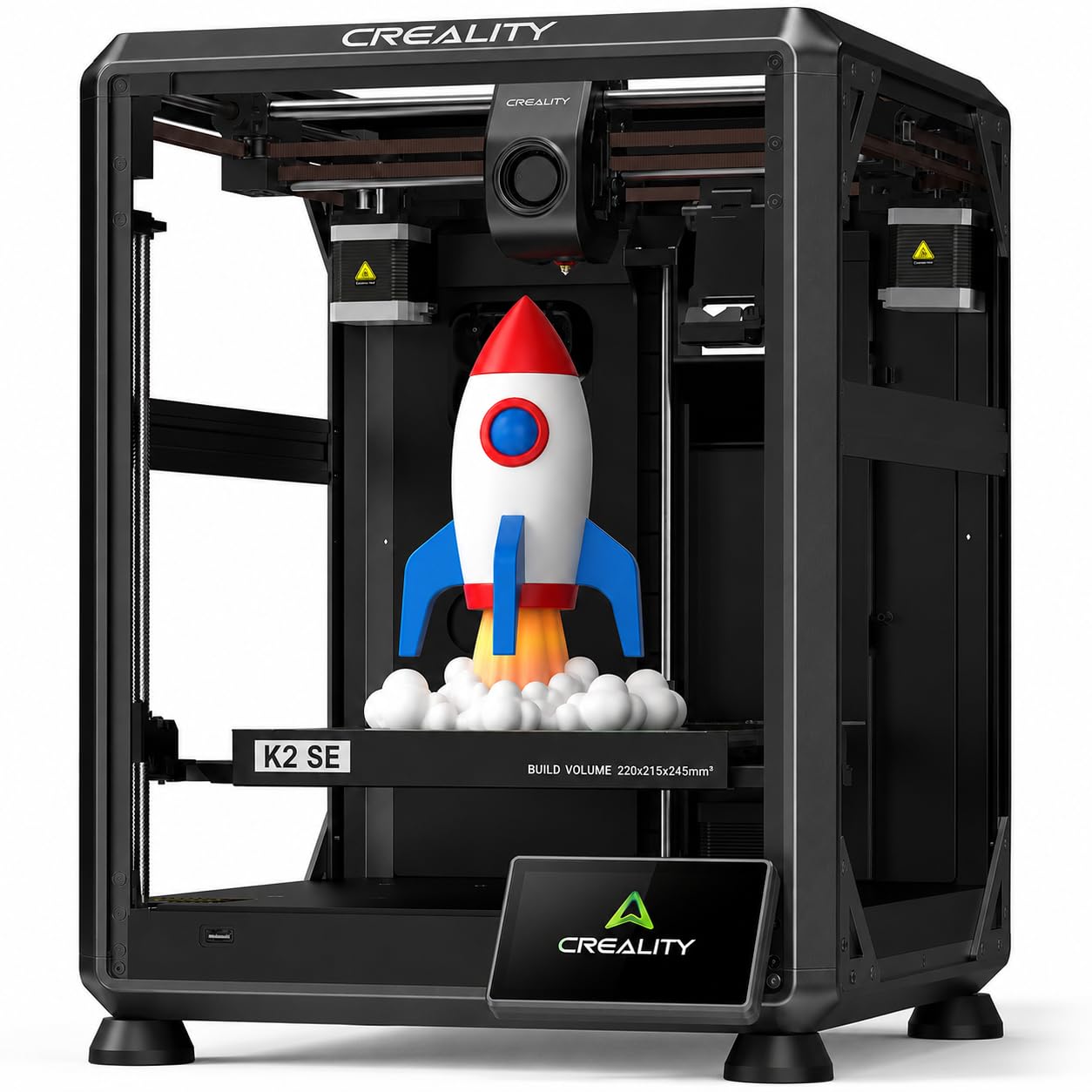
The Creality K2 SE is perfect for a kid or a complete beginner who wants to print toys and basic parts without learning how to level a bed or swap a hotend, offering the CoreXY high-speed structure found in much more expensive printers — 600mm/s travel speed with 20,000mm/s² acceleration, which is about 12 times faster than a standard bed-slinger.
What you give up at this price is build quality consistency — one reviewer called it a “great upgrade from an Ender 3 v2” but noted the nozzle change is not as easy as advertised and the Amazon listing has inaccuracies about included accessories. It requires a glue stick on the bed for print adhesion (no PEI surface), and the control panel is basic compared to touchscreens on costlier models. On the plus side, owners mention “30+ prints with zero failures” and the auto-leveling works perfectly for beginners.
The 300°C dual-gear direct extruder handles PLA, PETG, TPU, and ABS, and the tri-metal nozzle (steel-tipped copper with a titanium alloy heatbreak) resists heat-creep that clogs cheaper printers. For a child’s first printer or a school project station, this delivers surprising speed for the price — but if you can stretch the budget to the Kobra X, you get multi-color capability and much better build quality.
Strong points
- 600mm/s CoreXY speed at an entry-level price point is unmatched in this tier.
- Auto-leveling makes setup genuinely simple for kids and first-time users.
- 300°C hotend handles flexible TPU and ABS filaments.
Before you buy
- Requires a glue stick on the bed for proper print adhesion — not a fully PEI experience.
- Nozzle swap is not as tool-free as advertised; some reviewers found it finicky.
- Control panel is basic and lacks the refined interface of mid-range models.
7. Creality Ender-3 V3 KE 3D Printer

Compared to the rest of the field, the Creality Ender-3 V3 KE lands at a lower price point while offering a highly modifiable open-frame design, making it a strong value for hobbyists who prioritize customization over out-of-the-box refinement.
What that money actually buys is reliability with a caveat: one customer observed “first 10 prints were spot on” before the feed system failed and needed a new hotend and electronics board. Other reviewers with consistent success praise the “easy setup, sharp first prints” and note the printer has transformed from a casual hobby into selling custom designs. The 0.1mm layer height accuracy is tight enough for detailed miniatures and mechanical parts. The CR Touch sensor (a probe that maps the bed at multiple points) gives consistent first layers, but customers note it still requires occasional manual tramming (adjusting the bed with screws) if the bed is warped.
The one clear reason to choose the V3 KE is the ecosystem — Creality’s extensive community means you can find a fix or upgrade for any issue, and the Sprite extruder handles TPU (flexible material) and other tricky filaments better than the K2 SE’s design.
What we like
- Massive community of users means endless mods, profiles, and troubleshooting help.
- CR Touch auto-leveling with multi-point calibration gives consistent first layers.
- Sprite direct extruder handles flexible TPU filaments without jamming.
The downsides
- Some units experience feed system failures after initial successful prints.
- Fan noise is louder than enclosed or newer CoreXY models.
- Bed leveling still requires occasional manual tramming despite the CR Touch sensor.
Understanding the Specs
Print Speed (mm/s) and Acceleration (mm/s²)
Print speed is the fastest the print head can move while extruding plastic, measured in millimeters per second (mm/s). Acceleration is how quickly the head reaches that speed. A 600mm/s printer with low acceleration can take as long as a 300mm/s printer with high acceleration. Look for both numbers. 20,000mm/s² acceleration is typical for fast CoreXY machines; 10,000mm/s² is common on bed-slinger designs. In real use, a Benchy test boat prints in about 14-18 minutes on a well-tuned fast machine and 60+ minutes on a basic printer.
Auto Bed Leveling
Auto bed leveling uses a sensor or probe to measure the build plate at multiple points and create a height map. The printer then compensates for small tilts or bumps during every print. Systems range from simple 16-point switches to advanced 49-point algorithms. A 49-point system like LeviQ 3.0 on the Anycubic Kobra X is essentially fire-and-forget — you never touch a leveling screw. A CR Touch sensor (used on the Ender-3 V3 KE) is excellent but may still need occasional manual tweaks if the bed is warped.
Build Volume and Footprint
Build volume is the maximum size of a part you can print, shown as width x depth x height. A 220mm³ volume fits most small tools, figurines, and phone cases. A 260mm³ volume fits larger parts like helmet halves or functional brackets. A bigger build volume usually means a bigger desk footprint — check the product dimensions, not just the printable area. The Bambu Lab A1 Mini is tiny for its build plate, while the P1S takes up almost 2 feet in every direction.
Nozzle Temperature and Material Compatibility
Nozzle temperature determines what plastic the printer can melt. 300°C handles PLA, PETG, TPU, and ABS. 320°C adds carbon-fiber-reinforced filaments and nylon. All-metal hotends are required for high temperatures; PTFE-lined (lined with polytetrafluoroethylene, a non-stick coating) hotends degrade above 260°C. For most consumers, 300°C is plenty — unless you specifically want to print carbon-fiber parts, the extra 20°C of the ELEGOO Centauri Carbon is not needed.
FAQ
How much filament waste should I expect from multi-color printing?
What is the difference between a CoreXY and a bed-slinger printer?
Can I print carbon-fiber filament on a standard 300°C printer?
How much desk space do I actually need for a consumer 3D printer?
Final Thoughts: The Verdict
For the majority of shoppers, the consumer 3d printer winner is the Anycubic Kobra X Multicolor because it delivers 600mm/s speed, native 4-color printing, and a large 260mm³ build volume at a price that undercuts multi-color competitors — all without sacrificing reliability or ease of use. If you want the absolute best print quality and a sealed ecosystem with 16-color capability, grab the Bambu Lab P1S Combo. And for a compact desk-friendly entry into multi-color printing that still delivers excellent results, the Bambu Lab A1 Mini Combo is the obvious choice.

Mo Maruf
I created WellFizz to bridge the gap between vague wellness advice and actionable solutions. My mission is simple: to decode the research and give you practical tools you can actually use.
Beyond the data, I am a passionate traveler. I believe that stepping away from the screen to explore new environments is essential for mental clarity and physical vitality.