Our readers keep the lights on and my smoothie glass nicely filled. As an Amazon Associate, I earn from qualifying purchases.
Specs are compiled from manufacturer listings and verified buyer reviews and can change over time — please confirm the key details on the product page before buying.
The real problem with a smart home isn’t the cost or the setup—it’s waking up to four different apps because your lights, alarm, doorbell, and thermostat all speak different languages. A connected home system is the single brain that ties them together, and the right one means you use one app, one routine, and one rulebook instead of juggling five separate gadgets. This guide cuts through the platform hype to show you which hub actually matches the way you live.
I’m Mohammad Maruf — the founder and writer behind WellFizz. This guide is built by comparing the manufacturers’ published specifications and the patterns across verified customer reviews, so you get each pick’s real strengths and trade-offs instead of marketing spin.
From self-monitored alarm kits to multi-protocol automation brains, these reviews cover the top contenders for the best connected home systems available right now, each with a distinct job that makes your house work as one.
Our Picks at a Glance


How To Choose The Best Connected Home Systems
The core question isn’t which hub has the most features on paper—it’s which protocols it speaks. Your smart lights might run on Zigbee, your door lock on Z-Wave, and your sensors on Wi-Fi. If your hub doesn’t support a protocol natively, you will need extra adapters or you won’t get local control at all. Start by listing the wireless standards your current (or planned) devices use, then match that list to the hub’s built-in radios.
Protocols and Vendor Lock-In
A hub that relies on the cloud for every command introduces lag and a single point of failure if your internet goes down. A local-first hub processes automations inside your home, keeping response times under a second and your data off someone else’s server. Systems like Home Assistant Green and Homey Pro prioritize local processing, while many security-first kits like the Ring Alarm still lean on the cloud for remote access.
Quick Comparison
| Model | Best For | Built-in Protocols | Max Devices Supported | Local Storage | Amazon |
|---|---|---|---|---|---|
| Like-New Ring Alarm 8-Piece Kit★ Best Overall | DIY home security starters | Z-Wave, Wi-Fi | Expandable (accessories sold separately) | None (cloud required) | Amazon |
| Homey Pro (Early 2023)Also Great | Multi-protocol power users | Wi-Fi, Zigbee, Z-Wave Plus, BLE, Infrared, Matter & Thread | 50,000+ device types | On-premise (local) | Amazon |
| Home Assistant GreenAutomation Brain | Custom automation tinkerers | Ethernet, USB (add-on Z-Wave/Zigbee/Thread) | 640+ integrations | 32GB internal | Amazon |
| OSI Alarm System Gen 2 (4G) | Flexible self-monitoring or pro monitoring | 4G, Wi-Fi | 160 sensors, 6 controllers, 6 doorbells, 6 keypads | None (cloud/app based) | Amazon |
| eufy Security Smart Display E10 | Dedicated camera monitoring hub | Wi-Fi (works with HomeBase 3) | Multiple cameras (depends on system) | Yes (via HomeBase 3) | Amazon |
| Philips Hue Smart Light Starter Kit | Lighting-focused smart home entry | Bluetooth, Zigbee (via Bridge) | Up to 50 lights per Bridge | None (Bridge controls locally) | Amazon |
| Tapo CentralHub H500 | Tapo ecosystem central management | Wi-Fi, Ethernet | 16 cameras & 64 Sub-G sensors | 16GB + expandable SATA | Amazon |
| SK-200 SkylinkNet Wireless Alarm System | Budget no-subscription security | Proprietary RF, Wi-Fi | 100 sensors/controllers | None (app-based alerts) | Amazon |
| PGST Home Security System 103-C | Entry-level all-in-one alarm kit | GSM/4G, Wi-Fi | 99+ sensors | None (app-based alerts) | Amazon |
In‑Depth Reviews
1. Like-New Ring Alarm 8-Piece Kit
Our pick — over 4.5★ from 800+ verified ratings; the strongest balance of quality and price.
A certified refurbished security starter that delivers brand-new reliability at a fraction of the usual entry price.
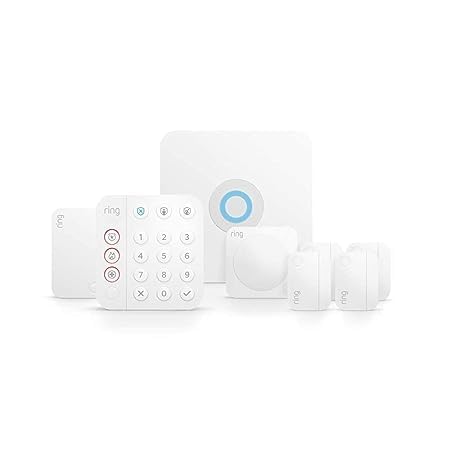
This 8-piece kit comes with a base station, a keypad, four contact sensors (for doors and windows), one motion detector (which is pet-friendly), and one range extender. Reviewers point out the refurbished unit arrived in perfect condition, with the same limited warranty as a new device. Setup takes about 45 minutes via the Ring app, and the adhesive backing means you don’t need to drill holes. Unlike the PGST system, the Ring app is polished and well-maintained, and buyers consistently praise the easy integration with Alexa. You can arm and disarm with your voice (with a Ring Protect subscription), and the system sends instant mobile notifications when triggered.
There are a few things to know. The Ring Protect subscription is sold separately if you want professional monitoring, cellular backup, or the ability to arm from anywhere. Without it, the system is still functional but limited to local arming/disarming and mobile notifications. Unlike the OSI system, Ring does not offer a self-monitoring tier with 4G backup built in—you need the subscription for that. Buyers do mention that the kit fits 1-2 bedroom homes well but will require additional sensors (sold separately) for larger layouts. If you are already in the Amazon/Alexa ecosystem, this is the smoothest path to a reliable alarm system without monthly commitments.
Polished and Proven
- Refurbished unit looks and works like new; backed by full warranty.
- Easy adhesive installation; no drilling required.
- smooth Alexa voice control and Ring app notifications.
What Subscription Hides
- Professional monitoring and remote arming require a paid Ring Protect plan.
- No 4G cellular backup without subscription.
- Kit fits small homes best; expansion sensors cost extra.
Best for Amazon households: If you already use Alexa, Ring delivers the most integrated and user-friendly alarm experience at a low hardware cost.
Consider the OSI instead if: You want professional monitoring as an a la carte option without an ongoing subscription commitment.
2. Homey Pro (Early 2023)
The only hub that sidesteps the protocol tower-of-babel with seven radios inside a single box.
Homey Pro eliminates the need for a drawer full of USB dongles by packing Wi-Fi, Zigbee, Z-Wave Plus, BLE (Bluetooth Low Energy), Infrared, Matter, and Thread (seven wireless standards) into one device. That means you mix a Govee LED strip, a Kwikset lock, and a Sonos speaker without worrying if they talk to each other. Everything is processed locally on the hub, so automations like turning off all lights when you leave fire instantly and your data stays in your house. Buyers report that the flow editor inside the Homey app lets you create advanced rules (for example, “if solar generation exceeds X, start charging the EV”) without writing a single line of code. It is the most versatile connected brain you can buy today.
The trade-offs are real. Some buyers found that certain Z-Wave devices lack a sturdy driver—one reviewer’s Stelpro thermostat wouldn’t work properly. The Wi-Fi radio can be unstable, and several users recommend a wired Ethernet connection for reliability. At 1.43 pounds and a foot print of 5.04 x 5.04 inches, it is compact enough for a bookshelf, but the premium price puts it firmly in enthusiast territory. For sheer device compatibility, it outperforms Home Assistant Green from the start because you do not need to hunt down and configure community drivers for every device.
Seven Radios, No Adapters Needed
- Supports 50,000+ device types from over 1,000 brands.
- Local processing keeps automations fast and private.
- Supports Matter and Thread for future-proofing.
Real-World Caveats
- Some niche Z-Wave devices lack full driver support.
- Wi-Fi radio can be unreliable; Ethernet is recommended.
- Price is significantly higher than other hubs.
Smart money pick: If you own gadgets from more than three brands and want a single pane of glass, this hub closes the compatibility gap better than anything else.
Biggest caution: Device support is vast but not infinite—always check the Homey website for your specific model before buying.
3. Home Assistant Green
The cheapest way to break out of a single-brand ecosystem and run automations with total local control.
Home Assistant Green comes with Home Assistant OS pre-installed, so you plug in Ethernet and power and the setup wizard starts discovering devices within minutes. The hardware is fanless and silent, with a quad-core processor, 4GB of LPDDR4X RAM (low-power memory that helps the small box run fast), and 32GB of internal storage. Owners mention automatic discovery works almost like magic—the hub finds Zigbee lights, Wi-Fi plugs, and even obscure sensors without manual configuration. Unlike the Homey Pro, it does not have built-in Z-Wave or Zigbee radios, but it has a USB port for adding exactly the dongle you need. That modularity keeps the entry cost low.
The catch is that this is a hobbyist platform. One reviewer with over 60 devices noted that building complex automations requires browser tinkering and often help from AI or forums. Another buyer described it as “tricky but reliable and rewarding.” If you want a system that works from the start with no learning curve, the Ring Alarm or OSI system will be easier. But if you want your Lutron lights, Arlo doorbell, and Sonos speaker all responding to a single “goodnight” command without cloud delays, Home Assistant Green makes it happen at a power draw of only a couple of watts.
Open-Source Freedom
- Runs thousands of free integrations through HACS (Home Assistant Community Store).
- Local processing only—all data stays in your home.
- Uses only a couple of watts of power.
Know Before You Buy
- Steep learning curve for advanced automations.
- No built-in Zigbee/Z-Wave radio; requires separate USB dongles.
- May become a daily tinkering hobby rather than a low-maintenance device.
Best for tinkerers: If you enjoy configuring your own rules and want to unite every brand without paying per-device fees, this is the most capable and private option.
Look elsewhere if: You want a straightforward alarm system or a ready-made dashboard for family members who don’t troubleshoot tech.
4. OSI Alarm System Gen 2 (4G)

A self-monitored alarm that offers professional 24/7 monitoring as a switch you flip, not a contract you sign.
The OSI Gen 2 kit includes a control panel with a 7-inch touchscreen (with an HD 1024 x 600px (high-definition, good-size display) anti-fingerprint coating), two motion sensors, five contact sensors, a wireless strobe siren, and two remote controllers. You can self-monitor for zero monthly fees using the Smart Life app, or opt into professional monitoring (police/fire/medical dispatch) starting at per month with no long-term contract. Unlike the Ring Alarm, this system connects via 4G cellular as well as Wi-Fi, so alerts still go through if your internet goes down, and it has a 24-hour backup battery. Customers note that the setup wizard guides you through every step, and a former professional installer called it “the best DIY alarm system” he tested.
The main limitation buyers mention is the Smart Life app itself: it lacks a history deletion feature and doesn’t display well on tablets. The included plug-in siren is cheap and takes up two socket spaces. Up to 160 sensors, six controllers, six doorbells, and six keypads can be added, which makes it highly scalable for a large house or small business. It also supports multiple user access levels (one admin and five limited accounts), so renters or kids can arm and disarm without accessing system settings.
Flexible Monitoring, Solid Kit
- Works with or without professional monitoring; no contracts.
- Large 7-inch touchscreen with clear setup wizard.
- Scalable to 160 sensors, 6 keypads, 6 doorbells.
App and Hardware Quirks
- Smart Life app lacks some features and has rough tablet display.
- Plug-in siren is low-quality and bulky.
- No built-in Zigbee/Z-Wave for smart home device control.
Best for dual-use households: Great for owners who want free self-monitoring but also the option to enable professional dispatch later without hardware changes.
One real trade-off: If you need smart home device integration (lights, locks), this is a security hub first and not a universal automation brain like the Homey Pro or Home Assistant Green.
5. eufy Security Smart Display E10
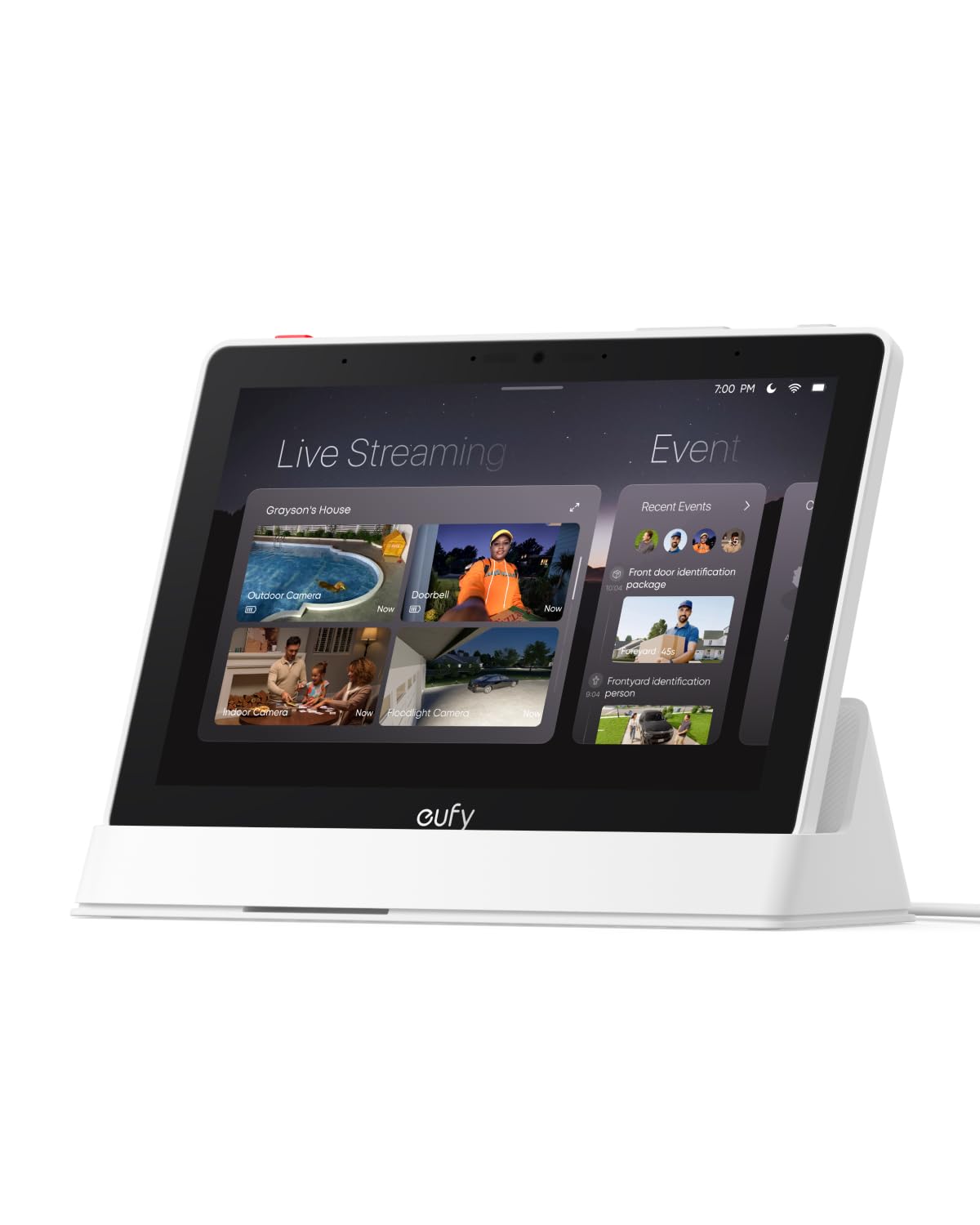
A dedicated touchscreen display that surfaces your camera feeds instantly—no phone needed to check who is at the door.
The E10 is an 8-inch smart display that acts as a dedicated monitor for your eufy Security system. When someone rings the doorbell, open up the door, or triggers a motion alert, the screen automatically lights up with a live feed and a voice alert telling you who it is. You can view up to four camera feeds simultaneously on the screen, and historical events are stored locally (via the HomeBase 3) for instant playback with no buffering. Unlike the Tapo H500 which is a hub you access via an app, the E10 is an always-on physical panel that family members of any age can use easily—shoppers say it is “simple enough for kids and seniors.” The unit is rechargeable and portable, so you can pick it up and take it to another room.
The main drawback reported by users is connectivity when streaming more than two cameras simultaneously. One reviewer noted live streaming three or four cameras at once can cause the feed to stutter. It requires the eufy HomeBase 3 to function—it is not a standalone display—so you must already own or buy into the eufy ecosystem. The 1.11-kilogram (about 2.4 pounds) weight and 7.91 x 5.47-inch footprint make it larger than a tablet, but the trade-off is a screen big enough to read from across the kitchen counter.
Always-On Camera Monitor
- Instant hands-free door alerts with live feed and voice.
- Four-camera live view on one screen.
- Rechargeable and portable throughout the home.
Ecosystem and Performance Limits
- Requires eufy HomeBase 3; not a standalone hub.
- Streaming more than two cameras live can cause connectivity drops.
- 12-month warranty is shorter than some competitors.
Best for eufy owners: If you have multiple eufy cameras, this display is the easiest way to monitor them without pulling out your phone every time.
skip it if: You use cameras from other brands—this display only works with eufy’s ecosystem.
6. Philips Hue Smart Light Starter Kit

The gold standard for smart lighting color quality combined with a hub that open up the full power of automation.
This starter kit includes one Hue Bridge and four 75W A19 E26 (standard screw-base) White and Color Ambiance bulbs. The Bridge connects via Bluetooth and Zigbee, which gives you a dedicated network that doesn’t rely on your Wi-Fi. Buyers consistently praise the color depth and richness, with one owner calling them “the best color of all the smart bulbs I’ve used.” The Bridge enables automations like setting a 24-hour natural light scene that mimics the sun, dynamic light effects that change subtly, and control from anywhere in the world via the Hue app. It works with Alexa, Google Assistant, and Apple HomeKit. Unlike the budget PGST kit, the Hue system has a mature ecosystem with years of reliable firmware updates and third-party app support.
One buyer mentioned a hub connection issue that was resolved by adding the Bridge directly to Apple Home instead of through the Hue app. The kit is expensive compared to generic Wi-Fi bulbs, but the difference is reliability and ecosystem depth. The Color Rendering Index (a measure of how accurately colors look under the light) is 80, which is good for a smart bulb. The included Bridge supports Matter, so future smart home devices using that standard can be added. If your goal is lighting-first smart home control, this kit is the most dependable entry point.
Rich Colors and Reliable Hub
- Best color quality among all tested smart bulbs in reviews.
- Bridge creates a stable, dedicated mesh network (Zigbee).
- Supports Matter, Apple HomeKit, Alexa, and Google Assistant.
Cost and Compatibility Notes
- Premium price per bulb vs. Wi-Fi alternatives.
- Bridge connection may need direct Apple Home configuration.
- Bulbs are for indoor use only (E26 base).
Best for lighting enthusiasts: If color quality and reliable home/away automation matter more than the lowest price, this is the most proven starter system.
Consider a Wyze alternative if: You want more saturated, punchy colors at a lower cost, even if reliability takes a slight hit.
7. Tapo CentralHub H500

The hub that kills the need for microSD cards in every camera by offering one big shared storage pool.
The Tapo H500 connects up to 16 Tapo cameras (with continuous recording supported on up to 4 of them) and 64 Tapo Sub-G sensors. It comes with 16GB of built-in storage and has a SATA port for adding a 2.5-inch HDD or SSD with no capacity limit, so you can install a single 2TB drive (like one buyer’s Crucial MX500) instead of buying separate microSD cards for each camera. An HDMI port lets you monitor up to four live views on a TV or monitor. Buyers report that setup is as simple as plugging it into the router via Ethernet, and the WPA3 encryption (the latest Wi-Fi security standard) protects your footage from unauthorized access. A built-in 110dB siren can act as an alarm or a doorbell chime.
The biggest limitation: it only works with Tapo devices. If you have cameras from Ring, Arlo, or Eufy, this hub cannot see them. Some owners mention that it supports up to 16 cameras for event detection but only four for continuous recording—a distinction that matters if you want 24/7 footage from more than four cameras. The 6.81 x 4.13 x 3.58-inch body is compact but requires a wired Ethernet connection for best performance (Wi-Fi is available but less stable). For anyone building a Tapo-only system, this hub consolidates storage, notifications, and live viewing into a single interface and eliminates cloud subscription fees.
Storage Centralization
- Built-in 16GB storage plus expandable SATA port for large HDDs/SSDs.
- No subscription required; all footage stored locally.
- HDMI port for monitoring four live camera feeds on a TV.
Ecosystem Lock-In
- Only works with Tapo cameras and sensors.
- Only 4 cameras support continuous recording (16 for event-based).
- Best performance requires wired Ethernet, not Wi-Fi.
Best for Tapo loyalists: If you already own Tapo cameras, this hub is the most organized and cost-effective way to manage them without per-camera subscription fees.
Not for mixed ecosystems: If your cameras come from multiple brands, choose the Homey Pro or Home Assistant Green instead.
8. SK-200 SkylinkNet Wireless Alarm System

A no-subscription DIY alarm that one buyer liked so much they bought four of them for different properties.
The Skylink SK-200 is a straightforward security system with no monthly fees. It connects to your Wi-Fi and uses the Skylink Smartphone App for arming/disarming and push notifications. The system supports up to 100 sensors and controllers (sold separately), so you can expand coverage across a whole house. Customers note reliable performance with no false alarms over two months of use, and the sensor battery life is rated at 4320 hours (about 180 days). The 120dB siren is loud enough to be heard throughout a house, and the system works even when the internet is down if you use the key fob or keypad to arm/disarm. Unlike the PGST kit, which has significant app and instruction issues, the Skylink system buyers describe the setup as easy and the app as functional.
The limitations are notable. The kit only includes two door sensors, so most buyers will need to purchase additional sensors to cover more than one or two entry points. The iOS app has been reported as buggy for initial hub setup, and some reviewers point out the hub requires a monthly power cycle to stay connected. The Android app is described as less sturdy than the iOS version. The battery life of 4320 hours sounds long, but actual life depends on usage frequency. This system is best for renters or homeowners who want bare-bones, reliable intrusion alerts without a contract.
Simple, Contract-Free Alerts
- No monthly fees or contracts.
- Good range and flexible sensor settings.
- Battery-powered sensors with 4320-hour rated life.
What You Give Up
- Only two door sensors included; expansion needed for full coverage.
- iOS app can be buggy; hub may need monthly reset.
- No professional monitoring option or cellular backup.
Best for budget renters: A reliable, no-strings-attached alarm for small apartments where the goal is simple entry alerts.
Look at the OSI Gen 2 if: You want the option to add professional monitoring later or need a system that works without Wi-Fi.
9. PGST Home Security System 103-C
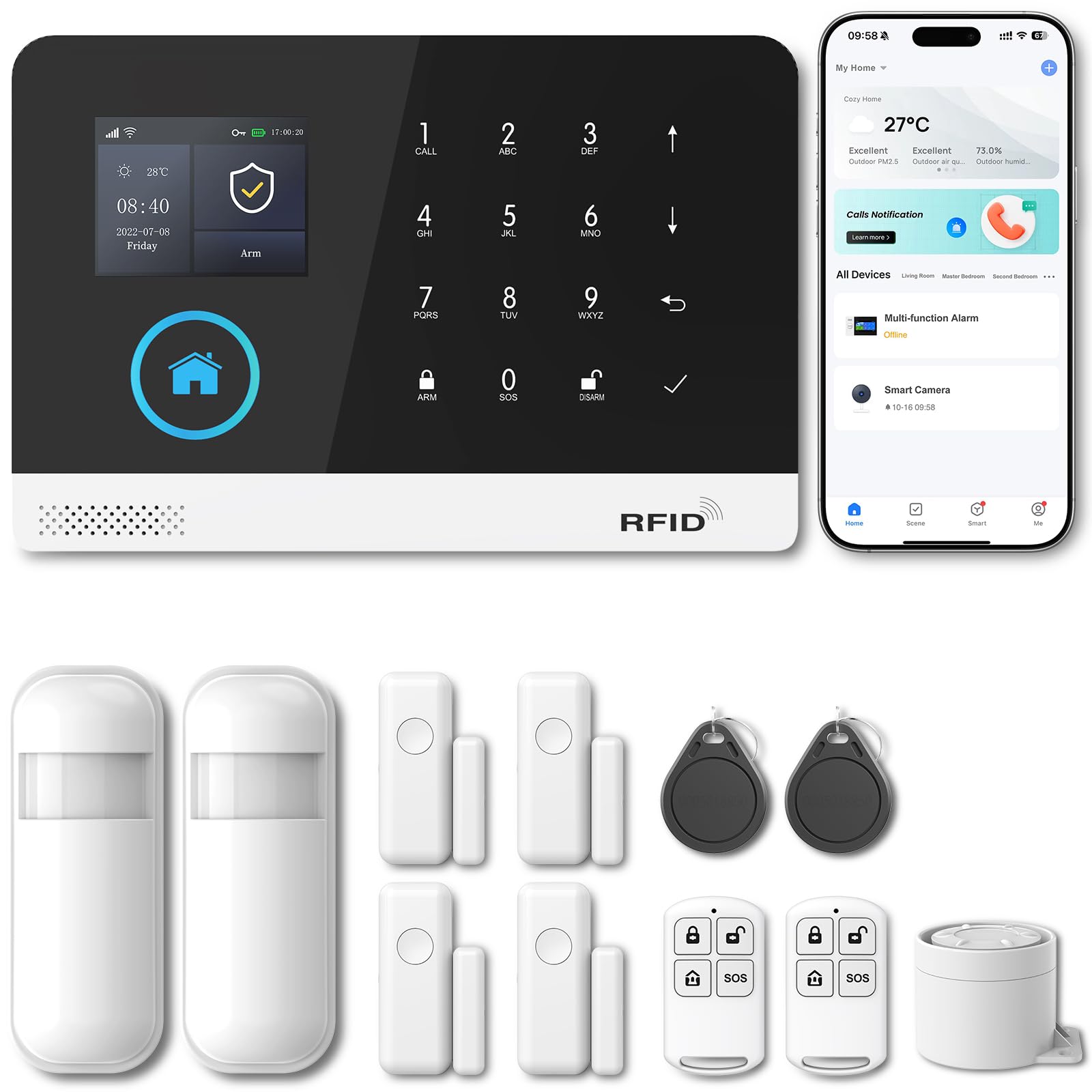
The cheapest complete alarm kit that throws in 4G cellular backup and a 120dB siren for under mid-range hub prices.
The PGST 103-C comes with a control panel, two motion sensors, four door/window sensors, two RFID cards, two remote controls, and a siren (12 pieces total). It supports both Wi-Fi and GSM/4G connectivity, so you can get alerts via the Smart Life app even if your home internet is down—just insert a SIM card. The alarm features a physical anti-tamper switch, so if someone forcibly removes a sensor from a door or window, the siren triggers immediately. A screen lock prevents anyone from turning off the alarm without your password. The system supports up to 99+ sensors, and it works with Alexa for voice control. Unlike the Skylink system, this kit includes motion sensors and RFID cards, giving you more coverage from the start.
The catch, as multiple shoppers say, is serious quality control and documentation issues. One owner reported that “sensor batteries died within days,” while another called the instructions “very difficult to understand” and “needing retranslation.” The app notifications show a zone number rather than the sensor name, making it hard to know which door triggered the alarm. The power cord exits from the side of the control panel rather than the bottom, which some buyers find awkward for wall mounting. The 3.8-star average from only 23 ratings suggests this is a bare-bones system best suited for buyers willing to experiment and troubleshoot.
Feature-Rich on Paper
- Includes 12 pieces: panel, 2 motion sensors, 4 contact sensors, 2 RFID cards, 2 remotes, siren.
- Dual Wi-Fi and GSM/4G connectivity for backup alerts.
- Supports up to 99+ sensors and voice control via Alexa.
Build and Usability Hurdles
- Sensor batteries reportedly die within days for some buyers.
- Poorly translated instructions; difficult setup for non-technical users.
- App shows zone numbers, not sensor names; limited configuration.
Best for tech-savvy users on a tight budget: The hardware features (4G backup, large sensor count) are generous, but expect to invest time in setup and maybe buy better batteries.
Avoid if: You want a system that works reliably from the start with minimal tinkering—choose the Ring Alarm or OSI Gen 2 instead.
Understanding the Specs
Wireless Protocols (Zigbee, Z-Wave, Thread, Matter)
Think of these as the different languages your smart home devices speak. Zigbee and Z-Wave are mesh networks that pass signals from one device to the next, giving you better range than Wi-Fi without clogging your home network. Thread is the newer standard designed for low-power devices like sensors and light bulbs—it creates its own self-healing mesh. Matter is the newest universal standard that lets devices from Apple, Amazon, Google, and Samsung work together locally. A hub that supports more protocols natively (like the Homey Pro with seven built-in radios) can connect more brands without extra dongles.
Local vs. Cloud Processing
Local processing means your hub makes decisions inside your home without sending data to a company’s server. This gives you faster response times—your motion sensor triggers the lights instantly—and keeps your private data off the internet. Cloud-dependent systems (like basic Ring without a subscription) have a built-in delay because commands must travel to a server and back. Some systems offer a hybrid mode: they process basic automations locally but use the cloud for remote access from your phone. If your internet goes down, a local-first hub still runs automations; a cloud-only system goes silent.
FAQ
Will any connected home system work with my existing smart devices?
What happens if my internet goes down?
Can I connect devices from different brands in one app?
How many sensors or devices can one hub handle?
Do I need a subscription to use a connected home system?
What is the difference between Zigbee and Z-Wave?
Can I use a smart display like the eufy E10 as my main hub?
Is Home Assistant Green a good choice for beginners?
What is Matter and do I need a hub that supports it?
Can I expand a starter security kit later?
Final Thoughts: The Verdict
If you want one dependable pick, the best connected home systems winner is the Homey Pro (Early 2023) because its seven built-in protocols cover more brands than any other single hub, giving you one place to control lights, locks, sensors, and speakers without extra dongles. If you want the deepest automation and data privacy without paying a premium for built-in radios, the Home Assistant Green is the most powerful open platform. And for a straightforward alarm system with zero monthly fees and the option to add professional monitoring any time, the OSI Alarm System Gen 2 (4G) is the smartest pick for home security-first buyers.
How We Picked
We do not accept paid placement. Every pick is matched to a real buyer and a real use-case; we do not hands-on test units.
Sources & Methodology
Specifications: manufacturer listings and product documentation. Review insights: verified customer reviews, as of July 2026. Pricing: not shown on this page (it changes often); check the current price via the retailer link.
As an Amazon Associate, WellFizz earns from qualifying purchases. This does not affect which products we feature.
Related Guides

Mo Maruf
I created WellFizz to bridge the gap between vague wellness advice and actionable solutions. My mission is simple: to decode the research and give you practical tools you can actually use.
Beyond the data, I am a passionate traveler. I believe that stepping away from the screen to explore new environments is essential for mental clarity and physical vitality.