Our readers keep the lights on and my smoothie glass nicely filled. As an Amazon Associate, I earn from qualifying purchases.
Specs are compiled from manufacturer listings and verified buyer reviews and can change over time — please confirm the key details on the product page before buying.
You want a system that makes remote participants feel like they are in the room, not a distant voice on a phone. The real challenge your team faces is that standard webcams miss half the conversation and pick up every cough and shuffle from across the table. This guide cuts through the confusion between camera resolution and microphone pickup range, showing you exactly which all-in-one bar or 360° hub will actually fill your room’s audio without costing your business weeks of setup time.
I’m Mohammad Maruf — the founder and writer behind WellFizz. This guide is built by comparing the manufacturers’ published specifications and the patterns across verified customer reviews, so you get each pick’s real strengths and trade-offs instead of marketing spin.
You get clear audio pickup up to 18 feet (so everyone in a medium room is heard) and automatic speaker tracking (the camera follows whoever is talking) with the best conference room video conferencing systems. The top picks here range from a flagship 4K 360° Owl Labs system to a reliable Logitech workhorse for huddle rooms. if you need a compact PC-free unit or a 180° panoramic bar, these systems make hybrid meetings feel natural.
Quick Picks
- Meeting Owl 4+ 360-Degree, 4K Smart Video Conference Camera — Top Performer
- Jabra PanaCast 50 – Intelligent 180° Panoramic-4K Meeting Room Video Camera — Best Value
- Poly – Studio X50 (Polycom) with TC8 Touch Controller – 4K Video & Audio Bar — Standalone Pick
- Owl Labs Meeting Owl 3 – 360° 1080p HD Conference Room Camera — Durable 360°
- KanDao Meeting Pro 360-degree Video Conference Camera with Microphones and Speakers — Budget 360°
- Logitech MeetUp Video Conferencing System, Ultra HD 4K/1080p/720p — Small Room Specialist
How To Choose The Best Conference Room Video Conferencing Systems
Your choice depends on room size, table layout, and if you want it to run without a PC. A small 4-person huddle room needs a very different camera than a 12-person L-shaped boardroom.
Microphone Pickup Range
This is the single most overlooked spec. A camera with a beautiful 4K image is useless if people at the far end of the table cannot hear the person in the corner. Look for beamforming microphones (microphones that focus their listening to a specific area) and a pickup distance listed in feet — 18 feet is the gold standard for medium rooms. You see an “18 ft audio pickup range” on many high-end models.
Camera Coverage: 180°, 120°, or 360°
A 120° field of view works well for a small room of 5-6 people where everyone sits in a line. A 180° panoramic view captures a wider spread, ideal for a rectangular conference table. A 360° camera sits in the middle of the table and catches every person, no matter which way they face — critical for round tables or large groups.
Standalone vs. PC-Required
Some video conferencing bars have a built-in Android operating system, meaning they can run Zoom or Teams directly without a laptop plugged in. Others are USB peripherals that must connect to a computer. Standalone units simplify the room setup but sometimes lock you into specific app stores.
Quick Comparison
| Model | Best For | Resolution | Mic Pickup | Field of View | Amazon |
|---|---|---|---|---|---|
| Meeting Owl 4+ | Larger team rooms needing 4K | 4K UHD | 18 ft | 360° | Amazon |
| Meeting Owl 3 | Reliable 360° with proven durability | 1080p HD | 18 ft | 360° | Amazon |
| Jabra PanaCast 50 | Panoramic front-of-room setup | 3840 x 1080 | Beamforming | 180° | Amazon |
| Poly Studio X50 | PC‑free Teams / Zoom rooms | UHD 4K | 25 ft | 120° | Amazon |
| KanDao Meeting Pro | 360° on a mid-range budget | 1080p FHD | 18 ft | 360° | Amazon |
| Logitech MeetUp | Small 5‑6 person huddle rooms | 4K UHD | 13 ft (with optional mic) | 120° | Amazon |
In‑Depth Reviews
1. Meeting Owl 4+ 360-Degree, 4K Smart Video Conference Camera

The 360° hub that upgrades your room to 4K without adding a second device.
This is the system for teams that have outgrown 1080p. The Meeting Owl 4+ captures 360° video in true 4K resolution — a big step up from the 1080p of its sibling the Meeting Owl 3 — while also gathering 360° audio up to 18 feet (5.5m) away. For a 12-seat doughnut layout, buyers report that it works reliably on Windows 11 with plug-and-play simplicity. You get the same Owl Intelligence System for automatic speaker tracking, enterprise features like a built-in Kensington lock, and Power over Ethernet capability (via an adapter).
Buyers mention one small trade-off: the camera takes a brief moment to switch from one active speaker to a different speaker, but teams learn to work around it. The setup itself takes about six minutes from unboxing to your first meeting. It is certified for Microsoft Teams and works with Zoom, Google Meet, and Cisco Webex.
Compared to the Meeting Owl 3, the 4+ doubles the video resolution while keeping the same 18-foot pickup radius and AI tracking — a meaningful upgrade if your display is a large TV where low resolution looks soft.
What makes it shine
- 360° 4K video eliminates blind spots around the table
- Audio pickup reaches 18 ft, covering most medium rooms
- Enterprise WiFi and Kensington lock for secure installation
The honest downside
- Camera lags slightly when switching between speakers
- Premium price positions it above the 1080p Owl 3
Ideal fit: Medium-to-large rooms where 4K video quality on a big screen and a 360° full-table view are non-negotiable.
skip it if: Your room seats only 4-5 people and you do not need the extra resolution of 4K over 1080p.
2. Jabra PanaCast 50 – Intelligent 180° Panoramic-4K Meeting Room Video Camera

The panoramic bar that sees the whole room from the front of the room.
Unlike a 360° camera that sits on the table, the Jabra PanaCast 50 mounts under or above your display and delivers a wide panoramic 180° view. It uses three 13 MP cameras that stitch video in real time. You can choose between 90°, 120°, 140°, and 180° field of view depending on your table shape. The eight beamforming microphones (microphones that listen in a focused direction) and four speakers make voice pickup clear for rooms of 20+ people.
Buyers who installed it in multiple conference rooms report great quality, but note that the remote control is sold separately and you lose some functions without it. It is certified for Microsoft Teams and works with Zoom. The adjustable field of view automatically zooms to include everyone in the frame, adapting to changing lighting conditions.
Compared to the 360° Owl systems, the PanaCast 50 gives a 180° view from the front of the room rather than a 360° center-table view — better for long rectangular tables where you want everyone facing the screen straight on.
The wins
- 180° panoramic field of view with adjustable zoom levels
- Three 13 MP cameras deliver sharp 3840 x 1080 resolution
- Beamforming mics and speakers handle 20+ people
The caveats
- Remote control not included in the box
- Requires a PC or laptop for operation — no standalone mode
Best for: Rectangular conference rooms where the camera sits at the front and needs to see every seat without distortion.
Look elsewhere: If your table is round or you want a device that runs Zoom without a connected laptop.
3. Poly – Studio X50 (Polycom) with TC8 Touch Controller – 4K Video & Audio Bar

The PC‑free video bar with the longest microphone pickup in this lineup.
The Studio X50 is a true all-in-one without a computer. It runs Zoom, Microsoft Teams, and other cloud video apps directly from its own operating system. Camera and microphones, along with stereo speakers, are all in one sleek bar. The included TC8 touch controller makes starting and controlling meetings simple. This system offers a 25-foot microphone pickup range — the longest of any product here — and uses Poly’s NoiseBlockAI machine learning to filter out distractions like typing or rustling papers.
Owners mention mixed long-term experiences. Some note that after the warranty period, a firmware update rendered the device defective with no repair path from Poly. Others describe audio and camera glitches that require unplugging the unit to restart, since it has no power button. The materials feel sturdy, but the reliability reviews are polarizing.
If you need a PC-free solution for a mid-size room up to ten participants, the 25-foot pickup range vastly exceeds the 18-foot range of the Owl systems. Just weigh that against the reliability concerns noted by long-term owners.
Strong points
- 25-foot microphone pickup covers large rooms easily
- Runs Teams and Zoom without a PC using built-in software
- NoiseBlockAI removes background noise automatically
Risks to know
- Multiple reviews report glitches and failures after warranty
- No power button forces unplugging for hard resets
Smart buy for: A mid-size room where you want to eliminate the PC from the equation and need the widest audio pickup available.
Not for you if: Reliability under daily heavy use is your top priority — check the warranty terms and plan for support costs.
4. Owl Labs Meeting Owl 3 – 360° 1080p HD Conference Room Camera

The workhorse 360° camera that survived drops and still delivers crisp audio.
The Meeting Owl 3 is the proven middle sibling in Owl Labs’ lineup. It captures 360° video at 1080p HD and 360° audio up to 18 feet (5.5m) away. The Owl Intelligence System uses visual and audio cues to automatically focus on whoever is speaking, making remote participants feel like they are in the conversation. One buyer who used it for two years reports accurate voice tracking and that the unit survived about nine drops without breaking — proof of its durability.
Setting it up takes about six minutes with simple plug-and-play USB connectivity. Teams find it easy to use for group meetings, and the 1080p video is clear on standard monitors. The main limitation is that on large 4K TVs, the 1080p resolution can look soft compared to the Meeting Owl 4+. It is certified for Microsoft Teams and works with Zoom, Google Meet, and Cisco Webex.
Compared to the Owl 4+, the 3 shares the same 18-foot audio range and AI tracking but halves the video resolution — a sensible trade-off if your display is a standard monitor rather than a 65-inch 4K screen.
What it does well
- Accurate speaker tracking keeps remote viewers on the current speaker
- Durable build — survived multiple drops in real-world use
- Plug-and-play setup in under six minutes
Where it falls short
- 1080p video can appear soft on large 4K displays
- More expensive than some front-of-room bars with higher resolution
Go with this if: You need a tough, proven 360° system with reliable voice tracking for a medium room and your monitor is not a giant 4K TV.
Consider the 4+ instead: If crisp video on a large screen matters and your budget allows the upgrade.
5. KanDao Meeting Pro 360-degree Video Conference Camera with Microphones and Speakers
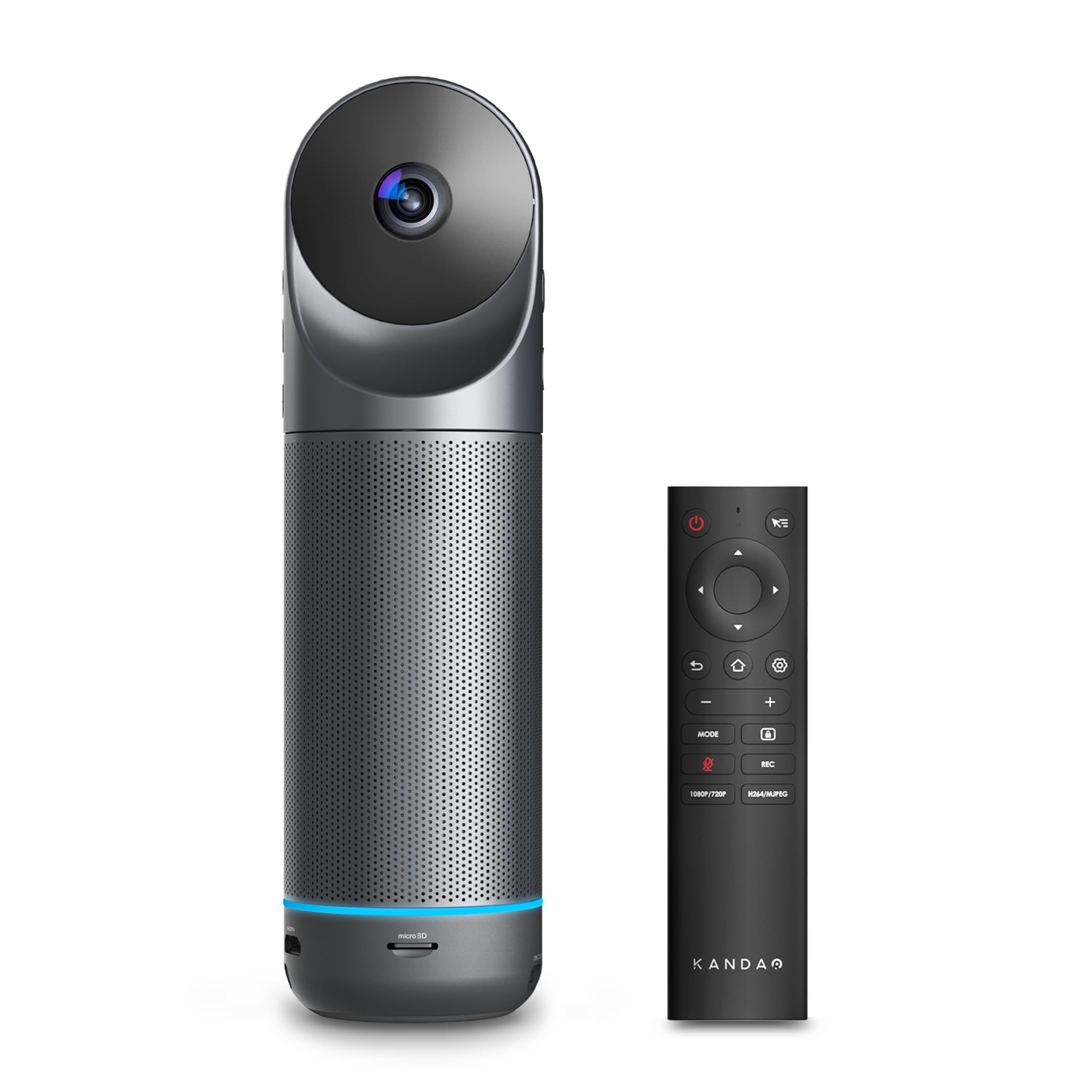
The affordable 360° camera that works as a standalone Android system.
The KanDao Meeting Pro offers a compelling alternative to the Owl ecosystem at a lower entry price. It uses dual 195° wide-angle lenses to create a complete 360° view, and the built-in Android OS means it can run as a standalone conference system without a PC. The eight omnidirectional microphones and a 5W speaker provide an 18-foot audio pickup range with intelligent noise and echo cancellation. You get five smart modes — Discussion, Global, Presentation, Patrol, and Custom — to adapt to different meeting styles.
One critical catch that buyers mention: the device is not Google Play Protect certified, so using the standalone Android mode requires manually installing APK files, which is tedious. As a USB camera plugged into a PC or Mac, it works great. The 1080p video output is standard, and the auto-focus speaker tracking works well in small rooms. The light weight of 0.8 kg (about 1.76 pounds) makes it easy to move between rooms.
At 1080p resolution, the KanDao matches the Meeting Owl 3’s video quality but costs less. The trade-off is the extra setup friction if you want to use it without a computer.
What makes it appealing
- 360° view with AI face tracking for active speaker
- Eight-mic array with 18 ft pickup range
- Lightweight and easy to move between rooms
What to watch for
- Standalone Android mode requires manual APK installation
- 1080p resolution is lower than 4K competitors
Right for: Budget-conscious teams that need a 360° view and plan to use it primarily as a PC-connected camera.
Not ideal if: Your goal is a friction-free standalone system — the lack of Google certification adds setup hassle.
6. Logitech MeetUp Video Conferencing System, Ultra HD 4K/1080p/720p

The dedicated small-room camera that is easy to mount and delivers 4K clarity.
Logitech designed the MeetUp specifically for huddle and small rooms. It has an Ultra HD 4K sensor with a 120° wide field of view, and the motorized pan and tilt expands coverage up to 170°. The beamforming microphones capture voices up to 4 meters (about 13 feet) away, and you can extend that to 5 meters with the optional Expansion Mic. Mounting is flexible — wall, credenza, or TV mount — making it a fit for tight spaces.
Buyers consistently call it “Excellent for small 5-6 person rooms.” The wide angle captures the entire table with minimal warping, and the beamforming sound impresses in huddle-room acoustics. The 8 MP effective still resolution gives clear freeze-frame images, and the 3840-pixel effective video resolution matches 4K UHD. One note: the extreme wide angle means digital zoom falls apart quickly — it is not an optical zoom, so zooming in at 9 feet makes the image fuzzy. For small rooms where you sit close, this is rarely a problem.
Compared to the Poly Studio X50, the MeetUp is simpler and more reliable for small spaces, but its 13-foot microphone range is about half the Poly’s 25-foot reach. The Logitech costs less and is better for rooms under 7 people.
Standout features
- 4K sensor captures sharp detail in close-range rooms
- 120° field of view with motorized pan up to 170°
- Plug-and-play USB works with Teams, Zoom, Google Meet
One note of caution
- Digital zoom degrades resolution quickly — no optical zoom
- Microphone reach of 13 ft limits use to small rooms
Ideal for: Small huddle rooms of 5-6 people where a simple, reliable, affordable 4K camera does everything you need.
Not the right fit: For rooms larger than 7 people or if you need to zoom in on a whiteboard far away.
Understanding the Specs
Microphone Pickup Range
This is the maximum distance in feet (or meters) that the microphones can clearly pick up a normal speaking voice. A system with an 18-foot pickup covers a room of about 12 x 12 feet. If you go beyond that range, remote participants hear muffled or distant audio. Look for systems with beamforming microphones, which focus their listening area automatically.
Field of View (FOV)
The FOV tells you how wide a scene the camera captures, measured in degrees. A 120° field of view covers the people directly in front of the camera. A 180° view catches a wider spread, like a U-shaped table. A 360° FOV sees the entire room from a central position on the table. For a small huddle room, 120° works fine. For a large boardroom, go 180° or 360°.
FAQ
What is the difference between a 360° camera and a wide-angle bar?
Can I use a conference room video conferencing system without a PC?
How many people can these systems support in one room?
What does beamforming mean in a microphone?
How important is 4K resolution for a conference room camera?
Will these systems work with Zoom and Microsoft Teams?
What is AI speaker tracking and does it actually work?
How long do these conference systems typically last?
Can I mount these systems on a wall or under a TV?
Final Thoughts: The Verdict
Across the board, the conference room video conferencing systems winner is the Meeting Owl 4+ because it combines true 360° 4K video with 18-foot audio pickup and a six-minute plug-and-play setup that works with all major platforms. If you want a front-of-room panoramic bar with adjustable 180° coverage, grab the Jabra PanaCast 50. And for a budget-friendly 360° option with standalone Android capability, the KanDao Meeting Pro delivers solid performance at a lower price point.
How We Picked
We do not accept paid placement. Every pick is matched to a real buyer and a real use-case; we do not hands-on test units.
Sources & Methodology
Specifications: manufacturer listings and product documentation. Review insights: verified customer reviews, as of July 2026. Pricing: not shown on this page (it changes often); check the current price via the retailer link.
As an Amazon Associate, WellFizz earns from qualifying purchases. This does not affect which products we feature.

Mo Maruf
I created WellFizz to bridge the gap between vague wellness advice and actionable solutions. My mission is simple: to decode the research and give you practical tools you can actually use.
Beyond the data, I am a passionate traveler. I believe that stepping away from the screen to explore new environments is essential for mental clarity and physical vitality.