Our readers keep the lights on and my smoothie glass nicely filled. As an Amazon Associate, I earn from qualifying purchases.
Specs are compiled from manufacturer listings and verified buyer reviews and can change over time — please confirm the key details on the product page before buying.
Getting everyone in a meeting room to look good and sound clear on a video call is harder than it seems. The right camera, microphone, and speaker setup is the difference between a productive hybrid discussion and a frustrating game of “can you hear me now?” This guide breaks down nine of the most capable all-in-one conference cameras and speakerphones, matching each to the specific room size and meeting style it handles best.
I’m Mohammad Maruf — the founder and writer behind WellFizz. This guide is built by comparing the manufacturers’ published specifications and the patterns across verified customer reviews, so you get each pick’s real strengths and trade-offs instead of marketing spin.
You want conference room equipment that makes remote participants feel as present as the people sitting at the table — and that starts with a system that automates the hard parts.
Quick Picks
- Jabra PanaCast 50 – Intelligent 180° Panoramic-4K Meeting Room Video Camera — Top Performer
- Meeting Owl 4+ 360-Degree, 4K Smart Video Conference Camera — Premium 4K 360°
- COOLPO Camera 360, 4K Smart Video Conference Room Camera and Microphone — Smart 360° Value
- Owl Labs Meeting Owl 3 – 360° 1080p HD Conference Room Camera — Proven 360°
- Logitech MeetUp Video Conferencing System – Ultra HD 4K Sensor — Small Room Specialist
- TONGVEO 4K AI Auto Tracking PTZ Conference Camera System with Bluetooth Speakerphone — Ultra-Long Reach
- TOUCAN 360-Degree Video Conference Camera, 1080p HD Webcam with 4 Noise Reduction Mics — Best Value 360°
- Yealink 4K USB Video Conference Camera – 120° Wide Angle, Auto Framing — Great Value 4K
- WYRESTORM 4K Conference Room Camera System with AI Auto Framing — Budget All-in-One
How To Choose The Best Conference Room Equipment
The two biggest decisions you will make are the field of view (wide-angle vs. 360-degree) and the zoom type (optical vs. digital). A wide-angle camera with optical zoom is better for long, narrow rooms where one person presents from the front. A 360-degree camera is better for square tables where you want to see every face around the circle. The other key spec is the microphone pickup range — anything under 15 feet works for small rooms, but larger spaces need a pickup range of 18 feet or more to catch the person leaning back in their chair.
Room Size vs. Camera Coverage
Measure your table length first. A 120-degree wide-angle lens covers a small to medium conference table well. For tables longer than 15 feet, consider a 180-degree panoramic or 360-degree camera so no one is cropped out. The product data will list a field of view in degrees — that is your quick compatibility check.
AI Tracking: Speaker vs. Presenter
A speaker-tracking camera automatically follows whoever is talking, which is great for open discussions where multiple people chime in. A presenter-tracking system locks onto one person at the front, which works best for lectures or training sessions. Some cameras let you toggle between modes, so you can adapt the same device to different meeting types.
Quick Comparison
| Model | Best For | Video Resolution | Field of View | Mic Pickup | Amazon |
|---|---|---|---|---|---|
| Jabra PanaCast 50 | Large panoramic rooms | 3840 x 1080 | 180° | 8 mics | Amazon |
| Meeting Owl 4+ | Premium 4K 360° | 4K (3840) | 360° | 18 ft | Amazon |
| COOLPO AI Huddle Pana | Mid-size 360° meetings | 4K (3840) | 360° | 15 ft | Amazon |
| Meeting Owl 3 | Reliable 360° at 1080p | 1080p | 360° | 18 ft | Amazon |
| Logitech MeetUp | Small huddle rooms | 4K UHD sensor | 120° | 13 ft (4 m) | Amazon |
| TONGVEO 4K AI PTZ | Large room presenter tracking | 4K (8.29 MP) | Wide (PTZ) | 16.4 ft (5 m) | Amazon |
| TOUCAN 360 | Budget 360° tabletop | 1080p | 360° | 4 mics | Amazon |
| Yealink 4K UVC34 | Wide-angle clarity on a budget | 4K (3840) | 120° | 18 ft | Amazon |
| WYRESTORM 4K AI | All-in-one value for medium rooms | 4K UHD | 120° | 4-mic array | Amazon |
In‑Depth Reviews
1. Jabra PanaCast 50 – Intelligent 180° Panoramic-4K Meeting Room Video Camera

A panoramic video bar that stitches three 13 MP camera feeds into one smooth 180-degree view.
Instead of a single wide lens that warps edges, the PanaCast 50 uses three separate 13 MP cameras and stitches their video in real time. You can choose between 90-, 120-, 140-, and 180-degree fields of view depending on your table layout, so the same device adapts to different room sizes. The 8 built-in microphones with noise suppression and speaker detection mean remote participants hear whoever is talking without the shuffle of papers drowning out the conversation.
Buyers report great voice and video quality right from the start, though one owner flagged that the remote control is not included at this price and that you lose some functionality without it. The PanaCast 50 is certified for Microsoft Teams and compatible with Zoom, making it a safe bet if your company standardizes on those platforms.
Stitched to Impress
- Three 13 MP cameras deliver a true 180° panoramic view without fisheye distortion
- Adjustable field of view (90°, 120°, 140°, 180°) adapts to different room shapes
- 8 beamforming microphones with noise suppression capture clear audio across the table
The Fine Print
- Remote control is sold separately, which feels like an oversight at this price level
- Some users report the setup app needs a little tweaking before it works perfectly
Who it fits: Medium to large rooms where you want every person visible in one continuous panoramic frame without edge warping.
One real caveat: If your team relies heavily on manual pan and zoom, budget for the separate remote — the base unit ships without one.
2. Meeting Owl 4+ 360-Degree, 4K Smart Video Conference Camera

A 360-degree, 4K all-in-one that turns any round table into a fully rich hybrid space.
The Meeting Owl 4+ steps up from its 1080p predecessor by capturing 360° video in true 4K resolution, which makes faces and whiteboard scribbles far sharper on the far end. It picks up audio up to 18 feet (5.5 meters) away and uses its Owl Intelligence System to automatically focus the frame on whoever is speaking. You can be unboxing it and into your first meeting in about six minutes — just plug in the USB-C cable and select it in your conferencing app.
Buyers mention it works reliably for rooms up to about 12 seats in a doughnut layout, though one reviewer notes the camera lags briefly when switching between speakers. It is certified for Microsoft Teams and works with Zoom, Google Meet, and Cisco Webex. The 4+ also adds enterprise features like a Kensington lock and Power over Ethernet support via an adapter, which makes IT deployments cleaner.
360° Intelligence
- 4K resolution gives remote viewers a much sharper picture than the 1080p Meeting Owl 3
- 18 ft audio pickup covers most medium conference rooms without an extra mic
- Plug-and-play setup gets you running in about 6 minutes
Speed Bump
- Camera takes a moment to switch focus from one speaker to the next
- Backlit participants near a window can be harder to see clearly
Best suited for: Teams that want a premium 360° experience with 4K clarity in medium-sized rooms.
Keep in mind: The brief lag when the camera switches speakers means very fast-paced discussions might feel slightly delayed on the remote end.
3. COOLPO Camera 360, 4K Smart Video Conference Room Camera and Microphone

A 4K 360-degree camera that tracks speakers using on-device AI so no audio leaves the room.
The COOLPO AI Huddle Pana captures a full 360-degree view without needing to stitch multiple feeds — the single lens does the job. It packs eight microphones that pick up voices clearly within 15 feet, and its AI automatically zooms in on the active speaker. Because all of the AI processing happens locally on the device (edge computing), no video or audio data is sent to an external server, which is a meaningful privacy advantage for businesses handling sensitive discussions.
Owners mention that it integrates smoothly with Teams, Zoom, and Google Meet on both Windows and Mac, and one owner noted it has held up well after four years of rough use in hybrid HOA meetings with 50-plus people. The trade-off is that the fisheye lens can create some visual distortion on rectangular tables, and the microphone can be overly sensitive, snapping between speakers too often for some tastes.
Privacy-First Design
- All AI processing happens on the device, so no meeting data leaves the room
- 8 microphones capture voices clearly within 15 feet
- 4K 360-degree video from a single lens with no stitching needed
Fisheye Factor
- The 360° lens can distort rectangular tables visually
- Mic sensitivity causes the camera to jump between speakers too quickly at times
Reach for this if: Privacy is a top concern and you need 4K 360° coverage in a mid-size room without data leaving the device.
Look elsewhere if: Your table is a long rectangle and visual distortion would bother remote participants.
4. Owl Labs Meeting Owl 3 – 360° 1080p HD Conference Room Camera

The 360-degree 1080p workhorse that built Owl Labs’ reputation in thousands of conference rooms.
Before the 4K version arrived, the Meeting Owl 3 was the standard for 360-degree hybrid meetings. It still captures a full 360° view in 1080p HD and picks up audio up to 18 feet away, which is enough for most medium conference rooms. The Owl Intelligence System uses both visual and audio cues to automatically frame whoever is speaking, and the whole setup takes about six minutes from unboxing to first call.
One reviewer noted that after two years of use the voice tracking remains accurate and the device survived nine drops without breaking, which speaks to its build quality. Another reviewer noted that the 1080p video feels limited at the original price point, and that 4K would be welcome for larger spaces. It is certified for Microsoft Teams and works with Zoom, Google Meet, and Cisco Webex, and you can pair two Owls together to cover larger rooms.
Tough and Trusted
- Durable design that customers note surviving accidental drops without issue
- 360° video and 18 ft audio pickup cover most medium conference rooms well
- Quick 6-minute setup and widely compatible with major conferencing platforms
Resolution Ceiling
- 1080p video resolution is noticeably lower than 4K competitors at this price
- Some buyers feel the image quality needs an upgrade for larger or brighter rooms
Who it works for: Teams that want a proven, durable 360-degree camera and do not need 4K resolution yet.
One real limit: If your room has large windows behind participants, the 1080p sensor struggles to keep faces well-lit compared to 4K alternatives.
5. Logitech MeetUp Video Conferencing System – Ultra HD 4K Sensor

An all-in-one purpose-built for huddle rooms where every inch of table space counts.
The Logitech MeetUp is designed specifically for small conference rooms and huddle spaces with 5 to 7 seats. It has a 4K Ultra HD sensor, a 120-degree field of view, and a 5x HD zoom (digital only). The beamforming microphones capture voices up to 4 meters (about 13 feet) away, which is right-sized for these smaller rooms. You can motorize the pan and tilt to get up to 170 degrees of coverage, which is handy for turning the camera toward a whiteboard without physically moving the unit.
Buyers consistently praise the plug-and-play simplicity and loud, clear audio. One owner called it the best small-room camera they have used, noting that the wide-angle lens has minimal warping. The main criticism is that the zoom is entirely digital — one reviewer found the image fuzzy when zooming in to capture a 4×6 foot dry board from 9 feet away. For rooms larger than about 6 seats, this is not the right fit.
Small Room, Big Sound
- Beamforming microphones capture voices up to 4 meters (13 ft) with impressive clarity
- Motorized pan and tilt expands the field of view up to 170° without moving the device
- Ultra HD 4K sensor delivers sharp video for huddle rooms with 5-7 people
Digital Only
- No optical zoom — digital zoom loses resolution quickly when you zoom in
- Not suited for rooms with more than 6 seats; the mic array and lens are calibrated for smaller spaces
Reach for this if: You need a reliable, easy-to-deploy camera for a small huddle room with 5-7 people.
skip it if: Your room has more than 6 seats or you need to zoom in on a whiteboard without losing image quality.
6. TONGVEO 4K AI Auto Tracking PTZ Conference Camera System with Bluetooth Speakerphone
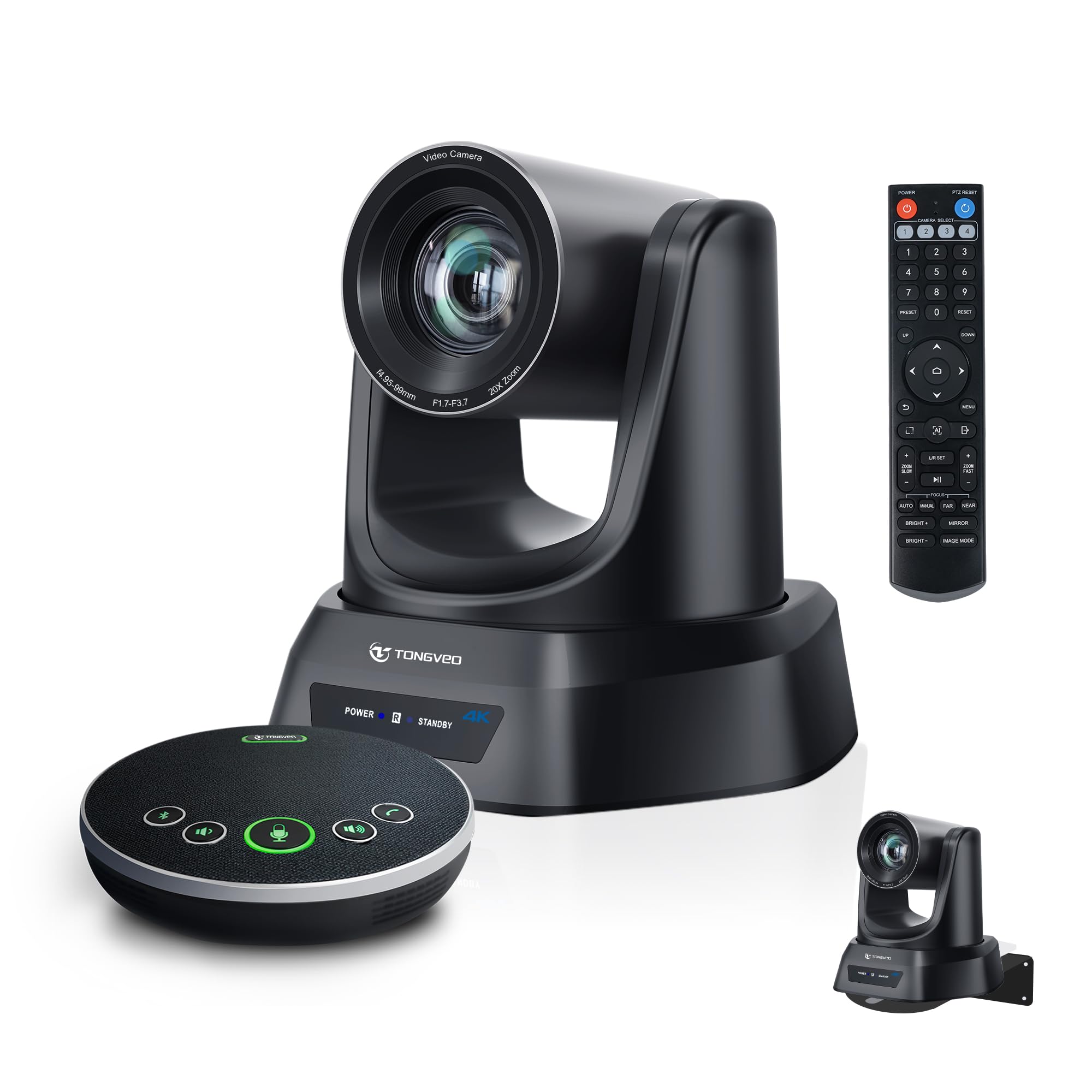
A PTZ camera with 20X optical zoom that can read a speaker’s expression from the back of a large room.
Unlike fixed wide-angle cameras, the TONGVEO 4K AI PTZ uses a pan-tilt-zoom (PTZ) motor that you can aim precisely. The standout spec is the 20X optical zoom — a huge 4.0x gap over typical 5X conference cameras — which means you can place this camera at the back of a 20-by-30 foot room and still get a clear close-up of a presenter. The included Bluetooth wireless speakerphone has four microphones with noise reduction and a 16.4 foot (5 meter) voice pickup range, plus a built-in battery that lasts 6 to 8 hours.
Reviewers point out excellent video quality in a large room and say the AI tracking follows speakers smoothly. One buyer mentioned the Bluetooth speakerphone stopped charging and the support team sent replacements, though the replacements also had the same charging issue. The system works as a plug-and-play USB device with Zoom, Teams, OBS, and WebEx on both Windows and macOS.
Long-Range Clarity
- 20X optical zoom captures sharp close-ups from across a large conference room or church sanctuary
- AI auto-tracking keeps the speaker centered without a human operator
- Wireless Bluetooth speakerphone with 6-8 hour battery offers flexible placement away from the camera
Charging Concern
- Multiple shoppers say the included speakerphone has a charging defect that support struggles to fix
- Setup is more involved than a single-device all-in-one — you connect both the PTZ camera and the separate speakerphone
Best suited for: Large rooms, churches, or training spaces where one person presents from a distance and you need optical zoom to capture them clearly.
Keep an eye on: The Bluetooth speakerphone’s charging reliability has been flagged by multiple buyers, so test it immediately after arrival.
7. TOUCAN 360-Degree Video Conference Camera, 1080p HD Webcam with 4 Noise Reduction Mics

An affordable 360-degree camera that puts everyone around the table on screen without breaking the budget.
The TOUCAN 360 offers a 1080p HD 360-degree view and four noise-reduction microphones, all for a fraction of what 4K 360-degree systems cost. It is designed to sit in the middle of a conference table and capture every face, making it a solid choice for round-table discussions. Setup is genuinely plug-and-play — buyers report being up and running in about two minutes without installing any software.
One owner reported it works great for 6 to 10 people on Teams, with good microphone pickup over 12 feet and a clear picture that includes a lens cover for privacy. The main trade-off is that the maximum speaker volume is too low for noisy rooms, and the 1080p video resolution is a 3.6x gap compared to 4K cameras like the Yealink or COOLPO. But for teams on a budget who just need everyone visible and audible, this delivers.
Budget-Friendly 360°
- Easy 2-minute setup with no software or driver installation needed
- 360-degree view captures everyone at a round table, ideal for 6-10 person meetings
- 4 noise-reduction microphones pick up voices clearly from over 12 feet away
Volume and Resolution Limits
- Maximum speaker volume is too low for conference rooms with background noise
- 1080p video resolution is noticeably less sharp than 4K alternatives in this list
Reach for this if: You need an affordable 360-degree camera for a small to medium conference room and 1080p quality is sufficient.
Look elsewhere if: Your room is noisy or you need 4K resolution for larger displays where participants sit far from the screen.
8. Yealink 4K USB Video Conference Camera – 120° Wide Angle, Auto Framing

A 4K wide-angle camera that delivers sharp video and 18-foot audio pickup without the premium price tag.
The Yealink 4K USB Video Conference Camera (UVC34) captures video at a 3840-pixel effective resolution — a 3.6x pixel advantage over 1080p cameras. It has a 120-degree wide-angle lens and a 5X digital zoom (a 60% less digital zoom than the WYRESTORM’s 8X). The built-in AI features include auto framing, face enhancement, and low-light optimization that keeps faces visible even when the room is dim or backlit.
Buyers consistently praise the video and audio quality, with one noting that clients praised the clarity during calls and that the 18-foot audio pickup covers their office well. Another reviewer who owns several Meeting Owls said the Yealink outperforms them in most ways except for auto tracking, which is slow and disappointing. It includes a privacy cover that closes the camera lens when idle, and the package comes with a wall mount, monitor grip, and velcro straps.
4K Without the Sticker Shock
- 3840-pixel effective video resolution delivers noticeably sharper images than 1080p cameras
- Low-light optimization keeps faces clear in dim or backlit conference rooms
- 18-ft microphone pickup covers most medium rooms without an extra mic
Tracking Lag
- Auto tracking is slow and disappointing compared to competitors in this list
- Remote control only handles volume; zoom and pan features reportedly non-functional via the remote
Best suited for: Teams that want sharp 4K video and wide audio coverage without paying premium-tier prices.
One real caveat: If automatic speaker tracking is critical to your meetings, the laggy tracking here will frustrate you — look at a dedicated PTZ or 360° system instead.
9. WYRESTORM 4K Conference Room Camera System with AI Auto Framing
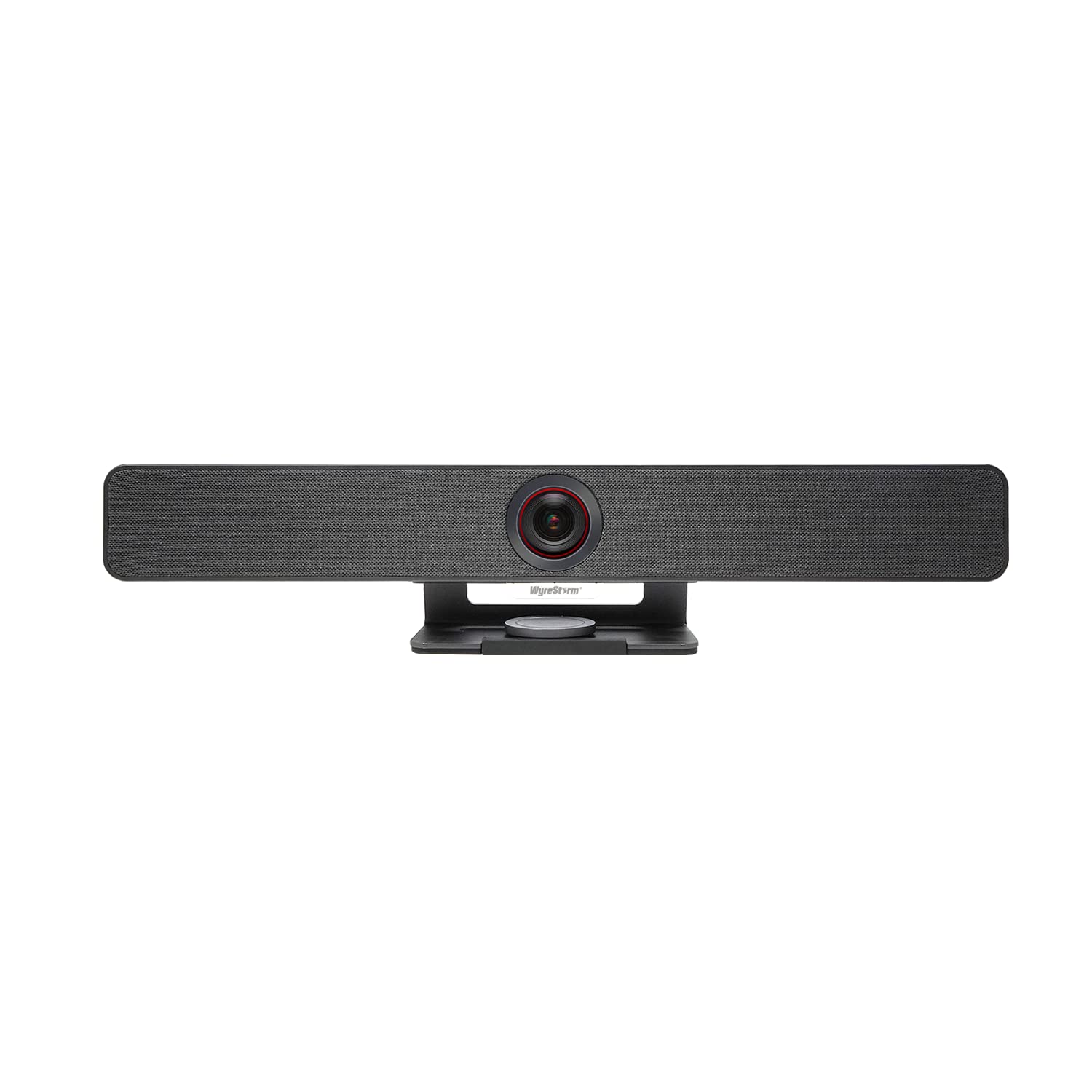
A value-packed all-in-one that combines 4K video, AI tracking, and a 4-mic array at an entry-level price.
The WYRESTORM 4K system bundles a 4K UHD camera, a 4-microphone array with noise reduction, and dual built-in speakers into one device that sits below a monitor or mounts on a wall. The 120-degree wide-angle lens covers a medium conference room, and the 8X digital zoom (a 60% more digital zoom than the Yealink’s 5X) lets you get closer to the action, though keep in mind it is digital zoom so resolution drops when you punch in. The AI auto-framing detects participants and adjusts the frame in real time to keep everyone centered.
Owners mention excellent low-light performance with minimal noise, and one reviewer using it in a 15-by-30 foot office said the wide-angle coverage works great. Another reviewer flagged a critical firmware issue: updating the firmware via a non-admin account can soft-brick the device, requiring admin privileges to fix. The camera also defaults to 50Hz (European power frequency) and needs to be manually switched to 60Hz for North America.
Packed and Priced Right
- 4K UHD resolution with AI auto-framing that tracks movement smoothly in real time
- 4-mic array with noise reduction captures voices across a medium conference room
- Built-in dual speakers eliminate the need for separate audio in smaller setups
Firmware Friction
- Firmware update via a non-admin account can soft-brick the device
- Default 50Hz setting needs manual changing to 60Hz for North American power grids
Reach for this if: You need an affordable all-in-one 4K system for a medium conference room and are comfortable with a little initial setup.
Look elsewhere if: Your IT policy restricts admin-level software installs — the firmware update process is a potential headache here.
Understanding the Specs
Optical Zoom vs. Digital Zoom
Optical zoom uses physical glass to magnify the image, so a 20X optical zoom camera like the TONGVEO can bring a person at the back of a large room into clear view without any quality loss. Digital zoom simply crops and enlarges the image electronically, which means the picture gets softer and blockier the further you zoom in. If your room is long or you need to capture a distant whiteboard, prioritize optical zoom. For small rooms where everyone is close, digital zoom is fine.
Field of View (Wide-Angle vs. 360°)
The field of view determines how much of the room the camera sees. A 120-degree wide-angle lens covers a typical 8-foot conference table well, but people at the far edges may be cut off or stretched. A 180-degree panoramic lens (like the Jabra PanaCast 50) shows the whole table without the extreme distortion of a fisheye lens. A 360-degree camera (like the Meeting Owl 3 or COOLPO) sits in the center of the table and sees everyone, making it the best choice for square or round tables where you want to see every face equally.
FAQ
Can I use a 360-degree conference camera on a rectangular table?
How far away can a conference camera microphone pick up voices?
What is the difference between speaker tracking and presenter tracking?
Will a conference camera work with Zoom, Teams, and Google Meet?
Do I need a separate microphone and speaker with an all-in-one conference camera?
Can I mount a conference camera on the wall or ceiling?
Is 1080p resolution good enough for a conference room camera?
How do I update the firmware on a conference camera?
Can I use a conference camera without a computer?
What does a privacy cover do and should I get one?
Final Thoughts: The Verdict
For most buyers, the conference room equipment winner is the Jabra PanaCast 50 because its three-camera 180-degree panoramic view and 8-microphone array offer the best balance of coverage and clarity for medium to large rooms. If you want 4K 360-degree coverage with strong privacy features, grab the COOLPO AI Huddle Pana. And for a budget-friendly 360-degree option that gets everyone on screen without fuss, grab the TOUCAN 360.
How We Picked
We do not accept paid placement. Every pick is matched to a real buyer and a real use-case; we do not hands-on test units.
Sources & Methodology
Specifications: manufacturer listings and product documentation. Review insights: verified customer reviews, as of July 2026. Pricing: not shown on this page (it changes often); check the current price via the retailer link.
As an Amazon Associate, WellFizz earns from qualifying purchases. This does not affect which products we feature.

Mo Maruf
I created WellFizz to bridge the gap between vague wellness advice and actionable solutions. My mission is simple: to decode the research and give you practical tools you can actually use.
Beyond the data, I am a passionate traveler. I believe that stepping away from the screen to explore new environments is essential for mental clarity and physical vitality.