Our readers keep the lights on and my smoothie glass nicely filled. As an Amazon Associate, I earn from qualifying purchases.
The moment you hit record, you hear it—the hollow echo, the hum of your PC fans, the refrigerator kicking in two rooms away. A headset mic can’t fix this. A condenser microphone can, but only if you pick one that actually suits a quiet desk or a noisy living room. The right choice captures the warmth of your voice while burying the ambient chaos, and the wrong one leaves you fighting noise gates in post-production.
I’m Mohammad Maruf — the founder and writer behind WellFizz. I’ve spent hundreds of hours dissecting the specs, reading through user experiences, and comparing capsule types, polar patterns, and connectivity options in the beginner condenser mic space to help you make a confident first purchase.
Whether you’re starting a podcast, jumping into live streaming, or recording your first voiceover, finding a reliable best condenser microphone for beginners means balancing clear vocal capture with forgiving room noise handling and simple USB connectivity.
How To Choose The Best Condenser Microphone For Beginners
Not every shiny mic with RGB is the right tool for your voice. Beginners often get dazzled by features that don’t matter—like multi-pattern modes they never touch. Focus on these three areas first, and you’ll end up with a mic that makes your voice sound natural without punishing your room.
Polar Pattern: Cardioid Is Your Best Friend
A cardioid polar pattern picks up sound from the front and rejects noise from the sides and rear. For a beginner recording in an untreated room, this is non-negotiable. It kills keyboard clatter, mouse clicks, and road noise before they reach your track. Omni or bidirectional patterns are useful later, but start with a cardioid capsule.
Connectivity: USB vs. XLR
USB mics include an audio interface inside the body—just plug into your computer and go. XLR mics require a separate interface and a phantom power source, adding cost and complexity. For a beginner, a USB condenser mic removes all friction. You can always upgrade to XLR after you’ve outgrown the USB stage.
Build Quality and Accessories
A metal body offers better durability and less handling noise than plastic. Look for a built-in headphone jack for zero-latency monitoring, a mute button that’s easy to find during a live stream, and a shock mount that isolates the capsule from desk vibrations. These details separate a mic you’ll keep for years from one you’ll return in a month.
Quick Comparison
On smaller screens, swipe sideways to see the full table.
| Model | Category | Best For | Key Spec | Amazon |
|---|---|---|---|---|
| Sennheiser Profile | Premium USB | Warm vocal capture with no software | 24‑bit / 48 kHz | Amazon |
| Elgato Wave:3 MK.2 | Premium USB | Streaming with Clipguard anti‑distortion | 24‑bit / 96 kHz | Amazon |
| Audio-Technica AT2020USB-X | Premium USB | Studio‑grade plug‑and‑play | 24‑bit / 96 kHz | Amazon |
| Audio-Technica AT2020 XLR | XLR Studio | Home studio with future upgrade path | 20 Hz‑20 kHz | Amazon |
| Razer Seiren V3 Chroma | USB Gaming | Gaming with reactive RGB | 20 Hz‑20 kHz | Amazon |
| HyperX SoloCast | Budget USB | Entry‑level plug‑and‑play | 24‑bit / 96 kHz | Amazon |
| Blue Yeti Blackout | Multi‑Pattern USB | Versatile recording with four patterns | 16‑bit / 48 kHz | Amazon |
In‑Depth Reviews
1. Sennheiser Profile USB Condenser Microphone

Sennheiser built the Profile around a cardioid condenser capsule that delivers a natural, warm vocal tone right out of the box—no EQ tweaking required. The metal housing and integrated shock mount minimize handling noise, while the twist‑and‑click controls for gain, volume, and mix keep you in command without opening a single piece of software. It operates as a standard USB audio device, meaning no drivers or proprietary apps are needed.
User reviews consistently praise the smooth, non‑tinny sound that rivals basic XLR setups. The built‑in headphone jack provides zero‑latency monitoring, and the mute button features a clear LED status. Several users noted the desk stand is low, which may require a boom arm if your desk surface picks up vibrations.
For a beginner who wants broadcast‑quality voice without learning curves, the Profile delivers Sennheiser’s German‑engineered capsule in a no‑fuss USB package. It’s the mic you can use for years before feeling the need to upgrade.
Why it’s great
- Natural, warm vocal sound with zero software
- Sturdy metal construction with integrated shock mount
- Intuitive physical controls for gain and monitoring
Good to know
- Low desk stand may pick up surface vibrations
- No RGB or stream‑reactive lighting
2. Elgato Wave:3 MK.2 USB Condenser Microphone
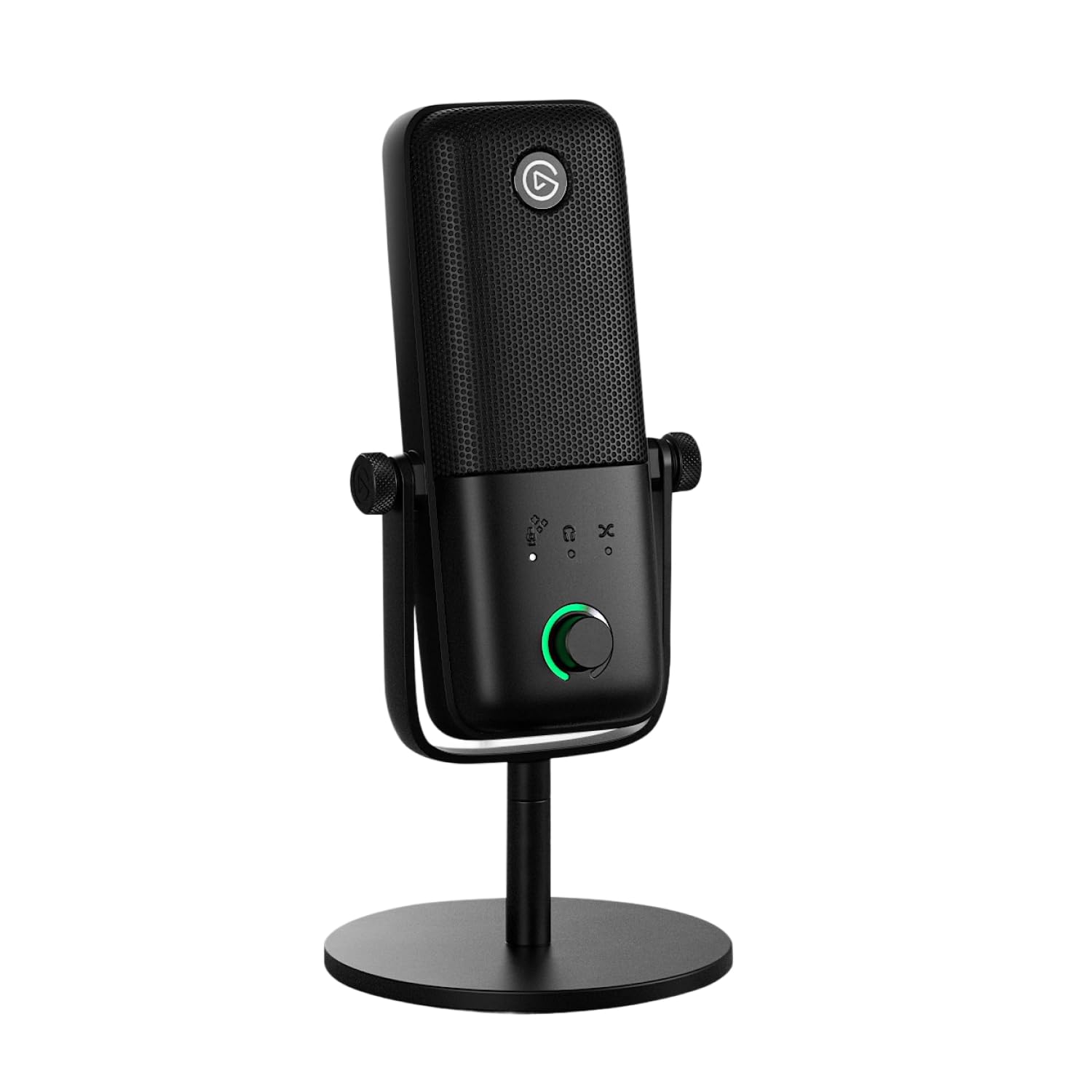
The Wave:3 MK.2 is built for streamers who need voice clarity without constant gain babysitting. Its Clipguard 2.0 anti‑distortion system automatically catches sudden peaks—screams, laughs, loud clicks—so your audio never clips. The 24‑bit/96 kHz capsule captures studio‑grade detail, and the cardioid pattern rejects background fan and keyboard noise effectively.
Users highlight the intuitive multifunction dial and tap‑to‑mute as reliable hardware controls. The Wave Link app allows you to mix multiple audio sources and apply EQ, compression, and VST plugins directly to the mic signal. Some found the mic height blocks a monitor when placed on the desk stand, and the premium price reflects the added DSP features.
If your workflow involves live streaming with complex audio routing, the Wave:3 MK.2 gives you control that usually requires a mixer. It’s an investment in a cleaner production flow.
Why it’s great
- Clipguard 2.0 eliminates clipping automatically
- Powerful Wave Link app with VST support
- Premium build with multifunction dial
Good to know
- Tall body may block screen view
- Premium tier adds cost over basic USB mics
3. Audio-Technica AT2020USB-X Cardioid Condenser USB Microphone

The AT2020USB-X takes the legendary AT2020 XLR capsule and adds a high‑resolution 24‑bit/96 kHz USB converter so you get studio‑grade fidelity without an audio interface. The cardioid polar pattern is tight enough to reduce side and rear noise, and the custom desk stand is surprisingly stable. A soft‑touch capacitive mute button lights up blue when active and red when muted, providing clear visual feedback.
Users report excellent sound clarity for vocals and instruments, with many noting it works seamlessly with Mac and PC. The built‑in headphone jack allows direct monitoring, and the USB‑C cable includes a USB‑A adapter for older ports. Some found the capsule sensitive—it picks up furnace vents and PC fans—so a quiet room or noise gate helps. The RGB power light stays on after PC shutdown unless you disable it in settings.
For a beginner who values the Audio-Technica brand reputation and wants a USB mic that can grow into semi‑pro use, this is a reliable bridge between entry‑level and advanced gear.
Why it’s great
- High‑resolution 24‑bit/96 kHz USB conversion
- Reputable AT2020 capsule in plug‑and‑play format
- Sturdy desk stand and capacitive mute button
Good to know
- Sensitive capsule picks up ambient room noise
- RGB light stays on after PC shutdown
4. Audio-Technica AT2020 Cardioid Condenser Studio XLR Microphone

The original AT2020 is the industry standard for entry‑level XLR mics. Its custom‑engineered low‑mass diaphragm delivers extended frequency response and fast transient capture, making it excellent for vocals, acoustic guitar, and even loud sources like drums thanks to its high SPL handling. The cardioid pattern isolates your voice from room reflections and computer noise.
Users consistently report ten years or more of reliable service, with consistent sound quality across units. The self‑noise of 20 dB(A) is slightly higher than some premium mics, but within acceptable range for controlled home studios. Reviewers emphasize that you need an audio interface with 48V phantom power, an XLR cable, a stand, and a pop filter—this is not a plug‑and‑play device.
For a beginner who plans to build a proper home studio over time, the AT2020 XLR is a smart long‑term investment. You can upgrade the interface and preamps later, but the capsule itself will serve you well for a decade.
Why it’s great
- Legendary sound quality with high SPL handling
- Durable metal construction with excellent longevity
- Upgradeable via better audio interfaces over time
Good to know
- Requires XLR cable, interface, and 48V phantom power
- Self-noise of 20 dB(A) may be noticeable in quiet rooms
5. Razer Seiren V3 Chroma RGB USB Microphone

The Seiren V3 Chroma uses a supercardioid capsule—a tighter polar pattern than standard cardioid—that suppresses more side and rear noise, making it ideal for gaming setups where mechanical keyboards and mouse clicks are constant. The built‑in digital gain limiter prevents sudden volume spikes from ruining your stream, and the tap‑to‑mute sensor with customizable double‑ and triple‑tap commands is genuinely useful mid‑game.
Users love the clarity and the reactive RGB that syncs with Chroma‑integrated games and stream events like emotes and alerts. The all‑metal build feels solid, and the included shock absorber reduces desk vibrations. Some users reported that the Razer Synapse software could be more helpful for EQ settings, and a few found the mic large for tight desk spaces.
If RGB and game integration matter as much as audio quality, the Seiren V3 Chroma delivers a polished experience without breaking the bank for beginners who game and stream.
Why it’s great
- Supercardioid pattern for aggressive noise rejection
- Reactive RGB with game and stream integration
- Digital gain limiter prevents clipping automatically
Good to know
- Razer Synapse software has limited audio control
- Large body may crowd a small desk
6. HyperX SoloCast USB Condenser Gaming Microphone

The SoloCast strips away everything non‑essential and delivers a solid cardioid condenser experience at a price that leaves room for a boom arm and pop filter. The tap‑to‑mute sensor with a clear LED indicator is responsive, and the 24‑bit/96 kHz recording resolution matches mics costing twice as much. The adjustable stand swivels easily and fits under monitors, making it one of the most space‑efficient options here.
Users praise its crisp, clear vocal reproduction and reliable plug‑and‑play setup via USB‑C. Many noted that it needs a pop filter for plosive sounds, and the touch mute unmutes after sleep—a minor annoyance in some setups. The compact build feels sturdy enough for daily use and travel.
If your budget is tight but you want legit condenser quality with zero setup friction, the SoloCast delivers. Pair it with a pop filter and a boom arm, and you have a respectable streaming or podcasting rig for a total investment that stays low.
Why it’s great
- Excellent price‑to‑performance ratio
- 24‑bit/96 kHz recording in a compact frame
- Versatile stand fits under monitors
Good to know
- Needs a separate pop filter for plosives
- Touch mute unmutes automatically after sleep
7. Logitech Creators Blue Yeti Blackout USB Microphone

The Blue Yeti remains the most recognized USB condenser mic for good reason: its three‑capsule array gives you four pickup patterns—cardioid, omni, bidirectional, and stereo. This means a single mic can handle solo voiceovers, two‑person interviews, and even room ambience capture. The onboard controls for gain, mute, headphone volume, and pattern selection keep you away from software menus.
Users appreciate the dramatic improvement in audio quality over headset mics, with clear, broadcast‑ready sound. The sturdy metal body and adjustable stand feel premium. However, the Yeti is large—it will dominate your desk—and it picks up more room noise than a pure cardioid mic because of its multi‑capsule design. Some users found the default gain sensitivity too high for noisy rooms.
For a beginner who wants to experiment with different recording styles—solo podcasting, group chats, ASMR, or instrument recording—the Yeti offers flexibility that dedicated cardioid mics cannot match. Just keep your room quiet.
Why it’s great
- Four pickup patterns for versatile recording
- Solid build with direct onboard controls
- Blue VO!CE software adds broadcast effects
Good to know
- Large footprint takes up significant desk space
- Multi‑capsule design picks up more ambient noise
FAQ
Why does my condenser microphone pick up background noise so easily?
Do I need an audio interface for a USB condenser microphone?
What accessories should a beginner buy with their first condenser mic?
Is a multi‑pattern microphone better for beginners than a cardioid mic?
Final Thoughts: The Verdict
For most users, the best condenser microphone for beginners winner is the Sennheiser Profile because it combines a premium German‑engineered capsule with true plug‑and‑play simplicity, giving you natural, warm vocal tone without ever opening software. If you want flexible recording patterns and don’t mind a larger footprint, grab the Blue Yeti Blackout. And for a budget‑friendly setup that still delivers 24‑bit clarity, nothing beats the HyperX SoloCast paired with a simple pop filter.

Mo Maruf
I created WellFizz to bridge the gap between vague wellness advice and actionable solutions. My mission is simple: to decode the research and give you practical tools you can actually use.
Beyond the data, I am a passionate traveler. I believe that stepping away from the screen to explore new environments is essential for mental clarity and physical vitality.