Our readers keep the lights on and my smoothie glass nicely filled. As an Amazon Associate, I earn from qualifying purchases.
An architecture student’s laptop is their drafting table, rendering farm, and presentation studio all in one. The wrong choice means laggy 3D orbits, crashed BIM models, and deadlines slipping through your fingers. Finding a machine that balances raw rendering power with genuine portability demands a deep understanding of CPU threading, GPU CUDA cores, and thermal design wattage — not just a flashy spec sheet.
I’m Mohammad Maruf — the founder and writer behind WellFizz. I’ve spent hundreds of hours dissecting technical specifications and real-world performance data for demanding creative and professional workflows to deliver recommendations that actually hold up under sustained load.
This guide breaks down the critical specs — from single-core burst clocks for Revit to VRAM capacity for Enscape — so you can confidently choose from the best computers for architecture students available right now.
How To Choose The Best Computers For Architecture Students
Architecture software like Revit, AutoCAD, Rhino 3D, and Lumion places extreme demands on both the CPU and GPU simultaneously. A machine optimized for general productivity will choke when you try to render a complex massing model with ray-traced lighting. Your buying decision must prioritize three core components: a powerful processor for viewport navigation and modeling, a dedicated graphics card for real-time rendering and VR walkthroughs, and enough high-bandwidth RAM to hold your entire project in memory without paging to the SSD.
Consider the GPU First, Not the CPU
Many students mistakenly fixate on the fastest Intel Core i9 or AMD Ryzen 9 chip and neglect the graphics card. While the CPU handles simulation and file operations, your GPU does the heavy lifting for every rendered viewport, every material preview, and every Enscape fly-through. An NVIDIA GeForce RTX 4050 or RTX 5060 with at least 6GB of VRAM will dramatically outperform a laptop with a faster CPU but integrated Intel UHD graphics. Look for models with the NVIDIA Blackwell architecture or equivalent AMD Radeon RX 7000 series — these support ray tracing and AI-accelerated denoising that can cut render times in half.
Quick Comparison
On smaller screens, swipe sideways to see the full table.
| Model | Category | Best For | Key Spec | Amazon |
|---|---|---|---|---|
| GEEKOM GeekBook X16 Pro | Ultralight Workstation | All-day portability + 2.5K screen | 2.8 lbs, 32GB LPDDR5x 7500MHz | Amazon |
| GIGABYTE AERO X16 | Creator Powerhouse | High-end rendering + gaming | RTX 5070, Ryzen AI 9 HX 370 | Amazon |
| Alienware 16 Aurora | Gaming/Creator Hybrid | Demanding 3D modeling + gaming | RTX 5050, 120Hz WQXGA | Amazon |
| LG gram Pro 17 | Ultra-Portable Premium | Travel-heavy architecture students | 3.3 lbs, 90Wh battery, 17″ | Amazon |
| ASUS ROG Strix G16 | Mid-Range Gaming/Work | Solid modeling at 165Hz | RTX 5060, 165Hz FHD+ 16:10 | Amazon |
| Acer Nitro V (i9/RTX 5060) | Budget Performance | Good FPS in Revit + gaming | i9-13900H, RTX 5060, 165Hz | Amazon |
| Dell Precision 3490 | Mobile Workstation | ISV-certified CAD reliability | 64GB DDR5, MIL-STD 810H | Amazon |
| Lenovo ThinkPad E16 Gen 2 | Business CAD Choice | Professional CAD + security | 16:10 display, 16GB DDR5 | Amazon |
| Acer Aspire AI (Ultra 7) | AI-Powered Creator | Touchscreen + AI acceleration | 32GB RAM, 2TB SSD, NPU 47 TOPS | Amazon |
| Lenovo V15 (Ryzen 7) | Value Workhorse | Large storage + multitasking | 40GB RAM, 2TB SSD | Amazon |
| HP 17 (32GB RAM) | Budget Large Screen | Basic 2D drafting + media | 17.3″ HD+, 32GB RAM | Amazon |
| NIMO 17.3 (Ryzen 7) | Entry-Level Rendering | 4K display + Radeon 780M | 4K IPS, Radeon 780M graphics | Amazon |
| HP Touchscreen (64GB) | Basics Plus Touch | Lightweight touch interface | 64GB RAM, 1366×768 touch | Amazon |
In‑Depth Reviews
1. GEEKOM GeekBook X16 Pro

The GEEKOM GeekBook X16 Pro redefines what a portable workstation can be for architecture students. Weighing just 2.8 pounds with a 16-inch 2.5K IPS display that covers 100% sRGB, it allows you to review material textures and linework with genuine color accuracy — critical when your professor judges a presentation on visual clarity. The 120Hz refresh rate makes orbit and pan operations in Rhino feel exceptionally fluid, reducing eye strain during long studio sessions.
Under the hood, the Intel Core Ultra 9 185H with 16 cores and 22 threads provides the single-threaded burst performance that Revit demands for regenerating views, while the 32GB of LPDDR5x 7500MHz RAM ensures you can keep multiple browser tabs, your BIM model, and Adobe suite all open without swapping. The IceBlade 2.0 dual-fan cooling system keeps the CPU from throttling even when you run a Lumion export alongside a lecture video.
The all-metal magnesium alloy chassis feels premium and the 77Wh battery delivers up to 17 hours of light use — enough for a full day of crits and pin-ups without hunting for an outlet. The 40Gbps USB4 port also supports external GPU enclosures if you eventually need a desktop-class render card. For the architecture student who values portability without sacrificing screen quality, this is the package to beat.
Why it’s great
- Exceptionally lightweight at 2.8 lbs for a 16-inch chassis
- Color-accurate 2.5K IPS display with fluid 120Hz refresh
- Massive 32GB of ultra-fast LPDDR5x memory
Good to know
- Fan noise is audible during sustained rendering loads
- Non-upgradable RAM limits future expansion
2. GIGABYTE AERO X16

The GIGABYTE AERO X16 is built for architecture students who refuse to compromise on rendering power. The NVIDIA GeForce RTX 5070 with Blackwell architecture and 12GB of GDDR7 VRAM provides the raw compute needed for path-traced renders in Enscape and real-time viewport denoising in Lumion. This GPU can handle complex massing models with hundreds of thousands of polygons without dropping below 30 frames per second in the viewport.
The AMD Ryzen AI 9 HX 370 processor balances 12 high-performance cores with a dedicated NPU that accelerates AI-assisted features in software like Photoshop and DaVinci Resolve — handy when you need to upscale texture maps or apply generative fills. The 32GB of DDR5 RAM and 1TB Gen4 SSD provide fast load times for your project files, and the 165Hz WQXGA display ensures buttery-smooth navigation even in heavy shading views.
At just 16.75mm thin and 4.18 pounds, the AERO X16 slips into a backpack easily, and the 14-hour battery life means you can attend back-to-back reviews without a charger. The thermals are managed by a vapor chamber that keeps the GPU and CPU in the mid-60s Celsius range during sustained loads, so you won’t experience thermal throttling during a late-night rendering session.
Why it’s great
- RTX 5070 GPU delivers exceptional ray-tracing performance
- Slim 16.75mm profile for a high-power gaming laptop
- Stable thermals keep CPU/GPU mid-60s under load
Good to know
- Only one USB-C port limits peripheral connections
- Premium pricing places it at the top of the budget
3. Alienware 16 Aurora

The Alienware 16 Aurora brings desktop-class GPU performance to a mobile chassis, making it a compelling option for architecture students who also game. The NVIDIA GeForce RTX 5050 with 8GB of VRAM provides enough graphical headroom to render detailed Lumion scenes and handle 3ds Max viewport shading without stuttering. The 16-inch WQXGA 120Hz display with 300 nits brightness delivers crisp lines and vibrant material previews.
Powered by an Intel Core 7-240H processor and 16GB of DDR5 RAM, this system handles multitasking between Revit, AutoCAD, and reference images fluidly. The Cryo-Chamber cooling system uses a vapor chamber and quad-fan design to keep the GPU running at peak boost clocks during extended rendering sessions, and the 1TB Gen4 SSD provides fast project load times.
The build quality is robust with a premium aluminum lid, though the laptop is heavier than ultraportables. The 1-year on-site Dell service provides peace of mind if hardware issues arise during the semester. Students running heavy BIM models will appreciate the dedicated RTX 5050 for GPU-accelerated viewport rendering in Enscape and Twinmotion.
Why it’s great
- Dedicated RTX 5050 with 8GB VRAM for GPU rendering
- Excellent Cryo-Chamber cooling prevents thermal throttling
- Sharp 120Hz WQXGA display for detailed modeling
Good to know
- Heavier than many competitors at over 5.5 lbs
- No fingerprint reader for quick login
4. LG gram Pro 17

The LG gram Pro 17 delivers an astonishing combination of a massive 17-inch display and featherlight 3.3-pound chassis, making it the ultimate mobile workstation for architecture students who commute across campus. The 17-inch display at a 16:10 aspect ratio provides extra vertical space for your Revit tool palette and property panels, reducing the need to constantly zoom in and out. The 144Hz variable refresh rate ensures smooth scrolling through large PDF portfolios.
Intel Core Ultra 9 285H processor with NVIDIA RTX 5050 graphics provides capable performance for moderate rendering workloads, while the 32GB of DDR5 RAM and 2TB SSD give you immense storage and multitasking headroom. The 90Wh battery offers up to 25 hours of video playback — enough for a full week of classes on a single charge. The laptop has passed MIL-STD-810H military standards for durability, so it can survive a drop from a drafting table.
The dual cooling system with internal fans keeps the chassis comfortable during light rendering, though sustained heavy loads will generate noticeable fan noise. The lack of an Ethernet port may be a concern for students relying on wired studio networks. For architecture students who prioritize portability and screen real estate above all else, the gram Pro 17 is a remarkable achievement.
Why it’s great
- Incredibly light 3.3 lbs for a 17-inch laptop
- 25-hour battery life eliminates charger dependency
- MIL-STD-810H certified for campus durability
Good to know
- No built-in Ethernet port for wired networking
- Premium price places it at the high end
5. ASUS ROG Strix G16

The ASUS ROG Strix G16 offers architecture students a robust balance of rendering performance and build quality. The NVIDIA RTX 5060 with 8GB VRAM handles most student-level rendering in Lumion and V-Ray with ease, while the Intel Core i7 14650HX provides the high single-core clock speeds that Revit needs for view generation. The 16-inch FHD+ 16:10 display gives you extra vertical workspace for your modeling viewport.
The 165Hz refresh rate makes viewport navigation exceptionally smooth, and the ACR anti-glare film reduces reflections in brightly lit studio environments. With 16GB of DDR5-5600MHz RAM and a 1TB Gen4 SSD, the system boots in seconds and loads your project files quickly. The ROG Intelligent Cooling system with vapor chamber and liquid metal on the CPU keeps temperatures in check during marathon studio sessions.
The full-surround RGB light bar adds a gaming aesthetic that may not suit every studio environment, but you can toggle Stealth Mode to turn off all lighting for a professional appearance. The tool-less bottom panel makes upgrading RAM or storage straightforward. For architecture students who want a reliable performer that also handles demanding games, the ROG Strix G16 delivers solid versatility.
Why it’s great
- Excellent thermal management with liquid metal on CPU
- Smooth 165Hz display with anti-glare coating
- Tool-less bottom panel for easy upgrades
Good to know
- Gaming-centric design may look out of place in crits
- Requires plugging in for optimal GPU performance
6. Acer Nitro V (i9/RTX 5060)

The Acer Nitro V demonstrates that you can get a serious rendering machine without spending a fortune. The Intel Core i9-13900H with 14 cores provides exceptional multi-threaded performance for CPU-based rendering in V-Ray and mental ray, while the NVIDIA RTX 5060 with 8GB VRAM handles GPU-accelerated viewport shading in SketchUp and Rhino. The 15.6-inch IPS display with 165Hz refresh rate delivers fluid navigation through complex assemblies.
The 16GB of DDR4 RAM is adequate for most student projects, though upgrading to 32GB later will help with large BIM models. The 1TB Gen4 SSD provides fast storage for project files and reference libraries. The dual-fan cooling system with quad exhaust vents keeps the system from overheating during extended rendering sessions, though it does generate noticeable fan noise under heavy load.
The Thunderbolt 4 port provides high-speed connectivity for external displays and storage — useful for connecting to a studio monitor for detailed drafting work. The NitroSense software gives you control over fan speeds and performance profiles, letting you optimize for either quiet operation during lectures or maximum performance during rendering. For budget-conscious students who still need dedicated GPU power, the Nitro V is a strong contender.
Why it’s great
- Excellent price-to-performance ratio for student budgets
- Powerful i9 CPU with 14 cores for multi-threaded rendering
- Thunderbolt 4 connectivity for future expansion
Good to know
- DDR4 RAM instead of faster DDR5
- Fan noise is noticeable under sustained load
7. Dell Precision 3490

The Dell Precision 3490 is an ISV-certified mobile workstation engineered specifically for professional CAD and BIM workflows. With 64GB of DDR5 RAM and a 2TB SSD, this machine can handle massive Revit models with hundreds of linked files without slowing down. The Intel Core Ultra 5 135H with 14 cores provides reliable multi-threaded performance for rendering and simulation tasks.
The 14-inch FHD display offers decent color accuracy for material previews, and the dual Thunderbolt 4 ports allow you to connect up to three external 4K monitors for a full studio setup. The MIL-STD 810H certification ensures the chassis can survive the bumps and drops of campus life, while the backlit keyboard and 1080p webcam with privacy shutter keep you productive in any environment.
The integrated Intel graphics won’t match dedicated GPUs for heavy real-time rendering, but for students focused on 2D drafting, section detailing, and moderate 3D modeling, the Precision 3490 offers the stability and ISV driver certifications that academic software demands. The three-year warranty on upgraded memory and SSD provides long-term peace of mind for your investment.
Why it’s great
- Massive 64GB DDR5 RAM for multi-project workflows
- ISV certified for AutoCAD, Revit, and SolidWorks
- MIL-STD 810H tested for durability
Good to know
- Integrated Intel graphics limit real-time rendering
- Windows may require re-install for proper license activation
8. Lenovo ThinkPad E16 Gen 2

The Lenovo ThinkPad E16 Gen 2 brings the legendary ThinkPad build quality to architecture students who value a professional aesthetic and reliable performance. The AMD Ryzen 7 7735HS with 8 cores and 16 threads provides ample CPU power for Revit and SketchUp, while the AMD Radeon 680M integrated graphics handle basic viewport navigation and presentation tasks. The 16-inch WUXGA display with a 16:10 aspect ratio gives you 11% more vertical workspace than standard 16:9 screens, which means less scrolling through toolbars.
The 16GB of DDR5 RAM ensures smooth multitasking between modeling software, reference images, and documentation. The ThinkPad fingerprint reader and IR webcam with Windows Hello support provide quick, secure login — useful for shared studio environments. The aluminum chassis feels durable and professional, and the backlit keyboard offers the tactile feedback that ThinkPad users appreciate.
The integrated graphics cap real-time rendering performance, so this machine is better suited for drafting, modeling, and rendering through CPU-based engines like V-Ray CPU. The Wi-Fi 6E and dual USB-C ports with DisplayPort support provide modern connectivity for external monitors and peripherals. For architecture students who spend most of their time in 2D drafting and 3D modeling without heavy real-time rendering, the ThinkPad E16 is a reliable workhorse.
Why it’s great
- Professional ThinkPad build quality with aluminum chassis
- 16:10 display provides extra vertical workspace
- Fingerprint and IR camera for secure login
Good to know
- Integrated graphics limit real-time rendering performance
- RAM is soldered and cannot be upgraded later
9. Acer 2026 Aspire AI (Ultra 7)

The Acer Aspire AI leverages the Intel Core Ultra 7 258V with a dedicated NPU delivering 47 TOPS of AI performance. This accelerates AI-assisted features in the latest versions of Adobe Photoshop, Lightroom, and even AI denoising in rendering software. The 14-inch touchscreen display allows intuitive zooming and panning through drawings, making it ideal for students who prefer a tactile interface for reviewing details.
With 32GB of LPDDR5X RAM and a 2TB SSD, the Aspire AI handles large project files and multiple applications without slowdown. The Intel Arc 140V graphics offer decent performance for 1080p video editing and basic 3D modeling, though they won’t match a dedicated RTX GPU for heavy real-time rendering. The laptop weighs just 3.09 pounds and is 0.7 inches thin, making it highly portable for campus use.
The included USB hub provides HDMI, USB-A, USB-C, SD card, and Ethernet ports, eliminating the need for dongles — a practical benefit when connecting to studio peripherals. The long battery life supports full days of classes without charging. For architecture students who focus on drafting, documentation, and AI-enhanced workflows rather than GPU-intensive rendering, the Aspire AI is an intelligent choice.
Why it’s great
- Dedicated NPU accelerates AI features in design software
- Touchscreen enables intuitive drawing navigation
- Lightweight and slim for all-day campus carry
Good to know
- Integrated graphics limit heavy real-time rendering
- Lifetime Office 365 claim may be misleading
10. Lenovo V15 (Ryzen 7)

The Lenovo V15 offers architecture students an exceptional amount of memory and storage for the money. With 40GB of DDR4 RAM and a 2TB PCIe NVMe SSD, this machine can hold your entire portfolio, reference library, and semester projects without breaking a sweat. The AMD Ryzen 7 7730U with 8 cores and 16 threads provides solid CPU performance for modeling and light rendering tasks in Revit and SketchUp.
The 15.6-inch FHD display provides adequate workspace for drafting and modeling, though the standard 16:9 aspect ratio means less vertical space compared to 16:10 displays. The numeric keypad is a welcome addition for architects who frequently input dimensions and coordinates. The AMD Radeon integrated graphics handle basic viewport navigation but struggle with heavy real-time rendering in Lumion or Enscape.
The V15 includes an RJ45 Ethernet port — a practical feature for connecting to studio networks that may not have reliable Wi-Fi. The Windows 11 Pro operating system includes enhanced security and management features suitable for students who use their laptop for professional internships. For budget-conscious students who need massive storage for project archives and reference materials, the Lenovo V15 delivers exceptional value.
Why it’s great
- Huge 40GB RAM and 2TB SSD for project archives
- Includes RJ45 Ethernet for reliable studio networking
- Exceptional value for the memory and storage capacity
Good to know
- Integrated graphics limit real-time rendering
- Standard 16:9 display rather than taller 16:10
11. HP 17 (32GB RAM)

The HP 17 gives architecture students a massive 17.3-inch display for an exceptionally accessible price point. The HD+ 1600×900 resolution provides enough screen real estate for side-by-side window management, while the 32GB of RAM ensures you can run multiple applications without system slowdown. The AMD Ryzen 5 processor with integrated graphics provides adequate performance for basic 2D drafting in AutoCAD and light 3D modeling in SketchUp.
The numeric keypad is a practical addition for dimensioning and data entry, and the full-size keyboard makes long drafting sessions more comfortable. However, the HD+ resolution is lower than the FHD panels found on most competitors, which means less screen sharpness when reviewing detailed construction drawings. The integrated graphics cannot handle realistic viewport rendering in Enscape or Lumion.
The laptop’s battery life is adequate for a day of lectures, though you’ll want to plug in for extended modeling sessions. The build quality is acceptable for the price range, though the chassis material feels less premium than metal laptops. For students on a tight budget who primarily work in 2D drafting and need a large screen for document review, the HP 17 offers a functional starting point.
Why it’s great
- Very large 17.3-inch display for your budget
- 32GB RAM provides solid multitasking performance
- Includes numeric keypad for data entry
Good to know
- HD+ 1600×900 resolution is not sharp for detailed drawings
- Integrated graphics limit 3D rendering capability
12. NIMO 17.3 (Ryzen 7)

The NIMO 17.3 brings a 4K IPS display to a budget-friendly laptop, offering architecture students exceptional screen clarity for reviewing detailed construction drawings and material textures. The AMD Ryzen 7 8745HS with Radeon 780M graphics provides integrated GPU performance that approaches entry-level dedicated graphics for light 3D modeling and viewport navigation. The 16GB of DDR5 RAM handles moderate multitasking needs.
The 180-degree hinge allows the screen to lay flat for collaborative reviews — useful for pin-up sessions and group critiques. The 100W USB-C Power Delivery charger keeps the system powered up quickly, and the 58Wh battery provides a few hours of unplugged use for lectures and meetings. The backlit keyboard is useful for late-night studio sessions in dim lighting.
The Radeon 780M integrated graphics will struggle with demanding real-time rendering engines like Lumion or V-Ray RT, but it can handle basic viewport navigation in SketchUp and Rhino at reduced settings. The 4K display resolution means you’ll need to scale the UI in Windows for comfortable text size. For students on a tight budget who prioritize a high-resolution display for document review and basic modeling, the NIMO offers a compelling value.
Why it’s great
- 4K IPS display provides exceptional detail for drawings
- 180-degree hinge facilitates collaborative reviews
- USB-C Power Delivery for convenient charging
Good to know
- Integrated graphics limit real-time rendering capability
- Speakers lack bass and clarity
13. HP 15.6 Touchscreen (64GB)
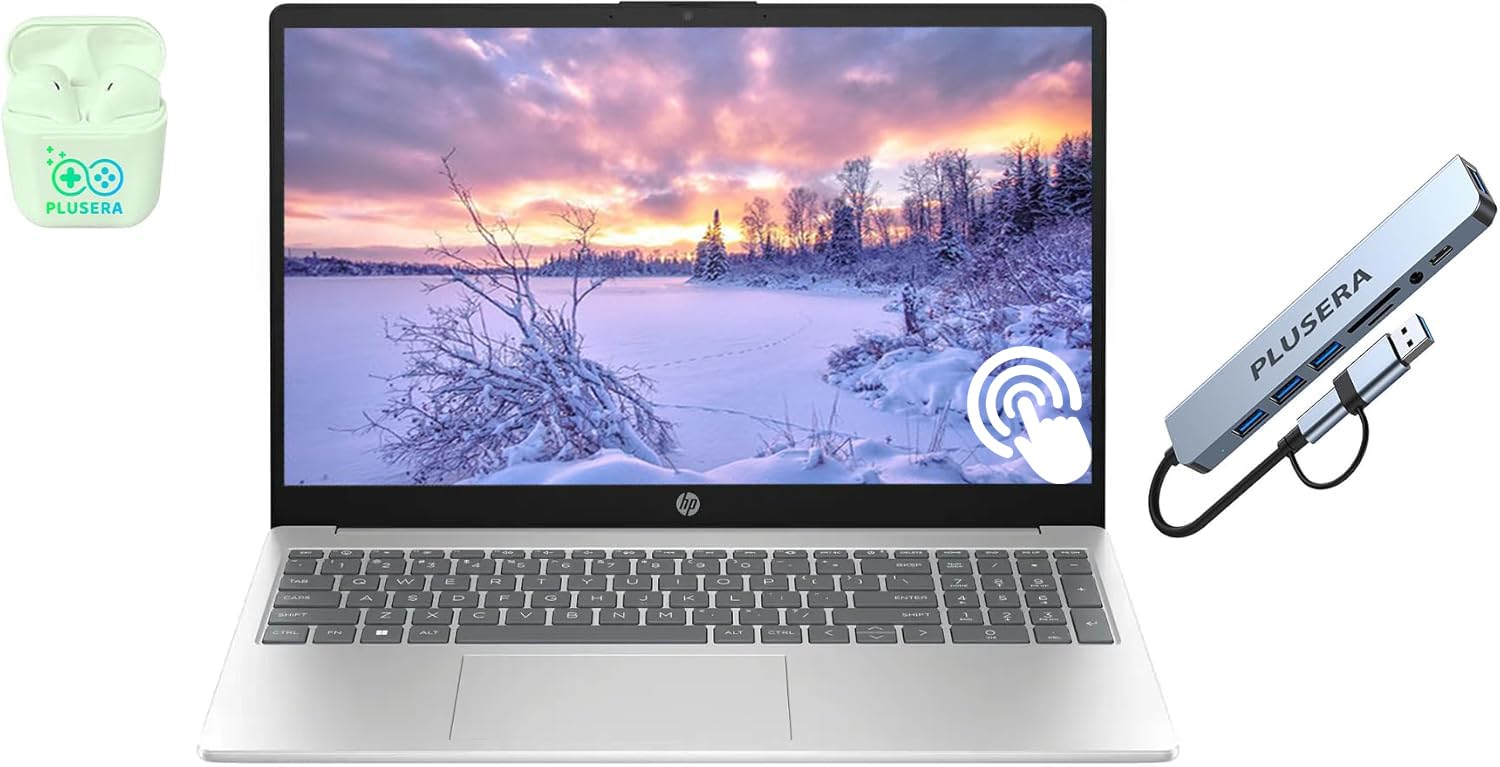
The HP 15.6 Touchscreen laptop provides an affordable entry point for architecture students who want the convenience of a touchscreen for zooming and panning through drawings. The 64GB of RAM is an unusual and generous amount for this price range, allowing for extreme multitasking with dozens of browser tabs and multiple applications running simultaneously. The 2TB storage capacity, combined with a 512GB docking station, provides ample space for project files and reference materials.
The Intel Core i3 processor and Intel UHD Graphics are the main limitations here. The i3 handles basic productivity tasks like word processing and web browsing well, but it will struggle with 3D modeling in Revit, SketchUp, or Rhino. The 1366×768 HD resolution display lacks the sharpness needed for detailed construction drawing review, and the bottom-firing speakers are muffled when the laptop sits on a desk.
The touchscreen does provide intuitive navigation through PDF portfolios and reference images, and the numeric keypad is practical for data entry. The camera privacy shutter offers peace of mind for students concerned about webcam security. For architecture students who primarily need a machine for research, documentation, and presentations rather than 3D modeling, the HP Touchscreen offers a functional but limited option.
Why it’s great
- Generous 64GB RAM for extreme multitasking
- Touchscreen enables intuitive document navigation
- Large 2TB storage for project archives
Good to know
- Low-resolution 1366×768 display limits detail review
- Core i3 and integrated graphics cannot handle 3D modeling
FAQ
Can I use a MacBook Pro for architecture school?
How much RAM do I actually need for Revit and Lumion?
Is a gaming laptop good enough for architecture software?
What screen size is best for architecture laptops?
Final Thoughts: The Verdict
For most architecture students, the best computers for architecture students winner is the GEEKOM GeekBook X16 Pro because it combines an ultralight 2.8-pound chassis with a color-accurate 2.5K 120Hz display, 32GB of fast RAM, and a powerful Intel Core Ultra 9 CPU — everything you need for all-day modeling and rendering without the bulk. If you demand dedicated GPU rendering power for Enscape and Lumion, grab the GIGABYTE AERO X16 with its RTX 5070 and excellent thermal management. And for the budget-conscious student who still needs a large screen and solid performance, the Acer Nitro V delivers exceptional value for the price.

Mo Maruf
I created WellFizz to bridge the gap between vague wellness advice and actionable solutions. My mission is simple: to decode the research and give you practical tools you can actually use.
Beyond the data, I am a passionate traveler. I believe that stepping away from the screen to explore new environments is essential for mental clarity and physical vitality.