Our readers keep the lights on and my smoothie glass nicely filled. As an Amazon Associate, I earn from qualifying purchases.
An animation rig can stall on a single timeline scrub if the hardware can’t push through the vertex count. The difference between a fluid viewport and a stuttering one comes down to the specific pairing of multi-core threading, GPU compute units, and memory bandwidth your workstation delivers. This guide cuts through the spec noise to find the machines that handle Blender, Maya, and Cinema 4D without forcing you to constantly rebuild your workflow around their limits.
I’m Mohammad Maruf — the founder and writer behind WellFizz. I’ve spent hundreds of hours analyzing component benchmarks, thermal performance under sustained loads, and real-world rendering scenarios to separate animation-capable machines from those that simply claim to be.
Whether you are building a character from scratch or compositing complex particle simulations, finding the right best computers for animation means matching your specific software stack to the CPU-GPU-RAM trifecta that keeps your viewport responsive during dense scene manipulation.
How To Choose The Best Computers For Animation
Animators face a unique balancing act: your CPU must handle simulation and rig calculations, your GPU must push high polygon counts through the viewport, and your RAM must keep multiple software tools open without bottlenecking either. A gaming PC might game well but fail during a long sub-surface scattering render. Prioritize these three pillars when evaluating any candidate.
Prioritize the CPU for Rigging and Simulation
Animation software like Blender and Maya rely heavily on single-core performance for viewport interactions, but multi-core strength dominates final frame rendering and physics simulations. Look for processors with at least 8 cores and a turbo boost above 4.5 GHz. Intel’s 13th and 14th Gen i7/i9 and AMD’s Ryzen 7/9 lines are the standard here. Avoid ultra-low-power “T” series chips, as they throttle under sustained loads and extend render times noticeably.
GPU VRAM Determines Your Scene Ceiling
The amount of video memory on your graphics card directly limits the complexity of the scenes you can manipulate in real time. For 1080p animation work, 8 GB is the minimum comfortable floor. For 4K asset creation or heavy sculpting in ZBrush, aim for 12 GB or more. NVIDIA RTX cards (4060 and above) and AMD RX 9070 XT class GPUs provide the compute units necessary for hardware-accelerated rendering in Cycles or Redshift. A card with insufficient VRAM will stutter during texture painting and force you to reduce preview quality.
RAM Capacity and Speed for Multitasking
A minimum of 16 GB is acceptable for simple 2D animations, but 32 GB is the practical entry point for 3D work where you keep Blender, Photoshop, and After Effects open simultaneously. DDR5 memory running at 5200 MHz or faster provides a measurable improvement in timeline responsiveness and simulation caching. If your budget allows, a 64 GB configuration future-proofs your workstation for Unreal Engine-based animation pipelines and larger scene files.
Quick Comparison
On smaller screens, swipe sideways to see the full table.
| Model | Category | Best For | Key Spec | Amazon |
|---|---|---|---|---|
| Skytech Gaming O11 Vision | Premium | High-fidelity 4K rendering | AMD RX 9070 XT 16GB VRAM | Amazon |
| Alienware Aurora ACT1250 | Premium | Long render sessions | RTX 5070 12GB GDDR7 | Amazon |
| ACEMAGIC M1A Pro | Mid-Range | Space-conscious workstation | ARC A770 16GB VRAM | Amazon |
| Dell Tower Plus EBT2250 | Mid-Range | All-around 3D pipeline | Intel Core Ultra 7 265 | Amazon |
| HP Envy i9-14900K | Premium | Multi-software compositing | 64GB DDR5 RAM | Amazon |
| HP Mini i7-12700T | Budget | 2D animation & light 3D | Integrated UHD 770 | Amazon |
| MXZ i5-12400F RTX4060 | Budget | Entry-level 3D animation | RTX 4060 8GB GDDR6 | Amazon |
In‑Depth Reviews
1. Skytech Gaming O11 Vision Desktop PC

The Skytech O11 Vision pairs the fastest gaming CPU on the market, the Ryzen 7 9800X3D, with the AMD RX 9070 XT delivering 16 GB of VRAM. This combination directly translates to smooth timeline scrubbing in 4K and significantly reduced render times in Blender Cycles and Redshift. The 32 GB of DDR5 RAM running at 6000 MHz provides enough headroom to have Maya, Substance Painter, and After Effects open simultaneously without forcing you to close assets.
The 2 TB Gen4 NVMe SSD ensures that even the largest project files load in seconds, and the Lian Li PC-O11 Vision case with a 360mm AIO cooler keeps the 9800X3D at stable temperatures during overnight renders. The system ships with no bloatware, which is a genuine relief when you need every ounce of performance for production work. The free keyboard and mouse are serviceable, but you will likely replace them for long ergonomic sessions.
User feedback highlights the quiet operation even under full load and the ease of upgrading the RAM later. Some users noted that the Bluetooth connection for peripherals can be inconsistent, so a wired mouse for precision work is advisable. This machine handles the highest preset settings in games like Black Myth Wukong, but more importantly, it handles heavy subdivision surface previews in Maya without dropping frames.
Why it’s great
- RX 9070 XT with 16GB of VRAM handles dense 4K viewport textures without stuttering.
- Ryzen 7 9800X3D provides exceptional single-core speed for rigging and simulation calculations.
- Quiet 360mm AIO liquid cooler maintains consistent performance during long rendering sessions.
Good to know
- Bluetooth connectivity for peripherals can be unreliable and may require a dongle.
- RGB fan control software includes paywalled features for advanced customization.
- One fan failure was reported, and support required photo evidence for replacement.
2. Alienware Aurora Gaming Desktop ACT1250

The Alienware Aurora ACT1250 steps into the animation space with an RTX 5070 GPU built on the Blackwell architecture, delivering 12 GB of GDDR7 VRAM. This is a significant leap for real-time viewport rendering and AI-accelerated denoising in Cycles. The Intel Core Ultra 7 265F CPU, with its dedicated NPU, offers a unique advantage for AI-driven tasks like motion capture cleanup and automated rigging, though the software ecosystem for the NPU is still maturing.
With 32 GB of DDR5 RAM and a 1 TB SSD, this system handles standard animation pipelines smoothly. The 1000W Platinum rated PSU ensures clean power delivery during extended rendering marathons, and the Alienware Command Center allows you to monitor thermals and adjust performance profiles. The stadium lighting and clear side panel are more aesthetic than functional for animation work, but the matte black finish reduces glare in a dark studio setup.
Customer reviews consistently praise the quiet operation and build quality. Some users experienced intermittent startup issues requiring a full power discharge, and replacing the factory Windows installation with Linux requires research since Dell lacks official Linux driver support for the proprietary lighting. For a pure Windows-based animation workflow, this machine offers a robust balance of price and performance for serious freelancers.
Why it’s great
- RTX 5070 with 12GB GDDR7 VRAM accelerates AI denoising and real-time path tracing.
- 1000W Platinum PSU provides stable power for sustained CPU and GPU loads.
- Quiet chassis design keeps noise levels low even during all-night renders.
Good to know
- Some units experience a no-start condition requiring a full power discharge to reset.
- No official Linux driver support for the AlienFX lighting system.
- Boot time is around two minutes, slower than some custom builds.
3. ACEMAGIC M1A Pro AI Mini PC Workstation

The ACEMAGIC M1A Pro is a compact workstation that packs an Intel Core i9-13900HK processor and a discrete Intel ARC A770 GPU with 16 GB of VRAM into a chassis roughly the size of a thick hardcover book. For animators working in tight studio spaces or needing a portable rendering node, this form factor is a genuine breakthrough. The i9-13900HK with 14 cores and 20 threads handles heavy simulation and code compilation with surprising authority for a 54W TDP platform.
The ARC A770 GPU, while not as universally optimized as Nvidia’s RTX lineup, performs admirably in Blender 4.0+ with the Vulkan render path and supports AV1 hardware encoding for video output. The M1A Pro supports up to four 8K displays via USB4, dual DisplayPort 2.0, and dual HDMI 2.0, making it an excellent choice for animators who rely on multiple reference monitors. The 32 GB of DDR5 memory is sufficient for most 3D pipelines, and the dual PCIe 4.0 NVMe slots allow for fast asset storage.
Users report that the factory Windows image includes buggy drivers that cause poor initial performance, requiring a clean installation of the chipset and GPU drivers. Tech support resolved a RAM fingerprint issue for one user quickly. For non-tech-savvy animators, the driver setup can be frustrating, but once configured, the system provides solid compute performance without occupying a full desk footprint.
Why it’s great
- 16GB VRAM on ARC A770 handles high-res texture work and GPU rendering.
- Compact chassis fits easily into small studio spaces or mobile rigs.
- Supports four 8K displays for extensive multi-monitor animation pipelines.
Good to know
- Factory driver image can cause poor performance; a clean install is often required.
- ARC GPU driver support is less mature than Nvidia for some professional applications.
- Non-technical users may find the initial setup process challenging.
4. Dell Tower Plus EBT2250 Desktop
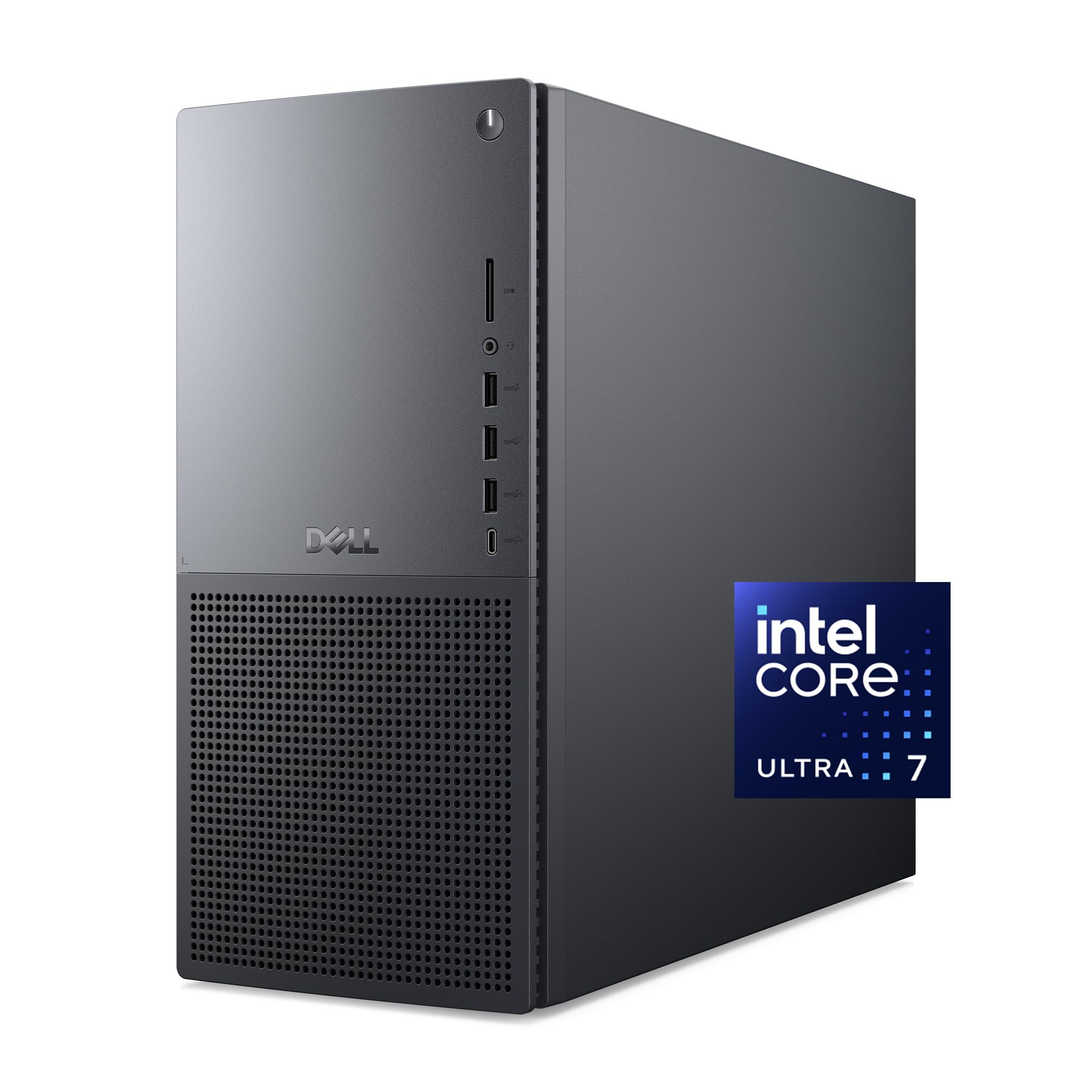
The Dell Tower Plus EBT2250 delivers a balanced mid-range workstation with the Intel Core Ultra 7 265 processor featuring a dedicated NPU for AI-enhanced workflows and an RTX 4060 with 8 GB of VRAM. This configuration is well-suited for animators working primarily in 1080p and lighter 1440p scenes. The 16 GB of DDR5 RAM is the main bottleneck here — upgrading to 32 GB is highly recommended for any serious 3D work involving simulations or heavy compositing.
The thermal design prioritizes quiet acoustics with standard CPU air cooling for the 65W TDP, and the case allows for easy tool-less access to internal components for RAM and storage upgrades. Dell includes a 1 Year Onsite Service warranty, which is valuable for studio environments where downtime directly impacts deadlines. The inclusion of 6 months of Dell Migrate makes transferring data from an old workstation straightforward.
Customer feedback highlights that the RTX 4060 handles non-4K gaming well, but the 8 GB VRAM can become a limitation for 4K texture work. An unusual design choice is the lack of a 3.5mm audio line-out jack on the back panel, which prohibits the use of standard wired speakers without a USB sound adapter. If you rely on studio monitors with 3.5mm input, this limitation is a dealbreaker that requires a separate audio interface.
Why it’s great
- Intel Core Ultra 7 265 with NPU offers AI acceleration for supported creative tools.
- Easy tool-less access to upgrade RAM and storage drives in the future.
- 1 Year Onsite Service warranty reduces downtime for professional studios.
Good to know
- No 3.5mm audio line-out on the back panel; requires USB adapter for standard speakers.
- 8GB VRAM on RTX 4060 limits performance with 4K textures and heavy scenes.
- 16GB RAM is insufficient for multi-software animation pipelines; upgrade needed.
5. HP Envy Desktop PC i9-14900K

The HP Envy Desktop is built around the flagship Intel Core i9-14900K processor, capable of turbo boosting up to 6.0 GHz, and comes equipped with 64 GB of DDR5 RAM. This massive memory pool is a distinct advantage for animators who run multiple heavy applications simultaneously — think Blender for modeling, After Effects for motion graphics, and Unreal Engine for real-time visualization, all open at once without swapping memory pages.
The included NVIDIA GeForce RTX 3050 with 8 GB of GDDR6 VRAM is the weakest link in this configuration. While the CPU and RAM are top-tier, the GPU is entry-level and will bottleneck viewport performance with dense scenes. For pure CPU-based rendering or heavy compositing work, this machine excels, but for GPU-accelerated render engines like Cycles or Octane, the RTX 3050 will lag significantly behind a mid-range RTX 4060 or better.
Users working in stock charting or data-heavy workflows report the processor rarely exceeds 20% load, indicating the i9-14900K has substantial headroom for animation tasks. The 2 TB SSD provides ample storage for project files and assets. For animators who want to upgrade the GPU later, this offers a strong foundational platform, but out of the box, the GPU limits its application for modern 3D pipelines.
Why it’s great
- i9-14900K with 6.0 GHz turbo provides market-leading single-core performance for rigging.
- 64GB DDR5 RAM handles massive multi-software compositing workflows without slowdown.
- 2TB SSD offers generous storage for project files, assets, and caching simulation data.
Good to know
- RTX 3050 GPU with 8GB VRAM is underspecced for modern GPU-accelerated rendering.
- GPU upgrade is recommended for serious 3D animation work, adding to total investment.
- The high-end CPU and RAM push the system into a premium price bracket.
6. HP Mini Desktop PC i7-12700T

The HP Mini Desktop PC uses a 12th Gen Intel Core i7-12700T processor with integrated Intel UHD 770 graphics. This is a low-power 12-core chip optimized for office productivity, not intensive 3D rendering. For 2D animators working primarily in Toon Boom Harmony, TVPaint, or Adobe Animate, the 16 GB of RAM and 1 TB SSD provide sufficient performance for frame-by-frame animation and compositing in After Effects at 1080p.
The compact 6.97-inch form factor is ideal for animators with limited desk space or those who need a dedicated machine for rendering while a primary workstation handles viewport work. The triple 4K monitor support via dual DisplayPort and HDMI 2.1 is excellent for managing multiple reference panels and a timeline. The included wired keyboard and mouse get you started immediately, and Windows 11 Pro is pre-installed.
Customer reviews note the machine works well for Linux users as a replacement for aging laptops, and it handles data processing and stock charting with ease. For any 3D work beyond simple polygon modeling, the lack of a dedicated GPU is a hard limitation. The integrated UHD 770 cannot handle viewport rendering of even moderately complex scenes. This machine serves a specific niche for 2D professionals or as a secondary rendering node.
Why it’s great
- Ultra-compact chassis saves desk space while supporting triple 4K monitor setups.
- i7-12700T provides 12 cores for efficient batch rendering and simulation tasks.
- Includes Windows 11 Pro, keyboard, and mouse for immediate use.
Good to know
- Integrated UHD 770 graphics cannot handle 3D viewport work or GPU rendering.
- Limited to 2D animation pipelines or use as a secondary rendering node.
- RAM is capped at 16GB, which may throttle complex After Effects compositions.
7. MXZ Gaming PC i5-12400F RTX4060

The MXZ Gaming PC offers the most accessible entry point for new animators with a dedicated GPU: the RTX 4060 with 8 GB of VRAM paired with a 12th Gen Core i5-12400F processor. This configuration is capable of running Blender, Maya, and Cinema 4D for learning and small-scale projects. The 16 GB of DDR4 RAM is sufficient for scene manipulation but will require closing background apps when working with complex simulations.
The system ships with Windows 11 Pro pre-installed and includes PCI-E WiFi and 5 RGB fans for adequate cooling. The 550W 80+ power supply provides stable power, though it leaves minimal headroom for future GPU upgrades. The 500 GB NVMe SSD holds the operating system and a few project files, but you will quickly need external storage for larger asset libraries and final renders.
Customer feedback consistently highlights the value proposition for first-time PC buyers. Users report smooth performance in games like Apex Legends at high FPS, which translates to a comfortable viewport experience for lightweight 3D scenes. One user noted a nonfunctional top USB port, so quality control may vary. For animation students or hobbyists on a tight budget, this machine provides a foundation that can be upgraded as skills grow.
Why it’s great
- RTX 4060 with 8GB VRAM provides dedicated GPU compute for Blender Cycles and Unreal Engine.
- Budget-friendly entry point for animation students learning 3D software.
- Pre-installed Windows 11 Pro and included WiFi reduce setup complexity.
Good to know
- 500GB SSD fills up quickly with animation project files and render outputs.
- 550W PSU limits future upgrade potential for higher-tier GPUs.
- 16GB DDR4 RAM is the minimum for 3D work; expect to close other apps.
FAQ
Can a gaming PC serve as a reliable animation workstation?
Is Intel or AMD better for Blender rendering?
How much RAM do I need for 4K animation compositing?
Does a dedicated GPU matter for 2D frame-by-frame animation?
Final Thoughts: The Verdict
For most animators, the best computers for animation winner is the Skytech Gaming O11 Vision because its 16 GB VRAM GPU and 9800X3D CPU provide a balanced, future-proof platform for 4K rendering and real-time viewport work. If you want a compact workstation for a tight desk setup, grab the ACEMAGIC M1A Pro. And for the most accessible entry into 3D animation on a budget, nothing beats the MXZ i5-12400F RTX4060 as a student workstation that can be upgraded as your skills grow.

Mo Maruf
I created WellFizz to bridge the gap between vague wellness advice and actionable solutions. My mission is simple: to decode the research and give you practical tools you can actually use.
Beyond the data, I am a passionate traveler. I believe that stepping away from the screen to explore new environments is essential for mental clarity and physical vitality.