Our readers keep the lights on and my smoothie glass nicely filled. As an Amazon Associate, I earn from qualifying purchases.
The line between a capable workstation and a space-hogging tower has never been thinner. Modern computers pack desktop-grade processors, discrete graphics, and enough RAM to crush 4K video timelines into chassis smaller than a textbook. The hard part isn’t finding power — it’s choosing the right architecture for your workflow without overpaying for flashy marketing.
I’m Mohammad Maruf — the founder and writer behind WellFizz. I’ve spent hundreds of hours analyzing silicon roadmaps, comparing chassis cooling solutions, and auditing real-world performance benchmarks across every major PC form factor to build this guide around measurable value, not brand hype.
Whether you need a quiet office workhorse or a VR-ready battlestation, these recommendations help you cut through the noise and buy with confidence. This is the definitive guide to the best computer for your specific needs and budget.
How To Choose The Best Computer
Picking a computer today means navigating a maze of processor tiers, memory standards, and form factors. The wrong choice locks you into poor performance or needless overspending. Focus on three pillars: what you ask the machine to do daily, how much expandability you actually need, and the cooling tech that keeps it all stable under sustained load.
Processor Architecture & Core Strategy
Core count alone is a trap. A 12th-gen Intel i5 with efficient P-cores and E-cores often outperforms a cheaper 10th-gen i7 in everyday productivity because architecture improvements matter more than raw thread count. AMD’s Zen 3+ and Zen 4 chips offer strong multi-threaded performance for content creation, while Intel’s hybrid architecture favors bursty single-thread tasks like office applications. Match the silicon generation to your primary software’s threading preferences.
Memory & Storage for Real Workloads
16GB is the baseline for smooth multitasking — 32GB becomes essential if you run virtual machines, edit large media files, or keep dozens of browser tabs active. Speed also matters: DDR5 offers higher bandwidth for integrated graphics and reduces stutter in memory-heavy games. For storage, a PCIe 4.0 NVMe SSD delivers sub-five-second boot times and near-instant asset loading. Consider a secondary HDD only for archival if your motherboard has the slot.
Quick Comparison
On smaller screens, swipe sideways to see the full table.
| Model | Category | Best For | Key Spec | Amazon |
|---|---|---|---|---|
| CyberPowerPC Gamer Master | Gaming Desktop | Entry-Level 1440p Gaming | RTX 5060 Ti 8GB / Ryzen 7 8700F | Amazon |
| Dell 27 All-in-One | All-in-One | Clutter-Free Home Office | 32GB DDR5 / 1TB SSD | Amazon |
| GMKtec M5 Ultra | Mini PC | Linux Dev & Light Gaming | Ryzen 7 7730U / 32GB DDR4 | Amazon |
| GEEKOM IT12 | Mini PC | Plex Server / 24/7 Operation | i5-12450H / Dual USB4 8K | Amazon |
| HP Pro Tower 290 G9 | Business Tower | Small Office Productivity | i5-12500 / 16GB DDR4 | Amazon |
| Dell Slim ECS1250 | Business Tower | Basic Home & Office Tasks | Ultra 5-225 / Intel UHD | Amazon |
| GMKtec M2 Pro S | Mini PC | Multi-Monitor Workstation | i7-1185G7 / 1TB NVMe | Amazon |
| Skytech Azure 3 | Gaming Desktop | Ultra Settings 1440p Gaming | RTX 5070 12GB / 32GB DDR5 | Amazon |
| msi Codex Z2 | Gaming Desktop | High-FPS Competitive Play | RTX 5070 / 2TB NVMe SSD | Amazon |
| Alienware Aurora | Gaming Desktop | Premium Build & RGB Ecosystem | RTX 5070 / Intel Ultra 7 265F | Amazon |
| Horizon Autherium Dragon | Gaming Desktop | Maxed-Out Workstation / VR | 64GB RAM / 5TB Storage | Amazon |
In‑Depth Reviews
1. CyberPowerPC Gamer Master GMA2900A3

The CyberPowerPC Gamer Master strikes an ideal balance between raw gaming chops and everyday usability. Powered by an AMD Ryzen 7 8700F paired with an NVIDIA GeForce RTX 5060 Ti 8GB, this machine runs the latest AAA titles at 60+ FPS on ultra settings without breaking a sweat. The 16GB of DDR5 memory and 1TB PCIe 4.0 NVMe SSD ensure snappy load times and smooth multitasking for streaming or background tasks. It ships with Windows 11 Home and includes a tempered glass side panel with custom RGB lighting that looks clean out of the box.
Connectivity is well-sorted with two USB-C 3.2 ports, four USB-A 3.2 ports, and integrated Wi-Fi 6 for lag-free online gaming. The RTX 5060 Ti uses GDDR7 memory, which provides higher bandwidth for texture-heavy scenes and ray tracing at 1440p resolution. Users report that the chassis stays quiet under load, thanks to the efficient AMD processor and adequate case airflow. The 1-year parts and labor warranty, plus free lifetime tech support, adds peace of mind for first-time prebuilt buyers.
One consideration is the 8GB VRAM on the RTX 5060 Ti — it handles current-gen games well, but future titles with higher texture budgets may require dropping from ultra to high settings. The included keyboard and mouse are functional but basic; most users will want to upgrade those separately. Overall, this is the most balanced entry point into modern PC gaming without jumping to a premium price tier.
Why it’s great
- Excellent 1440p gaming performance out of the box
- DDR5 RAM and fast NVMe storage for quick load times
- Non-proprietary parts allow easy future upgrades
Good to know
- 8GB VRAM may limit ultra textures in future games
- Included keyboard and mouse are entry-level
2. Dell 27 All-in-One EC27250

The Dell 27 All-in-One eliminates cable clutter by integrating a 27-inch FHD touch display, a powerful Intel Core 7 processor (150U), and dedicated NVIDIA GeForce MX570A graphics into a single sleek white chassis. With 32GB of DDR5 RAM and a 1TB SSD, this machine handles multitasking — spreadsheets, video calls, light creative work — without hesitation. The FHD IPS panel covers 99% sRGB and offers 50% higher contrast than previous generations, making colors pop for photo editing and streaming.
Dell included ComfortView Plus to reduce blue light emissions without a yellow tint, which helps during long work sessions. The 5MP IR webcam with HDR and a pop-up privacy shutter ensures you look sharp on video conferences. The innovative stand tucks the keyboard underneath, freeing desk space, and Dolby Atmos speakers deliver clear, room-filling audio for media consumption. Onsite service for one year means a technician will come to your home if hardware issues can’t be resolved remotely.
The main trade-off is the 1080p resolution — at 27 inches, pixel density is lower than a 4K monitor, so text won’t be as razor-sharp for spreadsheet work. The NVIDIA MX570A is fine for casual photo editing but won’t handle modern gaming above low settings. It also lacks a built-in DVD drive, which may require a separate purchase if you still use physical media. For a clean, powerful family computer, it’s hard to beat.
Why it’s great
- Integrated design saves desk space and reduces cable mess
- 32GB DDR5 RAM and dedicated GPU for light creative work
- ComfortView Plus and Dolby Atmos enhance daily comfort
Good to know
- Only 1080p FHD resolution on a 27-inch panel
- MX570A GPU is not suitable for gaming
3. GMKtec M5 Ultra
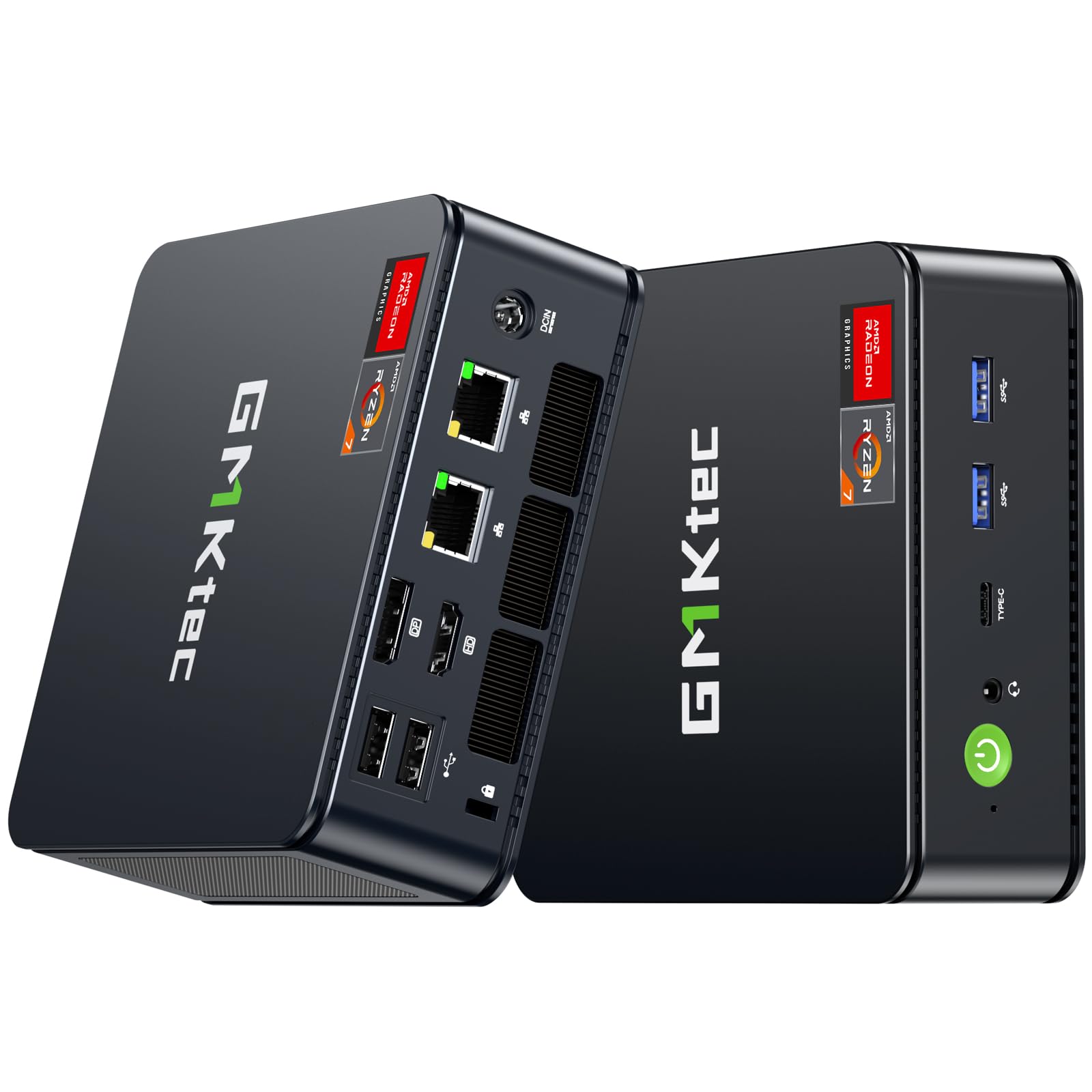
The GMKtec M5 Ultra delivers serious processing power in a tiny footprint thanks to the AMD Ryzen 7 7730U, an 8-core, 16-thread chip based on Zen 3+ architecture. With 32GB of dual-channel DDR4 RAM and a 512GB PCIe 3.0 SSD, this mini PC handles Linux development, office multitasking, and even light gaming (World of Tanks at 40-60 FPS on low-medium) without breaking a sweat. The integrated Radeon Graphics with 8 cores at 2000 MHz supports triple 4K displays through HDMI 2.0, USB-C, and DisplayPort outputs.
One standout feature is the dual 2.5GbE LAN ports, making this an excellent choice for a PFSense firewall, home server, or NAS gateway. The inclusion of Wi-Fi 6E and Bluetooth 5.2 ensures modern wireless connectivity. Users report that the system runs cool and quiet at just 15 watts of typical power draw, which translates to significant energy savings over a traditional tower. The stock 512GB SSD can be expanded via a second M.2 slot up to 4TB total.
The plastic build feels less premium than metal-chassis alternatives, and the included instructions are sparse. Some units may ship with malware-prone recovery software, so a clean Windows install is recommended. The front headphone jack is a minor convenience, but overall, this is a powerhouse for developers and server enthusiasts who value space efficiency and dual LAN capabilities.
Why it’s great
- Dual 2.5GbE ports ideal for homelab and router use
- Triple 4K display support with capable integrated GPU
- Extremely low 15W power draw for 24/7 operation
Good to know
- Plastic chassis feels less durable than metal alternatives
- Includes potentially unwanted bloatware on the recovery image
4. GEEKOM IT12 Business Mini PC
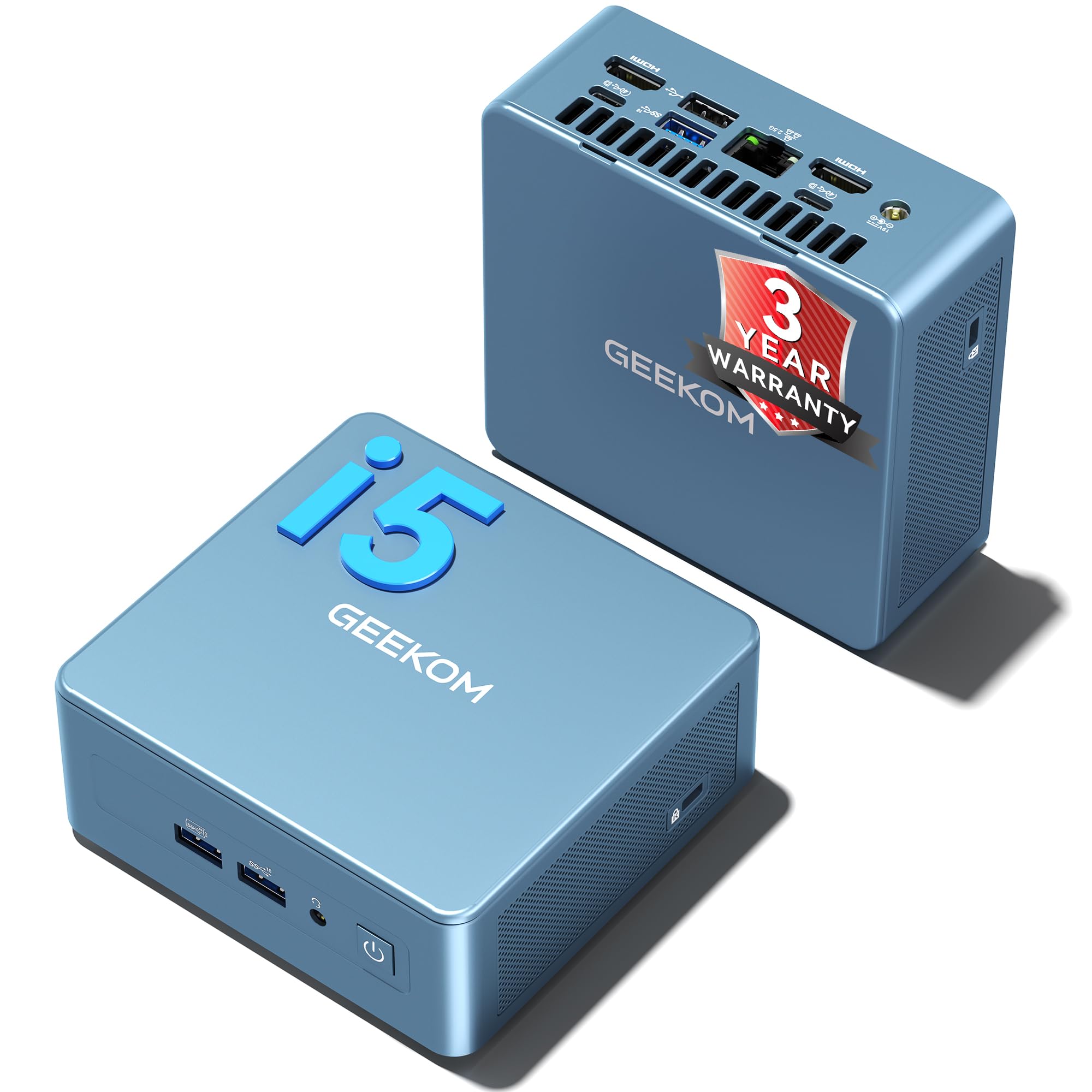
The GEEKOM IT12 targets enterprise and prosumer users who need a reliable 24/7 machine for tasks like Plex media serving, CAD design, or digital signage. The Intel Core i5-12450H processor with Intel UHD Graphics accelerates 4K transcoding by 30% via Intel Quick Sync, and its single-core performance rivals the AMD Ryzen 9 6900HX. With 16GB of expandable RAM (up to 96GB) and a 512GB NVMe SSD, it handles multiple virtual machines and resource-heavy applications without stuttering.
The IceBlast 2.0 cooling system boosts heat dissipation by 52% and cuts noise by 40%, which is critical for noise-sensitive environments like a home office or recording studio. Dual USB4 ports support 40Gbps data transfer and 8K display output, while the dual HDMI 2.0 ports handle 4K@120Hz. The 2.5GbE LAN and Wi-Fi 6E ensure fast, stable network connectivity for cloud-based workloads. The three-year warranty with US-based support and local repair options sets it apart from most mini PCs.
The bundled 16GB RAM and 512GB SSD are adequate for most business workflows, but power users will want to upgrade to higher capacity immediately. Some customer reports mention instability with certain USB peripherals under heavy load, though firmware updates have addressed many of these issues. The design is utilitarian and won’t win style points, but for a silent, capable media server or business workstation, it’s a top contender.
Why it’s great
- Excellent cooling keeps performance stable under 24/7 load
- Dual USB4 and 8K display support for future-proof connectivity
- Three-year warranty with US-based support and local repair
Good to know
- Base RAM and SSD capacity may need upgrades for heavy workflows
- Utilitarian design lacks aesthetic flair
5. HP Pro Tower 290 G9

HP’s Pro Tower 290 G9 is built for the corporate environment: reliable, serviceable, and secure. The Intel Core i5-12500 processor with 6 Performance-cores and 4 Efficiency-cores (up to 4.6 GHz turbo) delivers snappy responsiveness in Office 365, browser-based applications, and data analysis tools. The 16GB of DDR4 RAM handles multiple simultaneous applications without slowdown, while the 512GB PCIe NVMe SSD provides lightning-fast boot and file access. Intel UHD Graphics 770 supports dual monitors via HDMI and VGA, which is ideal for spreadsheet-heavy workflows.
Connectivity is generous with four USB 3.0 ports on the front and four USB 2.0 ports on the rear, plus a dedicated headphone/mic combo. The TPM 2.0 security chip and lock slot make it suitable for office environments where data protection is a priority. The 80 Plus Gold-rated 180W power supply is efficient and runs cool. Users report that the system is whisper-quiet even under sustained load, and the compact tower design (11.92″ x 6.1″ x 13.27″) fits easily under a desk or in a credenza.
The Intel UHD 770 integrated GPU cannot handle modern gaming or GPU-accelerated rendering tasks, so this is strictly a productivity machine. The included wired keyboard and mouse are basic but functional. Some users have noted Bluetooth connectivity quirks with certain peripherals, though these are generally resolved with driver updates. For a dependable, no-nonsense business desktop with solid brand support, the HP Pro Tower is a safe bet.
Why it’s great
- Fast 12th-gen i5 processor with hybrid architecture
- TPM 2.0 and lock slot for office security compliance
- Quiet, compact design with 80 Plus Gold PSU
Good to know
- Integrated graphics unsuitable for gaming or GPU-accelerated work
- Included peripherals are basic and may be replaced
6. Dell Slim Desktop ECS1250

The Dell Slim Desktop ECS1250 is a modern replacement for aging office computers, powered by the Intel Core Ultra 5-225 processor with built-in AI acceleration for tasks like background blur in video calls and real-time transcription. The 16GB of DDR5 memory and 512GB M.2 SSD deliver snappy performance for web browsing, document editing, and media consumption. The slim tower design, crafted from recycled materials, fits easily into small workspaces without sacrificing expandability — the tool-less side panel lets you access internal components for quick upgrades.
Display connectivity is robust: you can run up to four FHD monitors using DisplayPort 1.4a daisy chaining, or two 4K displays via HDMI 2.1 and DisplayPort 1.4a. This makes it an excellent choice for traders, analysts, or anyone who needs extensive screen real estate. The hardware TPM security chip and lock slot provide basic security for sensitive data. Dell includes a 1-year onsite service plan and a 6-month Dell Migrate tool for easy data transfer from an old PC.
The integrated Intel UHD Graphics is adequate for productivity but cannot handle gaming or GPU-intensive tasks. Some users report that the included wired keyboard and mouse feel cheap, and the lack of a dedicated GPU means no support for CUDA-accelerated applications. For basic home use or as a secondary workstation, it’s a well-built, reliable choice with a sustainable design philosophy.
Why it’s great
- Intel Core Ultra processor with built-in AI acceleration
- Multi-monitor support with DisplayPort daisy chaining
- Tool-less chassis for easy upgrades and sustainable materials
Good to know
- Integrated GPU limits this to productivity and media tasks
- Included peripherals are basic quality
7. GMKtec M2 Pro S

The GMKtec M2 Pro S packs an 11th-gen Intel Core i7-1185G7 processor with Iris Xe Graphics G7 (96 EU), delivering strong single-threaded performance that rivals newer chips in many productivity tasks. With 16GB of dual-channel DDR4 RAM and a 1TB NVMe SSD, this mini PC boots quickly and handles multitasking with ease. The standout feature is its ability to drive three 4K displays simultaneously via two HDMI 2.0 ports and one USB-C port — a rare capability at this price point, ideal for financial dashboards or digital signage.
The 2.5GbE LAN port and Wi-Fi 6 ensure fast network transfers, and Bluetooth 5.2 supports modern peripherals. Despite its compact size, the M2 Pro S includes dual SSD slots (M.2 2280 and M.2 2242) for expansion up to 4TB total storage. Users report that the system stays cool even in challenging environments like a garage with temperatures up to 90°F, thanks to an efficient cooling fan design. The included VESA mount allows easy attachment behind a monitor for a completely hidden setup.
The 11th-gen processor is now a generation behind current Intel offerings, so raw multi-core performance lags behind i5-12450H or newer AMD chips. Some units may ship with AI bloatware on the recovery image that requires a clean Windows install to remove. The front-facing headphone jack is a minor ergonomic win. For a quiet, multi-monitor mini PC that fits anywhere, the M2 Pro S is a solid mid-range contender.
Why it’s great
- Drives three 4K displays simultaneously with Iris Xe graphics
- Generous 1TB NVMe SSD and dual storage slots
- Compact design with included VESA mount for clean setups
Good to know
- Processor is a generation behind current Intel offerings
- Recovery image may include unwanted software
8. Skytech Gaming Azure 3

The Skytech Azure 3 is built for high-refresh-rate 1440p gaming, combining an AMD Ryzen 7 7700X with an NVIDIA GeForce RTX 5070 12GB on a liquid-cooled platform. The 32GB of DDR5 RAM at 6000 MHz RGB ensures snappy multitasking, while the 1TB Gen4 NVMe SSD delivers sub-second loading in large open-world games. The 360mm AIO liquid cooler keeps CPU temperatures in check during extended sessions, preventing thermal throttling even under sustained all-core loads. With no bloatware pre-installed, the system boots straight into Windows 11 without unnecessary clutter.
Graphics output via HDMI and DisplayPort supports high-refresh monitors, and the 850W 80+ Gold ATX 3.0 power supply provides headroom for future GPU upgrades. The tempered glass case with ARGB fans looks striking, though the proprietary fan connections may complicate future fan swaps. Users report that the system handles demanding titles like Call of Duty, Cyberpunk 2077, and Elden Ring at ultra settings with smooth 60+ FPS performance at 1440p resolution. The 360mm AIO liquid cooler is a significant advantage over air-cooled competitors at this price tier.
The included keyboard and mouse are functional but basic. Some users note that the fans can become audible under heavy load, though the liquid cooler keeps overall noise lower than air-cooled alternatives. The 1-year warranty on parts and labor is standard for prebuilt gaming PCs. For gamers who want a turnkey 1440p machine with liquid cooling and a clean software experience, the Skytech Azure 3 is a compelling option.
Why it’s great
- RTX 5070 12GB delivers excellent 1440p ultra settings performance
- 360mm AIO liquid cooler prevents thermal throttling
- No bloatware pre-installed for a clean Windows experience
Good to know
- Fans can become audible under sustained heavy load
- Included keyboard and mouse are entry-level
9. msi Codex Z2

The msi Codex Z2 is a purpose-built gaming desktop that focuses on cooling and expandability. Powered by an AMD Ryzen 7 8700F processor and NVIDIA GeForce RTX 5070 12GB, this rig handles competitive shooters at high frame rates and AAA titles at 1440p with ray tracing enabled. The 32GB of DDR5 RAM ensures smooth multitasking during streaming or Discord calls, while the generous 2TB NVMe SSD provides ample storage for a large game library without needing an immediate upgrade.
The chassis features four system cooling fans — three front intake and one rear exhaust — that maintain low temperatures even during extended gaming sessions. The ARGB air cooler keeps the CPU within safe operating ranges without the complexity of liquid cooling. Users report smooth 160Hz gaming performance at 1440p, with fast game loading and minimal stutter. The MSI LED button on the front panel cycles through lighting effects without requiring software, which is convenient for users who prefer a hardware-based adjustment.
Some users have reported Bluetooth connectivity issues that required a separate PCIe Wi-Fi/BT card upgrade, and a few experienced early SSD failures that were resolved under warranty. The fans can become loud under heavy load, which is typical for air-cooled gaming rigs. For competitive gamers who prioritize raw frame rates and storage capacity over absolute silence, the msi Codex Z2 offers strong value with a reliable cooling design.
Why it’s great
- Large 2TB NVMe SSD eliminates need for immediate storage upgrade
- Effective air cooling with four case fans for sustained gaming
- Hardware LED button for lighting control without software
Good to know
- Bluetooth module may need replacement for reliable connectivity
- Fans can become loud under sustained heavy load
10. Alienware Aurora ACT1250

The Alienware Aurora ACT1250 is a statement piece as much as a gaming machine, with a matte basalt black finish, customizable AlienFX stadium lighting, and a clear side panel showcasing the Intel Core Ultra 7 265F processor and NVIDIA GeForce RTX 5070 12GB. With 32GB of DDR5 RAM and a 1TB SSD, it handles the latest games, streaming, and multitasking with ease. The 1000W Platinum-rated power supply provides clean, stable power for extended gaming sessions and headroom for future upgrades.
The Alienware Command Center software lets you customize lighting across the ecosystem, choose performance modes, and create game-specific profiles. The optimized chassis includes a 120mm fan for CPU cooling and a 120mm fan for exhaust, keeping temperatures manageable under load. Users report that the system remains fairly quiet during normal use, though it can become audible under sustained gaming. The included keyboard and mouse are functional, and the 1-year onsite service provides peace of mind for hardware issues.
Some units have arrived with cosmetic defects like a misaligned USB-C port or a non-functional front ring light, requiring Dell support intervention — which can be a mixed experience. The proprietary chassis design limits upgrade options compared to standard ATX cases. For buyers who prioritize brand aesthetics and a cohesive RGB ecosystem over raw component value, the Alienware Aurora delivers a premium experience with the support backing of Dell.
Why it’s great
- Premium build with customizable AlienFX lighting zones
- 1000W Platinum PSU provides clean power and upgrade headroom
- 1-year onsite service for convenient hardware support
Good to know
- Quality control issues reported with some units
- Proprietary chassis limits future component upgrades
11. Horizon Autherium Dragon

The Horizon Autherium Dragon is an unapologetically maxed-out gaming and workstation PC, packing an unlocked Core i9 processor that boosts up to 5.4 GHz, 64GB of DDR5 RAM, and a massive 5TB of combined storage (1TB M.2 NVMe + 4TB 7200RPM HDD). The NVIDIA GeForce RTX 5070 OC 12GB handles VR, AI deep learning tasks, and 4K gaming with DLSS 4.0 support. The system uses a 360mm AIO liquid cooler with 11 total fans (including GPU and PSU fans) to maintain stable temperatures under extreme loads.
This machine is designed for users who multitask without compromise — running virtual machines, editing 4K video timelines, and gaming simultaneously without stuttering. The 7 visible ARGB fans and dragon front panel create a distinctive aesthetic that stands out in any setup. Connectivity includes a USB-C 3.2 port, eight USB 3.0 ports, and a 2.5GbE LAN port for fast network transfers. The 850W 80+ Gold PSU with x6 extra SATA connectors supports extensive storage expansion.
Customer support is a strong point, with a 3-year parts warranty and 5-year labor warranty, plus direct access to experienced specialists. Some users have reported that the included 7200RPM HDD uses an older SATA interface, which is slower than modern NVMe storage for active workloads. The system runs hot under sustained load, requiring good airflow in the room. For users who want an uncompromised machine that handles everything from CAD to VR gaming, the Horizon Autherium Dragon is a top-tier choice.
Why it’s great
- Massive 64GB RAM and 5TB storage for extreme multitasking
- Excellent customer support with 3-year parts warranty
- 360mm AIO liquid cooling with 11 fans for thermal headroom
Good to know
- 4TB HDD is slower SATA interface, not NVMe
- Generates significant heat under sustained load
FAQ
How much RAM do I actually need for gaming in 2025?
Is an integrated GPU enough for video editing and light rendering?
Should I get a mini PC or a traditional tower for home office use?
Final Thoughts: The Verdict
For most users, the best computer winner is the CyberPowerPC Gamer Master because it offers the best balance of modern gaming performance, DDR5 memory, and upgrade-friendly components at a very accessible price point. If you want a clean, all-in-one design that eliminates cable clutter and includes a great display, grab the Dell 27 All-in-One. And for the ultimate workstation that handles VR, CAD, and heavy multitasking without compromise, nothing beats the Horizon Autherium Dragon.

Mo Maruf
I created WellFizz to bridge the gap between vague wellness advice and actionable solutions. My mission is simple: to decode the research and give you practical tools you can actually use.
Beyond the data, I am a passionate traveler. I believe that stepping away from the screen to explore new environments is essential for mental clarity and physical vitality.