Our readers keep the lights on and my smoothie glass nicely filled. As an Amazon Associate, I earn from qualifying purchases.
Specs are compiled from manufacturer listings and verified buyer reviews and can change over time — please confirm the key details on the product page before buying.
Finding a desktop that handles both a heavy workday and serious gaming without breaking a sweat or your budget depends on one thing: picking the right blend of processor, graphics card, and memory for what you actually do. Whether you are running financial models, editing video, or playing the latest titles, the wrong mix leaves you waiting for apps to load or dropping frames mid-game.
I’m Mohammad Maruf — the founder and writer behind WellFizz. This guide is built by comparing the manufacturers’ published specifications and the patterns across verified customer reviews, so you get each pick’s real strengths and trade-offs instead of marketing spin.
No matter if you need a professional workstation or a gaming rig, each option below delivers strong performance for the price. Read on to find the computer under 1500 that fits your exact needs.
Quick Picks
- Gaming Desktop PC Computer Liquid Cooled 12-Core Processor, GeForce RTX 4060 — Best Overall
- CyberPowerPC Gaming PC, AMD Ryzen 7 8700F, GeForce RTX 5060 Ti 8GB — Top Performer
- Lenovo Legion Tower 5i AI-Powered Gaming PC, Core Ultra 7 265F, RTX 5060 Ti — Great Value
- Alienware Aurora Gaming Desktop ACT1250, Core Ultra 7 265F, RTX 5060Ti — Premium Pick
- KOTIN Prebuilt Gaming PC, Ryzen 7 9700X, RTX 5060, 32GB DDR5, 11.3″ Display — Best Display
- Skytech Gaming Crystal Gaming PC, Ryzen 7 5700, RTX 5060, 32GB DDR4 — Best Value
- HP OmniDesk Desktop Computer PC, AMD Ryzen 7 8700G, 32GB DDR5 — Compact Pick
- YAWYORE Gaming PC, AMD Ryzen 7 5700X, GeForce RTX 5060, 32GB DDR4 — Entry-Level Power
- Thermaltake LCGS View i1460-170 Gaming Desktop, i5-14400F, RTX 5060 — Upgradable Gaming
- Dell Pro Tower Business Desktop, 14th Gen Intel Core i5-14500 vPro — Business Power
- Dell Tower Desktop ECT1250, Intel Core Ultra 7-265, 32GB Memory — AI-Ready
- Acer Aspire Business Desktop, 16GB DDR5 RAM, 1TB Storage (512GB SSD + 500GB HDD) — Budget Office
- HP Pro Tower 290 G9 Business Desktop Computer, Intel i5-12500
How To Choose The Best Computer Under 1500
The key is to match the hardware to the task. A machine built for data entry will struggle with video editing, and a gaming-focused rig may not have the security features a business needs. Look for the component that matters most for your primary use case.
Processor (CPU)
The CPU is the brain of the computer. For general office work, browsing, and streaming, an Intel i5 or AMD Ryzen 5 is plenty. For heavy multitasking, video rendering, or simulation, step up to a higher-core-count i7 or Ryzen 7. The clock speed (measured in GHz) tells you how fast each core runs, while the core count tells you how many tasks it can juggle at once.
Graphics Card (GPU)
This is the most crucial component for gaming and creative work. An integrated GPU (built into the CPU) is fine for basic office use, but for modern games, 3D modeling, or video editing, you need a dedicated card like an NVIDIA GeForce RTX 5060. The VRAM (video memory) on the card is key—8GB is the current balance for 1080p to 1440p gaming.
Memory (RAM)
RAM is the short-term memory your computer uses for active tasks. 16GB is the standard for smooth multitasking and most games. 32GB is ideal for heavy workloads like virtual machines, video editing, and high-end gaming. Don’t forget the generation—DDR5 is faster and more efficient than older DDR4.
Storage (SSD vs HDD)
A solid-state drive (SSD) makes everything feel snappy—your computer boots in seconds, and games load in a fraction of the time compared to an old hard drive (HDD). An NVMe SSD is the fastest type. Many builds pair a speedy SSD for the operating system with a larger HDD for storing photos, videos, and older games.
Quick Comparison
| Model | Best For | Processor | RAM | Graphics | Amazon |
|---|---|---|---|---|---|
| Gaming Desktop PC Liquid Cooled | High-FPS Gaming | 12-Core Xeon processor | 64GB | RTX 4060 | Amazon |
| Acer Aspire Business Desktop | Budget Office Work | i3-14100T | 16GB DDR5 | Integrated | Amazon |
| HP Pro Tower 290 G9 | Reliable Business | i5-12500 | 16GB DDR4 | Integrated | Amazon |
| Dell Pro Tower i5-14500 vPro | Business Productivity | i5-14500 vPro | 16GB DDR5 | Intel UHD 770 | Amazon |
| HP OmniDesk Ryzen 7 8700G | All-in-One Media | Ryzen 7 8700G | 32GB DDR5 | Radeon 780M | Amazon |
| Skytech Gaming Crystal | 1080p E-Sports | Ryzen 7 5700 | 32GB DDR4 | RTX 5060 | Amazon |
| Dell Tower ECT1250 | AI-Ready Productivity | Core Ultra 7-265 | 32GB | UHD Graphics | Amazon |
| Thermaltake View i1460 | Upgradable Gaming | i5-14400F | 16GB DDR5 | RTX 5060 | Amazon |
| YAWYORE Gaming PC | Budget High-End Gaming | Ryzen 7 5700X | 32GB DDR4 | RTX 5060 | Amazon |
| Lenovo Legion Tower 5i | AAA Gaming | Core Ultra 7 265F | 16GB DDR5 | RTX 5060 Ti | Amazon |
| CyberPowerPC Gamer Master | Future-Proof Gaming | Ryzen 7 8700F | 16GB DDR5 | RTX 5060 Ti | Amazon |
| Alienware Aurora ACT1250 | Premium Brand Gaming | Core Ultra 7 265F | 16GB DDR5 | RTX 5060Ti | Amazon |
| KOTIN G60B | High-End 1440p Gaming | Ryzen 7 9700X | 32GB DDR5 | RTX 5060 | Amazon |
In‑Depth Reviews
1. Gaming Desktop PC Computer Liquid Cooled 12-Core Processor, GeForce RTX 4060

The liquid-cooled beast that packs 64GB of RAM for heavy multitasking.
This machine throws an enormous amount of memory at the problem. With 64GB of DDR4 RAM, you can run a dozen browser tabs, a virtual machine, a video editor, and a game all at once without stuttering. That is 64GB versus the 16GB you get in the Acer Aspire Business Desktop, which makes this the right pick if your work or play involves many heavy apps running simultaneously.
The GeForce RTX 4060 graphics card (8GB GDDR6 memory, a dedicated card that handles its own video processing) handles modern games at high settings in 1080p. The liquid cooling keeps temperatures stable during long sessions, and the included 650W power supply gives you headroom for upgrades. Buyers report that the 12-core Xeon processor and RTX 4060 deliver high fps for competitive titles and smooth modern visuals right from the start.
The catch is the older-generation Xeon processor platform, which means you get a high core count but not the latest CPU architecture found in newer Intel Core or AMD Ryzen chips. This is a trade-off for the massive RAM and dedicated GPU at a mid-range price.
Raw performance value: The 64GB RAM plus RTX 4060 combo gives you serious multitasking and gaming power for the money, beating many similarly priced systems on memory capacity alone.
Honest trade-off: The older Xeon platform limits future CPU upgrade paths and single-core speed for some games.
Reach for this if: You need a huge amount of RAM for heavy multitasking, virtual machines, or demanding creative work alongside gaming.
Look elsewhere if: You want the absolute latest CPU architecture or plan to upgrade the processor later, as the socket is outdated.
2. CyberPowerPC Gaming PC, AMD Ryzen 7 8700F, GeForce RTX 5060 Ti 8GB

The future-proof gaming rig with an upgradable AM5 platform.
This build centers on the AMD Ryzen 7 8700F processor and the NVIDIA GeForce RTX 5060 Ti 8GB graphics card, which uses newer GDDR7 video memory for faster data transfer than the GDDR6 found in regular RTX 5060 cards. It delivers excellent 1080p and solid 1440p gaming, with buyers noting it runs games like Call of Duty on ultra settings at around 60 FPS. The RTX 5060 Ti also comes with 2 DisplayPort outputs and 1 HDMI, giving you flexibility for multi-monitor setups.
The AM5 socket motherboard is the key advantage here. Unlike the Lenovo Legion Tower 5i which also has an RTX 5060 Ti but with 16GB of DDR5, the CyberPowerPC lets you upgrade the processor for years without replacing the motherboard. It includes 16GB of fast DDR5 RAM and a 1TB PCIe 4.0 NVMe SSD (a very fast solid-state drive that plugs directly into the motherboard). One reviewer noted the case is easy to work with for future upgrades, and the 650W Gold PSU provides stable power.
Be aware that the DDR5 RAM capacity is 16GB, which is less than the 32GB found in the YAWYORE or KOTIN builds, so heavy multitaskers may want to upgrade sooner.
Why it stands out
- RTX 5060 Ti with faster GDDR7 memory for better gaming performance
- AMD AM5 socket allows easy CPU upgrades in the future
- Includes WiFi 6 and Bluetooth 5.3 for modern wireless connectivity
Know before you buy
- Only 16GB DDR5 RAM, less than some competitors for heavy multitasking
- Some users report needing to adjust RGB color settings from limited to full for best display quality
Best for upgraders: Pick this if you want a solid gaming PC today and the option to drop in a newer processor later without buying a whole new motherboard.
skip it if: You need 32GB of RAM from day one for heavy multitasking and virtual machine workloads.
3. Lenovo Legion Tower 5i AI-Powered Gaming PC, Core Ultra 7 265F, RTX 5060 Ti

A premium brand name with an RTX 5060 Ti and a sturdy upgrade path.
Lenovo brings its reputation for reliability to the Legion Tower 5i, packing an Intel Core Ultra 7 265F processor (up to 5.3 GHz) and an NVIDIA GeForce RTX 5060 Ti 8GB graphics card. This combination lets you play modern AAA games at high settings and tackle creative projects without lag. The 180W optimized air cooling system keeps things quiet under load, so the machine doesn’t sound like a jet engine during a gaming session.
The true standout is the 2.5G Ethernet port, which gives you much faster wired network speeds than the standard 1G port on most other PCs here. This matters if you transfer large files across a home network or play online games with high bandwidth demands. Owners mention it runs a golf simulator perfectly with no lag or freezing, and specifically appreciate that the specs are accurately listed without vague promises. The 16GB of 5600MHz DDR5 memory is upgradeable up to 128GB, and the tool-less side panel makes it easy to install new parts.
At 16GB of RAM, it starts with the same memory as the CyberPowerPC, and the expandability to 128GB means you can add more later as your needs grow.
Brand and performance balance: Lenovo’s build quality, 2.5G Ethernet, and upgrade-friendly chassis make this a strong pick for gamers who also want a professional look.
The catch: 16GB of RAM is a starting point, and you may want to budget for a memory upgrade sooner than with a 32GB system.
Go for this if: You want a respected brand name, a powerful RTX 5060 Ti, and fast wired networking for online gaming or large file transfers.
Consider another if: You need 32GB of RAM immediately for heavy multitasking or video editing.
4. Alienware Aurora Gaming Desktop ACT1250, Core Ultra 7 265F, RTX 5060Ti

Alienware’s iconic design meets strong performance with a clear side panel.
The Alienware Aurora is a statement piece. It comes with an Intel Core Ultra 7 265F processor that can boost up to 5.5 GHz and a large 66MB of cache memory (the processor’s own quick-access storage, versus the 24MB cache on the Dell Pro Tower i5-14500, which helps with high-speed data retrieval). The NVIDIA GeForce RTX 5060Ti handles modern games with ease, and the 500W Platinum-rated PSU delivers power efficiently.
The design is a big part of the appeal. The matte “basalt black” finish and customizable AlienFX lighting zones, including the stadium lighting on the front, let you match the look to your setup. The clear side panel shows off the internal components and RGB lighting. Dell backs it with 1 Year Onsite Service, meaning a technician will come to your home if something breaks, which is a higher level of support than most competitors offer.
The 16GB of DDR5 RAM is the bare minimum for a premium gaming PC at this price, and the air cooling, while effective, may not handle sustained heavy loads as quietly as the liquid-cooled KOTIN or the Evounic pick.
What stands out
- Alienware brand prestige with a unique, customizable lighting design
- Large 66MB cache for fast processor data access
- Dell Onsite Service provides support at your home
Things to consider
- 16GB of RAM is a lower starting amount for this price tier
- 500W PSU is lower wattage than the 650W units in many competing gaming PCs
Choose this for: The Alienware aesthetic, the in-home warranty service, and a powerful current-gen CPU/GPU combo.
Think twice if: Maximizing RAM capacity or having a higher wattage PSU for future upgrades is your priority.
5. KOTIN Prebuilt Gaming PC, Ryzen 7 9700X, RTX 5060, 32GB DDR5, 11.3″ Display
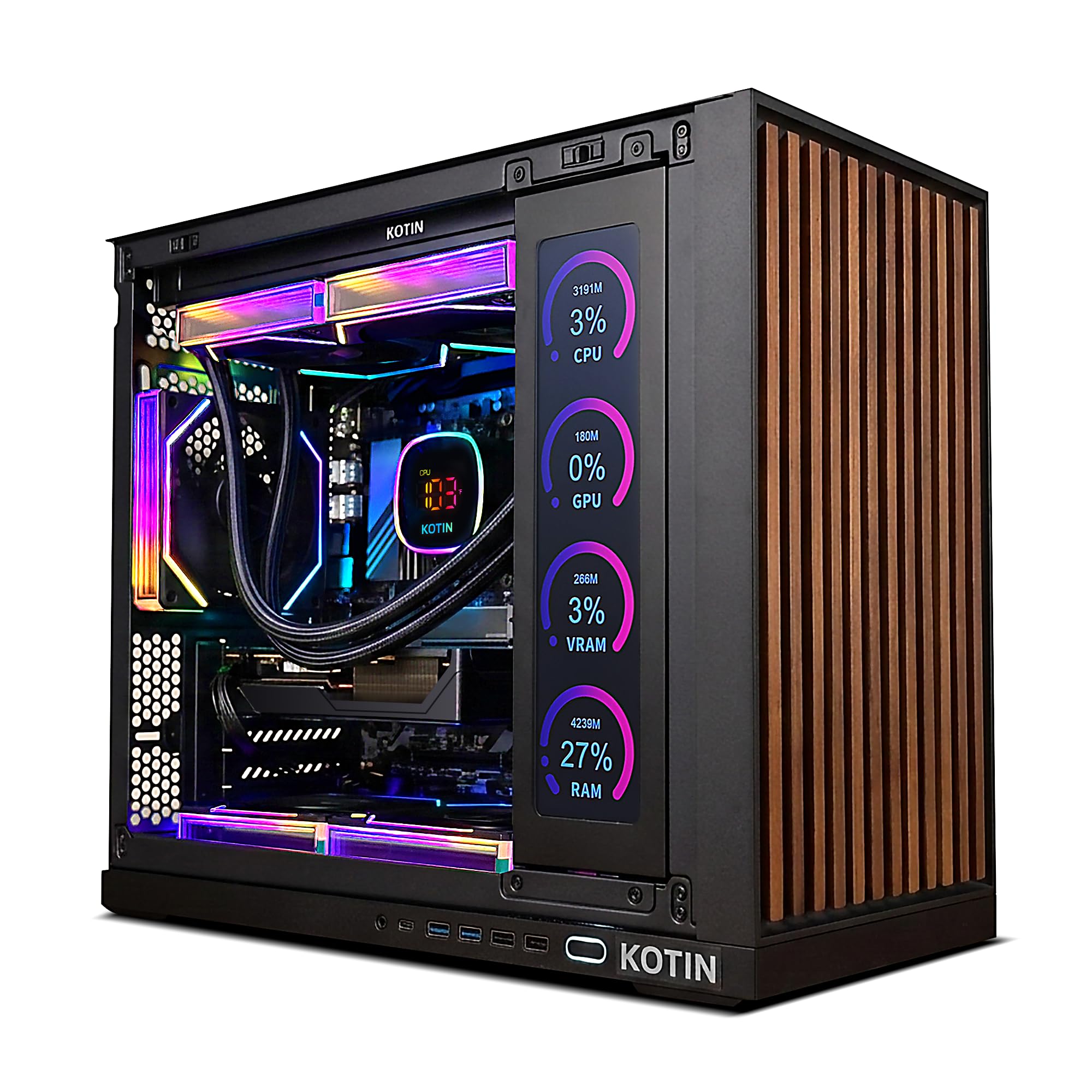
A showstopper with an integrated smart display and 32GB of fast DDR5 memory.
The KOTIN G60B has a unique feature: an 11.3-inch smart display built into the front of the case that shows real-time system info like your CPU temperature, the weather, and the time. You can glance at it to see how hard your system is working without opening any software. It also comes with a 360mm digital liquid cooler that keeps the Ryzen 7 9700X processor (up to 5.5 GHz) running at peak performance during long gaming or rendering sessions.
Inside, you get 32GB of fast DDR5 6000MHz RAM and a 1TB PCIe 4.0 SSD with read speeds up to 6000MB/s. This means lightning-fast game loads and smooth multitasking. The GeForce RTX 5060 8GB card, paired with the 32GB RAM, makes this a capable 1440p gaming machine, with buyers reporting 120+ fps at 1440p on many games with ease.
The 650W 80 PLUS Gold PSU gives you solid, efficient power, and the 3 M.2 slots (including one PCIe 5.0 slot) offer plenty of expansion room for additional storage.
Unique visual appeal: The 11.3-inch side display is a genuinely useful monitoring tool and a conversation starter, while the 32GB of DDR5 RAM provides top-tier multitasking.
The honest trade-off: Some customers note the side display can have functionality issues, and the brand is less established than Dell or Lenovo for warranty support.
Ideal for enthusiasts: Get this if you want the fastest RAM, a unique monitoring display, and liquid cooling for a powerful Ryzen 7 processor.
Pass on this if: You prefer a well-known brand for long-term warranty support and are not interested in the side screen.
6. Skytech Gaming Crystal Gaming PC, Ryzen 7 5700, RTX 5060, 32GB DDR4
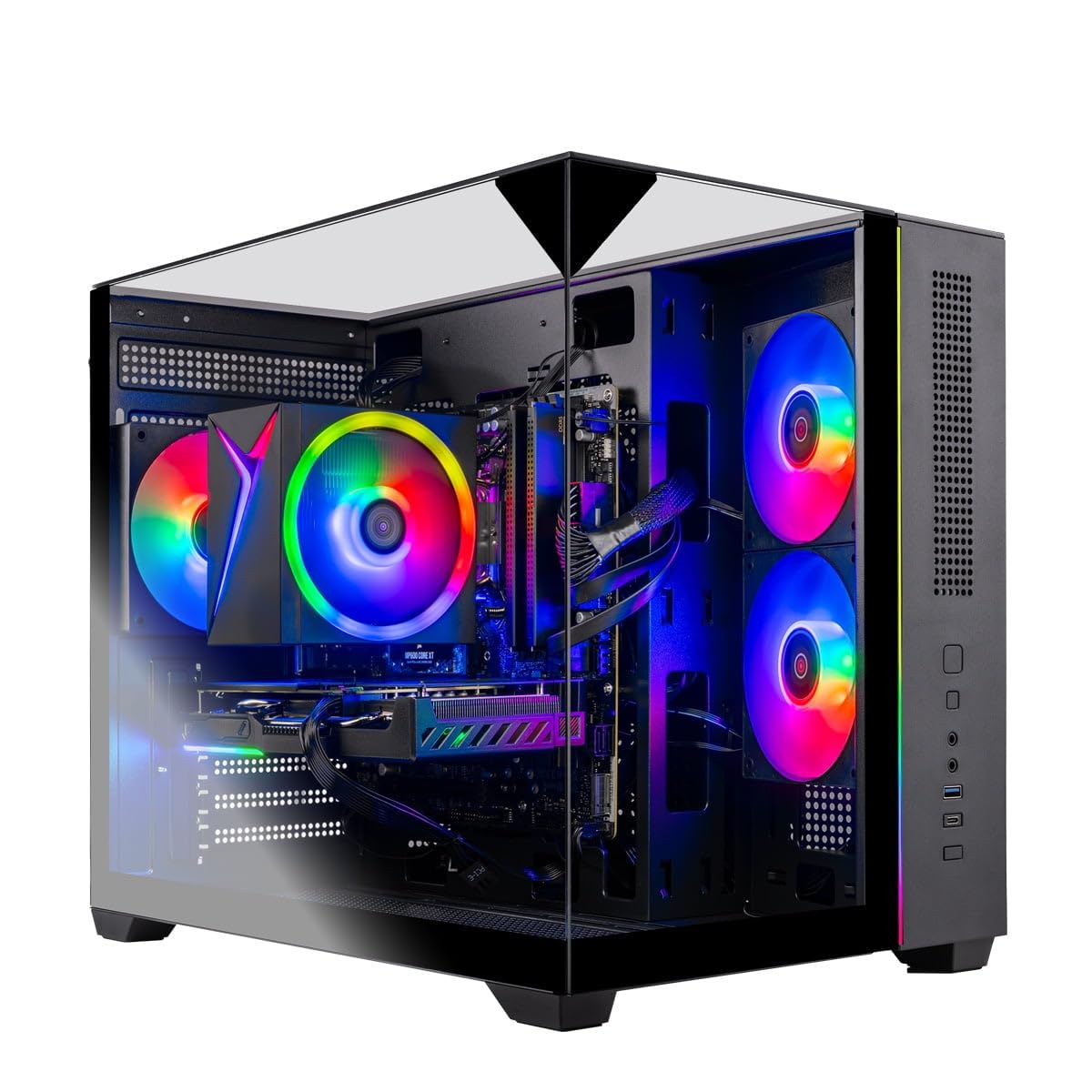
Excellent 1080p gaming value with a generous 32GB of RAM.
The Skytech Gaming Crystal balances price and performance well. It features an AMD Ryzen 7 5700 processor (up to 4.6 GHz) and an NVIDIA GeForce RTX 5060 8GB graphics card, which is more than enough to run popular e-sports titles and many AAA games at ultra settings in 1080p with smooth frame rates. The 32GB of DDR4 RAM at 3200MHz gives you plenty of headroom for running games, Discord, and a browser all at once.
Storage is handled by a 1TB NVMe M.2 SSD, which is up to 30x faster than a traditional hard drive. This means your games and operating system load in a blink. The Skytech Crystal case features triple tempered glass panels, so you can show off the internal components and ARGB fans. An included gaming keyboard and mouse mean you can get started right away.
The main difference between this and pricier options is the use of DDR4 instead of DDR5 memory, and the Ryzen 7 5700 is a previous-generation chip compared to the newer Ryzen 7 8700F or Core Ultra 7 found in other picks.
Why it delivers
- 32GB of DDR4 RAM is excellent for multitasking and gaming
- RTX 5060 handles 1080p ultra and 60+ FPS gameplay easily
- 650W Gold PSU provides efficient and stable power
What to note
- DDR4 RAM is previous-generation, which limits future CPU upgrade potential
- Ryzen 7 5700 is a last-gen processor
Perfect for budget gamers: Pick this if you want a high-FPS 1080p gaming machine with plenty of RAM right now and aren’t worried about the latest CPU socket.
Consider a DDR5 model if: You want the best possible platform for future CPU upgrades.
7. HP OmniDesk Desktop Computer PC, AMD Ryzen 7 8700G, 32GB DDR5

An integrated GPU powerhouse for media and light gaming in a compact tower.
The HP OmniDesk uses the AMD Ryzen 7 8700G processor, which is special because it has built-in Radeon 780M graphics that are much more powerful than typical integrated graphics. You can play many modern games at 1080p with decent settings without needing a separate graphics card. It also includes AMD Ryzen AI with 16 NPU TOPS (a dedicated part of the processor for handling AI tasks faster), which helps with software that uses AI features like video conferencing background effects or photo editing tools.
With 32GB of fast DDR5-5200 MT/s memory and a 1TB PCIe Gen4 NVMe SSD, this machine feels snappy for everything from web browsing to video editing. It supports up to 3840×2160 (4K) resolution over its ports. Reviewers point out it works well as a living room media PC and starter gaming system, though they note the included keyboard and mouse feel lower quality than the PC itself.
Like the Dell Tower ECT1250, this lacks a dedicated graphics card, so it cannot match the raw gaming power of the RTX 5060-based systems in this list.
Integrated power: The Radeon 780M graphics are the strongest integrated solution available, making this a great choice for a compact media center or light gaming PC.
Know the limit: For heavy modern games at high settings, you will need a system with a dedicated RTX 4060 or RTX 5060 card.
Best for media enthusiasts: Grab this if you need a small, quiet desktop for 4K video, light gaming, and everyday tasks with plenty of RAM.
Avoid if: Playing the latest AAA games at high settings is your primary goal.
8. YAWYORE Gaming PC, AMD Ryzen 7 5700X, GeForce RTX 5060, 32GB DDR4

A value-focused build with a reliable MSI motherboard and strong gaming specs.
The YAWYORE PC combines an AMD Ryzen 7 5700X processor (8 cores, 16 threads, up to 4.6 GHz) with an NVIDIA GeForce RTX 5060 8GB graphics card. This is a potent combination for 1080p and entry-level 1440p gaming. It uses a known MSI B550M-A PRO motherboard, which gives you a reliable base and good upgrade potential for storage and RAM within the AM4 platform.
With 32GB of DDR4 3200MHz RAM and a 1TB M.2 NVMe SSD, you have enough memory for heavy multitasking and fast load times. A 650W 80 Plus Bronze power supply keeps everything running stably. Buyers were pleasantly surprised by the build quality, noting the boxy tower design looks like an “aquarium” and the included liquid cooler with ARGB fans is very quiet and controllable via remote. The shock-absorbing foam in the chassis ensures safe shipping.
The main drawbacks are the older DDR4 RAM (which is slower than the DDR5 in the KOTIN or Lenovo builds) and the AM4 platform, which is not upgradeable to the latest AMD Ryzen 9000 series processors.
What we like
- Trusted MSI motherboard provides a stable foundation
- 32GB DDR4 RAM and RTX 5060 make it a strong value for the price
- Included liquid cooler keeps things quiet
Good to know
- AM4 platform limits future CPU upgrades to previous-gen chips
- DDR4 RAM is slower than DDR5 used in newer competing builds
Ideal for value hunters: Pick this if you want a solid 1080p gaming PC with 32GB of RAM and a known quality motherboard at a very competitive price.
Think about a DDR5 build if: You plan to keep the PC for many years and want the fastest possible upgrade path.
9. Thermaltake LCGS View i1460-170 Gaming Desktop, i5-14400F, RTX 5060

A thoughtfully engineered prebuilt from a respected DIY brand.
Thermaltake is known for its PC components, and the LCGS View i1460 reflects that expertise. It features an Intel Core i5-14400F processor (which lacks integrated graphics, meaning it relies entirely on the dedicated GPU) and an NVIDIA GeForce RTX 5060 8GB card. This is a powerful setup for 1080p gaming and solid for 1440p. The included ARGB tower air cooler handles heat well, and the PSU has a filtered, ventilated side mount for clean airflow.
The standout spec here is the 16GB of DDR5 6000MT/s RGB memory—this is very fast RAM that helps your processor access data quickly, improving performance in games and demanding applications. In this price range, you are paying for a quality of components (motherboard, PSU, cooler) that you would choose yourself if building a PC. The Intel B760 chipset motherboard gives you a solid foundation for future upgrades.
With only 16GB of RAM, it is a step behind the 32GB systems for heavy multitasking, and the 1TB NVMe M.2 drive is your only storage, with no extra HDD for bulk file storage.
Component quality: The fast DDR5 6000 memory and Thermaltake-branded parts this PC uses are the same high-quality components a DIY builder would pick.
Consider this: If you appreciate a system built from quality parts that is easy to upgrade, and you value fast RAM over the total RAM capacity.
Great for DIY fans: Choose this if you like the idea of a prebuilt that uses the same quality parts you would buy for a custom build, with easy upgrade access.
Pick a 32GB model if: You know you will be running many demanding applications simultaneously right from the start.
10. Dell Pro Tower Business Desktop, 14th Gen Intel Core i5-14500 vPro
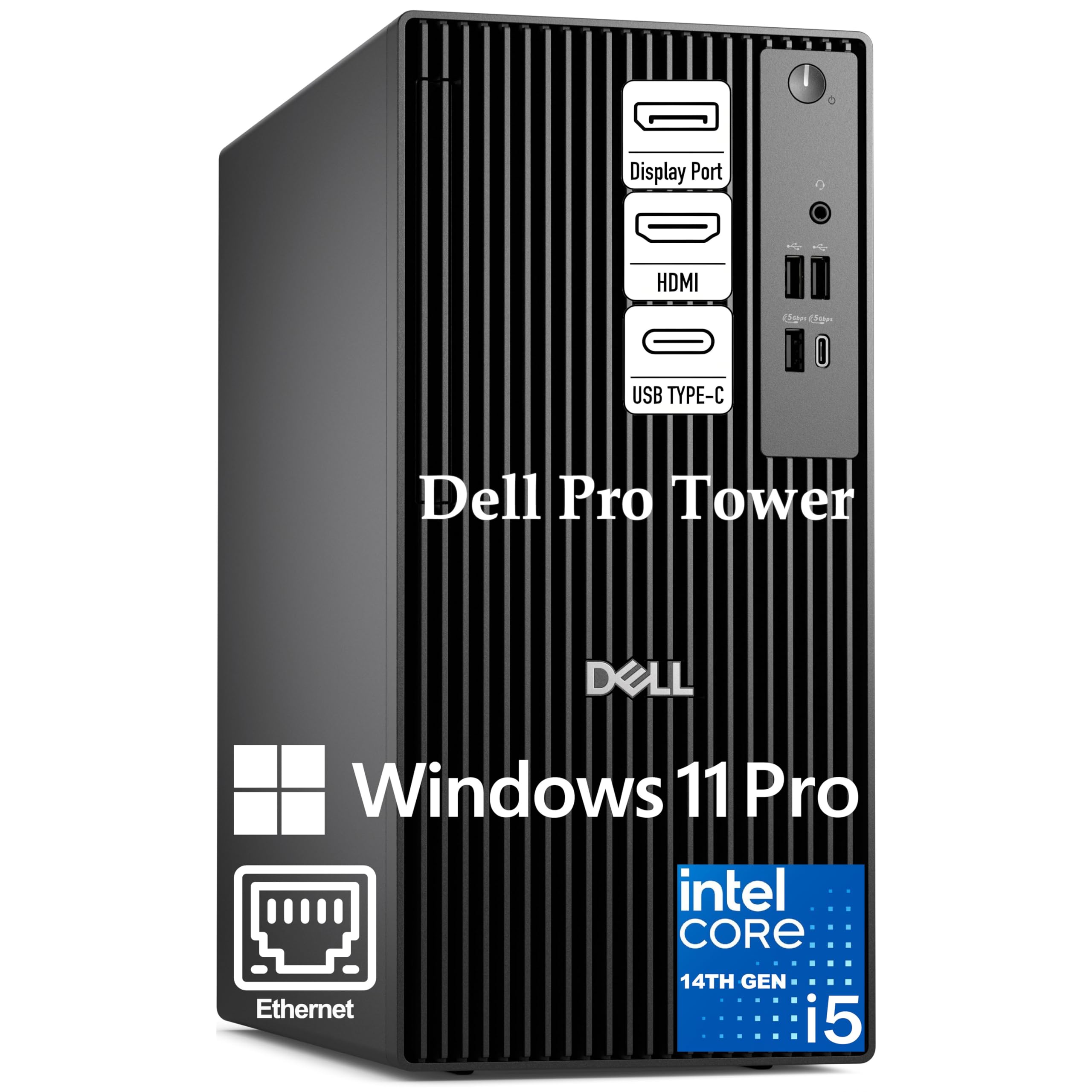
A secure, business-grade tower with 14 performance cores for professional workflows.
The Dell Pro Tower is built for serious office productivity. Its 14th Gen Intel Core i5-14500 vPro processor has 14 cores (6 high-performance cores plus 8 efficient cores) and 20 threads, with a max boost of 5.0 GHz. The “vPro” in the name means it includes hardware-based security and remote manageability features that IT departments rely on.
It comes with 16GB of DDR5 RAM and a 512GB PCIe NVMe SSD. The Intel UHD Graphics 770 can drive two 4K displays at once via the HDMI 2.1 and DisplayPort 1.4a ports, which is ideal for financial analysts or project managers who need massive desktop space. The compact 11.5-inch chassis fits neatly on any desk, and the front USB 3.2 Gen 1 Type-C port makes it easy to connect modern peripherals.
The integrated graphics mean it is not designed for gaming, and the 512GB SSD is smaller than the 1TB drives found in many other picks.
Why it works for work
- 14-core i5-14500 vPro with 24MB cache handles heavy business applications
- Dual 4K display support via HDMI 2.1 and DisplayPort 1.4a
- vPro technology provides enterprise-grade security and remote management
Keep in mind
- Integrated graphics are not suitable for gaming or GPU-intensive creative work
- Storage is limited to 512GB, which may fill quickly with large files
Built for professionals: Choose this if you need a secure, powerful machine for demanding business tasks and multi-monitor productivity.
Look at a gaming system if: You also plan to do any gaming or 3D modeling work, as the integrated GPU cannot handle those tasks.
11. Dell Tower Desktop ECT1250, Intel Core Ultra 7-265, 32GB Memory

A modern business desktop with built-in AI acceleration for next-gen tasks.
The Dell Tower ECT1250 is equipped with the new Intel Core Ultra 7-265 processor, which has a built-in AI accelerator (NPU) to speed up AI-powered tasks like background blur in video calls, photo editing filters, and real-time language translation. This makes it a forward-looking choice for professionals who use software with AI features. With 32GB of memory and a 1TB M.2 SSD, it handles heavy multitasking without breaking a sweat.
Connectivity is a highlight. It can support up to four FHD monitors using DisplayPort and daisy chaining (a way to connect multiple monitors in a series), or two 4K displays via the HDMI 2.1 port. The tool-less entry and removable side panel make upgrades like adding more RAM or storage very simple. It also has a built-in 3.0 SD card reader, which is handy for photographers and videographers. Dell includes 1 Year Onsite Service for added confidence.
Like other office-focused systems, it uses integrated graphics, so it is not designed for gaming or GPU-heavy creative workloads.
AI-ready and expandable: The Core Ultra 7 processor with its NPU is a step ahead for AI-accelerated productivity software, and the tool-less design makes upgrades easy.
Honest limitation: The integrated UHD Graphics cannot handle modern games, so this is strictly for office and creative productivity.
Perfect for the future of work: Get this if you want a powerful, upgrade-friendly desktop that is ready for AI-enhanced software and supports multiple high-resolution monitors.
Avoid for gaming: This is not the right choice if you plan to play PC games, as it lacks a dedicated graphics card.
12. Acer Aspire Business Desktop, 16GB DDR5 RAM, 1TB Storage (512GB SSD + 500GB HDD)

A surprisingly capable budget desktop with the modern DDR5 memory standard.
The Acer Aspire Business Desktop is an entry-level tower that punches above its price. It uses a 14th Gen Intel Core i3-14100T processor (4 cores, up to 4.4 GHz) and 16GB of DDR5 RAM. DDR5 is a newer, faster memory standard than the DDR4 found in the HP Pro Tower 290 G9, so this budget PC actually has more modern memory than a business-focused PC costing more. The processor is said to beat the Intel i5-12400T in some tasks despite having fewer cores, due to its newer architecture.
Storage is split: a 512GB NVMe SSD for your operating system and main programs, plus a 500GB HDD for storing documents, photos, and older files. This gives you 1TB of total space. It includes WiFi 6 and Bluetooth 5.1 for wireless connectivity, and a USB 3.2 Type-C Gen 1 port on the front for modern devices. Buyers are very satisfied, calling it “great performance at a great price” and noting it is “very fast and affordable for the RAM and SSD.”
The integrated graphics mean no gaming, and the i3 processor may feel slow if you try to run very demanding professional software or have dozens of browser tabs open all at once.
Surprising value
- DDR5 RAM brings modern speed to a budget-friendly desktop
- Dual storage (512GB SSD + 500GB HDD) offers a good balance of speed and capacity
- Includes a USB 3.2 Type-C port, WiFi 6, and a keyboard and mouse
What it lacks
- Integrated graphics limit it to basic office and web tasks
- i3-14100T is a 4-core processor, which may struggle with heavy multitasking
Perfect for basic office: Pick this if you need a very affordable desktop for email, web browsing, and office documents with the benefit of modern DDR5 RAM.
Spend more if: You need a faster processor for heavy multitasking, data analysis, or any form of video editing or gaming.
13. HP Pro Tower 290 G9 Business Desktop Computer, Intel i5-12500

A trusted HP business tower with a 6-core i5 for reliable daily productivity.
The HP Pro Tower 290 G9 is a straightforward, reliable business desktop. It is powered by the Intel Core i5-12500 processor, which has 6 performance cores running at up to 4.6 GHz and an 18MB cache. This is a solid step up in performance from the i3 in the Acer and gives you more room for multitasking.
It comes with 16GB of DDR4 RAM and a 512GB PCIe NVMe SSD for fast boot times. The connectivity suite is a highlight: the front panel offers 4 USB 3.0 ports (each capable of 5Gbps transfer speeds), and the rear offers 4 USB 2.0 ports, HDMI, VGA, and an RJ-45 Ethernet port. This allows for easy connection to dual monitors and multiple peripherals. Shoppers say it has “fast speed for daily use and streaming” and is a “good value and reliability.” The compact tower measures 11.92 inches deep and is very quiet in operation.
The 512GB SSD is smaller than many competitors, and a reviewer noted it can struggle with many open apps at once, meaning the 16GB of DDR4 RAM is a base configuration for lighter workloads.
Why it’s a solid choice
- Reliable HP build quality with a trusted brand name
- 6-core i5-12500 provides strong performance for business tasks
- Excellent selection of front USB 3.0 ports for easy peripheral access
What to watch for
- DDR4 RAM is a generation behind the DDR5 found in the Acer Aspire
- 512GB storage is limited for users with large file libraries
Ideal for office and streaming: Choose this if you want a quiet, dependable PC from a trusted brand for everyday office work, video calls, and media consumption.
Consider a larger SSD if: You need to store a large collection of files, video projects, or games locally on the machine.
Understanding the Specs
Processor Cores and Cache
A processor’s core count tells you how many tasks it can handle simultaneously. A 4-core i3 is fine for basic work, but an 8-core Ryzen 7 or 14-core i5 can run many heavy programs at once without slowing down. The cache memory, measured in MB, is the processor’s own quick-access storage. A larger cache (like 24MB in the Dell Pro Tower versus 18MB in the HP Pro Tower) helps the CPU access frequently used data faster, which improves responsiveness in demanding tasks like data analysis or compiling code.
DDR4 vs DDR5 RAM
RAM is your computer’s short-term memory. The generation matters a lot. DDR5 is the newer standard and is noticeably faster than DDR4. It transfers data at a higher speed and uses less power, which can help your system feel more responsive in games and heavy multitasking. If you see a system with DDR5, it is a more modern and future-proof choice than one with DDR4, even if both have the same capacity (like 16GB).
FAQ
Can I upgrade the graphics card in these prebuilt computers later?
Is a computer with 16GB of RAM enough for gaming in 2025?
What is the difference between an integrated GPU and a dedicated GPU?
Do I need a liquid-cooled computer?
What does vPro mean on the Dell Pro Tower processor?
Will an RTX 5060 handle 1440p gaming well?
How important is the power supply wattage?
What is a PCIe 4.0 NVMe SSD?
Can I connect multiple monitors to these computers?
Is a 1TB SSD enough storage?
Final Thoughts: The Verdict
For most people, the computer under 1500 winner is the Gaming Desktop PC Liquid Cooled 12-Core Processor because it offers an class-leading 64GB of RAM and a dedicated RTX 4060, giving you heavy multitasking and strong gaming performance at a mid-range price. If you want the best future-proof gaming platform, grab the CyberPowerPC Gamer Master with its AM5 socket and RTX 5060 Ti. And for serious business productivity with enterprise security, the standout is the Dell Pro Tower with Intel vPro.
How We Picked
We do not accept paid placement. Every pick is matched to a real buyer and a real use-case; we do not hands-on test units.
Sources & Methodology
Specifications: manufacturer listings and product documentation. Review insights: verified customer reviews, as of July 2026. Pricing: not shown on this page (it changes often); check the current price via the retailer link.
As an Amazon Associate, WellFizz earns from qualifying purchases. This does not affect which products we feature.

Mo Maruf
I created WellFizz to bridge the gap between vague wellness advice and actionable solutions. My mission is simple: to decode the research and give you practical tools you can actually use.
Beyond the data, I am a passionate traveler. I believe that stepping away from the screen to explore new environments is essential for mental clarity and physical vitality.