Our readers keep the lights on and my smoothie glass nicely filled. As an Amazon Associate, I earn from qualifying purchases.
Specs are compiled from manufacturer listings and verified buyer reviews and can change over time — please confirm the key details on the product page before buying.
The case you pick decides whether your expensive CPU and GPU run cool and quiet or choke on their own heat. You want a computer tower that delivers strong airflow, fits your motherboard and graphics card, and does not turn your desk into a wind tunnel. This guide breaks down nine of the best options across different budgets and priorities — from budget-friendly builds to premium showpieces — so you can pick the one that actually fits your hardware and your noise tolerance.
I’m Mohammad Maruf — the founder and writer behind WellFizz. This guide is built by comparing the manufacturers’ published specifications and the patterns across verified customer reviews, so you get each pick’s real strengths and trade-offs instead of marketing spin.
Whether you are building your first rig or upgrading an existing one, the right chassis keeps your CPU and GPU cool and quiet. That is why we have put together this honest breakdown of the best computer towers for every type of builder and every budget.
Our Picks at a Glance



How To Choose The Best Computer Towers
You need to match your case to three things: your motherboard size (ATX, Micro-ATX, or Mini-ITX), your graphics card length, and whether you plan to use liquid cooling. A mid-tower handles most builds. A full-tower gives you room for extra drives and huge radiators. Budget cases often skimp on included fans or cable management — but the picks below prove you do not have to overspend for quality.
Motherboard Form Factor and Size
Your motherboard size decides the case form factor you need. ATX motherboards fit inside ATX mid-towers and full towers. Micro-ATX boards fit inside most mid-towers too, but Mini-ITX boards need a compact case. Always check the case’s compatible devices list — the product data above confirms every case here supports standard ATX boards.
GPU Clearance and Cooling Support
Modern graphics cards are large. You need at least 350mm of GPU clearance for most high-end cards. The cases here support GPUs ranging from 370mm up to 420mm. Also check CPU cooler height — big air coolers need 160mm or more. If you plan a liquid cooler, confirm the case fits your radiator size (240mm, 360mm, or 420mm) in the top or front.
Fan Count and Pre-Installed Fans
The number of fans a case includes directly affects your build cost. Some cases ship with one or two fans, forcing you to buy more. Others include five, seven, or even ten fans right from the start. The picks below range from two pre-installed 140mm fans to seven RGB fans — so you can match your cooling needs without extra spending.
Quick Comparison
| Model | Best For | Fan Count | GPU Clearance | Radiator Support | Amazon |
|---|---|---|---|---|---|
| Lian Li Vector V100★ Best Overall | Best Overall | 4 ARGB PWM | 420mm | 360mm | Amazon |
| MONTECH XR-BBest Value | Value Pick | 3 ARGB PWM | 40 series GPUs | 360mm | Amazon |
| CORSAIR 4000D RS FrameTop Performer | Modular Airflow | 3 RS PWM | Large GPUs | 360mm (multiple) | Amazon |
| MUSETEX Y6 | RGB Showcase | 7 Infinity Mirror | 410mm | 360mm | Amazon |
| be quiet! Pure Base 501 | Silent Builds | 2 Pure Wings 3 140mm | High-end GPUs | 360mm front / 240mm top | Amazon |
| Lian Li LANCOOL 217 | Premium Cooling | 5 (2x170mm, 2x120mm, 1x140mm) | Large GPUs | 360mm | Amazon |
| Antec Performance 1 FT | Full Tower Space | 4 Storm T3 PWM | 370mm | 360mm | Amazon |
| ASUS TUF Gaming GT502 | Dual Chamber | None (supports up to 10+) | 400mm | 360mm and 280mm | Amazon |
| NZXT H9 Flow RGB+ | Premium Dual Chamber | 7 RGB (6x140mm, 1x120mm) | High-end GPUs | 420mm | Amazon |
In‑Depth Reviews
1. Lian Li Vector V100 ATX Mid-Tower PC Case
Our pick — over 4.5★ from 400+ verified ratings; the strongest balance of quality and price.
The crowd favorite delivers premium features at a surprisingly low price.
This case ships with four pre-installed PWM-controlled 120mm ARGB fans — three in the front for intake, one in the rear for exhaust. Those fans move a lot of air (up to 61.47 CFM) while staying quiet at 26.5 dBA. Buyers report that it is a “dream to build in, pre-wired/managed,” and the spacious interior handles GPUs up to 420mm and CPU coolers up to 178mm with ease.
Cable management is a standout here. The built-in routing channels and included GPU sag bracket make the build process smooth. The tempered glass side panels use a tool-less mounting mechanism, so you can pop them off without fumbling for screws. At 4 internal bays, it offers 33% more storage space than the MONTECH XR-B (which has 3 bays), giving you more room for drives.
The trade-off? The open, airflow-focused design means poor sound isolation — you will hear your components under load. But for the price, the value is undeniable. The quality (74 mentions) and appearance (51 mentions) are what win people over.
What Wins Owners Over
- Pre-installed 4 ARGB fans with daisy-chain connectivity for easy setup
- Spacious interior fits massive GPUs up to 420mm and 360mm radiators
- Tool-less side panels and included GPU sag bracket simplify the build
The Honest Trade-Off
- Open design does not dampen sound well — expect audible component noise
- Intake fan wires inside the case; rerouting them behind the motherboard tray gives a cleaner look
Reach for this if: you want a high-quality case with four great fans, easy cable management, and room for the biggest GPUs — all while staying affordable.
Think twice if: you need a silent build for a recording studio or quiet office; the mesh panels let sound escape freely.
2. MONTECH XR-B ATX Mid-Tower PC Gaming Case
A budget-friendly case that feels premium thanks to solid metal and smart design.
The XR-B includes three pre-installed ARGB fans — two reverse-blade units on the side and one regular-blade fan at the rear. They run at a max of 1500 RPM and are daisy-chained for easy plug-and-play setup. Buyers describe it as a “spacious ATX mid-tower, builder-friendly layout” with excellent cable management options thanks to generous space and tie-down points.
At 17.1 inches deep and 9 inches wide, it is notably more compact than the CORSAIR 4000D RS (19.17 x 9.41 inches) — a 12% size difference — yet it still supports 360mm radiators (liquid-cooling radiators that are 360mm long) and high-end 40-series GPUs (graphics cards from Nvidia’s RTX 40-series). The wood-grain I/O interface (input/output panel where you plug in USB and audio) adds a unique touch that separates it visually from the black-box competition. Three dust filters cover the top, bottom, and side panels, keeping the interior clean.
Owners praise the “high-quality metal construction” and professional appearance. The recurring minor gripe is that the glass panel can arrive with scratches or smudges — treat it with care during unboxing.
Why It Stands Out
- Three pre-installed ARGB fans (2 reverse-blade) for excellent out-of-box cooling
- Compact dimensions (17.1 x 9 x 17.7 inches) while fitting 360mm radiators
- Three dust filters (top, bottom, side) and tool-less drive bays
What to Watch For
- Glass panel may have light scratches or smudges on arrival — inspect immediately
- Side panel is a tight fit when closing; align carefully to avoid pressure
Perfect for: builders on a tight budget who still want a metal case with RGB fans, good airflow, and clean cable routing.
Consider another if: you plan a massive custom loop with a 420mm radiator — this case tops out at 360mm support.
3. CORSAIR 4000D RS Frame Modular Mid-Tower PC Case
Modular versatility lets you reconfigure the case as your build evolves.
The 4000D RS uses CORSAIR’s FRAME modular system — you can swap the motherboard tray for a billet aluminum version or change the front I/O panel for more USB ports later. It comes with three pre-installed RS PWM fans that support Zero RPM mode, meaning they stop spinning entirely at low loads for near-silent operation. Buyers confirm that it offers “excellent airflow with no dead zones; CPU/GPU temps stabilize quickly.”
The InfiniRail fan mounting system lets you slide fans anywhere along the front and roof rails, supporting fans up to 200mm in the front and 140mm in the roof. This flexibility means you can target airflow exactly where your hottest components sit. The 3D Y-pattern steel front panel pulls in cool air with minimal restriction. The case also supports ASUS BTF, Gigabyte Project Stealth, and MSI Project Zero back-connect motherboards for cable-free builds.
The one challenge owners note: the glass side panel is difficult to remove and install upright because there are no alignment guides, increasing the risk of drops. The PSU cable hole is also tight for thick power supply cables.
Standout Flexibility: The FRAME system means this case grows with you — upgrade the motherboard tray or I/O panel years later instead of buying a whole new case.
The Clumsy Catch: The glass panel lacks alignment guides, making removal stressful; plan to work on a soft surface.
4. MUSETEX Y6 ATX Mid Tower Computer Case

Seven Infinity Mirror fans and wraparound glass make this the ultimate light show.
The Y6 ships with seven pre-installed 120mm Infinity Mirror ARGB fans (addressable RGB fans that create an infinite-mirror light effect) — three reverse-blade on the side, three reverse-blade on the bottom, and one forward fan on the rear. According to the brand, these are MUSETEX’s 9th-generation prism fans, producing “continuous gradient rainbow light bands with smooth, silky-smooth color transitions.” The 270-degree dual tempered glass panels let you see every component from almost every angle.
Inside, the case supports ATX, Micro-ATX, and Mini-ITX motherboards, GPUs up to 410mm, and CPU coolers up to 160mm. The front I/O includes a Type-C port, a USB 3.0 port, and a USB 2.0 port. Owners highlight the “spacious design, strong airflow, and impressive pre-installed ARGB fans” as major wins.
The mixed feedback centers on cable management. With a full ATX board, the space gets tight, and there are no bottom cable cutouts. Best for Micro-ATX builds if you want the cleanest wiring. The fans also use a ribbon connector (2-pin), which means you cannot control each fan’s color individually — they all run as one zone.
Visual Punch: Seven fans with Infinity Mirror effects create lighting that rivals custom RGB setups — all included in the box.
Space Reality: Cable management is tricky with a full-size ATX board; Micro-ATX builds have a much easier time here.
5. be quiet! Pure Base 501 Black ATX Case
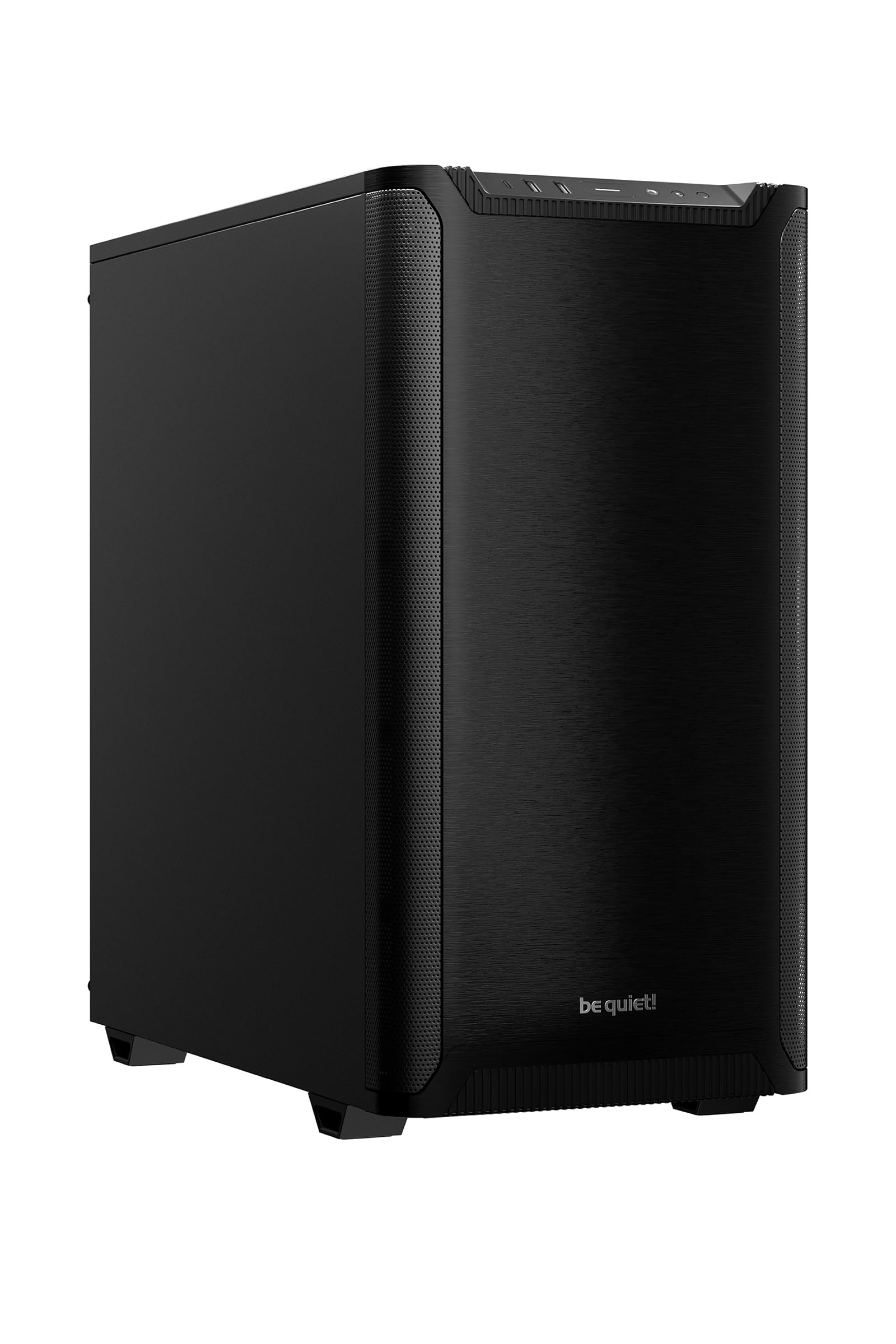
A compact case obsessed with silence — two 140mm fans that barely whisper.
The Pure Base 501 comes with two pre-installed Pure Wings 3 140mm PWM fans, each with seven airflow-tune blades that reduce noise-generating turbulence. Owners confirm the “PC silent except gaming” — even under load, the case stays remarkably quiet thanks to heavy foam insulation on the side panels. The quiet operation is the most-praised aspect, with 17 owners singling it out.
Despite its compact dimensions (17.72 x 9.09 x 17.68 inches), it still supports front radiators up to 360mm and top radiators up to 240mm. The PCIe slots rotate 90 degrees for a vertical GPU installation, and the included riser cable foam base provides anti-sag support. Front I/O includes USB 3.2 Gen 2 Type-C and two Type-A ports.
The one design note: the top panel is permanently vented with no solid cover included. This means CPU fan noise is more noticeable from the top, though the included fans themselves are nearly silent. The dust filters on the side panels also pop off pretty easily when you move the case around.
Acoustic Excellence: Two 140mm fans plus foam insulation keep this case quiet enough for a recording studio or a shared office.
The Vent Caveat: The permanently open top panel lets out CPU fan noise; a top-mounted AIO or a low-noise CPU cooler helps.
6. Lian Li LANCOOL 217 ATX Mid-Tower PC Case

Two massive 170mm front fans and real walnut wood give this case both brawn and beauty.
The LANCOOL 217 includes five pre-installed fans: two 170x30mm front fans, two 120mm reverse-blade fans on the bottom, and one 140mm fan at the rear. The front fans can slide up or down — raise them toward the CPU for CPU-focused cooling or keep them in default position for balanced GPU and CPU airflow. Owners say it delivers “exceptional airflow” and keeps an i7-11700K and RTX 3080 Ti running cool.
The real wood accent (dark walnut in this black version) improve the look far beyond the typical all-black or all-white case. You also get two PSU mounting configurations — front-facing for easy cable management or standard orientation — accommodating PSUs up to 220mm. It supports back-connect motherboards for a cable-free front view. The build quality is the most-praised aspect, with 60 owners highlighting it.
Noise level receives mixed feedback — it is quiet at idle but becomes audible with all five fans running at full speed. The fan hub requires SATA power, so plan your PSU cabling accordingly.
Why It Impresses
- Two oversized 170x30mm front fans that move massive airflow with a slide-to-adjust cooling bias
- Real walnut wood accents for a refined, non-gamer aesthetic
- Dual PSU mounting options and back-connect motherboard support for clean builds
The Noise Reality
- All five fans at full speed produce noticeable sound — not silent under heavy load
- Fan hub needs SATA power, so factor that into your cable routing
7. Antec Performance 1 FT Full Tower PC Gaming Case

A full-tower with a built-in temperature display and room for E-ATX boards.
The Performance 1 FT is a full-tower case that supports E-ATX, ATX, Micro-ATX, and ITX motherboards. It comes with four Storm T3 PWM fans and includes a temperature display on the front panel — glance at it to see your system status without opening any software. The case ships with two cable covers to hide routing and a Type-C 10Gbps port on the front I/O.
Inside, you get space for GPUs up to 370mm and CPU coolers up to 165mm. It supports 6x 120mm or 4x 140mm fans total, plus a 360mm radiator in the top. The dual 4mm tempered glass side panels show off your build from both sides. Owners praise the “minimalist brushed aluminum design” and find cable management easy thanks to rubber-grommeted holes and labeled routing paths.
The included fans are quiet and non-RGB, which a buyer who wants minimal lighting will appreciate. The magnetic front grill feels a bit loose — it stays in place but does not have a firm lock. The 420mm radiator is too tight to fit comfortably, so stick with 360mm for top mounting.
Spacious and Smart: The temperature display and Antec iUnity software give you real-time PC stats without extra hardware.
Radiator Limitation: A 420mm radiator is a squeeze up top; this case works best with 360mm coolers.
8. ASUS TUF Gaming GT502 ATX Full Tower PC Case

A dual-chamber design that separates CPU and GPU cooling for better thermals.
The GT502 splits its interior into two chambers — the main chamber for the motherboard and GPU, and a rear chamber for the PSU and drives. This keeps cables hidden and allows independent cooling zones. It includes a vertical GPU mount and an anti-sag bracket. Buyers call it “built like a tank” with exceptional sturdiness, and they note it can accommodate up to 10 case fans (or 18 total including GPU and AIO fans).
The tool-free side panels release by pressing a hidden button on the rear. Tempered glass panels on the front and side give you a panoramic view of the main chamber. Front I/O includes USB 3.2 Gen 2 Type-C, two USB 3.0 ports, and an RGB button. At 400mm GPU clearance, it fits the largest cards on the market without issue.
No fans are included — you must buy your own. This is a blank canvas for builders who already have specific fans in mind. The case is also heavy at 10.5 kilograms, so moving it around requires some muscle. Velcro straps on the top help with transport.
The Best Features
- Dual-chamber layout keeps cables hidden and creates separate CPU/GPU cooling zones
- Tool-free side panels with a hidden button release for quick access
- Includes vertical GPU mount and anti-sag bracket from the start
What You Give Up
- No fans included — budget for a full set of case fans separately
- Heavy at 10.5 kg; the Velcro transport straps help but the size is still cumbersome
9. NZXT H9 Flow RGB+ (2025) Dual-Chamber ATX Mid-Tower

Seven RGB fans and a 420mm radiator capacity make this the ultimate showpiece.
The H9 Flow RGB+ ships with seven RGB fans — six 140mm F420 RGB Core fans and one 120mm F120 RGB Core fan in the rear — plus an NZXT Control Hub for centralized lighting and speed control. The dual-chamber design separates the PSU and drives from the main components, improving thermal performance and cable management. Owners say it is the “best case ever built in” with a premium dual-chamber layout.
It supports up to a 420mm radiator on the top and front-right, giving you serious flexibility for custom liquid cooling loops. The panoramic tempered glass panels give you a full view of the interior from the front and side. Back-connect readiness means it works with ASUS BTF and MSI Project Zero motherboards for a completely wire-free look in the main chamber. The case includes extra-wide cable channels, built-in Velcro straps, and tie-down points.
At 13.4 kilograms, this is a heavy case — moving it around requires planning. The fans can also be slightly noisy at full speed, though they are effective. The price is the highest in this lineup, reflecting the seven included RGB fans and the premium build.
Cooling Monster: Seven pre-installed RGB fans plus support for a 420mm radiator mean this case can handle the hottest components without breaking a sweat.
Weight and Cost: At over 13 kg and the highest price here, this is for builders who want maximum cooling and lighting without compromise.
Understanding the Specs
GPU Clearance
This is the maximum length of graphics card that fits inside the case. Modern high-end cards like the RTX 4090 can exceed 350mm. If you plan to buy a large GPU, choose a case with at least 370mm of clearance — the cases above range from 370mm to 420mm, so you have room to spare.
Fan Count and Pre-Installed Fans
More fans mean better airflow, but buying them separately adds cost. The cases above include between 2 and 7 fans from the start. If you want RGB lighting, look for cases with ARGB fans that sync with your motherboard software. If you prefer silence, look for larger 140mm fans that move the same air at lower RPM and lower noise.
Radiator Support
If you plan to use an all-in-one (AIO) liquid cooler, check radiator support. A 240mm radiator fits in most mid-towers. A 360mm radiator needs a case with top or front mounting space — all the cases here support 360mm. The NZXT H9 Flow RGB+ and Lian Li LANCOOL 217 also support 420mm radiators for custom loops.
Cable Management
Cases with dedicated cable channels, Velcro straps, and rubber grommets make building easier. Dual-chamber designs (like the ASUS GT502 and NZXT H9) hide cables completely in a separate compartment. Back-connect motherboard support takes this a step further by routing all cables behind the motherboard tray for a clean front face.
FAQ
Will a mid-tower case fit my ATX motherboard?
How do I know if my graphics card will fit inside a case?
What does “back-connect motherboard compatible” mean?
Is a full-tower case better than a mid-tower?
How many fans do I really need for a gaming PC?
What size radiator fits a 360mm AIO cooler?
Can I install a vertical GPU mount in these cases?
How important are dust filters on a PC case?
What does “tool-less side panel” mean?
Which case is best for a quiet office or recording studio?
Final Thoughts: The Verdict
Across the board, the computer towers winner is the Lian Li Vector V100 because it delivers four quality ARGB fans (addressable RGB fans you can control the lighting on), a spacious interior for the biggest GPUs (graphics cards), and tool-less panels — all at a price that undercuts nearly everything else. If you want the absolute best value with a unique wood-grain look, grab the MONTECH XR-B. And for a silent build with premium acoustics, the be quiet! Pure Base 501 is the one to reach for. Between the Lian Li Vector V100 and the CORSAIR 4000D RS, the Lian Li beats it on included fans (4 vs 3) and GPU clearance (420mm vs unspecified but typically around 360mm), while the CORSAIR wins on modular future-proofing with its FRAME system (a swappable I/O panel system). Pick the one that fits your cooling needs and your noise tolerance.
How We Picked
We do not accept paid placement. Every pick is matched to a real buyer and a real use-case; we do not hands-on test units.
Sources & Methodology
Specifications: manufacturer listings and product documentation. Review insights: verified customer reviews, as of July 2026. Pricing: not shown on this page (it changes often); check the current price via the retailer link.
As an Amazon Associate, WellFizz earns from qualifying purchases. This does not affect which products we feature.
Related Guides

Mo Maruf
I created WellFizz to bridge the gap between vague wellness advice and actionable solutions. My mission is simple: to decode the research and give you practical tools you can actually use.
Beyond the data, I am a passionate traveler. I believe that stepping away from the screen to explore new environments is essential for mental clarity and physical vitality.