Our readers keep the lights on and my smoothie glass nicely filled. As an Amazon Associate, I earn from qualifying purchases.
The tablet market now spans from budget-friendly workstations with bundled keyboards to premium slates carrying processing power that rivals laptops, but the real difference lies in how these devices handle daily multitasking, stylus input lag, and long-haul battery life. Choosing the right slate means understanding the trade-offs between operating system ecosystems, processor architecture, and display quality.
I’m Mohammad Maruf — the founder and writer behind WellFizz. I’ve spent countless hours analyzing processor benchmarks, RAM configurations, display resolutions, and real-world user feedback across dozens of models to separate the productivity powerhouses from the streaming-only companions.
After thorough research, I’ve curated this list of the best computer tablets to help you find the perfect balance of performance, portability, and value for your specific needs.
How To Choose The Best Computer Tablets
Selecting a tablet isn’t just about screen size. Your decision should hinge on processor architecture, RAM, display quality, storage, and the operating system ecosystem. Here’s the breakdown.
Processor and RAM: The Real Performance Drivers
The processor determines how fast apps load and how many you can run simultaneously. Mid-range tablets often use MediaTek Dimensity or Snapdragon chips, while premium models use Apple’s M-series or Samsung’s flagship processors. Physical RAM matters more than virtual RAM expansions — a tablet with 8GB physical RAM will outperform one with 4GB physical RAM even if both advertise 16GB total via virtual expansion. For heavy multitasking, look for at least 6GB of physical memory.
Display Panel and Resolution: Clarity Matters
IPS LCD panels are common in budget and mid-range tablets. They offer decent color accuracy and viewing angles. AMOLED and OLED panels, found in premium models, deliver deeper blacks, higher contrast, and richer colors, which is crucial for creative work and media consumption. Resolution above 2000 pixels wide (like 2.5K or 3K) provides sharper text for reading and finer detail for drawing. The 90Hz or 120Hz refresh rates reduce stylus latency and make scrolling feel smoother.
Operating System: Android vs iPadOS
Android tablets offer flexibility with expandable storage, multiple user profiles, and a wider range of price points. iPadOS provides a polished ecosystem with optimized apps, seamless handoff with Macs and iPhones, and superior stylus support through the Apple Pencil. Your choice should align with your existing devices and software needs — Android if you value customization and expandable storage, iPadOS for creative workflows and app optimization.
Storage and Expandability
Internal storage speeds up app loading and file access. MicroSD card support, common in Android tablets, allows you to expand storage for media files, documents, and apps. iPads do not offer expandable storage, so choose your capacity carefully — 64GB fills quickly with apps and media, while 256GB or 512GB is more future-proof for professionals.
Battery Life and Charging Speed
Battery capacity (mAh) is only part of the equation. Processor efficiency and display technology heavily influence real-world battery life. A premium tablet with an OLED display may last longer on a single charge than a budget tablet with a larger battery and less efficient processor, due to OLED’s power efficiency. Fast charging (20W or higher) reduces downtime — essential for students and professionals on the go.
Quick Comparison
On smaller screens, swipe sideways to see the full table.
| Model | Category | Best For | Key Spec | Amazon |
|---|---|---|---|---|
| Lenovo Idea Tab Pro | Premium Mid-Range | Students & Creative Work | 12.7″ 3K LCD, 90Hz, 10200mAh | Amazon |
| Samsung Galaxy Tab S11 | Premium | All-Round Productivity | 11″ Dynamic AMOLED 2X, S Pen | Amazon |
| Samsung Galaxy Tab S10+ | Premium Plus | Note-Taking & Media | 12.4″ AMOLED 2X, 10090mAh | Amazon |
| Apple iPad Pro 13″ (M5) | Flagship | Pro Creative Workflows | 13″ Ultra Retina XDR, M5 Chip | Amazon |
| Apple iPad Pro 13″ (M4 Renewed) | Premium Value | Budget-Conscious Professionals | 13″ Ultra Retina XDR, 256GB | Amazon |
| Lenovo Idea Tab | Mid-Range | College Study & Note-Taking | 11″ 2.5K IPS, 90Hz, 7216mAh | Amazon |
| Amazon Fire HD 10 | Entertainment | Media Consumption & Reading | 10.1″ 1080p Full HD, 3GB RAM | Amazon |
| Jeazans Android 16 Tablet | Budget Workstation | Student 2-in-1 Computing | 10.1″ 1280×800, 24GB RAM (3+21) | Amazon |
| FEONAL Android 16 Tablet | Budget Cellular | Basic Connectivity & Media | 11″ 1280×800, 4G LTE, 7000mAh | Amazon |
In‑Depth Reviews
1. Lenovo Idea Tab Pro

The Lenovo Idea Tab Pro bridges the gap between premium performance and reasonable cost. Its MediaTek Dimensity 8300 processor handles multiple Chrome tabs, streaming, and productivity apps without lag. The 12.7-inch 3K LCD display at 90Hz provides sharp text and smooth scrolling, while quad JBL-tuned speakers with Dolby Atmos deliver rich audio.
With 8GB of physical RAM and 128GB of storage, this tablet is ready for college workloads. The included Tab Pen Plus supports pressure sensitivity for note-taking and sketching. The 10200mAh battery lasts up to 11 hours of video streaming, and the 45W fast charging gets you back to full quickly — though you need a compatible PD charger to hit those speeds.
Circle to Search with Google and AI-powered note-taking features enhance productivity. Google Gemini integration assists with research and writing. The folio case included protects the tablet during transit. It supports microSD expansion up to 1TB for media libraries.
Why it’s great
- High-resolution 3K display with smooth 90Hz refresh rate
- Massive 10200mAh battery lasts through long study sessions
- Includes pressure-sensitive stylus and protective folio case
- AI-powered note-taking and Circle to Search boost productivity
Good to know
- Requires 45W PD charger for fast charging (not included)
- Heavier than premium tablets at 1.4 pounds
- LCD panel not as power-efficient as AMOLED for battery life
2. Samsung Galaxy Tab S11

The Galaxy Tab S11 is the flagship Android tablet for professional workflows. Its 11-inch Dynamic AMOLED 2X display delivers deep blacks and vibrant colors, with Vision Booster ensuring readability outdoors. The MediaTek processor powering this tablet is built on a 3nm process, delivering exceptional performance per watt for heavy multitasking and graphic design.
With 12GB of RAM and 128GB of expandable storage (up to 1TB via microSD), this tablet handles multiple apps, large files, and demanding creative software without hesitation. The included S Pen features near-zero latency for natural writing and drawing. Galaxy AI tools like Note Assist, Drawing Assist, and Circle to Search streamline productivity and creativity.
The IP68 rating means it survives spills, dust, and even submersion — ideal for field work or outdoor use. At only 5.5mm thick, it’s remarkably portable. The 8400mAh battery provides up to 18 hours of video playback. USB-C connectivity and Wi-Fi 6 ensure fast data transfers and streaming.
Why it’s great
- Stunning Dynamic AMOLED 2X display with Vision Booster
- 12GB RAM and expandable storage up to 1TB
- Superior S Pen with advanced Galaxy AI features
- IP68 dust and water resistance for durability
Good to know
- Premium price point reflects flagship features
- 60Hz display refresh rate (not 120Hz as in some competitors)
- Samsung ecosystem features may feel locked for some users
3. Samsung Galaxy Tab S10+ Plus
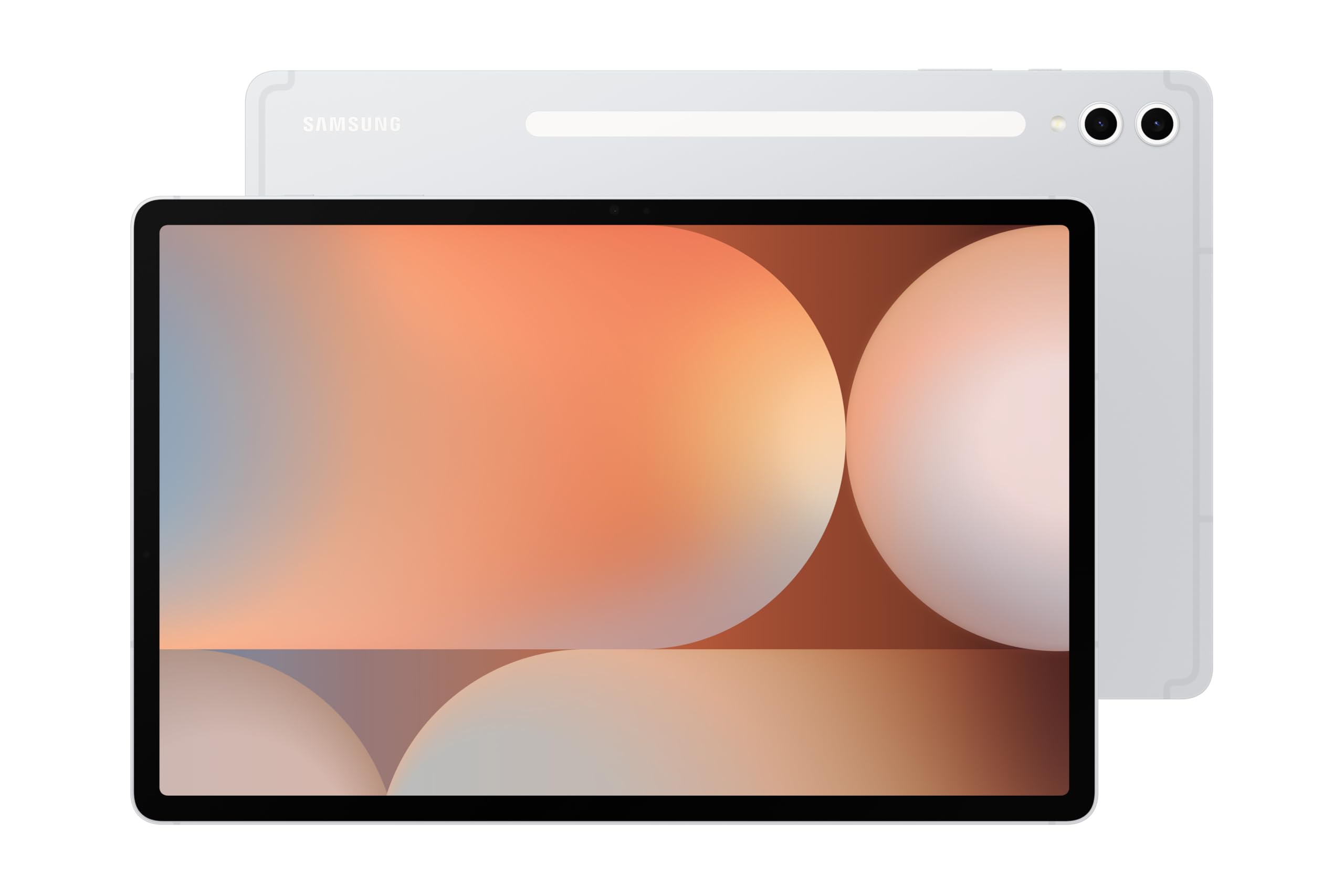
The Galaxy Tab S10+ expands the S series formula with a larger 12.4-inch AMOLED 2X display, perfect for media consumption and detailed note-taking. The MediaTek Dimensity 9300+ processor provides flagship-level performance for demanding apps, multitasking, and creative work. With 256GB of internal storage, you have ample space for documents, media, and projects.
The S Pen included with the Tab S10+ works seamlessly with Samsung Notes, allowing you to record lectures while taking handwritten notes. Galaxy AI tools like Sketch to Image transform simple doodles into polished artwork. Circle to Search with Google enables instant lookups without switching apps — particularly useful for research and studying.
The 10090mAh battery delivers over 12 hours of mixed usage. The ultra-slim profile makes it easy to carry alongside a laptop. USB-C connectivity supports accessories. The premium aluminum build and Moonstone Gray finish give it a sophisticated look suitable for professional environments.
Why it’s great
- Expansive 12.4-inch AMOLED 2X display for immersive viewing
- Massive 10090mAh battery for all-day productivity
- S Pen included with advanced Galaxy AI features
- 256GB storage with microSD expansion for media libraries
Good to know
- Premium price point aligns with flagship features
- Shipping packaging reported as inadequate in some cases
- OneUI interface has some pre-installed apps
4. Apple iPad Pro 13-inch (M5)

The iPad Pro with M5 chip represents the absolute peak of tablet performance. The 13-inch Ultra Retina XDR display with ProMotion (120Hz) delivers unmatched brightness, contrast, and color accuracy for professional photo editing, video production, and 3D modeling. The M5 chip, with its Neural Engine, accelerates AI workloads, rendering, and multitasking beyond any other tablet.
With 512GB of storage and 16GB of memory, this tablet handles 4K video editing, large graphic design files, and complex 3D rendering in apps like Shapr3D. The landscape 12MP Center Stage camera ensures clear video calls, while the four-speaker audio system with spatial audio provides immersive sound. Face ID enables secure authentication and Apple Pay.
Wi-Fi 7 with Apple N1 delivers the fastest wireless speeds available. The all-day battery life reaches 2-3 days under normal use. The ultra-thin 0.2-inch profile is lighter than a MacBook Air. Apple Pencil Pro compatibility and Magic Keyboard support (sold separately) transform it into a full creative workstation.
Why it’s great
- M5 chip delivers unmatched pro performance and AI capabilities
- Stunning 13-inch Ultra Retina XDR display with ProMotion
- Exceptional battery life lasting 2-3 days with moderate use
- Wi-Fi 7 support for fastest wireless connectivity
Good to know
- Highest price point in this guide
- Apple Pencil and Magic Keyboard sold separately
- No expandable storage — choose capacity wisely
5. Apple iPad Pro 2024 (13-inch, 256GB) Renewed

The Renewed iPad Pro with M4 chip offers near-flagship performance at a significantly lower price point. The 13-inch Ultra Retina XDR display with ProMotion delivers the same exceptional brightness, contrast, and 120Hz smoothness as the current model. The M4 chip provides ample power for video editing, creative work, and demanding productivity apps.
With 256GB of storage and cellular connectivity (4G LTE), this tablet is ready for on-the-go professionals. Users report units arriving in excellent condition with 100% battery health and no visible wear. The inclusion of a one-year warranty from the seller adds peace of mind. The 16:9 aspect ratio is well-suited for media consumption and document viewing.
The M4 chip handles 4K video rendering, multi-track audio editing, and graphic design without stutter. iPadOS multitasking features like Stage Manager support complex workflows. The 12MP camera system with Center Stage ensures professional-quality video calls. The slim and light design makes it highly portable.
Why it’s great
- M4 chip performance at a fraction of retail price
- Units often arrive with 100% battery health
- Includes one-year warranty for protection
- Cellular connectivity for professionals on the go
Good to know
- Renewed condition requires trust in seller quality checks
- No Apple Pencil or Magic Keyboard included
- Some units may have minor cosmetic blemishes
6. Lenovo Idea Tab

The Lenovo Idea Tab strikes an excellent balance between performance and affordability for college students. Its MediaTek Dimensity 6300 processor provides smooth performance for note-taking apps, PDF reading, and web browsing. The 11-inch 2.5K IPS display at 90Hz delivers sharp text and fluid scrolling, reducing eye strain during long study sessions.
With 8GB of RAM and 256GB of storage, this tablet handles multitasking between research, writing, and media without running out of space. The included Tab Pen supports Circle to Search with Google, instant translation, and precise note-taking. The folio case protects the tablet and doubles as a stand for hands-free viewing.
Quad Dolby Atmos-tuned speakers provide clear audio for lectures and streaming. The 7216mAh battery lasts up to 12 hours of YouTube playback, easily covering a full day of classes. Lenovo AI Note, Squid, and MyScript Calculator enhance study productivity. The TÜV Rheinland Low Blue Light certification reduces eye fatigue.
Why it’s great
- Sharp 2.5K IPS display with 90Hz for smooth performance
- Includes Tab Pen and folio case right out of the box
- 256GB storage capacity ideal for students
- All-day battery with 12 hours of mixed usage
Good to know
- Included case is basic and may not offer heavy drop protection
- Charging speed depends on the power brick used
- Dimensity 6300 not suited for heavy gaming
7. Amazon Fire HD 10

The Amazon Fire HD 10 is purpose-built for relaxation and media consumption. Its 10.1-inch 1080p Full HD display provides vibrant colors for streaming movies, TV shows, and gaming. The octa-core processor and 3GB RAM offer 25% faster performance than the previous generation, ensuring smooth app navigation and browsing.
Battery life reaches 13 hours for binge-watching sessions. With 32GB of internal storage expandable up to 1TB via microSD, you can store large media libraries. The 5MP front-facing camera supports video calls on Zoom and other apps. The lightweight, durable design with aluminosilicate glass is 2.7 times more drop-resistant than the Samsung Galaxy Tab A8 (2022).
Amazon Kids+ subscription gives access to thousands of books, apps, and games with parental controls. Alexa integration enables hands-free control of smart home devices. The Made for Amazon Stylus Pen (sold separately) offers 4,096 levels of pressure sensitivity for note-taking and sketching. The Fire OS interface is Amazon-centric, but Google Play can be installed manually.
Why it’s great
- Excellent Full HD display for streaming and reading
- Exceptional 13-hour battery life for extended use
- Durable build with drop-resistant glass
- Amazon Kids+ support makes it ideal for families
Good to know
- Fire OS is limited without Google Play Store
- Lock-screen ads require a fee to remove
- 3GB RAM is lower than mid-range Android alternatives
8. Jeazans Android 16 Tablet 10.1 Inch Bundle
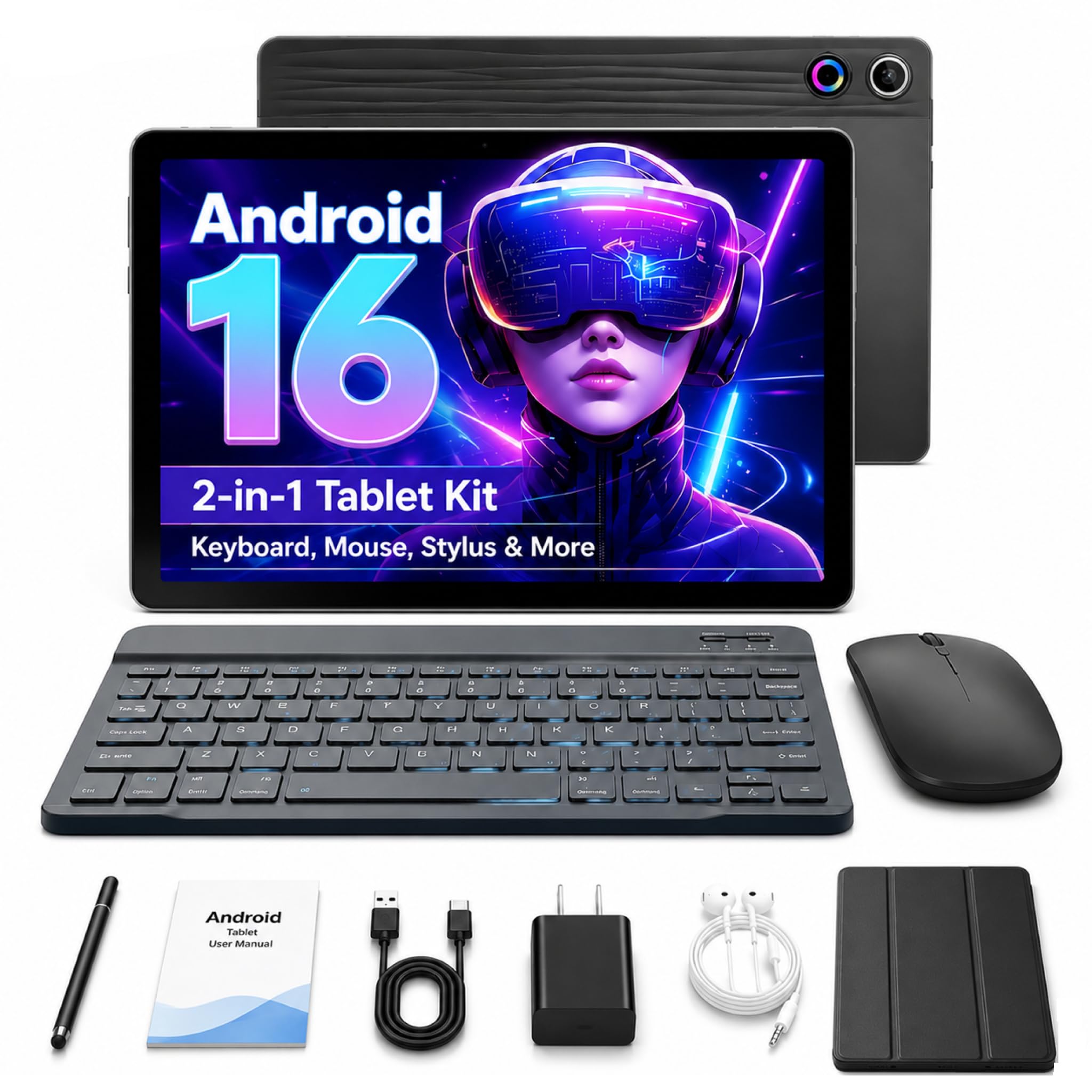
The Jeazans tablet bundle provides a complete 2-in-1 computing solution at a budget-friendly price point. It includes a 10.1-inch tablet, Bluetooth keyboard, wireless mouse, stylus pen, and leather case — everything needed for basic productivity. The Android 16 operating system offers enhanced privacy controls and a modern interface.
The 1280×800 LCD display, while not high-resolution, is adequate for web browsing, email, social media, and video streaming. The 24GB RAM (3GB physical + 21GB virtual) provides reasonable multitasking for light apps. 64GB of internal storage expandable to 1TB via microSD offers ample space for documents and media. Dual HD cameras support video calls.
Wi-Fi 6 and Bluetooth 5.4 connectivity ensure fast wireless performance. PD fast charging reduces downtime. The bundled leather case provides 360-degree protection and multiple viewing angles. Student users appreciate the portable form factor and the ability to switch between tablet and laptop modes. Performance is suitable for basic tasks rather than demanding applications.
Why it’s great
- Complete 2-in-1 bundle with keyboard, mouse, and stylus included
- Expandable storage up to 1TB for media and documents
- Wi-Fi 6 and Bluetooth 5.4 for fast connectivity
- PD fast charging reduces downtime
Good to know
- Performance suitable only for basic tasks and light multitasking
- 1280×800 resolution is not sharp for detailed work
- Virtual RAM expansion may not match physical RAM performance
- Some users report reliability concerns with long-term use
9. FEONAL Android 16 Tablet 11 Inch

The FEONAL 11-inch tablet is built for users who need cellular connectivity without the premium price tag. With 4G LTE support and dual SIM card slots, it enables always-on internet access away from Wi-Fi networks. The MTK8786 Octa-Core processor runs Android 16 with GMS certification, providing access to the Google Play Store and standard Android apps.
The 11-inch Incell display with 1280×800 HD resolution is suitable for web browsing, email, social media, and video streaming. The 20GB RAM (8GB physical + 12GB virtual) and 128GB of internal storage offer ample space for apps and media, expandable to 1TB via microSD. The 13MP rear camera and 8MP front camera handle basic photography and video calls.
The 7000mAh battery provides up to 480 hours of standby time and lasts a full day of light usage. Dual stereo speakers deliver decent audio. The tablet supports split-screen functionality for multitasking. It offers reading mode and eye protection mode for comfortable extended use. Basic performance makes it ideal for seniors or as a travel companion for media and communication.
Why it’s great
- 4G LTE cellular connectivity for always-on internet
- Large 7000mAh battery for extended standby and usage
- Expandable storage up to 1TB for media libraries
- Dual SIM support for flexible data plans
Good to know
- 1280×800 resolution is basic for media consumption
- Camera and audio quality are entry-level
- No fingerprint or face unlock for security
- Virtual RAM may not match physical RAM performance
FAQ
What processor is best for heavy multitasking on a computer tablet?
How much storage do I need for note-taking and media?
Is a 90Hz or 120Hz display refresh rate important for tablets?
Can budget Android tablets replace a laptop for student work?
How does cellular connectivity benefit a tablet?
Final Thoughts: The Verdict
For most users, the best computer tablets winner is the Lenovo Idea Tab Pro because it delivers flagship-level performance, a large 3K display, and included stylus at a price that undercuts traditional premium tablets. If you want an AMOLED display with superior color reproduction and the S Pen ecosystem, grab the Samsung Galaxy Tab S11. And for professional creative workflows requiring the M5 chip and Ultra Retina XDR display, nothing beats the Apple iPad Pro 13-inch (M5).

Mo Maruf
I created WellFizz to bridge the gap between vague wellness advice and actionable solutions. My mission is simple: to decode the research and give you practical tools you can actually use.
Beyond the data, I am a passionate traveler. I believe that stepping away from the screen to explore new environments is essential for mental clarity and physical vitality.