Our readers keep the lights on and my smoothie glass nicely filled. As an Amazon Associate, I earn from qualifying purchases.
A computer radiator is the heart of any liquid cooling loop, responsible for pulling heat away from your CPU or GPU and dumping it out of your case. Choosing the wrong size or type can leave your components thermal throttling or force you into a noisy, inefficient setup.
I’m Mohammad Maruf — the founder and writer behind WellFizz. I’ve spent countless hours analyzing radiator specs, fin densities, material choices, and real-world thermal performance data to help you cut through the marketing noise.
Whether you’re building a custom loop or upgrading an AIO, this guide breaks down the essential factors for choosing the best computer radiator for your specific build and budget.
How To Choose The Best Computer Radiator
Picking a radiator isn’t just about measuring your case’s fan mounts. You need to balance physical dimensions, core material, and loop compatibility to avoid a build that underperforms or leaks.
Size, Thickness, and Mounting Clearance
The most common sizes are 240mm (dual 120mm fans), 280mm (dual 140mm fans), and 360mm (triple 120mm fans). A 360mm radiator provides roughly 50% more surface area than a 240mm, directly translating to higher heat dissipation. Thickness is equally critical: slim radiators (around 25-30mm) fit most cases, while thick radiators (45mm+) require deep chassis or front-mount clearance and benefit from push-pull fan setups.
Core Material — Copper vs. Aluminum
Copper radiators offer superior thermal conductivity (roughly 400 W/mK vs. aluminum’s 237 W/mK) and are the gold standard for custom loops. The trade-off is weight and cost. Aluminum radiators are lighter and cheaper but cannot be mixed with copper components in the same loop without introducing galvanic corrosion. If you’re building an all-copper custom loop, stick with copper rads and brass fittings. All-in-one coolers (AIOs) typically use aluminum, so never mix their coolant with a copper custom loop.
Fin Density and Static Pressure
Fin density, measured in Fins Per Inch (FPI), determines airflow resistance. A high-FPI radiator (20 FPI or more) needs strong static pressure fans to push air through dense fins. Low-FPI radiators (12-16 FPI) work well with standard airflow fans and run quieter. For a silent build, choose a low-FPI copper radiator paired with slow-spinning 140mm fans. For maximum thermal performance in a compact case, a high-FPI radiator with high-static-pressure fans is the better choice.
Quick Comparison
On smaller screens, swipe sideways to see the full table.
| Model | Category | Best For | Key Spec | Amazon |
|---|---|---|---|---|
| MSI MAG Coreliquid A13 360 | AIO 360mm | High-TDP CPU cooling with minimal noise | 14.4 dBA noise level, 3800 RPM pump | Amazon |
| Dracaena.io 360mm Copper | Custom Loop | Enthusiast custom loops needing copper purity | 14 micro-channels, copper fins & tubes | Amazon |
| Corsair Nautilus 360 RS | AIO 360mm | Silent mid-range builds with easy wiring | 20 dBA pump, convex cold plate | Amazon |
| ARCTIC Liquid Freezer III Pro 280 | AIO 280mm | Ultra-low noise with thick 38mm rad | 38mm radiator thickness, 2500 RPM fans | Amazon |
| Corsair Hydro X XR7 240mm | Custom Loop | Max cooling density in a small footprint | 54mm thickness, 25-micron copper fins | Amazon |
| NZXT Kraken Core 240 RGB | AIO 240mm | Balanced mid-range builds with RGB | 3100 RPM pump, single-frame fans | Amazon |
| Lian Li GA II LCD 360MM | AIO 360mm | Premium showpiece with LCD screen | 3600 RPM Asetek 8th gen pump | Amazon |
In‑Depth Reviews
1. MSI MAG Coreliquid A13 360

The MSI MAG Coreliquid A13 360 hits a sweet spot for anyone running a high-TDP CPU like a 5800X3D or a 14900K. Its split-flow radiator architecture and three-phase pump running up to 3800 RPM deliver strong thermal transfer while keeping noise at an impressively low 14.4 decibels. Reviewers report max package temps around 75°C under sustained gaming loads, effectively eliminating thermal throttling even with demanding chips.
Installation is straightforward thanks to preinstalled 120mm ARGB PWM fans and included thermal paste. The 390mm evaporation-proof tubing uses triple-layered netted plastic beneath reinforced mesh sheathing—a detail that matters for long-term closed-loop reliability. The LGA 1851 support out of the box ensures forward compatibility with Intel’s newest sockets.
Some users note the MSI logo alignment may be slightly off with AM4/5 brackets, but this is cosmetic. The daisy-chained fan connectors simplify cable management significantly. For an entry-level-to-mid-range price, the Coreliquid A13 360 offers a near-silent operation and robust cooling that rivals more expensive 360mm units.
Why it’s great
- Ultra-quiet 14.4 dBA pump noise
- Evaporation-proof tubing for long-term reliability
- Easy daisy-chain fan wiring
Good to know
- Logo alignment may be off on some AMD brackets
- No LCD screen or advanced pump customization
2. Dracaena.io 360mm Copper PC Radiator

For custom loop enthusiasts, the Dracaena Osprey 360mm radiator is built with copper fins and tubes for superior thermal conductivity, along with brass headers that resist corrosion and seal G1/4 threads reliably. At 28mm thick, it is a slim radiator that fits most standard 360mm fan mounts, including the HYTE Y60 and full-tower cases. The 14 micro-channels offer a good balance of flow restriction and heat exchange surface area.
The dual G1/4 BSP ports are compatible with every major fitting brand—EK, Alphacool, Barrow, Bitspower—so you won’t need adapters. At just 13.6 ounces, it is lightweight compared to copper radiators with thicker cores. The black oxidation finish provides a clean, uniform look. A 1-year limited warranty backs the build.
Experienced builders should be warned: the coating can bleed onto threads and the edges are sharp enough to damage o-rings. Deburring with plastic and using washers under screws is recommended. First-time custom loop builders may prefer a more forgiving radiator, but for the price point, this is a capable copper performer.
Why it’s great
- Full copper core for excellent heat transfer
- Universal G1/4 thread compatibility
- Lightweight for a 360mm copper rad
Good to know
- Sharp edges may damage o-rings
- Included screws may be too long without washers
3. Corsair Nautilus 360 RS
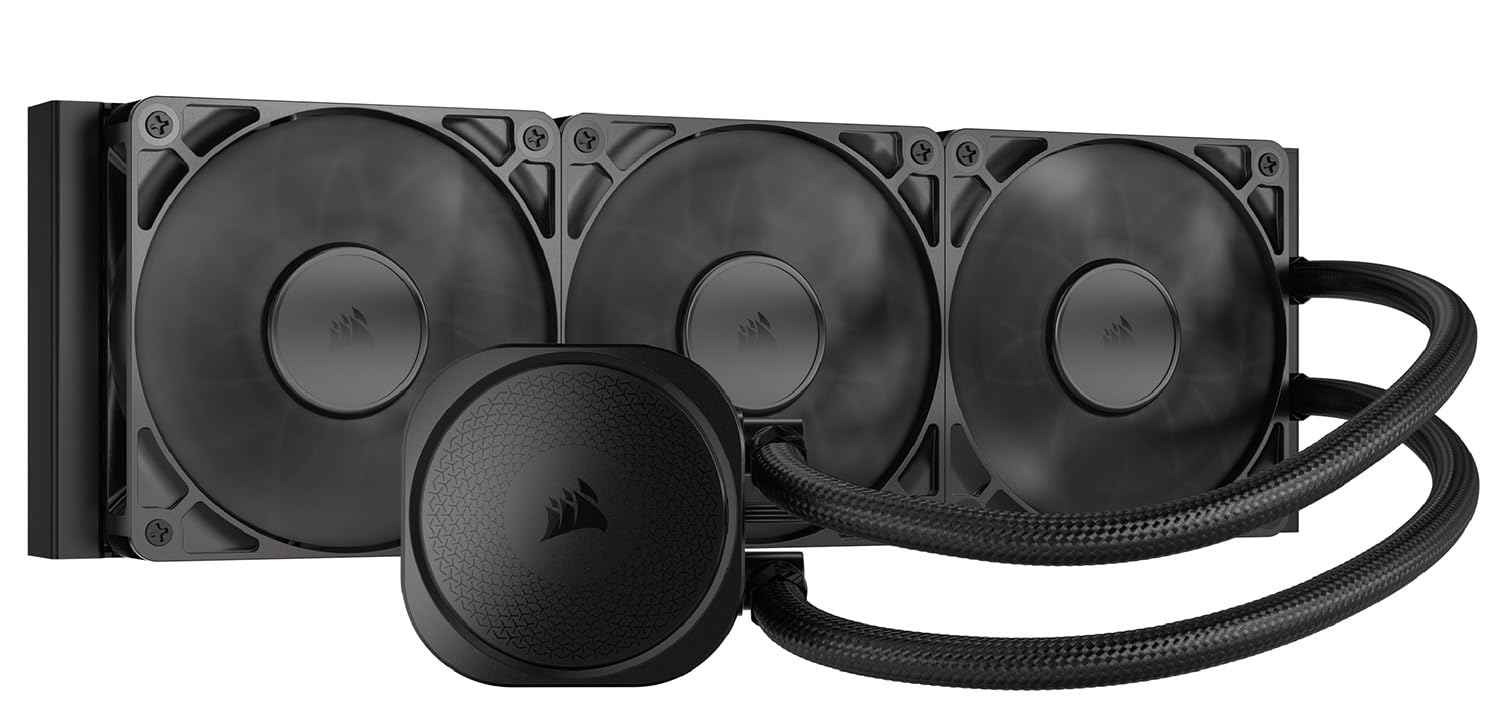
Corsair’s Nautilus 360 RS is a strong entry in the quiet-performance segment. The pump generates only 20 dBA, making it nearly inaudible under light loads. The slightly convex cold plate combined with pre-applied thermal paste ensures maximum contact with the CPU’s integrated heat spreader. Users report a 10°C drop in gaming temperatures when replacing the pre-applied paste with quality thermal compound.
The RS120 fans feature AirGuide technology and Magnetic Dome bearings, producing high static pressure needed to push air through the 360mm radiator at 2100 RPM. The daisy-chain wiring reduces cable clutter—a single 4-pin PWM header controls all three fans. Compatibility includes LGA 1851, LGA 1700, and AM5/AM4 sockets.
At 3.5 pounds, it is relatively light for a 360mm AIO. The 36 dBA fan noise rating is typical for this class, but the pump remains silent. A few users mention the fans become audible under heavy load, but the thermal performance (idle around 28°C) justifies the trade-off for noise-sensitive builders.
Why it’s great
- Very quiet 20 dBA pump
- Excellent idle temps around 28°C
- Easy daisy-chain wiring with single PWM header
Good to know
- Fan noise audible under heavy load
- Requires ample case space for 360mm mount
4. ARCTIC Liquid Freezer III Pro 280

ARCTIC’s Liquid Freezer III Pro 280 is a 280mm AIO with a 38mm thick radiator—significantly thicker than the standard 25-30mm designs. This extra thermal mass allows the P14 PRO fans to run at lower speeds while still dissipating high heat loads. Reviewers moving from a 240mm to this 280mm unit saw full-load temperatures drop from 90-95°C to 60-70°C on a Ryzen 9850X3D.
The integrated VRM fan is a unique touch—a PWM-controlled 40mm fan that pulls heat away from the voltage regulators, ensuring stable performance under sustained loads. The native offset mounting shifts the cold plate center toward the CPU hotspot, improving heat transfer efficiency. The contact frame for Intel LGA 1851/1700 distributes pressure evenly for longer CPU life.
The 38mm thickness creates fitment challenges. It may not fit top-mounted in cases like the Hyte Y60 without modifications. Some users report the VRM fan enclosure can touch the radiator fan, requiring Dremel work. The pump speed reporting can also be inaccurate on some motherboards. For those with case clearance, though, the thermal performance per dollar is outstanding.
Why it’s great
- Very low full-load temps (60-70°C on high-TDP CPUs)
- Integrated VRM fan for voltage regulator cooling
- Excellent value for performance
Good to know
- 38mm thickness limits case compatibility
- VRM fan can experience ramping noise
5. Corsair Hydro X Series XR7 240mm

The Corsair Hydro X XR7 240mm is built for enthusiasts who want extreme cooling density in a compact footprint. Its 54mm thickness makes it nearly twice as thick as standard radiators, housing a premium copper core with 25-micron thick cooling fins for exceptional thermal transfer. Reviewers report idle temps at 23°C and gaming temps at 27°C with 1000-1200 RPM fans, and Cyberpunk 2077 temps as low as 31°C.
Despite the small 240mm format, the XR7 requires serious case clearance. The matte black polyurethane coating resists fingerprints and looks premium. Integrated fan screw guides simplify fan installation even after the radiator is mounted. The dual 120mm fan mounts on both sides support push-pull configurations without extra brackets.
At roughly 1 gram (listed weight), it is notably heavy due to the copper core—expect to double-check your case’s structural support. Some units may require initial flushing due to debris, and the sharp logo has been reported to cause cuts during handling. This is a pure custom-loop component: no pump, no fittings, just raw thermal capacity for the most ambitious builds.
Why it’s great
- Exceptional thermal density with 54mm thickness
- 25-micron copper fins for high heat transfer
- Supports push-pull fan configurations
Good to know
- Heavy; may need case reinforcement
- Sharp edges and coating can cause injury
6. NZXT Kraken Core 240 RGB
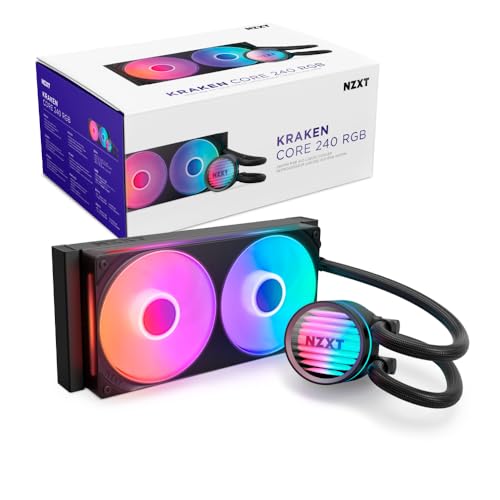
The NZXT Kraken Core 240 RGB delivers strong cooling for mid-range builds with an i7-11700K or Ryzen 9 series. The pump spins up to 3100 RPM and keeps CPUs cool during heavy gaming and multitasking. The single-frame design houses dual RGB Core fans in one solid piece, reducing screws and cables for a cleaner build. PWM control lets you fine-tune fan curves.
The 240mm radiator is compact enough to fit in most mid-tower cases, including the Corsair 4000D Airflow. Airflow capacity is rated at 75.05 CFM, with a noise level of 31.9 dBA—quiet enough for most environments. The pump connects directly to the motherboard, eliminating the need for extra controllers. RGB connectivity requires a 5V RGB header, so verify your motherboard’s compatibility before buying.
Some users report slight pump noise at default speeds, but it is manageable and often masked by case fans. The single-frame design’s pre-connected fan cables make installation faster than traditional three-fan setups. For the price, the Kraken Core 240 RGB offers a balanced mix of aesthetics, noise levels, and cooling capacity for mid-range to upper-mid-range processors.
Why it’s great
- Single-frame design simplifies installation
- PWM fans for precise speed control
- Good balance of noise and cooling for mid-range CPUs
Good to know
- Requires 5V RGB header (not 12V)
- Pump noise can be slightly audible
7. Lian Li GA II LCD 360MM

The Lian Li Galahad II LCD 360 is the flagship AIO for builders who want both elite cooling and a visual centerpiece. Driven by Asetek’s 8th generation pump, it reaches 3600 RPM and pairs with a 360mm aluminum radiator to handle high-TDP CPUs like the i9-14900K. Users report max temperatures around 80°C under load and gaming temps between 50-65°C—strong numbers for air-cooled and entry-level AIO alternatives.
The 2.88-inch IPS LCD is fully customizable via L-Connect 3 software, supporting JPEG, PNG, GIF, and MP4 uploads, plus screen recording. The 45-degree tubing connector rotates 360°, offering versatile mounting options in large cases. Pre-installed UNI FAN SL-INF fans reduce the steps needed for installation. RGB lighting is vibrant but not as refined as Corsair’s offerings.
The LCD add-on and Asetek licensing push the price into the premium tier. Early batch units have reported pump noise issues and LCD burn-in after 6-8 months. The software can also be resource-intensive, causing crashes in some games. For those willing to tolerate the quirks, the Galahad II LCD delivers top-tier thermal performance and a stunning display.
Why it’s great
- Powerful Asetek 8th gen pump at 3600 RPM
- Customizable LCD screen for monitoring and aesthetics
- Pre-installed fans and rotating tubing connector
Good to know
- Software can cause stuttering and high CPU usage
- Reported LCD burn-in and pump noise in early batches
FAQ
What size computer radiator do I need for my CPU?
Can I mix a copper radiator with an aluminum radiator in the same loop?
What does FPI mean for my fan choice?
Is push-pull fan configuration worth it?
How do I clean a computer radiator?
Final Thoughts: The Verdict
For most users, the best computer radiator winner is the MSI MAG Coreliquid A13 360 because it combines a near-silent 14.4 dBA pump with strong thermal performance and easy installation at a mid-range price. If you want a copper custom loop radiator for maximum heat transfer, grab the Dracaena.io 360mm Copper. And for premium aesthetics and a customizable LCD screen, nothing beats the Lian Li GA II LCD 360MM.

Mo Maruf
I created WellFizz to bridge the gap between vague wellness advice and actionable solutions. My mission is simple: to decode the research and give you practical tools you can actually use.
Beyond the data, I am a passionate traveler. I believe that stepping away from the screen to explore new environments is essential for mental clarity and physical vitality.