Our readers keep the lights on and my smoothie glass nicely filled. As an Amazon Associate, I earn from qualifying purchases.
Specs are compiled from manufacturer listings and verified buyer reviews and can change over time — please confirm the key details on the product page before buying.
You want a mouse that tracks accurately, feels good for hours, and doesn’t drain batteries — all without blowing your budget.
I’m Mohammad Maruf — the founder and writer behind WellFizz. This guide is built by comparing the manufacturers’ published specifications and the patterns across verified customer reviews, so you get each pick’s real strengths and trade-offs instead of marketing spin.
The shortlist covers everything from a budget-friendly wireless workhorse that lasts two years on a single set of batteries to a high-end gaming mouse with a 26,000 DPI sensor. Here is your no-nonsense guide to the computer mouse under 50.
Our Picks at a Glance


How To Choose The Best Computer Mouse Under 50
Picking the right mouse under means balancing your daily use-case against specs that matter at this price.
Sensor and DPI
The sensor tracks your hand movement. DPI (dots per inch) measures how far the cursor moves per inch of physical movement. Higher DPI means a faster, more sensitive cursor — a 26,000 DPI sensor feels twitchy-fast on a high-res monitor, while 1,000 DPI is more deliberate and controlled. For office work and general browsing, anything above 1,600 DPI is plenty. For competitive gaming, you want a sensor that can hit 6,400 DPI or more without smoothing or acceleration.
Wired vs Wireless
Wired mice offer zero-lag input and never need charging — a no-brainer for serious gamers. Wireless mice give you a cleaner desk and more flexibility but rely on batteries. Under, you will find excellent wireless options with battery lives from several months to two years. The trade-off is a tiny bit of wireless latency, though modern 2.4G and Bluetooth connections are nearly imperceptible.
Ergonomics and Button Count
Your hand size and grip style matter more than any spec. A contoured right-handed mouse with a thumb rest can save your wrist during an eight-hour workday. Look for rubber side grips if your palm gets sweaty. Extra buttons — forward/backward navigation, a programmable thumb cluster — can dramatically speed up workflow, but only if they are easy to reach without stretching. More than six buttons without a good layout can feel cluttered.
Battery Life and Rechargeability
For wireless mice, battery life is the make-or-break spec. A mouse that lasts 24 months on a single AA set is a low-maintenance device. A rechargeable mouse with a 500mAh battery and auto-sleep can go a full work month on a charge. The catch: if you forget to charge it, you are stuck with a dead mouse until you find a cable. Some mice offer a “five-minute top-up” that buys you an hour of use — a great emergency feature.
Quick Comparison
| Model | Best For | Sensor / DPI | Battery Life | Buttons | Amazon |
|---|---|---|---|---|---|
| TECKNET Wireless Mouse★ Best Overall | Budget Long-Life Travel | Optical / 2,600 DPI | 24 Months | 6 | Amazon |
| Razer DeathAdder EssentialGaming Value King | Budget Wired Gaming | Optical / 6,400 DPI | Wired (No batteries) | 5 | Amazon |
| KYSONA Vertical Mouse | Wrist Relief | Optical / 4,000 DPI | 12 Months | 5 | Amazon |
| Razer Basilisk V3 | Ergonomic RGB Gaming | Focus+ / 26,000 DPI | Wired (No batteries) | 11 | Amazon |
| Logitech G502 Hero | Performance Gaming / MMO | HERO 25K / 25,600 DPI | Wired (No batteries) | 11 | Amazon |
| PHILIPS Ergonomic Wireless | Multi-Device Productivity | Optical / 4,000 DPI | 200 Hours (25 days heavy use) | 5 | Amazon |
| Logitech M720 Triathlon | Cross-Device Workflow | Optical / 1,000 DPI | 24 Months | 6 | Amazon |
In‑Depth Reviews
1. TECKNET Wireless Mouse, 2.4G Ergonomic Optical Mouse
The budget champ that somehow lasts two full years on one set of batteries.
The TECKNET is the crowd favorite because it nails the basics without fuss. A contoured shape and rubber side grips keep it comfortable for all-day clicking, and the 2,600 DPI (dots per inch) optical sensor — adjustable across five levels from 800 to 2,600 DPI — handles most surfaces except glass. The real standout is the 24-month battery life, which outlasts many premium wireless mice by a wide margin. One buyer reports a unit that “lasted daily use 2018-2024,” proof of its durability.
The six buttons include forward/back navigation, and the compact size (about 4 inches long, or 4.09 x 2.68 x 1.49 inches) makes it genuinely travel-friendly. The main drawback is the size: it is small, so owners with larger hands sometimes find their palm overhanging. The wake-from-sleep delay can also drag on for up to 45 seconds, which annoys some users.
The TECKNET absolutely crushes the value-per-dollar metric. For a fraction of the cost of some competitors, you get a wireless mouse that works, lasts, and feels far better than its price suggests. If you want a no-worry daily driver that you can set up and forget about for two years, this is it.
Why It Wins
- Exceptional 24-month battery life eliminates the annoyance of constant swaps.
- Rubber side grips provide a secure, non-slip hold even during extended sessions.
- Five-level DPI adjustment (800-2600) lets you tailor cursor speed to your exact preference.
The Trade-Offs
- Its compact size can feel cramped if you have larger hands and prefer a full palm grip.
- The wake-from-sleep delay can be frustrating — some buyers report waiting up to 45 seconds.
Grab it for: anyone who wants an affordable, reliable wireless mouse for office work, school, or travel and hates changing batteries.
Think twice if: you need a full-size mouse that fills your palm or if the slow wake-up would drive you crazy.
2. Razer DeathAdder Essential Gaming Mouse
A wired gaming legend that trades wireless convenience for pure, lag-free precision.
If you play games and need zero input latency, the DeathAdder Essential is the benchmark at this price. Its 6,400 DPI (dots per inch) optical sensor offers a massive sensitivity jump over most office mice, at 6,400 DPI versus the TECKNET’s 2,600 DPI, which means you can flick across a 1440p or 4K screen with a tiny wrist movement. The DPI button on top lets you cycle through sensitivities on the fly mid-game.
The build is a long-standing favorite: a right-handed ergonomic shape that fits large hands comfortably for six-hour sessions, with mechanical switches that the brand rates for 10 million clicks. One buyer reports a unit “lasted 4 years before left click became too sensitive” — solid longevity for a wired mouse. The ridged rubberized scroll wheel gives you tactile feedback for weapon switching or zooming. The five programmable buttons (two side buttons) are easy to remap via Razer Synapse software.
The catch is the scroll wheel: a notable portion of owners mention it developing a jittery scrolling behavior after 6 to 13 months. At this price, some consider it disposable enough to replace every year. It is also wired-only, so you are stuck with a cord on your desk. For a budget-conscious gamer who wants proven performance, this remains a staple.
Proven Performer: The 6,400 DPI sensor and mechanical switches (the brand claims a 10-million-click lifespan) make it a fantastic entry-level gaming mouse that rivals more expensive options.
The One Flaw: The scroll wheel is the weak link — treat it gently, and be prepared to replace the mouse after a year or two.
Best for: gamers on a tight budget who want a wired, responsive, and comfortable mouse that can handle competitive shooters.
Not for you if: you need a wireless mouse or you want something that will definitely last several years without any part failing.
3. KYSONA Ergonomic Mouse Wireless, Bluetooth Vertical Mouse
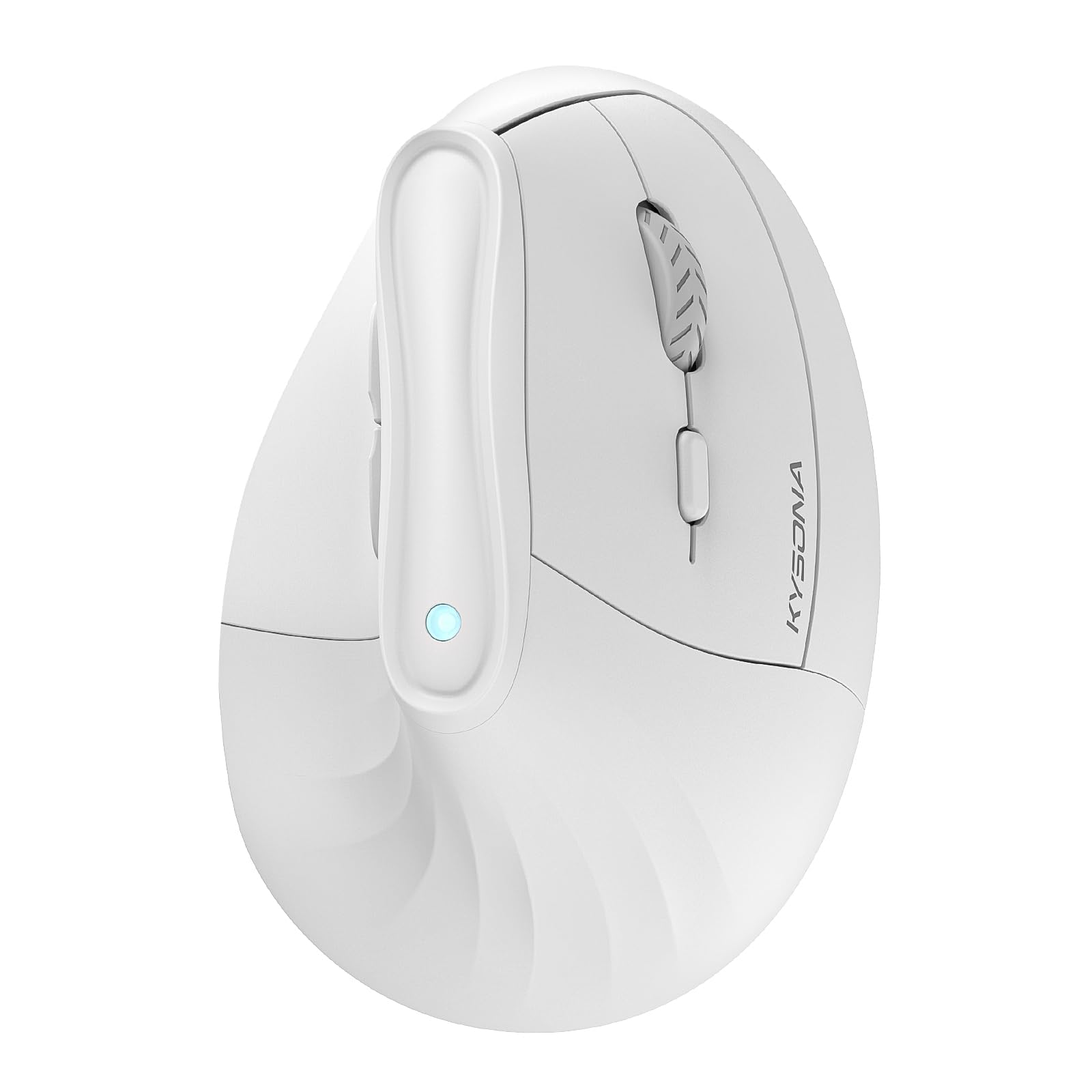
A vertical design that repositions your hand to a natural 57-degree handshake angle for serious wrist relief.
Designed explicitly for small to medium hands, the KYSONA vertical mouse is designed to fix the wrist strain that flat mice cause over eight-hour days. The 57-degree tilt forces your hand into a handshake position, reducing pressure on the carpal tunnel. The silent switches mean you can click furiously in a library or open-plan office without a single sound.
Connectivity is a strong point: it supports dual-mode wireless via Bluetooth 3.0/5.0 and a 2.4G receiver, so you can pair it with three devices and switch between a laptop, iPad, and PC with a button press. The 5-level DPI (dots per inch) ranges from 800 to 4,000 DPI, giving you fine control from slow, precise dragging to fast cursor movement. Battery life stretches up to 12 months from two AAA batteries.
The vertical shape takes some getting used to — expect a day or two of adjustment. Some customers note intermittent functionality issues after extended use, and the glossy plastic finish shows fingerprints quickly. If you already feel wrist fatigue, this mouse is worth the adaptation period. It beats the TECKNET on wrist comfort but falls short on battery life (12 months vs 24 months).
Why It Works
- The 57-degree vertical angle genuinely reduces wrist strain, as many owners confirm after months of daily use.
- Dual-mode wireless (Bluetooth + 2.4G) with three-device switching is fantastic for multi-device setups.
- Silent clicks mean zero distraction for nearby coworkers or family members.
The Adjustment
- It is only recommended for small to medium hands — larger hands will find the grip awkward.
- Occasional units have reported connectivity or functionality glitches after several months.
Pick this if: you already have wrist pain or carpal tunnel concerns, you use multiple devices, and your hands are on the smaller side.
Look elsewhere if: you have large hands or you want a traditional mouse shape without an adjustment period.
4. Razer Basilisk V3 Customizable Ergonomic Gaming Mouse

An absurdly precise mouse packing an 26,000 DPI sensor and an infinite-scroll wheel under.
The Basilisk V3 is the feature monster of this list. Its Focus+ optical sensor hits 26,000 DPI (dots per inch) with zero smoothing — a sensor that outperforms much pricier mice. The HyperScroll tilt wheel is a standout: flick it to spin freely through long documents, then click it back to tactile notched scrolling for weapon selection in an FPS (first-person shooter). Eleven programmable buttons let you map everything from push-to-talk to complex macros.
The 11-zone Chroma RGB lighting (a brand-name lighting system from Razer) is fully customizable with over 16.8 million colors, and it integrates with over 150 games for dynamic effects. The optical switches actuate (register a click) at 0.2ms with zero unintended misclicks and are rated for 70 million clicks — far beyond the DeathAdder’s 10 million. Buyers describe it as “peak gaming mouse energy” and note that the shape is extremely comfortable for extended sessions.
The trade-offs are minor at this price: the plastic enclosure feels premium but not luxury, and the customization software (Razer Synapse) has no Mac support. It is also a wired mouse, which some competitive gamers prefer but desk-clutter haters dislike. Durability is generally solid, but occasional scroll wheel issues appear after many months. For the sheer spec-to-dollar ratio, it is tough to top.
Spec Beast: The 26,000 DPI sensor, HyperScroll wheel, and 11 programmable buttons make this the most feature-dense wired gaming mouse you can buy under.
One Caveat: The software is Windows-only, and the scroll wheel is the part most likely to feel less crisp over time.
Who it suits: gamers and power users who want top-tier sensor performance, extensive button customization, and a satisfying scroll wheel.
Who should skip: Mac users (no software support) and anyone who prefers a wireless mouse for a clean desk.
5. Logitech G502 Hero High Performance Wired Gaming Mouse

The legendary G502 with a Hero 25K sensor and five removable weights for a perfectly balanced feel.
The G502 Hero is a wired gaming icon that has remained a top seller for years. Its Hero 25K optical sensor tracks up to 25,600 DPI (dots per inch) with zero smoothing, filtering, or acceleration — delivering pixel-perfect accuracy across any monitor setup. What truly separates it from the Razer Basilisk V3 is the adjustable weight system: you can add or remove up to five 3.6-gram weights to fine-tune the mouse’s balance and heft to match your personal preference.
The eleven programmable buttons include a dual-mode hyper-fast scroll wheel that spins freely for rapid browsing and clicks into notched mode for precise moves. Mechanical switch button tensioning uses a metal spring system for a crisp, clean click feel. The RGB lighting syncs with games via Logitech G Hub software. Owners consistently call it “the best mouse hands down” and praise its durability over many years of use.
The main downer is that it is on the heavier side even without weights — some find it sluggish for fast-paced twitch shooters compared to ultralight mice. The G Hub software can also be finicky sometimes. If you want a customizable wired mouse that feels substantial and accurate, the G502 Hero is the benchmark.
Why It Stands Out
- The adjustable weight system (5 x 3.6g) is unique at this price — you can dial in the exact feel you want.
- Hero 25K sensor delivers flawless tracking with zero smoothing, ideal for competitive gaming.
- A massive 11 programmable buttons with a dual-mode scroll wheel for both speed and precision.
The Trade-Off
- It is heavier than many modern gaming mice, which can be a drawback for twitchy FPS players.
- The Logitech G Hub software can occasionally be buggy or slow to load.
Get this for: gamers who want a heavy, tunable wired mouse with a legendary sensor and tons of buttons.
Skip if: you prefer an ultralight mouse for fast flicks or you want a wireless setup.
6. PHILIPS Ergonomic Wireless Mouse, Multi-Device Bluetooth

A rechargeable productivity mouse with a horizontal scroll wheel for Excel ninjas.
The Philips ergonomic mouse is built for multi-device office workers who hate hunting for dongles. It comes with a dual 2.4G receiver that has both USB-A and USB-C connectors, plus Bluetooth 5.0/3.0 — so you can connect to a laptop, desktop, and iPad and switch between them instantly. The standout feature for spreadsheet warriors is the thumb-side horizontal scroll wheel, letting you zip left and right through columns without dragging.
The 500mAh rechargeable battery promises 200 hours of use, which translates to about 25 days of heavy use (8 hours a day), and a five-minute charge gives you an emergency one-hour top-up — a lifesaver before a critical Zoom call. The 5-level DPI (dots per inch, from 800 to 4,000 DPI) lets you switch from precise photo editing to fast multi-monitor navigation. The silent library-quiet clicks and anti-slip thumb rest add to the all-day comfort.
Not everything is perfect: the scroll wheel has a dotted texture that some owners find uncomfortable after several hours, causing a blister-like sensation. A few units have reported the USB plug failing after a few days, needing a specific pressure to maintain connection. It is also a productivity-focused right-handed mouse — not designed for gaming.
Spreadsheet Savior: The horizontal side scroll and three-device connectivity make this the best office productivity mouse on the list.
Be aware: The wheel texture can be uncomfortable during long sessions, and a small number of units have USB connectivity issues.
Perfect for: multi-device professionals who work in spreadsheets or design software and want a rechargeable wireless mouse.
Not ideal if: you are a gamer or you have a history of palm blistering from unusual scroll wheel textures.
7. Logitech M720 Triathlon Multi-Device Wireless Mouse

A wireless workhorse that survives up to two years on one AA battery while juggling three computers.
The M720 Triathlon is Logitech’s answer to the multi-device professional. It pairs with up to three devices via Bluetooth or the included Logitech Unifying receiver, and you can switch between them with a single button press — no re-pairing. Thanks to Logitech FLOW (a Logitech software feature), you can even drag and drop files and text across different computers smoothly, as if they were one screen.
Battery life is a class-leading 24 months from a single AA battery, which is extraordinary for a wireless mouse with constant Bluetooth connectivity — matching the TECKNET’s claim. The rubberized body and sculpted right-handed design with a thumb rest make it comfortable for all-day use. The hyper-fast scroll wheel spins freely through long documents or clicks into notched mode for precise browsing. Six programmable buttons are customizable via Logitech Options software.
The common complaint is the side button for device switching: it is too close to the forward/back thumb buttons, and some owners accidentally trigger it during intense work or gaming. A few also report the scroll wheel becoming too loose over time. For pure productivity across multiple machines, the M720 is the most refined option here, but it is not a gaming mouse — its max DPI (dots per inch) of 1,000 DPI is far below the 6,400 DPI of the Razer DeathAdder Essential or the 26,000 DPI of the Razer Basilisk V3.
What Makes It Great
- 24-month battery life on a single AA eliminates charging anxiety entirely.
- smooth three-device switching with easy-flow drag-and-drop between computers.
- Hyper-fast scroll wheel is perfect for flying through long web pages and documents.
The Drawbacks
- The device-switching button is easy to press by mistake, which can disrupt your workflow.
- 1,000 max DPI is too slow for gaming or high-resolution monitors.
Reach for this if: you work across a desktop, laptop, and tablet daily and want a single mouse that handles all three with easy switching.
Skip if: you need a high-DPI mouse for gaming or precise creative work.
Understanding the Specs
DPI: How Fast the Cursor Moves
DPI, or dots per inch, measures how many pixels the cursor travels for every inch you move the mouse. A higher DPI (like 26,000) means the cursor zips across the screen with a tiny nudge — great for 4K monitors and fast-paced gaming where you need to flick quickly. A lower DPI (like 1,000) is slower and more controlled, which helps with precise clicking in spreadsheets or photo editing. The best practice is to find a DPI that lets you move from one edge of your monitor to the other without lifting the mouse. Many mice offer on-the-fly DPI switching so you can slow down for sniping and speed up for inventory management.
Programmable Buttons
Programmable buttons are extra clicks you can assign to common tasks like copy/paste, push-to-talk, or opening an app. A mouse with 6 buttons usually adds forward/back navigation and a middle-click, which is enough for most office work. Mice with 11 buttons (like the Razer Basilisk V3 or Logitech G502) often include a thumb cluster or dedicated buttons for macros — complex, multi-step commands executed with one press. This is a huge productivity boost for gamers (casting spells) and professionals (running scripts). The key is that each extra button should be reachable without looking or stretching; poorly placed buttons collect dust.
FAQ
What does the DPI number actually mean for my daily use?
Is a wired mouse always better than a wireless mouse for gaming?
Will a vertical mouse actually help with wrist pain?
How long should a wireless mouse battery last?
Can I use a gaming mouse for office work?
What is the difference between optical and laser mouse sensors?
What size hand is the TECKNET mouse designed for?
How many programmable buttons do I really need?
Final Thoughts: The Verdict
For most buyers, the computer mouse under 50 winner is the Razer Basilisk V3 because it packs a flagship 26,000 DPI sensor, an infinite-scroll wheel, and 11 programmable buttons at a price that beats everything else in specs per dollar. If you want wireless freedom and a battery that lasts years, grab the TECKNET Wireless Mouse. And for multi-device professionals who need smooth switching across three computers, the Logitech M720 Triathlon is the one to reach for.
How We Picked
We do not accept paid placement. Every pick is matched to a real buyer and a real use-case; we do not hands-on test units.
Sources & Methodology
Specifications: manufacturer listings and product documentation. Review insights: verified customer reviews, as of July 2026. Pricing: not shown on this page (it changes often); check the current price via the retailer link.
As an Amazon Associate, WellFizz earns from qualifying purchases. This does not affect which products we feature.
Related Guides

Mo Maruf
I created WellFizz to bridge the gap between vague wellness advice and actionable solutions. My mission is simple: to decode the research and give you practical tools you can actually use.
Beyond the data, I am a passionate traveler. I believe that stepping away from the screen to explore new environments is essential for mental clarity and physical vitality.