Our readers keep the lights on and my smoothie glass nicely filled. As an Amazon Associate, I earn from qualifying purchases.
Specs are compiled from manufacturer listings and verified buyer reviews and can change over time — please confirm the key details on the product page before buying.
Your wrist aches after a long day clicking through spreadsheets, and the loud click from your mouse bothers your colleagues on every Zoom call. The right work mouse stays quiet, fits your hand without cramping, and connects without a tangled wire. This guide picks the best options based on manufacturers’ published specs and real buyer reviews, so you skip gaming flash and get what matters for an eight-hour desk day.
I’m Mohammad Maruf — the founder and writer behind WellFizz. This guide is built by comparing the manufacturers’ published specifications and the patterns across verified customer reviews, so you get each pick’s real strengths and trade-offs instead of marketing spin.
You want a mouse that lasts through your workday without recharging, clicks quietly, and fits your hand comfortably. Here is the honest breakdown of the best computer mouse for work options available right now based on real specs and actual buyer experiences.
Our Picks at a Glance


How To Choose The Best Computer Mouse For Work
Picking the right work mouse is less about specs on a box and more about how it feels in your hand for eight hours. The three things that matter most are shape (ergonomics), noise level (silence for shared spaces), and connection type (no driver install needed). Ignore gamer features like RGB lighting and ultra-high DPI over 4000 — those do not make you more productive at a desk job.
Ergonomics and Hand Size
A mouse should support your natural hand position, not force your wrist flat. Vertical mice keep your wrist at a handshake angle (typically around 57 degrees), which reduces pressure on the carpal tunnel. Standard mice work well if your hand rests flat without strain, but you need to match the size. Small mice for small hands prevent finger overreaching, but using one that forces your palm to hover causes arm fatigue. Check the product data for hand orientation — right-handed, left-handed, or ambidextrous — and never buy a mouse designed for a grip style opposite your dominant hand.
Connection Type: Bluetooth vs 2.4GHz
Bluetooth is the cleanest option for work because you do not need a USB dongle occupying a port on your laptop. However, Bluetooth can have a tiny delay and sometimes drops connection for a second. A 2.4GHz wireless connection (using a small USB receiver) gives a more stable link with no lag, but you can lose the tiny dongle easily. Some mice let you use both or switch between them, which is perfect if you move between a desktop and a tablet throughout the day.
Battery Type and Life
Rechargeable mice save you from buying AA batteries every few months, but they need to be plugged in to charge, which stops your work for an hour. Mice that run on a single AA battery can last up to 24 months, which means you basically never think about power. If you choose a rechargeable mouse, look for one that charges via USB-C (most modern laptops use the same cable) and has a quick top-up feature — a 5-minute charge that gives you an hour of use can save you during a meeting.
Quick Comparison
| Model | Best For | Connection | Button Count | Battery Life | Amazon |
|---|---|---|---|---|---|
| Logitech Signature M650 L★ Best Overall | Large Hands & Long Battery | Bluetooth / Logi Bolt USB | 3 | 24 months | Amazon |
| Logitech MX Master 3SAlso Great | Premium All-Day Workhorse | Bluetooth | 7 | 70 days | Amazon |
| HP 400 Quiet Wireless Mouse | Silent Clicks & Eco Build | Bluetooth / 2.4GHz Dongle | 5 | 24 months | Amazon |
| PHILIPS SPK7628 Ergonomic | Wrist Relief (Small Hands) | 2.4GHz USB | 6 | — | Amazon |
| PHILIPS SPK7858 Multi-Device | Multi-Device & Dual Scroll | Bluetooth / USB-A & USB-C | 5 | 200 hours (25 days) | Amazon |
| Uineer Vertical Mouse | Budget Vertical & 7-Color LED | Bluetooth 5.0/4.0 / 2.4G | 6 | — | Amazon |
| XBG B15pro Tri-Mode | LED Display & Rechargeable | Bluetooth 5.0/4.0 / 2.4G | 6 | 1 month | Amazon |
In‑Depth Reviews
1. Logitech Signature M650 L Full Size Wireless Mouse
Our pick — 4.5★ from 14,000+ verified ratings; the strongest balance of quality and price.
Designed for people whose hands touch the edges of smaller mice.
The Logitech Signature M650 L is the answer for anyone with larger hands who has spent years curling their fingers around standard-sized mice. Its full-size shape, soft thumb area, and rubber side grips keep your hand snug and relaxed over long work sessions. It connects instantly via Bluetooth Low Energy or the Logi Bolt USB receiver (both included), and it is a Works with Chromebook certified product — so it just works on Windows, macOS, Linux, ChromeOS, iPadOS, and Android without hunting for drivers.
The SmartWheel is a smart upgrade: it switches between line-by-line precision (slow, clicky scroll) for documents and ulta-fast free-spinning for long web pages with just a flick of the wheel. This is the same wheel technology that makes the MX Master 3S so fast, but at a much more accessible price. The mouse produces quieter clicks using SilentTouch technology, making it office-friendly for open floor plans. However, the 3-button layout is minimal — you get left, right, and the clickable scroll wheel — plus two customizable side buttons for shortcuts like back/forward or copy/paste via the Logitech Options+ app.
The battery life here is a full 24 months on the single included AA battery. That matches the HP 400 at the top of the class, so you are not worrying about charging cables on your desk. Owners mention that the large size genuinely fixes hand cramps from smaller mice, but note that the right-handed-only design leaves lefties without a comfortable shape. The plastic construction includes certified post-consumer recycled plastic (Graphite and Black models use at least 65% — one of the highest recycled content rates on this list).
Best for big hands: If your hand spans beyond a standard mouse, the M650 L is the most comfortable shape here at a sensible price. The only trade-off is the low button count — just three main buttons plus two side buttons, while the XBG B15pro and Philips SPK7628 have 6 buttons each.
Buy this if: you have large hands and need a quiet mouse that lasts two years on one battery.
skip it if: you need lots of programmable buttons for complex shortcuts or you are left-handed.
2. Logitech MX Master 3S Bluetooth Edition Wireless Mouse
The work mouse that tracks on glass and scrolls faster than you can blink.
If you sit at a desk all day and want zero compromises, this is the one. The Logitech MX Master 3S tracks on any surface you put it on, even on a glass table, using an 8000 DPI sensor (a laser that reads the tiniest movements, so your cursor goes exactly where you want). It connects to up to three devices at once via Bluetooth on Windows, macOS, Chrome OS, or Linux — you just tap the button on the bottom to switch computers without fumbling with cables. The 70-day battery life from a full charge is solid, and a one-minute charge gives you three hours of use when you forget to plug it in overnight.
The quiet clicks are a big deal in an open office. Logitech uses Quiet Clicks technology that produces quieter clicks compared to a standard mouse, so your coworkers do not hear every single selection you make. The MagSpeed scroll wheel is unlike anything else here — it spins freely for lightning-fast scrolling through long documents or locks into ratchet mode for precise line-by-line work. Buyers report that the ergonomic silhouette with thumb controls lets them work for hours without wrist fatigue, though the right-handed-only design means lefties are out of luck.
With 7 programmable buttons (including a gesture button), you can set up app-specific shortcuts inside the Logi Options+ app — for example, a single button press to switch virtual desktops on a Mac. This is the only mouse on this list that supports FLOW cross-computer control, meaning you can copy text or a file on your desktop PC and paste it on your laptop as if they were one screen. The plastic body uses 27% certified post-consumer recycled plastic, which is a nice environmental touch for a high-end device.
Flagship performance: The only real catch is the price — this is the most premium option here, and it does not include a USB receiver (Logi Bolt not included), so you are Bluetooth-only unless you buy a separate receiver. It is worth the money if you work across multiple computers daily and value speed and silence.
Reach for this if: you work across multiple computers every day, value silent clicks, and want the fastest scroll wheel and glass tracking on the market.
Look elsewhere if: you are left-handed (this is right-hand only) or you want a simple plug-and-play mouse without any app setup.
3. HP 400 Quiet Wireless Mouse
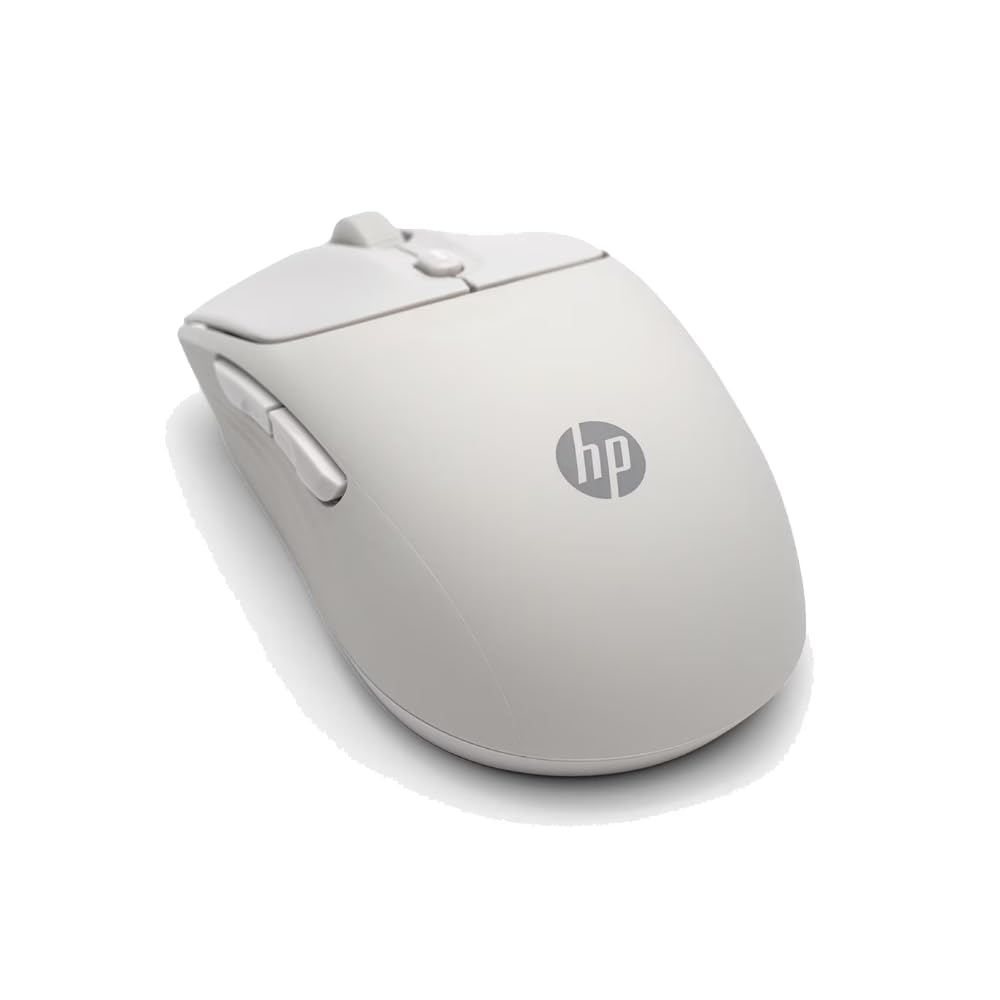
A soft-touch ambidextrous mouse that runs for two years on one AA battery.
The HP 400 Quiet Wireless Mouse solves two problems most work mice have: loud clicks and a hard plastic shell that gets slippery after an hour. The cover is made of soft silicone rubber, which stays grippy even when your hands get sweaty, and it is easy to wipe clean — a big plus for shared desks or the kitchen table. It connects wirelessly either via Bluetooth or a 2.4GHz Dongle (included), so you can leave the dongle plugged into your desktop and use Bluetooth when pairing with a laptop to save the port.
At 6000 adjustable DPI (dots per inch — the higher the number, the faster your cursor moves across the screen when you move the mouse a small distance), this mouse tracks on nearly any surface. You can tweak the sensitivity in software to slow it down for precision work or speed it up for quick navigation across multiple monitors. The quiet clicks and the vertical/horizontal scrolling options via the Microsoft Wheel (one click of the center button for shortcuts) make it a solid productivity companion. Buyers give it a 4.7-star rating from 205 reviews, praising the soft feel and the fact that it works right from the start without installing a driver.
A standout feature is the 24-month battery life from the single AA battery that comes in the box. Like the Logitech Signature M650, the HP 400 also lasts two years on one AA battery, so it keeps going while other rechargeable mice need a cable. The eco-friendly design uses at least 40% post-consumer recycled materials with FSC certified packaging.
Smart budget pick: The ambidextrous shape means lefties get equal comfort, and the soft silicone feels more pleasant than hard plastic. The trade-off is that there are only 5 buttons (no side scroll wheel), and some users report the silicone attracts dust over time.
Grab this for: a soft, silent, two-year battery mouse that works for both left and right hands.
Pass if: you need extra side buttons for macros or you want a vertical grip for wrist issues.
4. PHILIPS Ergonomic Wireless Mouse SPK7858 Multi-Device Bluetooth

Two scroll wheels and a USB-C receiver for the modern hybrid desk.
The PHILIPS SPK7858 is built for the professional who juggles a desktop at the office and a laptop at the café. It comes with a dual 2.4G receiver that has both a USB-A and USB-C connector, so you plug it directly into any modern laptop without needing the bulky adapter that trips up most mice. It pairs via Bluetooth too, letting you switch instantly between three devices — for example, your iPad, your work PC, and your MacBook — without re-pairing. The right-handed contoured shell with an anti-slip thumb rest supports a natural wrist position during the 9-to-5 grind.
The productivity-focused design includes two scroll wheels. The main wheel scrolls up and down normally, while the thumb-side horizontal scroll wheel lets you slice through Excel columns left-to-right without dragging your cursor across the screen. Using the Philips software, you can map the forward, backward, and middle-click buttons to macros or shortcuts. The 5-level adjustable DPI (800 to 4000) is controlled on the fly, so you adapt tracking speed for precision work (low DPI) or fast monitor navigation (high DPI).
Battery anxiety is handled well here. The 500mAh rechargeable battery delivers a heavy workload time of about 25 days (200 hours), and the emergency top-up feature — 5 minutes of charging via the included cable — gives you 1 hour of use. That is a lifesaver before a critical Zoom pitch. The quiet clicks use noise-reduced switches, keeping things quiet for library and open-office environments. Buyers rate it 4.6 stars from 960 reviews, noting the scroll wheel works smoothly and the USB-C receiver is genuinely convenient.
Workflow accelerator: The dual scroll wheels and emergency charge make this a premium productivity tool, but the 5 buttons are fewer than some picks, and the right-handed-only design excludes lefties.
Ideal for: spreadsheet-heavy analysts and anyone who needs to switch between a PC and a Mac daily.
Not for you if: you want an ambidextrous shape or you prefer a mouse with a replaceable AA battery over an internal rechargeable.
5. PHILIPS SPK7628 Ergonomic Vertical Mouse
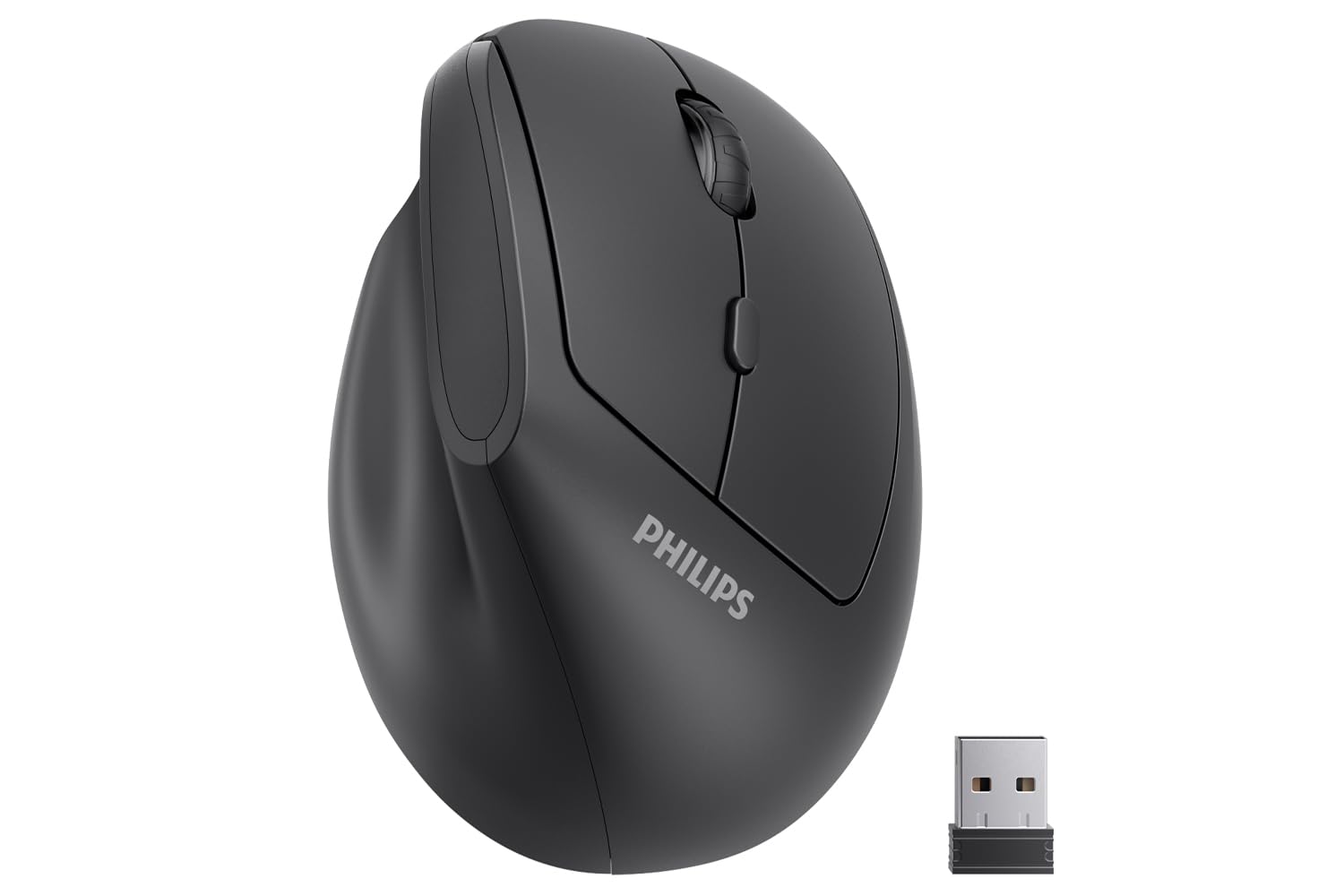
A 57-degree vertical grip designed for small and medium hands.
The PHILIPS SPK7628 takes a different approach to wrist pain. Instead of flattening your hand on the desk, it angles your hand at a natural 57-degree handshake position, reducing the forearm strain caused by standard mice. The upright grip promotes a more relaxed posture for long workdays. This mouse is specifically shaped for hand lengths up to 7 inches — so if your palm is on the smaller side, the button placement will not force you to overstretch your fingers. If you have larger hands, the Logitech Signature M650 L is a better fit.
There is a solid 6-button layout (left, right, scroll, plus forward/backward and a DPI switch), which is the same number as the XBG B15pro and the Uineer, giving you more control than the 3-button Logitech M650. All left and right clicks are silent, making it ideal for shared offices, libraries, and coffee shops. The 2.4GHz wireless connection works with a simple plug-and-play USB receiver (it is not Bluetooth, so you need a USB-A port or a USB-C adapter for newer laptops). You can adjust the DPI between 800, 1200, and 1600 to match spreadsheet work or casual browsing.
It runs on included batteries with an intelligent sleep mode that activates during inactivity to save power — spec sheets do not list exact battery life in months. The lightweight design (0.15 kg) makes it easy to toss into a laptop bag, and the USB receiver tucks inside the mouse base so you do not lose it. Customers note the vertical grip takes about a day to get used to but genuinely relieves wrist pain after that adjustment period. PHILIPS includes a 12-month warranty for confidence.
Wrist-first design: The best ergonomic pick here for small-medium hands, but the lack of Bluetooth means you will need a free USB port or an adapter for a USB-C laptop.
Best suited for: anyone experiencing wrist or forearm pain from a standard mouse, especially with smaller hands (up to 7 inches).
Not for: users with very large hands, anyone needing Bluetooth connectivity, or people who hate adjusting to a different grip angle.
6. XBG B15pro Wireless Bluetooth Tri-Mode Mouse

A tiny LED screen on the side shows you the battery and DPI at a glance.
The XBG B15pro stands out from every other mouse on this list because of its built-in LED screen. Instead of guessing your battery level or DPI setting, you look at the side of the mouse and it tells you the exact battery percentage, DPI level (800/1000/1200/1600/2400), and which connection mode you are in (Bluetooth 5.0, Bluetooth 4.0, or 2.4GHz). That small screen removes one of the biggest annoyances of wireless mice — the guessing game about whether it is about to die mid-work. It is a true tri-mode model, so you can pair it with a laptop, a tablet, and a desktop, and switch between them with a button press in 0.8 seconds.
The 500 mAh large-capacity battery charges via a Type-C port, putting an end to AA battery waste. However, the rated battery life here is only 1 month — while the Logitech M650 and HP 400 each last 24 months on a single AA battery. The mouse automatically enters sleep mode after 5 minutes of inactivity to save power, but you will still need to charge it far more often. The 6-button layout equals the Philips SPK7628 and Uineer, giving you programmable buttons for forward/back navigation.
The ambidextrous design means you can use it comfortably in either hand, though the contoured thumb rest and arched palm support benefit right-handers more. It uses a silent button mechanism that keeps click noise low, making it suitable for quiet environments like libraries. Reviewers point out the LED screen is genuinely useful for keeping track of settings, and the tri-mode flexibility works well for hybrid workers who switch between devices throughout the day. The 30-day return policy and 1-year free replacement warranty make it a low-risk choice.
Tech-forward convenience: The LED screen is unique and genuinely useful, but the penalty is a short battery life — 1 month vs 24 months on the top contenders
Pick this for: the LED screen that tells battery and DPI at a glance, plus tri-mode flexibility between laptop, tablet, and desktop.
pass on it if: you hate charging devices often or you want a mouse that runs for a year without thinking about power.
7. Uineer Wireless Ergonomic Vertical Mouse

A vertical grip with 7 glowing colors to light up your boring desk.
The Uineer Vertical Mouse is the budget-friendly entry into vertical ergonomics. It angles your wrist into a natural handshake position to relieve strain, and it adds a fun visual twist — 7-color ambient LEDs that cycle through colors or stay on your favorite hue. While the RGB lighting does not help you work faster, it does make the mouse feel a bit more personal on a plain desk. The manufacturer notes that this mouse is ideal for small-medium hands, so check your hand size before ordering.
It uses dual wireless modes (Bluetooth 5.0/4.0 and 2.4G) and can sync up to 3 devices simultaneously — laptop, PC, phone, or tablet — without needing to re-pair. The 6-button layout includes left/right clicks, scroll, DPI switcher, and forward/back buttons, matching the same count as the Philips SPK7628 and XBG B15pro. The 4-level adjustable DPI (800/1200/1600/2400) lets you adapt cursor speed for different tasks using a high-performance chip for smooth tracking on various surfaces. Note that the side buttons are not functional on macOS systems.
For power, the rechargeable battery uses USB-A for charging and has a smart power-saving feature — it goes to sleep after 10-30 minutes of inactivity, waking with a single click. A low-battery LED reminder alerts you before it shuts down so you avoid sudden disconnection. Weighing just 71 grams (about 2.5 oz), this is the lightest option on this list, making it genuinely travel-friendly. Buyers rate it 4.6 stars from 517 reviews, praising the ergonomic shape for reducing wrist pain and the price point for being accessible. The 45-day no-reason refund and 24-month replacement warranty are generous for a low-cost mouse.
Affordable ergonomics: Great for dipping your toe into vertical mice without spending much, but the button limitation on macOS and small-medium hand size requirement narrows who it works for best.
Best for: a budget-friendly vertical mouse trial for small to medium hands on Windows systems.
Not for: macOS users who want side buttons, people with large hands, or anyone who dislikes LED lights on their desk.
Understanding the Specs
DPI (Dots Per Inch)
This number tells you how sensitive the mouse is to movement. A higher DPI (like 8000 on the Logitech MX Master 3S or 6000 on the HP 400) means the cursor moves faster across the screen with a small hand movement. You want adjustable DPI so you can switch from slow, precise tracking for graphic design to fast cursor movement for navigating multiple monitors without flinging your arm across the desk. Office workers rarely need more than 2400 DPI — the rest is just marketing padding.
Silent Switches / Silent Clicks
Standard mouse switches produce a loud, sharp click sound that travels across an open office. Silent switches use a dampener inside the button mechanism to reduce the noise drastically — Logitech claims reduced click noise on the M650 and MX Master 3S. If you share a space, quiet clicks save your coworkers from hearing every single selection you make. Budget silent mice (like the XBG B15pro and Philips SPK7628) also reduce noise but may feel slightly mushier than a standard click.
FAQ
Will a vertical mouse actually help with wrist pain?
Can I use a Bluetooth mouse with a USB-C only laptop?
How long does a work mouse battery usually last?
Does a higher DPI make me more productive?
What is the difference between Bluetooth and 2.4GHz wireless?
Can I program the side buttons on a work mouse?
Is an ambidextrous mouse or a right-handed mouse better for work?
What does a rechargeable mouse vs a battery mouse mean for daily use?
Will a mouse work on a glass desk?
How many devices can I connect simultaneously?
Final Thoughts: The Verdict
Across the board, the computer mouse for work winner is the Logitech MX Master 3S because it combines silent clicks, a fast scroll wheel, glass tracking, and multi-device FLOW control in one premium package. If you want a fantastic battery that lasts two years and a large hand-friendly shape, grab the Logitech Signature M650 L. And for a budget-friendly ergonomic upgrade plus silent clicks, the HP 400 Quiet Wireless Mouse is the best value for shared desks and left-handed users.
How We Picked
We do not accept paid placement. Every pick is matched to a real buyer and a real use-case; we do not hands-on test units.
Sources & Methodology
Specifications: manufacturer listings and product documentation. Review insights: verified customer reviews, as of July 2026. Pricing: not shown on this page (it changes often); check the current price via the retailer link.
As an Amazon Associate, WellFizz earns from qualifying purchases. This does not affect which products we feature.
Related Guides

Mo Maruf
I created WellFizz to bridge the gap between vague wellness advice and actionable solutions. My mission is simple: to decode the research and give you practical tools you can actually use.
Beyond the data, I am a passionate traveler. I believe that stepping away from the screen to explore new environments is essential for mental clarity and physical vitality.