Our readers keep the lights on and my smoothie glass nicely filled. As an Amazon Associate, I earn from qualifying purchases.
Specs are compiled from manufacturer listings and verified buyer reviews and can change over time — please confirm the key details on the product page before buying.
A travel mouse needs to vanish into your bag, survive a drop onto airport tile, and still feel good after a full day of coffee-shop clicking. The wrong one leaves you hunting for a flat surface or swapping batteries mid-flight. This guide cuts through the noise by comparing the specs and real-world buyer experiences that actually matter for life on the road: battery life in months (or minutes of charge), connection options, and whether it actually fits a pocket or a laptop sleeve.
I’m Mohammad Maruf — the founder and writer behind WellFizz. This guide is built by comparing the manufacturers’ published specifications and the patterns across verified customer reviews, so you get each pick’s real strengths and trade-offs instead of marketing spin.
Whether you are packing for a cross-country flight or just moving between meeting rooms, this lineup of the best computer mouse for travel covers the compact, silent, and multi-device models that backpackers and remote workers trust most.
Quick Picks
- ESR MagMouse Snap-to-Carry Bluetooth Mouse — Best Overall
- DELUX Wireless Bluetooth Pocket Mouse (MF20) — Compact Pick
- XBG B15pro Wireless Bluetooth Mouse — Best Value
- Logitech M325S Mouse — Reliable Workhorse
- Logitech M240 Silent Bluetooth Mouse — Silent Pick
- NYIEFADA Bluetooth Wireless Arc Travel Mouse — Foldable Travel
How To Choose The Best Computer Mouse For Travel
The perfect travel mouse balances three things: a battery that does not die on a long trip, a shape that fits your hand without taking up half your bag, and a connection that works with whatever laptop or tablet you have. Here is what to look for.
Battery Life and Charging Convenience
Battery life for travel mice spans from a few weeks to up to three years on a single set of batteries. If you hate carrying spare AAAs, look for a built-in rechargeable battery with a short quick-charge feature — some models give you four hours of use from just one minute of charging. A visible battery indicator (either an LED on the mouse or an on-screen pop-up) removes the guesswork mid-trip.
Connection Versatility
Bluetooth is the simplest setup — no dongle, no occupied USB port, and it works with tablets and phones. A 2.4GHz wireless dongle can offer a more stable connection in crowded Wi-Fi environments (hotel lobbies, airport lounges). Tri-mode mice that offer Bluetooth 5.0, Bluetooth 4.0, and a 2.4GHz dongle let you switch between three devices — your work laptop, personal tablet, and phone — in under a second.
Portability and Shape
A travel mouse needs to be slim enough to slide into a laptop sleeve or jeans pocket. Look for foldable or sliding designs that collapse flat, or magnetic bases that attach to your laptop lid. But a small footprint sometimes means a compromise on ergonomics — if you have larger hands, a contoured shape or a thumb rest can save you from cramps during a full workday.
Quick Comparison
| Model | Best For | Battery Life | Connection Modes | Weight | Amazon |
|---|---|---|---|---|---|
| ESR MagMouse | Premium Portability | 36 months | Bluetooth 5.0 + 2.4GHz | 113.6 Grams | Amazon |
| DELUX MF20 Pocket Mouse | Ultra-Compact Design | 7 hrs use / 3 mo standby | Bluetooth 5.2 + 2.4GHz | — | Amazon |
| XBG B15pro Tri-Mode | Budget Versatility | 1 months | Bluetooth 5.0/4.0 + 2.4GHz | — | Amazon |
| Logitech M325S | Reliable Everyday Pick | Years (from reviews) | Wireless (RF) | — | Amazon |
| Logitech M240 Silent | Ultra-Quiet Work | 18 months | Bluetooth | — | Amazon |
| NYIEFADA Arc Mouse | Foldable Travel | 60 Hours | Bluetooth 5.0/4.0 + 2.4GHz | — | Amazon |
In‑Depth Reviews
1. ESR MagMouse Snap-to-Carry Bluetooth Mouse

A travel mouse that sticks to your laptop lid and charges in a minute.
The ESR MagMouse solves the biggest travel-mouse annoyance — where to put it. A magnetic base attaches to your laptop (with a reusable adhesive pad) so the mouse is always right where you left it, never sliding off the seatback tray. One minute of charging yields four hours of use, and a full 45-minute charge lasts up to 160 hours, which beats the XBG B15pro’s 1-month average battery life by a wide margin (36 months vs. 1 month overall average). The 4-way scroll wheel lets you glide sideways through wide spreadsheets and timelines without lifting your finger.
Buyers report they haven’t charged it in three months of regular use, which speaks to the 36-month battery life average. The built-in USB-C cable is tucked right into the mouse — no rummaging through your bag. Reviewers also note the 10-million-press rated switches hold up well over a year of daily clicking. The main catch: the adhesive base stays put on a laptop, but one owner mentioned it will not stay connected to the computer if stored inside a backpack, so you open up the full value only if you keep the mouse attached to the lid.
Why It Travels So Well
- Magnetic dock means the mouse never falls off your laptop
- 1 minute charging gives you 4 hours of use
- 6 adjustable DPI levels up to 4800 for precise tracking
- Silent clicks rated for 10 million presses
The Catch
- Adhesive base may loosen on textured surfaces over time
- Magnetic attachment works best with metal laptop lids
Reach for this if: you want a mouse that stays attached to your laptop so you never misplace it.
Look elsewhere if: you need a wired connection or prefer a traditional non-sticky design.
2. DELUX Wireless Bluetooth Pocket Mouse (MF20)
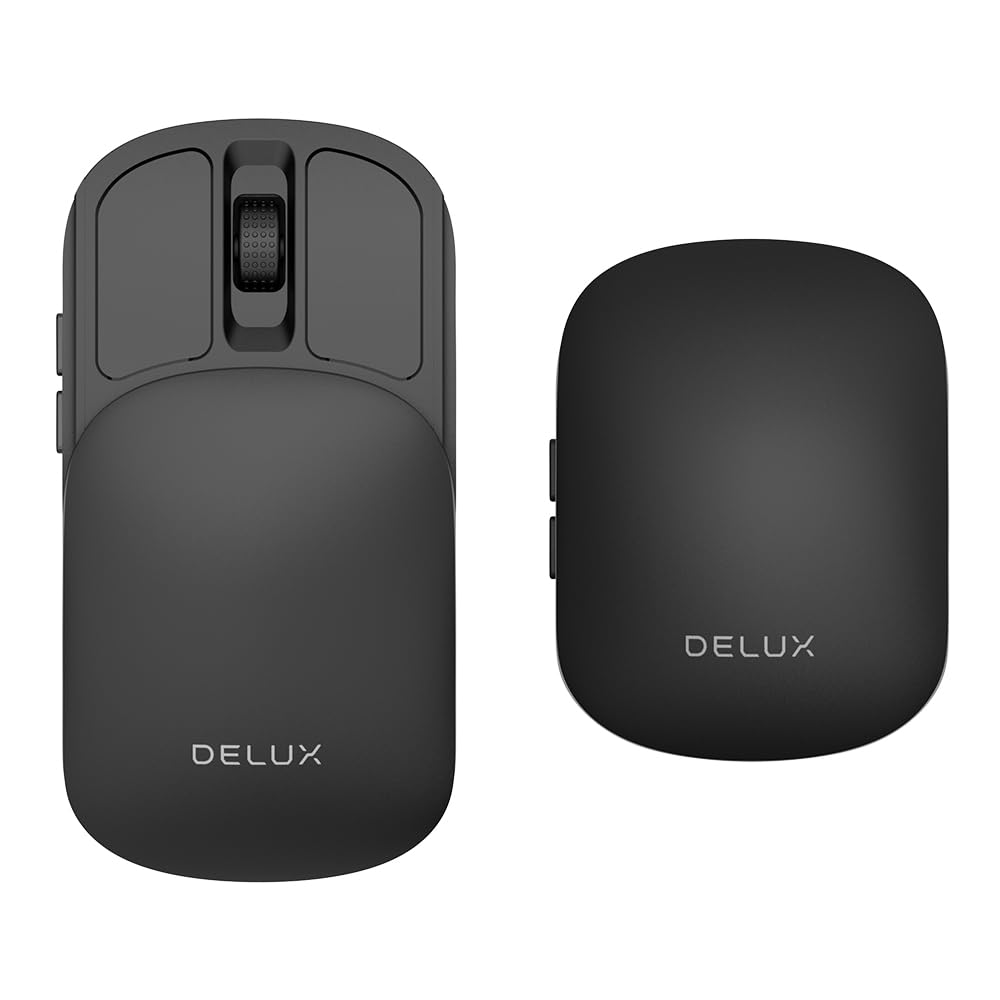
Slides shut small enough to disappear into a jeans pocket.
The DELUX MF20 uses a sliding shell that shrinks the mouse into a flat, pocket-friendly block when closed — far more compact than a standard contoured travel mouse. With a 300mAh rechargeable battery, you get up to seven hours of continuous use after a one-hour charge, and the front-mounted USB-C port lets you keep working while it charges. The 5 adjustable DPI levels (800/1200/1600/2400/4000) cover everything from precise spreadsheet edits to fast casual gaming, and the 4000 DPI top end beats the XBG B15pro’s 2400 maximum, giving you faster cursor travel across high-resolution screens.
Reviewers call it “by far the best travel mouse on Amazon” for its extreme portability and quiet, responsive clicks. One reviewer noted the battery dropped about 10% over four days of heavy use, which matches the seven-hour run-time spec. The sliding design protects the sensor when closed, so it survives loose-pocket carry. The biggest trade-off: the sliding top cover shifts slightly when you press the side buttons, which a few owners say makes it frustrating for gaming, but for daily travel and office work it is a non-issue.
What Makes It Pocket Ready
- Sliding shell collapses to a true pocket size
- USB-C charging works while you use the mouse
- 4000 DPI for smooth high-resolution tracking
- Includes velvet storage bag
Know Before You Buy
- Sliding cover shifts under side-button pressure
- Not customizable — no programmable buttons
Who should grab this: minimalists who want the smallest possible mouse for a jeans pocket.
One real limitation: the sliding top can wiggle when you press the side buttons, so avoid it if you need a rock-solid grip for gaming.
3. XBG B15pro Wireless Bluetooth Mouse

A budget tri-mode mouse that talks to three devices at once.
For under premium-tier money, the XBG B15pro gives you Bluetooth 5.0, Bluetooth 4.0, and a 2.4GHz dongle all in one mouse, letting you switch between a work laptop, a tablet, and a phone in 0.8 seconds. A small LED screen on the top shows your real-time battery percentage, the current DPI level (800/1000/1200/1600/2400), and which connection mode is active — no guesswork. The 500 mAh battery charges over USB-C, and with 6 discreet buttons (the Logitech M240 has 3), you get forward/back navigation without reaching for the keyboard.
Owners mention the 1600 DPI setting works smoothly across three monitors, and the quietest clicks they have ever used make it a good fit for libraries and open offices. The contoured thumb rest and arched palm support help prevent wrist strain during eight-hour workdays. The obvious trade-off: the 1-month average battery life is much shorter than the ESR MagMouse’s 36 months, so you will need to charge it more often. Reviewers also note you cannot re-map the buttons or adjust the 5-minute auto-sleep timer.
Value Highlights
- Tri-mode connection lets you use 3 devices simultaneously
- LED display shows battery, DPI, and mode at a glance
- 500 mAh rechargeable battery with USB-C
- Ergonomic shape with thumb rest for long workdays
The Compromise
- 1-month battery life is short compared to top-tier models
- No button re-mapping or sleep-timer adjustments
Best suited for: multi-device users who need one mouse for a laptop, tablet, and phone on a budget.
skip it if: you want months of battery — the ESR or Logitech models last far longer between charges.
4. Logitech M325S Mouse

The tried-and-true travel mouse that outlasts other batteries.
Logitech’s M325S has been a road-warrior favorite for years, and the reason is simple: customers note it delivers years of battery life without a single replacement. The 5-button layout includes a tilt wheel for horizontal scrolling through wide web pages and spreadsheets, a feature you do not get on the 3-button Logitech M240. The contoured, matte-finish shape fits a natural hand curve, and the micro-precise scrolling makes it easy to stop exactly on the line you need — no overshooting.
Reviewers point out the compact design works well even for larger hands, though the small size can cause cramping during extended use. The on/off switch is hard to read (black on black), but once you memorize its position it is a non-issue. The wireless connection is steady across various surfaces, and the ambidextrous shape works for lefties and righties. Unlike the rechargeable ESR and XBG models, the M325S runs on AA batteries, which means you swap instead of plugging in — a fair trade for multi-year battery life.
What Keeps It on the Road
- Reports of years-long battery life without a change
- Tilt wheel for sideways scrolling
- 5 programmable buttons for quick shortcuts
- Contoured shape suits larger hands
What to Consider
- AA battery means eventual replacement, not rechargeable
- Small size may cause cramping for very large hands
Choose this for: a low-maintenance travel mouse that you will not have to charge for years.
Not for you if: you prefer a rechargeable USB-C mouse or need Bluetooth for a tablet.
5. Logitech M240 Silent Bluetooth Mouse

A Bluetooth-only travel mouse built for silence and simplicity.
If your biggest annoyance is a clicky mouse in a quiet library, the Logitech M240 cuts the click sound by 90% while keeping the same satisfying tactile feel. It connects instantly over Bluetooth — no dongle, no occupied port — and works with Windows, macOS, Linux, ChromeOS, iPadOS, and Android from the start. The 18-month battery life (from a single AA) is backed by an auto-sleep feature that kicks in when you step away, saving power without a manual off switch.
Shoppers say it pairs instantly with a MacBook Air and tracks smoothly without a mouse pad — the three white pads on the bottom glide on bare desks. The slim, ambidextrous shape guides either hand into a natural position, and the rising arc adds a bit of palm support despite the small footprint. The main trade-off: with only 3 buttons (no side buttons), you lose the forward/back navigation that the XBG B15pro and Logitech M325S offer, which slows down web browsing.
Why It Earns a Spot in Your Bag
- 90% reduced click sound for quiet workspaces
- 18-month battery life with auto-sleep
- Bluetooth works with nearly every OS and device
- 48% post-consumer recycled plastic (Graphite model)
The Sacrifice
- Only 3 buttons — no side navigation buttons
- AA battery rather than built-in rechargeable
Ideal for: anyone who works in quiet spaces and wants a simple Bluetooth connection without a dongle.
Look elsewhere if: you need forward/back buttons or prefer rechargeable power.
6. NYIEFADA Bluetooth Wireless Arc Travel Mouse

Twists flat for pocket carry and works with three devices.
The NYIEFADA Arc Mouse rotates 360 degrees to snap flat, sliding into a pocket or bag fold like a slim wallet. It offers tri-mode connectivity (Bluetooth 5.0, Bluetooth 4.0, and a 2.4GHz dongle) so you can work on a laptop, a tablet, and a phone without re-pairing. The built-in rechargeable battery delivers about 60 hours of use, and one buyer mentioned the first charge lasted a month under heavy daily use — solid for a compact travel mouse.
The arc shape feels different from a standard mouse — it encourages a claw grip — but buyers report it is comfortable for long chart work and daily travel. The mouse powers off automatically when the nano receiver is disconnected, saving battery when you pack up, and clicking any button wakes it instantly. The included storage bag keeps the rotating mechanism safe in a backpack. The flip side: with only 3 buttons, you skip the side navigation that multi-monitor users often rely on.
What Makes It Travel Friendly
- Rotates flat to a slim pocket shape
- Tri-mode connection for laptop, tablet, and phone
- 60-hour rechargeable battery
- Auto-power-off when receiver is removed
One Trade-Off
- 3 buttons only — no forward/back navigation
- Arc shape takes a day or two to get used to
Pick this up if: you want a twist-flat mouse that disappears into a pocket and works across multiple platforms.
Keep searching if: you need side buttons or prefer a traditional contoured shape for all-day use.
Understanding the Specs
Battery Life & Charging
Battery life in a travel mouse is measured in months (for AA-powered models like the Logitech M240) or in charging cycles (for rechargeable models like the ESR MagMouse). A longer battery life means you pack less weight and worry less on a trip. Pay attention to quick-charge speed — some rechargeable mice give you four hours of use from just one minute of charging, which can save you during a layover. A visible battery indicator (an LED percentage or an on-screen pop-up) helps you avoid a dead mouse mid-task.
Connection Modes
Bluetooth 5.0 and 5.2 offer a fast, stable connection without needing a dongle, making them ideal for tablets and phones. A 2.4GHz wireless dongle provides a dedicated link that avoids Bluetooth interference in crowded areas like airport lounges or office open plans. A tri-mode mouse lets you pair with three devices and switch in under a second, which is valuable if you work across a laptop, a tablet, and a phone. If you only use one device, a simpler Bluetooth-only mouse saves weight and setup time.
DPI (Dots Per Inch)
DPI controls how fast your cursor moves on the screen when you move the mouse across a surface. A higher DPI (like 4000 or 4800) means the cursor zips across a large monitor with a small hand movement — useful on cramped airplane tray tables. A lower DPI (800 to 1200) gives you fine control for detailed work like photo editing. Most travel mice offer multiple adjustable DPI levels, so you can bump it up for travel and dial it down for precision work at your desk.
Portability Features
Look for a mouse that physically shrinks for travel. Foldable designs rotate flat, sliding designs collapse into a smaller block, and magnetic bases let the mouse attach to your laptop lid. Check the weight — a lightweight mouse (under 120 grams) is easier to carry but may feel less sturdy. A storage pouch or case protects the mouse from being crushed in a bag. A built-in USB-C cable or a storage slot for the wireless dongle means one less thing to lose.
FAQ
Will a travel mouse work with a tablet or a phone?
How do I clean a travel mouse after a trip?
What is the difference between a 2.4GHz wireless mouse and a Bluetooth travel mouse?
Does a small travel mouse cause hand cramps?
How long does a rechargeable travel mouse battery last on a single charge?
Can I use a travel mouse on a glass desk or a reflective surface?
What does the DPI button actually change?
What does auto-sleep mean and does it save battery?
Is a folding mouse as durable as a solid-body mouse?
How do I connect a travel mouse to a Chromebook?
Final Thoughts: The Verdict
For the majority of shoppers, the computer mouse for travel winner is the ESR MagMouse because its quick-charge (1 minute = 4 hours) and magnetic dock solve the two real travel problems — running out of battery and misplacing the mouse. If you want a tiny pocket-friendly size above all else, grab the DELUX MF20 for its sliding shell. And for a budget-friendly tri-mode option that handles three devices at once, the XBG B15pro delivers surprising versatility for the price.
How We Picked
We do not accept paid placement. Every pick is matched to a real buyer and a real use-case; we do not hands-on test units.
Sources & Methodology
Specifications: manufacturer listings and product documentation. Review insights: verified customer reviews, as of July 2026. Pricing: not shown on this page (it changes often); check the current price via the retailer link.
As an Amazon Associate, WellFizz earns from qualifying purchases. This does not affect which products we feature.
Related Guides

Mo Maruf
I created WellFizz to bridge the gap between vague wellness advice and actionable solutions. My mission is simple: to decode the research and give you practical tools you can actually use.
Beyond the data, I am a passionate traveler. I believe that stepping away from the screen to explore new environments is essential for mental clarity and physical vitality.