Our readers keep the lights on and my smoothie glass nicely filled. As an Amazon Associate, I earn from qualifying purchases.
That dull ache radiating from your wrist into your forearm after a day of clicking and dragging isn’t just annoying—it’s a signal that your standard mouse is forcing your hand into an unnatural, strained position hour after hour. Finding a mouse that actually works with your body instead of against it is the single most impactful change you can make to reduce tendonitis pain at your desk.
I’m Mohammad Maruf — the founder and writer behind WellFizz. I’ve spent countless hours diving into ergonomic studies, analyzing grip angles, button actuation forces, and sensor precision to understand what separates a mouse that merely claims to be ergonomic from one that genuinely reduces strain on inflamed tendons.
Whether you’re a designer, developer, or remote worker logging long hours, this guide cuts through the marketing to help you find the best computer mouse for tendonitis that suits your hand size, grip style, and daily workflow.
How To Choose The Best Computer Mouse For Tendonitis
Selecting a mouse for tendonitis relief means understanding how different designs shift the load from inflamed tendons to larger, healthier muscle groups. The wrong choice—even among ergonomic models—can aggravate your symptoms rather than soothe them.
Vertical vs. Trackball: Which Design Works for Your Pain?
Vertical mice (like the handshake grip) keep your forearm in a neutral, palm-in position, reducing pronation strain on the wrist and elbow. Trackball mice, by contrast, eliminate the need to move your arm entirely—your thumb or fingers roll the ball while your wrist stays still. For tendonitis stemming from repetitive wrist extension, a vertical mouse is often the better starting point. For those whose pain originates from constant shoulder or arm movement, a trackball can be transformative.
Hand Size and Grip Fit: The Non-Negotiable Variable
A vertical mouse designed for medium hands will cause new pain in a large-handed user, whose fingers may overreach or hover. Conversely, a large trackball mouse can force a small hand into an uncomfortable splay. Check the manufacturer’s recommended hand size—most specify small-to-medium or medium-to-large. If customer reviews consistently mention “too small” or “too big” for a given hand size, pay close attention.
Button Actuation Force and Click Feedback
Every click exerts a force on your finger tendons. Mice with light, micro-force switches or silent clicks reduce cumulative strain significantly. Conversely, stiff or heavy clicks force inflamed tendons to work harder. A quiet click is often a lighter click, as the dampening mechanism reduces the required actuation pressure.
DPI, Sensor Quality, and Customization
Adjustable DPI lets you match pointer speed to your preferred movement style—higher DPI means less arm displacement per inch of cursor movement. A well-tuned sensor with low lift-off distance is essential for trackballs and vertical designs, preventing erratic cursor jumps during repositioning. Customizable buttons can offload repetitive shortcuts from your keyboard hand, reducing total strain.
Quick Comparison
On smaller screens, swipe sideways to see the full table.
| Model | Category | Best For | Key Spec | Amazon |
|---|---|---|---|---|
| Logitech MX Ergo S | Trackball | Advanced thumb control with quiet clicks | 20° tilt, 120-day battery | Amazon |
| Evoluent Vertical Mouse | Vertical | Classic vertical design for medium-large hands | 57° angle, 6 buttons | Amazon |
| Microsoft Sculpt | Ergonomic | Domed shape for relaxed wrist posture | Ambidextrous, AA battery | Amazon |
| Logitech Lift Vertical | Vertical | Small to medium hands, quiet clicks | 57° angle, 2 year battery | Amazon |
| ProtoArc EM01 NL | Trackball | Adjustable tilt, budget-friendly trackball | 0-20° adjustable, 5 DPI levels | Amazon |
| SABLUTE MAM1 Pro | Trackball | Adjustable 18° angle, software customization | 0/18° tilt, 4800 DPI | Amazon |
| Ergodriven Om | Vertical | Silent clicks, OLED screen for DPI | Rechargeable, 5 week battery | Amazon |
In‑Depth Reviews
1. Logitech MX Ergo S Advanced Wireless Trackball Mouse

The MX Ergo S sits in a category of its own for tendonitis relief, combining a 20-degree adjustable tilt with a precision thumb trackball that eliminates all forearm movement. Logitech’s own testing shows the tilt reduces muscle strain by 27 percent, and the 80 percent quieter clicks mean significantly lighter actuation force for inflamed fingers. The sculpted rubber grip contours naturally to medium-to-large hands, providing a stable base that prevents grip fatigue over long sessions.
USB-C charging delivers a full day of use from just a one-minute charge, and a full charge lasts up to 120 days. The six programmable buttons, controlled through Logi Options+ software, allow you to offload common shortcuts like copy-paste or undo to the trackball’s secondary zones, reducing keypress strain. The precision mode button lets you toggle between fast cursor movement and pixel-level accuracy on the fly.
Some users with smaller hands (under five inches from wrist to fingertip) find the trackball’s spread forces an overly open grip, causing fatigue rather than relieving it. For those with medium to large hands who can commit to a short adaptation period, this mouse virtually ends wrist and shoulder pain during daily computing.
Why it’s great
- 20-degree tilt reduces measured muscle strain
- Thumb trackball eliminates arm movement
- Ultra-quiet clicks reduce finger tendon stress
- 120-day battery with quick USB-C charging
Good to know
- Best suited for medium to large hands
- Requires adaptation period for trackball control
- Silicone coating can attract dust over time
2. Evoluent Vertical Mouse Wired

As the original inventor of the vertical mouse in 1994, Evoluent brings decades of ergonomic refinement to this wired model. The handshake grip positions your forearm at a roughly 57-degree angle, eliminating the forearm twisting that aggravates tendonitis in the wrist and elbow. The sculpted finger support prevents your pinkie from scraping the desk, a subtle but critical detail for anyone with ulnar-sided tendon pain.
Six customizable buttons provide dual-function thumb switches that can handle tasks like double-click, back, or middle-click without flexing your wrist. Four pointer speed settings with indicator lights let you adjust sensitivity on the fly without software. The precision sensor tracks reliably across most surfaces, and the wired connection removes any charging or pairing anxiety—a real benefit for users who just want consistent performance.
The vertical angle is fixed and steeper than some modern vertical competitors, which some users find forces a slight shoulder rotation. The scroll wheel click requires more force than the main buttons, and the glossy plastic can feel slippery after extended use. For those whose tendonitis is specifically tied to wrist pronation rather than shoulder movement, this remains one of the most proven solutions available.
Why it’s great
- Pioneering vertical design with proven ergonomics
- Low-force buttons reduce finger tendon strain
- No battery or connection worries
- Finger support prevents pinkie drag
Good to know
- Fixed angle may not suit all body types
- Glossy plastic can feel slippery
- No official Mac driver for full customization
3. Microsoft Sculpt Wireless Ergonomic Mouse
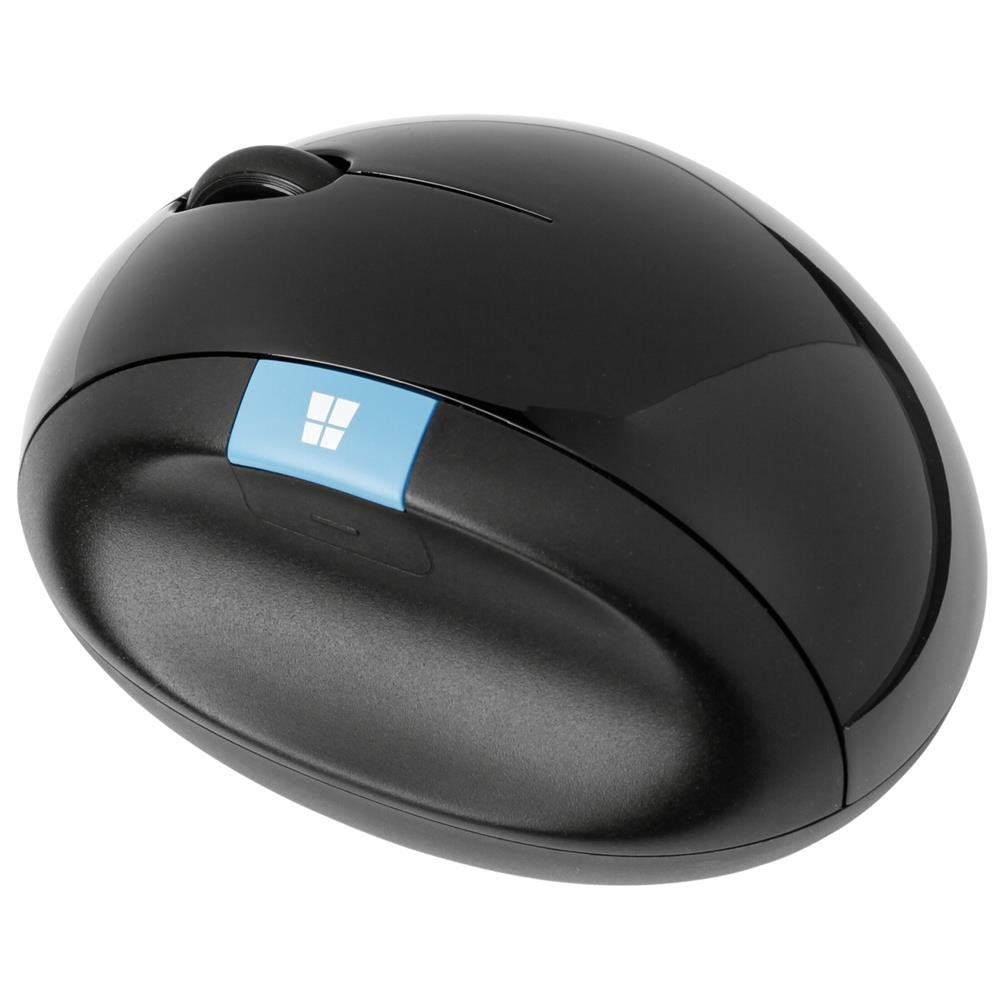
The Microsoft Sculpt takes a different approach to tendonitis relief: instead of tilting your hand vertically, it uses a domed shape that elevates your wrist and palm into a neutral, relaxed position. This design reduces the wrist extension that inflames the tendons on the top of your forearm, making it particularly effective for those whose pain is triggered by upward wrist bending. The sculpted thumb rest provides a natural landing zone that prevents over-gripping.
It runs on a single AA battery and connects via a proprietary USB receiver—there is no Bluetooth option, which is a notable limitation for modern multi-device setups. The four buttons are pre-configured and not programmable, but the left-click and right-click are light and responsive, requiring minimal actuation force. The rounded base glides smoothly across almost any surface, and the overall shape works well for both large and medium hands.
The lack of Bluetooth means that if you lose the receiver, the mouse becomes unusable. For users whose tendonitis is primarily in the wrist extensor tendons and who work on a single computer, this lightweight mouse delivers noticeable relief within the first week.
Why it’s great
- Domed shape reduces wrist extension strain
- Lightweight and glides smoothly
- Minimal learning curve for new users
- Comfortable for medium and large hands
Good to know
- No Bluetooth connectivity
- No programmable buttons
- Proprietary receiver is hard to replace
4. Logitech Lift Vertical Ergonomic Mouse

The Logitech Lift is purpose-built for users with small to medium hands who find most vertical mice too large to grip comfortably. Its 57-degree vertical angle promotes a natural forearm posture, and the softly textured rubber grip with a sculpted thumb rest provides a secure, fatigue-reducing hold. The silent clicks register with noticeably lower force than standard mice, directly reducing the cumulative tendon load during high-click-volume tasks like photo editing or data entry.
It connects via Bluetooth Low Energy or the Logi Bolt USB receiver, and a single AA battery provides up to two years of use—making it one of the longest-lasting options on this list. The SmartWheel scrolls smoothly with both notched and free-spin modes, though this model lacks the infinite scroll of Logitech’s MX series. Four customizable buttons let you assign media controls, zoom, or app switching through the Logi Options+ software.
The tall vertical profile makes it easy to knock over, and the lack of rechargeability means keeping spare AA batteries on hand. Some users with very large hands report that the mouse feels cramped. For anyone with small-to-medium hands who wants a reliable, quiet vertical mouse at a mid-range price point, the Lift is the clear choice.
Why it’s great
- Specifically sized for small to medium hands
- Ultra-quiet, low-force clicks
- Two-year battery life from one AA
- Ergo-certified design
Good to know
- Too small for large hands
- Uses disposable AA battery
- Tall profile can be knocked over
5. ProtoArc EM01 NL Wireless Trackball Mouse

The ProtoArc EM01 NL brings adjustable ergonomics to the trackball category at a highly accessible price point. Its unique hinge allows you to tilt the entire chassis from 0 to 20 degrees, letting you dial in the exact wrist angle that feels most comfortable for your specific tendonitis pattern. The thumb-operated trackball eliminates arm movement entirely, channeling all cursor control to your thumb—a shift that can dramatically reduce strain on sore wrist extensors and flexors.
Five DPI levels (200, 400, 800, 1200, 1600) give you granular control over cursor sensitivity, and the quiet clicks reduce auditory and physical feedback fatigue. The rechargeable lithium battery charges via USB-C, and you can connect up to three devices simultaneously using a combination of Bluetooth and the 2.4GHz receiver, switching between them with a single button. The matte finish resists fingerprints and provides a secure grip.
The trackball is highly sensitive to dirt and requires regular cleaning of the three white rollers inside the ball housing to maintain smooth tracking—a maintenance step that some users find tedious. The scroll wheel is not silent, and none of the buttons are programmable. For users willing to perform weekly trackball cleaning and who want adjustable angle control without spending premium-tier money, this trackball delivers excellent value.
Why it’s great
- Adjustable tilt hinge for personalized wrist angle
- Thumb trackball eliminates arm movement
- Triple device connectivity
- USB-C rechargeable
Good to know
- Trackball requires frequent cleaning
- Non-programmable buttons
- Scroll wheel is not silent
6. SABLUTE MAM1 Pro Ergonomic Wireless Trackball Mouse

The SABLUTE MAM1 Pro offers a 0- or 18-degree adjustable tilt, providing two distinct ergonomic positions to suit different workstations and pain points. The thumb-operated trackball again eliminates arm motion, but this model distinguishes itself with a wider DPI range (800 to 4800) and a companion software driver (Windows only) that allows full button customization and macro assignment. For users whose tendonitis is aggravated by specific repetitive keystrokes, assigning those actions to the trackball buttons can provide significant relief.
The build quality feels sturdy, with a rubberized texture and a magnetic slip-proof base that keeps the mouse planted during use. The rechargeable battery lasts several weeks between charges, and a soft ambient backlight can be toggled on or off. The USB receiver stores neatly in the base, eliminating the risk of losing it. The MAM1 Pro supports three-device switching via dual Bluetooth channels and the 2.4GHz dongle, making it seamless to move between work and personal machines.
The trackball can produce a clanking noise when the mouse is tilted to the left, which some users notice through noise-canceling headphones. The driver software is not compatible with macOS, limiting customization for Mac users. For Windows users who want the most customizable trackball experience in the value range, this model punches well above its tier.
Why it’s great
- Adjustable 18-degree tilt reduces wrist strain
- Wide DPI range for precise sensitivity control
- Customizable software for button mapping
- USB receiver stores in the base
Good to know
- Trackball may clank when tilted left
- Customization software not available for macOS
- Requires 1-2 week adaptation period
7. Ergodriven Om Vertical Ergonomic Mouse

The Ergodriven Om stands out in the budget-friendly vertical category for its unique OLED screen, which displays DPI level and battery status at a glance—eliminating the guesswork of finding your ideal sensitivity. The vertical handshake grip positions the wrist at a healthy angle, and the micro-force silent buttons require significantly less actuation pressure than traditional switches, directly reducing the repeated micro-trauma that fuels tendonitis flare-ups. Five customizable buttons can be assigned to common shortcuts like copy, paste, undo, or mute directly from the onboard screen without installing any software.
The wireless chipset supports both Bluetooth and 2.4GHz connectivity, and the rechargeable lithium battery ships with at least a 50 percent charge, lasting several weeks before needing a top-up. The connection is stable and lag-free across Windows, macOS, and Linux platforms—no drivers required. The Om’s compact form factor makes it a strong option for users with smaller hands or those who travel with their gear.
Multiple customer reviews note that the mouse is too small for larger hands, causing wrist pain over extended use rather than relieving it. The sensor has a higher-than-average lift-off distance, which can be annoying for users who lift and reposition the mouse frequently. For users with small to medium hands who want a vertical mouse with an intuitive setup and clear visual feedback, the Om is a compelling entry-level choice.
Why it’s great
- OLED screen shows DPI and battery level
- Micro-force silent buttons reduce finger strain
- Onboard button customization without software
- Dual wireless connectivity
Good to know
- Small size unsuitable for large hands
- High sensor lift-off distance
- Limited preset button assignments
FAQ
Will a vertical mouse cure my tendonitis?
How long does it take to adapt to a trackball mouse?
Can I use an ergonomic mouse for gaming with tendonitis?
What hand size is considered small, medium, or large for ergonomic mice?
Do I need a mouse with an adjustable DPI setting for tendonitis relief?
Final Thoughts: The Verdict
For most users, the computer mouse for tendonitis winner is the Logitech MX Ergo S because its 20-degree tilt and thumb trackball combination addresses both wrist pronation and repetitive arm movement in one premium package. If you want a proven vertical design that works without batteries and costs less, grab the Evoluent Vertical Mouse. And for the best value in a trackball with adjustable angle control, nothing beats the ProtoArc EM01 NL. Make the switch today—your tendons will thank you tomorrow.

Mo Maruf
I created WellFizz to bridge the gap between vague wellness advice and actionable solutions. My mission is simple: to decode the research and give you practical tools you can actually use.
Beyond the data, I am a passionate traveler. I believe that stepping away from the screen to explore new environments is essential for mental clarity and physical vitality.