Our readers keep the lights on and my smoothie glass nicely filled. As an Amazon Associate, I earn from qualifying purchases.
Specs are compiled from manufacturer listings and verified buyer reviews and can change over time — please confirm the key details on the product page before buying.
If your fingers hang off the edge of a standard mouse, you already know the problem—hand cramps, wrist strain, and that annoying “pinky drag” across the desk pad. Picking the right mouse for large hands is really about finding one that lets your whole palm rest naturally, not just the tips of your fingers.
I’m Mohammad Maruf — the founder and writer behind WellFizz. This guide is built by comparing the manufacturers’ published specifications and the patterns across verified customer reviews, so you get each pick’s real strengths and trade-offs instead of marketing spin.
Whether you are after a quiet office companion or a high-DPI gaming peripheral, here are the best options to make your search for the right computer mouse for large hands a whole lot more comfortable.
Our Picks at a Glance


How To Choose The Best Computer Mouse For Large Hands
Finding a mouse that genuinely fits your hand means looking past the generic “one-size-fits-all” marketing. For larger palms, three things make or break the experience: the physical shape, the weight, and how the scroll wheel and side buttons feel under your fingers during extended use.
Shape and grip style
A mouse designed for large hands should let your entire palm rest on the body. That means a taller arch, a wider base, and enough length so your fingertips don’t curl over the front edge. For right-handed users, a contoured thumb rest or a vertical “handshake” design can shift pressure away from the wrist.
Sensor precision and DPI range
DPI (dots per inch — a measure of how far the cursor moves per inch of physical mouse movement) governs how quickly the cursor responds. A wider DPI range (like 800 to 8000) means you can dial in slow precision for design work or fast sweeps for gaming. For large monitors, a minimum of 1600 DPI is a practical starting point.
Connectivity and battery life
Bluetooth Low Energy and a USB receiver give you two ways to connect, keeping the option open if one port is occupied. For a wireless mouse, a battery life measured in months (rather than days) spares you the hassle of constant recharging. Look for models that advertise a 24-month or similar multi-month battery span.
Quick Comparison
| Model | Best For | Connectivity | DPI Range | Button Count | Amazon |
|---|---|---|---|---|---|
| Logitech Signature M650 L★ Best Overall | Best Overall | Bluetooth / Logi Bolt | Fixed (1000 default) | 3 | Amazon |
| Corsair IRONCLAW Wireless SEPro Grade | Gaming Performance | Bluetooth / 2.4GHz | 100 – 26,000 | 10 | Amazon |
| Logitech Signature M550 L | Quiet Office Work | Bluetooth / Logi Bolt | Fixed (1000 default) | 3 | Amazon |
| SABLUTE MAM4 Vertical | Ergonomic Vertical | Bluetooth 5.0 / 2.4GHz | 50 – 8,000 | 6 | Amazon |
| Adjustable Vertical Ergo Mouse | Angle Customization | RF / USB | 1000 – 3600 | 6 | Amazon |
In‑Depth Reviews
1. Logitech Signature M650 L Full Size Wireless Mouse
Our pick — 4.5★ from 14,000+ verified ratings; the strongest balance of quality and price.
The quiet everyday workhorse built for a full palm grip.
Let your hand sit naturally with a contoured shape, a soft thumb area, and rubber side grips that keep you snug during long hours of work. Buyers report that the M650L offers better ergonomics for large hands, and the SilentTouch technology cuts click noise by 90 percent so coworkers won’t hear each press.
The SmartWheel switches between line-by-line precision for documents and high-speed free spin for long web pages with a flick of the wheel. You get a 24-month battery life from a single AA battery (included), and you can connect via Bluetooth Low Energy or the Logi Bolt USB receiver — the choice is yours. Unlike the Corsair IRONCLAW with its 10 buttons, this model keeps things streamlined with just 3 buttons and no software remapping for gaming.
Plastic parts use certified post-consumer recycled content (minimum 65% in the Graphite version), and compatibility spans Windows, macOS, Linux, ChromeOS, iPadOS, and Android.
Office-ready comfort: The rubber sides and quiet clicks make this a top pick for anyone who spends all day at a desk. The catch is the 3-button layout — no extra side buttons for macros or app shortcuts.
Reach for this if: you want a simple, silent, long-lasting mouse that fits a large palm without extra software fuss.
Look elsewhere if: you need programmable gaming buttons or a vertical wrist angle.
2. Corsair IRONCLAW Wireless SE Gaming Mouse
A palm-grip gaming powerhouse with marathon battery life.
Built for larger hands and right-handed players who use a palm grip, the IRONCLAW’s asymmetric shape means you are not straining your wrist to fit a mouse that was designed for smaller hands. The CORSAIR MARKSMAN sensor delivers up to 26,000 DPI (dots per inch), and surface calibration lets the mouse adapt to any desk pad or mouse mat.
Battery life is where this mouse really stands out — up to 285 hours over 2.4GHz wireless and up to 532 hours using Bluetooth, so marathon gaming sessions (or work weeks) don’t stall for a charge. You get 10 programmable buttons for macros and keybinds via the iCUE software, plus customizable RGB lighting on the scroll wheel, logo, and front grill. At 5.12 inches long and 3.15 inches wide, it gives your palm a full resting surface, unlike the SABLUTE MAM4’s taller vertical profile.
Owners mention it is an excellent fit for taller users (one reviewer at 6’3″ praised the ergonomics), but note that the iCUE software support may not be fully available for this model at launch. The scroll wheel design is improved over the original wired IRONCLAW, though some early buyers found two index-finger buttons locked from customization on device memory.
Why it wins for gamers
- Up to 532 hours of battery (Bluetooth mode)
- 26K DPI sensor with surface calibration
- 10 programmable buttons for complex macros
One early adopter pain point
- iCUE software may not support this model at launch (customers note as of Feb 2026)
- Two index-finger buttons could be locked from customization on device memory
Best for: larger-handed gamers who want a rechargeable wireless mouse with extreme battery life and high-DPI precision.
Skip if: you cannot wait for full iCUE compatibility or you prefer a vertical handshake angle.
3. Logitech Signature M550 L Full Size Wireless Mouse

A full-size, no-fuss mouse that keeps the click noise out of your workspace.
This is the cleanest version of the Logitech Signature lineup for large hands — no side buttons, no software, just a comfortable full-size shape with soft thumb area and rubber side grips. The M550 L is designed specifically for larger hands, and buyers confirm it reduces hand strain compared to smaller models. One buyer mentioned it is “quiet, smooth, fast Bluetooth,” and the 24-month battery life from a single AA battery (included) means you practically forget about power.
You connect via Bluetooth Low Energy or Logi Bolt USB receiver, and it works with Windows, macOS, Linux, ChromeOS, iPadOS, and Android. Unlike the M750 L, this model has no customizable side buttons, making it simpler but less flexible for power users. The 90 percent quieter clicks (SilentTouch) are a genuine benefit for shared office spaces or late-night work. Plastic parts include certified post-consumer recycled content (66% in Graphite).
Simplicity done right
- Full-size large-hand fit at a budget-friendly tier
- 24-month battery life — one AA battery included
- 90% quieter clicks than standard mice
Trade-offs
- No customizable side buttons (unlike the M750 L)
- Not ideal for gaming — fixed DPI and no software
Reach for this if: you want a basic, quiet, large-hand mouse for office work with zero setup time.
Look elsewhere if: you need programmable buttons or a rechargeable battery.
4. SABLUTE MAM4 Vertical Wireless Mouse
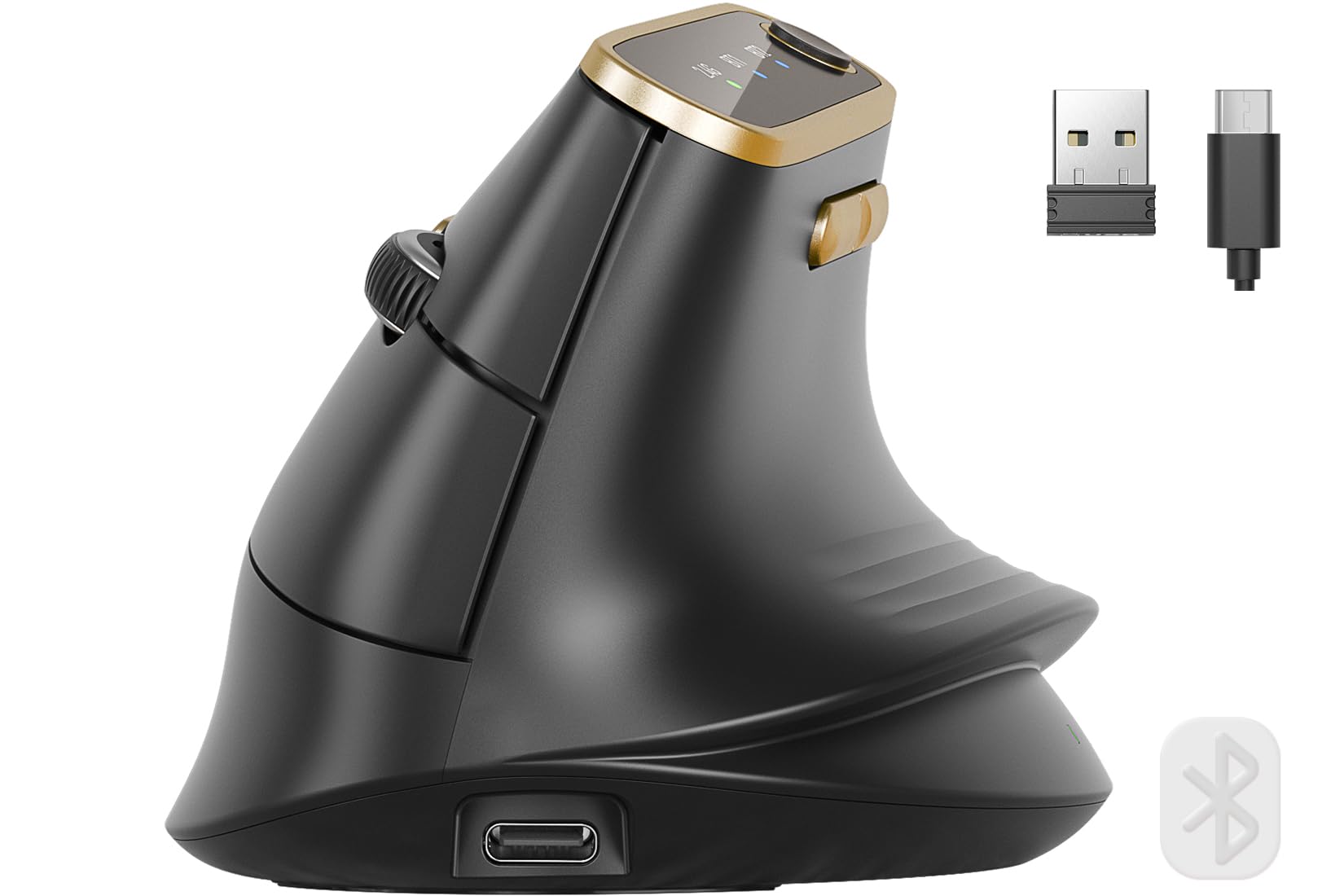
A 57-degree handshake angle that stops the “pinky drag” for medium-to-large palms.
If you have tried standard mice and still feel wrist strain after an hour, the MAM4’s taller profile and 57-degree angle let your whole palm rest instead of squeezing into a smaller shape. It is designed for medium-to-large hands, and the vertical orientation shifts your forearm into a natural handshake position that reduces the pressure on the carpal tunnel compared to a flat mouse like the Logitech M650 L.
You can fine-tune cursor speed for any task: six preset DPI (dots per inch, a measure of cursor sensitivity) levels from 800 to 4000, and you can open up up to 8000 DPI via driver software (or go as low as 50 DPI for precise design work). The ultra-fast scroll wheel can scroll 1000 lines in seconds — helpful for long spreadsheets. All 6 buttons support full macro programming on Windows (note: the programming software is not available for macOS). An 800mAh rechargeable battery lasts up to 30 days per charge, which is nearly double the capacity of some market leaders. Shoppers say the quiet clicks reduce noise by 90 percent, and the lightweight ABS plastic chassis glides smoothly on clean surfaces — though one owner reported the wrist corner may press into the desk if your hand hangs off the edge.
Vertical relief with premium DPI: The MAM4’s 8K DPI sensor and 30-day battery are a direct upgrade over the Adjustable Vertical Ergo Mouse’s 3600 DPI and disposable battery design. The catch: the programming app is Windows-only.
Best for: anyone with medium-to-large hands looking to switch to a vertical mouse with high-precision DPI and rechargeable battery.
Not for: Mac users who need full macro programming on macOS.
5. Adjustable Angle Ergonomic Vertical Wireless Mouse

An adjustable angle lets you dial in your perfect wrist position on a budget.
Unlike most vertical mice that lock you into a single angle, this model features an adjustable angle gradient so you can tilt the grip to exactly where your wrist feels relaxed. The removable palm rest adds extra support during long hours, and the large size is built for bigger hands. With 6 buttons, you get forward/backward navigation and DPI switching across 1000, 1600, 2000, 2400, and 3600 DPI settings — a nice spec range for a budget-tier entry.
Connectivity is via RF wireless (up to 33 feet range) with a plug-and-play USB receiver — no software or drivers required. Buyers report one-year-in-service durability (“Coming up on one year in service, being used everyday,” one customer observed), though some mention occasional lockups needing the receiver unplugged. The RGB breathing light and dynamic lighting effect add desk flair, but note: this model does not support static single-color lighting. Unlike the SABLUTE MAM4 which offers a rechargeable 800mAh battery, this mouse requires batteries (not included).
What stands out
- Adjustable angle gradient for personalized wrist angle
- Removable palm rest adds extra support for large hands
- Wide DPI range (1000-3600) at an entry-level tier
Keep in mind
- Requires batteries (not included) — no rechargeable option
- Not a silent mouse; clicks are audible
- Occasional receiver re-plug needed (owners mention)
Ideal for: large-handed users on a tight budget who want to experiment with vertical ergonomics and an adjustable wrist angle.
Pass if: you need silent clicks or a rechargeable battery.
Understanding the Specs
DPI (dots per inch)
DPI tells you how many pixels the cursor moves for every inch you physically move the mouse. A higher DPI means less arm movement, which is helpful on large monitors or high-resolution screens. For general office work, 1600 DPI is a good starting point; for gaming or 4K displays, you may want a range that goes well above 4000. The Corsair IRONCLAW tops out at 26,000 DPI, while the Adjustable Vertical Ergo Mouse offers up to 3600 DPI.
SmartWheel and scroll modes
The SmartWheel is a feature on Logitech Signature mice that lets you switch between two scrolling modes: a precise line-by-line ratcheting feel for documents, and a free-spin mode that flies through long web pages or spreadsheets with one flick. Not all mice have this — the SABLUTE MAM4 uses an ultra-fast metal scroll wheel that can go through 1000 lines in seconds, but without a click-mode toggle.
FAQ
Will a mouse for large hands work with a right-handed grip style only?
How long does a wireless mouse battery last for large-hand models?
Is a vertical mouse better for large hands than a standard contoured mouse?
Can I use a large-hand gaming mouse like the Corsair IRONCLAW for office work?
What DPI should I choose for a large-hand mouse on a 4K monitor?
Do these mice work with a Mac or a Chromebook?
Which mouse has the most programmable buttons for macros?
How do I clean a rubber-coated mouse designed for large hands?
Is a 3-button mouse enough for daily office work?
Can I use a large-hand mouse with a wired connection?
Final Thoughts: The Verdict
For the majority of shoppers, the best computer mouse for large hands winner is the Logitech Signature M650 L because it combines a full-palm fit, silent clicks, and a 24-month battery life at an accessible price point — no software fuss, just comfort from the start. If you want a rechargeable vertical design with high DPI precision for design work, grab the SABLUTE MAM4. And for marathon gaming sessions with extreme battery life and full button customisation, the Corsair IRONCLAW Wireless SE is the one to pick.
How We Picked
We do not accept paid placement. Every pick is matched to a real buyer and a real use-case; we do not hands-on test units.
Sources & Methodology
Specifications: manufacturer listings and product documentation. Review insights: verified customer reviews, as of July 2026. Pricing: not shown on this page (it changes often); check the current price via the retailer link.
As an Amazon Associate, WellFizz earns from qualifying purchases. This does not affect which products we feature.
Related Guides

Mo Maruf
I created WellFizz to bridge the gap between vague wellness advice and actionable solutions. My mission is simple: to decode the research and give you practical tools you can actually use.
Beyond the data, I am a passionate traveler. I believe that stepping away from the screen to explore new environments is essential for mental clarity and physical vitality.