Our readers keep the lights on and my smoothie glass nicely filled. As an Amazon Associate, I earn from qualifying purchases.
Specs are compiled from manufacturer listings and verified buyer reviews and can change over time — please confirm the key details on the product page before buying.
Staring at a screen that sits too low is the fastest way to earn a sore neck and tired eyes before lunch. The right monitor stand lifts your screen to eye level, reclaims desk space, and hides the cable mess — but picking the wrong one usually means wobbly support or wasted desk real estate. This guide sorts through seven top models so you can spot which one fits your actual setup.
I’m Mohammad Maruf — the founder and writer behind WellFizz. This guide is built by comparing the manufacturers’ published specifications and the patterns across verified customer reviews, so you get each pick’s real strengths and trade-offs instead of marketing spin.
Your neck and shoulders will thank you when your screen sits at eye level, and a computer monitor stand also frees up desk space for your keyboard, mouse, and coffee mug — making your work setup more comfortable and less cluttered instantly.
Our Picks at a Glance

How To Choose The Best Computer Monitor Stand
You need to match three things: your desk’s width, your monitor’s weight, and if you want drawers or charging ports built in. Focus on those, and the choice gets simple.
Width and Number of Monitors
The first number to check is the total width. A single 24-inch monitor needs roughly 22 inches of space, but dual 27-inch screens push that past 46 inches. If your stand is too narrow, your monitors will hang off the edges or you will have to stack them awkwardly. Measure your total screen width before you shop.
Load Capacity and Materials
Every stand has a maximum weight it can hold without bending or sagging. A basic aluminum or plastic riser might top out around 50 pounds, while a thick bamboo or steel model can handle over 200 pounds. Check the combined weight of your monitors plus anything else you plan to set on the shelf — a heavy all-in-one computer alone can weigh 25 pounds or more.
Extra Features That Actually Help
Drawers, USB ports, wireless charging pads, and cable management slots all add convenience, but they also add cost and bulk. A drawer is useful if you stash pens and sticky notes under the stand. A built-in USB hub saves you reaching behind the computer tower. If you just want a clean lift with no clutter, skip the extras and go for a simple shelf.
Quick Comparison
| Model | Best For | Width | Load Capacity | Levels | Amazon |
|---|---|---|---|---|---|
| OPNICE Dual Stand★ Best Overall | Entry-level value | 16.06 in | — | 1 | Amazon |
| Vaydeer All-in-OneAlso Great | Tech-heavy desk setups | 39.3 in | 110 lb | 2 | Amazon |
| Fenge 42.5in (with Drawer) | Ultra-wide dual monitors | 42.5 in | 99 lb | 2 | Amazon |
| Fenge 42.5in (Cable Mgmt) | Cord-free workspace | 42.5 in | 99 lb | 1 | Amazon |
| Bamboo Monitor with Storage | Heavy single monitor | 25 in | 220 lb | 1 | Amazon |
| Dual Monitor Riser (ROCDEER) | Flexible corner desks | 37 in | 130 lb | 1 | Amazon |
| Simple Trending 2-Tier | Budget dual-tier storage | 32 in | — | 2 | Amazon |
In‑Depth Reviews
1. OPNICE Desk Organizers Dual Monitor Stand Riser
Our pick — over 4.5★ from 950+ verified ratings; the strongest balance of quality and price.
A no-tools-needed riser that adds a drawer and pen holders in seconds.
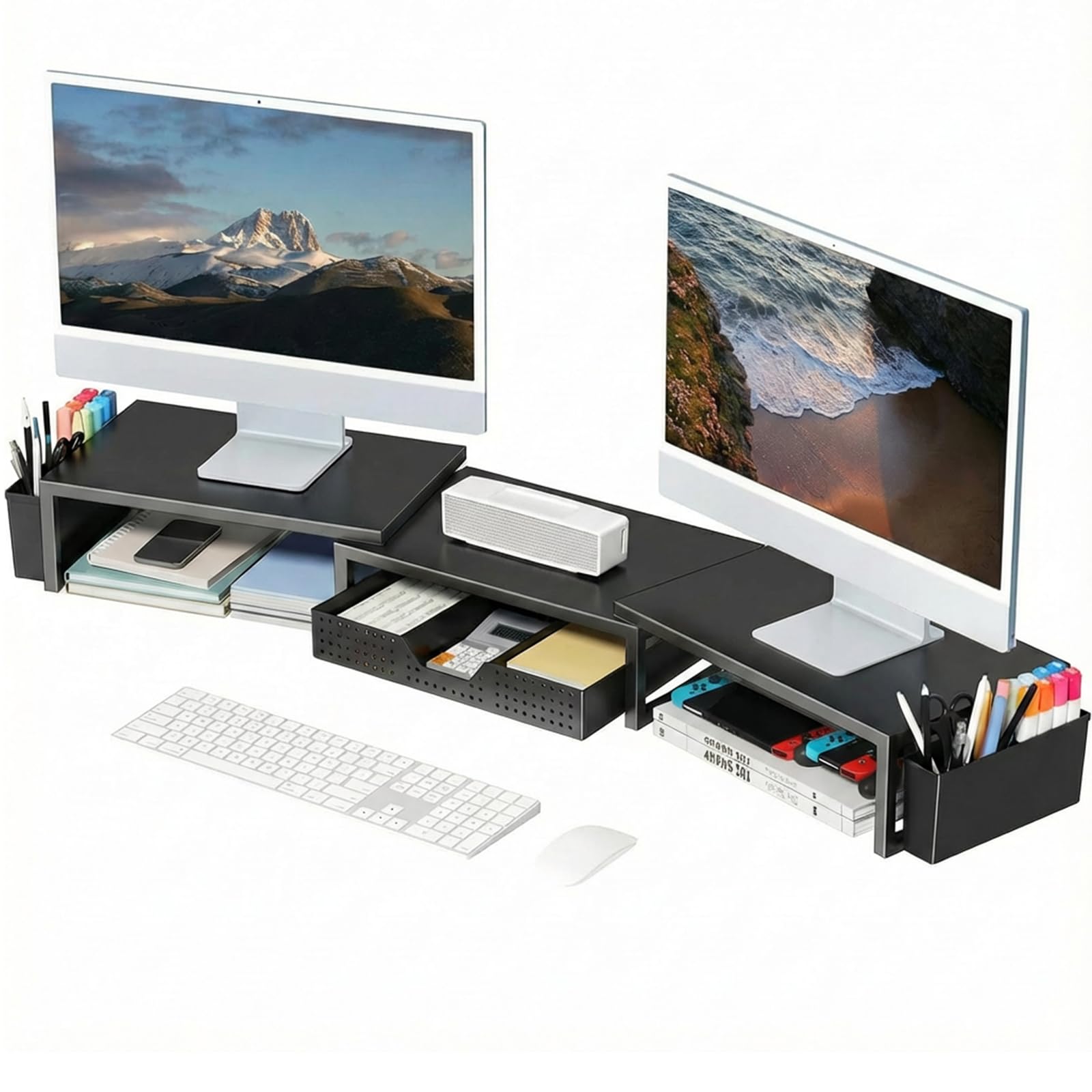
The OPNICE stand is built for anyone who wants instant desk organization without spending half an hour with an Allen key. It arrives fully assembled — you just set it on your desk and start using the drawer and two hanging pen holders right away. The unit is made of alloy steel with a powder-coated finish, so it feels sturdy despite its lightweight 3.39 kilograms. At 16.06 inches deep and 3.62 inches tall, it is a short, compact riser that works best for a single large monitor or a laptop, though the adjustable plates can extend to handle two monitors up to 39 inches wide when fully pulled out.
Where the OPNICE falls short is height: at just over 3.6 inches, it is the shortest rise in this lineup, which means it may not bring your screen high enough to correct a forward-head posture. Shoppers say that “this works well to improve two 32 inch monitors and organize my desktop clutter at work” and love the magnetic strips that keep the adjustable plates in place without screws. The included adhesive strips are optional — some reviewers find the stand more flexible without them. If you need a taller lift, the Vaydeer or Fenge models give you nearly 2 inches more height.
What Works Well
- Zero assembly means you can unpack and organize in under a minute
- Drawer and two pen holders keep small tools and stationery off the desk surface
- Metal construction provides stable support for two monitors when fully extended
What to Watch
- 3.62-inch height is lower than ergonomic recommendations for taller users
- Compact footprint may not feel substantial under very large monitors
Grab this if: You want the easiest possible setup and need a drawer and pen holders without assembly.
Pass if: You need a taller rise for ergonomic posture or require a solid wood surface.
2. Vaydeer All-in-One Dual Monitor Stand Riser
The all-in-one desk hub that charges, lights, and stores your gear at once.
The Vaydeer stand packs more features into one metal frame than anything else on this list — it is part monitor riser, part charging station, and part desk organizer all in one. You get a built-in 15W wireless charging pad (a pad that lets you charge a phone just by setting it down), 8 USB ports split between fast charging and data transfer, and an integrated LED light strip that shines softly across your workspace. At 39.3 inches wide and supporting up to 110 pounds, it easily handles two large monitors plus a laptop on the second tier. The two pull-out drawers give you a neat home for pens, USB drives, and notepads, keeping the surface clutter-free.
Compared to the other Fenge models here, the Vaydeer is the clear choice if you want every modern convenience without needing separate accessories. Buyers report that the wireless charging pad saves them from hunting for a cable every time the phone battery dips. The catch is the higher investment — this is the most expensive stand in the lineup — and some buyers find the built-in LED light more subtle than a dedicated desk lamp.
What Works
- 15W wireless charging pad and 8 USB ports keep devices topped up without extra cables
- LED light strip reduces eye strain in dim office lighting
- Two-tier design with drawers offers generous storage for office supplies
Trade-Offs
- Higher price than most single-function stands
- Built-in lighting is subtle, not a full desk lamp replacement
Ideal for: Anyone who wants a single dock that lifts monitors, charges phones, and stashes accessories without clutter.
Note: If you do not need charging ports or a light strip, a simpler stand saves money and keeps the setup cleaner.
3. Fenge Monitor Stand with Drawer (42.5 Inch)
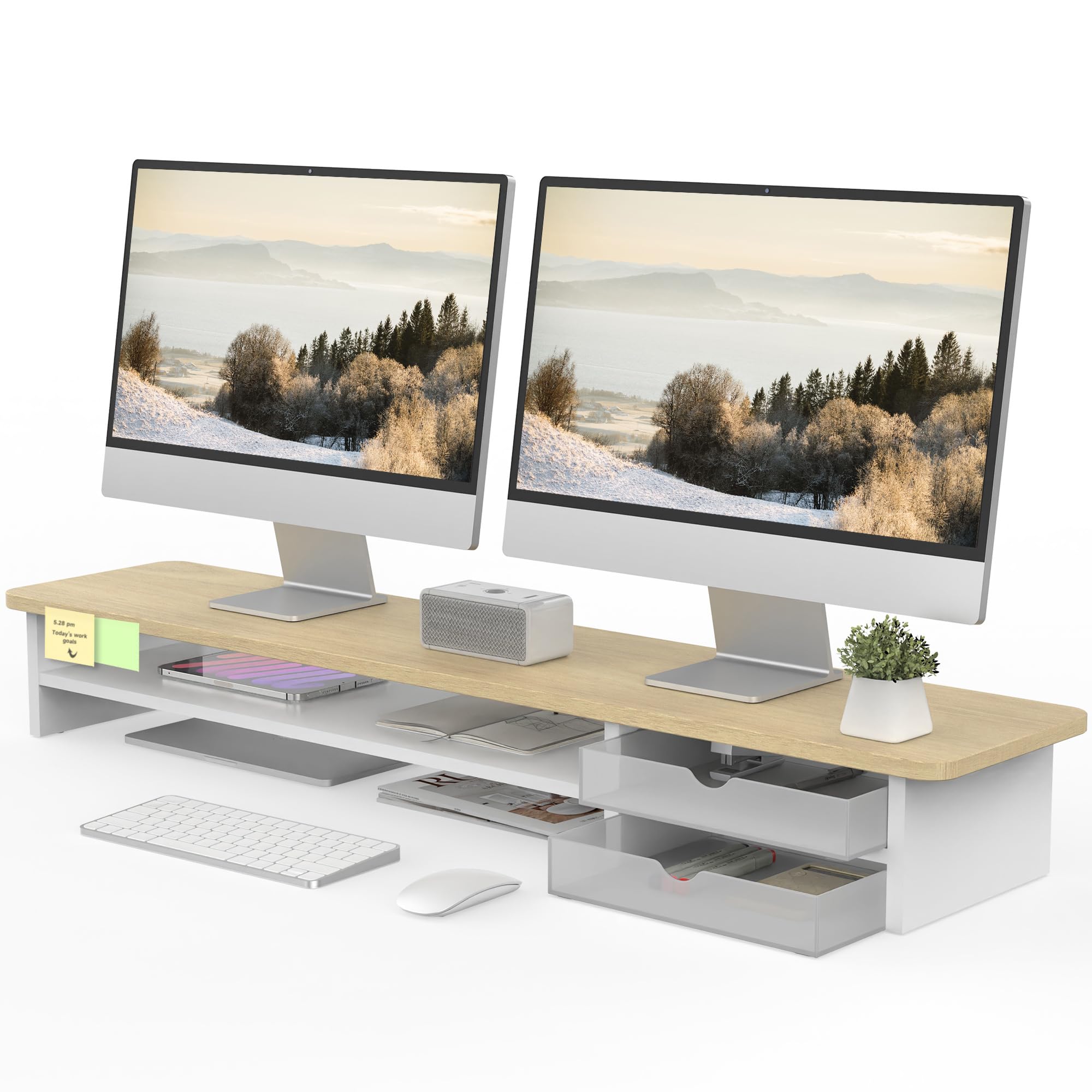
An extra-wide shell that keeps two monitors up and gear tucked away.
At 42.5 inches long, this Fenge stand is built for anyone who runs two monitors side by side without wanting them to overhang the edges. The shelf sits at 5.5 inches high — enough to slide a keyboard underneath when you finish typing — and the top surface is made from engineered wood with a waterproof finish that resists fingerprints and scratches. The two semi-transparent frosted acrylic drawers slide out smoothly and can be swapped left and right if your desk layout changes. Beneath the top tier, you get a second level that holds a tablet, notebook, or phone within easy reach.
Where this stand beats the ROCDEER model is its 2-tier layout and included drawers. Unlike the Vaydeer, which relies on metal and USB ports, this one keeps the design wood-focused and storage-forward. Owners mention that the 99-pound load capacity is plenty for dual 27-inch monitors plus a few decorations on top. The main downsides are that assembly takes about 5 to 8 minutes and the price sits higher than a basic shelf model.
Strong Points
- 42.5-inch length fits two monitors and leaves extra room for a laptop or speakers
- Two acrylic drawers provide visible storage for small desk items
- Waterproof surface resists scratches and fingerprints during daily use
Weak Points
- Engineered wood may feel less premium than solid bamboo
- Assembly required with included tools and instructions
Go for it if: You have a wide desk and want a dedicated home for monitors plus two drawers without paying for charging extras.
skip it if: You prefer a single-level riser with cable management instead of drawers.
4. Fenge Dual Monitor Stand (42.5 Inch, Cable Management)
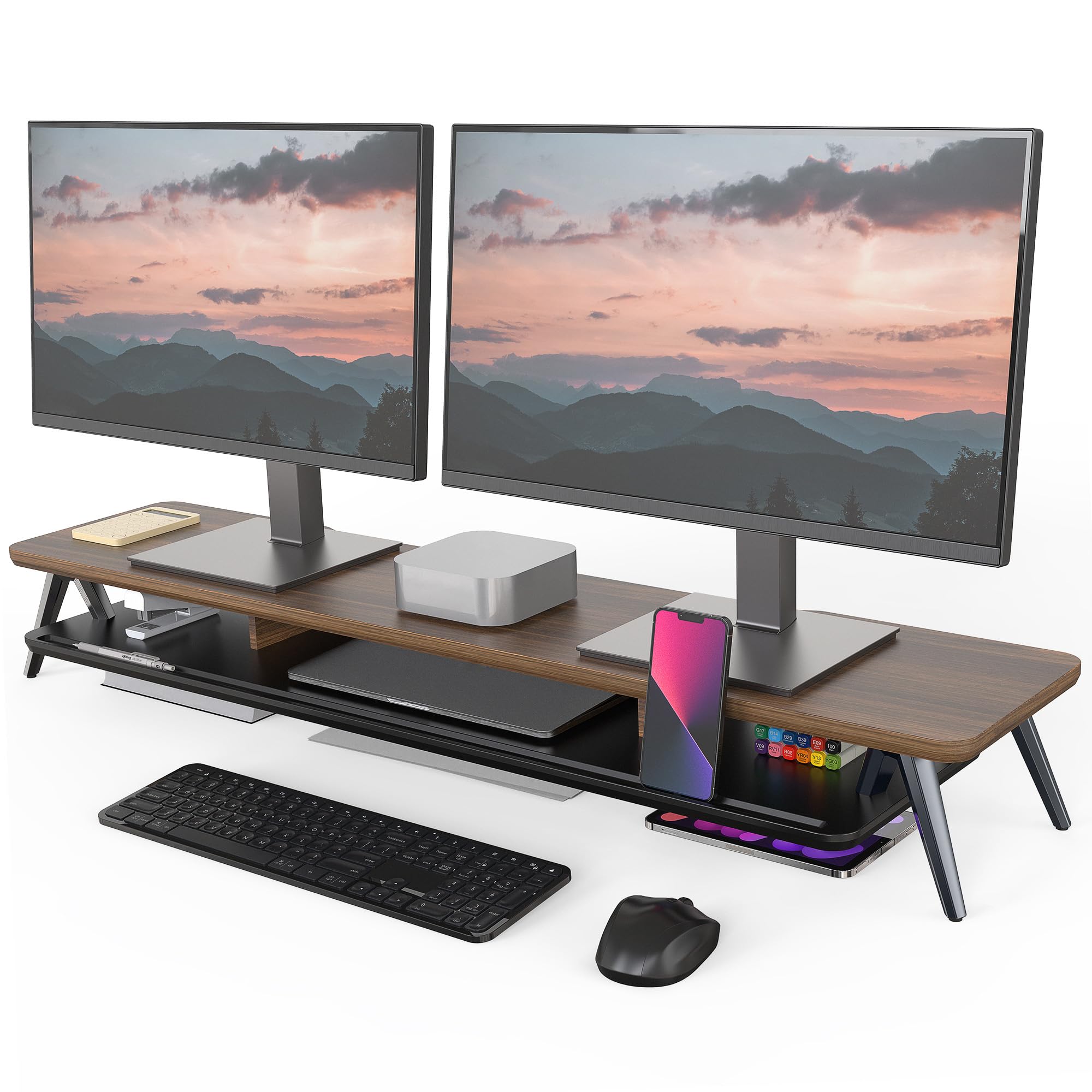
A clean, cable-friendly riser that hides cords without bulky drawers.
If you want the same 42.5-inch width as the previous Fenge but prefer a simpler, storage-light design, this version strips out the drawers and focuses on cable management instead. The top is a thick 0.7-inch MDF panel (a dense wood board) with a waterproof coating, while the legs are solid aluminum that keeps the stand stable at the full 99-pound capacity. The built-in cable management slots let you route monitor and power cords out of sight, so your desk stays clean from every angle. A universal device holder slot on the top deck props up your phone or tablet while you work.
Compared to the WELL WENG bamboo stand, this Fenge is wider and lighter at 8.46 kilograms versus the bamboo unit’s load rating, but both are designed for heavy single or dual monitors. Reviewers highlight that the 5.7-inch height is just right for a sit-stand desk, and one owner said it “saved my neck and my desk space” after mounting dual 27-inch screens. On the downside, the MDF surface lacks the natural grain of solid bamboo, and some buyers wish the legs were adjustable by another inch.
Pros
- Waterproof MDF panel resists spills and scratches during long workdays
- Cable management slots keep cords tidy without needing extra clips
- Solid aluminum legs provide wobble-free support for heavy monitors
Cons
- MDF is not as durable as solid wood over many years
- No drawers or visible storage compartments
Pick this if: You want a wide, low-profile riser with built-in cord routing and no extra bulk on your desktop.
Look elsewhere if: You need drawers or a second tier for storage — the drawer version above suits you better.
5. Bamboo Monitor Stand with Storage (WELL WENG)
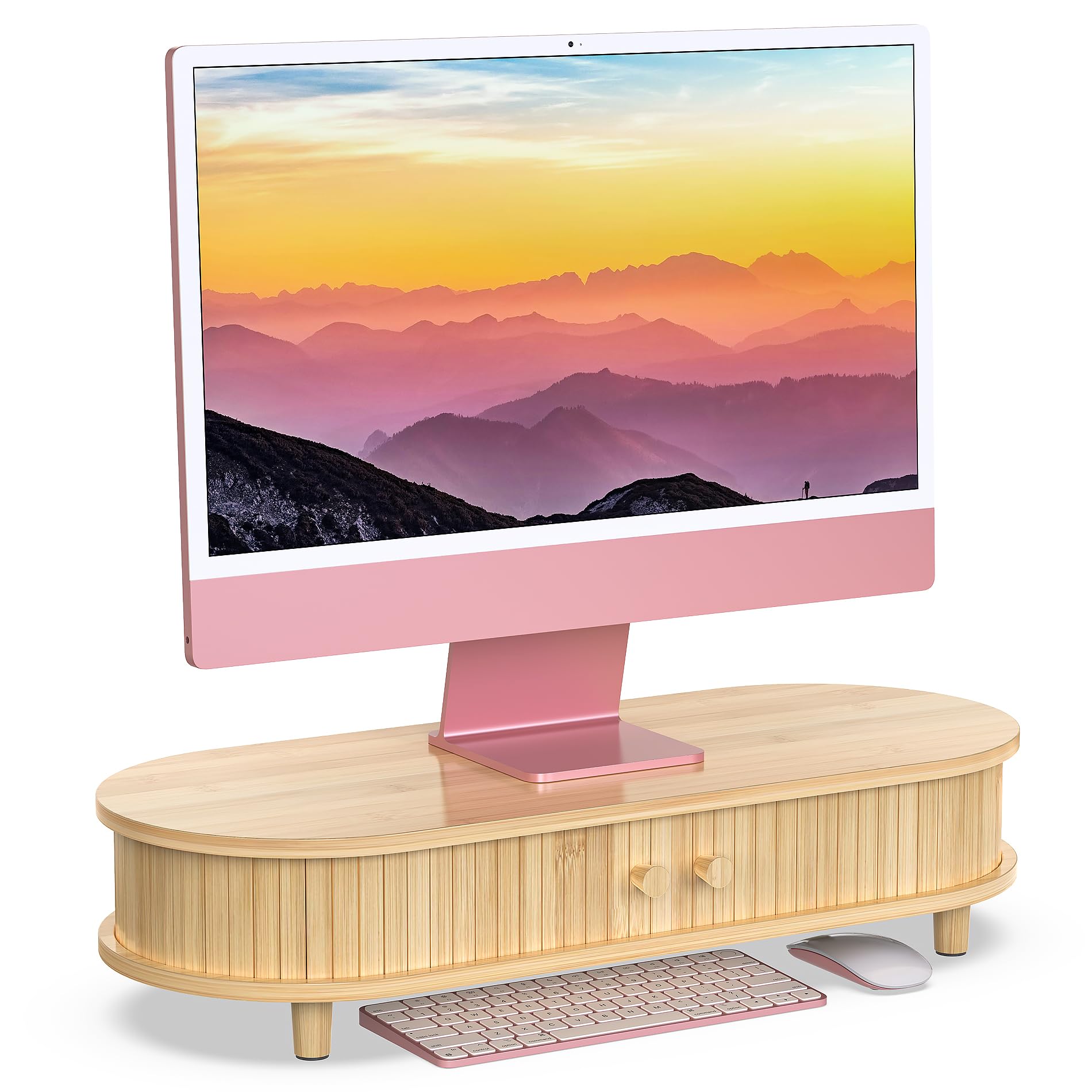
A bamboo powerhouse that lifts heavy gear and hides clutter behind sliding doors.
With a load capacity of 220 pounds — more than any other stand in this lineup — the WELL WENG bamboo riser is built for the heaviest single monitors or even a compact CPU sitting on top. The curved design gives it a softer, modern look, while the spacious cabinet underneath uses sliding doors to conceal office supplies, a keyboard, or a tablet. At 25 inches wide, 10 inches deep, and 5.5 inches tall, it is a compact footprint that still leaves room underneath to slide a mouse and keyboard out of sight when you finish work. The middle compartment includes a cutout for cable routing, so charging cords stay tucked away.
This stand has a capacity of 220 pounds, while the ROCDEER dual riser is rated at 130 pounds, making it the best choice if you own a heavy all-in-one or a large TV monitor. Customers note that the natural bamboo grain varies slightly between units — that is normal for real wood — and one reviewer noted it “saves a ton of space by fitting my MacBook Air, mouse, and ergonomic keyboard underneath.” The trade-off is that it supports only one level and one monitor well, so it is not the right fit for side-by-side dual screens or people who need a second shelf for accessories.
Reasons to Buy
- 220-pound load capacity handles massive monitors and extra gear without sagging
- Sliding-door cabinet keeps supplies hidden but accessible
- Natural bamboo finish looks warm and blends with wood desks
Reasons to Skip
- 25-inch width is too short for dual monitors
- No second tier or drawers for vertical storage
Perfect for: A single heavy monitor or all-in-one computer, especially if you want hidden storage and a natural wood look.
Not for: Dual-monitor setups or anyone who needs a second shelf level — its strength is in weight, not width.
6. Dual Monitor Stand Riser (ROCDEER, Adjustable)

A bamboo stand that splits apart to wrap around corner desks or odd layouts.
The ROCDEER riser stands out because it is not a single fixed shelf — it comes in three pieces that you can arrange as one long 37-inch unit, separate into two or three smaller stands, or angle to fit L-shaped and corner desks. The patented design lets you customize the layout without tools, so if your monitors sit at different heights or your desk has an unusual shape, this stand adapts. The bamboo material is FSC-certified (meaning the wood comes from responsibly managed forests), and the maker says it tested the shelf to 130 pounds without deformation — though the provided data states the load capacity at 130 pounds directly. Rubber gaskets on the bottom prevent sliding, and the top surface includes slots for holding phones, pens, and small office supplies.
Compared to the WELL WENG bamboo stand, the ROCDEER is wider at 37 inches but lighter in weight at 4.92 kilograms, and it gives you way more layout options. The downside is that at 4.1 inches tall, this stand is shorter than most others on the list — you may need to check if your monitors sit high enough after setting it up. Assembly is quick at about 3 minutes, but you do have to screw in 8 legs.
what separates it
- Three-piece modular design fits corner desks, L-desks, and separate monitor heights
- FSC-certified bamboo is a renewable, eco-friendly material choice
- 130-pound load capacity handles dual monitors with safety margin
The Limitations
- 4.1-inch height is shorter than some ergonomic recommendations
- Requires assembly of legs, though no tools are needed
Best suited for: Non-standard desk shapes, corner setups, or anyone who wants to position monitors at independent heights.
Consider something else if: You prefer a single solid shelf with a taller rise and simpler assembly.
7. Simple Trending 2 Tier Metal Dual Monitor Stand Riser

A two-tier metal shelf that lifts and stores without emptying your wallet.
If you want the vertical storage of a 2-tier design without moving into premium pricing, the Simple Trending stand is a solid middle-ground pick. The bottom tier is open and tall enough to slide a keyboard or a console underneath, while the top shelf raises your monitors to a comfortable eye level. Two pull-out drawers sit under the top shelf for small supplies like pens and cables, and a pair of USB 2.0 ports with a charging protector gives you a convenient plug-in spot for phones without reaching under the desk. Reusable cable ties are included to bundle loose cords against the metal frame.
At 32 inches wide, this stand holds two monitors comfortably but is narrower than the Fenge or Vaydeer models. Reviewers point out that “my laptop and two desk top fits them all three, lots of space and two drawer storage on it.” One thing the data does not list is a specific load capacity, so if you use very heavy monitors, you may want to check that the metal mesh can handle the weight. The 2-level layout gives you 7 inches of total height — taller than the ROCDEER stand — and the metal mesh surface increases air flow to prevent overheating, which is a bonus for gaming rigs or hot-running laptops.
Strong Suits
- 2-tier design gives you a dedicated place for a keyboard or gaming console
- USB 2.0 ports with charging protector offer convenient device power
- Metal mesh platform improves air flow to keep gear cool
Shortcomings
- No published load capacity could be a concern for heavy setups
- Drawers slide without rails, so they are better for light items
A solid pick if: You need two shelf levels and USB ports but want to stay in a more accessible price range.
Think twice if: You rely on a very heavy monitor or want the clean look of solid wood instead of metal mesh.
Understanding the Specs
Load Capacity
This is the maximum weight the stand can hold without bending, sagging, or collapsing. It matters because a heavy monitor or all-in-one computer can easily weigh 25 to 50 pounds. If you plan to set two monitors on the same shelf, add their weights together plus anything else you put on top. A stand rated at 220 pounds — like the WELL WENG bamboo model — gives you a huge safety margin, while a stand with no listed capacity is a risk for heavy screens.
Width and Number of Levels
Width determines how many monitors fit side by side without overhanging. A 42.5-inch stand (the Fenge models) can hold two 27-inch screens with a few inches of breathing room. The number of levels tells you whether the stand has a second shelf underneath for a keyboard, gaming console, or storage bins. A 2-tier stand like the Simple Trending gives you vertical organization, while a single-level stand keeps things simpler and lower to the desk.
FAQ
Will a monitor stand fit my curved monitor?
What height should my monitor stand be?
Can I put a computer tower on a monitor stand?
Do I need cable management on my stand?
Will a dual monitor stand work with an ultrawide monitor?
How much weight can a typical metal monitor stand hold?
Is bamboo better than metal for a monitor stand?
Can I use a monitor stand on a standing desk?
Do I need to assemble all monitor stands?
Will a monitor stand help with neck pain?
Final Thoughts: The Verdict
For the majority of shoppers, the computer monitor stand winner is the Vaydeer All-in-One because it combines a wide 39.3-inch metal riser with wireless charging, 8 USB ports, drawers, and an LED light strip — a complete desk hub. If you want a wide wood shelf with drawers and no electronics, grab the Fenge 42.5-inch with Drawer. And for the strongest build under a single heavy monitor, the standout is the WELL WENG Bamboo Stand with its 220-pound capacity and sliding storage doors.
How We Picked
We do not accept paid placement. Every pick is matched to a real buyer and a real use-case; we do not hands-on test units.
Sources & Methodology
Specifications: manufacturer listings and product documentation. Review insights: verified customer reviews, as of July 2026. Pricing: not shown on this page (it changes often); check the current price via the retailer link.
As an Amazon Associate, WellFizz earns from qualifying purchases. This does not affect which products we feature.
Related Guides

Mo Maruf
I created WellFizz to bridge the gap between vague wellness advice and actionable solutions. My mission is simple: to decode the research and give you practical tools you can actually use.
Beyond the data, I am a passionate traveler. I believe that stepping away from the screen to explore new environments is essential for mental clarity and physical vitality.