Our readers keep the lights on and my smoothie glass nicely filled. As an Amazon Associate, I earn from qualifying purchases.
Specs are compiled from manufacturer listings and verified buyer reviews and can change over time — please confirm the key details on the product page before buying.
A dictation microphone lives or dies on one thing: whether your words hit the page exactly as you said them, with zero background noise layered in. When a mic smears consonants or lets the air conditioner drown out your commands, you waste time correcting errors — which defeats the whole point of speaking instead of typing. This guide walks you through the microphones that actually deliver clean voice-to-text performance, with the real specs that make dictation work.
I’m Mohammad Maruf — the founder and writer behind WellFizz. This guide is built by comparing the manufacturers’ published specifications and the patterns across verified customer reviews, so you get each pick’s real strengths and trade-offs instead of marketing spin.
Whether you dictate memos, write documents by voice, or transcribe long recordings, finding the right computer microphone for dictation means knowing which polar pattern, noise-cancellation method, and form factor actually match your daily workflow.
Quick Picks
- TONOR USB Conference Microphone TM310 — Best Overall
- Logitech Creators Blue Yeti USB Microphone — Premium Pick
- BOYA CM40 Computer USB Microphone — Best Value
- Movo MC1000 Conference USB Microphone — Wide Room Pick
- NEEWER UM01 AI Noise Canceling USB Microphone — Streaming & Dictation
- FIFINE AmpliGame A6T Gaming PC USB Microphone — Budget Champion
- MAIRDI USB Headset with Microphone for PC — Entry-Level Headset
How To Choose The Best Computer Microphone For Dictation
You need a microphone that delivers a clean, steady vocal signal to your dictation software, or you will spend more time correcting errors than speaking. A podcast mic can fail you badly for dictation because it may pick up too much room echo or let background noise through. The key is how the mic captures sound, how it filters out noise, and whether you can keep it at a fixed distance from your mouth.
Polar Pattern Matters (Cardioid is the safe bet)
A microphone’s polar pattern describes the directions from which it picks up sound. For dictation, a cardioid pattern records sound in a heart-shaped zone in front of the mic while rejecting noise from the sides and rear. That means your desktop fan, a neighbor’s keyboard, or the hum of a monitor stay out of your voice track. Some mics offer omnidirectional or bidirectional patterns, but those pick up everything — including sounds that confuse speech-recognition software.
Noise Cancellation: Hardware vs Software
Some dictation microphones use a built-in hardware algorithm (often called ENC or AI noise cancellation) that cleans the audio signal before it reaches your computer. Others rely on the microphone’s physical design — a supercardioid or cardioid capsule — to reject background sound mechanically. The most effective dictation setups combine both. Keep in mind that heavy software noise cancellation can sometimes compress your voice or introduce artifacts, making speech recognition less accurate.
Mute, Gain, and Monitoring Controls
A physical mute button gives you instant privacy without fumbling with software settings. A gain knob lets you adjust how sensitive the microphone is to your voice — important if you dictate from different distances. A headphone monitoring jack (with zero-latency output) lets you hear exactly what your microphone hears, so you can adjust your speaking position and volume in real time. These controls are not extras; they are daily-use necessities for anyone who dictates for hours.
Quick Comparison
| Model | Best For | Pickup Pattern | Noise Cancellation | Connection | Amazon |
|---|---|---|---|---|---|
| TONOR TM310 | Clip-on conferencing & quiet offices | Supercardioid | Hardware (long-press ANC) | USB-A / USB-C | Amazon |
| BOYA CM40 | Desktop dictation with gain control | Cardioid (9.7mm condenser) | ENC algorithm | USB-C | Amazon |
| MAIRDI USB Headset | All-day dictation & call center work | Unidirectional (headset boom) | DSP + noise-reduction sound card | USB | Amazon |
| Movo MC1000 | Group dictation & large room pickup | Cardioid (boundary) | None (relies on cardioid pattern) | USB | Amazon |
| FIFINE AmpliGame A6T | Streamers who also take dictation | Cardioid (condenser capsule) | None (pattern-based | USB-C | Amazon |
| NEEWER UM01 | Noisy environments needing AI cleaning | Cardioid | AI noise cancellation | USB-C | Amazon |
| Blue Yeti (Blackout) | Versatile studio-grade dictation | Cardioid / Omni / Bidirectional /Stereo | None (pattern-based) | USB | Amazon |
In‑Depth Reviews
1. TONOR USB Conference Microphone TM310

A clip-on mic that stays stable while rejecting side noise
The TONOR TM310 uses a supercardioid dynamic core that focuses on sound from the front and cuts pickup from the back and sides — a design choice that directly benefits dictation. It clips directly onto your monitor or laptop screen using a padded clip that protects the screen from scratches, and its 300-gram weight means the mount stays put. The included cables (both USB-C to USB-C and USB-C to USB-A) give you compatibility with Windows 7 through 11 and macOS.
A long-press on the single-button control turns on the hardware noise reduction (a green light shows it is active). But buyers report that “noise cancelling compresses audio, captures ambient noise; better to use app-based noise cancelling (Discord/Zoom).” For dictation, this matters: the built-in ANC (active noise cancellation, which uses electronics to cancel background sound) can sometimes flatten your voice before it reaches your speech recognition software. You may get cleaner text-to-speech by relying on the supercardioid pattern (a pickup pattern that rejects sound from the sides and rear) alone. The adjustable rotational joint gives you 360 degrees of horizontal rotation and -25 to 10 degrees of vertical tilt, so you can aim the microphone capsule directly at your mouth.
At 78 Decibels of audible noise (the loudest in this group — compare to the Movo MC1000 at 58 dB), the TM310 is not the quietest mic. The mute/ANC LED does not sync with Zoom’s interface, so you have to check the light yourself. But for a dedicated dictation setup where you sit in front of a monitor, the clip-on form factor and supercardioid pickup give you a stable, space-saving solution that keeps your desk clear.
Clip-and-Forget Design: The padded clip-on mount holds firmly at any angle, keeping the microphone exactly where you need it for consistent dictation distance.
The Trade-Off: The built-in noise reduction can compress audio — you may prefer to turn it off and rely on the supercardioid pattern for cleaner dictation.
Reach for this if… you want a clip-on mic that mounts on your screen, keeps your desk clear, and focuses tightly on your voice.
Look elsewhere if… you need to dictate from varying distances or want silent hardware — the 78 dB noise floor is noticeable.
2. Logitech Creators Blue Yeti USB Microphone

The studio standard with four pickup patterns for any recording scenario
The Blue Yeti’s custom three-capsule array gives you the most flexible setup in this list for dictation. You can switch between cardioid (picks up your voice from the front, rejects noise from the sides), omnidirectional (captures sound from all directions for group dictation), bidirectional (for two people facing each other), and stereo (for ambient recording). The adjustable desktop stand lets you pivot the microphone to aim the cardioid capsule right at your mouth. Onboard controls for headphone volume, mute, mic gain, and pattern selection mean you never need to open software to adjust settings.
Owners mention that the “rear knob cancels background noise and enables multi-user conference mode” and the sound quality is a “dramatic improvement” over built-in mics for vocals and acoustic instruments. The 16-ohm impedance is low enough to drive with any computer sound card, and the metal enclosure gives it a heavy-duty feel. Blue VO!CE software adds broadcast-quality effects and advanced modulation, though for pure dictation you likely will not need it.
The catch is size — at roughly 12 inches tall on its stand, the Yeti takes up noticeable desk space and picks up desk vibrations if you type while dictating (a shock mount solves that). The frequency response spans 20 Hz to 20 kHz, which is wider than most dictation needs. For a home office or studio where dictation shares time with podcasting or music recording, this is the most adaptable microphone on the list.
Pickup Versatility: Four polar patterns let you use the same microphone for solo dictation, two-person interviews, or full-room recording — no extra gear needed.
Desk Real Estate: The Yeti is bulky and heavy; it works best on a dedicated desk where it will not be moved often.
A versatile studio tool: If you need one microphone for dictation, podcasting, and music, the Yeti’s pattern switching covers all three.
Not ideal if… you have limited desk space or need a discreet, travel-friendly microphone — this is a permanent desktop piece.
3. BOYA CM40 Computer USB Microphone
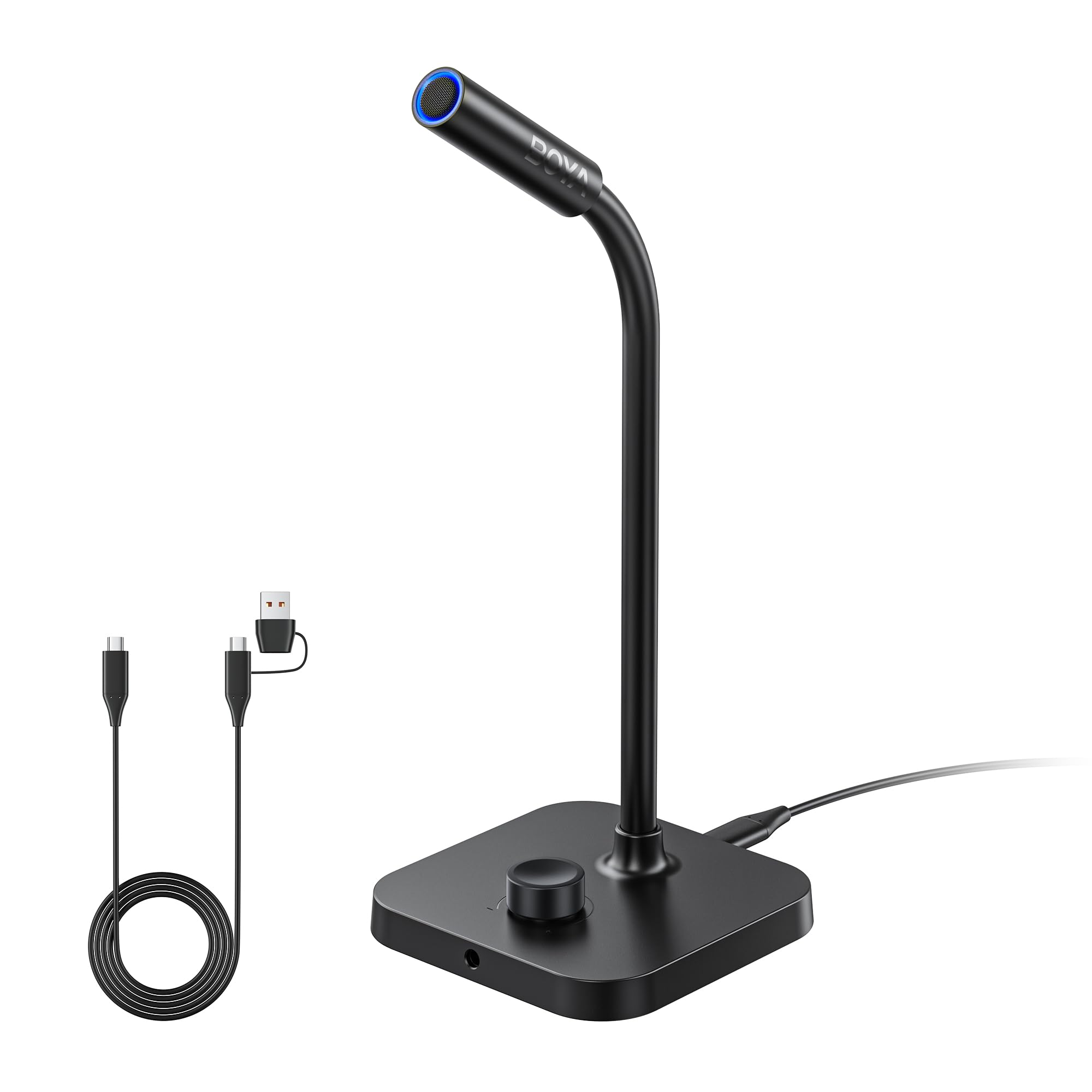
High-resolution audio with a gooseneck that bends to your voice
The BOYA CM40 packs a 9.7mm condenser capsule and 192kHz/24-bit recording into a compact desktop microphone that stands 11.42 inches tall with a flexible gooseneck. The gooseneck is key for dictation — you can bend the mic close to your mouth without moving the heavy base, keeping a consistent distance that speech recognition software needs. A stepless rotary knob gives you 0 to 30 dB of gain control, so you can dial in sensitivity for your voice level and room acoustics.
Customers note “this microphone is much better than any cam microphone I’ve ever used” and note the red/green mute light makes it easy to know when you are live. The built-in ENC (Environmental Noise Cancellation) algorithm suppresses background hum while keeping your voice natural — important for dictation where processing artifacts can cause transcription errors. The USB-C connection works with Windows, macOS, and USB-C phones or tablets, with a dedicated 3.5mm headphone jack for zero-latency monitoring.
The CM40 has a 130 dB SPL handling, meaning it will not distort even if you speak loudly or shout across a room. The anti-slip silicone base keeps the microphone planted during use, unlike the Movo MC1000 which sits flat on a desk. For dictation, the 0-30 dB gain knob is a practical feature most budget mics skip — it lets you boost a quiet voice without adding computer-side gain that introduces hiss.
Gooseneck Precision: You can position the capsule exactly at mouth level and adjust on the fly without picking up the base — ideal for long dictation sessions.
Gain Control: The 0-30 dB knob gives you hardware-level control over sensitivity, which is more reliable than software gain adjustments.
Grab this for: a desk mic with gooseneck flexibility that delivers 192kHz audio and ENC noise cancellation at a fair price.
skip it if: you need a clip-on or headset form factor — the CM40 sits on your desk and takes up a small footprint.
4. Movo MC1000 Conference USB Microphone

A boundary mic that picks up voices across a conference table
The Movo MC1000 is a boundary-style, tabletop microphone with a cardioid pattern that captures sound within a 20-foot radius and 180-degree coverage. At 58 Decibels of audible noise, it is the quietest microphone in this lineup — a full 34% lower than the TONOR TM310’s 78 dB. This low noise floor means the MC1000 introduces very little self-noise to your dictation signal, which helps speech recognition stay clean even at lower recording volumes.
Reviewers point out it delivers “crisp Skype audio” and “excellent pickup range across the room” — one reviewer noted the advertised 20-foot range works well with correct settings, picking up door sounds 40 feet away through a wall. The built-in headphone monitoring jack lets you hear live audio with zero delay, and the 6.5-foot USB cable makes it easy to position the microphone away from your computer. It is compatible with Windows and Mac with no driver installation.
The trade-off is that the MC1000 is a boundary microphone that sits flat on a table — it picks up desk thumps and vibrations from typing more easily than a mic on a boom arm or stand. Shoppers say it is “not truly omnidirectional—acts cardioid (logo is front)” and that off-axis sound rejection is worse than some dedicated conference mics. For dictation where you sit at a desk and want the mic off your monitor, this works well; for loud keyboard environments, the desk pickup will be noticeable.
Silent Foundation: At 58 dB noise floor, this mic is quieter than any other in the list — your dictation software gets a cleaner signal.
Desk-Bound Design: The boundary form factor transmits table vibrations into the audio, so typing or moving papers will be picked up.
Best for: group dictation or situations where you want a wide pickup range and a very low-noise capsule.
Look elsewhere if: you type heavily while dictating — desk vibrations will bleed into your audio track.
5. NEEWER UM01 AI Noise Canceling USB Microphone
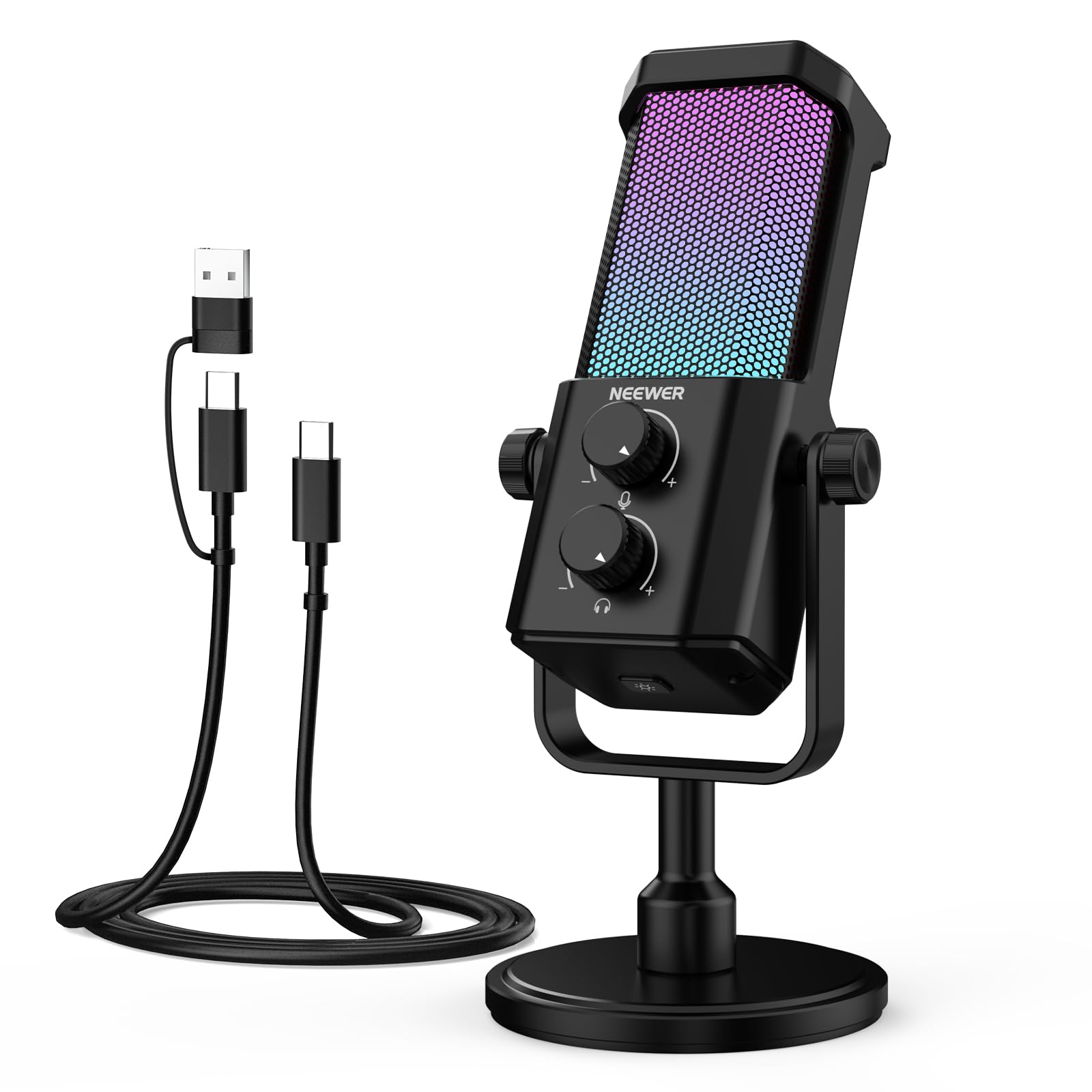
AI-powered background cleaning for dictation in noisy rooms
The NEEWER UM01 sets itself apart with AI noise cancellation — a long-press of the button activates a software-assisted algorithm that suppresses keyboard clicks, fan hum, and surrounding conversations. Buyers report it requires a 5-6 inch speaking distance and works best with a boom arm to avoid desk noise, but the AI cleaning makes it functional in environments where other mics would pick up every sound. The cardioid polar pattern provides 48kHz/24-bit sampling with an 84 dB signal-to-noise ratio and 120 dB max SPL.
A 3.5mm TRS headphone jack gives you zero-latency monitoring, and independent dials control mic gain and headphone volume separately — a setup that mimics higher-end studio gear. The NEEWER MIC desktop app (PC-only) lets you control gain, EQ, AI noise cancellation, and RGB lighting effects from your computer. The all-metal construction feels solid, and the USB-C connection is compatible with Windows, Mac, PS4, PS5, and Android devices.
The AI noise cancellation (artificial intelligence that filters out background sounds) is not a substitute for a treated room — one buyer mentioned “thin bass, occasional clipping, needs pop filter” and described the UM01 as “good for casual gamers/streamers, not audiophiles.” For dictation, the AI feature makes a real difference when you work in a coffee shop or a shared office. The 20 Hz-20kHz frequency response (the range of sound it can capture) is standard for USB mics, but the -36 dB sensitivity (how much signal it needs to produce a clean recording) means you will need close proximity for reliable transcription.
AI Cleaning: Long-press to activate background noise reduction while keeping your voice clear — useful for noisy home offices.
Proximity Required: Cardioid pattern and -36 dB sensitivity mean you need to stay 5-6 inches from the capsule for consistent dictation.
Reach for this if… you dictate in a noisy environment and want AI assistance to clean the signal before it hits your computer.
Skip if… you want studio-grade sound — this mic prioritizes convenience and noise reduction over pure audio fidelity.
6. FIFINE AmpliGame A6T Gaming PC USB Microphone

An all-in-one kit with a boom arm for easy dictation positioning
The FIFINE AmpliGame A6T comes with a boom arm, shock mount, and pop filter in the box — everything you need to set the cardioid condenser capsule at mouth level directly above your keyboard. The 8.2-foot USB-C cable is long enough to route cleanly behind a desk, and the C-clamp mounts to desks up to 2 inches thick. A touch-mute button on the top lets you cut audio instantly without moving your hands from typing position, and the large volume knob at the base makes fine-tuning easy.
Owners mention “crisp audio for beginners” and note the cardioid pattern effectively reduces noise from the back and sides. The upgraded condenser capsule delivers “energetic and warm vocal” tone that works well for speech. The 60 Hz to 18 kHz frequency range is narrower than the 20 Hz-20 kHz of the NEEWER UM01 or Blue Yeti, but dictation software works perfectly within that vocal range. The RGB lighting adds visual flair but can be distracting in a professional office.
The A6T produces 70 Decibels of audible noise — quieter than the TONOR TM310 (78 dB) but louder than the Movo MC1000 (58 dB). Some customers note “randomly has sound spikes” and the build feels a little light for its 900-gram weight. For dictation, the boom arm is the real value: it positions the mic exactly at mouth height and keeps it stable, which is more important for accuracy than the capsule’s frequency extension.
Complete Kit: Boom arm, shock mount, pop filter, and mic all included — no extra purchases needed for proper desk setup.
Sound Spikes: A handful of reviewers point out random audio peaks, which could cause transcription errors if your dictation software cannot flatten them.
Go for it if: you want a complete desk setup with a boom arm that positions the mic at mouth level for reliable dictation.
Avoid if: you need a silent, minimalist mic without RGB — the lighting cannot be turned off completely on some units.
7. MAIRDI USB Headset with Microphone for PC

A lightweight USB headset built for dictation and call center work
The MAIRDI USB Headset is tune for Dragon NaturallySpeaking and other speech recognition software, with a noise-canceling microphone that uses DSP (digital signal processing) to suppress background noise and echo. The single-ear design means you can hear your surroundings while dictating — a safety feature for open offices or remote work. The microphone arm rotates 330 degrees, letting you wear the headset on either left or right side, and the reinforced cord is built with Kevlar to resist office chair wheels.
Shoppers say “extremely clear sound, no background noise” and describe it as a “great value for office work.” The inline volume switch and mute button give you hands-on control without clicking through software. The wideband audio solution delivers HD quality sound for natural hearing, which helps dictation software parse speech more accurately. The headband is adjustable for different head sizes, and the memory foam ear cushion with protein leather is designed for all-day comfort.
The catch is that some buyers report the “mute button is non-functional” and the noise cancellation is “decent but not great.” The single-ear design does not cancel ambient noise on the uncovered ear, which means background sounds can still leak into your dictation if you speak loudly. At 36.99, this is the cheapest full-dictation solution in the list, but you are trading the precision of a dedicated desk mic for the convenience of a headset that stays with you.
Dragon tune: The DSP and wideband audio are tuned for speech recognition — this headset works with Dragon NaturallySpeaking right from the start.
Mute Button Reliability: Multiple owners mention the mute button does not function correctly, which can cause privacy issues during dictation sessions.
Best for: budget-conscious dictation users who want a lightweight, wired headset with basic noise cancellation and a long cord.
Skip if: you need reliable mute functionality or full ambient noise isolation — the single-ear design and reported mute issues are limiting.
Understanding the Specs
Polar Pattern (Cardioid vs Supercardioid)
A polar pattern is a map of where a microphone picks up sound. Cardioid (heart-shaped) picks up sound in front of the mic and rejects sound from the sides and rear — ideal for dictation because it ignores your keyboard, fan, and traffic noise. Supercardioid is tighter, rejecting even more side noise at the cost of a small rear pickup lobe. Both work well; supercardioid is better for noisy rooms, cardioid is more forgiving if you move around while speaking.
Noise Cancellation (ENC vs AI vs DSP)
ENC (Environmental Noise Cancellation) uses a hardware algorithm inside the microphone to subtract steady background hum like fans or air conditioning. AI noise cancellation uses software-assisted models to identify and remove non-vocal sounds in real time, but can sometimes compress voice quality. DSP (Digital Signal Processing) works inside the microphone’s own sound card to clean both incoming and outgoing audio. For dictation, the goal is to clean noise without adding artifacts that confuse speech recognition — hardware-based methods (ENC, DSP) usually win here.
Sample Rate and Bit Depth (48kHz/24-bit vs 192kHz/24-bit)
Sample rate and bit depth describe how much audio information the microphone records per second. 48kHz/24-bit is the standard for professional video and voice: it captures the full range of human speech with enough headroom to avoid distortion. 192kHz/24-bit captures 192,000 samples per second, compared to 48,000 samples per second for 48kHz/24-bit, which matters for high-resolution music recording but offers no benefit for dictation — speech recognition software processes at much lower rates. Do not pay extra for a higher sample rate if you only dictate.
Audible Noise and Signal-to-Noise Ratio
Audible noise (measured in decibels) is the self-noise the microphone produces when it is not picking up your voice — lower numbers mean a quieter mic. A mic rated at 58 dB (like the Movo MC1000) is much cleaner than one at 78 dB (like the TONOR TM310). Signal-to-noise ratio (SNR) is the opposite: it measures how much louder your voice is than the mic’s own noise, with higher numbers being better. For dictation, a lower noise floor means less hiss that the speech recognition engine has to ignore.
FAQ
Can I use a gaming microphone for dictation?
Does a higher sample rate improve dictation accuracy?
What is the best polar pattern for dictation in a noisy room?
Does a headset mic work better for dictation than a desktop mic?
How important is a mute button for dictation?
Can I use a conference microphone for solo dictation?
How close to my mouth should the microphone be for dictation?
What does plug-and-play mean for a dictation microphone?
Will a USB microphone work with Dragon NaturallySpeaking?
How do I reduce keyboard noise in my dictation?
Final Thoughts: The Verdict
For most people, the computer microphone for dictation winner is the TONOR TM310 because its supercardioid pattern and clip-on design deliver a focused vocal signal with minimal desk clutter. If you want studio-quality flexibility and multi-pattern recording, grab the Blue Yeti. And for a high-value desktop mic with gooseneck positioning and ENC noise cancellation, the BOYA CM40 is the budget-friendly workhorse that punches well above its price class.
How We Picked
We do not accept paid placement. Every pick is matched to a real buyer and a real use-case; we do not hands-on test units.
Sources & Methodology
Specifications: manufacturer listings and product documentation. Review insights: verified customer reviews, as of July 2026. Pricing: not shown on this page (it changes often); check the current price via the retailer link.
As an Amazon Associate, WellFizz earns from qualifying purchases. This does not affect which products we feature.
Related Guides

Mo Maruf
I created WellFizz to bridge the gap between vague wellness advice and actionable solutions. My mission is simple: to decode the research and give you practical tools you can actually use.
Beyond the data, I am a passionate traveler. I believe that stepping away from the screen to explore new environments is essential for mental clarity and physical vitality.