Our readers keep the lights on and my smoothie glass nicely filled. As an Amazon Associate, I earn from qualifying purchases.
Specs are compiled from manufacturer listings and verified buyer reviews and can change over time — please confirm the key details on the product page before buying.
Your voice recording is only as clear as the microphone that captures it, and the wrong mic will make even the best script sound like it came from inside a box fan. Desktop fans, keyboard clatter, and room echo ruin more recordings than a bad voice ever does — the right mic filters that noise before it reaches your audience, saving you hours of editing.
I’m Mohammad Maruf — the founder and writer behind WellFizz. This guide is built by comparing the manufacturers’ published specifications and the patterns across verified customer reviews, so you get each pick’s real strengths and trade-offs instead of marketing spin.
Whether you are recording a podcast, streaming on Twitch, or nailing a Zoom presentation, these picks cover everything from dynamic voice isolation to studio-grade multi-pattern flexibility. This is your complete guide to the computer mic for voice recording that actually fits your setup, your budget, and the way you speak.
Quick Picks
- Blue Yeti USB Microphone — Best Overall
- FIFINE AmpliGame AM8PROT — Best for Streamers
- MAONO PD200W Hybrid Wireless — Best Wireless
- MAONO PD100U Dynamic Microphone — Best Value Dynamic
- HyperX SoloCast 2 — Best Compact
- Razer Seiren V3 Mini — Desk-Saving Design
- ZealSound A68S Condenser Mic — Budget Champion
How To Choose The Best Computer Mic For Voice Recording
Even the most expensive mic sounds bad if you choose the wrong pickup pattern or place it incorrectly for your room.
Pickup Pattern: The Shape of Your Mic’s Ear
Cardioid (heart-shaped) patterns capture sound from the front and reject noise from the sides and rear — this is the best match for a typical desk setup where a PC fan or keyboard sits behind the mic. Supercardioid tightens that focus even further, useful if you have louder background hums, but it also picks up a small amount from directly behind, so you must face the mic properly. Omnidirectional picks up sound evenly from every direction, great for group podcasts or conference calls but terrible for noisy solo recording.
Dynamic vs Condenser: Sensitivity and Environment
Dynamic microphones (like the MAONO PD100U) are less sensitive and naturally reject room echo, keyboard clicks, and AC hum — they need you to speak close, usually 2–4 inches away, but deliver focused voice isolation without needing a treated room. Condenser mics (like the Blue Yeti) capture more detail and higher frequencies, making your voice sound airier and more present, but they also capture every bump, breath, and fan noise in the room. If your recording space is untreated, a dynamic mic is often the smarter shortcut to clean audio.
Connectivity and Latency: USB Convenience vs XLR Upgrade Path
Pure USB mics are plug-and-play — you plug into your computer and start recording immediately with no audio interface. XLR mics require a separate interface (or mixer) but give you cleaner preamps and the ability to daisy-chain multiple mics. Hybrid mics like the FIFINE AM8PROT and MAONO PD200W give you USB for quick desktop use today and XLR if you later invest in a professional interface. If you plan to record dual-voice interviews or upgrade your setup over time, a hybrid model prevents needing to buy a second mic later.
Monitoring: Hearing Yourself in Real-Time
Zero-latency monitoring (on the ZealSound and FIFINE) lets you hear your voice through the mic’s headphone jack without the distracting delay of computer audio return. You can adjust volume, plosives, and mic distance in real time instead of discovering issues during playback.
Quick Comparison
| Model | Best For | Pickup Pattern | Sample Rate / Bit Depth | Connectivity | Amazon |
|---|---|---|---|---|---|
| Blue Yeti | Multi-scenario versatility | Cardioid, Omni, Bidirectional, Stereo | — | USB | Amazon |
| FIFINE AM8PROT | Streamers needing noise rejection | Cardioid (Dynamic) | 24-bit | USB, XLR | Amazon |
| MAONO PD200W | Wireless freedom & dual-mic setups | Cardioid (Dynamic) | — | USB, Wireless, XLR | Amazon |
| MAONO PD100U | Budget-friendly dynamic isolation | Cardioid (Dynamic) | 192kHz / 24-bit | USB-C | Amazon |
| HyperX SoloCast 2 | Compact plug-and-play clarity | Cardioid (Condenser) | 96kHz / 24-bit | USB-C | Amazon |
| Razer Seiren V3 Mini | Ultra-compact desk saving | Supercardioid (Condenser) | — | USB | Amazon |
| ZealSound A68S | Complete kit on a budget | Cardioid (Condenser) | 96kHz | USB / USB-C / Lightning | Amazon |
In‑Depth Reviews
1. Blue Yeti USB Microphone

Four pickup patterns handle vocals, instruments, and group chats without swapping mics.
This is the benchmark mic that buyers compare everything else against. The custom three-capsule array gives you cardioid for solo voice, omnidirectional for round-table meetings, bidirectional for one-on-one interviews, and stereo for capturing acoustic instruments or ambient room sound — all from one USB-connected unit. You get onboard audio controls for headphone volume, pattern selection, mute, and gain, plus a no-latency monitoring headphone jack so you hear yourself in real time without the disorienting delay that computer software returns introduce.
Reviewers consistently call the sound broadcast-quality for YouTube, Twitch streaming, podcasting, and even music recording — one reviewer noted it produced “clear sound with no static or plosives” for recording guitar and vocals. The adjustable desktop stand lets you pivot the mic toward the sound source, optimizing capture angle without needing a separate boom arm. Blue VO!CE software adds effects, modulation, and HD audio samples if you want to enhance your stream or recording with a polished broadcast sound. It is a larger desktop footprint compared to the Razer Seiren V3 Mini (which measures just 3.59 x 3.59 x 6.38 inches against the Yeti’s bulkier body), but you get the versatility of a multi-mic setup in one device.
Choose this if you record solo, interviews, and group sessions without reconfiguring a single cable.
The Multi-Pattern Advantage
- Four pickup patterns (cardioid, omni, bidirectional, stereo) cover every recording scenario without buying extra mics
- Blue VO!CE software adds broadcast-quality effects and audio samples for streaming and podcasting
- Onboard gain, mute, pattern, and headphone controls are all accessible without opening software
Space and Sensitivity
- Large desk footprint compared to compact options like the Razer Seiren V3 Mini
- Condenser design captures background room noise and keyboard clatter in untreated spaces
- Not portable — one buyer mentioned it is not ideal for travel given its size and metal build
Versatile powerhouse: Choose the Blue Yeti if you switch between solo voiceovers, group podcasts, instrument recording, and broadcasts — one mic that adapts to the situation beats buying multiple.
Room requirement: This condenser picks up everything in your space, so if your desk sits next to a noisy AC vent or a loud PC tower, you will need to treat the room or use the cardioid pattern with careful positioning.
2. FIFINE AmpliGame AM8PROT
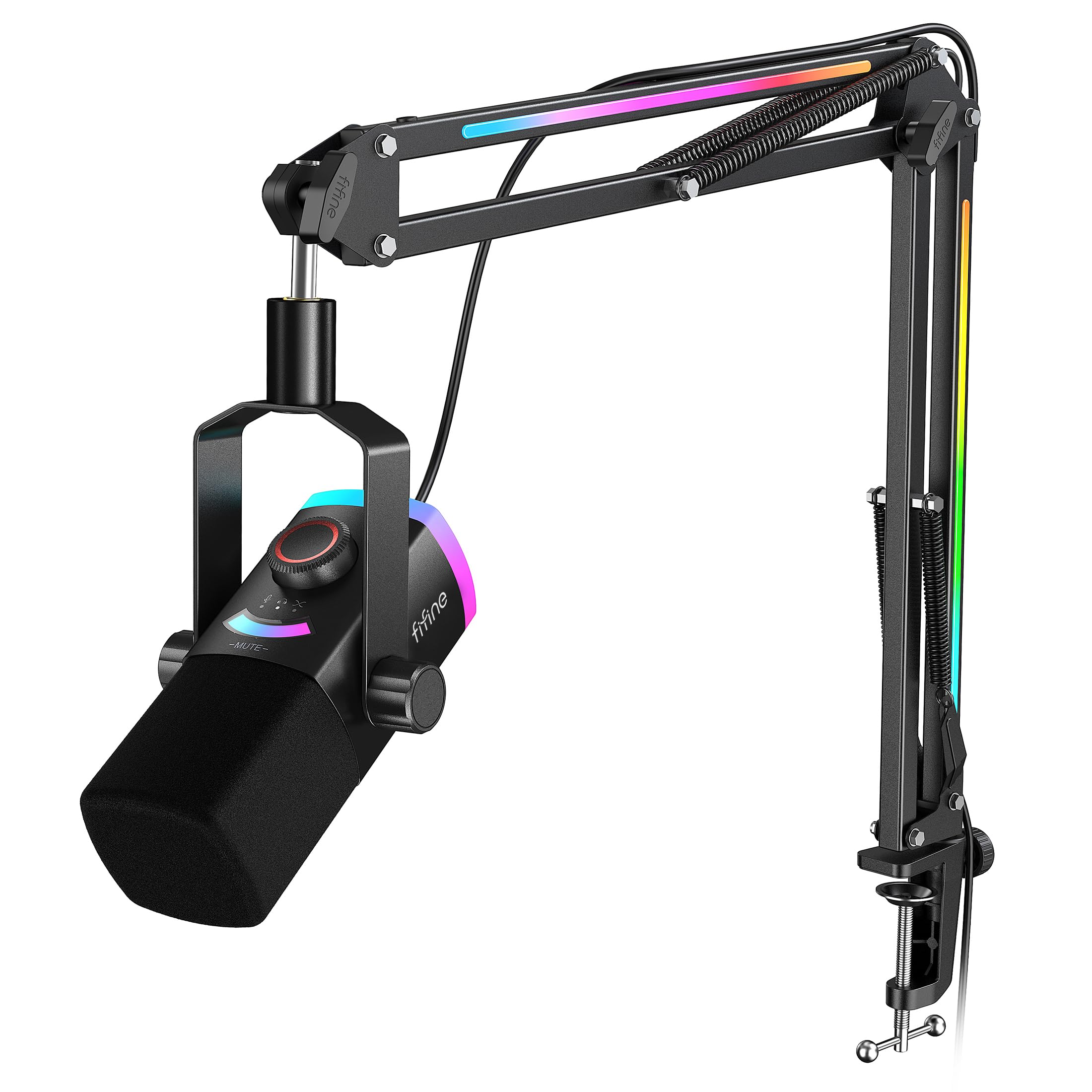
A dynamic mic kit that kills background noise before the stream starts.
This is a complete kit aimed at streamers and gamers who want a pro-looking setup without the pro-level budget. The dynamic cardioid capsule naturally rejects ambient room noise — PC fans, keyboard clicks, mouse sounds — much better than a condenser would, and the thickened boom arm measures up to 30 inches of extension with multi-angle joints to keep the mic at mouth level while your desk stays clear. It features plug-and-play USB-A and USB-C compatibility, so you can jump between a desktop PC and a PS4/PS5 or a USB-C laptop in seconds, plus an XLR connection for future upgrades to an audio interface.
The Mix Control dial is a standout for streamers: you balance your microphone level and PC audio together live, meaning you can adjust the balance between your voice and background game music without tabbing out. The 240+ RGB combos sync between the mic and the boom arm, adding visual flair that reviewers described as “premium” and “vibrant.” One owner reported the “excellent clarity with 24-bit audio, tap-to-mute, single scroll knob for gain/volume.” The tap-to-mute with a visible LED panel prevents hot-mic moments during intense gaming — you see at a glance whether you are live. The 8.2ft USB-C cable is long enough to route cleanly from a desk edge to a PC back panel without cable strain.
Use this if background noise from your gaming setup ruins your recordings and you want a boom arm solution from the start.
Streamer-Ready Features
- Dynamic capsule rejects room echo and keyboard/fan noise naturally, reducing post-processing work
- Dual USB/XLR connectivity lets you upgrade to an interface later without buying a new mic
- Complete kit includes a thick boom arm, shock mount, windscreen, and all cables — no extras needed
Software Dependency
- May require EQ tuning via the Fifine Genie app to bring out warmth in the lower frequencies
- Cable management on the boom arm can be tricky to keep neat according to some reviewers
- Mute button is sensitive — easy to hit accidentally mid-sentence
Dynamic isolation specialist: This is the pick for streamers and podcasters who share a room with a noisy PC, pets, or family members and need voice isolation without a treated sound booth.
Software curve: You will likely want to spend a few minutes in the app to dial in your voice profile — the stock sound leans neutral and benefits from a subtle low-frequency boost for warmth.
3. MAONO PD200W Hybrid Wireless
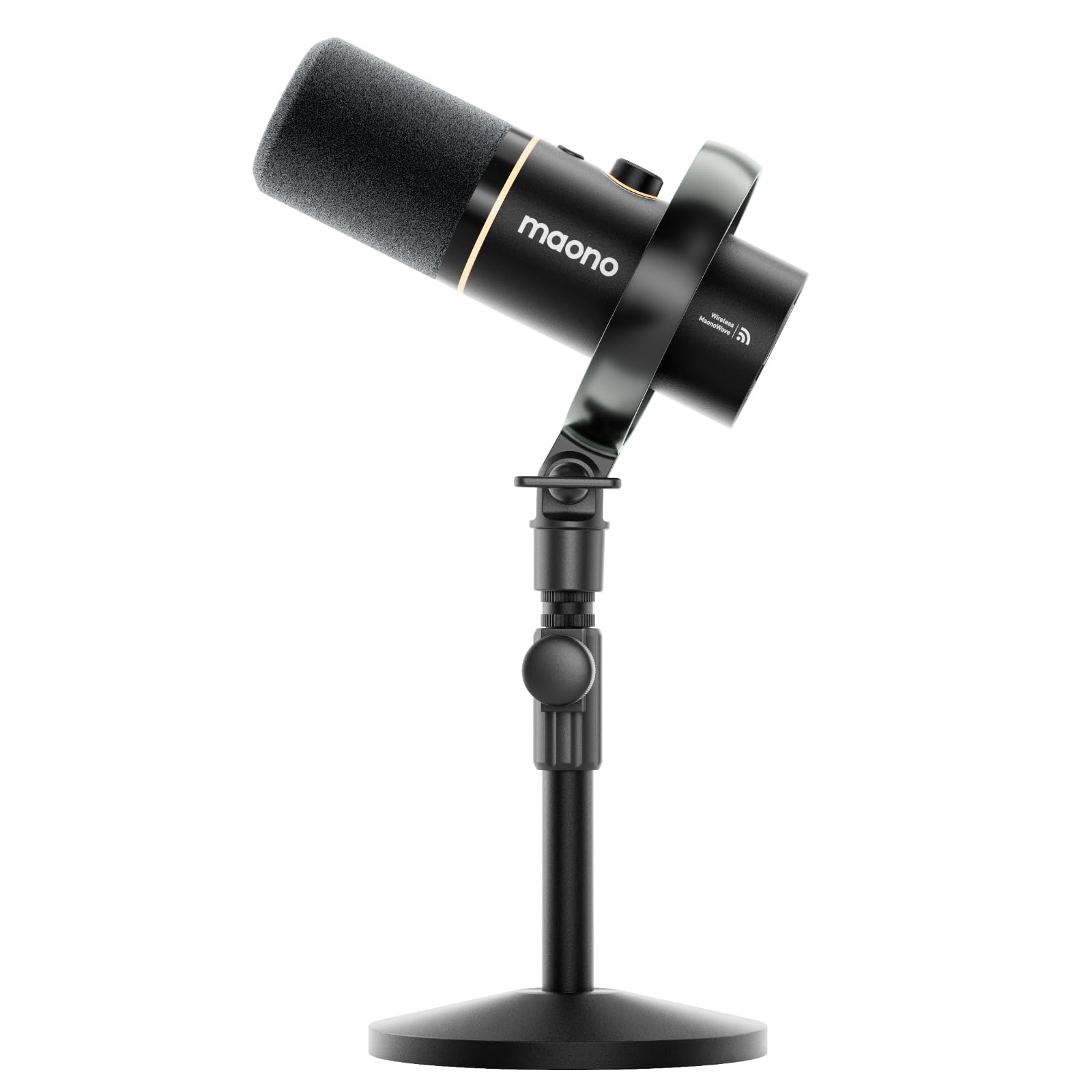
The dynamic mic that cuts the USB cord and still sounds studio-clean at 60 feet away.
This is the most versatile connectivity option on the list by a wide margin. The MAONO PD200W supports three ways to connect: wireless (up to 60 meters / about 197 feet of range), USB-C for quick plug-and-play on a phone, tablet, or computer, and XLR for a pro-level stable connection with an audio interface. The built-in 30mm dynamic capsule with cardioid pickup delivers an ultra-clean 82dB signal-to-noise ratio and handles up to 128dB SPL without distortion — meaning you can raise your voice or laugh without clipping the recording. When running wirelessly with RGB off, the mic lasts up to 60 hours of battery life, which is enough for a full week of daily podcasting or streaming without recharging.
A unique feature for duo recordings: the receiver supports two wireless mics simultaneously, each recording to its own track so you can edit each voice independently. Reviewers highlight that the setup is “easy on iPad and PC, wired and wireless work flawlessly.” The MaonoLink app on PC or smartphone gives you four master-tuned preset modes plus access to adjust EQ, reverb, and noise reduction curves. One customer observed the “excellent sound quality, versatile wireless/USB/XLR connectivity” and that customer support was responsive. The mute button lights red when active, giving you a clear visual cue during live recordings. The desktop stand is sturdy and adjustable, and the metal enclosure feels sturdy compared to budget plastic arms.
Reach for this if you move around while recording, host a duo podcast, or want to ditch the cable tangle without sacrificing pro audio quality.
Freedom and Flexibility
- Triple connectivity (wireless, USB, XLR) future-proofs your setup and works with cameras, iPads, and interfaces
- Up to 60 hours of battery life (RGB off) enables multiple recording sessions between charges
- Dual-mic support with separate track recording makes two-person podcast editing simple
Battery Management
- Battery needs recharging roughly twice a week with regular daily use, according to one reviewer
- Pairing receiver (USB vs camera) requires choosing the correct model for 3.5mm input compatibility
- No USB-C to USB-C cable included — you need to buy one separately if your computer only has USB-C ports
Untethered creator: Perfect for podcasters who walk around while recording, mobile content creators who record with a phone and a laptop interchangeably, or anyone who dislikes the cable clutter of a traditional desktop mic.
Extra cable needed: Check your device ports — if you use a modern MacBook or tablet with only USB-C, you will need an extra USB-C to USB-C cable not included in the box.
4. MAONO PD100U Dynamic Microphone

The dynamic mic that gives you broadcast-quality vocal isolation without spending more than.
Where most budget mics are sensitive condenser units that pick up every room sound, the PD100U is a dynamic microphone designed to reject ambient noise and focus on your voice from 2–4 inches away. Its built-in professional sound chipset delivers a high sampling rate of 192kHz / 24-bit and a flat frequency response of 60Hz–14kHz, which is tuned specifically for mid-frequency vocal clarity — male voices, podcasting, voice-overs, and streaming all benefit from that natural warmth. The cardioid pickup pattern combined with a dual-layer physical noise reduction system (woven nets and an anti-spray sponge) effectively reduces breathing pops and airflow noise without needing an external pop filter.
Unlike the Blue Yeti’s condenser versatility, the PD100U takes a different approach: it sacrifices multi-pattern flexibility for focused voice isolation. The gain knob on the body lets you dial sensitivity down to cut room noise further or turn it up to catch softer speech. Reviewers describe the sound as “warm” with “good noise rejection” and note it is “great for male vocals, podcasting, voice-over.” The metal construction and thick non-slip rubber base provide shock absorption for a stable recording surface. The 2.36-inch extended height adapter gives it a bit of lift over standard desktop stands, and it fits both 3/8″ and 5/8″ thread mounts for boom arm compatibility. One caveat buyers consistently mention: it requires higher gain settings, meaning you may need a small FET preamp or audio interface boost to reach optimal levels — but that is common for most entry-level dynamic mics.
Grab this if you record in an untreated room with echo or background noise and want the cleanest voice isolation at this price point.
Voice-First Design
- Dynamic capsule naturally rejects room echo, keyboard clicks, and PC fan hum without software filters
- 192kHz / 24-bit sampling delivers high-resolution vocal detail for podcasting and voice-overs
- All-metal build with rubber base adds stability and reduces table vibration noise
Gain Hungry
- Requires higher gain than a condenser — may need a preamp or audio interface to reach full volume
- Frequency response tops out at 14kHz, meaning some high-frequency airiness is absent compared to condensers
- Handling noise and plosives without the supplied sponge require careful positioning or a separate windscreen
Noise-rejection specialist: Ideal for home podcasters, streamers, and remote workers who record in untreated bedrooms, basements, or shared spaces where room echo and background sounds are unavoidable.
Gain warning: Check your computer’s mic input — if it runs quiet even at max volume, budget for a simple inline preamp or a USB audio interface to bring the level up cleanly.
5. HyperX SoloCast 2

The compact condenser that fits anywhere and sounds like it should cost twice as much.
This second-generation HyperX mic packs a studio-quality condenser capsule with 24-bit bit depth and 96kHz sampling rate into a body that is just 330 grams and takes up minimal desk space. The cardioid polar pattern captures sound best from the front while reducing pickup from sides and rear, and the built-in suspension system (an internal shock mount literally built into the chassis) reduces vibration noise from desk bumps and typing without the bulk of an external shock mount. The tiltable stand has a weighted base for stability, and built-in 3/8” and 5/8” threads let you mount it to a boom arm easily.
Buyers report “excellent audio quality” with the built-in foam pop filter and shock mount reducing plosives and handling noise. The tap-to-mute sensor with LED indicator is responsive, showing red when live and off when muted — a visual cue that streamers and remote workers rely on. Crucially, the HyperX NGENUITY software gives you customizable audio filters: high-pass to reduce low rumble, low-pass to soften sharp frequencies, and a voice enhancement filter to boost clarity. You can save these settings directly to the mic so they travel with you to any computer. Owners mention that the exposed USB-C port on the lower back can disconnect if the cable gets bumped, so routing the cable carefully or using a boom arm with cable management is recommended. Unlike the Razer Seiren V3 Mini which uses a supercardioid pattern for tighter focus, the SoloCast 2 uses a standard cardioid pattern that is slightly more forgiving of off-axis placement.
Choose this if you want a fuss-free, highly portable desk mic with on-mic audio filters and a clean minimalist look.
Plug-and-Plus-Software
- Built-in shock mount and foam pop filter eliminate need for extra accessories in most setups
- NGENUITY software EQ filters can be saved to the mic for consistent sound across computers
- Compact and lightweight at 330 grams — easy to pack in a bag for travel or LAN parties
No Onboard Gain
- No physical gain knob — volume level must be adjusted through computer or software settings
- USB-C port on the lower back is not reinforced; cable movement can cause disconnects
- Condenser nature picks up keyboard and fan noise more than a dynamic mic would
Desktop minimalist: Get the SoloCast 2 if your desk is crowded, you move between workspaces, and you want studio-quality voice capture without the boom arm or extra gear.
Port risk: Secure the USB cable to the boom arm or desk with a velcro tie — the rear-facing USB-C port’s loose fit is the single common complaint, and a secured cable solves it completely.
6. Razer Seiren V3 Mini

The smallest supercardioid condenser that saves desk space without sacrificing detail.
At just 8.32 ounces and measuring 3.59 x 3.59 x 6.38 inches, the Razer Seiren V3 Mini is built specifically for cramped desks where the Blue Yeti’s footprint would dominate. Its supercardioid pickup pattern is tighter than a standard cardioid, suppressing more room noise from the sides — helpful if your keyboard and mouse sit close to the mic. The custom condenser capsule is engineered to capture more detail at higher frequencies, so your voice sounds crisp and present without the muddy bottom-end that plagues some budget mics. The built-in shock absorber in the tiltable stand dampens accidental knocks, and the stand detaches if you prefer a boom arm setup.
Reviewers appreciate the tap-to-mute sensor with LED indicator: “works well if you are on work calls all the time” and the mute function is “really good.” The plug-and-play USB design works with Discord, OBS Studio, and XSplit from the start — no drivers needed. Razer Synapse software open up advanced customization including studio-level sample rates and separate volume mixes for playback versus your audience. The honest trade-off: customers note that “background noise dampening is less effective” compared to a dynamic mic, and one user highlighted no big improvement over their headset microphone. This makes sense — the supercardioid pattern is tighter than cardioid, but a condenser still captures more room ambience than a dynamic mic. The V3 Mini’s supercardioid is a meaningful step toward rejecting peripheral side-noise like typing and mouse clicks, but it still picks up ambient room hum.
Ideal for the compact desk setup where every inch matters and you prioritize visual simplicity and plug-and-play convenience.
Space-Saving Clarity
- Ultra-compact size (8.32 oz, 6.38 inches tall) fits on crowded desks where full-size mics block monitors
- Supercardioid pattern rejects more side noise (typing, mouse clicks) than standard cardioid mics
- Tap-to-mute sensor with LED status indicator is intuitive and reliable for calls and streaming
No Physical Controls
- No on-mic gain or volume controls — all level adjustments require software access
- Condenser sensitivity still picks up room ambience despite the supercardioid pattern
- Some reviewers found the mute sensor occasionally requires multiple taps to register
Minimalist’s mic: Choose the Seiren V3 Mini if your workspace is visually clean and physically tight, and you want a supercardioid that narrows focus on your voice while taking up almost no space.
Software-dependent: Without an onboard gain knob, you are locked into adjusting levels through Razer Synapse or your OS sound panel — not ideal if you frequently switch between quiet and loud speaking environments.
7. ZealSound A68S Condenser Mic

The complete starter kit with a boom arm, shock mount, and pop filter for less than most standalone mics.
The ZealSound A68S is the most value-packed kit on this list: you get the USB condenser microphone, scissor boom arm, desk clamp, foldable tripod stand, shock mount, detachable pop filter, a 78.7-inch USB cable, a Lightning-compatible adapter, and a USB-C adapter — all in the box. It captures clear voice at 96kHz sampling with a cardioid pickup pattern and a built-in noise reduction chip designed to reduce background buzz. The real-time gain knob on the bottom is textured and grippy, allowing one-handed adjustment while gaming or streaming, and the mute button with its large red indicator is easy to spot on camera or during a dark room stream.
Reviewers point out “crisp voice with excellent active noise cancellation” and consistently praise the value. The 3.5mm zero-latency headphone jack lets you monitor your voice in real time without the distracting delay that software monitoring introduces, helping you catch plosives, volume issues, and breath noise before they hit the recording. The boom arm extends up to 30.8 inches, rotates 360°, and the desk clamp fits surfaces up to 1.8 inches thick. For mobile creators, the included Lightning and USB-C adapters mean you can plug directly into an iPhone, iPad, or USB-C phone without buying additional dongles — a feature the Razer Seiren V3 Mini (which measures 3.59 x 3.59 x 6.38 inches to the ZealSound’s 16.65 x 7.95 x 26 inches when fully assembled with boom arm) does not offer. The RGB lighting with multiple colors and dynamic effects adds visual appeal for streaming setups, and a long-press turns it off for a distraction-free recording mood.
Best for first-time creators who want everything needed to start recording immediately without spending extra on accessories.
All-In-One Value
- Included boom arm, tripod, shock mount, pop filter, and mobile adapters mean zero extra purchases for a full setup
- Zero-latency monitoring via 3.5mm jack helps you adjust technique in real time
- 96kHz sampling with noise reduction chip delivers clear voice for streaming, podcasting, and calls
Plastic Elements
- Enclosure uses ABS plastic rather than all-metal construction found on pricier rivals like the Blue Yeti
- Boom arm is functional but feels less premium than the FIFINE AM8PROT’s thicker arm
- RGB lighting and bottom gain knob add bulk compared to the sleek, compact Razer Seiren V3 Mini
Best starter kit: If this is your first dedicated computer mic for voice recording beyond a headset, the ZealSound removes every barrier — you get the mic, the arm, the filters, and mobile compatibility in one box at a price that leaves room for upgrading later.
Build trade-off: The ABS plastic body is lighter and cheaper-feeling than a metal chassis mic, so treat the stand and boom arm carefully during adjustments to avoid wear over time.
Understanding the Specs
Sample Rate & Bit Depth
These two numbers describe how much audio detail your mic captures per second. A sample rate of 96kHz (96,000 samples per second) captures enough detail for most podcasting and streaming — higher rates like 192kHz are useful for professional music production where ultra-high frequencies matter. Bit depth (16-bit vs 24-bit) defines the dynamic range, or how quietly and loudly the mic can record without distortion. For voice recording, 24-bit / 96kHz (found on the HyperX SoloCast 2) provides more headroom than CD-quality 16-bit / 44.1kHz, giving you flexibility to adjust volume in editing without introducing background hiss.
Pickup Pattern & Polar Response
This is the shape of your mic’s listening area. Cardioid captures sound in a heart-shaped zone in front of the mic and rejects side and rear noise — the universal choice for solo desktop recording. Supercardioid (found on the Razer Seiren V3 Mini) narrows that zone further for even better side rejection but introduces a small rear pickup lobe behind the mic, meaning you must face the correct direction. Omnidirectional picks up 360 degrees around the mic, useful for round-table podcasts but terrible for noisy rooms. Multi-pattern mics like the Blue Yeti switch between these modes, letting you adapt to different recording scenarios without buying multiple microphones.
FAQ
Will a computer mic for voice recording work with my iPhone or iPad?
Do I need a boom arm for a desktop microphone?
What is the difference between a dynamic and a condenser microphone for voice recording?
Does a higher sample rate (192kHz vs 96kHz) sound better for voice?
Can I use a computer mic for voice recording with a PS4 or PS5?
What does zero-latency monitoring mean and do I need it?
Is a supercardioid mic worth choosing over cardioid?
How far should I sit from a computer microphone?
Do I need an audio interface for any of these computer mics?
What does a built-in pop filter or shock mount do for voice recording?
Final Thoughts: The Verdict
Across the board, the computer mic for voice recording winner is the FIFINE AM8PROT because its dynamic capsule rejects room noise naturally while the all-in-one boom arm kit gets you set up instantly — and the USB/XLR hybrid gives room to grow if you eventually upgrade to a pro interface. If you want four pickup patterns to switch between solo voiceovers, instruments, and group interviews from one mic body, grab the Blue Yeti. And for the best value that gives you a complete kit (boom arm, shock mount, pop filter, and mobile adapters) at a budget-friendly price, the ZealSound A68S is the smart call for first-time creators building their first recording setup.
How We Picked
We do not accept paid placement. Every pick is matched to a real buyer and a real use-case; we do not hands-on test units.
Sources & Methodology
Specifications: manufacturer listings and product documentation. Review insights: verified customer reviews, as of July 2026. Pricing: not shown on this page (it changes often); check the current price via the retailer link.
As an Amazon Associate, WellFizz earns from qualifying purchases. This does not affect which products we feature.
Related Guides

Mo Maruf
I created WellFizz to bridge the gap between vague wellness advice and actionable solutions. My mission is simple: to decode the research and give you practical tools you can actually use.
Beyond the data, I am a passionate traveler. I believe that stepping away from the screen to explore new environments is essential for mental clarity and physical vitality.