Our readers keep the lights on and my smoothie glass nicely filled. As an Amazon Associate, I earn from qualifying purchases.
A keyboard is the single most tactile connection you have to your digital world, yet most people settle for mushy membranes or hollow, noisy mechanical boards. The disconnect between what you type and what you feel can kill your gaming reaction time, slow your workflow, and leave your fingers fatigued after a long session. Finding the right switch, form factor, and build quality transforms your daily computing experience from a chore into a pleasure.
I’m Mohammad Maruf — the founder and writer behind WellFizz. I’ve spent countless hours analyzing switch types, actuation curves, noise-dampening layers, and connectivity standards to separate genuine performance from marketing noise in the keyboard world.
This guide breaks down seven carefully selected models across Hall Effect, mechanical, and membrane designs to help you find the best computer keyboards for your exact typing style, gaming needs, and workspace aesthetic.
How To Choose The Best Computer Keyboards
Selecting a keyboard goes far beyond brand loyalty or color preference. The switch technology, layout size, connectivity options, and build materials directly impact how fast you type, how accurately you game, and how comfortable your hands feel over hours of use. Focus on these four considerations to narrow your options.
Switch Technology and Actuation
The switch determines the entire personality of a keyboard. Traditional mechanical switches use a metal leaf spring to register a keystroke at a fixed point. Hall Effect magnetic switches, found in models like the AULA WIN68 HE, use a magnet and sensor to detect press depth without physical contact. This allows adjustable actuation points from 0.1mm to 4.0mm, giving you granular control over how far you must press before the key fires — ideal for competitive gamers who want ultra-fast response. Linear mechanical switches, such as the pre-lubed Mint Mambo ones in the Redragon K745 PRO, offer a smooth, consistent press with no tactile bump, making them a favorite for both typing and gaming.
Layout Size and Key Count
Your desk space and workflow dictate the ideal form factor. Full-size (100%) keyboards include a number pad and navigation cluster, essential for data entry and spreadsheet work. The tenkeyless (TKL) layout removes the numpad to save space without sacrificing arrow keys. Compact 60% and 68-key designs ditch the function row and navigation keys entirely, saving up to 40% of desk space for gamers who want room for a large mouse pad. The RK ROYAL KLUDGE R98 Pro uses a 96% layout, retaining the numpad while shortening the overall width — a practical middle ground for those who need the keys but want a smaller footprint.
Connectivity and Battery Life
Wired keyboards offer the lowest latency and most stable connection, essential for competitive gaming. Wireless options have matured significantly, with tri-mode designs (USB-C, Bluetooth, 2.4GHz) providing flexibility across multiple devices. The Logitech Signature Slim K950 uses a Logi Bolt receiver and Bluetooth to switch between three devices with one tap, making it a productivity powerhouse. If you choose wireless, battery capacity matters — the AULA F99 Pro packs an 8000mAh battery that lasts weeks on a single charge, while others rely on standard AAA batteries for months of use.
Build Quality and Acoustics
The materials and internal structure of a keyboard determine its feel and sound. Aluminum top plates add weight and rigidity, reducing flex during heavy typing. PBT double-shot keycaps resist shine and wear far better than ABS. Internal dampening layers — such as silicone pads, IXPE foam, and PET sound sheets — eliminate hollow pinging and create a deeper, more satisfying “thock” or “creamy” sound. Gasket mounts, used in the Redragon K745 PRO and RK R98 Pro, suspend the plate between soft silicone gaskets rather than screwing it directly to the case, resulting in a cushioned, bouncier typing feel that many enthusiasts prefer.
Quick Comparison
On smaller screens, swipe sideways to see the full table.
| Model | Category | Best For | Key Spec | Amazon |
|---|---|---|---|---|
| SteelSeries Apex Pro TKL Gen 3 | Premium | Competitive Gaming | 0.1mm-4.0mm adjustable actuation | Amazon |
| ASUS ROG Strix Scope II X | Mid-Range | Full-Size Gaming & Work | ROG NX Snow V2 linear switches | Amazon |
| AULA F99 Pro | Mid-Range | Multi-Device & Extended Sessions | 8000mAh battery capacity | Amazon |
| RK ROYAL KLUDGE R98 Pro | Mid-Range | Compact Layout with Numpad | MDA profile PBT keycaps | Amazon |
| Redragon K745 PRO | Mid-Range | Quiet Creamy Typing | 5-layer sound dampening | Amazon |
| AULA WIN68 HE | Budget | Budget Hall Effect Gaming | 8000Hz polling rate | Amazon |
| Logitech Signature Slim K950 | Premium | Multi-Device Office Work | Logi Bolt tri-device switching | Amazon |
In‑Depth Reviews
1. SteelSeries Apex Pro TKL Gen 3

The SteelSeries Apex Pro TKL Gen 3 sits at the top of the competitive gaming food chain, and for good reason. Its OmniPoint 3.0 HyperMagnetic switches deliver a 20x faster actuation than standard mechanical switches, with a fully adjustable range from 0.1mm to 4.0mm. This means you can set WASD to fire on the lightest brush for rapid strafing while keeping ability keys at a deeper press to avoid accidental casts. The Rapid Trigger and Rapid Tap features further reduce latency by re-registering a key on the slightest lift, allowing for inhumanly fast double-taps and counter-strafes in FPS titles.
Beyond raw speed, the build quality matches the performance ambition. The tenkeyless layout keeps your mouse hand close, while PBT double-shot keycaps resist shine and wear over months of heavy use. The integrated OLED Smart Display lets you adjust profiles, actuation points, and RGB lighting on the fly without alt-tabbing out of a game. SteelSeries GG QuickSet software offers game-ready presets that automatically configure the optimal actuation curve for popular titles like Valorant, CS2, and Apex Legends.
The Protection Mode is a clever exclusive: it reduces the sensitivity of adjacent keys when one key is pressed firmly, preventing accidental inputs during frantic moments. The sound signature is a solid, satisfying thump rather than a sharp click or hollow clack. The included magnetic wrist rest adds ergonomic comfort for marathon sessions. For the competitive player who demands every millisecond advantage, this is the definitive tool.
Why it’s great
- Adjustable actuation from 0.1mm to 4.0mm for game-specific customization
- Rapid Trigger and Rapid Tap reduce latency for faster inputs
- OLED display for on-the-fly adjustments without software
- Sturdy, non-slip build with premium PBT keycaps
Good to know
- Premium price point, targeted primarily at competitive gamers
- Tenkeyless layout lacks a dedicated numpad for data entry
- SteelSeries GG software required for full customization
2. ASUS ROG Strix Scope II X

The ASUS ROG Strix Scope II X delivers a full-size layout with absolutely no compromises on typing feel or gaming performance. The ROG NX Snow V2 linear switches are pre-lubed from the factory, delivering a smooth, thocky keystroke that feels consistent across all 104 keys. The aluminum top plate adds rigidity and a premium weight, while the integrated sound-dampening foam and switch-dampening pads absorb the pinging and echo that plague lesser boards. The result is a clean, refined acoustic profile that is satisfying without being loud enough to disturb others in the room.
Hot-swappable sockets (3-pin and 5-pin compatible) let you experiment with different switch types without soldering, so you can dial in the exact feel you want over time. The detachable wrist rest is firm yet comfortable, and three adjustable tilt angles help position your hands for long work sessions. The multi-function scroll wheel on the top left edge is a brilliant touch — it controls volume, media playback, and lighting brightness depending on the mode, saving you from reaching for a mouse or monitor controls.
Pre-programmed hotkeys (F1-F5) offer one-tap access to Xbox Game Bar and recording functions, making it a natural fit for streamers and content creators. The PBT double-shot keycaps resist fading and grease, keeping the legends legible for years. While the onboard controls for RGB and media are sufficient, deeper lighting customization requires ASUS Armoury Crate software. For a full-size board that handles spreadsheets by day and headshots by night, this is a versatile top contender.
Why it’s great
- Pre-lubed ROG NX Snow V2 switches for smooth, thocky keystrokes
- Aluminum top plate and sound-dampening foam for premium build and acoustics
- Hot-swappable sockets for easy switch customization
- Multi-function scroll wheel and ergonomic wrist rest included
Good to know
- Full-size layout takes up more desk space than TKL options
- Armoury Crate software required for advanced RGB customization
- Some users report a sticky space bar out of the box
3. AULA F99 Pro Wireless Mechanical Keyboard

The AULA F99 Pro solves the two biggest wireless keyboard frustrations: battery anxiety and connectivity hassle. Its enormous 8000mAh internal battery delivers weeks of use on a single charge, even with RGB lighting active. One reviewer reported 92% remaining battery after a full month of daily use. The tri-mode connectivity — USB-C wired, 2.4GHz wireless, and Bluetooth 5.0 — lets you pair up to five devices simultaneously and switch between them with a side button or FN combination. This flexibility makes it ideal for users who toggle between a desktop PC, laptop, and tablet throughout the day.
The typing experience punches well above its price tier. Pre-lubed linear switches combined with a gasket mount structure and five layers of sound-dampening foam produce a creamy, velvety acoustic signature that users describe as “chalky” and “wood soup” — deep, muted, and deeply satisfying. The 96% layout (99 keys) retains a full numpad and arrow cluster while shortening the overall width compared to a standard full-size board. The multi-function knob on the top right controls RGB brightness and volume, with a long press to switch between modes.
Double-shot PBT keycaps ensure the legends remain crisp and the texture stays matte even after heavy use. Side-printed legends on some color variants add a unique aesthetic, though the RGB LEDs are south-facing and may not fully illuminate top-printed keycaps. The gasket mount gives the board a soft, bouncy feel that reduces finger fatigue during long typing sessions. For a mid-range wireless board that feels premium, lasts forever on a charge, and sounds incredible, the F99 Pro is tough to beat.
Why it’s great
- 8000mAh battery provides weeks of use on a single charge
- Tri-mode connectivity for seamless multi-device switching
- Gasket mount and 5-layer dampening for creamy acoustics
- 96% layout saves desk space while keeping a numpad
Good to know
- No dedicated media controls; requires knob mode switching
- Bluetooth connection can occasionally require re-pairing
- South-facing LEDs may not illuminate top-printed keycaps well
4. RK ROYAL KLUDGE R98 Pro

The RK ROYAL KLUDGE R98 Pro is a wired board that proves you don’t need wireless to enjoy a premium typing experience. Its 96% layout (98 keys) keeps the essential numpad and arrow keys while trimming the overall footprint to something much more desk-friendly than a standard full-size board. The MDA profile PBT keycaps are the standout feature here — their unique sculpted shape provides a stronger sense of finger wrapping with each press, making long typing sessions feel more natural and less fatiguing. The matte texture resists shine and keeps the keys feeling dry and grippy.
Pre-lubed linear cream switches produce a deliciously creamy sound right out of the box, with no modifications required. Users consistently report that the acoustic profile rivals that of customized boards with added foam and lubed switches. The gasket mount structure contributes to a soft, cushioned bottom-out that absorbs shock and reduces noise. The detachable aluminum CNC volume knob is satisfying to spin and provides quick audio control without reaching for the mouse. Four indicator lights (Num Lock, Caps Lock, Win Lock, Mac Mode) keep your keyboard state visible at a glance.
Hot-swappable sockets support both 3-pin and 5-pin switches, so you can experiment with different switch types later without any soldering. The RK online driver allows for full key remapping, macro creation, and RGB customization on both Windows and Mac. One minor caveat: the backlighting is not as bright as some competitors, with the keys themselves being more illuminated from the sides than the legends. Still, for a wired board that delivers enthusiast-grade sound and feel at a mid-range price, the R98 Pro is a stellar choice.
Why it’s great
- MDA profile PBT keycaps provide a unique, ergonomic typing feel
- Pre-lubed cream switches sound creamy and smooth out of the box
- Gasket mount with 5-layer foam for a soft, quiet typing experience
- Detachable aluminum volume knob adds a premium tactile touch
Good to know
- Backlighting is dimmer than many competitors, especially on the key legends
- Wired only — no wireless connectivity for multi-device setups
- Some early durability concerns reported in long-term reviews
5. Redragon K745 PRO

The Redragon K745 PRO is a wireless gasket-mount keyboard that proves enthusiast-grade features can exist at a surprisingly accessible price. Its 108-key full-size layout includes four extra programmable hotkeys above the function row, giving you dedicated macro buttons without sacrificing the standard layout. The gasket mount structure is the star here — precision-locked covers with silicone gaskets suspend the plate, providing even feedback and dramatically reducing rigid noise compared to traditional screw-mounted designs. The result is a cushioned, flexible typing feel that absorbs shock and keeps each keystroke satisfyingly quiet.
The custom Mint Mambo linear switches are pre-lubed from the factory, offering a silky, creamy travel with a 40g actuation force and 2.0mm actuation point. The 5-layer sound dampening system — 3.5mm PO foam, IXPE switch foam, PET sound pad, bottom socket foam, and a silicone bottom pad — eliminates hollow pinging and creates an ultra-clean acoustic profile that users describe as “thocky” and “creamy.” The round PBT keycaps add a unique aesthetic and a comfortable concave surface that works especially well for users with longer nails.
Tri-mode connectivity (USB-C wired, Bluetooth 3.0/5.0, 2.4GHz wireless) provides flexibility across PC, laptop, and tablet. Battery life is approximately 40 hours with backlighting off and around 20 hours with RGB active. The two-stage adjustable feet allow for personalized typing angles. While the Redragon software is available for macros and RGB customization, the keyboard works perfectly out of the box with no software required. For someone seeking a silent, thocky full-size board with wireless freedom, this is an exceptional value.
Why it’s great
- Gasket mount with 5-layer dampening for a quiet, thocky typing sound
- Pre-lubed Mint Mambo linear switches are smooth and responsive
- Tri-mode wireless (2.4GHz, BT, USB-C) for multi-device flexibility
- Full-size 108-key layout with extra programmable hotkeys
Good to know
- Battery life drops to ~20 hours with RGB backlighting on
- Plastic build lacks the premium weight of aluminum-framed boards
- Redragon software is functional but not as polished as major brands
6. AULA WIN68 HE

The AULA WIN68 HE is the most affordable Hall Effect keyboard on the market, and it delivers a staggering amount of performance for its price. Its 8000Hz polling rate and 0.3ms latency mean your inputs reach the PC eight times faster than a standard 1000Hz mechanical board. The Hall Effect magnetic switches allow adjustable actuation from 0.02mm to 3.44mm in 0.1mm increments — a feature typically reserved for boards costing two to three times as much. This granular control is a genuine competitive advantage for gamers who want to set movement keys to hair-trigger sensitivity while keeping other keys at a deeper actuation to prevent accidents.
The 60% layout (68 keys) saves significant desk space, making it ideal for competitive FPS players who need maximum mouse room. Despite the compact footprint, the board retains dedicated arrow keys, which is a rare and welcome design choice in the 60% format. The RGB lighting is vivid with 16.8 million colors and 14 preset effects, all controllable via FN shortcuts or the web-based driver. The build quality is surprisingly solid for the price — users consistently note the heavy weight and premium feel, with no flex or creaking in the plastic chassis.
The web-based driver (compatible with Windows only) gives access to RT, SOCD, DKS, MT, TGL functions, key remapping, and macro editing. Some users found the web driver slightly hard to locate, but once accessed it works smoothly for actuation point adjustment. The sound signature is silky smooth and creamy, earning praise as one of the best-sounding budget keyboards available. The detachable USB-C cable makes transport easy. For the budget-conscious gamer or enthusiast curious about Hall Effect technology, the WIN68 HE is an incredible entry point.
Why it’s great
- 8000Hz polling rate and 0.3ms latency for lightning-fast inputs
- Adjustable Hall Effect actuation from 0.02mm to 3.44mm
- Compact 60% layout saves desk space while retaining arrow keys
- Remarkably solid build and creamy sound for a budget board
Good to know
- Web-based driver is a bit tricky to locate and does not support macOS
- 60% layout lacks function row and navigation keys for productivity users
- The standard black version has limited aesthetic options
7. Logitech Signature Slim K950
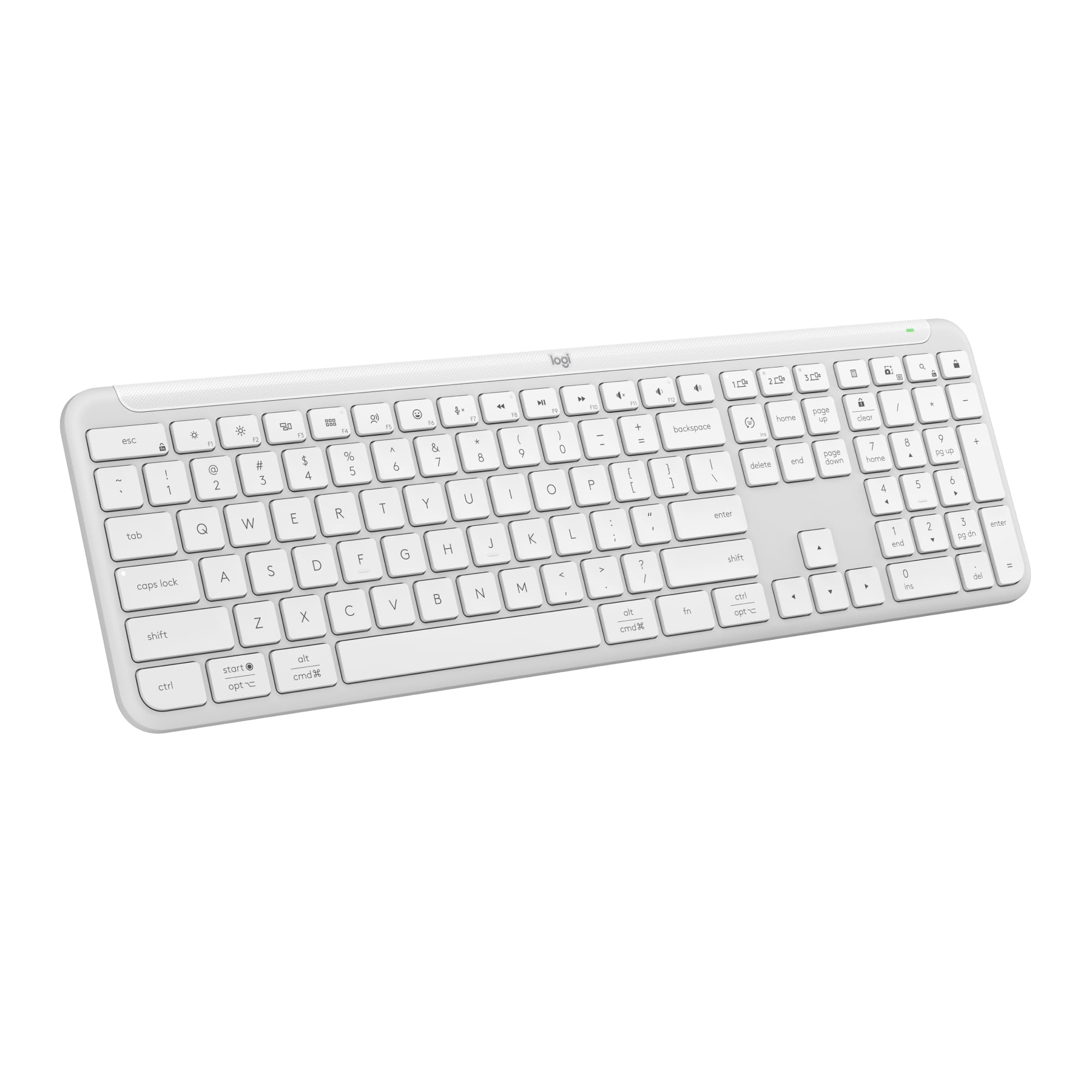
The Logitech Signature Slim K950 is a different breed from the mechanical and Hall Effect boards above — and that is exactly its strength. It uses a membrane scissor-switch mechanism that replicates the familiar, quiet feel of a laptop keyboard, making it an effortless transition for anyone who spends most of their time on a notebook. The full-size layout includes a number pad, dedicated media keys, and a clean, minimalistic design that blends seamlessly into a professional workspace. The off-white color option adds a subtle warmth that stands out without being flashy.
Multi-device connectivity is the K950’s superpower. Using Logitech’s Logi Bolt receiver or Bluetooth, you can pair up to three devices and switch between them with a single tap of the Easy-Switch button. This makes it ideal for users who bounce between a Windows desktop, a MacBook, and an iPad throughout the day. The Logi Options+ app allows deeper customization, letting you assign shortcuts to the function row and adjust cursor speed. Out of the box, the keyboard works with Windows, macOS, Chrome OS, Linux, iPadOS, iOS, and Android — nearly every platform you can throw at it.
The typing experience is quiet enough for open-plan offices, with a soft, cushioned bottom-out that produces almost no sound. Two AAA batteries (included) power the board for months of use — one reviewer reported over a month with heavy daily use and no signs of draining. The build is lightweight but durable, using recycled plastic in its construction. Some users note that the volume keys are uncomfortably close to the backspace, leading to accidental presses when typing quickly. For the productivity-focused user who prioritizes seamless multi-device switching and a quiet, familiar typing feel, the K950 is a refined, reliable choice.
Why it’s great
- Quiet membrane scissor-switch feel, familiar to laptop users
- Seamless multi-device switching between three paired devices
- Long battery life on two AAA batteries (months of use)
- Cross-platform compatibility with Windows, Mac, Chrome, Linux, and more
Good to know
- Membrane switches lack the tactile feedback enthusiasts prefer
- Volume keys positioned near backspace can cause accidental presses
- No backlighting — not ideal for low-light environments
FAQ
Is a Hall Effect keyboard worth it over a traditional mechanical one?
What does a gasket mount do for typing feel?
Can I use a mechanical gaming keyboard for office typing?
Do I really need a 96% or full-size keyboard for gaming?
Final Thoughts: The Verdict
For most users, the best computer keyboards winner is the ASUS ROG Strix Scope II X because it delivers a premium full-size build, pre-lubed smooth linear switches, hot-swappable flexibility, and excellent sound dampening at a mid-range price that balances work and gaming equally well. If you want the absolute fastest competitive edge with adjustable Hall Effect actuation, grab the SteelSeries Apex Pro TKL Gen 3. And for a quiet, multi-device wireless office keyboard with exceptional battery life and cross-platform compatibility, nothing beats the Logitech Signature Slim K950.

Mo Maruf
I created WellFizz to bridge the gap between vague wellness advice and actionable solutions. My mission is simple: to decode the research and give you practical tools you can actually use.
Beyond the data, I am a passionate traveler. I believe that stepping away from the screen to explore new environments is essential for mental clarity and physical vitality.