Our readers keep the lights on and my smoothie glass nicely filled. As an Amazon Associate, I earn from qualifying purchases.
A keyboard that fatigues your fingers halfway through a chapter isn’t a tool—it’s a bottleneck. Every writer faces the same friction: keys that feel mushy, layouts that waste desk space, and switch sounds that either distract or drain focus. The right mechanical board transforms typing from a chore into a rhythm, where every keystroke registers with crisp feedback and zero lag.
I’m Mohammad Maruf — the founder and writer behind WellFizz. I’ve spent hundreds of hours dissecting switch types, gasket structures, keycap profiles, and wireless latency figures to separate the true writing machines from the gaming gimmicks.
Whether you crave a creamy thock, a silent office zone, or a compact layout that leaves room for a notebook, this guide to the best computer keyboard for writers breaks down seven models that deliver on feel, build, and endurance.
How To Choose The Best Computer Keyboard For Writers
A writer’s keyboard lives under your fingertips for hours each day. The wrong switch weight leads to fatigue. The wrong layout forces your hands into awkward reaches. The wrong keycap material develops a greasy shine within months. Here are the three specs that matter most for long-form typing.
Switch Type: Linear, Tactile, or Clicky
Linear switches (like RK Cream or AULA pre-lubed linears) offer a smooth, uninterrupted press—ideal for fast typing with minimal sound. Tactile switches (like Keychron Super Brown) provide a distinct bump at the actuation point, giving you physical confirmation without the noise. Clicky switches (like the blue switches in the retro typewriter) produce an audible click with every press. For shared workspaces or late-night writing, quieter linears or tactile switches are the safer bet.
Layout and Desk Footprint
Full-size (104-key) boards include a dedicated numpad, function row, and navigation cluster—great for data entry but bulky. The 96% layout (100-key) squeezes the numpad next to the main block, saving about 20% of desk width while retaining all functionality. TKL (tenkeyless) drops the numpad entirely for a narrower profile. If you regularly input numbers or track word counts, a 96% or full-size board prevents constant hand movement.
Keycap Material and Profile
PBT (polybutylene terephthalate) keycaps resist shine, withstand heat, and keep their textured grip for years. ABS keycaps feel smooth out of the box but develop a glossy, slippery surface with prolonged use. The profile shape also matters: MDA and OEM profiles offer a shallow dish that cups your fingertips, while Cherry profile provides a more sculpted row-by-row height change. For all-day typing, MDA or Cherry profile PBT caps deliver the most consistent feel.
Quick Comparison
On smaller screens, swipe sideways to see the full table.
| Model | Category | Best For | Key Spec | Amazon |
|---|---|---|---|---|
| Keychron K4 | 96% Mechanical | All-day tactile typing | 4000mAh battery / 240hr battery life | Amazon |
| Logitech Wave Keys for Mac | Ergonomic Membrane | Reducing wrist strain | Cushioned palm rest / 3yr battery | Amazon |
| RK ROYAL KLUDGE R98 Pro | 96% Gaming/Writer | Creamy sound out of the box | Gasket mount / MDA PBT keycaps | Amazon |
| Retro Typewriter Taiahiro | Vintage 83-Key | Aesthetic clicky experience | Blue switches / Wood frame | Amazon |
| AULA F99 Pro Silent | Silent 96% | Quiet office typing | 8000mAh battery / Silent switches | Amazon |
| AULA F108 PRO Screen | Full-Size Premium | Customization and macros | TFT screen / 8000mAh battery | Amazon |
| Logitech Alto Keys K98M | Compact Clicky | Brand reliability + hot-swap | Gasket mount / Marble switches | Amazon |
In‑Depth Reviews
1. Keychron K4 96% Wireless Mechanical

The Keychron K4 strikes the ideal balance for prose-heavy writers who need a numpad without sacrificing desk space. Its 96% layout crams 100 keys into a frame barely wider than a TKL, and the Super Brown tactile switch delivers a gentle bump at actuation—enough to confirm each press without the click that disturbs a quiet room. The 4000mAh battery sustains up to 240 hours of typing with backlighting off, so you can go weeks between charges even during daily novel-length sessions.
Build quality feels robust for its mid-range positioning. The aluminum-reinforced plastic body keeps weight manageable while resisting flex, and the white LED backlight offers 14 static and dynamic modes. Bluetooth 5.1 connects to three devices simultaneously, letting you switch between a MacBook, iPad, and desktop with a single key press. The included extra keycaps for both macOS and Windows layouts mean zero configuration headaches out of the box.
Long-term reliability is well documented. Multiple reviewers report three years of daily use without switch degradation or keycap shine, thanks to the PBT-like coating on the stock caps. The only trade-off is the tall profile—pair it with a wrist rest if you type for extended stretches. For a durable, tactile, and space-efficient daily driver, few rivals match the K4’s package.
Why it’s great
- Outstanding 4000mAh battery lasts weeks
- Tactile Super Brown switches reduce accidental presses
- 96% layout saves desk space while keeping numpad
Good to know
- Tall profile requires a wrist rest for comfort
- White backlight only; no RGB customization
2. AULA F99 Pro Silent Wireless Mechanical

The AULA F99 Pro redefines quiet typing for the open-office writer. Its pre-lubed silent linear switches produce a subdued thock that multiple reviewers compare to “walking on snow”—no click, no clack, just a soft landing. The gasket mount isolates the plate from the case, eliminating the hollow ping that plagues tray-mounted boards, while five layers of sound-dampening foam kill any residual cavity echo.
Connectivity is genuinely tri-mode: Bluetooth 5.0, 2.4GHz via USB dongle, and wired USB-C. You can pair up to five devices and cycle through them with the side button. The 8000mAh battery is among the largest in this guide, and with RGB disabled on wireless mode, you can push through a full work month without reaching for the cable. The side-printed PBT keycaps resist shine and let RGB glow through the legends from the south-facing LEDs.
The 96% layout includes a full-size zero key on the numpad—a small detail that saves frustration during spreadsheet work or word-count entry. The multi-function knob switches between backlight brightness and volume modes with a long press. If your priority is a distraction-free typing environment that doesn’t annoy colleagues or family, the F99 Pro is the quietest mechanical board in this roundup.
Why it’s great
- Exceptionally quiet operation ideal for shared spaces
- Massive 8000mAh battery for extended wireless use
- Gasket mount provides soft, consistent key feel
Good to know
- RGB auto-off in wireless mode to save battery
- Plastic enclosure lacks the premium heft of metal boards
3. RK ROYAL KLUDGE R98 Pro Wired Mechanical

The RK R98 Pro delivers a creamy, ASMR-like typing experience that rivals boards costing twice as much. Its pre-lubed linear cream switches glide with minimal resistance, and the five layers of sound-absorbing foam produce a deep, marbly thock that reviewers describe as “buttery” and “satisfying right out of the box.” The MDA profile PBT keycaps feature a wider surface area and a shallower dish than OEM caps, wrapping around your fingertips for a more secure purchase during prolonged writing sessions.
This is a wired-only board (USB-C), but the trade-off is zero latency and no battery anxiety—plug it in and forget it. The 98-key layout retains the numpad and arrow cluster while trimming the width compared to a full-size 104-key board. A detachable aluminum volume knob offers tactile volume control, and four indicator lights clearly show Num Lock, Caps Lock, Win Lock, and Mac Mode status.
Hot-swappable sockets accept 3-pin and 5-pin switches, so you can experiment with different spring weights or tactile options without soldering. The onboard driver (Windows and Mac) allows key remapping and macro recording. For writers on a budget who want a premium sound signature and the ability to customize switches down the road, the R98 Pro punches well above its price tier.
Why it’s great
- Out-of-the-box creamy sound with no mods needed
- Hot-swap PCB supports future switch upgrades
- MDA PBT keycaps enhance fingertip comfort
Good to know
- Wired-only connection; no Bluetooth option
- RGB backlight is less bright than some competitors
4. AULA F108 PRO Full-Size with Screen

The AULA F108 PRO is the most feature-dense keyboard in this list, packing a 1.14-inch TFT color display, a multi-function knob, and full-size 104-key layout into a single chassis. The screen shows battery status, connection mode, date/time, and even custom GIFs—uploaded via the Windows-only driver in wired mode. For writers who enjoy tweaking their setup, the display adds a layer of personalization that no other board here offers.
Beneath the flashy screen, the typing fundamentals are solid. Pre-lubed linear switches deliver a smooth, creamy keystroke, and the five-layer gasket structure eliminates harsh bottom-out sounds. The 8000mAh battery supports tri-mode connectivity (BT 5.0, 2.4GHz, USB-C), and the side-printed PBT keycaps prevent character fading over years of use. The south-facing RGB LEDs illuminate the legends clearly without creating glare.
The full-size layout with dedicated arrow keys and a proper numpad makes this an excellent choice for writers who also handle data entry, spreadsheets, or administrative tasks. The heavy 2.65-pound weight keeps the board planted during aggressive typing. The main caveats are the Windows-only driver for customization and the Chinese-language default screen text, which a quick software update resolves. For power users who want a screen, macros, and a full numpad in one package, the F108 PRO delivers unmatched versatility.
Why it’s great
- TFT screen adds real-time status and custom GIFs
- Full-size layout with numpad for data-heavy work
- 8000mAh battery and tri-mode connectivity
Good to know
- Driver and screen customization only supported on Windows
- Screen defaults to Chinese text out of the box
5. Logitech Alto Keys K98M Wireless Mechanical
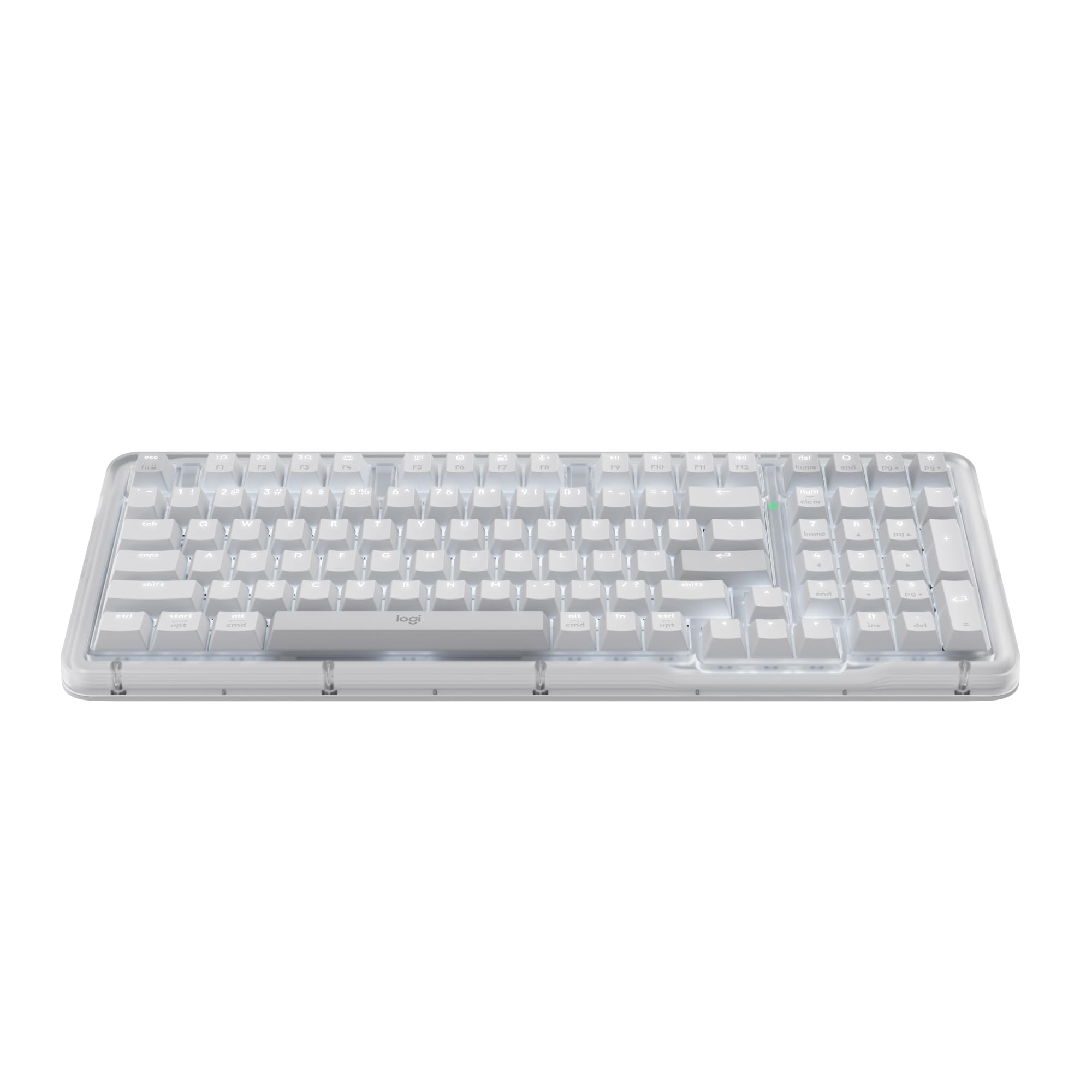
The Logitech Alto Keys K98M bridges the gap between mainstream brand reliability and enthusiast mechanical features. Its custom Marble switches are hot-swappable (5-pin) and provide a light, responsive click with a refined sound profile—less harsh than traditional blue switches but still satisfyingly tactile. The gasket mount absorbs vibration at the plate level, delivering a cushioned bottom-out that reduces finger fatigue during marathon writing sessions.
The 98-key compact 1800-style layout keeps the numpad while trimming the width compared to a traditional full-size board. White backlighting (non-RGB) keeps the workspace professional and avoids the gaming aesthetic. Bluetooth Low Energy and Logi Bolt wireless provide stable connectivity with up to 12 months of battery life on a single charge. The Logi Options+ app enables Action Key programming, letting you assign shortcuts like “insert current date” or “open Scrivener” to dedicated keys.
Build quality meets Logitech’s usual standard: the transparent top case gives a clean, modern look, and the concave keycaps guide your fingers into the correct position. The main drawbacks are the lack of an included wrist rest—surprising given the board’s 1.9-inch height—and the hollow sound from the space bar, which some users dampen with a bit of foam. For writers who trust Logitech’s warranty and want a hot-swap mechanical without the chin-headache of boutique brands, the Alto Keys K98M is a polished entry point.
Why it’s great
- Hot-swappable Marble switches from a major brand
- 12-month battery life with Bluetooth LE
- Compact 1800 layout saves desk space
Good to know
- No wrist rest included with the tall chassis
- Space bar produces a slightly hollow sound stock
6. Logitech Wave Keys for Mac Ergonomic

For writers who feel wrist pain or forearm tension after long sessions, the Logitech Wave Keys for Mac addresses the root cause with its signature wave-shaped layout. The keys are arranged in a gentle arc that follows the natural fan of your fingers, reducing ulnar deviation (the sideways wrist bend that strains the carpal tunnel). The cushioned palm rest provides continuous support from palm to wrist, eliminating the pressure point that hard plastic rests create.
This is a membrane keyboard, not mechanical, but the scissor-switch mechanism offers a quiet, low-force keypress that many typists prefer for sustained output. The battery life is exceptional—up to three years on two AAA batteries—and the Bluetooth connection pairs seamlessly with macOS, iPadOS, and iOS devices. The Easy-Switch key lets you toggle between three paired devices instantly, making it simple to move from a MacBook to an iPad without re-pairing.
The 78-key compact layout drops the numpad to keep the wave profile narrow, so it fits on smaller desks alongside a mouse. The Logi Options+ app allows Smart Actions and shortcut customization. The main compromise is the smaller key size compared to standard full-size boards, which takes a day or two to adjust to. For writers prioritizing joint health over mechanical feel, the Wave Keys delivers certified ergonomic relief that outpaces any clicky board.
Why it’s great
- Wave layout reduces wrist strain effectively
- Cushioned palm rest included for all-day support
- Exceptional 3-year battery life on AAAs
Good to know
- Membrane keys lack mechanical tactile feedback
- Compact layout omits the numpad
7. Retro Typewriter Wireless Mechanical (Taiahiro)

The Taiahiro Retro Typewriter keyboard is an aesthetic statement first and a typing tool second—but for the right writer, its charm and satisfying clicky feedback make it a desk centerpiece. The round, punk-style keycaps and wood-grain aluminum frame evoke a 1960s office, and the stainless-steel lever that controls backlight modes adds a tactile flourish that standard boards lack. The blue switches deliver a crisp, audible click with a moderate actuation force, which some writers find addictive for rhythmic prose.
Connectivity is dual-mode: Bluetooth 5.0 for up to three paired devices and USB-C for wired use. The 83-key layout (no numpad) keeps the footprint compact, and the hot-swappable design lets you replace switches or keycaps without tools. The white LED backlight offers 14 modes, adjustable via the lever and the left/right knobs that control brightness and volume. The built-in rechargeable battery lasts through a full workday on a single charge with backlighting on.
The typing feel is genuinely different from standard mechanical boards. The round keycaps have a smaller contact area, so your fingers land more precisely on each center. This takes adjustment—typos are common during the first few days—but experienced users report that muscle memory eventually locks in. Quality control can be inconsistent; some units ship with unreliable Bluetooth or non-functional wired mode. If you value aesthetics and enjoy the clicky sound signature, this board delivers character in spades. If you need bulletproof reliability, the Keychron K4 or AULA F99 Pro are safer choices.
Why it’s great
- Unique vintage design with wood and metal build
- Satisfying clicky blue switches for rhythmic typing
- Hot-swappable keycaps and switches for customization
Good to know
- Round keycaps require an adjustment period
- Quality control can be inconsistent across units
FAQ
What switch type is best for long-form writing?
Should I get a full-size or 96% layout for writing?
Is a membrane keyboard okay for serious writing?
How important is keycap material for typing comfort?
Final Thoughts: The Verdict
For most users, the best computer keyboard for writers winner is the Keychron K4 because it combines tactile Super Brown switches, a space-saving 96% layout with numpad, and a massive 4000mAh battery that lasts weeks between charges—all at a mid-range price that doesn’t compromise on build quality. If you need whisper-quiet operation for a shared office, grab the AULA F99 Pro. And for the writer who wants full-size layout versatility with a built-in screen and macros, nothing beats the AULA F108 PRO.

Mo Maruf
I created WellFizz to bridge the gap between vague wellness advice and actionable solutions. My mission is simple: to decode the research and give you practical tools you can actually use.
Beyond the data, I am a passionate traveler. I believe that stepping away from the screen to explore new environments is essential for mental clarity and physical vitality.