Our readers keep the lights on and my smoothie glass nicely filled. As an Amazon Associate, I earn from qualifying purchases.
Specs are compiled from manufacturer listings and verified buyer reviews and can change over time — please confirm the key details on the product page before buying.
For the home office, the keyboard is often the loudest and most tiring thing on your desk. A cheap membrane board can make your wrists ache by lunch, and a clacky mechanical one makes every Zoom call sound hollow. This guide compares five wired and wireless keyboards that keep your typing quiet, your hands comfortable, and your desk looking clean.
I’m Mohammad Maruf — the founder and writer behind WellFizz. This guide is built by comparing the manufacturers’ published specifications and the patterns across verified customer reviews, so you get each pick’s real strengths and trade-offs instead of marketing spin.
These are the best computer keyboard for office work options available today, if you need a full numpad for spreadsheets or a compact silent board for a shared workspace.
Quick Picks
- RK ROYAL KLUDGE R98 Pro Wired Mechanical Keyboard — Best Overall
- AULA F99 Pro Wireless Mechanical Keyboard — Silent Performer
- Cherry KC 200 MX, Wired Mechanical Office Keyboard — Value Mechanical
- Keychron C2 Full Size Wired Mechanical Keyboard for Mac — Retro Workhorse
- Logitech Wave Keys for Mac, Wireless Ergonomic Keyboard — Ergonomic Choice
How To Choose The Best Computer Keyboard For Office Work
Picking an office keyboard isn’t about picking the one with the most keys or the flashiest lights. You need to focus on three things: the switch type (which controls feel and noise), the layout (how many keys and how much desk space they take), and the connection (wired for zero lag vs wireless for a neat desk).
Switch Type: The Core of Your Typing Experience
Every mechanical keyboard comes with switches under each keycap. There are three main families: linear (smooth straight press, often quiet), tactile (a small bump when the key registers, gives feedback), and clicky (a loud click sound at the bump). For an open office or a quiet home workspace, linear or silent tactile switches keep your coworkers happy.
Layout and Size: Finding the Right Fit
Full-size keyboards have a number pad (numpad) on the right plus navigation keys, making them great for data entry. 96% or 98-key layouts squeeze the numpad and arrows closer together to save about four inches of desk width. Compact layouts skip the numpad entirely. Think about what you actually type — if you enter numbers daily, full-size or 96% layouts are worth the space.
Connection: Wired Reliability vs Wireless Freedom
Wired keyboards plug in via USB and never need battery changes. Wireless keyboards use Bluetooth or a tiny USB dongle (2.4GHz) to keep your desk cable-free. For office work, both are fine, but choose wired for mission-critical setups where a dead battery mid-sentence cannot happen.
Quick Comparison
| Model | Best For | Weight | Keys | Key Feature | Amazon |
|---|---|---|---|---|---|
| RK ROYAL KLUDGE R98 Pro | Buttery-smooth & quiet typing | 0.8 kg | 98 | Gasket mount + pre-lubed linear switches | Amazon |
| AULA F99 Pro | Silent work & multi-device use | 0.5 kg | 99 | 8000mAh battery + silent linear switches | Amazon |
| Cherry KC 200 MX Silent Red | Durable wired office reliability | — | 108 | CHERRY MX2A Silent Red switches | Amazon |
| Keychron C2 | Full-size Mac and Windows use | 1.5 kg | 104 | Keychron Brown tactile switches | Amazon |
| Logitech Wave Keys for Mac | Ergonomic comfort for Mac users | — | 78 | Cushioned palm rest + Bluetooth | Amazon |
In‑Depth Reviews
1. RK ROYAL KLUDGE R98 Pro Wired Mechanical Keyboard

Buttery-soft keystrokes that blend work and play into one satisfying board.
The RK Royal Kludge R98 Pro delivers exactly what its name promises: a creamy, smooth typing feel that is quiet enough for an office but responsive enough for gaming. Its 98-key layout (a 96% design) squeezes a full numpad and arrow keys into a compact frame that saves significant desktop space compared to a full-size board.
Buyers report the “solid build; gasket mount + pre-lubed linear switches = smooth, quiet, creamy feel; 96% layout with numpad & volume knob; bright RGB (software could be better); zero latency for gaming; hot-swappable.” The board weighs 0.8 Kilograms versus the 1.5 Kilograms Keychron C2, so it is easier to move or slide around your desk.
The gasket mount construction and five layers of sound-absorbing foam kill the hollow echo typical of cheaper mechanical keyboards, producing a muted “thock” sound. The pre-lubed linear switches come from the factory ready to type, and the hot-swappable socket means you can swap in any 3-pin or 5-pin mechanical switch later without soldering. The detachable aluminum volume knob is a nice touch, though the RGB lighting (over 20 modes) may be overkill for a serious office environment.
What elevates it
- Gasket mount and pre-lubed switches deliver an exceptionally smooth, quiet, creamy typing feel
- Compact 96% layout with a dedicated numpad and volume knob
- Hot-swappable PCB supports 3/5-pin switches
- Full N-key rollover and zero latency for both typing and gaming
Things to weigh
- RGB lighting is bright but the software could be more polished
- Keycaps are PBT but some users find backlighting dimmer than expected
- Only a wired USB-C connection — no wireless option
Perfect for: The typist who wants a smooth, quiet board that handles spreadsheets during the day and games at night without swapping keyboards.
One limitation: The left-side USB cord is a minor cable management issue, and the keyboard lacks Bluetooth for those who want a wireless desk.
2. AULA F99 Pro Wireless Mechanical Keyboard
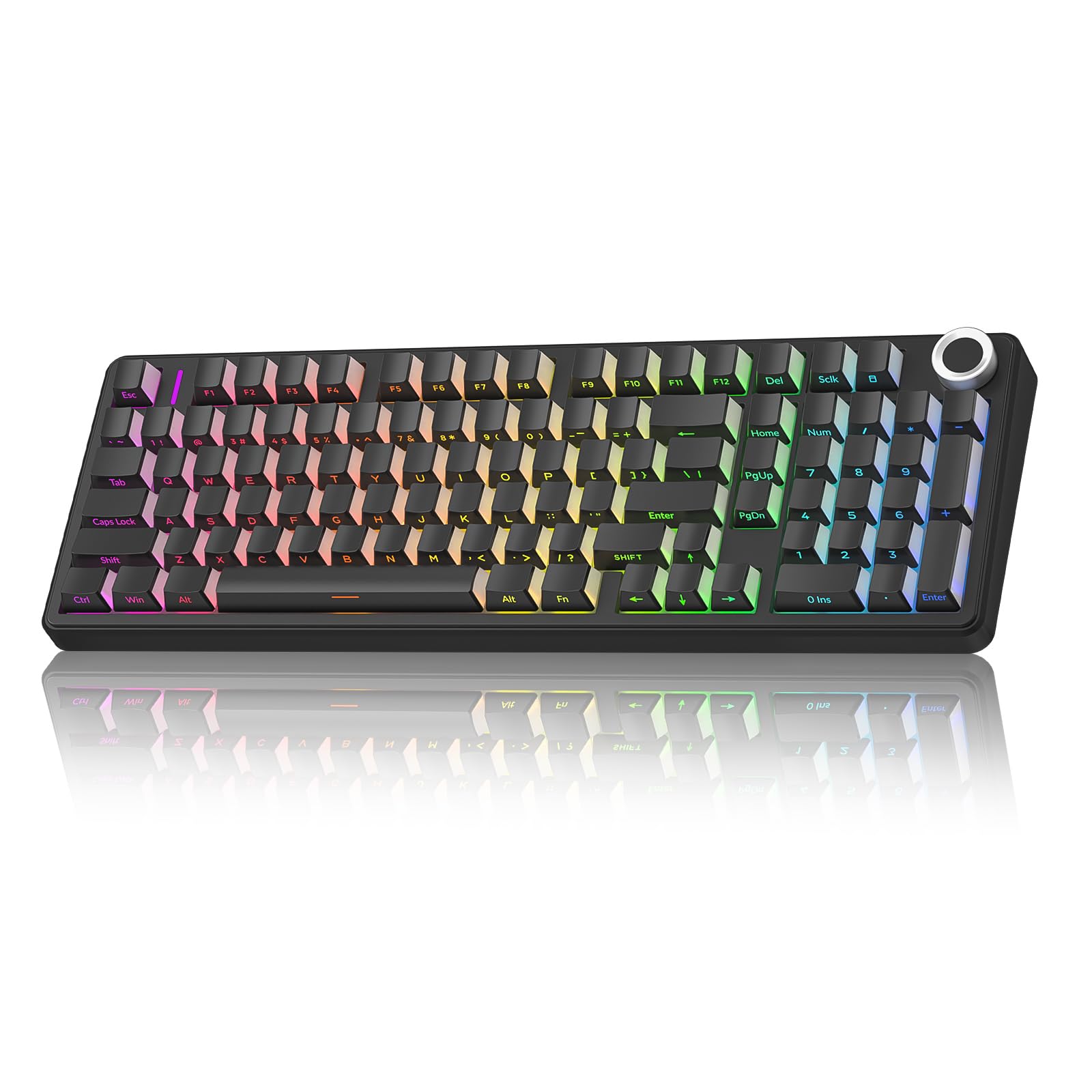
The near-silent board that lets you type all day without disturbing anyone.
If your office is a shared space or you work close to a sleeping partner, the AULA F99 Pro is purpose-built to be quiet. Its silent version uses pre-lubed linear switches that produce a muted, “thocky” sound that buyers describe as “like walking on snow.” The gasket structure and five layers of filling silencer cancel out the hollow cavity noise that plagues many budget mechanical boards.
Reviewers confirm it is “SO QUIET” and “ideal for office use.” The keyboard weighs just 500 grams (about 1.1 lbs), making it the lightest of the mechanical picks here. But its real party piece is the massive 8000mAh rechargeable battery — a capacity that dwarfs most competitors and means you could go weeks or months between charges, especially since the RGB lights automatically turn off after one minute of idle time on wireless to save power.
The F99 Pro connects three ways: USB-C wired, Bluetooth 5.0, or 2.4GHz wireless (with a bundled dongle). That tri-mode support lets you pair up to five devices at once and switch between a PC, a tablet, and a phone with a button press. The 99-key layout retains the numpad and arrow keys while staying compact, and the top multifunction knob controls both backlight brightness and volume depending on mode. The side-printed PBT keycaps are more durable than standard printed legends and stay readable even with heavy use.
Why this shines: The 8000mAh battery is extremely generous for a keyboard, effectively eliminating battery anxiety for office users. The silent linear switches produce the quietest typing experience in this roundup.
The trade-off: Side-printed keycaps mean letters can be hard to read in a dark room without the backlight on, and the fixed-on color options (no RGB cycling) are limited if you want a colorful desk.
Best suited for: Anyone who works in a shared office or quiet home environment and needs a nearly silent mechanical keyboard with long battery life and multi-device flexibility.
Skip if: You prefer a wired-only setup and do not want to manage a battery, or if you need the lower weight of a 60% board.
3. Cherry KC 200 MX, Wired Mechanical Office Keyboard

German-engineered switches in a metal body that just works without any software or fuss.
The Cherry KC 200 MX takes the opposite approach from flashy gaming boards: it is a plain-looking, professional keyboard built around Cherry’s own MX2A Silent Red linear switches. These switches are rated for more than 50 million actuations per key, which means the keyboard should outlast several generations of laptops. The Silent Red variant is linear and quiet — no click, no bump — making it ideal for open offices.
Owners mention it is “great keyboard and value, looks sharp too” and praise the “solid metal base” and “excellent feel.” The keyboard uses a USB-A wired connection, so there is zero latency and no battery to manage. It is a full-size board with 108 keys, including a full numpad, dedicated calculator key, and white status LEDs on the Caps Lock, Scroll Lock, and Num Lock keys. The laser-etched keycaps resist fading even after years of heavy typing.
The aluminum surface and metal enclosure give the KC 200 MX a premium, durable feel that heavier than the AULA F99 Pro. The keyboard includes two sturdy fold-out feet to adjust the typing angle, though a few reviewers mention the tilt-feet feel slightly clunky. Despite this, one reviewer describes it as “better than Durgod K320: more stable keys, less vibration, quieter, retro high-tech look.”
What it does right
- CHERRY MX2A Silent Red switches are smooth, quiet, and rated for 50 million actuations
- Full N-key rollover and anti-ghosting prevent missed key presses
- Laser-etched keycaps resist fading over years of use
- Anodized metal enclosure feels premium and sturdy
What to keep in mind
- Wired USB-A only — no Bluetooth or wireless option
- Some customers note the rubber feet are too small and cause sliding
- Non-replaceable USB-C cable is a minor durability concern
Reach for this if: You want a no-nonsense, wired mechanical keyboard with genuine Cherry switches, an aluminum body, and zero software setup — just plug in and type.
Look elsewhere if: You need wireless freedom, hot-swappable switches, or a compact layout to save desk space.
4. Keychron C2 Full Size Wired Mechanical Keyboard for Mac

A heavy-duty full-size board with tactile switches that give every keystroke a satisfying bump.
The Keychron C2 is a classic full-size mechanical keyboard with 104 keys and a retro-inspired color scheme. It comes pre-installed with Keychron’s own tactile Brown switches, which provide a small bump on each keystroke (tactile feedback) without the loud click of a clicky switch. This makes it a good middle ground for office work — you get typing feedback so you know your press registered, but you are not annoying everyone nearby.
Buyers call it a “Durable, quality retro-style keyboard” and note “Keys provide soothing feedback without clicking.” The C2 weighs 1.5 Kilograms versus the 0.8 Kilograms RK Royal Kludge R98 Pro, giving it a very planted feel on the desk — it will not slide around as you type fast. The included 2-level adjustable feet (6° and 9° tilt) let you find a comfortable typing angle, and the USB-C braided cable is built for durability.
One unique strength for Apple users is the dedicated Mac optimization: the C2 includes extra keycaps for both Mac and Windows operating systems, and a dedicated Siri key. The layout works smoothly with macOS while remaining fully compatible with Windows. One reviewer noted “Works flawlessly on Mac, Windows, and Linux.” The non-backlight version keeps the design understated, with just blue LED indicators for Caps/Num/Scroll Lock. The trade-off is no RGB backlighting, which some may prefer in an office setting anyway.
Built to last: The tactile switches are rated for up to 50 million keystrokes, and the sturdy ABS plastic enclosure has enough weight (1.5 kg) to prevent desk sliding. The simple design is office-appropriate with no flashy lights.
A missing feature: There is no scroll lock key or indicator, and the non-backlight version means you cannot type in the dark. The switches are also stiffer than linear options, which some fingers may find tiring over a full 8-hour day.
Who it fits: Mac users who need a full-size mechanical keyboard with a numpad, tactile feedback, and a retro aesthetic that blends into a professional office.
One catch: If your desk is small, the 17.1-inch width may be too much, and the tactile bump is not for everyone — consider the smooth linear switches of the R98 Pro above if you prefer a lighter press.
5. Logitech Wave Keys for Mac, Wireless Ergonomic Keyboard

The wave-shaped board that supports your wrists so you can type longer without pain.
The Logitech Wave Keys for Mac is not a mechanical keyboard — it uses membrane scissor switches underneath the keys. But it solves a different problem: wrist and hand fatigue. The board has a distinct wave shape that matches the natural curve of your hands, and it comes with a cushioned palm rest permanently attached to the front. Reviewers point out it “reduces wrist strain” and “the wave fits hands naturally.”
This keyboard is designed specifically for the Apple ecosystem, with a layout that works smoothly with macOS, iPadOS, and iOS. It connects via Bluetooth (or uses the Logi Bolt USB receiver sold separately), and the Easy-Switch button lets you toggle between a MacBook, iPad, and iPhone with a single tap. Battery life is rated at up to 3 years — impressive for a wireless keyboard — and one reviewer confirmed “9 months of regular use, battery lasts long (changed once).”
Despite only 78 keys (no dedicated numpad), the Wave Keys includes row of function keys for screen brightness, mission control, and media playback. Logitech’s Logi Options+ app lets you assign custom shortcuts and Smart Actions to streamline repetitive tasks. The board is also Ergo-certified by the United States Ergonomics group, and is made from 46% recycled plastic. The main downside: the white “for Mac” version lacks printed keycaps for Windows, making it tricky if you dual-boot. One reviewer flagged that “Left CTRL swapped with FN (cannot remap), ALT/Windows keys swapped,” so Windows users should buy the black version instead.
Why ergonomics win
- Wave-shaped design and cushioned palm rest reduce wrist and hand fatigue during long sessions
- Bluetooth wireless pairs easily with Mac, iPad, and iPhone via Easy-Switch
- Impressively long battery life rated up to 3 years
- Ergo-certified and partially made from recycled plastic
The compromises
- No mechanical switches — membrane keys lack the satisfying tactile feedback of mechanical boards
- No dedicated numpad (78 keys only), which slows down number entry
- Quieter than mechanical keyboards but not as customizable or durable over time
Ideal for: Mac users who spend all day typing and want a keyboard that actively reduces wrist strain — the wave shape and cushioned rest make a real difference in comfort.
Not for you if: You need a numpad for spreadsheets, prefer the crisp feel of mechanical switches, or use both Mac and Windows without wanting to juggle keycaps.
Understanding the Specs
Switches: The Heart of Feel and Sound
A keyboard switch is the mechanism under each keycap that registers your press. Linear switches move straight up and down with no bump or click (smooth and quiet, great for typing). Tactile switches give a small bump when the key activates so you feel the press without hearing a click. Clicky switches combine a bump with a loud audible click. For an office, linear or tactile switches are the best bet because they are quieter than clicky ones. The Cherry MX2A Silent Red in the Cherry KC 200 MX and the pre-lubed linear switches in the RK Royal Kludge R98 Pro are both excellent examples of quiet switches.
Layout: How Many Keys and How Much Space
The number of keys tells you how much of the traditional keyboard is present. A full-size board (around 104 keys) includes a separate numpad on the right, navigation cluster above the arrows, and function row — best for data entry. A 96% layout (around 98-99 keys) squeezes the numpad right next to the letter keys, saving about 4 inches of desk space while keeping all the essentials. Compact layouts drop the numpad entirely to save even more width. Consider your desk size and how often you type numbers before choosing.
FAQ
What is the quietest mechanical keyboard for an office?
Should I get a wired or wireless office keyboard?
Does the number of keys matter for office work?
What is a gasket mount and why should I care?
Can I use a Mac keyboard on Windows?
What does “hot-swappable” mean on a keyboard?
How long does a mechanical keyboard battery last?
What is the difference between a linear and tactile switch?
Are ergonomic wave keyboards actually good for your wrists?
Final Thoughts: The Verdict
For most people, the winner in the computer keyboard for office work category is the RK Royal Kludge R98 Pro because it combines a creamy, quiet typing feel with a compact numpad layout and hot-swappable switches at a mid-range price. If you want near-silent operation and multi-device wireless freedom, grab the AULA F99 Pro with its huge 8000mAh battery. And for a durable, no-software wired keyboard that will last years, the standout is the Cherry KC 200 MX with genuine German switches.
How We Picked
We do not accept paid placement. Every pick is matched to a real buyer and a real use-case; we do not hands-on test units.
Sources & Methodology
Specifications: manufacturer listings and product documentation. Review insights: verified customer reviews, as of July 2026. Pricing: not shown on this page (it changes often); check the current price via the retailer link.
As an Amazon Associate, WellFizz earns from qualifying purchases. This does not affect which products we feature.

Mo Maruf
I created WellFizz to bridge the gap between vague wellness advice and actionable solutions. My mission is simple: to decode the research and give you practical tools you can actually use.
Beyond the data, I am a passionate traveler. I believe that stepping away from the screen to explore new environments is essential for mental clarity and physical vitality.