Our readers keep the lights on and my smoothie glass nicely filled. As an Amazon Associate, I earn from qualifying purchases.
A cramped desk with a noisy keyboard and a laggy mouse can silently steal focus from your work or gaming session. The right combination of keys and a precise pointer reduces fatigue, clears the workspace of clutter, and keeps you in the zone hour after hour.
I’m Mohammad Maruf — the founder and writer behind WellFizz. I have spent long hours studying the ergonomic curves, keystroke decibel ratings, and connectivity protocols that separate a comfortable, hassle-free setup from a frustrating one.
Whether you share a small home office or sit down for hours of competitive gaming, this guide breaks down the most reliable computer keyboard and mouse combos available, from wave-shaped comfort designs to high-precision wireless options.
How To Choose The Best Computer Keyboard And Mouse
The best combo for you balances typing comfort with pointer precision and the right connection method. Three key factors will guide your decision.
Ergonomics and Wrist Support
A wave-shaped or split keyboard aligns your hands in a natural, relaxed position, reducing strain on the wrists and forearms over long sessions. Look for an integrated or cushioned palm rest that provides stable support without adding bulk. The mouse should also contour to your palm and offer a comfortable thumb rest to prevent fatigue.
Connectivity and Multi-Device Flexibility
Most combos use a single 2.4GHz USB receiver that connects both devices with a stable, low-lag signal. Premium options add Bluetooth to switch instantly between a desktop, laptop, and tablet. Tri-mode wireless (wired, Bluetooth, 2.4GHz) is ideal for gamers who need the lowest latency but want the freedom of wireless for everyday tasks.
Typing Experience and Noise Level
Membrane keyboards are generally quieter with a soft, cushioned feel. Scissor-switch or low-profile keys offer a snappier response similar to a laptop. If you share a workspace, prioritize quieter models — some combos produce clicks over 30 decibels, while others reduce noise by up to 90% without sacrificing tactile feedback.
Quick Comparison
On smaller screens, swipe sideways to see the full table.
| Model | Category | Best For | Key Spec | Amazon |
|---|---|---|---|---|
| Logitech MK955 Signature Slim | Premium | Large hands, quiet multi-device | 90% quieter click; 3-device Bluetooth | Amazon |
| ProtoArc EKM01 Plus | Premium | Full-size ergonomic split design | Split curved layout; 500mAh rechargeable | Amazon |
| Logitech POP ICON Combo | Mid-Range | Stylish, portable multi-device | Silent Touch; 2-year mouse battery | Amazon |
| Redragon S101M-KS Tri-Mode | Mid-Range | Wireless gaming with RGB | 4800 DPI; tri-mode wired/BT/2.4G | Amazon |
| SABLUTE MA41 | Mid-Range | Quiet wave design, cushioned rest | 30dB quiet; leather palm rest | Amazon |
| Lomiluskr Split Ergo | Budget | Colorful ergonomic value | PU wrist pad; 3-level DPI mouse | Amazon |
| MEETION Wave Keys | Budget | Entry-level ergonomic typing | Wave-shaped keys; hard wrist rest | Amazon |
In‑Depth Reviews
1. Logitech MK955 Signature Slim

This premium combo is built for large hands and quiet productivity. The full-size K950 keyboard uses low-profile scissor switches with a laptop-like feel and remarkably quiet operation — even quieter than most laptop keyboards, according to users. The M750 L mouse features SilentTouch technology that cuts click noise by 90 percent, plus a SmartWheel for fast line-by-line or free-scroll through long documents.
Both devices connect via Bluetooth or the included Logi Bolt USB receiver and can switch between three devices (desktop, laptop, tablet) with a single tap. The keyboard is made from at least 48 percent post-consumer recycled plastic, and the body has a solid, sleek build that feels premium on any desk. Battery life is excellent — years on the keyboard and two-plus years on the mouse with auto-sleep.
Setup is straightforward, though pairing additional computers using multiple Logi Bolt receivers requires a specific order. The mouse is right-handed only, and the forward/back buttons above the thumb are not adjustable in all apps. For anyone needing a whisper-quiet, multi-device professional setup, this is the benchmark.
Why it’s great
- Near-silent typing and clicking
- Seamless 3-device switching
- Full-size layout comfortable for large hands
Good to know
- Right-handed mouse only
- Multi-receiver setup not well documented
- Button customization requires Logi Options+ app
2. ProtoArc EKM01 Plus

The ProtoArc EKM01 Plus is a full-size, split-curved keyboard that forces your hands into a natural, relaxed position. The wave-shaped keyframe, combined with a cushioned memory foam palm rest and four adjustable tilt legs, effectively reduces wrist bending during all-day typing sessions. Users report significant relief from wrist pain after switching to this design.
Both keyboard and mouse connect via Bluetooth or the included USB receiver, allowing you to switch between three devices with a single button press. The 500mAh rechargeable lithium batteries provide about 250 hours of standby — a full charge takes two hours. The contoured mouse includes a palm and thumb rest with 2000 DPI optical tracking and forward/back buttons for webpage navigation.
The scissor-switch keys deliver quiet, responsive keystrokes that users describe as smooth and satisfying. Some note that the mouse buttons above the thumb can be accidentally pressed and cannot be deactivated. The board measures nearly 21 inches wide, so measure your desk before buying. If you need serious ergonomic support without losing a full numpad, this is a top choice.
Why it’s great
- Split curved design reduces strain
- Rechargeable with long standby
- Memory foam wrist rest included
Good to know
- Large footprint requires desk space
- Mouse thumb buttons cannot be disabled
- Not backlit
3. Logitech POP ICON Combo

The POP ICON Combo makes a style statement without sacrificing function. The compact, contoured keyboard has low-profile keys with quiet membrane switches, and the matching mouse uses Silent Touch Technology for nearly noiseless clicking. Both devices are available in bold matching colors that stand out on any desk.
Bluetooth pairing works seamlessly with up to three devices across Windows, macOS, iPadOS, and ChromeOS, and switching is instant with the press of a button. The keyboard has a three-year battery life, while the mouse lasts two years, both with auto-sleep. The Logi Options+ app lets you program Action Keys and Buttons to launch apps, control media, or trigger AI tools.
Users love the lightweight, portable design — it fits easily in a laptop bag. The keys feel similar to a MacBook keyboard. A few mention the mouse is small for very large hands. The plastic body uses 37-70 percent post-consumer recycled material. For a compact, quiet, and stylish everyday set that travels well, this is hard to beat.
Why it’s great
- Extremely quiet typing and clicking
- Battery life measured in years
- Portable and stylish design
Good to know
- Mouse may feel small for large hands
- No USB receiver included (Bluetooth-only)
- Action Keys require app setup
4. Redragon S101M-KS Tri-Mode

Redragon’s S101M-KS is a tri-mode wireless gaming combo that works wired, via Bluetooth, or with a 2.4GHz receiver. The keyboard features true RGB backlighting with eight patterns and adjustable speed, plus ten independent multimedia keys and twelve combination shortcuts for quick game control. The full-size layout includes a splash-resistant design and a WIN lock key.
The optical gaming mouse offers five DPI levels up to 4800, adjustable through a top button or the companion software. The software also lets you remap the seven mouse buttons and set the polling rate from 125Hz to 1000Hz. The keyboard’s rechargeable battery lasts up to 300 hours with RGB off, which is strong for a wireless gaming board.
Build quality is a step above typical budget gaming sets — keys feel solid and quiet with a bit more resistance than membrane boards. Users note the mouse requires frequent charging and that waking the keyboard from sleep can take 5-10 seconds. The mouse’s red-only lighting and a DPI reset on boot are minor quirks. For a flexible, affordable wireless gaming setup, this delivers real performance.
Why it’s great
- Tri-mode wireless for low-latency gaming
- Full software customization (keys, lighting, DPI)
- 300-hour battery with RGB off
Good to know
- Mouse needs frequent charging
- Keyboard sleep has noticeable reconnect lag
- Mouse DPI resets after reboot
5. SABLUTE MA41
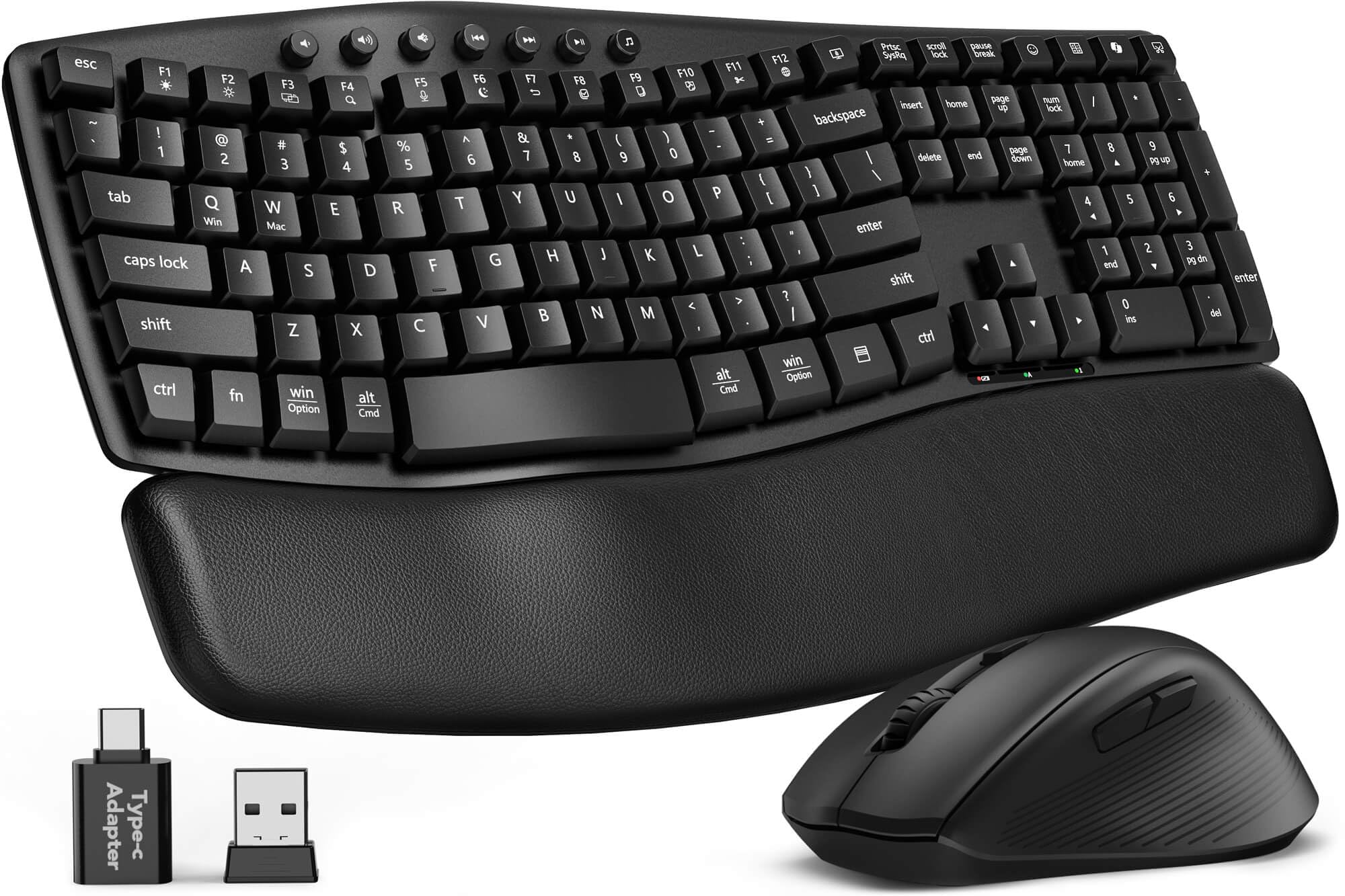
The SABLUTE MA41 brings premium ergonomic features to a mid-range price. The wave-shaped keyboard has two adjustable tilt angles to promote a natural typing posture, and the cushioned leather wrist rest is a significant upgrade over the hard plastic found on many budget combos. Users consistently praise the soft, supportive feel of the palm pad during long work sessions.
Typing is exceptionally quiet — rated at 30 decibels, which reduces noise by up to 90 percent compared to standard keyboards. The laser-etched keycaps are tested for 10 million keystrokes and resist fading over time. A single 2.4GHz receiver connects both devices, and the set includes a USB-C adapter for modern laptops. The keyboard is spill-resistant and auto-sleeps to extend battery life for six to twelve months.
The mouse is comfortable and responsive, though a few users found it sensitive. The combo works with Windows, macOS, ChromeOS, Linux, and Android. There is no Bluetooth option, only the 2.4GHz connection. For home offices and shared workspaces where silence and wrist comfort matter most, this combo provides a premium feel at a very reasonable cost.
Why it’s great
- 30dB quiet typing with cushioned leather rest
- 10 million keystroke durability
- Spill-resistant with long battery life
Good to know
- No Bluetooth — 2.4GHz only
- Mouse can feel oversensitive to some
- Not ideal for gaming
6. Lomiluskr Split Ergo (Purple)

This split-design membrane keyboard from Lomiluskr aims to reduce typing stress with a sloping layout that aligns your arms naturally. The integrated wrist rest is covered in soft PU leather, providing all-day comfort and a non-slip surface. The low-profile keys require a light press, which helps users with carpal tunnel or wrist fatigue.
The mouse offers three DPI levels — 1200, 1600, and 2400 — controllable with a top button. Its palm area is also wrapped in PU leather for a comfortable, grippy hold. Connectivity is through a single 2.4GHz USB receiver with a range of up to 10 meters. Both devices auto-sleep after 3-5 minutes to save battery and wake with a button press. Batteries are required and not rechargeable.
Users praise the quiet keystrokes and comfortable padding, especially for wrist pain. Some report occasional missed keystrokes or a lagging mouse. Compatibility with macOS can be inconsistent — some users experienced wrong key entries. The set uses alkaline batteries (two AAA included). For a budget-friendly, colorful entry into split ergonomics, this is worth considering with the understanding that reliability may vary.
Why it’s great
- Comfortable split membrane layout
- Soft PU leather palm rest
- Quiet typing with light actuation
Good to know
- Missed keystrokes reported by some
- Mac compatibility can be unreliable
- Fn key needed for F-keys; no Bluetooth
7. MEETION Wave Keys Director-D
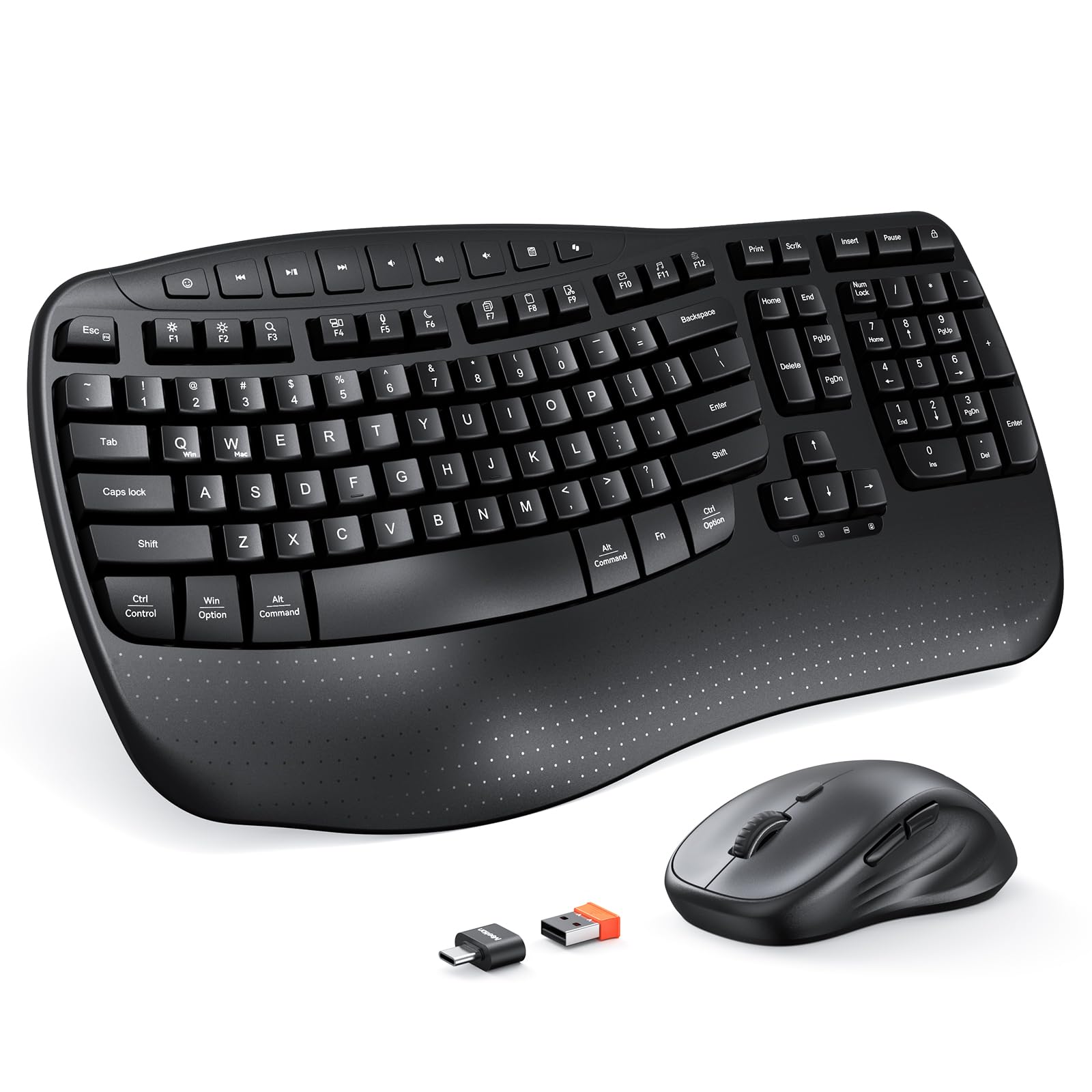
The MEETION Wave Keys Director-D is an entry-level ergonomic combo that brings wave-shaped key alignment and a solid hard plastic wrist rest to budget-conscious buyers. Meticulously crafted keys encourage a relaxed finger stretch, and users transitioning from a standard flat keyboard notice less finger fatigue after a few days. The hard wrist rest offers stable, firm support compared to cushioned alternatives.
Connectivity is via a single 2.4GHz USB receiver with a range of 33 feet. The keyboard and mouse are not Bluetooth-enabled and are not rechargeable — they use one AA (mouse) and two AAA (keyboard) batteries. The mouse features four adjustable DPI levels with a top button for quick switching. The set includes a USB-C adapter for extra port compatibility.
Keystrokes are described as pleasant, quiet, and smooth with a light touch. Some users experienced occasional oversensitivity (double letters) or need to power cycle to wake the keyboard. The design is slightly smaller than traditional ergonomic boards, saving desk space. For a very affordable way to test the ergonomic wave shape, this combo provides a low-risk starting point for home offices.
Why it’s great
- Affordable wave-shaped ergonomic design
- Quiet, smooth key feel
- Compact footprint saves desk space
Good to know
- Occasional double-letter keystrokes
- Not rechargeable; batteries not included
- No Bluetooth; limited OS support
FAQ
How do I clean a leather or PU palm rest without damaging it?
Can I use a 2.4GHz keyboard and mouse with a Mac that has only USB-C ports?
Why does my mouse cursor lag or stutter on certain surfaces?
Final Thoughts: The Verdict
For most users, the computer keyboard and mouse winner is the Logitech MK955 Signature Slim because it combines whisper-quiet operation, a comfortable full-size layout for larger hands, and seamless multi-device switching. If you need serious ergonomic support with a split design, grab the ProtoArc EKM01 Plus. And for a compact, stylish, and portable setup, nothing beats the Logitech POP ICON Combo.

Mo Maruf
I created WellFizz to bridge the gap between vague wellness advice and actionable solutions. My mission is simple: to decode the research and give you practical tools you can actually use.
Beyond the data, I am a passionate traveler. I believe that stepping away from the screen to explore new environments is essential for mental clarity and physical vitality.