Our readers keep the lights on and my smoothie glass nicely filled. As an Amazon Associate, I earn from qualifying purchases.
Specs are compiled from manufacturer listings and verified buyer reviews and can change over time — please confirm the key details on the product page before buying.
Your voice needs to be the only thing your listeners hear—not the dog barking, the lawnmower, or your own typing. A good work headset with a noise-canceling microphone makes that happen, so you sound professional on every call without shouting or repeating yourself. This guide compares wired and wireless options based on published specs and patterns from real customer reviews, so you get the truth about what works and what doesn’t for a full day of calls.
I’m Mohammad Maruf — the founder and writer behind WellFizz. This guide is built by comparing the manufacturers’ published specifications and the patterns across verified customer reviews, so you get each pick’s real strengths and trade-offs instead of marketing spin.
Whether you take calls in a busy open office or from a quiet home desk, finding a reliable computer headset with microphone for work depends on matching your setup with the right combination of noise cancellation, driver size, and connection type.
Quick Picks
- AOC Wireless Headset with Mic for Work — Smart Connection
- awatrue Wireless Headset with Mic for Work — Best Value
- Poly Blackwire 5220 Wired Headset — Premium Performer
- JIAMQISHI Bluetooth Headset — Wireless Dock
- Jabra Evolve 20 Wired Headset (2025 Edition) — Noise Blocker
- Poly Blackwire 3220 Wired Headset with Mic — Budget Audio
- Jabra Evolve 10 Wired Headset with Noise-Cancelling Microphone — Entry Level
How To Choose The Best Computer Headset With Microphone For Work
The perfect work headset isn’t the most expensive one—it’s the one that matches your specific daily routine. Here is what to check before you click buy.
Connection Type: Wired vs Wireless
Wired headsets (USB-A or USB-C) offer zero-latency audio and never need charging, making them the safest bet for long call-center shifts. Wireless models with a 2.4GHz dongle or Bluetooth 5.3 give you freedom to move around your desk, but you’ll need to remember to charge them between shifts. If you hate interruptions, a wired pick is usually the smarter choice for work.
Microphone & Noise Cancellation
A noise-canceling boom microphone physically positions the mic near your mouth and uses technology to filter out background sounds. Headsets with a flexible boom arm let you wear the mic on either side and mute it by rotating it upright—a feature that reviewers consistently say saves them from awkward moments during sensitive conversations.
Driver Size and Audio Quality
The driver size, measured in millimeters, directly affects how rich your call audio sounds. A 40mm driver delivers fuller, more natural voice reproduction than a 28mm driver, which can sound thin on long calls. If you also listen to music between meetings, bigger drivers make a noticeable difference.
Quick Comparison
| Model | Best For | Driver Size | Connection Type | Noise-Canceling Mic | Amazon |
|---|---|---|---|---|---|
| AOC Wireless Headset | Wireless freedom + AI noise canceling | — | Bluetooth 5.3 / 2.4G / 3.5mm | Yes (AI, Bluetooth only) | Amazon |
| awarue Wireless Headset | Dual-device + charging base | 40mm | Bluetooth 5.3 / 2.4G dongle | Yes (ENC) | Amazon |
| Poly Blackwire 5220 | Premium wired reliability | — | USB-C / USB-A / 3.5mm | Yes | Amazon |
| JIAMQISHI Bluetooth Headset | Wireless + charging dock | — | Bluetooth 5.2 / USB dongle | Yes | Amazon |
| Jabra Evolve 20 (2025) | Best noise dampening | 28mm | USB-C / USB-A (wired) | Yes | Amazon |
| Poly Blackwire 3220 | Big 40mm drivers on a budget | 40mm | USB-C / USB-A (wired) | Yes | Amazon |
| Jabra Evolve 10 | Budget-friendly plug-and-play | 30mm | USB-A (wired) | Yes | Amazon |
In‑Depth Reviews
1. AOC Wireless Headset with Mic for Work

The wireless contender that switches between Bluetooth, dongle, and wired modes on the fly.
Your calls shouldn’t drop just because you walked to the printer. This headset gives you three ways to stay connected—Bluetooth 5.3, a 2.4GHz USB-A/C dongle, or a 3.5mm audio cable (4 feet long)—so you always have a backup plan. Its AI noise cancellation, which uses algorithms to distinguish your voice from background sounds like barking dogs or kids, blocks out background distractions, but only works in Bluetooth mode. You can instantly mute the mic by rotating the boom upright.
Battery life is a strong point here, with up to 30 hours of talk time on a full charge that takes about 2.5 hours. At only 5.06 ounces with protein memory foam ear cups, it stays comfortable across a full workday. Buyers report the headset feels balanced without squeezing the head and stays stable on Zoom and Teams even when moving around the desk. The Bluetooth range reaches up to 36 feet, giving you real freedom to stand and stretch during calls.
Unlike the wired Jabra Evolve 20 below, the AOC headset requires charging and the AI noise cancellation is restricted to Bluetooth mode—so if you rely on the dongle for stability, you lose that extra filtering layer.
Why It Stands Out
- Three connection modes for total flexibility: Bluetooth 5.3, 2.4G dongle, or wired 3.5mm
- AI noise cancellation filters background noise effectively
- 30-hour battery life with fast 2.5-hour charging
- Lightweight at 5.06 oz with soft protein memory foam ear cups
The Trade-Offs
- AI noise cancellation active only in Bluetooth mode, not via dongle
- Needs to be charged regularly, unlike a wired headset
Ideal for: The worker who wants wireless freedom with the safety net of a wired option and needs AI-powered background noise filtering for busy home offices.
Not for: Anyone who prefers a zero-maintenance, always-on wired connection that never needs charging.
2. awatrue Wireless Headset with Mic for Work
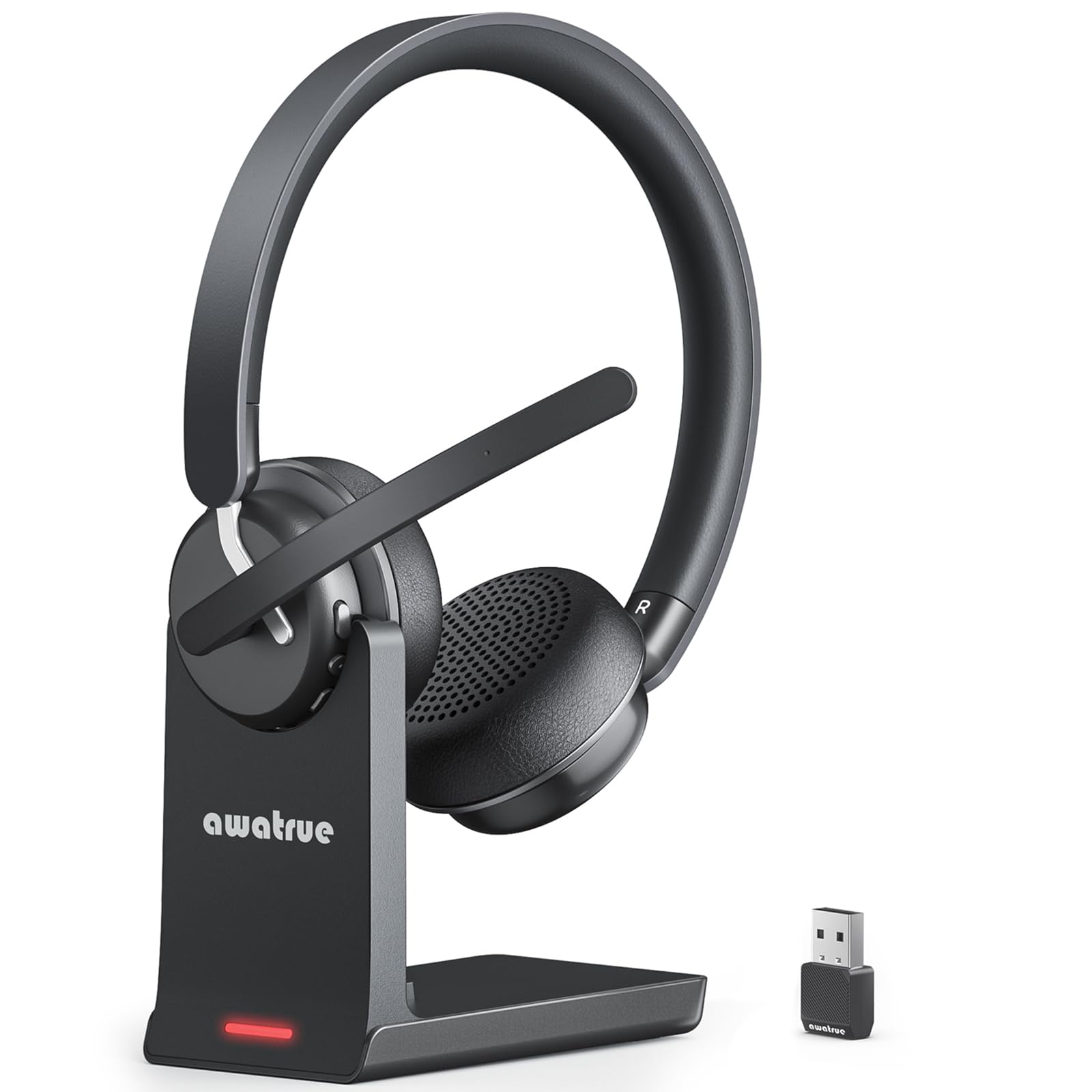
Wireless dependability with a charging base so you never start a shift low on battery.
Long call days demand a headset that stays powered and comfortable. The awatrue delivers up to 30 hours of continuous talk time and includes a plug-and-play charging base that keeps the headset topped up between meetings—you simply drop it in when you step away from your desk. It connects via Bluetooth 5.3 or the included 2.4GHz USB dongle, and its ENC (Environmental Noise Cancellation) technology, which uses multiple microphones to capture and cancel background noise, filters out 99% of background noise like keyboard clicks and office chatter, according to the maker. The microphone boom mutes instantly when rotated upright, adding a layer of privacy control.
With 40mm audio drivers, the sound is noticeably richer than smaller-driver competitors like the 28mm Jabra Evolve 20. Owners mention the headset is comfortable for all-day wear thanks to ultra-soft breathable ear cushions and an adjustable padded headband—one reviewer noted they could see it working for people who wear a headset all day. Another reviewer highlighted that the dual-device connection lets you stay on a Zoom call on your PC while taking a quick business call on your phone without disconnecting anything. The charging base is a nice desk companion, but the headset also charges via USB-C if you need to travel light.
Unlike the AOC headset above, the awatrue’s ENC noise cancellation works across both the dongle and Bluetooth connections, giving you more flexibility. The catch? At 30 hours of battery, heavy users may still need to charge mid-week if they forget to dock it nightly.
What We Like
- Includes a charging base for easy daily battery management
- 40mm drivers deliver fuller call audio than smaller 28mm drivers
- ENC noise cancellation works on both dongle and Bluetooth
- Dual-device connection for smooth PC/phone switching
What to Keep in Mind
- Battery will drain if you forget to dock it at the end of the day
- Charging base takes up desk space
Best for: The remote worker or call center agent who wants a wireless headset with desk-friendly charging, rich 40mm audio, and reliable noise cancellation across all connection modes.
Consider something else if: You prefer a wired connection with zero battery management and no charging base clutter.
3. Poly Blackwire 5220 Wired Headset

The wired flagship that solves softphone glitches and never needs a charger.
If your call quality suffers from stuttering or connectivity hiccups, the Poly Blackwire 5220 is the heavy lifter you want. It’s certified for Microsoft Teams and Zoom, meaning it is tested to deliver consistent, plug-and-play performance on those platforms. Customers note it resolved issues with Wispr Flow stuttering and Nextiva desktop app connection problems—a concrete fix for common softphone headaches. You get a noise-canceling boom mic plus conforming ear cushions that provide passive noise isolation, so barking dogs (one buyer mentioned exceptionally loud barking) don’t interrupt your calls. The headset connects via USB-C, includes a tethered USB-A adapter, and also works with a 3.5mm audio jack for mobile phones.
Poly built this for all-day wear with an ergonomic design, a flex strap, and padded ears that reviewers describe as comfortable even after hours of use. The carry case is included, a rare bonus in this category. Unlike the awatrue or AOC wireless models, the 5220 is 100% wired—zero battery anxiety, zero charging docks, zero pairing. It just works whenever you plug it in. The trade-off is you’re tethered to your desk. Some users report that after about five months of heavy use, the noise cancellation quality can begin to decline.
Compared to the Poly Blackwire 3220 below, the 5220 adds the 3.5mm jack and includes a carrying case, making it the more versatile premium choice for multi-device setups.
Why It Shines
- Certified for Microsoft Teams and Zoom for guaranteed compatibility
- Three connection options: USB-C, USB-A, and 3.5mm
- Excellent noise cancellation that blocked loud barking dogs
- Includes a carrying case for safe transport
The Drawback
- Wired-only: you cannot roam around your desk or office
- A few users report noise cancellation quality may decline after months of heavy use
Grab this if: You are a work-from-home pro or call center agent who prioritizes rock-solid wired reliability, platform certification, and the ability to connect to a phone via 3.5mm.
skip it if: You need the freedom to walk around during calls—go with a wireless option instead.
4. JIAMQISHI Bluetooth Headset

A wireless headset with a charging dock and 24-month warranty that goes the distance.
This headset is built for the call center or remote worker who wants a simple wireless setup without pairing complications. The included USB dongle is truly plug-and-play—no drivers, no pairing codes, just insert it into any USB port and it locks into a stable connection instantly. Bluetooth 5.2 keeps the link steady even in busy offices crowded with wireless devices. The plush padding and breathable material are designed to prevent ear soreness during eight-hour shifts, and buyers confirm it stays comfortable for long wear. One reviewer who works in a call center said it made a great fix after getting tired of wired sets catching on everything.
The charging dock is a standout feature here: it gives the headset a dedicated home on your desk so it’s always ready. The maker backs it with a 24-month warranty, well above the industry norm. However, a notable pattern in reviews is durability concern: several reviewers point out the headset gets staticky after about 5 months of use, with callers saying they cannot hear or understand the wearer. If you need a long-term workhorse, this is a risk to weigh against the low barrier to entry.
Unlike the awatrue, which offers 30 hours of battery and a charging base too, the JIAMQISHI comes with a longer warranty but a slightly older Bluetooth 5.2 version and more frequent reports of static issues over time.
What Works
- Plug-and-play USB dongle: no pairing or driver installation needed
- Includes a charging dock for convenient daily charging
- 24-month warranty provides extra confidence
- Comfortable padding for all-day wear
What Worries Us
- Multiple shoppers say static and audio failure after about 5 months of use
- Bluetooth 5.2 is a generation behind compared to newer 5.3 models
Consider this if: You want an affordable wireless headset with a charging dock and a long warranty, and you are willing to accept a higher risk of mid-term durability issues.
Look elsewhere if: Long-term reliability is your top priority—the static complaints suggest you may need to replace it within a year.
5. Jabra Evolve 20 Wired Headset (2025 Edition)

The wired headset that impressed reviewers by silencing a blender on video.
Noise dampening is the headline act here. One buyer specifically watched a video demo that showed a blender running in the background—and reported that you could not hear it through the headset at all. That kind of real-world isolation makes the Evolve 20 a strong pick for telehealth workers or anyone in a noisy home environment. Multiple reviewers confirm that clients couldn’t hear barking dogs or lawnmowers on the other end. The headset connects via USB-A or USB-C instantly, with inline call and volume controls for easy meeting management. It’s certified for Avaya and Cisco platforms, and works with all leading online meeting software.
The 28mm drivers are noticeably smaller than the 40mm drivers found in the Poly Blackwire 3220—a 43% smaller diameter—which means the audio is adequate for voice calls but less rich for music or multimedia. The design is lightweight with leatherette or foam ear cushions, keeping it comfortable for long wear. One thing to know: the ear pads and wires are not replaceable, so when they wear out, the whole unit is done. The wired connection means zero battery anxiety, which is a clear advantage over the JIAMQISHI and AOC wireless models for uninterrupted shift work.
Compared to the Jabra Evolve 10 below, the Evolve 20 offers USB-C connectivity (the Evolve 10 is USB-A only) and dual-ear design for better noise isolation.
What Makes It Great
- Exceptional noise dampening that blocked a blender and barking dogs
- Dual connectivity with USB-A and USB-C plug-and-play
- Lightweight and comfortable for all-day wear
- Certified for Avaya and Cisco platforms
What Holds It Back
- 28mm drivers produce thinner audio than 40mm alternatives
- Non-replaceable ear pads and cables limit the lifespan
Reach for this if: You work in a noisy environment (pets, kids, traffic) and need a wired headset that actually blocks out background sound so your callers never hear a thing.
Pass if: You want richer sound for music or multimedia alongside calls—the smaller drivers won’t deliver that.
6. Poly Blackwire 3220 Wired Headset with Mic

The budget pick with 40mm drivers that deliver surprisingly full audio for its price.
At the budget end of the list, the Poly Blackwire 3220 punches above its weight with a 40mm driver—the same size as the premium awatrue headset and a notable step up from the 28mm drivers on the Jabra Evolve 20. That translates to warmer, more natural call audio and decent music playback between meetings. The noise-canceling boom mic combined with conforming ear cushions provides passive noise isolation, and Dynamic EQ, a feature that adjusts sound frequencies automatically to tune voice clarity during calls, does just that—prioritizes your voice for callers. It connects to your PC via USB-C or the included tethered USB-A adapter, making it ready for both modern and older laptops.
Buyers consistently praise the comfort, with one reviewer saying the adjustable strap and soft ear padding prevented migraines during long workdays. The inline controls for volume and mute work well, though the headset emits a low beep when powered on. On the durability front, the story is mixed: one owner reported the unit quit working three days after the return window closed, which is a risk at this price point. Another noted that one earpiece felt slightly floppy but didn’t seem likely to break. For the price, the audio quality and comfort are strong, but you are trading some long-term build confidence.
Unlike the more expensive Poly Blackwire 5220, the 3220 lacks a 3.5mm jack and the carrying case, but at roughly a third of the price, it offers the same core microphone and noise-canceling technology.
What You Get
- 40mm drivers provide fuller sound than 28mm alternatives
- Comfortable design with adjustable strap and soft ear padding
- USB-C + USB-A connectivity for broad compatibility
- Noise-canceling mic with inline controls
The Catch
- Durability concerns: some units fail after a few months of use
- Wired-only, so no roaming freedom
Best for: The budget-conscious worker who prioritizes audio quality (thanks to 40mm drivers) and comfort over premium build materials, and who is okay with replacing an inexpensive headset if it fails.
Not the one for: Anyone who needs a bulletproof headset that will survive years of daily use—look at the Poly Blackwire 5220 instead.
7. Jabra Evolve 10 Wired Headset with Noise-Cancelling Microphone
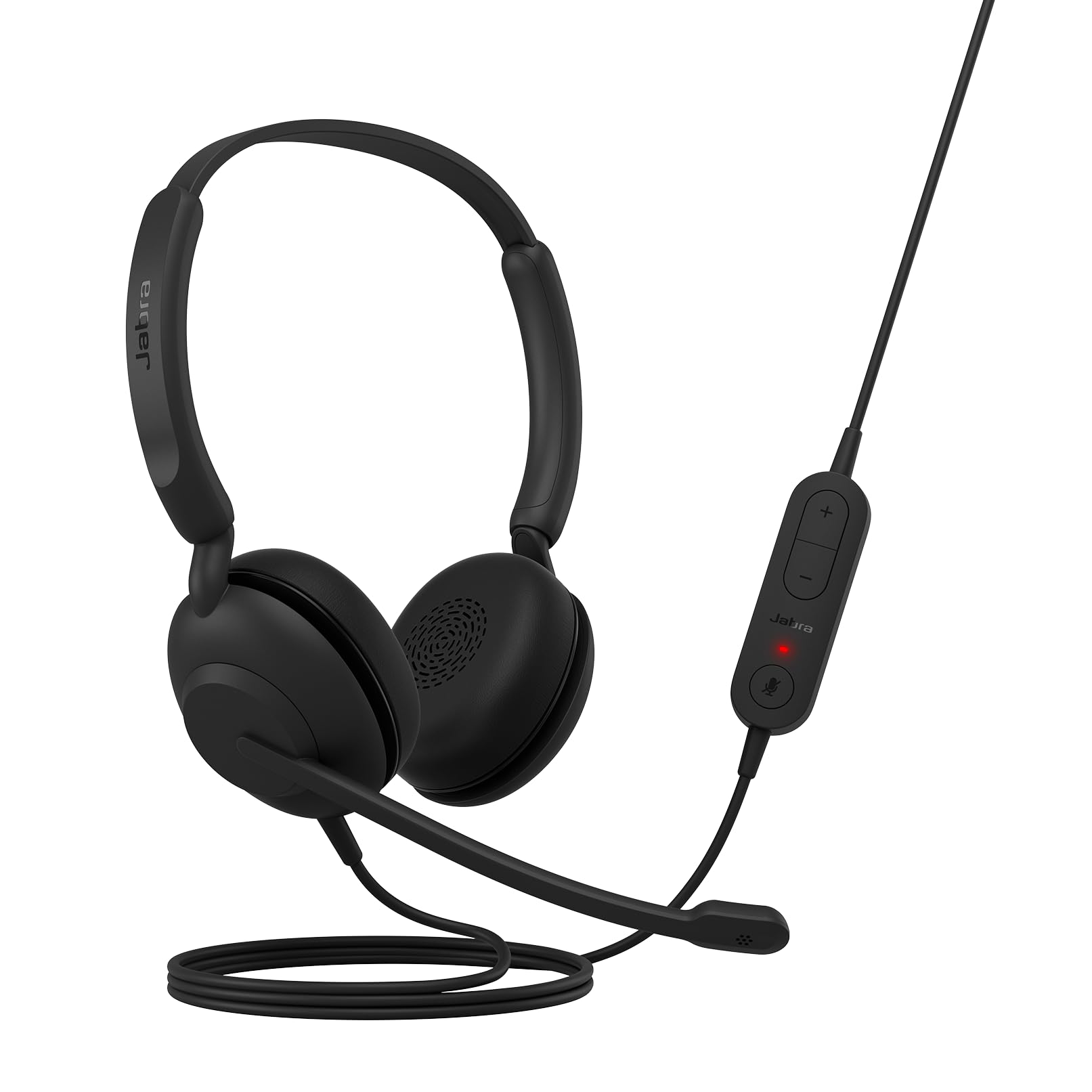
The simple USB-A plug-and-play headset that gets the job done without any fuss.
Not everyone needs heavy-duty features. The Jabra Evolve 10 is a no-nonsense wired headset for the worker who just wants to plug in and take calls. The noise-canceling microphone sits on an adjustable boom arm that can be worn on the left or right, and inline controls let you manage volume and calls. The cable is designed to be tangle-free, a small but welcome detail. At 30mm, the audio drivers sit between the budget 28mm and the richer 40mm options—fine for voice but not for music. Buyers consistently describe the sound as clear, the headset as lightweight and comfortable for long wear, and the setup as truly plug-and-play with no charging or connection issues.
The headset is made from more than 50% recycled plastic and is TCO certified, making it the most eco-friendly choice here if that matters to you. The trade-off is that it uses USB-A only—so it won’t connect to modern laptops that only have USB-C ports without an adapter. And like the Evolve 20, the ear cushions and cable are not replaceable, so the lifespan is limited when parts wear out. For the price, it’s a reliable starter headset that does exactly what it promises: clear calls, simple setup, all-day comfort.
Compared to the Poly Blackwire 3220, the Evolve 10 has smaller 30mm drivers (vs 40mm) and lacks USB-C, but it comes from a trusted brand and has consistently positive reviews for its core function.
Why It Works
- True plug-and-play USB-A setup with no software or pairing
- Lightweight and comfortable for long calls
- Adjustable boom arm works on left or right side
- Made from over 50% recycled plastic (TCO certified)
What You Give Up
- USB-A only—needs an adapter for USB-C devices
- Cable and ear pads are not replaceable
- 30mm drivers are adequate for voice but weak for music
Ideal for: The first-time buyer who needs a cheap, comfortable, and simple wired headset for occasional calls and doesn’t want to deal with Bluetooth pairing or drivers.
Not for: Anyone with a USB-C only laptop, or anyone who wants richer audio quality for multimedia use between calls.
Understanding the Specs
Driver Size (mm)
The driver is the tiny speaker inside each ear cup. A larger driver, like 40mm, moves more air and gives you richer, fuller sound—so voices sound more natural and music has some depth. Smaller drivers like 28mm are lighter and cheaper but can sound thin on long calls. If you also listen to music or podcasts between meetings, aim for 40mm drivers.
Noise Cancellation Type
There are two types: passive noise isolation (physical ear cushions that block sound) and active noise cancellation (electronics that neutralize background noise). ENC (Environmental Noise Cancellation) focuses on filtering out noise from your microphone so callers hear only you. AI noise cancellation uses algorithms to distinguish your voice from background sounds. Always check which mode the feature works in—some headsets only apply it during Bluetooth connection, not via the dongle.
Connection Method: Dongle vs Bluetooth vs Wired
A 2.4GHz USB dongle gives you the most stable wireless connection because it doesn’t compete with Wi-Fi or other Bluetooth devices. Bluetooth (5.2 or 5.3) is convenient but can experience interference in busy offices. Wired connections (USB-A, USB-C, or 3.5mm) are the most reliable—zero latency, no pairing, and no batteries to worry about. For 8-hour shift work, wired is still the gold standard.
Battery Life and Charging
For wireless headsets, look at both talk time and charge time. A headset with 30 hours of talk time can last a full work week on a single charge if you dock it nightly. Fast charging (2.5 hours to full) means less downtime. Headsets with a charging base make daily battery management easy—you just drop the headset in when you step away, and it’s always topped up for your next call.
FAQ
What is the most important spec in a work headset?
Are wired headsets better than wireless for work?
What does a 40mm driver mean for call quality?
How does a noise-canceling microphone work?
Can I use a work headset with my phone and my PC at the same time?
What is the difference between ENC and AI noise cancellation?
How long do wireless headset batteries typically last?
Are Jabra or Poly headsets better for business use?
What does it mean when a headset is certified for Microsoft Teams or Zoom?
Will a USB-A headset work with my new USB-C laptop?
Final Thoughts: The Verdict
For most people, the strongest computer headset with microphone for work is the awatrue Wireless Headset because it combines rich 40mm audio, reliable ENC noise cancellation, a convenient charging base, and smooth dual-device connection—all at a mid-range price that doesn’t break the bank. If you want the ultimate wired reliability with platform certification and a 3.5mm jack for your phone, grab the Poly Blackwire 5220. And for a simple, budget-friendly wired starter headset that just works, the Jabra Evolve 10 is a solid entry-level pick for occasional calls.
How We Picked
We do not accept paid placement. Every pick is matched to a real buyer and a real use-case; we do not hands-on test units.
Sources & Methodology
Specifications: manufacturer listings and product documentation. Review insights: verified customer reviews, as of July 2026. Pricing: not shown on this page (it changes often); check the current price via the retailer link.
As an Amazon Associate, WellFizz earns from qualifying purchases. This does not affect which products we feature.

Mo Maruf
I created WellFizz to bridge the gap between vague wellness advice and actionable solutions. My mission is simple: to decode the research and give you practical tools you can actually use.
Beyond the data, I am a passionate traveler. I believe that stepping away from the screen to explore new environments is essential for mental clarity and physical vitality.