Our readers keep the lights on and my smoothie glass nicely filled. As an Amazon Associate, I earn from qualifying purchases.
Specs are compiled from manufacturer listings and verified buyer reviews and can change over time — please confirm the key details on the product page before buying.
Choosing the right components for your PC is about matching each piece to the job you need done. Whether you are building a high-end gaming rig, a silent home office machine, or a local AI workstation, the internal hardware you pick determines everything from boot speed to multitasking smoothness. This guide covers a range of essential computer hardware components, from power supplies to mini PCs and expansion cards, with clear explanations of what each spec means for your real-world use.
I’m Mohammad Maruf — the founder and writer behind WellFizz. This guide is built by comparing the manufacturers’ published specifications and the patterns across verified customer reviews, so you get each pick’s real strengths and trade-offs instead of marketing spin.
Whether you are upgrading a SATA storage pool, finding a quiet and efficient power supply, or looking for a compact desktop that handles 4K displays, the right computer hardware starts with knowing which specs actually drive daily performance.
Quick Picks
- CORSAIR RM850e (2025) Fully Modular Low-Noise ATX Power Supply — Best Overall
- ASUS Prime 850W Gold Fully Modular Power Supply — Premium Pick
- MONTECH Century II 850W High-End ATX Gaming Power Supply — Best Value
- Thermaltake Toughpower GT 850W ATX 3.1 Standard Power Supply — Compact Choice
- ACEMAGIC K1 Mini PC AMD Ryzen R2544 — Desktop Power
- GLOTRENDS SA3026-C 6-Port PCIe X4 SATA III Expansion Card — Storage Saver
How To Choose The Best Computer Hardware
Picking computer hardware is a balancing act between what your applications demand, your case’s physical space, and your budget. A few key specifications guide every smart decision.
Power Supply Wattage and Efficiency
Your power supply (PSU) is the foundation of a stable system. The wattage rating tells you the maximum load it can handle — an 850W unit is enough for most single-GPU gaming or workstation builds. Efficiency certifications like 80 Plus Gold or Cybenetics Gold indicate how much energy is wasted as heat; higher efficiency means lower electricity bills and less heat inside your case.
Form Factor and Modular Cabling
A PSU’s physical size (ATX, SFX) must fit your case. Fully modular designs let you attach only the cables you need, which reduces clutter and improves airflow. For expansion cards, the PCIe slot generation (PCIe 3.0 vs 4.0) determines maximum data throughput — important for fast SSDs or SATA controllers.
Modern Standards: ATX 3.1 and PCIe 5.1
Newer power supplies comply with ATX 3.1 and PCIe 5.1 standards. This means they include a native 12V-2×6 connector for modern graphics cards and can handle sudden power spikes from the GPU without tripping protections. If you plan to upgrade to a high-end GPU in the next few years, this is a future-proofing feature worth paying for.
Processor, RAM, and Storage in Mini PCs
For compact desktops, the CPU model (like AMD Ryzen R2544) and RAM capacity dictate multitasking ability. Look for DDR4 or DDR5 memory and the ability to upgrade storage via M.2 slots. Integrated graphics from AMD Radeon or Intel UHD handle 4K video output, but dedicated gaming or AI work requires a discrete GPU or a specialized unit like the NVIDIA DGX Spark.
Quick Comparison
| Model | Best For | Wattage / Capacity | Form Factor / Standard | Key Feature | Amazon |
|---|---|---|---|---|---|
| CORSAIR RM850e (2025) | Quiet, reliable high-end builds | 850W | ATX 3.1 | 120mm fan, 3.37 lbs | Amazon |
| ASUS Prime 850W Gold | Dual ball bearing longevity | 850W | ATX 3.0 | Axial-tech fan, 8-year warranty | Amazon |
| MONTECH Century II 850W | Budget-friendly quality | 850W | ATX 3.1 | 135mm FDB fan, 4.63 lbs | Amazon |
| Thermaltake Toughpower GT 850W | Compact ATX 3.1 with white cables | 850W | ATX 3.1 | Smart Zero Fan, flat black cables | Amazon |
| ACEMAGIC K1 Mini PC | Compact office and 4K display | 8GB DDR4 RAM | Mini PC, AMD Ryzen R2544 | Triple 4K display, 28W TDP | Amazon |
| GLOTRENDS SA3026-C 6-Port PCIe SATA Card | Expanding storage capacity | 6 SATA III ports | PCIe X4 | ASM1166 chip, plug-and-play | Amazon |
In‑Depth Reviews
1. CORSAIR RM850e (2025) Fully Modular Low-Noise ATX Power Supply

The power supply that stays quiet while your demanding GPU pulls all the juice it needs.
This 850W unit is built for exactly the scenario where you do not want to hear your PSU. It uses a 120mm rifle bearing fan with a calculated fan curve that keeps noise low even at full load. Buyers report excellent build quality and fully modular flat black cables that make routing in any case simple and clean.
It is Intel ATX 3.1 certified and PCIe 5.1 compliant, meaning it includes the native 12V-2×6 cable for modern graphics cards and can withstand 2x transient power excursions from the GPU. The 105°C-rated capacitors deliver steady, reliable power. At 3.37 pounds versus the MONTECH Century II at 4.63 pounds, it is easier to handle during installation.
Modern Standby compatibility means extremely fast wake-from-sleep times and better low-load efficiency — a practical benefit if your PC sleeps between work sessions. Buyers confirm it handles an i9-12900KS plus RTX 3090 without breaking a sweat.
Why It Wins
- Fully modular flat black cables for clean builds
- ATX 3.1 and PCIe 5.1 ready with 12V-2×6 cable
- Very quiet 120mm fan with zero-RPM mode
- 105°C-rated capacitors for reliability
One Trade-Off
- At 3.37 lbs it is lighter than some competitors, but still a mid-range weight for an 850W PSU
Quiet powerhouse: Grab this if you want a near-silent 850W PSU with the latest ATX 3.1 standard and a proven Corsair track record for reliability.
Look elsewhere if: you need a PSU with a lower price floor or you are on a strict budget build where every dollar counts.
2. ASUS Prime 850W Gold Fully Modular Power Supply

A power supply built to outlast many builds, with fans that keep spinning for years.
The standout feature here is the dual ball bearing fan design, which the maker claims can last up to twice as long as sleeve bearing designs. That is a meaningful advantage if you keep your PC running 24/7 or plan to use this unit across multiple builds over the next 8 years — the warranty covers exactly that period.
It is 80 Plus Gold certified, using low-ESR capacitors and other premium components to achieve that efficiency. The Axial-tech fan design uses a smaller fan hub for longer blades and a barrier ring that increases downward air pressure, so the 120mm fan pushes more air through the unit quietly. It is compliant with ATX 3.0 and comes with a 16-pin PCIe cable compatible with PCIe Gen 5.0 graphics cards.
Buyers after 18 months of heavy use report it stays extremely quiet under load and that the included cables give you good build options. Unlike the more budget-focused MONTECH Century II, this unit adds a premium bearing structure and an 8-year warranty for extra confidence.
Built to Last
- Dual ball bearing fan with extended lifespan
- 80 Plus Gold certification from premium components
- Axial-tech fan for quiet, focused airflow
- 8-year warranty included
One Trade-Off
- ATX 3.0 (not 3.1) — the native 12V-2×6 connector is missing compared to newer units
Long-term investment: Choose this if you want a durable, quiet 850W PSU backed by an 8-year warranty and dual ball bearing fan technology.
Pass if: you need the absolute latest ATX 3.1 standard with a 12V-2×6 connector for a next-gen GPU.
3. MONTECH Century II 850W High-End ATX Gaming Power Supply

The 850W PSU that punches way above its price, with a 10-year warranty as backing.
This unit is ATX 3.1 and PCIe 5.1 ready, featuring a 12V-2×6 cable for modern GPUs — a spec normally found on more expensive units. It carries both 80 Plus Gold and Cybenetics Platinum efficiency certifications, meaning it wastes very little power as heat. Inside, 100% Japanese capacitors handle reliability, and the protections suite includes OCP, OVP, UVP, SCP, OTP, and OPP.
The 135mm FDB (fluid dynamic bearing) silent fan with zero RPM mode means the fan does not spin at all under light loads, keeping your PC dead silent when browsing or working. Buyers confirm it runs whisper quiet and that the build quality earns an A- rating on SPL’s PSU Tier List. One buyer specifically noted “80+ Gold, 850W, modular, 0 RPM mode, 12VHP.”
At 4.63 pounds and dimensions of 10 x 2 x 2.7 inches, it is physically larger and heavier than the CORSAIR RM850e, which weighs 3.37 pounds. That extra heft comes from the bigger 135mm fan and the sturdy internal components, so check your case clearance first.
Value Champ
- ATX 3.1 and PCIe 5.1 ready with 12V-2×6 cable
- 80 Plus Gold and Cybenetics Platinum certified
- 100% Japanese capacitors
- 10-year warranty
One Trade-Off
- Port spacing is tight during installation, making cable routing a bit fiddly
Best bang for buck: Get this if you want a fully featured ATX 3.1 PSU with a 10-year warranty and top-tier efficiency, but do not want to pay premium prices.
skip it if: your case has limited depth — the 10-inch dimension may not fit compact mid-towers.
4. Thermaltake Toughpower GT 850W ATX 3.1 Standard Power Supply

A compact 850W PSU that fits tight spaces and comes with smart fan control for near-silent operation.
The standout physical spec here is the size: 5.9 x 3.4 x 5.5 inches, versus the MONTECH Century II at 10 x 2 x 2.7 inches, so it fits easily in compact ATX cases where space is at a premium. Despite the small size, it delivers the full ATX 3.1 and PCIe 5.1 standard with a native 12V-2×6 connector for 450W power delivery to modern GPUs.
It is fully modular with low-profile flat black cables, and buyers who have used it for a year with a 9700X Ryzen and a 5070 Ti report “one year later – no issues” and praise the super easy installation. The Smart Zero Fan technology means the fan does not spin at low loads, keeping noise down. Buyers specifically mention the white color matching their PC case, making this a solid pick for themed builds.
The 80 Plus Gold efficiency rating and high amperage single +12V rail provide stable power for gaming and workstation use.
Space Saver
- Very compact dimensions for easy case fitting
- ATX 3.1 and PCIe 5.1 native 12V-2×6 connector
- Smart Zero Fan for silent low-load operation
- Fully modular flat black cables
One Trade-Off
- 5-year warranty is shorter than the 8-10 year coverage on some competitors
Tight fit, no problem: Ideal if you need a small-form-factor 850W PSU with modern GPU connectors and a clean white cable option.
Not for you if: you plan to keep your PSU across multiple builds over a decade — consider a unit with a longer warranty.
5. ACEMAGIC K1 Mini PC AMD Ryzen R2544
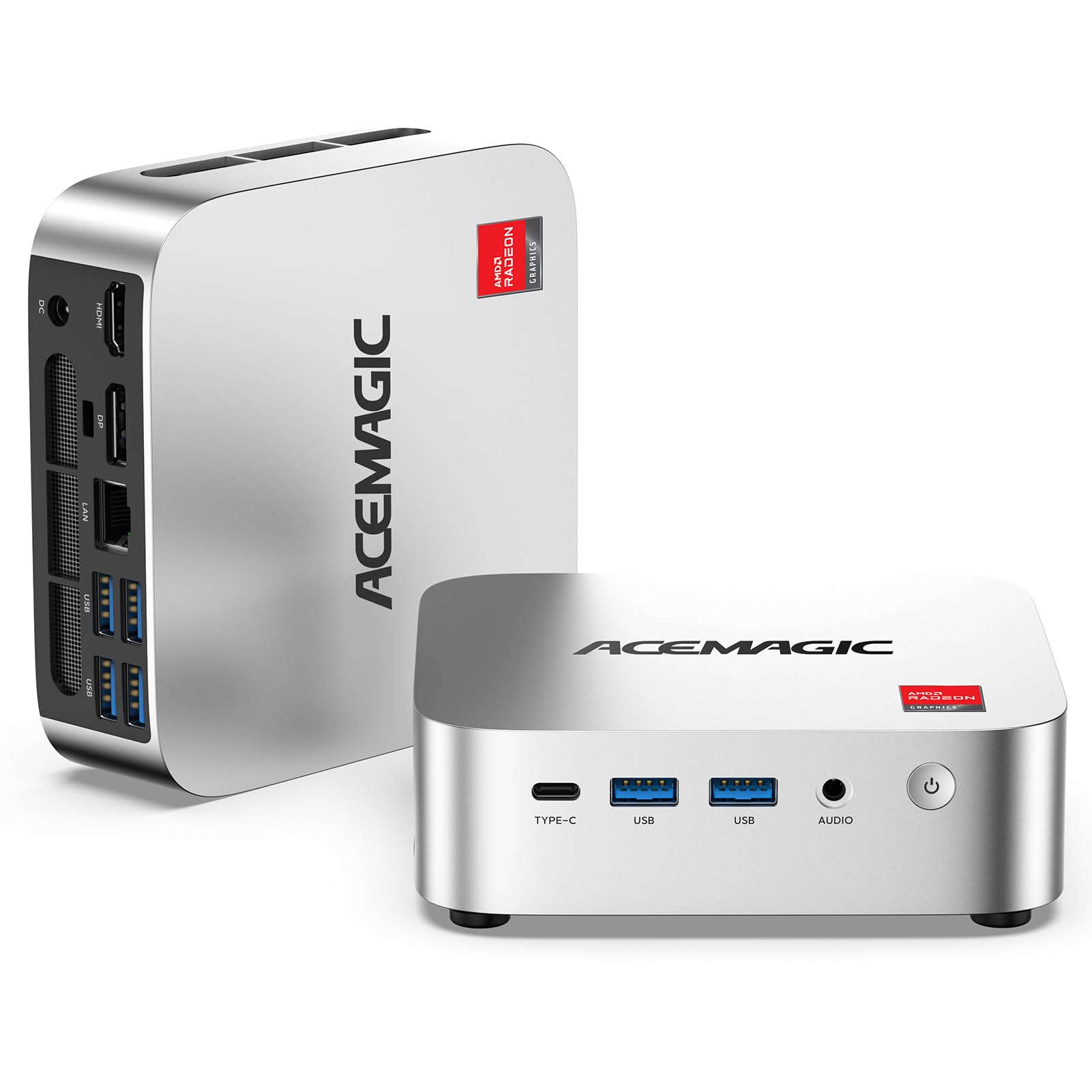
A tiny desktop that runs cool and quiet while pushing three 4K monitors at once.
This mini PC houses an AMD Ryzen R2544 processor with 4 cores and 8 threads, boosting up to 3.7 GHz from a base of 3.35 GHz. The integrated Radeon Graphics (max 1300 MHz, 8 graphics cores) delivers noticeably better graphics performance than entry-level N-series processors — the maker claims around 28% faster CPU and 35–50% better integrated GPU performance. That means smooth 4K video and casual gaming in a very small footprint.
It comes with 8GB DDR4 memory and a 256GB M.2 SSD, but supports upgrades up to 32GB DDR4 and two M.2 storage slots (one SATA/NVMe PCIe 3.0, one SATA) for up to 4TB total. The port selection is generous: 6x USB 3.2 ports including a USB-C Gen 2 at 10Gbps that also supports DP 1.4 4K@60Hz display output and PD power delivery. Owners mention it installs Ubuntu Linux easily and runs cool at around 50°C when playing 4K YouTube.
Triple 4K display support (1x HDMI 2.0, 1x DP 1.4, 1x USB-C 3.2) gives you serious desktop real estate for office work or creative projects, all at a full power performance of 28W TDP. The upgraded cooling fan spins at 2000+ RPM and the aluminum profile with dual air outlets keeps noise low.
Small Wonder
- Triple 4K display support for maximum productivity
- Upgradeable RAM and storage (32GB DDR4, 4TB storage)
- Runs cool and quiet with efficient 28W TDP
- 6x USB 3.2 ports with fast USB-C Gen 2
One Trade-Off
- No USB-C on all units (some customers note it missing) and DDR4 memory rather than DDR5
Versatile mini: Perfect for a clean desk setup with triple 4K monitors, light office work, and media streaming.
Pass if: you need serious gaming GPU power or dedicated graphics for heavy 3D workloads.
6. GLOTRENDS SA3026-C 6-Port PCIe X4 SATA III Expansion Card

A simple card that open up six extra SATA drives, perfect for building a massive storage pool.
If your motherboard has run out of SATA ports, this PCIe X4 card adds 6 SATA III ports using the ASM1166 controller. The upstream connection runs at PCI Express 3.0 X2 speed (16GT/s), and each downstream SATA port can reach 277MB/s max bandwidth — enough for mechanical hard drives and SATA SSDs. Buyers confirm it works with Linux, Windows, Mac OS, and NAS systems, and that plug-and-play detection works immediately on Intel Z890 motherboards.
One reviewer noted that the supplied SATA cables are short, so you may need longer cables for larger cases. The card includes 6 SATA III cables, a 1:5 SATA power splitter cable, and both 12cm regular and 8cm low-profile brackets for any PC case. Six built-in LEDs show drive status — steady red means normal, flashing means read/write activity.
A reviewer noted a potential bottleneck with fast SSDs. For a NAS or bulk storage pool of hard drives, this is fine; for performance-critical setups, an LSI HBA is recommended.
Port Multiplier
- Adds 6 SATA III ports via a single PCIe slot
- Plug-and-play with Windows, Linux, Mac OS, NAS
- Includes cables, power splitter, and low-profile brackets
- LED indicators for drive status monitoring
Know Before You Buy
- Supplied SATA cables are short — plan for aftermarket cables
- Bottleneck possible with many fast SSDs
Storage expander: Ideal if you have run out of motherboard SATA ports and need a simple, compatible way to add HDDs or SSDs for a bulk storage pool.
Not for: high-speed SSD arrays where you need to saturate all six ports simultaneously at full speed.
7. NVIDIA DGX Spark — Personal AI Desktop Supercomputer

A desktop supercomputer that brings enterprise-scale AI model training right to your desk.
This is not a typical PC — it is a purpose-built AI workstation using the NVIDIA GB10 Grace Blackwell Superchip, delivering up to 1 petaFLOP of FP4 AI performance. That is enough to fine-tune and run large language models locally. It comes with 128GB of coherent unified system memory and a 4TB NVMe M.2 self-encrypted drive, plus a ConnectX-7 Smart NIC for high-speed networking.
You can experiment with models up to 200 billion parameters at FP4 precision directly on your desktop. The system runs on NVIDIA’s full AI software stack, so you can develop locally and deploy anywhere. Buyers running local LLMs report it is reliable and fast, with one reviewer successfully running the qwen 3.6:27B model through ollama for codebase review on an ITAR-secure environment.
One buyer mentioned the device is basically silent and lacks any power-on light, which caused initial confusion about whether it was booting. Another reviewer was critical of the proprietary OS and found their 5090 GPU faster in most categories except VRAM capacity.
AI Beast
- Up to 1 petaFLOP FP4 AI performance for local models
- 128GB unified memory for large model loading
- 4TB self-encrypted NVMe storage
- Runs full NVIDIA AI software stack
Consider This
- Proprietary NVIDIA OS may limit long-term support flexibility
- No power-on indicator light, which can be confusing at first boot
Local AI specialist: Essential if you need to run large language models (up to 200B parameters) locally for research, ITAR compliance, or secure development.
Not the right fit: for general computing, gaming, or anyone who prefers standard Windows/Linux OS flexibility and wants peak GPU throughput for every task.
Understanding the Specs
Power Supply Wattage and Efficiency
Wattage (measured in watts, W) tells you the maximum continuous power your PSU can deliver to all components. An 850W unit handles a high-end CPU and single GPU comfortably. Efficiency certifications like 80 Plus Gold mean the PSU wastes less than 20% of energy as heat — you get lower electricity costs and less heat inside your case. Cybenetics Gold is a stricter independent standard that also measures noise.
ATX 3.1 and PCIe 5.1 Standards
The ATX 3.1 spec defines how a PSU handles transient power spikes from modern GPUs — it must withstand 2x the rated power for short bursts without tripping protections. PCIe 5.1 introduces the 12V-2×6 connector (also called 12VHPWR) that delivers up to 600W to a single graphics card. If you plan to buy a high-end GPU like an RTX 40-series or 50-series, a PSU with native 12V-2×6 support simplifies cabling and ensures compatibility.
Mini PC Processor and RAM
A processor like the AMD Ryzen R2544 (4 cores, 8 threads, 3.7 GHz boost) handles office apps, 4K video, and light multitasking. RAM (8GB or more) keeps multiple applications running smoothly. The key advantage of a mini PC is its tiny footprint and low power consumption (28W TDP) while still supporting triple 4K display outputs via HDMI, DisplayPort, and USB-C.
PCIe SATA Expansion Cards
A PCIe X4 SATA III expansion card adds extra SATA ports to your system when your motherboard runs out. The ASM1166 controller is used here, and each of the 6 SATA III ports can reach 277MB/s max — fine for HDDs and SATA SSDs, but a potential bottleneck if you try to max out all ports simultaneously with fast SSDs.
FAQ
Do I need an 850W power supply for a gaming PC?
What is the difference between ATX 3.0 and ATX 3.1?
Will a fully modular PSU improve airflow in my case?
Can I use a PCIe SATA expansion card with any motherboard?
How long do power supplies typically last?
Can a mini PC like the ACEMAGIC K1 handle 4K video editing?
What does zero RPM mode mean on a PSU?
What is the real-world benefit of 80 Plus Gold certification?
Can I use a PCIe SATA card to set up RAID?
Final Thoughts: The Verdict
Across the board, the computer hardware winner is the CORSAIR RM850e (2025) because it combines reliable 850W power, fully modular flat cables, the latest ATX 3.1 standard, and whisper-quiet operation in a compact package that fits most builds. If you want the best value with a 10-year warranty and the same ATX 3.1 features, grab the MONTECH Century II 850W.
How We Picked
We do not accept paid placement. Every pick is matched to a real buyer and a real use-case; we do not hands-on test units.
Sources & Methodology
Specifications: manufacturer listings and product documentation. Review insights: verified customer reviews, as of July 2026. Pricing: not shown on this page (it changes often); check the current price via the retailer link.
As an Amazon Associate, WellFizz earns from qualifying purchases. This does not affect which products we feature.

Mo Maruf
I created WellFizz to bridge the gap between vague wellness advice and actionable solutions. My mission is simple: to decode the research and give you practical tools you can actually use.
Beyond the data, I am a passionate traveler. I believe that stepping away from the screen to explore new environments is essential for mental clarity and physical vitality.