Our readers keep the lights on and my smoothie glass nicely filled. As an Amazon Associate, I earn from qualifying purchases.
A computer gamepad is no longer just a console relic. For PC shooters, platform fighters, and open-world explorers, the right gamepad delivers analog precision that a keyboard and mouse cannot match — from feather-light trigger pulls for racing to drift-free joysticks for competitive aim. But with a wave of new magnetic sensor and wireless polling technologies hitting the market, finding a controller that actually holds up under daily use requires more than just recognizing a brand name.
I’m Mohammad Maruf — the founder and writer behind WellFizz. I’ve spent hundreds of hours dissecting the technical specifications and consumer feedback behind the latest wave of computer gamepads to identify which models genuinely solve the endurance and latency problems that plague this category.
Whether you play on a Windows rig, a MacBook, or a Steam Deck, this guide breaks down the key metrics of a best computer gamepad — from Hall Effect and TMR joystick durability to polling rates that define competitive response times.
How To Choose The Best Computer Gamepad
Choosing a computer gamepad today means navigating a landscape where controllers can include features that were once exclusive to pro models. The three specifications that separate a good gamepad from a frustrating one are joystick sensor type, polling rate, and trigger mechanism. Ignore these and you risk drift within months, mushy inputs in fast games, or wasted money on features you do not need.
Sensor Type: Hall Effect vs. TMR vs. Potentiometer
The most common failure point in any gamepad is joystick drift — the unwanted movement that occurs when physical contact wears down the potentiometer. Hall Effect joysticks use magnets to measure position without contact, completely eliminating the wear that causes drift. TMR (Tunneling Magnetoresistance) sensors are a newer, more sensitive evolution of magnetic detection, offering even lower power consumption and smoother granular control. Any gamepad you consider should use one of these magnetic technologies. Standard carbon-film potentiometers should be avoided entirely if you expect the controller to last beyond a few months of regular play.
Polling Rate: 125Hz vs. 1000Hz vs. 8000Hz
Polling rate defines how often the controller reports its position to your computer each second. 125Hz (standard for many budget controllers) updates every 8ms, which is adequate for casual titles. 1000Hz updates every 1ms, a threshold where most competitive players notice the difference in tracking and responsiveness. 8000Hz is esports-grade — 0.125ms intervals — but the improvement becomes marginal on standard 60Hz monitors and is most beneficial for high-refresh-rate (144Hz+) displays and aim-intensive shooters. For the vast majority of users, a 1000Hz polling rate in either wired or 2.4GHz wireless mode is the sweet spot.
Trigger Type and Button Feel
Linear analog triggers (Hall Effect or potentiometer-based) provide the variable input needed for racing and flight sims. Micro-switch digital triggers offer a crisp, instant click for shooters and action games. The best modern gamepads offer a physical switch to toggle between these two modes. For face buttons, mechanical micro-switches provide tactile feedback and longer lifespan than traditional membrane or rubber-dome buttons, with optical switches (using light to register input) offering the fastest actuation and highest durability of all.
Quick Comparison
On smaller screens, swipe sideways to see the full table.
| Model | Category | Best For | Key Spec | Amazon |
|---|---|---|---|---|
| Razer Wolverine V3 Pro | Premium | Esports & Competitive FPS | 8000Hz polling / TMR Sticks | Amazon |
| GameSir G7 Pro 8K | Premium | Versatile Competitive Gaming | 8000Hz polling / TMR Sticks | Amazon |
| EasySMX D10 | Mid-Range | All-Genre Flexibility | TMR Sticks / Dual-Mode Triggers | Amazon |
| Machenike G3V2 | Mid-Range | Adjustable Stick Tension | 1000Hz / Hall Effect Sticks | Amazon |
| abxylute C6 | Entry | Budget Multi-Platform Use | 1000Hz / Hall Effect Sticks | Amazon |
| GAMSINGY Wireless Controller | Entry | Value with Charging Dock | 1000Hz / Hall Effect Sticks | Amazon |
| Xbox Wireless Controller | Standard | Console & PC Familiarity | Wired/Bluetooth / Potentiometer | Amazon |
In‑Depth Reviews
1. Razer Wolverine V3 Pro 8K

Razer’s Wolverine V3 Pro sets the benchmark for PC competitive gaming with a true 8000Hz wireless polling rate and TMR thumbsticks that surpass standard Hall Effect sensors in smoothness and anti-drift reliability. At its core, this controller is built around speed — every input from the Pro HyperTriggers (which toggle between instant mouse-click actuation and full analog range) to the 8-way floating D-pad registers with minimal latency. The six remappable buttons include four mouse-click back paddles and two claw grip bumpers, positions honed with esports players to reduce hand movement during intense sequences.
The controller uses mecha-tactile PBT face buttons that combine the confirm feel of a mechanical switch with the durability of doubleshot plastic. At just 292 grams (without rumble motors or RGB), it is one of the lightest premium wireless controllers available, reducing fatigue during long tournament sessions. Battery life reaches up to 36 hours at standard polling, though running at 8000Hz cuts that window closer to 5-8 hours. The included carry case, braided 2m USB-C cable, and swappable thumbstick caps add genuine travel utility.
On the software side, Razer Synapse allows deep per-game profile customization, including stick sensitivity curves, trigger deadzones, and keyboard key mapping for the programmable buttons. The main trade-off is a slightly plasticky chassis feel given the price, and the lack of adjustable stick tension — a feature some mid-range competitors include. For players who prioritize raw input speed and button placement precision above all else, this is the most focused esports gamepad currently available.
Why it’s great
- True 8000Hz wireless polling with ultra-low latency
- TMR thumbsticks are smooth, accurate, and drift-free
- Four back paddles and two claw bumpers offer extensive remapping
- Swappable trigger stops between analog and click modes
Good to know
- Plasticky body feel given the premium price point
- No adjustable stick tension mechanism
- Battery life drops significantly at 8000Hz polling
- No RGB lighting or rumble for weight savings
2. GameSir G7 Pro 8K PC Wireless Controller
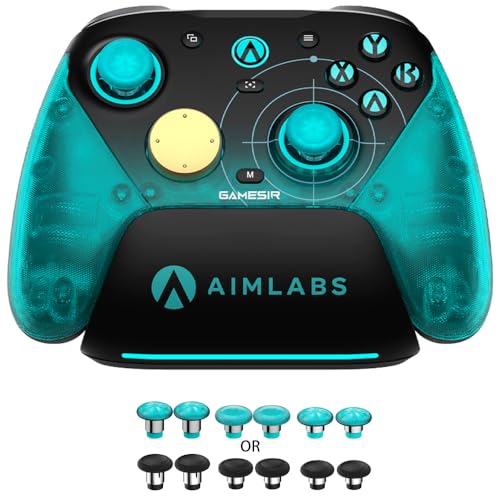
GameSir’s G7 Pro 8K delivers an 8000Hz polling rate over both wired USB-C and 2.4GHz wireless, making it one of the few sub- controllers to match Razer’s polling performance at a significantly lower entry point. The controller uses GameSir’s Gen-2 Mag-Res TMR sticks, which apply magnetic resistance sensing for smoother centering and zero physical contact drift. Paired with optical ABXY buttons that actuate with a microswitch click, the input chain from finger to screen feels instantaneous in competitive shooters like Valorant and Apex Legends.
The standout hardware feature is the dual-mode trigger stop system — a physical switch lets you toggle between linear Hall Effect analog triggers (for variable throttle in racing) and micro-switch digital triggers (for instant firing in shooters). Four remappable macro buttons (two lockable back paddles and two mini bumpers) support up to 32-step macro sequences, which is rare at this price tier. A 6-axis gyroscope enables motion aiming on PC, and the asymmetrical rumble motors use an instant start-stop circuit that makes vibration feel more responsive than typical rumble units.
The cyan translucent design gives the controller a retro-custom aesthetic, and the included charging dock stores the 2.4GHz dongle inside the base, keeping your desk clutter-free. The main downside is a slightly plastic-y feel around the L5/R5 macro buttons and thumbsticks, and Bluetooth performance is adequate but not as stable as the 2.4GHz connection. For PC gamers who want near-esports latency without the full Razer investment, this is the most feature-dense option in the mid-range.
Why it’s great
- True 8000Hz polling in both wired and 2.4G wireless modes
- Gen-2 TMR sticks with zero drift and smooth centering
- Dual-mode trigger system with Hall and micro-switch options
- Four remappable macro buttons with 32-step recording
Good to know
- Plastic feel on macro button stalks and thumbstick edges
- Bluetooth mode less stable than 2.4G connection
- ABXY buttons flat shape hinders rolling inputs for fighting games
- Circular D-pad less precise for diagonal inputs
3. EasySMX D10 Wireless Game Controller

The EasySMX D10 occupies a unique space in the mid-range market by combining TMR anti-drift joysticks with a fully mechanical button set and dual-mode triggers, all at a price point that undercuts premium offerings by a wide margin. The TMR sensors here provide over 5 million cycle lifespans with no physical contact, delivering smoother rotational precision than standard Hall Effect sticks in FPS tracking scenarios. The 1000Hz polling rate in wired and 2.4GHz wireless modes ensures sub-2ms response times adequate for any competitive title.
The trigger system is the D10’s defining feature — a physical lock lets you switch between Hall Effect linear analog triggers (for progressive input in driving games) and micro-switch tactile triggers (for instant response in action titles). The EasyPos D-pad uses an 8-way cross design with mechanical switches underneath, offering crisp directional feedback for fighting games and retro platformers. Two remappable back paddles, RGB lighting with multiple modes, and a 6-axis gyroscope (functional in Switch mode) round out the feature set.
The magnetic charging dock supports auto-reconnect and stores the 2.4GHz dongle internally, a convenience detail usually reserved for pricier models. Some users report the circular D-pad and flat ABXY buttons make rolling inputs less intuitive for fighting games, and the rumble motors produce a slightly metallic noise at higher intensities. Build quality is solid with a comfortable textured grip shell. For a gamer who plays across shooters, racers, and fighters on PC and Switch, the D10 offers the widest feature breadth in its price tier.
Why it’s great
- TMR joysticks with zero dead zone and no drift
- Dual-mode trigger system with analog and clicky options
- Fully mechanical face buttons with 5M+ click life
- Magnetic charging dock with dongle storage
Good to know
- Circular D-pad less accurate for diagonal fighting inputs
- Flat ABXY buttons hinder rolling inputs
- Rumble motors can produce audible metallic buzz
- No gyro functionality in 2.4G mode
4. Machenike G3V2 Bluetooth Controller

The Machenike G3V2 brings an enthusiast-level feature to the mid-range space — adjustable stick tension. A physical dial lets you customize the resistance of each Hall Effect joystick from light and springy to heavy and precise, allowing you to dial in the exact feel for shooters (lighter for quick flicks) or racing (heavier for steady control). This is a feature typically found only on + pro controllers, and its inclusion here at a fraction of the cost makes the G3V2 a strong option for players who want personalized thumbstick weight.
Beyond tension adjustment, the G3V2 offers 1000Hz polling rate in both wired and 2.4GHz modes, Hall Effect triggers for smooth analog input, and RGB lighting with customizable zones. The 1000mAh battery is among the largest in its class, supporting extended sessions between charges. The translucent pink shell design gives the controller a distinctive aesthetic, and the included charging dock allows drop-and-go recharging without fumbling with cables. Sixteen programmable buttons (including two rear paddles) give ample remapping flexibility through the mobile KeyLinker app.
On the durability side, some users have reported connection dropout after a week of use on Switch, and the companion app lacks a downloadable PC version for configuration. The D-pad has a different texture than standard Pro-style controllers, which can take adjustment time. For PC and Switch players who value stick resistance customization and battery endurance above raw polling speed, the G3V2 delivers uncommon mechanical depth at a mid-range investment.
Why it’s great
- Adjustable Hall Effect stick tension — rare at this tier
- 1000mAh battery for extended play sessions
- 1000Hz polling in wired and 2.4G modes
- Translucent design with RGB lighting options
Good to know
- Reported connectivity issues on Switch after short use
- Companion app lacks a PC installer
- Button layout differs from standard Xbox layout
- D-pad texture and feel may require adjustment
5. abxylute C6 Wireless PC Controller
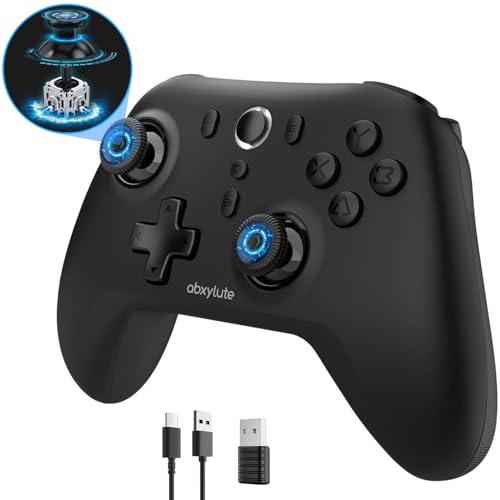
The abxylute C6 punches far above its entry-level price point by packing dual Hall Effect joysticks and a full 1000Hz polling rate into a package that costs nearly half of what similarly specced mid-range controllers demand. This is the controller that proves magnetic sensor technology is no longer a premium-only feature. The Hall Effect sticks and triggers eliminate drift and dead zone creep entirely, and the 1000Hz rate (achievable via both wired USB and Bluetooth dongle) keeps input lag low enough for fast-paced shooters and platformers.
What makes the C6 genuinely surprising at this price is the inclusion of 4-level vibration adjustment (from 30% gentle buzz to 100% intense rumble) and gyroscope support for motion aiming on Switch and PC via Switch Pro mode. The 600mAh battery delivers up to 18 hours of continuous gameplay, and multi-platform compatibility covers PC, Switch, iOS, Android, Mac, and even Tesla vehicles. The membrane face buttons feel comfortable and quiet, with a shape similar to the Xbox 360 controller that most PC gamers find familiar.
The trade-offs are evident in the D-pad, which reviewers describe as weak, and the analog triggers, which have noticeably short travel — making the C6 a poor choice for racing sims that require precise throttle modulation. The Bluetooth dongle uses a proprietary protocol (not standard 2.4GHz), which limits connectivity range compared to dedicated RF receivers. For budget-conscious gamers who want drift-free joysticks and a high polling rate for casual to intermediate competitive play, the C6 delivers exceptional foundational performance.
Why it’s great
- Dual Hall Effect joysticks and triggers for zero drift
- 1000Hz polling rate in wired and dongle modes
- Gyroscope for motion aiming on Switch and PC
- Excellent value — features normally priced much higher
Good to know
- Weak D-pad with poor diagonal accuracy
- Short trigger travel limits racing sim performance
- Dongle uses proprietary protocol, not standard 2.4GHz
- Lightweight plastic build may not suit all preferences
6. GAMSINGY Wireless PC Controller with Charging Dock
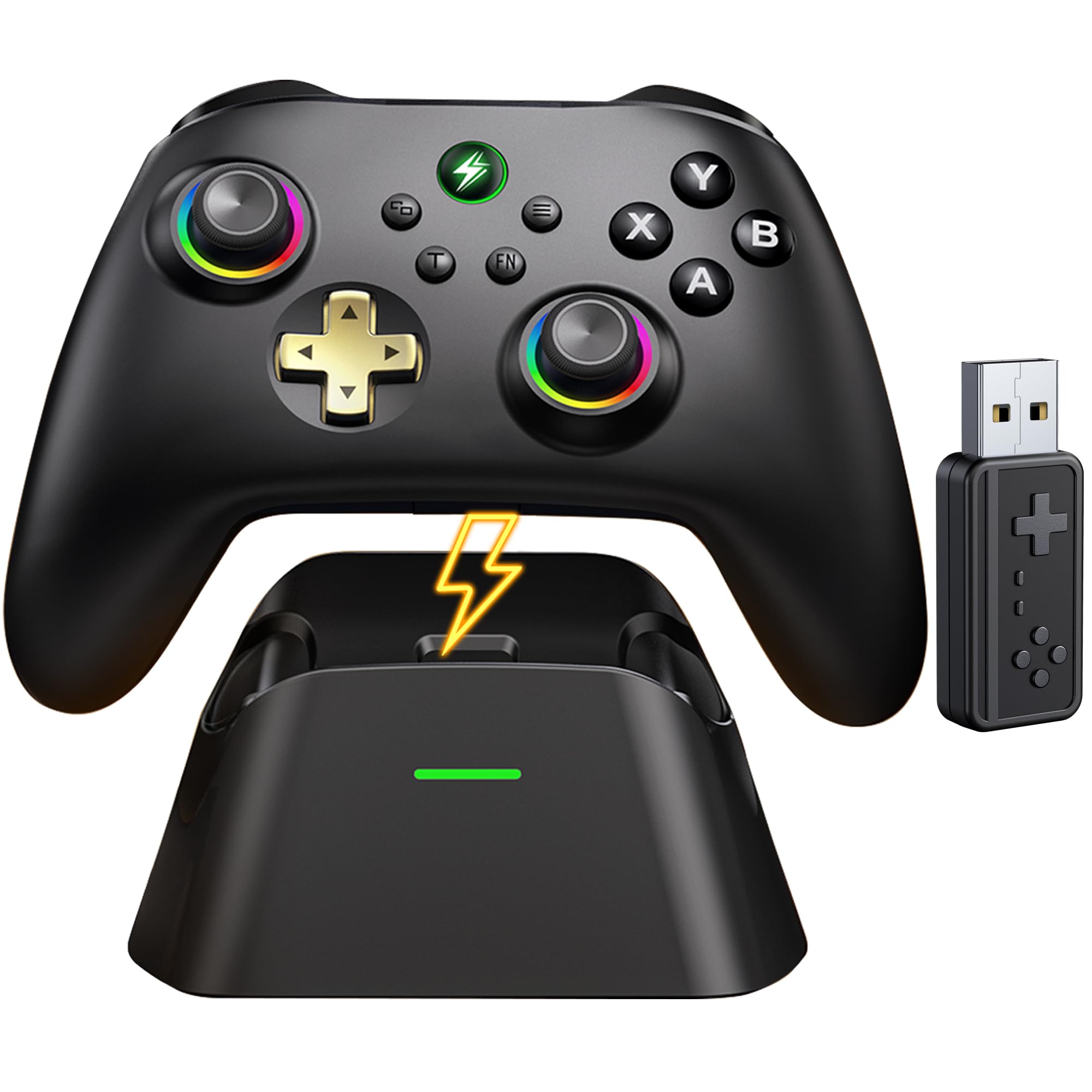
The GAMSINGY Wireless Controller targets the value segment with a combination of Hall Effect joysticks, 1000Hz polling rate, and a dedicated magnetic charging dock — three features that together create a compelling entry point for PC gamers who want modern sensor technology without stretching their budget. The Hall Effect sticks eliminate the drift that plagues cheaper controllers, and the 1000Hz polling rate (available via 2.4GHz dongle and USB-C wired mode) keeps latency competitive with controllers that cost twice as much.
The 1000mAh battery offers up to 15 hours of play per charge, and the magnetic dock makes recharging as simple as setting the controller down after a session — no cable fumbling. Triple-mode connectivity (2.4GHz, Bluetooth 5.0, and wired) provides flexibility across PC, Switch, Android, and iOS, and the two programmable back buttons allow basic remapping through the KeyLinker mobile app. The textured grip and balanced weight give the controller a more substantial feel than its price would suggest.
The trade-offs are notable — some users report difficulty getting the controller to connect with certain laptops on the first try, and the RGB lighting customization software is not particularly intuitive. The face buttons use membrane switches rather than mechanical, so the feel is softer and less crisp than premium controllers. Build quality is decent but not exceptional; the controller will serve well for casual and intermediate gamers, but heavy daily use may reveal reliability questions over months. For a first Hall Effect controller or a backup gamepad, it delivers reliable core performance at a low entry cost.
Why it’s great
- Hall Effect joysticks eliminate drift at an entry price
- Magnetic charging dock for effortless recharging
- 1000Hz polling rate via 2.4GHz and wired modes
- Triple-mode connectivity for multi-platform use
Good to know
- Occasional connectivity issues on first pairing
- Membrane face buttons lack mechanical feel
- RGB customization software is not intuitive
- Long-term durability not yet well-documented
7. Xbox Wireless Gaming Controller + USB-C Cable
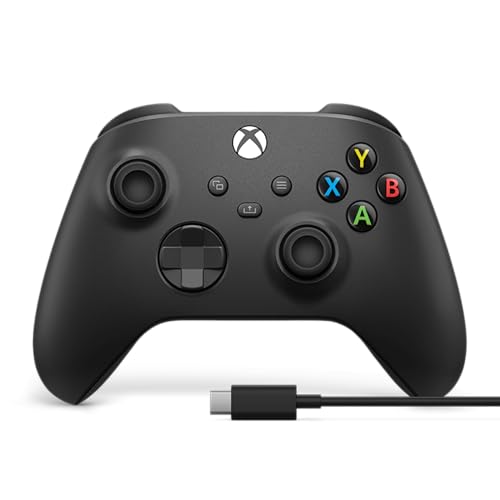
The standard Xbox Wireless Controller remains the baseline by which all PC gamepads are measured, not because of bleeding-edge specs, but because of unparalleled native compatibility and ergonomic refinement. The controller connects to Windows PCs with zero configuration — plug in the included USB-C cable and it is instantly recognized by Steam, the Xbox app, and virtually every PC game that supports gamepad input. The sculpted surfaces and refined geometry are the result of years of iterative design, and the textured grip on the triggers, bumpers, and back case prevents slippage during long sessions.
The hybrid D-pad combines a traditional cross shape with a faceted dish design, offering better diagonal accuracy than standard Xbox D-pads for fighting games and 2D platformers. Up to 40 hours of battery life on standard AA batteries means you are never tethered to a charging cable during a session, and the included 9-foot USB-C cable doubles as a zero-latency wired connection option. Built-in 3.5mm audio support allows direct headset connection for chat and in-game sound without additional adapters, and the Xbox Accessories app enables button remapping and custom profile creation.
The glaring weakness is the potentiometer-based joysticks — they are the single point of failure on an otherwise well-engineered controller. Multiple user reports indicate stick drift developing after roughly six months of use, a lifespan that is increasingly unacceptable when alternatives offer magnetic sensors that never drift. The controller also lacks back paddles, trigger stops, or any of the competitive features found in dedicated PC controllers. For the gamer who prioritizes plug-and-play simplicity and a familiar shape above long-term durability and advanced input options, the Xbox controller remains a comfortable and reliable choice — but its sensor technology is now generations behind.
Why it’s great
- Native plug-and-play compatibility with Windows PC
- Industry-leading ergonomic design and textured grip
- Hybrid D-pad with improved diagonal precision
- 3.5mm headphone jack for direct audio connection
Good to know
- Potentiometer joysticks are prone to eventual drift
- No back paddles or programmable buttons
- No physical trigger stop switches
- Requires AA batteries — no built-in rechargeable pack
FAQ
Will a PC gamepad work with my Mac or Steam Deck?
What is the difference between 2.4GHz and Bluetooth for gamepad connectivity?
How long should Hall Effect joysticks last compared to standard ones?
Final Thoughts: The Verdict
For most users, the best computer gamepad winner is the Razer Wolverine V3 Pro because it combines true 8000Hz wireless polling, TMR sticks, and a six-button remapping layout in a lightweight esports-focused package. If you want a broader feature set with dual-mode triggers and mechanical buttons at a lower investment, grab the GameSir G7 Pro 8K. And for a budget-friendly entry point into drift-free Hall Effect gaming that still delivers a 1000Hz polling rate, nothing beats the abxylute C6.

Mo Maruf
I created WellFizz to bridge the gap between vague wellness advice and actionable solutions. My mission is simple: to decode the research and give you practical tools you can actually use.
Beyond the data, I am a passionate traveler. I believe that stepping away from the screen to explore new environments is essential for mental clarity and physical vitality.