Our readers keep the lights on and my smoothie glass nicely filled. As an Amazon Associate, I earn from qualifying purchases.
A work computer is the single most important tool for your daily productivity. Whether you’re running complex spreadsheets, managing client calls, or developing software, the right machine keeps you in the flow and out of the waiting-for-it-to-load frustration.
I’m Mohammad Maruf — the founder and writer behind WellFizz. I’ve spent countless hours analyzing processor benchmarks, memory configurations, display specifications, and real-world performance data for the latest work-ready computers.
This guide focuses on machines that balance processing power, memory, and build quality to deliver a seamless experience. My goal is to help you find the best computer for work based on your specific tasks and budget.
How To Choose The Best Computer For Work
Selecting a work computer requires balancing several core components to match your daily applications. A spreadsheet-heavy user needs different specs than a video editor or a software developer. Understanding the role of the processor, memory, storage, and display helps narrow the field considerably.
Processor Performance and Cores
The CPU is the brain of your work computer. For standard office tasks like email, web browsing, and document editing, a mid-range Intel Core i5 or AMD Ryzen 5 is sufficient. For more demanding workloads like data analysis, coding compilation, or video editing, step up to an Intel Core i7, Core Ultra, or AMD Ryzen 7 or 9. The number of cores and threads directly impacts how many applications you can run simultaneously without slowdowns. A high single-core clock speed is important for responsiveness, while multi-core performance shines during rendering or virtual machine use.
Memory and Storage Configurations
RAM determines how many programs and browser tabs you can keep open at once. For basic work, 8GB is the minimum, but 16GB is the sweet spot for smooth multitasking. Power users handling large files or running virtual machines should look for 32GB or more. Storage type is equally critical. A solid-state drive (SSD) with PCIe NVMe interface provides dramatically faster boot times and file transfers compared to older hard drives. A 512GB SSD is a comfortable starting point, but 1TB is better for storing large projects and files without external drives.
Display Quality and Ports
A clear, sharp display reduces eye strain during long work sessions. Look for Full HD (1920×1080) resolution at a minimum, with higher resolution options like WUXGA or QHD providing even sharper text. IPS panels offer better viewing angles and color accuracy. For connectivity, ensure the laptop or desktop has enough USB-A and USB-C ports for your peripherals, plus HDMI or DisplayPort for external monitors. Wi-Fi 6 or 6E provides faster and more stable wireless connections, which is essential for video calls and cloud-based work.
Quick Comparison
On smaller screens, swipe sideways to see the full table.
| Model | Category | Best For | Key Spec | Amazon |
|---|---|---|---|---|
| Microsoft Surface Laptop (2024) | Ultraportable | On-the-go productivity | Snapdragon X Plus, 16GB RAM, 13.8″ Touchscreen | Amazon |
| Samsung Galaxy Book5 Pro 360 | Convertible | Creative work & meetings | Intel Core Ultra 7, 32GB RAM, 3K AMOLED | Amazon |
| HP EliteBook (next gen 660) | Business Flagship | Professional durability | Intel Ultra 7 255U, 32GB DDR5, 1TB SSD | Amazon |
| Dell Tower Desktop ECT1250 | Desktop | Multi-monitor setups | Intel Core Ultra 7-265, 32GB RAM, 1TB SSD | Amazon |
| GEEKOM A9 Max Mini PC | Mini PC | Space-saving AI workstation | AMD Ryzen AI 9 HX 370, 32GB DDR5, 1TB SSD | Amazon |
| HP 15 Touchscreen Business Laptop | Touch Laptop | Interactive workflows | Intel Core i7-1355U, 16GB RAM, 512GB SSD | Amazon |
| Apple MacBook Neo 13-inch | Ultraportable | Ecosystem & reliability | A18 Pro chip, 8GB Unified Memory, 512GB SSD | Amazon |
| Acer Aspire 14 AI Copilot+ PC | AI Laptop | AI-powered tasks | Intel Core Ultra 7 256V, 16GB LPDDR5X, 1TB SSD | Amazon |
| Lenovo IdeaPad Slim 3X | Everyday AI | All-day productivity | Snapdragon X, 16GB Memory, 512GB Storage | Amazon |
| Lenovo V15 Gen 4 Business Laptop | Business Budget | Entry-level business use | Intel Core i5-13420H, 16GB RAM, 512GB SSD | Amazon |
| Dell 24 All-in-One Desktop | All-in-One | Simple home office | Intel Core 3 100U, 8GB DDR5 RAM, 512GB SSD | Amazon |
In‑Depth Reviews
1. Microsoft Surface Laptop (2024)

The Microsoft Surface Laptop (2024) is a compelling choice for professionals who need top-tier portability and battery life. Powered by the Snapdragon X Plus processor, this 13.8-inch Copilot+ PC delivers snappy performance for web apps, document work, and video calls with impressive thermal efficiency. The 3:2 touchscreen display offers more vertical space, making it easier to read documents and browse the web without constant scrolling.
With 16GB of RAM and a 512GB SSD, this configuration handles multitasking — browser tabs, email, and office applications — smoothly without hesitation. The all-day battery life, reaching up to 20 hours, sets it apart for users who work remotely or travel frequently. Build quality is excellent, featuring a sleek magnesium-aluminum design, a responsive haptic trackpad, and a comfortable keyboard.
The ARM-based architecture means some legacy x86 applications may run via emulation, which could cause minor compatibility hiccups for niche enterprise software. The port selection includes a USB-A and a single USB-C port, which may require a dongle for some users. However, for any professional seeking a lightweight, long-lasting work companion, the Surface Laptop is a top-tier option.
Why it’s great
- Outstanding battery life exceeds 10 hours under real workloads
- Excellent 3:2 touchscreen display with 120Hz refresh rate
- Premium build quality with a comfortable keyboard
Good to know
- ARM architecture may cause issues with some specialized software
- Limited to a single USB-C port
- Base SSD is 256GB, upgrade to 512GB recommended for most users
2. Samsung Galaxy Book5 Pro 360

The Samsung Galaxy Book5 Pro 360 is a versatile convertible laptop designed for professionals who value display quality and creative flexibility. Its 16-inch 3K AMOLED touchscreen, with a 120Hz refresh rate, delivers stunning color accuracy and deep blacks that are ideal for graphic design, photo editing, and media consumption. The included S Pen adds precision for note-taking and sketching.
Under the hood, the Intel Core Ultra 7 258V processor paired with a generous 32GB of RAM and 1TB of SSD storage provides ample headroom for demanding multitasking — running multiple virtual machines, compiling code, or editing high-resolution video. The 47 TOPS NPU enables Copilot+ AI features, which can assist with real-time transcription, content generation, and search. The slim CNC aluminum design weighs just 3.72 pounds, making it remarkably portable for its screen size.
Battery life is average for this power class, lasting a full workday under moderate use, though heavy tasks like video editing drain it faster. The lack of a dedicated GPU means it isn’t a gaming or heavy 3D rendering machine. For creative professionals who want a beautiful, capable 2-in-1, the Galaxy Book5 Pro 360 is a strong contender.
Why it’s great
- Stunning 3K AMOLED display is best-in-class for color work
- Generous 32GB RAM and 1TB SSD for heavy workloads
- Thin, lightweight design for a 16-inch convertible
Good to know
- Average battery life compared to ultraportable competitors
- No dedicated GPU for demanding creative software
- Price point is high for standard office use
3. HP EliteBook (next gen 660)

The HP EliteBook is built for business professionals who need a reliable, durable, and secure workhorse. It features the new Intel Core Ultra 7 255U processor with an integrated NPU for AI tasks, ensuring snappy performance for demanding office applications, data analysis, and video conferencing. The 16-inch FHD+ anti-glare display is easy on the eyes during long workdays.
With 32GB of DDR5 RAM and a 1TB PCIe NVMe SSD, this machine is configured to handle heavy multitasking without breaking a sweat. The spill-resistant backlit keyboard with a numeric keypad is comfortable for data entry, and the built-in fingerprint reader adds a layer of security for sensitive work. Connectivity is robust, including Thunderbolt 4, USB-C, USB-A, HDMI 2.1, and RJ-45 Ethernet, so you can connect to almost any office peripheral without dongles.
At a premium price point, it’s an investment. The design is functional rather than flashy, and the display, while clear, doesn’t match the vibrancy of OLED options. For IT departments and professionals who require a dependable, long-lasting work laptop with strong support options, the EliteBook is a top-tier choice.
Why it’s great
- Excellent build quality and MIL-STD-810H durability
- Full port selection includes Thunderbolt 4 and RJ-45
- 32GB DDR5 RAM and 1TB SSD are future-proof for years
Good to know
- Premium price reflects business-targeted features
- Display is good but not as vibrant as OLED panels
- Design is utilitarian, not flashy
4. Dell Tower Desktop ECT1250

The Dell Tower Desktop ECT1250 is a traditional tower that offers raw power and expandability for professionals who need a stationary workstation. Driven by the Intel Core Ultra 7-265 processor, this machine handles heavy multitasking, financial trading with multiple monitors, and software development with ease. The 32GB of RAM ensures smooth operation even with dozens of browser tabs and professional applications running simultaneously.
Storage is handled by a fast 1TB M.2 SSD, providing quick boot times and file access. The tool-less entry and removable side panel make upgrades simple, which is a significant advantage for users who plan to add storage or a dedicated graphics card later. It can support up to four FHD monitors or two 4K displays using the integrated DisplayPort and HDMI ports, making it a powerful hub for complex workflows.
The 180W power supply limits the ability to add high-end graphics cards, so this isn’t a gaming desktop. The included keyboard and mouse are basic, and the case is a standard black tower. For a professional who needs a powerful, quiet, and upgradeable work desktop, the Dell ECT1250 provides excellent value.
Why it’s great
- Powerful Intel Core Ultra 7 processor for demanding tasks
- Tool-less chassis makes upgrades easy
- Supports multiple monitors out of the box
Good to know
- 180W PSU limits GPU upgrade potential
- Basic peripherals included
- No dedicated graphics for 3D work
5. GEEKOM A9 Max Mini PC

The GEEKOM A9 Max is a powerful mini PC that packs desktop-class performance into a compact chassis, making it ideal for professionals with limited desk space. It is powered by the AMD Ryzen AI 9 HX 370 processor, which offers 12 cores and 24 threads along with a dedicated NPU capable of 50 TOPS for accelerating AI workflows like local content generation and machine learning.
With 32GB of DDR5 RAM (expandable to 128GB) and a 1TB PCIe Gen4 SSD, the A9 Max handles intensive tasks such as 4K video editing in DaVinci Resolve, 3D rendering in Blender, and running multiple virtual machines without struggle. The Radeon 890M integrated graphics provide enough power for light gaming and GPU-accelerated tasks. Connectivity is future-proof, featuring dual USB4 ports, dual HDMI 2.1 ports supporting up to four 8K displays, Wi-Fi 7, and dual 2.5GbE LAN.
The all-metal chassis and IceBlast 2.0 cooling system keep thermals in check under load, but the fans can become audible during demanding sessions. It comes pre-installed with Windows 11 Pro and a 3-year warranty, offering peace of mind. For developers, data scientists, and content creators who want a powerful, space-saving workstation, the GEEKOM A9 Max is an exceptional choice.
Why it’s great
- Exceptional CPU and NPU performance for AI and professional workloads
- Supports up to four 8K displays with dual USB4 and HDMI 2.1
- Expandable RAM and dual SSD slots for future upgrades
Good to know
- Fan can be audible under sustained heavy loads
- Requires external monitor, keyboard, and mouse
- Price reflects premium components
6. HP 15 Touchscreen Business Laptop

The HP 15 Touchscreen Business Laptop combines a responsive FHD touchscreen with solid performance for users who benefit from direct interaction with their work. Whether you’re navigating spreadsheets, presenting to clients, or sketching ideas in a design app, the IPS touchscreen responds accurately to taps and swipes. The 15.6-inch anti-glare display works well in brightly lit offices.
Under the hood, the 10-core Intel Core i7-1355U processor with Intel Iris Xe Graphics provides smooth performance for multitasking, streaming, and light content creation. With 16GB of RAM and a 512GB PCIe SSD, this laptop handles standard business workflows efficiently. Connectivity includes Wi-Fi 6, Bluetooth 5.3, USB-C, USB-A, and HDMI, allowing for easy connection to peripherals.
The battery life is on the shorter side, offering around 7 hours of mixed use, which may not last through a full day away from a power outlet. The speakers are adequate, but the display’s color accuracy isn’t suited for professional photo editing. For business users who want a touch interface for navigation and presentations, this HP laptop offers a good balance of features and price.
Why it’s great
- Responsive touchscreen adds a productive interaction layer
- Powerful i7 processor with 10 cores for multitasking
- Good port selection including HDMI and Ethernet
Good to know
- Battery life is below average, around 7 hours
- Display color accuracy is not for professional color work
- Free Office 365 offer is only a trial
7. Apple MacBook Neo 13-inch

The Apple MacBook Neo 13-inch is a fresh entry-point into the macOS ecosystem, designed for students and professionals who want a reliable, lightweight laptop. Powered by the A18 Pro chip, it delivers performance that rivals the M1 chip, making it snappy for web browsing, email, word processing, and even light video editing. The fanless design keeps it silent during operation.
The 13-inch Liquid Retina display is a standout feature, offering up to 500 nits of brightness with excellent color accuracy and crisp text. Battery life is impressive, lasting up to 16 hours, which is enough for a full day of classes or remote work. The durable aluminum chassis is available in four colors, and the 1080p FaceTime HD camera ensures clear video calls. Integration with the Apple ecosystem means seamless handoff with iPhone and iPad.
A significant limitation is the fixed 8GB of unified memory, which cannot be upgraded after purchase, potentially bottlenecking heavy multitasking. The base model also lacks a keyboard backlight and Touch ID, which are standard on more expensive MacBook models. For users deeply embedded in Apple’s ecosystem or those who prioritize a premium-feeling, lightweight machine, the MacBook Neo is a compelling choice.
Why it’s great
- Excellent battery life up to 16 hours
- Beautiful 13-inch Liquid Retina display with 500 nits brightness
- Silent fanless design and premium aluminum build
Good to know
- Fixed 8GB RAM cannot be upgraded
- Base model lacks keyboard backlight and Touch ID
- Limited port selection requires dongles for many peripherals
8. Acer Aspire 14 AI Copilot+ PC
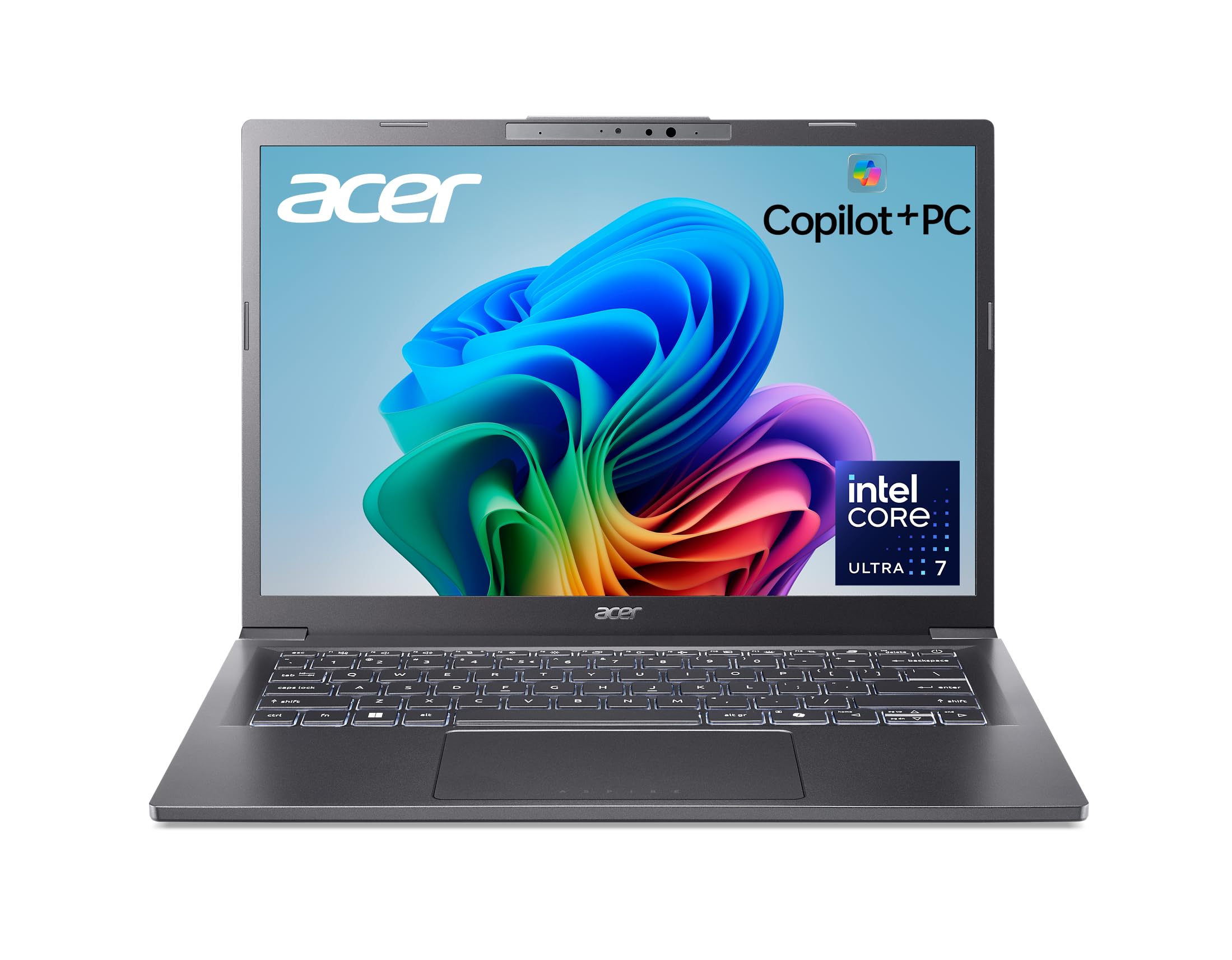
The Acer Aspire 14 AI Copilot+ PC is designed to bring AI-powered productivity to a portable, affordable package. Its Intel Core Ultra 7 256V processor includes an NPU with up to 47 TOPS to accelerate tasks like real-time search, content summarization, and Recall for finding past information. The 14-inch WUXGA display offers clear visuals, and the backlit keyboard enables work in low light.
With 16GB of LPDDR5X RAM and a 1TB SSD, this laptop provides smooth multitasking for standard office applications, web research, and data entry. The aluminum chassis feels premium and is lightweight (around 3.5 lbs), making it comfortable to carry between meetings. It also boasts a 180-degree hinge, a nice touch for sharing screens in collaborative settings. Battery life is rated up to 22 hours for video playback.
The integrated Intel Arc 140V graphics handle light creative tasks but aren’t suited for intensive gaming or 3D rendering. Some reviewers noted bloatware that can be removed. The display and speakers are acceptable for work but not exceptional. For budget-conscious professionals who want to experiment with AI tools, the Acer Aspire 14 offers modern features at an accessible price.
Why it’s great
- AI-capable NPU for Copilot+ PC features
- Good battery life and lightweight aluminum design
- Includes Thunderbolt 4 for fast connectivity
Good to know
- Integrated graphics not suited for gaming
- Some pre-installed bloatware
- Display and speakers are functional but not premium
9. Lenovo IdeaPad Slim 3X

The Lenovo IdeaPad Slim 3X is a Copilot+ PC built for the mobile worker, offering great battery life and a large 15.3-inch WUXGA display. Its Snapdragon X processor provides efficient performance for everyday tasks like managing email, browsing the web, and using office applications, with the AI NPU helping to smooth out video calls and searching. The 16:10 screen ratio gives extra vertical space for documents.
With 16GB of memory and 512GB SSD storage (which is user-expandable), this laptop handles moderate workloads well. The all-day battery life is a key selling point, and the Rapid Boost feature allows quick charging. The build quality is solid, featuring a metal chassis that meets MIL-STD-810H durability standards. It also includes a physical webcam shutter and a fingerprint reader for added security and privacy.
The Snapdragon X processor, while efficient, may not match the raw CPU performance of Intel Core i7 or AMD Ryzen 7 chips in heavily-threaded tasks. The selection of ports is limited, so a dongle might be needed for connecting multiple peripherals. For students and office workers who prioritize battery life and a good-sized screen, the IdeaPad Slim 3X is a strong choice.
Why it’s great
- Excellent all-day battery life
- Durable metal chassis with MIL-STD-810H rating
- User-expandable SSD storage
Good to know
- Snapdragon processor may be slower in heavy CPU tasks
- Limited port selection
- Not suited for intensive creative applications
10. Lenovo V15 Gen 4 Business Laptop

The Lenovo V15 Gen 4 is a no-nonsense business laptop that focuses on core functionality and affordability. It is powered by a 13th Gen Intel Core i5-13420H, which delivers strong performance for everyday business applications. The 15.6-inch FHD display provides a clear, functional workspace, and the inclusion of a numeric keypad is a welcome feature for data entry tasks.
Configured with 16GB of RAM and a 512GB SSD, this laptop is capable of handling multiple office applications and browser tabs without significant lag. The presence of an RJ-45 Ethernet port is a valuable addition for users who require a stable wired network connection, which is common in corporate environments. It runs Windows 11 Pro, offering additional management and remote desktop features.
The build quality is functional but feels more plastic than some premium rivals. The display is an LCD panel with standard color reproduction, not suitable for photo or video work. Some users may find the design dated. For businesses looking for a reliable, affordable laptop for standard office tasks with a focus on wired connectivity, the V15 Gen 4 is a practical solution.
Why it’s great
- Solid everyday performance from Intel Core i5
- Includes RJ-45 Ethernet port for stable wired networking
- Numeric keypad is great for data entry
Good to know
- Plastic build feels less premium
- Standard LCD display with limited color accuracy
- Design is basic and functional
11. Dell 24 All-in-One Desktop

The Dell 24 All-in-One Desktop is the ultimate choice for a clean, clutter-free home office setup. It integrates a 23.8-inch FHD IPS display with the computer components built into the monitor stand, eliminating the need for a separate tower. It is powered by an Intel Core 3 100U processor, which is adequate for basic tasks like web browsing, email, word processing, and streaming.
With 8GB of DDR5 RAM and a 512GB SSD, it boots quickly and handles day-to-day applications smoothly. The built-in 5MP IR webcam with HDR and dual speakers with Dolby Atmos makes it a great hub for video calls. The tilt-adjustable screen and ComfortView Plus reduce eye strain during long use. It comes with a wireless keyboard and mouse, providing a complete, ready-to-use system.
This machine is not designed for heavy multitasking, video editing, or gaming. The 8GB of RAM is the minimum for comfortable Windows use, and the integrated Intel Graphics are strictly for display output. Upgrading internal components can be difficult due to the all-in-one form factor. For family use, basic remote work, or as a secondary computer, the Dell All-in-One is a tidy and capable solution.
Why it’s great
- Clean, all-in-one design saves desk space
- Includes FHD IPS display with built-in speakers and webcam
- Comes with wireless keyboard and mouse
Good to know
- Limited to basic tasks with 8GB RAM and Core 3 CPU
- Internal upgrades are difficult
- Not suitable for heavy multitasking or creative work
FAQ
Is a dedicated GPU necessary for a work computer?
How much storage do I need for work files?
Is Windows 11 Pro necessary for a work computer?
Final Thoughts: The Verdict
For most users, the best computer for work winner is the Microsoft Surface Laptop (2024) because it combines outstanding battery life, a premium tactile feel, and sufficient power for standard office tasks. If you want a stunning display for creative work, grab the Samsung Galaxy Book5 Pro 360. And for a powerful, upgradeable desktop workstation, nothing beats the Dell Tower Desktop ECT1250.

Mo Maruf
I created WellFizz to bridge the gap between vague wellness advice and actionable solutions. My mission is simple: to decode the research and give you practical tools you can actually use.
Beyond the data, I am a passionate traveler. I believe that stepping away from the screen to explore new environments is essential for mental clarity and physical vitality.