Our readers keep the lights on and my smoothie glass nicely filled. As an Amazon Associate, I earn from qualifying purchases.
Specs are compiled from manufacturer listings and verified buyer reviews and can change over time — please confirm the key details on the product page before buying.
Picking a computer for web design is about one thing: keeping your workflow smooth when you have a dozen browser tabs, Photoshop, a code editor, and a Slack window all fighting for attention. The wrong machine makes every action feel sluggish, killing your creative flow and wasting your time. This guide cuts through the noise to help you find a desktop or laptop that handles these demands without drama.
I’m Mohammad Maruf — the founder and writer behind WellFizz. This guide is built by comparing the manufacturers’ published specifications and the patterns across verified customer reviews, so you get each pick’s real strengths and trade-offs instead of marketing spin.
if you need raw processing power for compiling Sass and running local dev servers or a portable laptop for client meetings, the right computer for web design balances a fast multi-core CPU, plenty of RAM, and a swift solid-state drive to keep your projects moving.
Our Picks at a Glance



How To Choose The Best Computer For Web Design
Choosing a computer for web design isn’t about the flashiest specs. It’s about matching the machine to your actual daily tasks: designing in Figma or Adobe XD, writing code in VS Code, and running local development environments. Here are the core specs that matter most.
Processor (CPU): The Engine of Your Workflow
The processor handles compiling code, running design apps, and keeping your system responsive. For web design, aim for a modern multi-core CPU. An Intel Core i5 or i7 (13th Gen or newer) or an AMD Ryzen 5 or 7 provides excellent performance while staying affordable. A higher clock speed (measured in GHz) helps with single-threaded tasks like JavaScript rendering, while more cores help with multitasking.
Memory (RAM): Your Multitasking Limit
RAM is where your active projects live. Running a design tool like Figma, a code editor, and a browser with 20 tabs can easily consume 16GB of RAM. If you also run Docker containers or virtual machines for testing, you’ll find 32GB to be a much more comfortable and future-proof amount. 8GB is no longer enough for serious web design work.
Storage (SSD): Speed for Your Assets
A fast SSD is non-negotiable. An NVMe PCIe SSD loads your operating system, software, and project files in seconds. A 512GB drive is a good starting point, but 1TB or more gives you space for design assets, site files, and local databases without constantly managing storage. Avoid machines with a traditional spinning hard drive (HDD) as your primary drive.
Graphics Card (GPU): When It Makes a Difference
Integrated graphics (like Intel UHD or AMD Radeon Graphics) are sufficient for most 2D web design work, UI design, and standard code editing. However, a dedicated GPU (like an NVIDIA GeForce or RTX series) becomes important if you do 3D modeling, video editing, motion graphics, or work in a very high-resolution (4K+) multi-monitor setup. It also helps accelerate some design software features.
Quick Comparison
| Model | Best For | CPU | RAM | Storage | Amazon |
|---|---|---|---|---|---|
| iBUYPOWER Element EWA9N5702★ Best Overall | Best Overall Performance | AMD Ryzen 9 7900X (5.6 GHz) | 32GB DDR5 | 1TB NVMe SSD | Amazon |
| HP Envy Desktop PCPremium Workstation | Raw Power for Heavy Tasks | Intel Core i9-14900K (6.0 GHz) | 64GB | 2TB SSD | Amazon |
| Dell Tower ECT1250Business Workhorse | Premium Business Workhorse | Intel Core Ultra 7-265 (5.3 GHz) | 32GB | 1TB M.2 SSD | Amazon |
| ASUS V500 Tower Desktop | Mid-Range Powerhouse | Intel Core i7-13620H (4.9 GHz) | 32GB DDR5 | 1TB SSD | Amazon |
| SKYESEV Gaming Desktop PC | Value with Dedicated GPU | AMD Ryzen 5 5600 (4.4 GHz) | 32GB DDR4 | 1TB M.2 NVMe | Amazon |
| YAWYORE Gaming PC (R7 5700X) | Strong Mid-Range Performer | AMD Ryzen 7 5700X (4.6 GHz) | 32GB DDR4 | 1TB M.2 NVMe SSD | Amazon |
| HP Elite Mini 800 G9 | Ultra-Compact Workstation | Intel Core i5-14500 (5.0 GHz) | 32GB DDR5 | 1TB SSD | Amazon |
| Acer 2026 Aspire AI Laptop | Portable Design Power | Intel Core Ultra 7 258V (4.8 GHz) | 32GB | 2TB SSD | Amazon |
| NIMO 15.6″ Light-Gaming-Laptop | Affordable Performance Laptop | AMD Ryzen 7 Pro 6850U (4.7 GHz) | 32GB LPDDR5 | 1TB PCIe 4.0 SSD | Amazon |
| Dell Slim Desktop ECS1250 | Space-Saving Business PC | Intel Core Ultra 5-225 (4.9 GHz) | 16GB | 512GB M.2 SSD | Amazon |
| Lenovo 24″ All-in-One | Simple Home Office Setup | Intel Core i3-N305 (3.8 GHz) | 16GB DDR4 | 512GB PCIe SSD | Amazon |
| YAWYORE Gaming PC (R5 5600GT) | Budget-Friendly Desktop | AMD Ryzen 5 5600GT (4.6 GHz) | 16GB DDR4 | 1TB M.2 NVMe PCIe | Amazon |
| ASUS Vivobook 16 | Entry-Level Portable Option | Qualcomm Snapdragon X (2.97 GHz) | 16GB | 512GB | Amazon |
In‑Depth Reviews
1. iBUYPOWER Element Gaming PC Desktop Computer AMD Ryzen 9 7900X CPU, NVIDIA GeForce RTX 5070 12GB GPU, 32GB DDR5 RAM, 1TB NVMe SSD, Windows 11 Home, Gamer Keyboard and Mouse – EWA9N5702
Our pick — over 4★ from 2,500+ verified ratings; the strongest balance of quality and price.
A desktop that eats multi-tab browsers and design suites for breakfast.
This iBUYPOWER rig is built for speed, and it shows. The AMD Ryzen 9 7900X CPU can boost up to 5.6 GHz, giving you enormous headroom for compiling code, running local servers, and juggling heavy design files without a stutter. With 32GB of DDR5 RAM and a fast 1TB NVMe SSD, your entire project environment stays responsive. The dedicated NVIDIA GeForce RTX 5070 with 12GB of GDDR7 memory is overkill for simple UI design, but it means you can easily drive multiple 4K monitors or dip into 3D rendering and motion graphics if your projects evolve.
Buyers report the system “runs latest games on Ultra” with the CPU maxing out at 32°C, confirming the water cooling keeps things quiet and cool even under load. That kind of thermal performance is great for a design rig that may run for hours. The iBUYPOWER’s CPU speed is 5.6 GHz, while the ASUS Vivobook’s CPU speed is 2.97 GHz, meaning complex tasks like rebuilding a large CSS framework or running a Webpack build finish in a fraction of the time.
The Muscle Behind the Work: The combination of a high-end AMD CPU, ample DDR5 RAM, and a powerful dedicated GPU means this machine won’t break a sweat no matter what you throw at it. It is a workstation-class desktop that doubles as a gaming PC, all wrapped in a white case with RGB lighting. The bundled keyboard and mouse are a nice bonus, though you’ll likely want to upgrade them for daily professional use.
The Main Trade-Off: This is a full-sized desktop tower, so it takes up desk space and isn’t portable. For the price of a premium segment, you are paying for top-tier components that may exceed the needs of a designer who only works in 2D UI tools. It is also best for those who don’t want to build their own PC.
Reach for this if: you want a future-proof powerhouse for web design that can handle any task, from code compilation to 3D graphics, without ever feeling slow.
Look elsewhere if: you need a portable laptop for on-the-go work or your budget is better suited to a mid-range machine with less extreme specs.
2. HP Envy Desktop PC 2TB SSD 64GB RAM Win 11 Pro (Intel Core 14th Generation i9-14900K Processor – 3.20GHz Turbo Boost to 6.00GHz, NVIDIA GeForce RTX 3050 8GB GDDR6) Business Computer
Desktop-level power that laughs at any task you assign.
If your web design workflow involves running multiple virtual machines, editing 4K video assets, or working with massive Photoshop files, the HP Envy Desktop is a serious contender. Its Intel Core i9-14900K processor can turbo boost all the way to 6.00 GHz, making it one of the fastest consumer CPUs available for single-threaded tasks like JavaScript rendering. The 64GB of RAM is a tier above most other systems, ensuring you can run a dozen heavy applications simultaneously without a hiccup. The 2TB SSD offers ample storage for all your projects, design assets, and local databases.
The NVIDIA GeForce RTX 3050 with 8GB of GDDR6 dedicated memory handles multi-display setups with ease. One reviewer noted it works great for stock trading with “four 4K displays” and that processor loading “rarely exceeds 20%,” which speaks volumes about its raw capacity. For a web designer, this means smooth multitasking even when you have Figma, VS Code, Docker, and a browser with 30 tabs open. The inclusion of Wi-Fi 6 and Bluetooth 5.3 keeps your wireless connections fast and modern.
The Over-Engineered Choice: With 64GB of RAM and a top-tier i9 processor, this machine has more raw power than 99% of web designers will ever need. It is future-proofed for years and an exceptional choice for the “power user” who also does video editing, 3D work, or extensive data analysis. The 16GB total video RAM (8GB dedicated plus shared system memory) is a plus for graphics-heavy tasks.
The Honest Letdown: This is the most premium-priced item on the list and its specs are overkill for pure HTML/CSS and UI design work. The included keyboard and mouse are basic business peripherals. It is also a sizable tower, not a space-saver.
Your pick if: you need a no-compromise professional workstation that handles the most demanding multitasking with ease and won’t need an upgrade for half a decade.
Pass if: your work is limited to standard design tools and static site coding—a machine with a mid-range CPU and 32GB RAM will save you significant money and perform identically.
3. Dell Tower Desktop ECT1250 – Intel Core Ultra 7-265 Processor, UHD Graphics, 32GB Memory, 1TB M.2 SSD, 3.0 SD Card Reader, Wired Keyboard and Mouse, Windows 11 Home, Basic Onsite Service
A reliable business-class tower that brings the future of AI-ready computing to your desk.
The Dell Tower ECT1250 is a serious step forward for a professional workstation. Powering it is the Intel Core Ultra 7-265 processor, which can hit speeds up to 5.3 GHz and features a built-in NPU for accelerating next-generation AI tasks. This is great for future-proofing your setup, as AI features in design and coding tools are growing fast. Combined with 32GB of memory and a 1TB M.2 SSD, the system boots quickly and handles complex project files with ease. It can drive up to four FHD monitors or two 4K displays, giving you the multi-screen real estate that serious designers love for their workspace.
The tool-less entry design makes upgrading components simple, which is a nice touch for long-term ownership. Dell also backs this with a 1 Year Onsite Service, meaning they will come to your home or office if an issue can’t be fixed remotely. One buyer called it “super fast” and noted it’s “great for trading stocks” because you can run charts, scans, and multiple monitors simultaneously—a workflow very similar to a designer’s multi-application environment. The tower is built from recycled materials, which is a nice sustainability note for your home office.
The Future-Ready Professional: The Intel Core Ultra 7 with its dedicated AI engine (NPU) makes this a very forward-looking choice. The 32GB RAM and 1TB SSD are the balance for modern web design. Its ability to support multiple monitors improves productivity from the start. Owners mention it is “quiet” and “fast for everyday use,” which is exactly what you want for a dependable work machine.
The Catch to Know: It relies on integrated UHD Graphics, so it is not the machine for heavy 3D modeling or CAD work. Some buyers noted it comes with a single 32GB RAM stick (leaving a slot open) and a 180W power supply that limits future GPU upgrades. It is a business tower, not a gaming or rendering rig.
Best for: the professional web designer who wants a dependable, business-grade tower with modern components, excellent support, and a clear path for memory upgrades.
Not for: users who need a dedicated graphics card for heavy video editing or 3D rendering—the integrated GPU is a limiting factor there.
4. ASUS V500 Home & Business Tower Desktop, 10-core Intel Core i7-13620H Processor, 32GB DDR5 RAM, 1TB SSD, DisplayPort, Wi-Fi 6, Wired KB & Mouse, Win11 Pro, Bundle with ADATA 64GB USB Flash Drive

A pure, no-fuss tower delivering the exact specs a designer needs to stay productive.
The ASUS V500 is built around a 10-core Intel Core i7-13620H processor, which boosts up to 4.9 GHz. This provides substantial processing power for web design tasks, from running complex build scripts to handling large PSD files. The inclusion of 32GB of DDR5 RAM is a major plus, giving you the headroom to keep dozens of browser tabs open alongside your design and development tools without slowdowns. The 1TB SSD is fast and spacious enough for your active projects. The inclusion of both HDMI and DisplayPort outputs means you can easily connect two or more monitors to create a more efficient workflow.
This model arrives as a bundle with a 64GB USB flash drive for quick file transfers. It also runs Windows 11 Pro, which includes advanced security features and remote desktop capabilities that are useful for professional environments. One buyer confirmed its “processing speed is FAST!” and it is “very easy to set up.” They noted it is “a bit heavy with all the cooling fans,” but that thermal management ensures consistent performance under load. This is a solid, professional choice that focuses on the core specs that matter for web design: a fast CPU, plenty of RAM, and a speedy SSD.
Focused Mid-Range Excellent: This tower nails the most important specs for web design: a powerful 10-core CPU, 32GB of modern DDR5 RAM, and a fast 1TB SSD. The hardware is exactly in the balance for a smooth multi-tasking experience. The inclusion of Windows 11 Pro and the bundled flash drive adds value.
The Limitations: It relies on integrated graphics, so it is not tune for 3D rendering or hardcore video editing. It is also a refurbished unit that has been professionally upgraded, which some buyers may be hesitant about, though it comes with a 1-year warranty on the upgraded parts.
Choose this if: you want a powerful desktop that hits a strong balance of performance and value for web design, with the RAM and CPU power to handle demanding multitasking.
skip it if: you prefer new-in-box hardware, or if your workflow absolutely requires a dedicated graphics card for 4K video or 3D assets.
5. SKYESEV Gaming Desktop Computer PC,AMD Ryzen 5 5600,RTX3050 6GB,32GB DDR4 | 1TB M.2 NVMe PCle,ARGB Fan,WiFi,Game Design Office Console,Sea View Room, Tower

A budget-friendly desktop that brings a dedicated GPU to the party.
The SKYESEV desktop stands out because it pairs its solid CPU performance with a dedicated GeForce RTX 3050 6GB graphics card at a mid-range price point. The AMD Ryzen 5 5600 processor (up to 4.4 GHz) is a capable 6-core chip for design software, but it’s the RTX 3050 that makes a difference if you ever need to accelerate rendering in Adobe Premiere or work on 3D elements. This combination means you can drive two or more high-res monitors smoothly. The 32GB of DDR4 RAM and a 1TB M.2 NVMe SSD provide the storage and memory needed for a responsive system.
This tower features five ARGB 120mm fans with a remote control for managing cooling and lighting. Customers note it is “powerful, quiet, works perfectly out of box” and handles games like Stellar Blade with “>60fps” at 4K. One owner who uses it for web design noted it runs “COD, arc raiders, overwatch etc!” without issues, proving its graphical capabilities. For a designer, this means you have a machine that handles your core web dev tools and leaves the door open for more intensive creative projects or even some after-hours gaming.
The Perks for Designers: The inclusion of an RTX 3050 6GB GPU at this price is the main draw. It makes this PC much more versatile than similarly priced desktops with integrated graphics. You get 32GB of RAM and a 1TB SSD, which is the ideal combo for multitasking. The ARGB cooling system keeps the high-performance parts from throttling under sustained loads.
The Compromise: The Ryzen 5 5600 is a last-generation CPU, so it doesn’t have the single-core speed of newer chips. The RAM is DDR4, not the faster DDR5 found on more modern motherboards. One buyer mentioned their unit stopped working after three days, which suggests quality control can be inconsistent.
Ideal for: the designer on a budget who needs a dedicated GPU for occasional video/3D work and wants a modern-looking tower with excellent cooling.
Skip if: long-term reliability is your absolute top concern, or if an older CPU architecture is a deal-breaker for you.
6. YAWYORE Gaming PC, AMD Ryzen 7 5700X, GeForce RTX 5060 Desktop Computer | 32GB DDR4 RAM, 1TB M.2 NVMe SSD,, ARGB Fans, WiFi+BT

An 8-core CPU and a next-gen GPU for a serious mid-range punch.
This YAWYORE build offers a significant step up in processing power over its budget siblings. The AMD Ryzen 7 5700X delivers 8 cores and 16 threads, boosting up to 4.6 GHz, which is excellent for compiling code, running virtual machines for testing, and handling large design files. The real star here is the GeForce RTX 5060 with 8GB of GDDR7 memory. This is a very capable graphics card that supports features like DLSS 4 and ray tracing. For a web designer, this means you can work on multiple high-resolution screens and confidently handle any motion graphics or 3D work you might encounter.
The system is backed by 32GB of DDR4 RAM and a 1TB M.2 NVMe SSD, providing fast boot times and plenty of space for your toolkit. It also includes a 650W 80 PLUS Bronze power supply for stable energy delivery. One owner reported it “runs Forza Horizon 6 smoothly” and another called it a “powerful PC at a budget price.” This is a compelling option for a designer who wants top-tier responsiveness and a strong GPU without jumping to the highest price tier. It also includes built-in WiFi and Bluetooth.
The Performance Jump: The Ryzen 7 5700X is a proper 8-core processor that handles heavy multitasking very well. The RTX 5060 8GB GPU is a modern, powerful component that sets this system apart from many mid-range options. The combination of 32GB RAM and a 1TB SSD ensures your workflow is unhindered. The build includes a remote for ARGB lighting and fan control, allowing you to fine-tune the cooling profile.
The Honest Catch: Like other YAWYORE models, this uses DDR4 memory, not the newer DDR5 standard. The motherboard chipset is B550, which is a last-gen platform. The brand is a lesser-known system integrator, so long-term customer support is a consideration.
This is for you if: you want a modern, powerful GPU and a solid 8-core CPU for a strong mid-range price, and you need the graphics muscle for more than just 2D design.
Pass if: you want the latest DDR5 memory technology or prefer buying a more established brand like Dell or HP for easier support.
7. HP Elite Mini 800 G9 Desktop Computer PC for Business Office use, Intel i5-14500 (32GB DDR5 RAM, 1TB SSD), Ultra-Compact Design for Video Editing & Coding, Keyboard & Mouse Included, Windows 11 Pro
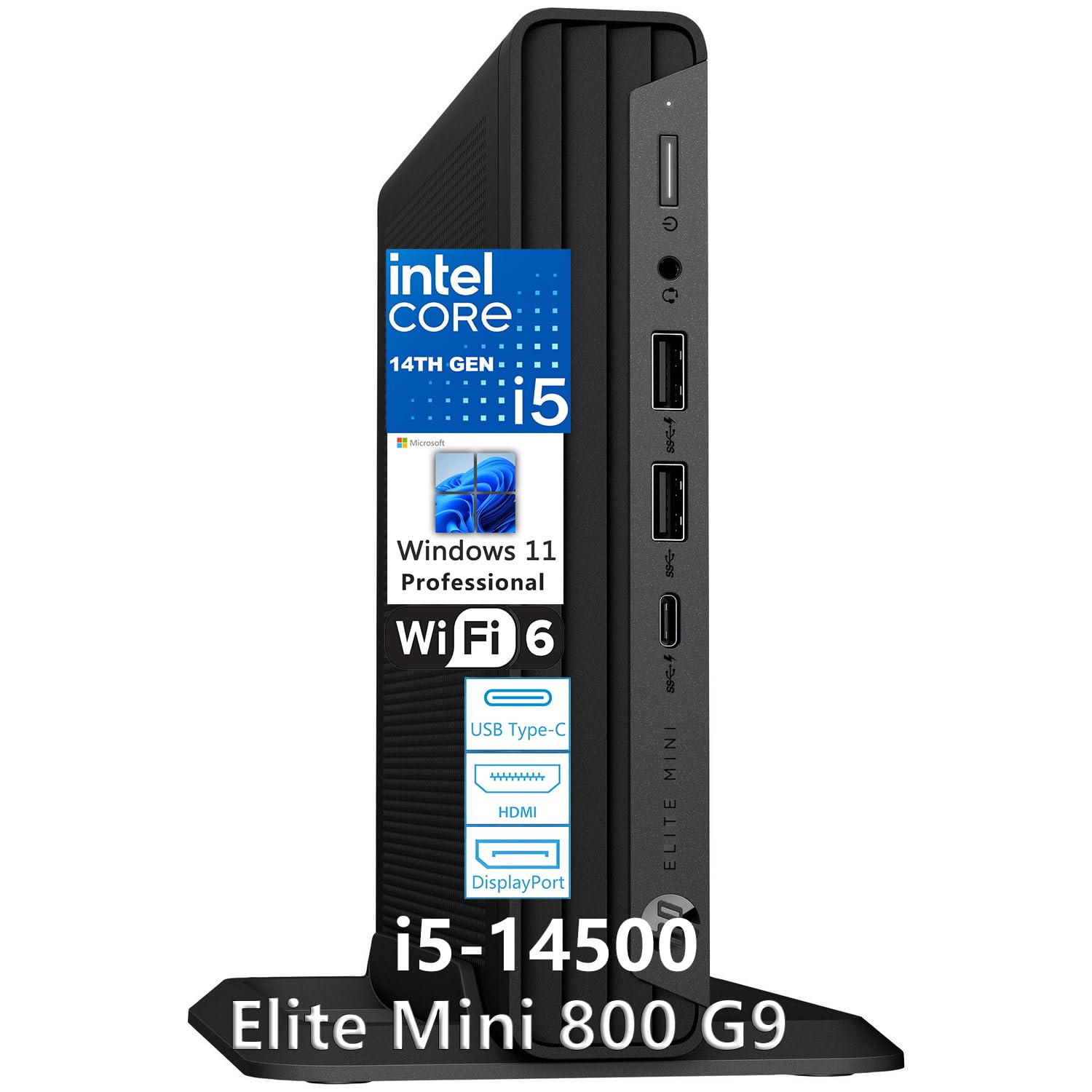
A tiny box that hides a professional workstation’s heart.
The HP Elite Mini 800 G9 is a marvel of engineering. It weighs just 3.13 lbs and measures a mere 6.97″ x 6.89″ x 1.35″, saving a huge amount of desk space. Despite its small size, it packs a 14th Gen Intel Core i5-14500 processor with 14 cores (6 P-cores up to 5.0 GHz + 8 E-cores). This is more than enough power for any web design workflow. It also includes a generous 32GB of DDR5 RAM and a fast 1TB SSD, making it an incredibly potent and compact machine. It’s perfect for a modern, minimalist desk setup or for being mounted behind a monitor via its VESA mount.
One of its best features for designers is its support for up to four monitors via two DisplayPort 1.4, one HDMI 2.1, and one USB-C port. You can run a quad-screen workspace for your design tools, code editor, browser preview, and asset manager. The Intel UHD 770 graphics handles 4K displays without a problem. It comes with a HP keyboard and mouse and runs Windows 11 Pro, making it enterprise-ready right from the start. One buyer simply called it a “high quality PC for the price,” which is high praise for a very compact package.
The Space-Saver’s Dream: This system is the definition of “small but mighty.” The 14-core CPU and 32GB of DDR5 RAM are flagship-level specs in a chassis that fits in the palm of your hand. The ability to drive four monitors is a killer feature for productivity. The build quality and enterprise support from HP add a lot of confidence.
The Limitations: The integrated Intel UHD 770 graphics are fine for 2D work and 4K desktop use, but they are not suitable for advanced 3D rendering or heavy video editing. It uses a compact power adapter (120W), so there is no room for a dedicated graphics card. This is a pure CPU-powered workstation.
Buy this for: a clean, minimalist desk setup without compromising on performance. It is ideal for UI/UX designers and front-end developers who need a powerful multi-monitor machine in a tiny footprint.
Not for: anyone needing a dedicated GPU for 3D work, video rendering, or gaming. That requirement makes the HP Elite Mini a non-starter.
8. Acer 2026 Aspire AI Laptop for Business & Creators | Intel Core Ultra 7 258V, 32GB RAM, 2TB SSD, 14″ FHD Touchscreen, Backlit KB, USB-C HUB, Lifetime Office 365, Long Battery Life, Windows 11 H, Gray

A featherlight laptop that brings desktop-class specs to your coffee shop desk.
For the web designer who needs to work from anywhere, the Acer Aspire AI Laptop is a compelling choice. It’s powered by the latest Intel Core Ultra 7 258V processor, which includes a dedicated NPU capable of 47 TOPS for AI tasks like background blur in video calls or AI photo editing. The 14-inch touchscreen with a 1920×1200 resolution is great for precise editing, and the Intel Arc 140V graphics can handle 1080p video editing in Premiere or DaVinci Resolve. With 32GB of RAM and a massive 2TB SSD, you have all the power and storage you need for any project.
Portability is a key strength here. It weighs just 3.09 lbs and is only 0.7″ thin, making it easy to slip into a bag. The advertised long battery life means you can work through a full day of client meetings or remote work sessions. The included USB-C hub provides HDMI, USB-A, USB-C, SD card, and Ethernet ports, solving the common problem of a laptop’s limited port selection. One buyer loves it, calling it “fast, smooth, especially the touchscreen that comes in handy.” Another praised its specs as “just what I expected.”
The Creator’s Companion: This laptop combines a powerful, AI-ready CPU with a generous 32GB of RAM and a 2TB SSD. The 14-inch touchscreen adds a level of interactivity for design work. Its light weight and long battery life make it ideal for mobile professionals, while the included USB hub ensures you can connect to office peripherals easily.
The Small Print: The “Lifetime Office 365” advertised is actually Microsoft Office for the Web, not the full desktop version, which disappointed one buyer. The integrated Intel Arc 140V graphics, while capable, are not as powerful as a dedicated GPU for heavy 3D tasks. The 14-inch screen, while portable, is smaller than a desktop monitor, so some designers may prefer an external display for long sessions.
Perfect for: the freelance web designer or creative professional who needs a portable, powerful laptop for on-the-go design work, client presentations, and light video editing.
Not ideal for: designers who prefer a single, large, high-resolution monitor for all their work, or those who need a dedicated GPU for extensive 3D modeling.
9. NIMO 15.6″ Light-Gaming-Laptop, 8 Cores AMD Ryzen 7 Pro 6850U 32GB RAM 1TB SSD (Beat i7-1360P Up to 4.7GHz) Radeon 680M 100W Fast PD FHD Backlit Keyboard for Content Creators & Student 2-Yr Warranty

A laptop that packs 32GB of RAM and a surprising GPU punch at a hard-to-beat price.
The NIMO laptop is a value champion. It offers an 8-core AMD Ryzen 7 Pro 6850U processor (boosting up to 4.7 GHz) paired with a powerful integrated AMD Radeon 680M graphics chip. This RDNA 2-based GPU rivals entry-level discrete graphics, meaning you can run design tools and photo-editing software very smoothly. It also boasts a fantastic 32GB of LPDDR5 RAM—the highest amount of memory for its price segment—and a fast 1TB PCIe 4.0 SSD. This spec sheet is designed to handle heavy multitasking and larger-than-average project files without issue.
One buyer, a developer, confirmed it’s “great for AI/development work” and another found the “9-hour battery life accurate.” The 53.58Wh battery and included 100W PD fast charger keep you going all day. The 15.6-inch Full HD (1920×1080) anti-glare display is comfortable for long work sessions. It also includes a backlit keyboard and a 2MP HD camera with a physical privacy shutter, showing thoughtful design for professional use. The NIMO team backs it with a 2-year manufacturer’s warranty, which is a strong vote of confidence for a lesser-known brand.
The Value Proposition: The core of this machine—its 32GB LPDDR5 RAM, powerful Radeon 680M graphics, and fast SSD—is hard to match at this price. It handles all 2D web design tasks with ease and offers a snappy experience for coding and design software. The battery life and fast charging are major pluses for portability. The 2-year US-based warranty is a standout feature.
The Known Drawbacks: Some buyers noted the build quality feels “cheaply made” compared to premium brands, with a trackpad that feels slow. It lacks an ethernet port, so you may need a docking station for a wired connection. The screen aspect ratio is shorter than some alternatives, which may feel cramped for code editing.
Reach for this if: your budget is limited but you refuse to compromise on having a large amount of RAM and solid graphical performance in a laptop. It is an excellent choice for a student designer or freelancer.
Look elsewhere if: premium build quality, a top-tier touchscreen, or a very large aspect ratio display are critical to your workflow.
10. Dell Slim Desktop ECS1250 – Intel Core Ultra 5-225 Processor, UHD Graphics, 16GB Memory, 512GB M.2 SSD, 3.0 SD Card Reader, Wired Keyboard and Mouse, Windows 11 Home, Onsite+Migrate Service

A sleek, modern desktop that is a very capable daily driver for web design.
The Dell Slim Desktop ECS1250 is a well-designed business PC that works great for web design. Its Intel Core Ultra 5-225 processor (boosting up to 4.9 GHz) brings AI acceleration capabilities to a slim, elegant chassis. It can support up to four FHD monitors or two 4K displays via its DisplayPort 1.4a and HDMI 2.1 ports, which is fantastic for building a productive multi-screen workspace. The 16GB of memory is the standard starting point for multitasking, and the 512GB M.2 SSD provides fast boot and load times. An SD card reader is a nice bonus for photographers or if you need to transfer assets directly from a camera.
The tool-less entry makes upgrading memory or storage a simple process. Dell also includes a 1 Year Onsite Service and 6 Months of Dell Migrate to help transfer your old files. One buyer called it a “great daily driver” and is using it as a NAS and Plex server, proving its reliability. Another said it has a “good processing speed.” This is a straightforward, high-quality option from a major brand that focuses on the essentials for a productive design environment. Its slim form factor (it stands vertically) takes up very little desk space.
The Reliable Choice: The Dell Slim Desktop is a well-built, business-class machine from a brand known for its support. The Intel Core Ultra 5 is a modern, capable processor. The AI-ready platform is a future-proof bonus. The multi-monitor support and SD card reader are practical features for a designer. The slim design is a space-saver.
The Trade-Off: With only 16GB of RAM, you will hit your multitasking limit faster than on machines with 32GB. The 512GB SSD also fills up quickly if you store many large project files locally. It uses integrated graphics, so it’s not for 3D work. Buyers noted it lacks a 2nd drive caddy, limiting internal storage upgrades.
Best for: a designer who wants a high-quality, space-saving desktop from a trusted brand with excellent support, and whose workload fits within 16GB of RAM.
Not for: heavy multitaskers who need to run many apps simultaneously, or anyone working with large video or 3D files that demand more RAM and a dedicated GPU.
11. Lenovo 24 23.8″ All-in-One Desktop Computer for Home Office, 16GB DDR4 RAM, 512GB PCIe SSD, Intel Processor 8-Core i3-N305, Lifetime Office 365 for Web, FHD AIO PC, WiFi 6, BT 5.2, Win 11, White

A clean, clutter-free PC with a lovely screen for a streamlined home office.
The Lenovo 24″ All-in-One is the definition of simplicity. It combines the computer and monitor into a single sleek white unit, connected by a single power cable. The 23.8-inch FHD IPS display is a highlight, featuring a three-sided borderless design and 99% sRGB color accuracy, making it suitable for photo editing and creating accurate color palettes. It is powered by an Intel Core i3-N305 8-core processor, which is efficient for standard web design tasks like coding in VS Code, running Figma, and managing email. The 16GB of DDR4 RAM and 512GB PCIe SSD ensure it feels snappy for everyday use.
This setup is perfect for a clean desk and for users who don’t want the complexity of a traditional desktop tower. It includes built-in Wi-Fi 6 and Bluetooth 5.2 for wireless connections. One customer observed it is “brilliant,” praising its “fast speed. Lush colors. Nice price.” Another mentioned it’s “so easy to set up” and perfect for “basic home needs.” For a freelance designer starting out or a web design student, this offers a complete, attractive, and functional workspace from the start. The included lifetime Office for the web covers basic document needs.
The Simple Elegance: The 99% sRGB color accurate display is a genuine plus for design work that this tier of all-in-one usually doesn’t offer. The space-saving design is visually appealing and reduces cable clutter. The performance is more than adequate for a junior designer or someone focusing on front-end coding.
The Compromises: The 16GB RAM and 512GB SSD are the lower end of what’s acceptable for web design. The Intel i3-N305, while having 8 cores, is not as powerful as an i5 or Ryzen 5. It’s not a machine for heavy multitasking or large-scale projects. The included keyboard and mouse are described as “junk” by one buyer, who recommended replacing them. It is not a gaming or rendering machine.
Ideal for: a new freelancer, a student, or anyone building a simple home office for web design and wants a clean, attractive setup without a bulky tower.
Not for: experienced designers who work with large PSD files, run multiple virtual machines, or need the power of a dedicated GPU or a faster processor.
12. YAWYORE Gaming PC Desktop Computer AMD R5 5600GT 16GB 1TB NVMe Towers WiFi | 16GB DDR4 3200MHz, 1TB M.2 NVMe PCIe, 550W 80PLUS PSU, WiFi BT, Game Design Office Console

An entry-level box that gets the job done for basic web design work.
The YAWYORE Gaming PC is the most affordable full desktop option on this list that is still viable for web design. It’s powered by the AMD R5 5600GT processor, which has integrated Radeon Vega graphics. This is enough to run your design software and drive a 1080P monitor for a smooth workspace. It comes with 16GB of DDR4 RAM and, crucially, a 1TB M.2 NVMe PCIe SSD, which is great for fast boot times and storing your project files. The 550W 80PLUS Bronze PSU ensures stable power, and it includes 5 ARGB fans for cooling.
Reviewers point out it is a “solid after 2 weeks daily use” machine. One noted it’s “good for work, multitasking, and multiple windows,” but it’s “not a gaming PC” and struggles with heavy modern games. For web design, this is a positive sign, as your tools (VS Code, Figma, browser) will run just fine. It also features built-in WiFi and Bluetooth, saving you the hassle of adapters. It is a very capable entry-level machine for the price, offering a large SSD and decent memory for a budget that is tough to top.
The Budget Baseline: For its price, this desktop offers excellent value. The 1TB NVMe SSD is a major plus, as many budget options include a tiny drive or a slow hard drive. The integrated graphics from the 5600GT are surprisingly capable for 2D work. It is easy to set up with Windows 11 pre-installed. The case is larger than expected, which helps with airflow.
The Entry-Level Limits: With only 16GB of RAM, you will have to be mindful of your browser tabs and open applications. The integrated graphics are not suitable for any serious rendering or 3D work. The Ryzen 5 5600GT is a last-generation chip. If your budget allows, spending slightly more for a model with 32GB of RAM is a significant upgrade for web design.
Buy this for: a very strict budget. It is a good starter machine for a budding web designer who needs a functional and fast PC for learning and small projects.
Consider upgrading if: your budget allows for a model with 32GB of RAM. The RAM is the main limiting factor here for heavier multitasking.
13. ASUS Vivobook/BLUE/16.0 WUXGA(WU) Non-Touch/X1 26 100/16GB/Qualcomm UMA/512GB/WIN11 Home

A very quiet, battery-sipping laptop for the basics of web design on the move.
The ASUS Vivobook 16 is powered by Qualcomm’s Snapdragon X processor. This ARM-based chip is designed for incredible power efficiency, which translates to multi-day battery life with light use. One user highlighted the “battery lasts several days with 2-3 hours daily use.” The 16-inch WUXGA (1920 x 1200) display has a 16:10 aspect ratio, which gives you a bit more vertical screen space for code and documents compared to a standard 16:9 screen. It has 16GB of RAM and a 512GB SSD, which is the baseline configuration for a smooth computing experience. The NPU (up to 45 TOPS) enables AI features in Windows.
For a very basic web design workflow—typing code, browsing, and using web-based tools like Figma—this laptop is a fascinating option. It runs cool and silent. It is also extremely portable and light for a 16-inch screen. The Microsoft “Copilot+ PC” features are built-in. However, the Qualcomm Snapdragon X architecture is still new for the Windows ecosystem. Some professional software (especially older plugins or certain virtualization tools) may not be fully compatible or run as fast as on an x86 processor like an Intel or AMD chip. At 2.97 GHz, its CPU speed is significantly lower than the iBUYPOWER’s 5.6 GHz, underscoring that this is a chip built for efficiency, not raw performance. One buyer called it “pretty good” and says it runs games at “good fps.”
The Endurance Runner: The battery life is a true standout. For a designer who works primarily in a browser and web apps, this laptop can easily last a full day or more away from a plug. The 16:10 screen is underrated and great for productivity. The fanless, cool operation is a big plus for quiet environments.
The Compatibility Question: The main risk here is software compatibility. Some professional Windows apps, particularly those that rely on specific x86 architecture instructions, may not run optimally or at all on a Qualcomm Snapdragon processor. You must verify your core toolchain (e.g., Adobe Photoshop, Docker, certain local development environments) has an ARM-native build or runs well in emulation. Its CPU is also not as fast as competitors for demanding multi-threaded tasks.
Best for: the web designer whose workflow is 100% web-based (Figma, VS Code in a browser) or uses only widely supported ARM-native apps, and who prioritizes battery life above all else.
Not for: designers who rely on heavy x86-native desktop software (like full Adobe Suite with plugins, Docker for x86 images, or specific dev tools) without confirmed ARM compatibility. You risk performance issues or outright incompatibility.
Understanding the Specs
CPU Speed (GHz)
This number tells you how fast the processor can handle a single task, like exporting a file or running JavaScript. A higher number, like 5.6 GHz on the iBUYPOWER, means snappier performance for most daily design work. For web design, a CPU boost speed of 4.0 GHz or higher is a good target for a fluid experience.
RAM (Memory)
Think of this as your desk space. The more you have, the more projects you can lay out at once. 16GB is the minimum for comfortable multitasking with a few apps. 32GB is the balance for heavy workflows with many browser tabs, Figma, Photoshop, and code editors all open at once. 8GB will feel cramped very quickly.
Dedicated GPU (Graphics Card)
This is a separate processor just for graphics. Most web design (UI design, 2D art) doesn’t need one. But if you edit video, work in 3D, or drive multiple high-res monitors, a dedicated GPU like an NVIDIA RTX 3050 or 5060 makes a huge difference. Integrated graphics are built into the CPU and are fine for basic 2D work but lack the power for heavy rendering.
Storage (SSD Type)
The hard drive is where all your files live. An NVMe M.2 SSD is the fastest type, making your computer boot in seconds and programs load instantly. A 1TB capacity gives you plenty of room for the operating system, software, and a large project library. Avoid computers with a traditional spinning hard drive (HDD) as the main drive for any modern setup.
FAQ
Is 16GB of RAM enough for web design in 2026?
Do I need a dedicated graphics card for web design?
Intel Core i5 vs i7 vs i9 for web design. Which one?
Is a laptop or a desktop better for web design?
Can I use a Chromebook for web design?
How much SSD storage do I need for web design projects?
What does “Windows 11 Pro” give me that “Home” does not?
The computer says it has “UHD Graphics.” Is that bad?
Final Thoughts: The Verdict
For the majority of shoppers, the computer for web design winner is the iBUYPOWER Element EWA9N5702 because it delivers uncompromising performance for any task with its powerful CPU, ample 32GB of DDR5 RAM, and a dedicated GPU, all at a strong price point for the specifications. If you want a compact, business-grade tower that is future-proofed for AI, grab the Dell Tower Desktop ECT1250. And for a portable laptop that balances raw power with incredible battery life for on-the-go design work, the Acer Aspire AI Laptop is an excellent premium choice.
How We Picked
We do not accept paid placement. Every pick is matched to a real buyer and a real use-case; we do not hands-on test units.
Sources & Methodology
Specifications: manufacturer listings and product documentation. Review insights: verified customer reviews, as of July 2026. Pricing: not shown on this page (it changes often); check the current price via the retailer link.
As an Amazon Associate, WellFizz earns from qualifying purchases. This does not affect which products we feature.
Related Guides

Mo Maruf
I created WellFizz to bridge the gap between vague wellness advice and actionable solutions. My mission is simple: to decode the research and give you practical tools you can actually use.
Beyond the data, I am a passionate traveler. I believe that stepping away from the screen to explore new environments is essential for mental clarity and physical vitality.