Our readers keep the lights on and my smoothie glass nicely filled. As an Amazon Associate, I earn from qualifying purchases.
The difference between a profitable trade and a missed opportunity often comes down to a single metric: system latency. Your charts, order books, and execution platform demand a machine that can process multiple data streams, render complex indicators, and switch between exchanges without a single stutter. A general-purpose office PC simply cannot handle the constant refresh of a multi-monitor trading setup — you need a computer built for split-second decision-making.
I’m Mohammad Maruf — the founder and writer behind WellFizz. My approach to this guide is rooted in parsing hardware specifications — CPU core counts, memory bandwidth, multi-display output capabilities, and network redundancy — to identify the machines that can keep pace with the relentless flow of market data.
Whether you are scalping on a single screen or managing a portfolio across four monitors, this guide cuts through the marketing to find the top-tier best computer for trading crypto that balances raw power with real-world reliability for active traders.
How To Choose The Best Computer For Trading Crypto
Selecting a machine for crypto trading requires moving beyond general computing benchmarks. You are not rendering a movie or compiling code — you are processing thousands of price updates per second while keeping your execution terminal responsive. Here are the key specs to prioritize.
CPU Core Count Over Clock Speed
A processor with multiple cores handles concurrent tasks — your charting software, web browser, Telegram alerts, and exchange platform — without any single application hogging resources. Look for at least 6 cores (12 threads) as a baseline, with 8 or more cores preferred for a multi-monitor setup. Higher clock speeds are beneficial, but core count is the primary bottleneck when you have dozens of chart windows open.
RAM Capacity and Speed
Each browser tab and software instance consumes memory. With 16GB as a bare minimum, 32GB is the sweet spot for traders who run a web-based platform like TradingView alongside a desktop exchange client. Faster DDR5 RAM (5600 MT/s or higher) also helps with data throughput, especially when running resource-intensive analytics. Skimping on RAM leads to system slowdowns right when the market moves.
Multi-Monitor Output Capabilities
You cannot trade effectively on a single screen. A trading computer must support at least two (ideally three or four) displays. Check the ports available: HDMI, DisplayPort, and USB-C / USB4 with display pass-through. A desktop PC with a dedicated or high-end integrated GPU is far more reliable for driving multiple 4K monitors than a standard office machine.
Network Connectivity and Redundancy
A dropped connection during a volatile candle can be costly. Dual LAN ports (one Ethernet for your primary connection, another for a backup line) offer a layer of reliability. Wi-Fi 6 or 7 is fine as a secondary option, but a wired Ethernet connection is always the primary path for low-latency trading. A system with two 2.5GbE ports is ideal for serious traders.
Quick Comparison
On smaller screens, swipe sideways to see the full table.
| Model | Category | Best For | Key Spec | Amazon |
|---|---|---|---|---|
| MINISFORUM MS-01 | Mini Workstation | 10GbE Networking & Lab Use | 2x 10G SFP+ & 2x 2.5GbE LAN | Amazon |
| Skytech Gaming King 95 | Gaming Desktop | Ultimate CPU & GPU Power | AMD Ryzen 7 9850X3D + RTX 5070 Ti | Amazon |
| Dell Pro Tower i7-14700 | Business Tower | Massive 64GB RAM Out of Box | Intel 20-Core i7-14700 + 64GB DDR5 | Amazon |
| HP OmniDesk M03 | AI Business PC | Intel Ultra 7 Value Workhorse | Intel Core Ultra 7 265 + 32GB DDR5 | Amazon |
| GEEKOM GT15 Max | Mini PC | Compact 4-Monitor AI Workstation | Intel Core Ultra 9 285H + 32GB DDR5 | Amazon |
| GMKtec K11 | Mini PC | Budget Multi-Screen & Oculink eGPU | AMD Ryzen 9 8945HS + Dual 2.5GbE | Amazon |
| CyberPowerPC Gamer Master | Gaming Desktop | Dedicated GPU for Heavy Charting | RTX 5060 Ti 8GB + 16GB DDR5 | Amazon |
| MSI Codex Z2 | Gaming Desktop | High-End RTX 5070 Desktop | RTX 5070 + 32GB DDR5 | Amazon |
| TechMagnet HP Trading PC | Trading Desktop | 4-Monitor Bundle Ready to Go | Core i5 9th Gen + 4x 27″ Monitors | Amazon |
| Alienware Aurora ACT1250 | Gaming Desktop | Premium Build & On-Site Service | RTX 5070 + 1000W Platinum PSU | Amazon |
| Dell Tower ECT1250 | Business Tower | Intel Ultra 7 Entry-Level AI PC | Intel Core Ultra 7-265 + 16GB RAM | Amazon |
| HP Pro Tower 290 G9 | Business Desktop | Budget Dual-Monitor Office PC | Intel i5-12500 + 16GB RAM | Amazon |
| NIMO 15.6″ Laptop | Laptop | Portable On-the-Go Trading | AMD Ryzen 7 6850U + 32GB RAM | Amazon |
In‑Depth Reviews
1. Dell Pro Tower PC Desktop Computers, Intel 20-Core i7-14700

The Dell Pro Tower with the Intel Core i7-14700 (20 cores) and 64GB of DDR5 RAM is a data-crunching monster out of the box. For a trader running multiple exchange platforms, a Bloomberg terminal replica, and dozens of browser tabs, this amount of memory eliminates the need to manage swap files. The integrated Intel UHD Graphics 770 is sufficient for driving two 4K displays via DisplayPort, making it a very capable dual-monitor workstation from the moment you unbox it.
The 2TB PCIe SSD ensures your OS, trading software, and historical data files load instantly. However, there is a notable omission for a modern trading setup: this system does not include built-in Wi-Fi, and you will need to purchase an adapter or rely exclusively on Ethernet. The lack of Wi-Fi is a trade-off for a clean business machine, but for a trading desk wired into a router, this is a non-issue.
With an enterprise-grade build backed by Dell’s support, this tower is designed to run 24/7 without thermal issues. The tool-less entry makes upgrading the RAM or adding a dedicated GPU later straightforward if your monitor count grows. For the serious trader who wants maximum RAM capacity from day one, this is a workstation-class solution.
Why it’s great
- Massive 64GB of DDR5 RAM right out of the box eliminates memory bottlenecks
- Powerful 20-core Intel i7-14700 handles heavy multitasking with ease
- Dell business-class build quality and support for 24/7 operation
Good to know
- Integrated graphics may strain with 4K multi-monitor setups above two displays
- No built-in Wi-Fi; requires a USB adapter or wired Ethernet connection
- Single HDMI port necessitates using DisplayPort for a second screen
2. MINISFORUM MS-01 Mini Workstation Core i9-13900H

The MINISFORUM MS-01 is a niche beast that excels in the one area most PCs ignore: networking. With two 10G SFP+ ports and two 2.5G RJ45 LAN ports, this mini workstation is built for traders or home-lab enthusiasts who need absolute network redundancy and speed. You can connect directly to your primary exchange server and a backup ISP simultaneously without any USB dongles. The Intel Core i9-13900H (14 cores) and 32GB of DDR5 RAM handle charting and order entry with authority.
Its video output is equally robust, featuring HDMI, and two USB4 ports that support up to 8K displays. This allows for a high-resolution triple-monitor setup where each screen can display maximum data density. The PCIe x16 slot is also a unique feature for a mini PC, allowing you to install a compatible GPU like an RTX 3050 if you decide you need dedicated graphics for more advanced chart rendering.
The trade-off is its form factor — this is not a traditional tower, so upgrading internal components beyond RAM and storage requires more care. Some users have reported intermittent disconnection issues with the SFP+ ports, but for the vast majority, this machine provides a level of connectivity that rivals server-grade equipment. It is the ultimate choice for the trader who treats their network as their most critical asset.
Why it’s great
- Two 10GbE SFP+ ports for ultra-low latency and redundant network connections
- Dual USB4 ports capable of driving 8K displays for maximum chart real estate
- PCIe expansion slot allows for future dedicated GPU upgrade
Good to know
- Compact chassis requires careful thermal management under sustained load
- Some SFP+ modules may experience compatibility disconnections
- No dedicated graphics included for intensive 3D charting
3. Skytech Gaming King 95 Gaming PC, AMD Ryzen 7 9850X3D
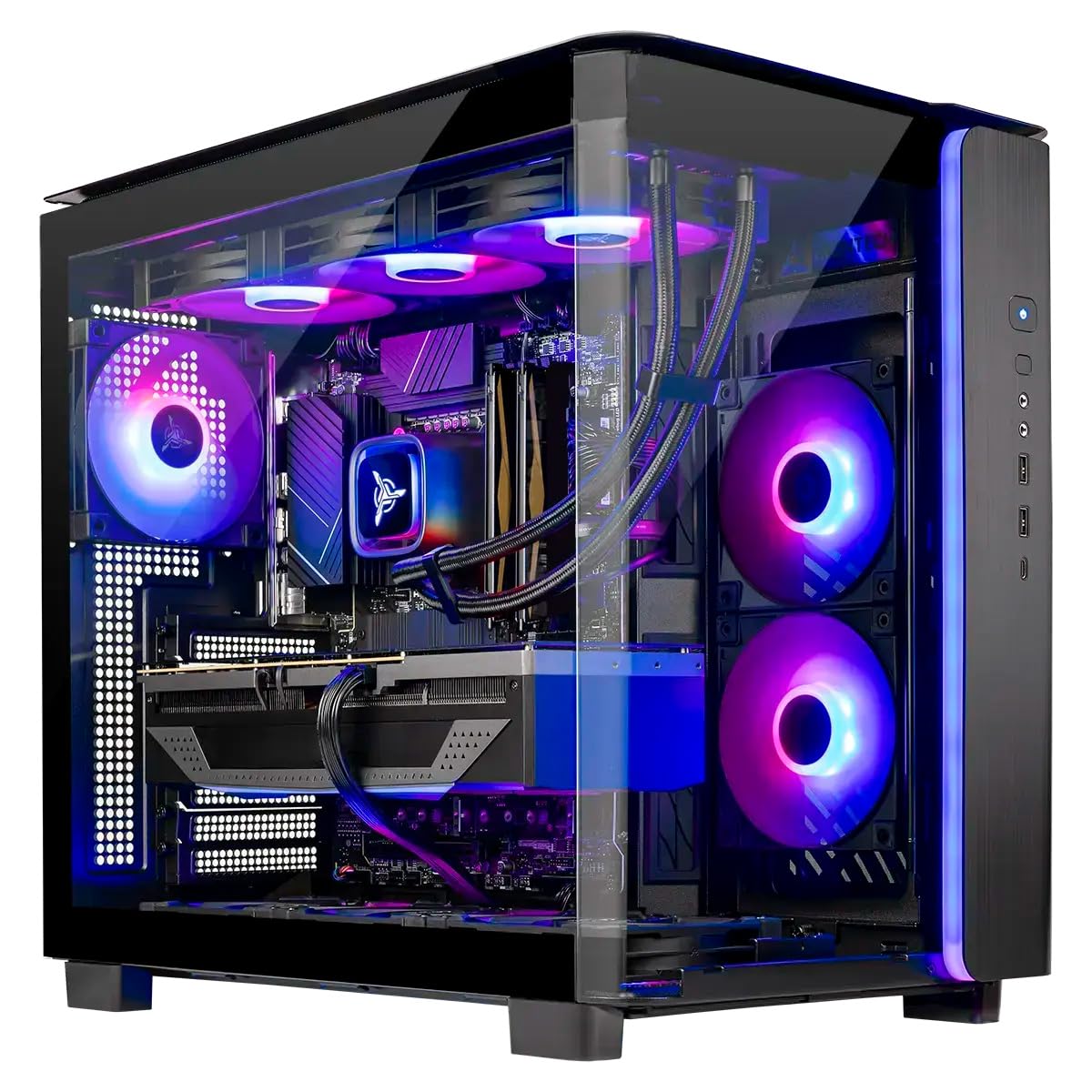
The Skytech Gaming King 95 represents the pinnacle of consumer CPU performance for a trading machine, thanks to the AMD Ryzen 7 9850X3D. This chip’s 3D V-Cache technology provides a massive L3 cache that significantly reduces latency when processing repetitive data requests — perfect for real-time chart refreshes and scanning multiple timeframes simultaneously. Paired with the NVIDIA RTX 5070 Ti (16GB VRAM), this system can drive a 4K multi-monitor array without breaking a sweat.
With 32GB of DDR5 RAM (6000 MT/s) and a 1TB Gen4 NVMe SSD, the entire system feels instantaneous. The 360mm AIO liquid cooler keeps the CPU from thermal throttling during long trading sessions, and the 850W Gold PSU provides stable power. The King 95 chassis itself has excellent airflow and tool-less drive bays, making it easy to add a second SSD for data storage.
This is overkill for a purely software-based trader, but for anyone who also runs quantitative backtesting scripts, virtual machines, or high-demand data analysis, this is a future-proof machine. The only real caveat is the lack of Wi-Fi 6 (it comes with Wi-Fi 5), which is a minor oversight at this price point, though wired Ethernet remains the standard for trading.
Why it’s great
- AMD Ryzen 7 9850X3D with 3D V-Cache excels at repeated data processing tasks
- NVIDIA RTX 5070 Ti 16GB handles multiple 4K monitors with ease
- Liquid cooling and high-wattage PSU ensure stable performance under long loads
Good to know
- Includes only Wi-Fi 5, which is outdated for wireless use
- Higher cost than necessary if you only run charting software
- Large tower case requires ample desk space
4. HP OmniDesk M03 Business AI Desktop PC, Intel Core Ultra 7 265
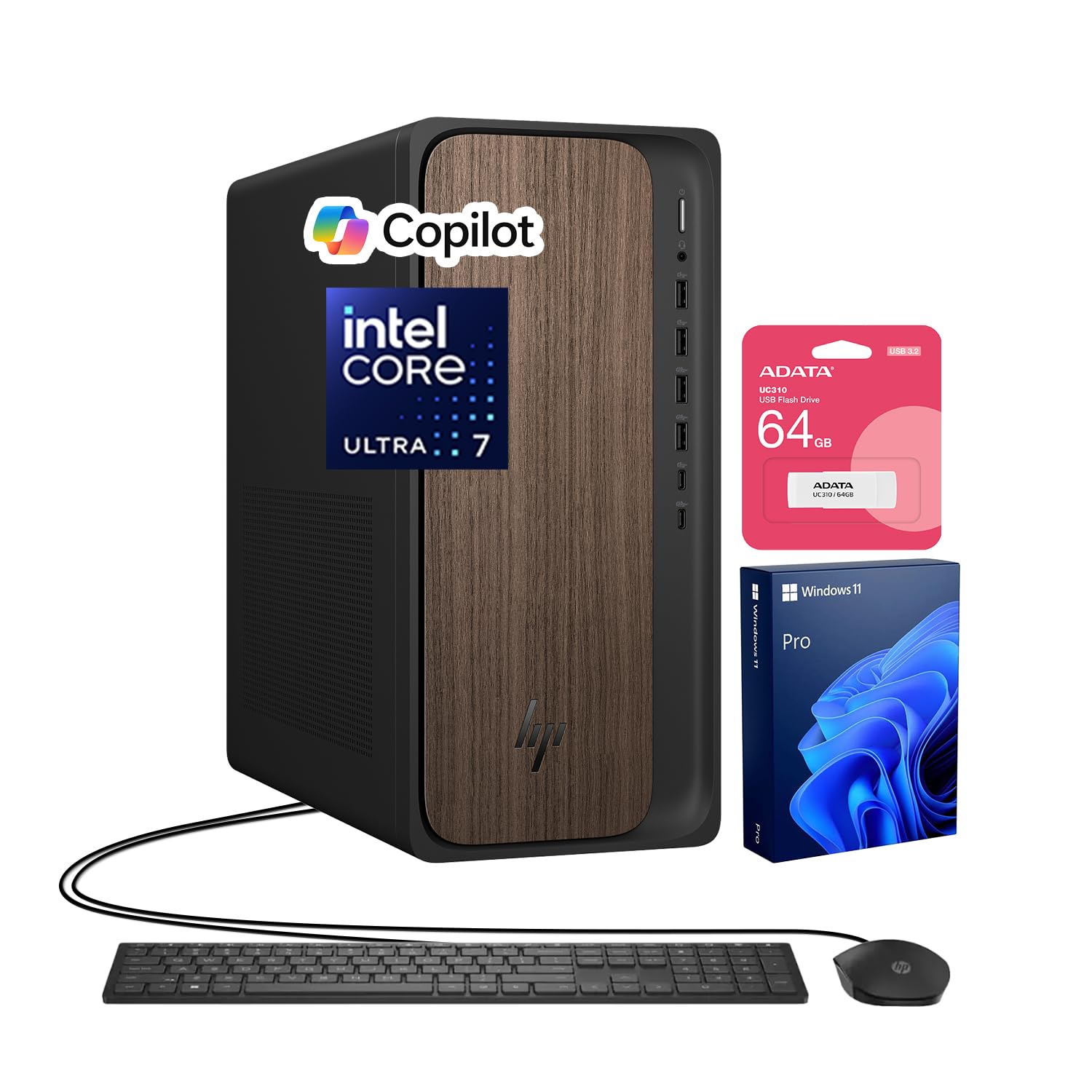
The HP OmniDesk M03 is a sleeper hit for value-conscious traders who need a modern, powerful machine without a dedicated gaming GPU. Powered by the Intel Core Ultra 7 265 (20 cores, up to 5.3 GHz), this desktop offers enough cores to handle a heavy trading workflow. The 32GB of DDR5 RAM and 2TB SSD provide ample room for software, cache, and saved chart layouts without ever running low on storage.
Its 4-monitor support via three DisplayPorts and one HDMI port is a genuine highlight at this price tier. You can run a full quad-screen setup without a dedicated graphics card, saving money while still getting all the screen real estate you need. The inclusion of a 64GB USB flash drive is a nice bonus for transferring settings between machines.
The build is a standard business tower, so it is quiet and efficient. The only potential frustration is the recessed power button, which some users find hard to press. This machine is a fantastic choice for the trader who wants a brand-name, reliable, multi-display desktop that offers professional-grade performance without the gamer aesthetics or price markup.
Why it’s great
- 4-monitor support via DisplayPort and HDMI without a dedicated GPU
- Plentiful 2TB SSD for storing large historical data files
- Fast 20-core Intel Ultra 7 processor for smooth multitasking
Good to know
- Recessed power button design can be difficult to press
- Integrated graphics limit performance for 3D charting or gaming
- The unit may have an opened seal for professional RAM/SSD upgrade
5. GEEKOM GT15 Max AI Performance Mini PC, Intel Core Ultra 9 285H

The GEEKOM GT15 Max packs a stunning amount of power into a tiny aluminum chassis. With the Intel Core Ultra 9 285H (16 cores, up to 5.4 GHz) and integrated Arc 140T GPU, this mini PC can comfortably drive two 8K displays or four 4K displays simultaneously via its dual USB4 and dual HDMI 2.0 ports. For a trader with a clean desk setup, this eliminates the space footprint of a tower entirely.
The inclusion of dual 2.5GbE LAN ports and Wi-Fi 7 ensures your network connections are as future-proof as the processor. The 32GB of DDR5 RAM is upgradeable to 128GB, and the dual NVMe slots allow for up to 6TB of storage. The IceBlast 3.0 cooling system is surprisingly effective, keeping the unit quiet even during sustained loads, which is critical for a machine on your desk.
One caveat reported is that the unit may ship with a European-style power plug, requiring an adapter. Additionally, while the Arc 140T GPU is strong, it is still an integrated solution — for the most demanding 3D charting software, a dedicated GPU might be preferable. For the vast majority of traders running web-based platforms and desktop exchanges, this is a perfectly capable and extremely compact workstation.
Why it’s great
- Ultra-compact form factor that drives up to four 4K displays
- Dual 2.5GbE LAN ports and Wi-Fi 7 for top-tier connectivity
- User-upgradeable RAM and storage slots for future expansion
Good to know
- May ship with a European plug; an adapter might be needed
- Integrated Arc GPU may not handle advanced 3D charting as well as a dedicated card
- No dedicated audio port for external DACs without USB adapter
6. GMKtec Gaming PC, K11 AMD Ryzen 9 8945HS

The GMKtec K11 is a strong contender for the best budget-friendly trading mini PC, thanks to the AMD Ryzen 9 8945HS processor. This 8-core, 16-thread chip with the Radeon 780M integrated graphics (RDNA 3) is powerful enough to drive four 4K displays via HDMI 2.1, DisplayPort 2.1, and dual USB4 ports. The 32GB of DDR5 RAM and 1TB PCIe 4.0 SSD deliver responsive performance for a multi-monitor trading setup.
Its networking suite is also impressive for the price: dual Intel i226V 2.5GbE LAN ports provide wired redundancy, and Wi-Fi 6 handles wireless needs. A feature that sets it apart is the Oculink port, which allows you to attach an external GPU later without the bandwidth limit of Thunderbolt. This is a fantastic upgrade path for a trader who wants to start small but keep the door open for more graphical power.
The unit runs three performance modes (Quiet, Balance, Performance) via its UEFI BIOS, allowing you to prioritize lower fan noise during quiet hours or raw performance during market rushes. Some users noted that the SSD arrived with a few hours of use, but overall this is a solid, powerful machine for a very attractive price point.
Why it’s great
- Excellent value with a powerful Ryzen 9 CPU and 32GB RAM
- Oculink port provides a unique upgrade path for an external GPU
- Quad 4K display support and dual 2.5GbE LAN ports
Good to know
- Plastic top panel can be difficult to remove for internal access
- RGB LED lighting on the top cannot be turned off
- May reach high temperatures at Performance mode under sustained load
7. MSI Codex Z2 Gaming Desktop, AMD R7-8700F, GeForce RTX 5070

The MSI Codex Z2 combines the stellar single-threaded performance of the AMD Ryzen 7 8700F with the graphics prowess of the NVIDIA GeForce RTX 5070. For a trader who demands absolute smoothness when moving between dozens of chart windows, or who runs visual analysis software that leverages GPU acceleration, this desktop delivers. The 32GB of DDR5 RAM and 2TB NVMe SSD provide a cavernous and fast storage and memory buffer.
The real-world benefit of the dedicated RTX 5070 is its ability to drive three 4K monitors at high refresh rates without any flicker or latency. This is a machine that will not drop frames during a volatile market chart update. The four-system fan configuration ensures the case stays cool, even when running CPU-intensive backtesting scripts in the background.
The caveat with this tier of pre-built is component quality variance. Some users have reported Bluetooth connectivity issues that required a third-party PCIe card to fix. The build is otherwise solid with good airflow, but be prepared to potentially troubleshoot minor issues. It is a premium trading machine that doubles as an excellent gaming rig, but it comes with the complexity of a high-performance desktop.
Why it’s great
- RTX 5070 provides flawless multi-4K monitor support and GPU acceleration
- Spacious 2TB NVMe SSD for all your trading data and applications
- Strong 8-core CPU and 32GB RAM for heavy multitasking
Good to know
- Bluetooth connection can be problematic and may require a hardware swap
- Fans can become loud under heavy gaming-style loads
- Pre-built nature means some component quality may vary
8. CyberPowerPC Gamer Master Gaming PC, AMD Ryzen 7 8700F, GeForce RTX 5060 Ti

The CyberPowerPC Gamer Master is a balanced mid-range option that brings dedicated graphics to a trading setup without the top-tier price premium. The AMD Ryzen 7 8700F (8 cores) handles trading software and multitasking with ease, while the GeForce RTX 5060 Ti with 8GB of GDDR7 VRAM provides the muscle for a multi-monitor array. You can run three high-resolution screens for charting and order books without any integrated GPU compromises.
The 16GB of DDR5 RAM is the only spec that may feel tight for a heavy trader running a dozen browser tabs, multiple exchange clients, and a charting platform simultaneously. Upgrading to 32GB should be a high-priority improvement. The 1TB PCIe 4.0 SSD is adequate for storing your OS, applications, and active data files, though you may need external storage for historical archives.
This machine also offers easy access for upgrades, with a standard case and non-proprietary components. The inclusion of Wi-Fi 6 and Bluetooth 5.3 is standard. For a trader who wants the visual performance of a dedicated GPU without jumping to the most expensive tier, this is one of the strongest options in its class, provided you factor in a RAM upgrade.
Why it’s great
- Dedicated RTX 5060 Ti graphics provide excellent multi-monitor performance
- Strong 8-core CPU for responsive trading multitasking
- Standard, upgradeable components make future expansion easy
Good to know
- 16GB RAM may be insufficient for heavy multi-tab trading workflows
- Some units may require BIOS tweaks for USB stability
- Pre-installed bloatware may need to be cleaned out
9. Alienware Aurora Gaming Desktop ACT1250, Intel Core Ultra 7 265F

The Alienware Aurora is a premium gaming machine that translates perfectly into a high-end trading workhorse. The RTX 5070 graphics card is more than capable of driving multiple 4K displays with zero latency, and the 1000W Platinum-rated power supply ensures clean, stable power delivery even under prolonged stress. The Intel Core Ultra 7 265F processor provides the 20 cores needed to run a full trading suite without a hint of lag.
Alienware’s Command Center allows you to control performance modes, which is useful for dialing down fan noise during quiet market analysis or ramping up for heavy number crunching. The 1TB SSD and 32GB of DDR5 RAM are a solid foundation, though power users may eventually want to expand the storage. The on-site Dell service is a major plus for a business-critical machine, as any downtime is expensive for a trader.
The downsides are mostly related to the “gamery” design — the bright AlienFX lighting cannot be fully disabled, which might be distracting in a professional trading environment. Also, the case is large and the boot time is reported as somewhat lengthy. This is a solid, powerful machine with a premium warranty, but the aesthetics may not suit a minimalist trading desk.
Why it’s great
- High-wattage Platinum-rated PSU ensures stable power for long hours
- Dell 1-year on-site service provides peace of mind for business use
- RTX 5070 GPU handles the most demanding multi-monitor setups
Good to know
- Stadium lighting can be distracting and may not fit a professional office
- May have long boot times compared to other systems
- Premium price for the brand name and aesthetics
10. TechMagnet HP Trading Desktop PC, 4 Monitors Bundle

The TechMagnet bundle is the “turnkey” solution for a trader who wants to skip the research and just set up a four-monitor trading station immediately. This package includes the tower, four 27-inch 1080p monitors, a keyboard, and a mouse — everything you need to start trading from a single purchase. The PC itself is an HP ProDesk with an Intel Core i5 9th Gen processor, 16GB RAM, and a 512GB SSD plus a 4TB HDD for massive data storage.
The inclusion of two network cards (1 Gbps minimum) shows that the builder understands the core need of a trader: connection redundancy. The system is advertised to support all trading platforms and is pre-configured to keep system response times under 100ms. For a new trader or someone who wants a dedicated machine without any configuration headache, this bundle offers incredible convenience.
The major caveat here is the aging hardware. The 9th-generation Intel processor is several generations old, and this is a used/renewed system. The 1080p resolution of the monitors is functional but not crisp compared to a 4K setup. Customer experiences vary widely, with some praising the support and others reporting system failures. This bundle is best approached as a budget-friendly starting point, not a long-term professional solution.
Why it’s great
- Complete 4-monitor bundle ready to use out of the box
- Two network cards ensure wired connection redundancy
- Massive 4TB HDD for storing years of trading data
Good to know
- Older 9th-gen processor may struggle with demanding modern software
- Renewed system with risk of hardware defects or failure
- 1080p monitors are basic and lack the sharpness of 4K displays
11. Dell Tower Desktop ECT1250, Intel Core Ultra 7-265 Processor

The Dell Tower ECT1250 is an entry-level business desktop that brings the latest Intel Core Ultra 7 processor to a very affordable price point. The built-in AI acceleration on this chip is beneficial for traders who use AI-based market analysis tools or have started to experiment with local AI models for data analysis. It supports up to four FHD monitors via its DisplayPort and HDMI 2.1 ports with daisy chaining.
The 16GB of DDR5 RAM is a starting point, and upgrading to 32GB is highly recommended for a smooth trading experience. The 1TB M.2 SSD is fast and adequate for a single user. Dell’s tool-less entry makes this upgrade process painless, and the 1-year on-site service is a valuable safety net for a business-critical machine.
Users consistently praise the build quality and the quiet operation of this Dell tower. However, the lack of an additional drive bay and cable is a common complaint for those who want to add a secondary storage drive. It is a solid foundation for a trading PC, provided you budget for a RAM upgrade from the start.
Why it’s great
- Latest Intel Core Ultra processor with built-in AI acceleration features
- Excellent build quality and quiet operation from a trusted brand
- Tool-less chassis makes upgrading RAM and storage simple
Good to know
- 16GB RAM is a minimum; an upgrade is necessary for heavy trading
- No provision or cables for adding a secondary 3.5-inch HDD or SSD
- Integrated graphics limit high-end multi-monitor setups
12. HP Pro Tower 290 G9 Business Desktop Computer, Intel i5-12500

The HP Pro Tower 290 G9 is a classic business-grade desktop that serves as a very affordable entry point into a dedicated trading computer. The Intel Core i5-12500 (6 cores, up to 4.6 GHz) is a capable processor for running a charting platform and a couple of exchange windows. With 16GB of DDR4 RAM and a 512GB SSD, it handles basic multitasking without major slowdowns.
Its dual-monitor support via HDMI and VGA output is sufficient for a two-screen trading setup. The integrated Intel UHD Graphics 770 is not suited for high-resolution or 3D charting, but for standard 1080p or 1440p displays, it works fine. The compact tower design is quiet and fits easily on a desk without taking over the space.
The main limitation is the older DDR4 RAM standard and the modest 512GB SSD, which may fill up quickly with trading software and historical data. It is also not suitable for heavy multitasking between many resource-hungry applications. This is a solid option for a new trader on a tight budget or as a secondary machine for executing trades while a more powerful system handles analysis.
Why it’s great
- Very affordable price for a brand-name business desktop
- Quiet operation and small footprint for desk placement
- Reliable HP brand that is easy to service
Good to know
- 16GB DDR4 RAM and 512GB SSD are limiting for heavy trading
- Integrated graphics cannot handle demanding multi-monitor or 4K setups
- Not suitable for running multiple intensive applications simultaneously
13. NIMO 15.6″ Light-Gaming-Laptop, AMD Ryzen 7 Pro 6850U

For the crypto trader who needs mobility, the NIMO 15.6-inch laptop offers an excellent mobile workstation. The AMD Ryzen 7 Pro 6850U (8 cores) and 32GB of LPDDR5 RAM provide enough power to run TradingView, Telegram, and an exchange client on the go. The integrated Radeon 680M graphics (RDNA 2) are surprisingly capable and can drive an external 4K monitor through its USB-C port.
The 1TB PCIe 4.0 SSD ensures fast boot times and application loading. The keyboard is backlit for late-night airport sessions, and the laptop only weighs under 1.7kg, making it genuinely portable. Security features like a physical webcam shutter and a fingerprint reader are useful for trading in public spaces, and the 100W PD charging is fast and convenient.
The main limitation for a dedicated trader is the single 1080p internal display. While you can connect external monitors, the laptop’s own screen is not high-resolution. Also, battery life is advertised at 9 hours, but will be significantly less under a full trading workload. This is a fantastic travel companion for monitoring positions, but it should not be your only machine if you need high-resolution multi-monitor analysis all day.
Why it’s great
- 32GB of LPDDR5 RAM in a lightweight, portable chassis
- Powerful 8-core AMD processor handles mobile trading well
- Physical webcam shutter and fingerprint reader for security on the go
Good to know
- Single 1080p display is not ideal for high-resolution chart analysis
- Battery life under heavy trading load is significantly reduced
- No dedicated graphics for 3D charting or demanding visual software
FAQ
Do I need a dedicated graphics card for trading crypto?
Is a used or refurbished trading computer a good idea?
How important is a fast internet connection for a trading computer?
Final Thoughts: The Verdict
For most users, the best computer for trading crypto winner is the MINISFORUM MS-01 because it offers an unmatched balance of raw processing power and professional-grade networking with dual 10G SFP+ ports. If you want massive out-of-box memory for heavy data analysis, grab the Dell Pro Tower i7-14700. And for a complete, ready-to-go multi-monitor bundle on a budget, nothing beats the convenience of the TechMagnet HP Trading PC.

Mo Maruf
I created WellFizz to bridge the gap between vague wellness advice and actionable solutions. My mission is simple: to decode the research and give you practical tools you can actually use.
Beyond the data, I am a passionate traveler. I believe that stepping away from the screen to explore new environments is essential for mental clarity and physical vitality.