Our readers keep the lights on and my smoothie glass nicely filled. As an Amazon Associate, I earn from qualifying purchases.
A computer that struggles to keep up with your workflow turns every task into a waiting game. Whether it’s a spreadsheet that takes seconds too long to load, video calls that stutter, or applications that bog down when you switch between them, the wrong machine costs you time every single day. The right office computer eliminates those friction points entirely, letting you focus on the work itself rather than the tool you’re using.
I’m Mohammad Maruf — the founder and writer behind WellFizz. I’ve dedicated countless hours to researching hardware specifications, benchmarking real-world office performance, and analyzing user feedback across dozens of models to separate the genuinely capable machines from those that just look good on paper.
From all-in-one desktops that eliminate cable clutter to compact towers with the horsepower for demanding multitasking, this guide focuses exclusively on the best computer for office work, covering models that balance processing power, memory, and display quality for professional use.
How To Choose The Best Computer For Office Work
Selecting an office computer requires looking past flashy marketing to the specs that actually determine your day-to-day experience. The main areas to focus on are processor performance, memory capacity, storage type, and display quality — each of which affects how smoothly your office applications run. Understanding what each specification means in practical terms will help you avoid paying for power you don’t need or settling for a machine that frustrates you within months.
Processor Performance for Office Workloads
For typical office software like Microsoft Office, web browsers, and video conferencing, the processor generation matters more than the core count. A newer mid-range chip like the Intel Core i5-12500 delivers snappier performance than an older i7 from several generations ago. Look for processors with decent single-core performance, as most office applications benefit more from fast individual core speeds than from having many cores. The Intel N100 found in budget all-in-one machines works for basic tasks but will struggle with heavy multitasking.
Memory and Storage: The Real Speed Factors
RAM is what lets you keep multiple applications open at the same time without slowdowns. For office work, 8GB is the absolute minimum for light use with a few browser tabs and one application. 16GB is the sweet spot for comfortable multitasking with several applications open simultaneously. 32GB becomes valuable if you work with large datasets, run virtual machines, or keep dozens of browser tabs active. For storage, an SSD is non-negotiable — it makes boot times instant and applications open nearly immediately. A 256GB SSD is tight but workable for cloud-focused workflows, while 512GB to 1TB provides comfortable local storage.
Form Factor: All-in-One vs Tower
All-in-one computers integrate the screen and components into a single unit, saving desk space and reducing cable clutter. They are ideal for offices where appearance matters and where you don’t plan to upgrade components later. Tower desktops offer more flexibility — you can add more storage, upgrade RAM, or replace the graphics card down the line. Towers also tend to offer better cooling and can house more powerful processors. The right choice depends on whether you prioritize a clean desk aesthetic or future upgrade potential.
Display Quality and Eye Comfort
For office work, a 23.8-inch or 24-inch Full HD display provides enough screen real estate for comfortable multitasking without taking up too much desk space. An IPS panel offers better viewing angles and color accuracy than a VA panel, which matters if you share your screen with colleagues. Features like blue light reduction and flicker-free technology become important if you spend eight or more hours at your desk daily. Higher resolution displays like 4K are available on premium models but require more graphics horsepower and are usually unnecessary for standard office applications.
Quick Comparison
On smaller screens, swipe sideways to see the full table.
| Model | Category | Best For | Key Spec | Amazon |
|---|---|---|---|---|
| HP Pro Tower 290 G9 | Mid-Range Tower | Versatile Office Multitasking | Intel i5-12500 / 16GB RAM | Amazon |
| Dell 24 All-in-One | Premium All-in-One | Clutter-Free Office Desk | Intel Core 3 100U / 8GB DDR5 | Amazon |
| MacBook Neo 13-inch | Premium Laptop | Mobile Office Work | A18 Pro / 8GB Unified Memory | Amazon |
| Lenovo IdeaCentre 24 | Mid-Range All-in-One | Home Office with Large Storage | Intel N100 / 16GB RAM / 1TB SSD | Amazon |
| GMKtec Mini PC K10 | Premium Mini PC | Power-User Compact Workstation | i9-13900HK / 32GB DDR5 / 1TB | Amazon |
| HP Pro Tower i5-12500 32GB | Premium Tower | Heavy Multitasking and Data Work | Intel i5-12500 / 32GB RAM / 1TB | Amazon |
| Dell Tower ECT1250 | Premium Tower | Multi-Monitor Office Setup | Core Ultra 7 / 32GB RAM / 1TB | Amazon |
| Dell Pro Tower i7-14700 | High-End Workstation | Demanding Business Applications | i7-14700 / 64GB DDR5 / 2TB SSD | Amazon |
| Lenovo IdeaPad 15.6 | Budget Laptop Bundle | All-in-One Laptop with Office | Intel i5 / 40GB RAM / 2.5TB Storage | Amazon |
| Lenovo 24 All-in-One | Budget All-in-One | Basic Office and School Work | Intel N100 / 8GB RAM / 256GB SSD | Amazon |
| HP 21.45 All-in-One | Budget All-in-One | Light Office and Media Viewing | Intel N200 / 8GB RAM / 512GB SSD | Amazon |
In‑Depth Reviews
1. HP Pro Tower 290 G9 Business Desktop

The HP Pro Tower 290 G9 strikes the ideal balance between performance and value for office work. Its Intel Core i5-12500 processor with six cores reaching up to 4.6GHz handles demanding multitasking — multiple Office documents, video conferencing, and dozens of browser tabs — without hesitation. The 16GB of DDR4 RAM ensures you can keep all these applications open simultaneously without experiencing slowdowns.
The 512GB PCIe NVMe SSD provides fast boot times and quick file access, with enough capacity for local document storage and essential applications. The tower form factor includes front USB 3.0 ports and rear HDMI plus VGA for connecting dual monitors, which dramatically improves productivity for spreadsheet work and data analysis. The compact design fits neatly on or under a desk without dominating the workspace.
What makes this model particularly appealing is its upgrade potential. The tower design allows you to add more RAM, swap in a larger SSD, or install a dedicated graphics card down the line. With Windows 11 Pro pre-installed and a wired keyboard and mouse included, this is a complete, business-ready solution that adapts as your needs grow.
Why it’s great
- Six-core i5 processor delivers strong multitasking performance
- 16GB RAM and 512GB SSD for smooth daily operation
- Dual monitor support via HDMI and VGA
- Upgrade-friendly tower design extends usable life
Good to know
- Integrated graphics not suitable for gaming or 3D work
- No USB-C ports on front panel
2. Dell 24 All-in-One Desktop EC24250

The Dell EC24250 combines a clean, cable-free design with performance that handles routine office tasks with ease. Its 23.8-inch Full HD IPS display offers 99% sRGB color coverage and higher contrast than standard panels, making it easier on the eyes during long work sessions. The Dell ComfortView Plus feature actively reduces blue light emissions without washing out colors, which is a genuine benefit for eight-hour desk days.
Under the hood, the Intel Core 3 100U processor, while not the most powerful chip on this list, provides enough horsepower for document editing, web browsing, email, and video calls. The 8GB of DDR5 RAM is sufficient for light multitasking with a few applications open, though power users might find themselves wanting more. The 512GB SSD offers fast boot times and adequate local storage for office files.
The integrated 5MP IR webcam with HDR produces clear video for conferencing, and the dual speakers with Dolby Atmos provide decent audio for calls without needing external speakers. The all-in-one design eliminates tower clutter entirely, making this a strong choice for reception areas, shared workspaces, or home offices where appearance matters as much as performance.
Why it’s great
- Excellent FHD IPS display with eye comfort technology
- Clean all-in-one design eliminates cable clutter
- Quality webcam and speakers for video conferencing
- 1-year onsite service included
Good to know
- 8GB RAM limits heavy multitasking
- Processor is entry-level, not ideal for demanding workloads
3. Apple MacBook Neo 13-inch

The MacBook Neo brings Apple silicon performance to a more accessible price point while retaining the build quality and ecosystem integration that professionals value. The A18 Pro chip, designed for AI and Apple Intelligence features, handles office applications with remarkable fluidity — spreadsheets, presentations, and document editing feel instant. The fanless design means it operates in complete silence, which is a significant advantage in quiet office environments.
The 13-inch Liquid Retina display with 500 nits of brightness produces crisp text and vivid colors, making reading documents and editing spreadsheets comfortable for extended periods. The 1080p FaceTime HD camera with a dual-mic array ensures you look and sound professional on video calls. The reported up to 16 hours of battery life means you can work through a full day without searching for an outlet.
At just 2.71 pounds with a durable aluminum chassis, this laptop is built for professionals who split their time between a desk, meeting rooms, and remote work. The macOS ecosystem offers seamless integration with iPhones and iPads, and the Touch ID model provides convenient fingerprint authentication. The 512GB SSD provides comfortable storage for documents and applications, though the fixed 8GB unified memory limits future-proofing for power users.
Why it’s great
- Silent fanless operation ideal for quiet offices
- Excellent display quality with 500 nits brightness
- All-day battery life for mobile workers
- Premium build quality and macOS ecosystem
Good to know
- Fixed 8GB unified memory cannot be upgraded
- Limited port selection requires adapters
- Base model lacks backlit keyboard
4. Lenovo IdeaCentre 24 All-in-One
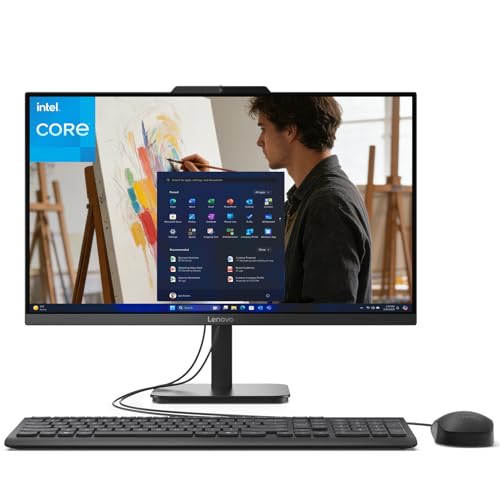
The Lenovo IdeaCentre 24 distinguishes itself with a generous 16GB of RAM and a 1TB PCIe SSD at a price point where competitors typically offer half the memory and storage. This combination allows for comfortable multitasking with multiple applications open simultaneously and provides ample local storage for document archives, project files, and media without needing external drives. The 23.8-inch Full HD IPS display with anti-glare coating and 99% sRGB coverage delivers clear, color-accurate visuals for document work.
Powered by the Intel N100 processor, this all-in-one handles typical office tasks like word processing, web browsing, and video conferencing smoothly. The processor is not designed for heavy computational workloads or intensive multitasking with dozens of applications, but for the standard office workflow of a few applications at a time, it performs admirably. The included wired keyboard and mouse complete the setup, and the Jet Black finish gives it a professional appearance.
Connectivity includes Wi-Fi 6 for fast wireless networking and a solid port selection with USB-A, USB-C, HDMI, and Ethernet ports. The all-in-one design keeps the desk clean, and the inclusion of a built-in webcam with microphone eliminates the need for external peripherals for video calls. This model is particularly well-suited for home offices where storage capacity and clean aesthetics are priorities.
Why it’s great
- Generous 16GB RAM for smooth multitasking
- Large 1TB SSD eliminates storage concerns
- Quality IPS display with anti-glare coating
- Includes wired keyboard and mouse
Good to know
- Intel N100 processor limits heavy workloads
- No HDMI input for use as standalone monitor
5. GMKtec Mini PC K10 Workstation

The GMKtec K10 packs workstation-grade power into a footprint barely larger than a notebook. Its Intel Core i9-13900HK processor with 14 cores and 20 threads reaching 5.4GHz delivers performance that rivals full-size business towers, making it capable of handling the most demanding office tasks — large datasets, virtual machines, extensive spreadsheet modeling, and video conferencing simultaneously without any slowdown. The 32GB of DDR5 RAM at 5600MHz provides ample headroom for memory-intensive workflows.
Storage is equally impressive with a 1TB PCIe Gen4 NVMe SSD and support for up to three M.2 drives, allowing expansion up to 12TB. The quad-display support via two HDMI 2.0 ports, one DisplayPort 1.4 supporting 8K, and a USB-C with DP Alt Mode makes this ideal for financial analysts, traders, or developers who need multiple screens. The inclusion of a COM port adds capability for industrial and serial device connectivity that some business environments require.
The compact size mounts discreetly behind a monitor, saving significant desk space. Despite its power, the cooling system keeps noise levels remarkably low during normal office use. Wi-Fi 6 and Bluetooth 5.2 provide current-generation wireless connectivity, and the 2.5 Gigabit Ethernet port ensures fast wired network speeds. This mini PC is the best choice for professionals who need high performance but have limited desk space.
Why it’s great
- Exceptional i9 processor with 14 cores
- 32GB DDR5 RAM for intensive multitasking
- Quad-display support including 8K output
- Ultra-compact form factor saves desk space
Good to know
- No dedicated graphics for creative workloads
- Power button can be hard to locate in bright light
6. HP Pro Tower Desktop 32GB RAM
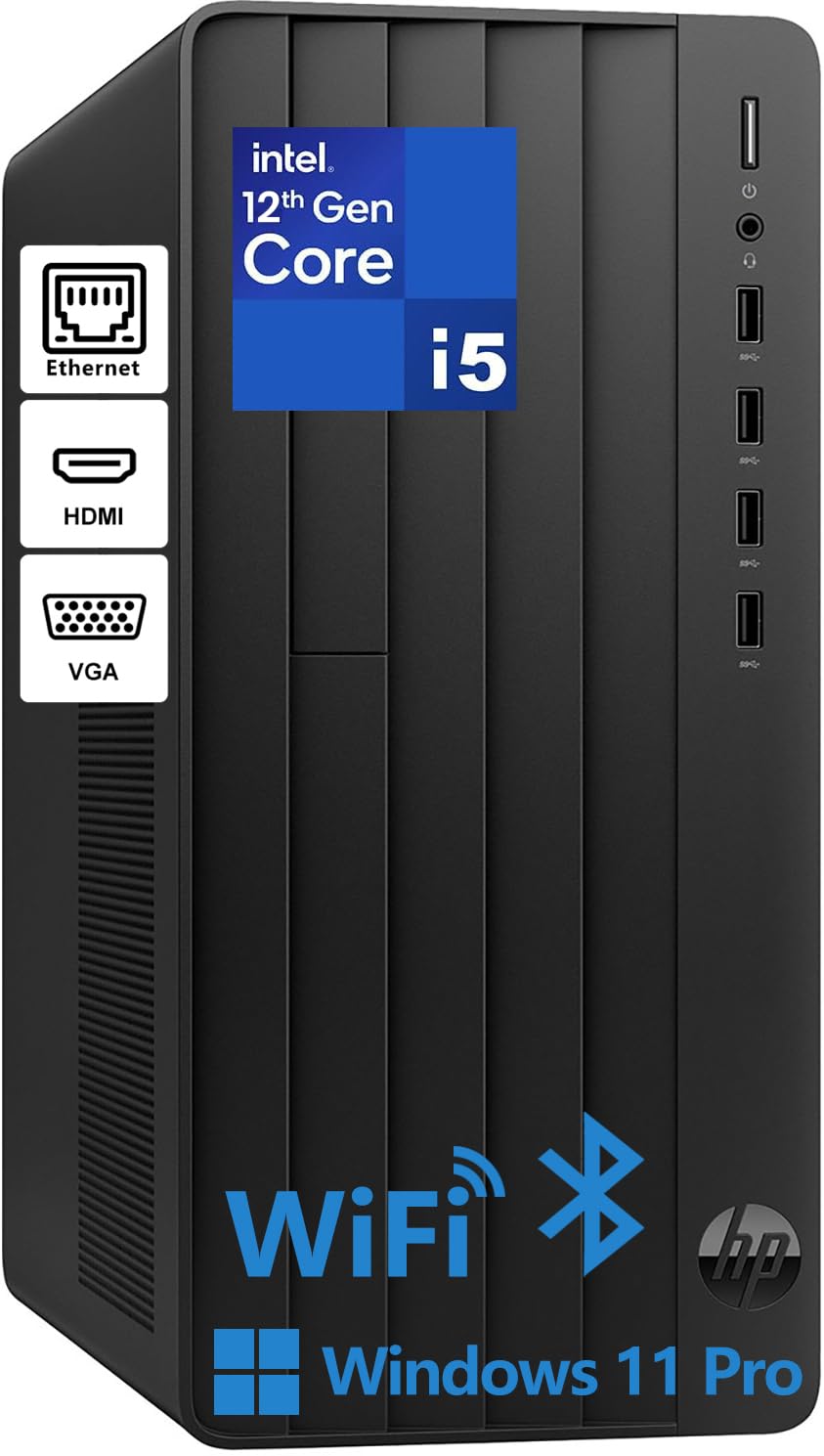
The HP Pro Tower with 32GB of RAM and a 1TB SSD addresses the two most common performance bottlenecks in office computing — insufficient memory and slow storage. The Intel Core i5-12500 processor provides the same strong 6-core, 12-thread performance as the standard Pro Tower, but the doubled RAM transforms the multitasking experience. Running a full Office suite, a web browser with 30 tabs, Slack, email client, and video conferencing software simultaneously feels effortless.
The 1TB SSD provides generous local storage for document archives, project files, and media content. The Intel UHD Graphics 770 supports dual displays through HDMI and VGA ports, though power users may need an adapter for modern monitor connections. The tower includes front USB 3.0 ports for easy peripheral access and rear USB 2.0 ports for keyboards and mice. The compact size, measuring roughly 12 by 6 by 13 inches, fits well in most office environments.
Security features include TPM 2.0 encryption for sensitive data and a padlock loop for physical security in shared workspaces. The wired keyboard and mouse included in the bundle get you started immediately. This configuration is ideal for professionals who keep many applications open throughout the day and want a machine that will remain responsive for years without needing upgrades.
Why it’s great
- 32GB RAM handles extreme multitasking
- 1TB SSD provides fast, spacious storage
- Strong i5 processor for demanding workflows
- TPM 2.0 security for sensitive data
Good to know
- Single RAM stick limits dual-channel performance
- Only one memory slot, uses laptop-style SODIMM
7. Dell Tower Desktop ECT1250

The Dell ECT1250 represents a significant step forward with its Intel Core Ultra 7 processor, which includes a dedicated AI engine for on-device AI processing. This translates to practical benefits for office users — more efficient background task management, smarter power distribution, and faster response times in AI-enhanced applications. The 32GB of DDR5 RAM and 1TB M.2 SSD provide the memory and storage foundation needed for a modern, fast workflow.
Multi-monitor support is a standout feature here. The system can drive up to four FHD displays using DisplayPort connections with daisy chaining, or two 4K displays through HDMI 2.1 and DisplayPort. For professionals who work with multiple reference documents, financial monitoring, or code across several screens, this capability dramatically improves productivity. The built-in SD card reader is a useful addition for photographers and content creators who work in office environments.
The tool-less chassis design makes upgrades straightforward — the removable side panel and tool-less entry allow quick access to internal components. Dell includes one year of onsite service, meaning a technician will come to your location if hardware issues cannot be resolved remotely. The design incorporates recycled materials and features refined corners that give it a modern, professional appearance suitable for any office setting.
Why it’s great
- Intel Core Ultra 7 with built-in AI acceleration
- Supports up to four FHD displays
- Tool-less chassis for easy upgrades
- 1-year onsite service included
Good to know
- Only one USB-C port
- No internal 2.5-inch drive bays
- Front audio jack does not support recording
8. Dell Pro Tower i7-14700 Desktop

The Dell Pro Tower with an Intel Core i7-14700 processor is built for the most demanding office environments where performance is non-negotiable. The 20-core processor, with a mix of performance and efficiency cores reaching up to 5.4GHz, handles everything from complex financial modeling and database management to 4K video editing and software development without hesitation. The 64GB of DDR5 RAM provides enough memory to run multiple virtual machines, large datasets, and dozens of applications simultaneously.
The 2TB PCIe SSD offers massive local storage capacity for enterprise users who work with large files or need to maintain extensive local archives. Dual 4K display support via HDMI and DisplayPort enables efficient multi-monitor workflows for traders, analysts, and creative professionals. Windows 11 Pro includes advanced security features like BitLocker encryption and remote desktop capabilities for enterprise deployment and management.
This system is designed for business continuity and scalability. The Dell engineering ensures reliability for 24/7 operation, and the tower chassis allows for expansion as needs grow. It is important to note that this configuration does not include built-in Wi-Fi, so a wired Ethernet connection or a Wi-Fi adapter will be necessary for wireless networking. This is the right machine for professionals who cannot afford any compromise in performance.
Why it’s great
- 20-core i7 processor for extreme workloads
- 64GB DDR5 RAM handles intensive tasks
- 2TB SSD provides massive storage capacity
- Dual 4K display support for multi-monitor setups
Good to know
- No built-in Wi-Fi, requires wired connection
- Premium price reflects enterprise-grade components
9. Lenovo IdeaPad 15.6 FHD Touchscreen Laptop

The Lenovo IdeaPad targets professionals who want a complete laptop solution with generous specifications at a competitive price point. The 40GB of DDR4 RAM is an unusually high amount for this class of machine, allowing for extreme multitasking scenarios with many applications and browser tabs open simultaneously. The combined 2.5TB of storage, consisting of a 2TB SSD plus a 512GB docking station, provides ample space for local file archives and backups.
The 15.6-inch Full HD touchscreen display with anti-glare coating works well for presentations and collaborative work. The 10-core Intel Core i5 processor handles standard office applications and productivity tasks competently. The numeric keypad is a practical addition for users who work heavily with spreadsheets and data entry. The inclusion of a Microsoft Office license and PLUSERA earphones adds to the value proposition for users who prefer an out-of-box solution.
Portability features include up to 10 hours of battery life, rapid charge capability, and a flip-to-start feature for instant booting. The camera privacy shutter provides peace of mind for remote work. Build quality feedback suggests the chassis feels less premium than higher-end models, but the specifications for the price point are difficult to match. This laptop suits users who prioritize raw memory and storage capacity over build refinement or brand prestige.
Why it’s great
- Exceptional 40GB RAM for extreme multitasking
- 2.5TB total storage capacity
- Includes Microsoft Office license
- Touchscreen display with numeric keypad
Good to know
- Build quality feels less premium than competitors
- Battery life may fall short of advertised estimates
- Chassis flexibility with single-hand corner lift
10. Lenovo 24 FHD All-in-One Desktop

The Lenovo 24 All-in-One offers a complete desktop experience at a competitive price point, making it accessible for budget-conscious office setups. The 23.8-inch Full HD IPS display provides clear, color-accurate visuals with wide viewing angles, which is a step above the VA panels found at similar price points. The anti-glare coating reduces reflections in brightly lit office environments, and the 99% sRGB coverage ensures decent color reproduction for presentations and document work.
The Intel N100 processor with 4 cores and 3.4GHz turbo speed handles basic office tasks like word processing, email, web browsing, and video calls competently. The 8GB of DDR4 RAM and 256GB PCIe SSD provide enough memory and storage for light workloads with a few applications open at once. Wi-Fi 6 and Bluetooth 5.2 ensure modern wireless connectivity, and the port selection includes USB-A, HDMI, and Ethernet for peripheral connections.
The included white wireless keyboard and mouse complete the package, which is particularly useful for users who need a full setup without additional purchases. Build quality reports note keyboard compatibility issues with incorrect key mapping, so checking functionality early in the return window is advisable. This system works well for reception desks, school computer labs, or home offices where the workload stays within basic productivity applications.
Why it’s great
- Quality FHD IPS display at budget price
- Includes wireless keyboard and mouse
- Wi-Fi 6 and Bluetooth 5.2 connectivity
- Compact all-in-one saves desk space
Good to know
- 8GB RAM limits heavy multitasking
- Some keyboard units have incorrect key mapping
- Processor suited for light tasks only
11. HP 21.45 All-in-One Desktop PC
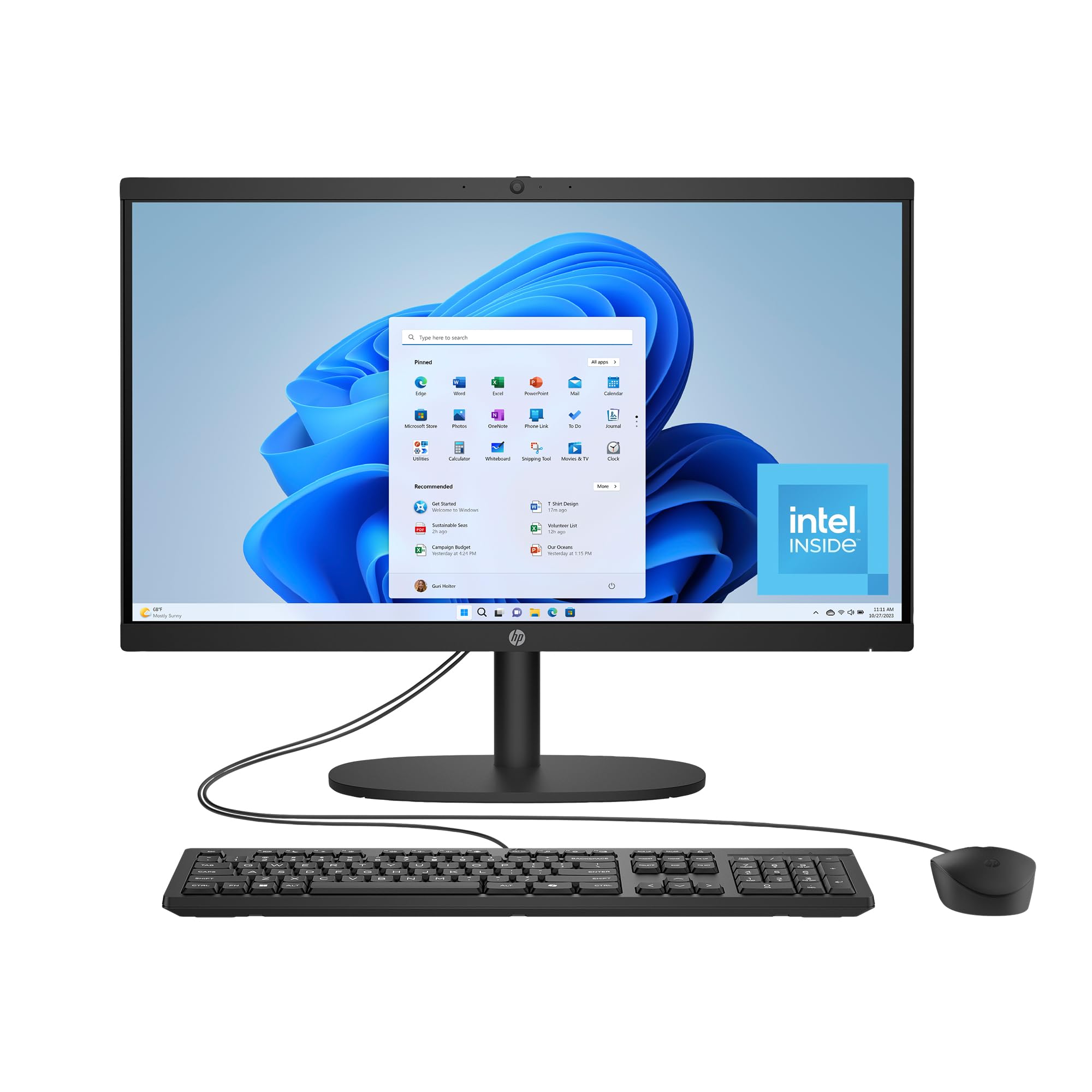
The HP 21.45 All-in-One is an entry-level desktop designed for users with basic computing needs — email, web browsing, document editing, and media consumption. The Intel Processor N200 provides sufficient performance for these tasks while maintaining energy efficiency, and the 512GB SSD ensures fast boot times and application loading compared to traditional hard drives. The 8GB of RAM handles light multitasking, though users will want to avoid running too many applications simultaneously.
The 21.45-inch Full HD VA display offers a decent viewing experience for the price, though the VA panel has narrower viewing angles than IPS displays found on more expensive models. The flicker-free DC Dimming technology is a practical inclusion for users who are sensitive to screen flicker during long sessions. The AI-powered noise reduction on the built-in microphone helps your voice stay clear during video calls, and the manual camera shutter provides privacy assurance when the camera is not in use.
HP has incorporated recycled materials into the construction, and the system carries EPEAT Gold and ENERGY STAR certifications for environmental responsibility. Wi-Fi 6 and Bluetooth 5.3 provide modern wireless connectivity. The all-in-one design eliminates tower clutter, though the 21.45-inch screen may feel small for users accustomed to larger displays. This is a suitable choice for basic office workstations, student desks, or as a secondary computer for light duties.
Why it’s great
- Flicker-free display with DC dimming technology
- AI noise reduction for clearer voice calls
- Manual camera shutter for privacy
- Environmentally certified with recycled materials
Good to know
- VA panel has limited viewing angles
- 8GB RAM limits multitasking capabilities
- 21.45-inch screen smaller than typical office displays
- Some units reported serial number mismatch issues
FAQ
How much RAM do I actually need for Microsoft Office and web browsing?
Is an All-in-One desktop better than a tower for office work?
Does the processor generation matter more than the model number?
Can a mini PC replace a traditional desktop for office work?
What is the minimum display size comfortable for full-time office work?
Final Thoughts: The Verdict
For most users, the best computer for office work winner is the HP Pro Tower 290 G9 because it combines a strong six-core processor, 16GB of RAM, and a fast SSD in an upgrade-friendly tower design at a price that delivers genuine value. If you want a clutter-free desk with strong display quality and eye comfort features, grab the Dell 24 All-in-One EC24250. And for uncompromising performance in a compact footprint, nothing beats the GMKtec Mini PC K10 for power users who need workstation-class performance without sacrificing desk space.

Mo Maruf
I created WellFizz to bridge the gap between vague wellness advice and actionable solutions. My mission is simple: to decode the research and give you practical tools you can actually use.
Beyond the data, I am a passionate traveler. I believe that stepping away from the screen to explore new environments is essential for mental clarity and physical vitality.