Our readers keep the lights on and my smoothie glass nicely filled. As an Amazon Associate, I earn from qualifying purchases.
Specs are compiled from manufacturer listings and verified buyer reviews and can change over time — please confirm the key details on the product page before buying.
When you are juggling massive 4K canvases in Photoshop, stacking 50+ layers in After Effects, or rendering a 3D scene, the difference between a computer that keeps up and one that leaves you staring at a spinning wheel depends on the graphics card and the processor. The picks below prioritize dedicated graphics and processor grunt so you spend your time creating, not waiting.
I’m Mohammad Maruf — the founder and writer behind WellFizz. This guide is built by comparing the manufacturers’ published specifications and the patterns across verified customer reviews, so you get each pick’s real strengths and trade-offs instead of marketing spin.
if you need a quiet workstation for an office or a dual-4K rendering beast, this look at the computer for graphic design breaks down the models that actually deliver the necessary dedicated graphics and processor grunt without the bloat.
Our Picks at a Glance


How To Choose The Best Computer For Graphic Design
Choosing a graphic design computer differs from picking one for gaming or spreadsheets. You need a graphics card that accelerates pen strokes and a processor that handles complex filter stacks without lag. These two specs separate a professional tool from a toy.
VRAM is your real canvas size
A graphics card’s dedicated video memory (VRAM) holds the textures and layers you are editing. If you run out, your software hits the system RAM or the hard drive, and the lag makes detailed work miserable. For graphic design, 8 GB is the entry point; 12 GB or more lets you work on multi-layered 4K composites without stutter.
Processor cores for filter stacks
Graphic design software benefits from multiple cores when applying complex filters or exporting large files. A processor like the AMD Ryzen 9 or Intel Core i7/i9 with 8 or more cores keeps things moving. A 5.6 GHz max turbo speed is a solid target, as high single-core speed drives snappy canvas responses.
Quick Comparison
| Model | Best For | Graphics Card RAM | Processor Speed | RAM | Amazon |
|---|---|---|---|---|---|
| iBUYPOWER Element★ Best Overall | Premium overall rendering | 12 GB GDDR7 | 5.6 GHz | 32 GB DDR5 | Amazon |
| KOTIN Gaming PCCreative Workstation | Dual-screen creative workflow | 12 GB GDDR7 | 5.5 GHz | 32 GB DDR5 | Amazon |
| msi Codex Z2Sleek Power | Streaming and 4K video work | 12 GB GDDR7 | 5.0 GHz | 32 GB DDR5 | Amazon |
| The Horizon Autherium | Massive file multitasking | 12 GB OC | 5.3 GHz | 64 GB DDR5 | Amazon |
| HP Envy Desktop | Extreme CPU-intensive rendering | 8 GB GDDR6 | 6.0 GHz | 64 GB DDR5 | Amazon |
| Alienware Aurora (5070) | Premium AI-powered workload | 12 GB GDDR7 | 5.3 GHz | 32 GB DDR5 | Amazon |
| YAWYORE Gaming PC | Budget 1440p design | 8 GB GDDR7 | 4.6 GHz | 32 GB DDR4 | Amazon |
| Lenovo Legion Tower 5i | Expandable mid-range build | 8 GB GDDR6 | 5.3 GHz | 16 GB DDR5 | Amazon |
| Alienware Aurora (5060 Ti) | Entry-level AI-assisted design | 8 GB GDDR6 | 5.5 GHz | 16 GB DDR5 | Amazon |
| Dell Pro Tower | Corporate design workstation | Integrated | 5.4 GHz | 32 GB DDR5 | Amazon |
| Dell Tower ECT1250 | Dual 4K office design | Integrated | 5.3 GHz | 32 GB DDR5 | Amazon |
| ASUS V500 | Professional multi-monitor setup | Integrated | 4.9 GHz | 32 GB DDR5 | Amazon |
| HP OmniDesk | Compact design on a budget | Integrated | 5.1 GHz | 32 GB DDR5 | Amazon |
In‑Depth Reviews
1. iBUYPOWER Element Gaming PC
Our pick — over 4★ from 2,500+ verified ratings; the strongest balance of quality and price.
The 12GB graphics card that chews through big canvases without reloading.
This machine gives you a generous 12 GB of dedicated graphics memory on the RTX 5070 — a 50% larger buffer than the 8 GB on the YAWYORE RTX 5060, which matters when you are scrubbing through layered 4K PSDs. The AMD Ryzen 9 7900X processor tops out at 5.6 GHz, and buyers report it “runs latest games on Ultra without lag,” a sign the cooling and components handle sustained workloads well.
The 32 GB of DDR5 RAM and a 1 TB NVMe SSD mean you can keep your current project and your entire assets library open at once. It also arrives with zero bloatware, according to the maker, which saves you the first-hour cleanup most prebuilts need. The tempered glass case includes 16-color RGB lighting and a free keyboard and mouse.
The VRAM Advantage
- 12 GB GDDR7 VRAM for large-layer design files
- 5.6 GHz max turbo speed for snappy filter rendering
- Water cooling keeps noise down during long exports
The Trade-Offs
- Some owners mention the 1 TB SSD fills fast with design project files
- Gamer-focused aesthetics may not suit every professional office
The smart pick if: You work with multi-layer 4K files and want a smooth, lag-free canvas from the start.
Look elsewhere if: You need a minimal, quiet office-style tower without RGB lights.
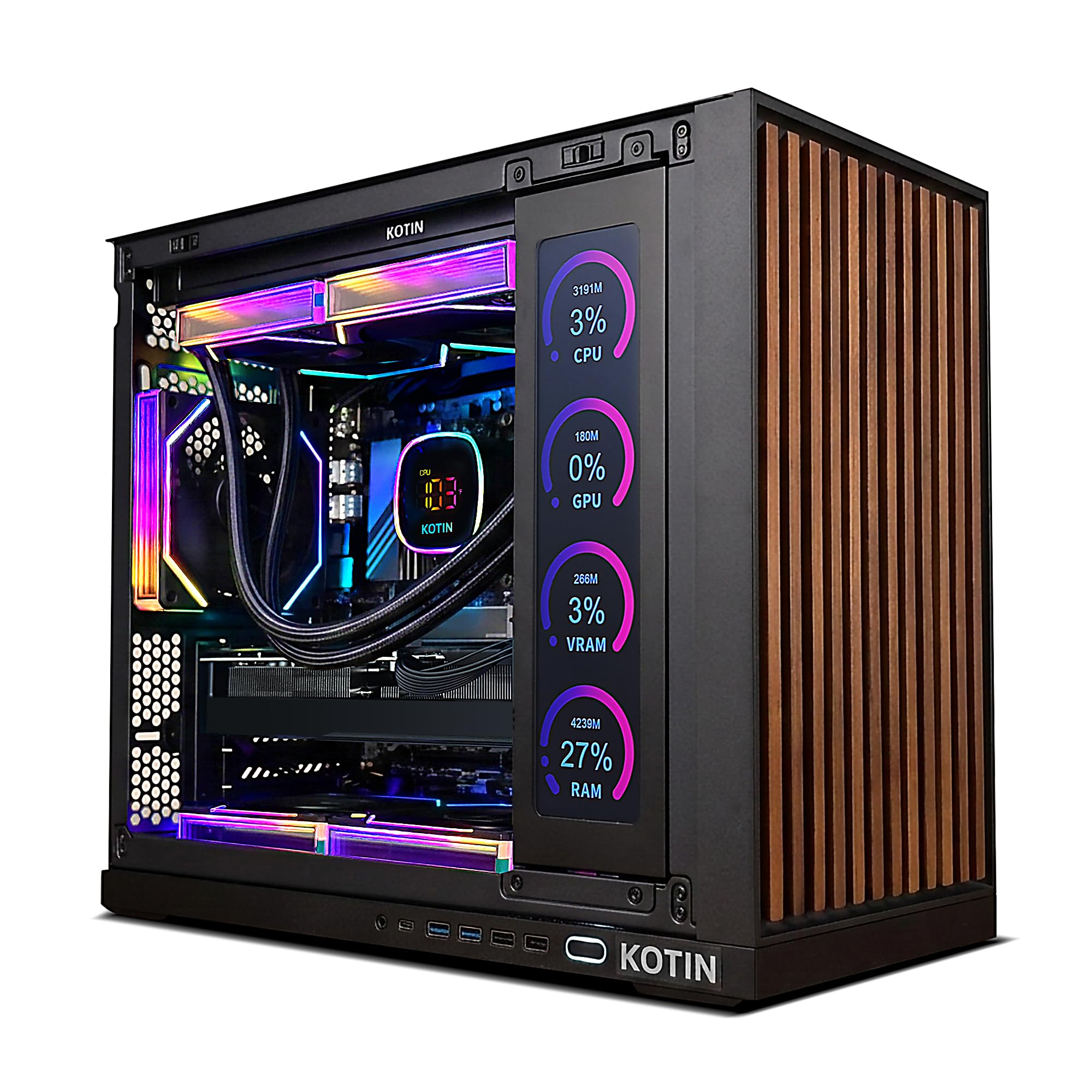
2. KOTIN Prebuilt Gaming PC
A built-in dashboard so you see temps while you render.
KOTIN packs an AMD Ryzen 7 9700X processor and a GeForce RTX 5070 12 GB into a case with an integrated 11.3-inch secondary display that shows you CPU and GPU temperatures, usage, and even the weather. The 32 GB of DDR5 memory at 6000MHz and a 1 TB PCIe 4.0 NVMe SSD mean your scratch disks are fast enough for large video exports.
The 360mm liquid cooler and an 850W 80+ Gold power supply give this machine headroom for future upgrades. One reviewer noted it “handles many games easily” and found the tower quiet. The 1-year limited warranty and lifetime free technical support are a bonus for confidence.
Dashboard appeal: The secondary screen lets you monitor thermal load without alt-tabbing, useful during long renders.
The reality: The side display is a design-centric differentiator that many competitors lack at this price tier.
Reach for this if: You want a visually distinctive workstation and appreciate real-time thermal monitoring.
Not for: Tight desks — the 360mm radiator case is larger than a standard mid-tower.
3. msi Codex Z2 Gaming Desktop
Four fans and a compact chassis for steady creative marathons.
The MSI Codex Z2 features an AMD Ryzen 7 8700F, an 8-core processor boosting up to 5.0 GHz, paired with an NVIDIA GeForce RTX 5070 with 12 GB of dedicated memory. It comes with 32 GB of DDR5 RAM and a 2 TB m.2 NVMe SSD — the doubled storage is a real relief when your design library and project files pile up.
One buyer mentioned it “handles 3x 27-inch 4K monitors easily,” which is a direct fit for a graphic designer’s multi-display layout. The four-system fan air cooler configuration (three front, one rear) keeps heat moving. The Bluetooth module was flagged by a reviewer as poor, but a quick upgrade with a TP-Link BE9300 card was an easy fix they detailed.
Storage-first design: The 2 TB drive is twice the capacity of most competitors, meaning fewer external backups during a project.
Quiet under load: The four-fan setup stays quieter than many single-fan workstations.
Best for: Designers who keep years of assets locally and run three monitors simultaneously.
Skip if: You need out-of-the-box Bluetooth stability for peripherals — you may need a PCIe card swap.
4. The Horizon Autherium Dragon RGB I9 RTX Gaming PC

5 TB of total storage means never saying “I need to free up space”.
This Horizon PC packs 64 GB of DDR5 RAM (double the 32 GB found in most rivals) and a total of 5 TB of combined storage — a 1 TB NVMe SSD that reaches up to 7000MB/s for active projects, plus a 4 TB 7200RPM HDD for archiving past work. The Core i9 processor and RTX 5070 OC with 12 GB of VRAM handle both the heaviest filter stacks and VR-ready design previews.
One reviewer confirmed it “handles CAD and 3D printing without lag” and that the 11-fan cooling setup (a mix of 360mm AIO liquid cooling and case fans) keeps noise low. The 3-year parts warranty and 5-year labor warranty reduce the risk of a costly repair after the first year. It also includes Wi-Fi up to 2.4GB/s and Bluetooth.
The Capacity Advantage
- 64 GB RAM for massive multi-software workflows
- 5 TB total storage (1 TB NVMe + 4 TB HDD)
- 360mm liquid cooling for sustained rendering
The Downside
- 11 fans create noticeable heat output in a small room
- Case design with dragon front panel is not office-discreet
Ideal for: Designers managing huge media libraries and 3D files who want local storage, not cloud dependance.
Consider another if: Your workspace is an open office where a subdued look matters.
5. HP Envy Desktop PC

A 6.0 GHz processor for when every second of export time matters.
The HP Envy Desktop is built around the Intel Core i9-14900K, a 14th-generation processor that turbos up to 6.00 GHz — the fastest single-core speed in this lineup. That raw clock speed directly translates to faster filter application and snappier software responsiveness. It comes with a generous 64 GB of DDR5 RAM and a 2 TB SSD.
The NVIDIA GeForce RTX 3050 with 8 GB of dedicated GDDR6 memory is the weakest link here for graphic design. One owner reported “processor loading rarely exceeds 20%” while running complex stock charts across four 4K displays, but the RTX 3050 will be a bottleneck on 3D rendering or heavy After Effects composites. The system includes Realtek Wi-Fi 6 and Bluetooth 5.3.
The CPU Power
- 6.00 GHz max turbo speed — class-leading for single-core tasks
- 64 GB RAM for running design suites plus VMs
- 2 TB SSD gives you breathing room for project storage
The Weak Spot
- The RTX 3050 8 GB is underpowered for 3D and video work
- Integrated design limits easy GPU upgrades compared to a gaming chassis
Who this fits: The designer who prioritizes raw CPU speed for 2D design and stock trading, not 3D rendering.
Not for: Anyone planning to render 3D scenes or edit 4K video professionally — upgrade the GPU plan.
6. Alienware Aurora Gaming Desktop (RTX 5070)

Alienware Command Center gives you full lighting and power control.
This Alienware Aurora carries an Intel Core Ultra 7 265F processor and an NVIDIA GeForce RTX 5070 with 12 GB of memory. It also includes 32 GB of DDR5 RAM and a 1 TB SSD, with a 1000W Platinum-rated power supply offering headroom for future upgrades. The matte basalt black case includes customizable AlienFX stadium lighting.
One customer observed they could “run Escape from Tarkov and Delta Force with ease,” and another confirmed it is “very quiet” during use. The 1-year onsite Dell service means a technician comes to you if a hardware issue can’t be resolved remotely. The open metal bay door issue was reported by one buyer, so check the chassis on arrival.
Service advantage: Dell’s onsite warranty is a genuine safety net for a business-critical tool.
Build concern: A verified review mentioned the tower arrived with a vacant bay, so inspect the hardware on day one.
The pick if: You value premium brand support and want a quiet, easy-to-setup workstation.
Consider alternatives if: You expect the computer to work flawlessly from the start without inspection.
7. YAWYORE Gaming PC

DDR4 memory keeps the price down without killing performance.
The YAWYORE Gaming PC uses an AMD Ryzen 7 5700X processor (up to 4.6 GHz) and an RTX 5060 with 8 GB of GDDR7 memory. It comes with 32 GB of DDR4 RAM (3200MHz) and a 1 TB M.2 NVMe SSD.
One buyer confirmed it “runs Forza Horizon 6 smoothly” and customers note the 650W 80 Plus Bronze power supply and MSI B550M-A PRO motherboard provide a solid upgrade path. The case includes ARGB fans and a remote control for the lighting. The trade-off is that DDR4 RAM is older technology, which may matter if you frequently move large files between the system and scratch disk.
The Savings
- 8 GB GDDR7 VRAM for 1440p design work
- 32 GB DDR4 RAM provides ample headroom for multitasking
- 650W PSU leaves room for future graphics card upgrades
The Compromise
- DDR4 RAM is slower than DDR5 for heavy data transfers
- 4.6 GHz processor is the slowest maximum speed here
A smart budget pick if: Your work stays at 1440p resolution and you want upgrade potential later.
Think twice if: You regularly work with 4K multi-layer files — the VRAM will be tight.
8. Lenovo Legion Tower 5i

A tool-less side panel for easy future storage and GPU swaps.
The Lenovo Legion Tower 5i features an Intel Core Ultra 7 265F processor (up to 5.3 GHz) and an NVIDIA GeForce RTX 5060 Ti with 8 GB of GDDR6 memory. It ships with 16 GB of DDR5 RAM, expandable up to 128 GB, giving you a path to add memory as your design projects grow. The storage is a 1 TB drive, and connectivity includes 2.5G Ethernet and WiFi 6E.
One user highlighted it “runs golf simulator perfectly with no lag” and confirmed the specs are accurate, unlike vague “up to” claims from other brands. The 180W tune air cooling keeps the system quiet during long rendering sessions. The only notable downside is the 8 GB VRAM, which is the minimum threshold for 4K design work.
Future-ready chassis: The tool-less transparent side panel and RAM expansion to 128 GB make this an easy machine to upgrade over years.
GPU limit: The RTX 5060 Ti is adequate for 1440p, but you will want more VRAM for 4K.
Choose this if: You want a mid-range workstation you can upgrade piece by piece rather than replacing the whole system.
Skip if: You need 4K-ready VRAM from the start — the iBUYPOWER or KOTIN have 12 GB.
9. Alienware Aurora Gaming Desktop (RTX 5060 Ti)
A 500W Platinum PSU keeps energy costs low during overnight renders.
This lower-tier Alienware Aurora uses an Intel Core Ultra 7 265F processor and an NVIDIA GeForce RTX 5060 Ti with 8 GB of GDDR6 memory. It comes with 16 GB of DDR5 RAM and a 1 TB SSD. The 500W Platinum-rated power supply is highly efficient, meaning lower electricity bills if your system runs long rendering sessions daily.
One shopper added it “runs most triple-A games” and another confirmed it is “whisper quiet.” The Alienware Command Center lets you control the AlienFX lighting across the whole ecosystem. The clearance panel shows off the internal components. The catch for designers is the 16 GB RAM and 8 GB VRAM, both tight for professional 4K work.
The Efficiency Angle
- 500W 80 Plus Platinum PSU for low power draw
- Whisper-quiet operation suitable for a shared workspace
- Alienware Command Center for complete software control
The Limits
- 16 GB RAM may fill quickly with design software and browser tabs
- 8 GB VRAM is the baseline for 4K work, not ideal for complex composites
Best for: The designer on a budget who loves the Alienware aesthetic and works mostly in 2D at 1080p or 1440p.
Look elsewhere: If you need heavy 3D rendering or 4K video export without upgrading.
10. Dell Pro Tower PC Desktop

A 20-core i7 for multitasking across every design app at once.
The Dell Pro Tower runs on an Intel Core i7-14700 processor with 20 cores, reaching up to 5.4 GHz. It includes 32 GB of DDR5 RAM and a 1 TB PCIe SSD. The Intel UHD Graphics 770 is integrated, not dedicated, so this is a system for 2D design where you do not need GPU acceleration for 3D modeling or video rendering.
One reviewer noted it “boots fast” and another said it is “very quiet.” It supports dual 4K displays via HDMI and DisplayPort, which is a solid configuration for a graphic designer running a large canvas plus a tools palette. The lack of built-in Wi-Fi is a genuine inconvenience — you will need a USB Wi-Fi adapter or an Ethernet cable. One reviewer also noted lower build quality than older Dell XPS models.
CPU-heavy workflow: The 20 cores handle software compilation and data analysis better than visual rendering.
Missing wireless: No built-in Wi-Fi means you are wired to the router unless you add a USB adapter.
Who it works for: Designers working primarily in 2D layout tools who want a fast, secure corporate workstation.
Not suitable for: Anyone doing 3D rendering, video editing, or GPU-accelerated tasks — the integrated graphics will stall.
11. Dell Tower Desktop ECT1250

Intel Core Ultra brings built-in AI acceleration for creative software.
This Dell Tower features an Intel Core Ultra 7-265 processor with AI capabilities, 32 GB of DDR5 RAM, and a 1 TB M.2 SSD. It supports up to four FHD monitors via DisplayPort daisy chaining, or two 4K displays. The tool-less side panel makes upgrades a breeze, and a built-in 3.0 SD card reader is handy for photographers.
One reviewer confirmed it “boots in under 30 seconds” and another noted it runs “three monitors, charts, scans, large trading software easily.” The 180W power supply limits GPU upgrades, so this is a capable machine for 2D design and office work but not for adding a high-power dedicated graphics card later. Reviewers point out a single RAM stick, meaning you will want to add another for dual-channel performance.
The Architecture
- Intel Core Ultra 7 with built-in AI for supported creative apps
- Tool-less case for easy RAM and storage upgrades
- SD card reader built in for direct photo imports
The Catch
- 180W PSU is not powerful enough for a dedicated graphics card
- Only front audio jack, no 2.5-inch drive mounts
Best for: The graphic designer who wants a modern, AI-ready office PC with room to add more RAM.
Choose something else if: You plan to add a dedicated GPU later — this power supply cannot support it.
12. ASUS V500 Home & Business Tower Desktop

A 10-core Intel i7 that boots faster than you can grab coffee.
The ASUS V500 uses a 10-core Intel Core i7-13620H processor (up to 4.9 GHz) and comes with 32 GB of DDR5 memory and a 1 TB SSD. It supports dual displays via HDMI and DisplayPort, making it a straightforward workstation for a designer who works on a single large monitor plus a reference screen. It runs Windows 11 Pro, which includes advanced security features for client data protection.
One buyer mentioned it is “very quiet, fast, lightweight” and recommended it for home and business use. The package includes a wired keyboard and mouse, plus an A-DATA 64GB USB flash drive for extra portable storage. The integrated graphics mean this is strictly a 2D machine. Another buyer warned that Windows 11’s default fast restart caused a hang during setup, but it was fixed by a cold boot.
Ready to work: Windows 11 Pro and a 64 GB flash drive included reduce the setup friction.
2D only: No dedicated GPU means this handles Illustrator and InDesign well, but not Premiere or Blender.
A good fit for: The print and vector designer who needs a reliable, quiet office machine with dual monitors.
Avoid if: You need GPU acceleration for 3D, video, or heavy Photoshop filters — the integrated graphics will lag.
13. HP OmniDesk Desktop Computer

AMD Ryzen AI gives you 16 NPU TOPS for smart photo editing.
The HP OmniDesk runs on an AMD Ryzen 7 8700G processor with integrated Radeon 780M graphics and 16 NPU TOPS for AI acceleration in supported software. It includes 32 GB of DDR5-5200 memory and a 1 TB PCIe Gen4 NVMe SSD. The compact tower measures 12.40 inches long by 6.10 inches wide, making it the smallest footprint in this list.
One reviewer called it “a decent, upgradable starter system” and another said it is “great for the practical user.” Connectivity includes Wi-Fi 6 and Bluetooth 5.4, plus multiple USB ports. The integrated graphics are efficient but not powerful enough for heavy GPU workloads. It includes an HP black wireless keyboard and mouse combo. The small size also means limited internal space for adding a dedicated GPU later.
The Space-Saving Design
- Compact 6.10-inch wide chassis fits on a small desk
- 32 GB DDR5 RAM and fast Gen4 NVMe storage
- AMD Ryzen AI for smart photo editing tasks
The Limitation
- Integrated Radeon 780M graphics cannot handle 3D or video rendering
- Small form factor limits upgrade options for the GPU
Ideal for: A graphic designer with limited desk space who works in 2D vector and raster software.
Not for: Heavy 3D modeling, video editing, or any workflow that needs a dedicated graphics card.
Understanding the Specs
Graphics Card VRAM
The video memory on a dedicated graphics card acts as your working canvas in design software. Every layer, texture, and filter you apply lives in this memory while you edit. If you hit the limit, your computer starts using your main system RAM or hard drive, causing lag. For graphic design, 8 GB is the entry point for 1440p work, while 12 GB or more gives you comfortable room for multi-layer 4K composites and 3D textures. An integrated graphics card (built into the processor) shares your system RAM and is only suitable for 2D vector and basic raster work.
Processor Clock Speed
The maximum turbo frequency of a processor (measured in GHz) determines how fast a single task runs — like applying a complex filter or exporting a file. A higher number, such as 5.6 GHz, means snappier real-time canvas response and faster export times. More is better, but the type of processor (AMD Ryzen vs Intel Core) also matters because of differences in architecture. For graphic design, a processor with a max speed of 5.0 GHz or higher is the balance for responsive work in Photoshop, Illustrator, and After Effects.
FAQ
Is a gaming PC good for graphic design?
How much VRAM do I need for graphic design in 2025?
Do I need a dedicated graphics card for graphic design?
What processor speed is best for Photoshop and After Effects?
Can a computer with integrated graphics run Adobe Creative Suite?
Is 16 GB of RAM enough for a graphic design computer in 2025?
How fast should the SSD be for a design workstation?
Will a 500W power supply limit my ability to upgrade the graphics card later?
What is the difference between GDDR6 and GDDR7 graphics memory?
Do I need a 4K-ready graphics card for 1440p monitor design work?
Final Thoughts: The Verdict
For most designers, the computer for graphic design winner is the iBUYPOWER Element Gaming PC because its 12 GB RTX 5070 and 5.6 GHz Ryzen 9 processor handle both 2D and 3D work without stutter or excessive heat. If you want a larger storage pool for massive media libraries, grab the The Horizon Autherium Dragon RGB I9 RTX Gaming PC with its 5 TB of total space and 64 GB RAM. And for a budget-friendly entry into 1440p design, the standout is the YAWYORE Gaming PC with its 32 GB RAM and upgrade-friendly platform.
How We Picked
We do not accept paid placement. Every pick is matched to a real buyer and a real use-case; we do not hands-on test units.
Sources & Methodology
Specifications: manufacturer listings and product documentation. Review insights: verified customer reviews, as of July 2026. Pricing: not shown on this page (it changes often); check the current price via the retailer link.
As an Amazon Associate, WellFizz earns from qualifying purchases. This does not affect which products we feature.
Related Guides

Mo Maruf
I created WellFizz to bridge the gap between vague wellness advice and actionable solutions. My mission is simple: to decode the research and give you practical tools you can actually use.
Beyond the data, I am a passionate traveler. I believe that stepping away from the screen to explore new environments is essential for mental clarity and physical vitality.