Our readers keep the lights on and my smoothie glass nicely filled. As an Amazon Associate, I earn from qualifying purchases.
Running a discounted cash flow model while your laptop stutters or crashes during a live market simulation is a pain every finance major knows too well. The right machine needs to handle dozens of browser tabs, Bloomberg terminals, massive Excel workbooks, and real-time data feeds without breaking a sweat.
I’m Mohammad Maruf — the founder and writer behind WellFizz. I’ve spent countless hours analyzing the hardware specifications, benchmark scores, and real-world performance data that actually matter for finance students and professionals.
This guide breaks down the processors, RAM, storage, and display features that separate a capable machine from a bottleneck. After detailed research, here is the definitive list of the best computer for finance majors available right now.
How To Choose The Best Computer For Finance Majors
Finance coursework demands a laptop that can handle heavy multitasking without lag. You will run data analysis software, spreadsheet models with thousands of formulas, and real-time market applications simultaneously. Prioritize raw processing power, ample memory, and a screen that shows every detail clearly.
Processor Performance: The Engine Behind the Numbers
The CPU is the heart of your workflow. For finance students, a processor with at least 8 cores ensures smooth operation when running Monte Carlo simulations, pivot tables, and financial calculators side by side. Intel Core i5 or i7 13th-gen chips and AMD Ryzen 7 processors deliver the performance headroom needed for demanding tasks like live data scraping and complex regression analyses.
Memory and Storage: Handling the Data Load
RAM is critical for multitasking. A minimum of 16GB lets you keep 30+ browser tabs open, an Excel workbook with 100,000 rows, and a Python backtesting environment active without slowdowns. For storage, a 512GB or 1TB SSD provides fast load times for large datasets and financial databases like CRSP or Compustat. Avoid hard drives; the speed difference is immediately noticeable.
Display and Keyboard: Tools for Accuracy
A high-resolution screen, such as FHD or higher, reduces eye strain during long study sessions. Look for a 15.6-inch or larger display with good color accuracy to distinguish data points on charts. A numeric keypad is a major advantage for quick data entry in Excel, and a comfortable backlit keyboard lets you work in low-light library settings without mistakes.
Quick Comparison
On smaller screens, swipe sideways to see the full table.
| Model | Category | Best For | Key Spec | Amazon |
|---|---|---|---|---|
| Lenovo V15 Gen 4 | Mid-Range | Data Entry & Office Use | Intel Core i5-13420H | Amazon |
| Apple 2026 MacBook Neo 13 | Mid-Range | All-Day Portability | A18 Pro chip | Amazon |
| HP 15 Touchscreen | Mid-Range | Touch Navigation | Intel Core i7-1355U | Amazon |
| NIMO 15.6 | Mid-Range | Fast Modeling & Gaming | AMD Ryzen 7 8745HS | Amazon |
| ASUS Vivobook 14 | Mid-Range | Lightweight Student Use | Intel Core 5 120U | Amazon |
| Acer Aspire AI 14 | Premium | AI-Powered Analysis | Intel Core Ultra 7 258V | Amazon |
| GEEKOM GeekBook X16 Pro | Premium | Heavy Multitasking | Ultra 9 185H | Amazon |
| ASUS Vivobook S16 | Premium | Visual-First Finance | Intel Core Ultra 9 285H | Amazon |
| HP EliteBook | Premium | Business & Security | Intel Core i7-1355U | Amazon |
| Apple 2025 MacBook Pro 14 | Premium | Professional Modeling | Apple M5 chip | Amazon |
| Dell Precision 3490 | Premium | Engineering & Analysis | Intel Core Ultra 5 135H | Amazon |
| Lenovo ThinkPad X1 Carbon Gen 13 | Premium | Executive & Travel | Intel Core Ultra 7 258V | Amazon |
| LG gram Pro 17 | Premium | Ultra-Light Power | Intel Core Ultra 9 285H | Amazon |
In‑Depth Reviews
1. Apple 2025 MacBook Pro 14

The MacBook Pro with the M5 chip delivers the fastest single-core and multi-core performance in this guide, which directly translates to effortless handling of complex financial models. The 14.2-inch Liquid Retina XDR display with 1600 nits peak brightness makes it easy to read dense spreadsheets and differentiate data points on charts, even in bright lecture halls. With 24GB of unified memory, you can run Excel, a Bloomberg terminal, and several data analysis scripts simultaneously without any slowdown.
The build quality is exceptional, featuring a lightweight magnesium-aluminum chassis that weighs just 3.4 pounds, making it a top-tier portable workstation for the finance student who needs to move between classes, libraries, and group project meetings. The six-speaker system with Spatial Audio also makes conference calls and study sessions feel more immersive. The 12MP Center Stage camera ensures you stay perfectly framed during virtual case competitions or interviews.
Battery life easily lasts a full day of classes, providing up to 17 hours of video playback on a single charge. While the lack of a built-in numeric keypad might bother some spreadsheet power users, the ultra-responsive trackpad and excellent keyboard layout compensate well. The Thunderbolt 4 ports allow you to connect an external monitor for a full desktop setup during intense modeling sessions.
Why it’s great
- Blazing M5 chip handles anything you throw at it
- Stunning XDR display with exceptional brightness
- Outstanding battery life for all-day campus use
- Lightweight and premium build quality
Good to know
- No built-in numeric keypad
- Higher upfront cost than mid-range options
- Limited to macOS ecosystem
2. Lenovo ThinkPad X1 Carbon Gen 13 Aura Edition

The ThinkPad X1 Carbon Gen 13 is the gold standard for finance professionals who need a business-class machine with military-grade durability. Weighing just 2.17 pounds, it is the lightest premium option here, making it ideal for traveling between internships, classes, and networking events. The 14-inch 2.8K OLED display with 120Hz refresh rate delivers incredible clarity for scrutinizing financial statements and market charts.
Under the hood, the Intel Core Ultra 7 258V processor with 47 TOPS NPU provides dedicated AI acceleration for tasks like background blurring during video calls and real-time data processing without draining the battery. The 32GB of DDR5 RAM ensures you can have multiple virtual desktops open with different financial databases, and the 2TB SSD provides ample storage for large datasets. The ThinkPad keyboard is widely considered the best in the industry, with deep key travel that makes long typing sessions comfortable.
Connectivity is robust with two Thunderbolt 4 ports and an HDMI 2.1 port for external monitors. It also includes a bundled 7-in-1 USB hub, which expands your ability to connect peripherals. The IR webcam with facial recognition and fingerprint reader add enterprise-level security. While the price is premium, the build quality and reliability track record make it a long-term investment that can survive the rigors of a finance career.
Why it’s great
- Extremely lightweight at just 2.17 lbs
- Outstanding OLED display with 120Hz
- Best-in-class keyboard for typing comfort
- MIL-STD-810H military-grade durability
Good to know
- Only one USB-A port included
- Premium price point
- Integrated graphics limit heavy gaming
3. LG gram Pro 17

The LG gram Pro 17 redefines portability by packing a massive 17-inch display into a chassis that weighs just 3.3 pounds. This is a game-changer for finance majors who need the real estate of a large screen for viewing multiple windows side-by-side—essential for comparing quarterly reports, running Bloomberg terminals, and drafting analyses simultaneously. The 2.5K resolution with a 144Hz variable refresh rate ensures smooth scrolling through long financial documents.
Powered by the Intel Core Ultra 9 285H processor and an NVIDIA RTX 5050 GPU, this machine handles the most demanding financial software, including complex Monte Carlo simulations in Python and GPU-accelerated data visualizations. The 32GB of DDR5 RAM and 2TB SSD provide more than enough capacity for massive datasets and quick boot times. The 90Wh battery offers up to 25 hours of video playback, meaning you can go through a full week of classes without needing to charge.
The build quality is impressive, having passed seven military-grade standards for durability. It features a full numeric keypad, which is a huge advantage for data entry tasks in Excel. While the price is at the higher end, the combination of screen size, portability, and raw performance is unmatched in this guide for finance students who demand the best.
Why it’s great
- Huge 17-inch screen in a 3.3-lb chassis
- Dedicated NVIDIA RTX 5050 GPU for heavy tasks
- Excellent battery life with 90Wh capacity
- Full numeric keypad included
Good to know
- Higher price point
- No Ethernet port
- Large size may not fit all bags
4. ASUS Vivobook S16 AI PC

The ASUS Vivobook S16 stands out with its stunning 16-inch 2.8K OLED display that covers 100% of the DCI-P3 color gamut. For finance majors who create presentations, charts, and data visualizations, the OLED panel provides true blacks and vibrant colors that make financial infographics pop. The 120Hz refresh rate also makes navigating through large datasets in Excel feel fluid.
The Intel Core Ultra 9 285H processor, paired with 32GB of LPDDR5X RAM and a 2TB SSD, delivers desktop-level performance for running virtual machines, backtesting trading algorithms, and compiling large financial models. Integrated Intel Arc Graphics handle light 3D rendering for financial data visualization tools. The RGB backlit keyboard with a numeric keypad is a thoughtful addition for late-night study sessions in the library.
Connectivity is future-proof with two Thunderbolt 4 ports, Wi-Fi 7, and Bluetooth 5.4. The FHD IR camera with a privacy shutter ensures you look professional during video conference calls with group project members. The Dolby Atmos audio system provides immersive sound for lectures and podcasts. The minor downside is the keyboard backlighting, which some users find uneven, but the overall package is hard to beat for a high-performance finance machine.
Why it’s great
- Vibrant 2.8K OLED display with 100% DCI-P3
- Powerful Ultra 9 processor and 32GB RAM
- RGB backlit keyboard with numeric keypad
- Wi-Fi 7 and dual Thunderbolt 4 ports
Good to know
- Keyboard backlight can be uneven
- Not the lightest premium option
- No dedicated GPU for heavy rendering
5. GEEKOM GeekBook X16 Pro

The GEEKOM GeekBook X16 Pro surprises with its premium build, featuring an aerospace-grade magnesium alloy chassis that weighs only 2.8 pounds. This makes it an excellent companion for the finance student who commutes frequently or attends multiple back-to-back meetings and classes. The 16-inch 2.5K IPS display with a 16:10 aspect ratio provides extra vertical screen space, perfect for viewing more rows in a spreadsheet without scrolling.
Inside, the Intel Core Ultra 9 185H processor with 16 cores and 22 threads delivers remarkable multitasking capabilities. The 32GB of LPDDR5x RAM at 7500MHz is among the fastest in this guide, ensuring zero lag when running heavy financial software. The 2TB PCIe Gen4 SSD provides lightning-fast file transfers. The IceBlade 2.0 cooling system with dual fans keeps performance steady during long modeling sessions.
Battery life is excellent, with up to 17 hours on a single charge, and the 65W GaN charger is compact enough to slip into any bag. The USB4 port offers 40Gbps speeds and supports dual 4K displays. While some users report fan noise under heavy load, the overall value proposition for this level of performance and portability is strong. It’s a fantastic mid-range option for the price-conscious finance major.
Why it’s great
- Extremely lightweight at 2.8 lbs
- Large 16:10 display for more spreadsheet space
- Fast LPDDR5x memory and 2TB SSD
- Great battery life with 17-hour rating
Good to know
- Fan can be audible under heavy load
- No dedicated GPU option
- Build quality is good but not premium ThinkPad level
6. Dell Precision 3490 Mobile Workstation

The Dell Precision 3490 is a mobile workstation designed for professionals who demand reliability. It comes equipped with a massive 64GB of DDR5 RAM, which is overkill for most users but ensures you can run multiple virtual machines, databases, and high-end financial simulation software simultaneously without a hiccup. The 14-inch FHD display is crisp and comfortable for long working sessions, and the MIL-STD-810H certification means it can withstand drops and bumps.
Powered by the Intel Core Ultra 5 135H processor with 14 cores, it handles moderate modeling tasks efficiently. The 2TB SSD provides ample storage for large financial datasets. The two Thunderbolt 4 ports allow for high-speed data transfers and connection to multiple external displays, making it easy to set up a multi-monitor trading desk at home. The 1080p FHD HDR webcam with a privacy shutter ensures clear video calls.
The keyboard is comfortable with good key travel, and the backlit feature helps in dim environments. While the design is utilitarian and not as flashy as some consumer laptops, it focuses on reliability and performance. The bundled 7-in-1 USB hub adds flexibility for connecting legacy devices. The main trade-off is the weight, as it is not the most portable option at 3.09 pounds, but the performance per dollar for heavy RAM usage is exceptional.
Why it’s great
- Massive 64GB DDR5 RAM for heavy multitasking
- MIL-STD-810H military-grade durability
- Thunderbolt 4 and HDMI 2.1 ports
- Great for running virtual machines
Good to know
- Heavier than ultra-portable options
- Design is business-focused, not sleek
- Processor is mid-range Ultra 5
7. Acer Aspire AI Laptop

The Acer Aspire AI offers incredible value for finance majors by packing a next-gen Intel Core Ultra 7 258V processor with a dedicated NPU into a mid-range price bracket. The NPU enables AI-powered features like real-time video effects and task automation, which can streamline workflows for students using AI tools for data analysis. The 14-inch FHD touchscreen is highly responsive, allowing you to interact with charts and data directly.
With 32GB of LPDDR5X RAM and a 2TB PCIe SSD, this laptop handles multi-application workloads with ease. The Intel Arc 140V graphics provide enough power for basic 1080p video editing and photo retouching, which is useful for creating presentation materials. The included USB hub adds HDMI, USB-A, USB-C, SD card, and Ethernet ports, making it a complete home office solution for remote internships.
The design is lightweight at 3.09 pounds and thin at 0.7 inches, making it highly portable. The long battery life supports a full day of classes. The main catch is that the advertised “Lifetime Office 365” is actually a web version, not a full subscription. However, for the price, the specs and build quality are hard to beat for a finance student seeking a modern, AI-capable machine.
Why it’s great
- Excellent value with Ultra 7 and 32GB RAM
- AI NPU for future-proof performance
- Responsive 14-inch FHD touchscreen
- Includes a versatile USB-C hub
Good to know
- Office 365 is web-based, not full app
- Display is FHD, not high-resolution OLED
- Integrated graphics are not for gaming
8. HP EliteBook Laptop

The HP EliteBook is a business-class machine that brings enterprise-level security and build quality to the finance student. The spill-resistant backlit keyboard with a numeric keypad is a standout feature for anyone who does a lot of data entry in Excel, and the integrated fingerprint reader makes logging in quick and secure. The 15.6-inch FHD anti-glare display is easy on the eyes during long study sessions.
Powered by a 13th Gen Intel Core i7-1355U processor and 32GB of DDR4 RAM, it offers solid performance for financial modeling, running browser-based applications, and streaming lectures. The 1TB PCIe SSD provides ample space for course materials and project files. Connectivity is robust with a Thunderbolt 4 port, HDMI 2.1, and an RJ-45 Ethernet port, ensuring fast wired internet access when Wi-Fi is unreliable.
The build quality is excellent, with a sturdy chassis that feels like it can handle daily commutes. The mouse bundled with the laptop is a minor bonus. While the processor is not the latest generation, the combination of RAM, storage, and business features makes it a reliable and long-lasting choice. The main drawback is the slightly thicker and heavier design compared to ultrabooks, but for the durability, it is a worthwhile trade-off.
Why it’s great
- Spill-resistant keyboard with numeric keypad
- Fingerprint reader for fast login
- Thunderbolt 4 and Ethernet ports
- Sturdy business-class build quality
Good to know
- Slightly thicker and heavier than competitors
- Processor is 13th Gen, not latest
- DDR4 RAM is not as fast as DDR5
9. Apple 2026 MacBook Neo 13

The MacBook Neo 13 is Apple’s entry-level offering that brings the snappy A18 Pro chip and a gorgeous Liquid Retina display to a more accessible price point. For finance majors who prioritize portability and battery life above raw power, this is a fantastic choice. The 13-inch display is bright at 500 nits, making it easy to read financial documents outdoors or in brightly lit classrooms.
The A18 Pro chip delivers performance that rivals older M1 chips, handling tasks like web browsing, Excel, and light Python scripting with ease. The fanless design means it runs silently, even during extended use. With up to 16 hours of battery life, you can go through an entire day of classes and study sessions without needing to find an outlet. The 1080p FaceTime HD camera ensures you look sharp on video calls for group projects.
Integration with the Apple ecosystem is a huge plus for iPhone users, allowing seamless file sharing and messaging. The device is incredibly portable at 2.71 pounds. However, the 8GB of unified memory is a limitation for heavy multitasking and large datasets. If you find yourself consistently running out of headroom, this machine may struggle with intensive financial modeling. It’s best suited for students who need a reliable, portable laptop for standard coursework.
Why it’s great
- Excellent battery life up to 16 hours
- Silent fanless operation
- Bright 500-nit Liquid Retina display
- Seamless integration with iPhone
Good to know
- 8GB RAM may be limiting for heavy multitasking
- No backlit keyboard on base model
- No numeric keypad
10. HP 15 Touchscreen Business Laptop

The HP 15 Touchscreen Business Laptop provides a solid balance of price and performance for the finance major. The 15.6-inch FHD anti-glare touchscreen is a practical addition, allowing you to scroll through financial articles, zoom into chart details, and navigate presentations with a simple tap. The IPS panel ensures good viewing angles when sharing your screen with study groups. Powered by the Intel Core i7-1355U processor with 10 cores and Intel Iris Xe graphics, it handles moderate multitasking, light photo editing for presentations, and streaming without issues. The 16GB of RAM and 512GB SSD provide a responsive experience for everyday tasks, though power users might want more storage for large datasets. The Wi-Fi 6 and Bluetooth 5.3 ensure stable and fast wireless connectivity. It’s a reliable, well-rounded laptop that offers great value for students who need a touch interface for their workflow.
Portability is decent at 3.52 pounds and 0.73 inches thin, making it easy to carry between classes. The HP Fast Charge technology is a nice convenience, reaching 50% battery in about 45 minutes. However, some users report that battery life is modest, lasting only a few hours under light use, so keeping the charger handy is a good idea. The speakers are sufficient for video calls but lack room-filling volume. Overall, this is a competent and affordable machine for the day-to-day needs of a finance student.
Why it’s great
- Intuitive 15.6-inch FHD touchscreen
- Fast Intel Core i7 13th-gen performance
- Wi-Fi 6 and Bluetooth 5.3 connectivity
- HP Fast Charge support
Good to know
- Battery life is modest
- Speakers could be louder
- 512GB SSD may fill up quickly
11. NIMO 15.6 Gaming Laptop
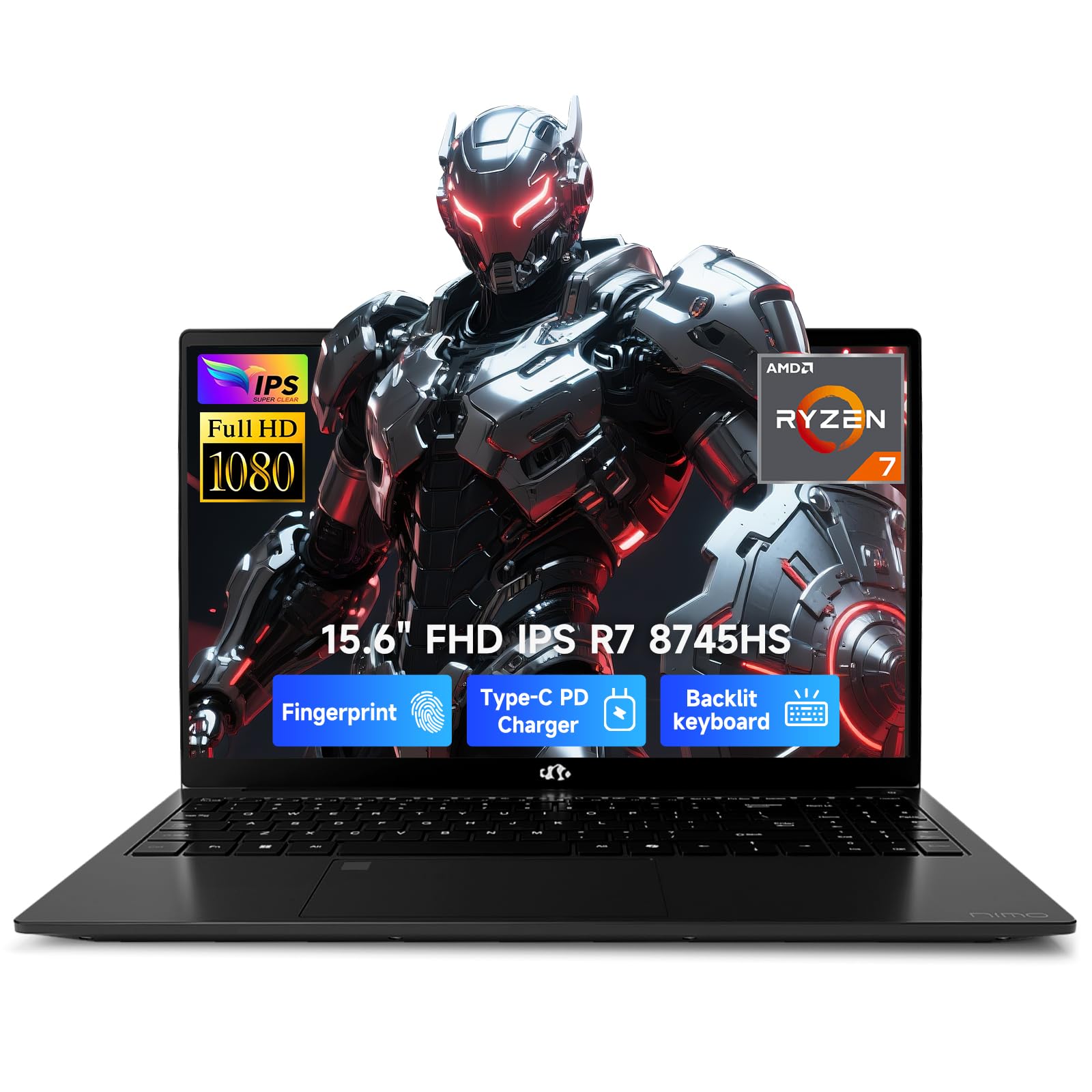
The NIMO 15.6 offers a powerful AMD Ryzen 7 8745HS processor with 8 cores and 16 threads, delivering strong multi-core performance for financial analysis and data processing. The 16GB of DDR5 RAM ensures smooth multitasking, while the 1TB SSD provides plenty of storage for large datasets and financial software. The Radeon 780M graphics are capable of handling light gaming should you need a break from studies, as well as accelerating certain visualization tasks.
The 15.6-inch FHD IPS anti-glare display is crisp and clear for reading financial documents. The backlit keyboard is a welcome feature for working in darker environments, and the fingerprint reader integrated into the touchpad adds a layer of security. The 100W USB-C fast charger is a nice bonus, allowing you to quickly top up the battery and even charge other devices. The build quality feels solid, though some users notes it runs warm under load, so elevating it for airflow is recommended.
This laptop is a solid choice for the finance student who wants strong performance without the premium price tag of a major brand. The 90-day return policy and 2-year warranty provide peace of mind. The main trade-off is that the brand is less established than Dell or Lenovo, so customer support may vary. However, for the raw specs, it represents great value for money.
Why it’s great
- Powerful Ryzen 7 processor for the price
- Backlit keyboard and fingerprint reader
- 100W USB-C fast charging included
- Good overall value for performance
Good to know
- Brand is less established
- Runs warm under load
- Battery life not fully tested
12. ASUS Vivobook 14

The ASUS Vivobook 14 is a budget-friendly option that still offers the essential features a finance major needs. It is equipped with a 10-core Intel Core 5 120U processor, which handles everyday tasks like word processing, web browsing, and running Excel for moderate datasets smoothly. The 14-inch FHD anti-glare display is adequate for reading and writing, and the included 8-in-1 PLUSERA USB hub adds extra connectivity options for external monitors and storage devices.
With 12GB of DDR4 RAM and a 1TB SSD, it provides a decent balance of memory and storage for a budget machine. The camera privacy shutter is a nice touch for security during video calls. The SonicMaster-tuned speakers deliver better-than-average audio for watching lecture recordings. The design is sleek in Quiet Blue, and the build is decent for its price bracket. However, the 720p webcam is noticeably lower quality than 1080p cameras on competing models, and the 12GB RAM may feel constrained if you try to run too many demanding applications simultaneously.
This is a great entry-level laptop for a student on a tight budget who needs a reliable computer for standard coursework. It’s not designed for heavy financial modeling or gaming but will handle the basics of a finance major’s workload without breaking the bank.
Why it’s great
- Very affordable price point
- Includes a useful 8-in-1 USB hub
- Camera privacy shutter for security
- 1TB SSD provides ample storage
Good to know
- 12GB RAM may be limiting for heavy use
- 720p webcam is low resolution
- DDR4 RAM is slower than DDR5
13. Lenovo V15 Gen 4

The Lenovo V15 Gen 4 is a standard business laptop that covers all the basics for a finance major without any unnecessary frills. It features a 15.6-inch FHD display and a full numeric keypad, which is a critical feature for efficient data entry in Excel and other financial software. The Intel Core i5-13420H processor provides solid performance for everyday tasks, from running Microsoft Office to web research and light programming.
With 16GB of RAM and a 512GB SSD, it is perfectly capable of handling standard coursework and moderate multitasking. The build quality is functional, though some users note it feels like a budget plastic chassis. The port selection is commendable, including USB-A, USB-C, HDMI, and an RJ-45 Ethernet port, making it easy to connect to monitors and wired networks. The Windows 11 Pro operating system is a bonus for business features.
This is a no-nonsense, reliable machine that offers good value for the price. It will get the job done for a finance major without any performance issues for standard applications. The main compromise is battery life, which is not exceptional, and the screen quality is just ordinary. But for a student who needs a functional laptop with a numeric keypad and doesn’t need flashy extras, this is a strong budget-friendly contender.
Why it’s great
- Full numeric keypad for Excel work
- Good CPU performance for the price
- Includes RJ-45 Ethernet port
- Windows 11 Pro included
Good to know
- Plastic build feels less premium
- Battery life is average
- Display quality is basic
FAQ
Do I need a dedicated graphics card for finance work?
Is a numeric keypad necessary for a finance major?
How much storage do I need for finance school?
Should I get a Windows laptop or a MacBook for finance?
Final Thoughts: The Verdict
For most users, the best computer for finance majors winner is the Apple 2025 MacBook Pro 14 because it combines the fastest CPU in this guide with a stunning display, all-day battery, and a lightweight build that handles any modeling task with ease. If you want the ultimate Windows machine with a best-in-class keyboard and unmatched portability, grab the Lenovo ThinkPad X1 Carbon Gen 13. And for a budget-friendly option that still offers a numeric keypad and solid all-around performance, the Lenovo V15 Gen 4 is hard to beat.

Mo Maruf
I created WellFizz to bridge the gap between vague wellness advice and actionable solutions. My mission is simple: to decode the research and give you practical tools you can actually use.
Beyond the data, I am a passionate traveler. I believe that stepping away from the screen to explore new environments is essential for mental clarity and physical vitality.