Our readers keep the lights on and my smoothie glass nicely filled. As an Amazon Associate, I earn from qualifying purchases.
If your gaming rig sounds like a jet engine or your video editing workstation keeps shutting down mid-render, the fans inside your case are the issue — and swapping them is the single cheapest upgrade you can make. This guide walks you through five very different computer fans, from a 140mm beast that moves an absurd amount of air to a white triple-pack that looks as good as it cools, so you know exactly which one to buy for your PC without wasting money on the wrong size or spec.
I’m Mohammad Maruf — the co-founder and writer behind WellFizz. This guide is built by comparing the manufacturers’ published specifications and the patterns across verified customer reviews, so you get each pick’s real strengths and trade-offs instead of marketing spin.
Whether you want whisper-quiet operation at your desk, enough static pressure (the force that pushes air through resistance, like a radiator) to work through a thick radiator, or RGB lighting that turns your side panel into a light show, the best computer fans share one thing in common: they move air efficiently without driving you crazy with noise or vibration.
How To Choose The Best Computer Fans
Picking the right case fan isn’t complicated, but getting it wrong means either a loud PC or a hot one. Here are the three things to check before you click “buy.”
Size: 120mm vs 140mm
120mm fans (12 centimeters wide) are the standard — they fit almost every case and CPU cooler. 140mm fans (14 centimeters wide) move more air at a lower speed, so they tend to be quieter for the same cooling, but only if your case has 140mm mounting holes. Measure your existing fan slots before ordering.
Airflow vs Static Pressure
Airflow (CFM, or Cubic Feet per Minute) tells you how much air the fan can push freely. Static pressure (mmH₂O) tells you how hard the fan can push air through resistance, like a radiator or a dust filter. For open case ventilation, go for high CFM. For a radiator or a front mesh panel, prioritize static pressure so the blades can force air through the gaps.
Bearing Type and Noise
Fluid dynamic bearings (FDB, which use a sealed oil film so the shaft floats) self-lubricate and last 50,000–60,000 hours with very low noise. Hydraulic bearings (HDB, a similar oil-based design) are nearly as quiet but slightly shorter-lived. Sleeve bearings are cheaper but wear out faster and get rattly. The noise rating (dBA) below 30 dB is fine for a quiet room; above 30 dB you will start to hear it.
Quick Comparison
On smaller screens, swipe sideways to see the full table.
| Model | Category | Best For | Key Spec | Amazon |
|---|---|---|---|---|
| ARCTIC P12 Pro A-RGB | Performance | High RPM √ cooling | 3000 RPM / 77 CFM | Amazon |
| Thermalright TL-C12CW-S X3 | Value 3-Pack | White build / quiet setup | 25.6 dBA noise level | Amazon |
| DARKROCK F120 3in1 | Budget | Infinity mirror RGB on a budget | 46.7 CFM airflow | Amazon |
| NZXT F140Q | High Airflow | Large case intake / exhaust | 102.9 CFM at 140mm | Amazon |
| AsiaHorse AMICI-5GT | Premium RGB | Showcase build with good cooling | 61.5 CFM / Infinity mirror | Amazon |
In‑Depth Reviews
1. ARCTIC P12 Pro A-RGB

If you need to cool a system that runs hot — think a high-end CPU under all-core load or a dense radiator setup — the ARCTIC P12 Pro A-RGB is the single most capable 120mm fan here. It has a maximum rotational speed of 3000 RPM (rotations per minute) that moves a full 77 CFM (Cubic Feet per Minute) of air, giving you serious cooling headroom for demanding workloads like all-night rendering sessions. That 3000 RPM ceiling is 2x higher than the Thermalright TL-C12CW-S X3’s 1500 RPM limit, so you get far more top-end power when you need it.
Buyers report this fan moves air so effectively it delivered a “15% temp drop across system including GPU,” and the fluid dynamic bearing keeps noise low at low speeds. The redesigned blades balance performance and sound well, and the included Y-cable lets you run multiple fans off a single PWM (Pulse Width Modulation) header on your motherboard for automatic speed control.
The honest catch: at 3000 RPM this fan is loud — owners mention it is “noisy at full speed.” For daily use, set a custom fan curve so it only hits those high speeds when the CPU really needs it. That minor tuning aside, this is the best pick for anyone who wants serious on-demand cooling power. skip it if you want near-silent operation at idle without fiddling with fan curves.
Why it’s great
- Massive 3000 RPM speed range for peak cooling
- Fluid dynamic bearing means quiet, long-lasting operation
- 0 RPM mode below 5% PWM for true silent idle
Good to know
- Gets loud at max speed — plan a custom curve
- Single fan, not a multi-pack
2. Thermalright TL-C12CW-S X3

Where the ARCTIC P12 Pro wins on raw speed, the Thermalright TL-C12CW-S X3 wins on noise control and style — it runs at just 25.6 dBA (a decibel rating so low you barely hear it in a quiet room), making it the most discreet option in this lineup for a bedroom or office build. At 66.17 CFM, it still moves plenty of air for most systems, but its 1500 RPM max speed means you trade away the extreme headroom the ARCTIC offers for a quieter daily experience.
This is a 3-pack, so you get three fans for roughly the price of one premium single, and the white color scheme is a rare find for builders who want an all-white interior. Customers note the long daisy-chain cables make cable management very easy, and the S-FDB bearing (a variation on fluid dynamic bearings that keeps the blades stable) keeps noise low. One reviewer mentions a screw stripped during install, but says the fan holds fine with three screws — a minor hardware annoyance.
Grab this set if you care most about quiet operation and clean white looks over the ability to crank up to 3000 RPM. It is also a strong budget pick if you need to fill three 120mm fan slots.
Where it shines
- Very quiet at just 25.6 dBA
- Three fans in one box for excellent value
- White design with soft ARGB lighting
Worth noting
- Max 1500 RPM limits extreme cooling use cases
- One reviewer experienced a stripped screw
3. DARKROCK F120 3in1
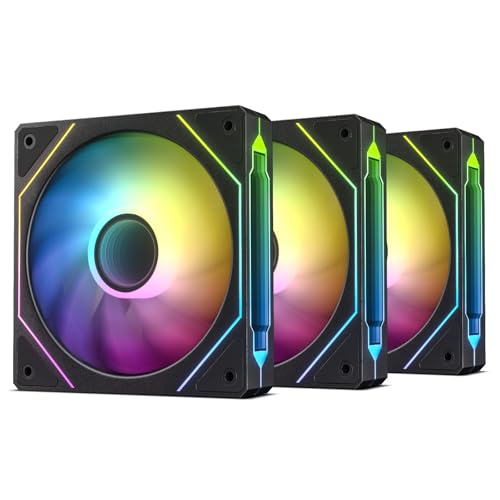
If you are building or upgrading a budget gaming PC and want the infinity mirror RGB effect (the layered reflective look that makes the fan center appear endless) without spending a fortune, the DARKROCK F120 3in1 delivers that premium visual for a low price. At 46.7 CFM, its airflow is 40% lower than the Thermalright’s 66.17 CFM, so it is best suited for standard case ventilation and not high-end radiator setups where you need more air pressure.
Buyers describe these fans as “reliable” and a “great value,” noting the 24 LEDs in each fan produce bright, customizable colors. The hydraulic bearing and eight rubber pads keep the 27.7 dBA noise level within a reasonable range for most builds. A common tip from reviewers: you do not need a separate controller hub if your motherboard has a JARGB_V2_1 header (a specific 3-pin ARGB connector) and a spare PWM fan header for daisy-chaining.
The key spec worth flagging is the 3-Pin power connector (not 4-Pin PWM), which means the motherboard controls speed by voltage instead of a dedicated PWM signal — fine for most builds, but you lose the granular speed control that 4-Pin PWM fans offer. This is a smart buy if you want infinity mirror looks without spending much, but pass on it if you need 4-Pin PWM control for precise fan curves.
What stands out
- Impressive infinity mirror RGB at a budget-friendly price
- Three fans included, daisy-chainable for easy setup
- Rubber pads reduce vibration noise
The trade-offs
- 46.7 CFM airflow is lower than other options here
- 3-Pin connector, not full 4-Pin PWM
- One reviewer reports red RGB appears pink with iCUE
4. NZXT F140Q

The single number that matters most in this category is airflow, and the NZXT F140Q scores 102.9 CFM — the highest here by far, meaning you can run it slower and quieter while still moving more air than any smaller fan at full speed. It is ideal for a roomy mid-tower or full-tower case where intake and exhaust volume matter most, keeping your components cool with very broad coverage.
The catch you accept for that air-moving dominance is its 29.8 dBA noise level, the loudest of the five fans here on paper — though the low 1500 RPM ceiling means it stays calm at normal settings. If you plan to use this on a radiator or through a very restrictive dust filter, buyers warn that the static-pressure version (designed to push through resistance) would be a better choice, as this is optimized for free airflow. The fluid dynamic bearing is rated for 60,000 hours, so it should outlast most builds.
Choose this one if you have a large case and want to move a massive volume of air with a single quiet-running fan. it’s not for you if your case only fits 120mm fans or if you need high static pressure for a radiator setup — that makes its price-to-value read as a specialist pick for open-air volume, not a universal buy.
The upsides
- Massive 102.9 CFM airflow for large case ventilation
- Fluid dynamic bearing rated for 60,000 hours
- PWM control adjusts speed automatically to system temps
Keep in mind
- Noisier at 29.8 dBA than smaller 120mm fans
- Not ideal for restricted environments like radiators without the static pressure version
- Single fan, not a multi-pack
5. AsiaHorse AMICI-5GT

What you actually get at this lower price is the best overall RGB experience in this lineup — with an infinity mirror design across both the center and the edge of the fan, 24 individually addressable LEDs per fan, and support for motherboard sync software like Asus Aura Sync and MSI Mystic Light. At 61.5 CFM and 1800 RPM top speed, it also has more airflow than the DARKROCK F120 (46.7 CFM) and is just 3 CFM shy of the Thermalright pack, so it keeps up with basic cooling needs.
The main thing you give up is the peace of mind of a no-questions-asked return policy, as the AMICI-5GT is sold by a smaller specialist brand rather than the biggest names. The noise rating of 30 dBA places it right at the threshold of audible in a quiet room, though reviewers consistently call it “silent at high RPM even with 10 fans” thanks to the hydraulic bearing and rubber pads. Note that this is not a wireless daisy-chain setup — each fan uses separate 5V ARGB and 4-pin PWM cables to connect, so plan for a little more cable management work behind the motherboard tray.
For the builder who wants a showpiece look with genuinely usable cooling specs and does not mind a few extra cables, this is the strongest value among the RGB-focused options here. It offers a better mix of looks and performance than the DARKROCK F120, though the Thermalright is quieter overall — making it the exact budget buyer it is perfect for.
Why we’d pick it
- Stunning dual-layer infinity mirror with 24 bright LEDs
- 61.5 CFM airflow and 1800 RPM for solid cooling performance
- Very quiet operation at low and medium speeds
A few caveats
- Cable-based daisy-chain (not wireless), requires cable management
- White version has a black plastic center hub, per some reviews
- Smaller brand with potentially shorter warranty support
Understanding the Specs
CFM (Cubic Feet per Minute)
This is the standard measurement of how much air a fan moves when running freely — think of it as the fan’s raw volume output. Higher CFM means more air going through your case, which pulls heat away from components faster. The NZXT F140Q leads here at 102.9 CFM, while the DARKROCK F120 sits at 46.7 CFM.
Static Pressure (mmH₂O)
This measures how hard the fan can push air through resistance, like a thick radiator, a dust filter, or a front mesh panel. If you are mounting fans on a radiator, look for a static pressure value of 1.5 mmH₂O or more so the blades can force air through the tight fins. For open intake or exhaust panels, high CFM matters more than high static pressure.
dBA (Noise Level)
The decibel rating tells you how loud the fan is at full speed. Under 27 dBA is essentially silent in a normal room; 27–30 dBA is a faint audible hum; over 30 dBA becomes noticeable. The Thermalright TL-C12CW-S X3 at 25.6 dBA is the quietest here; the NZXT F140Q at 29.8 dBA is the loudest, though still reasonable for a quiet environment.
Bearing Types (FDB vs HDB vs Sleeve)
Fluid Dynamic Bearings (FDB) use a sealed oil film to float the shaft, which makes them very quiet and long-lasting (50,000–60,000 hours). Hydraulic Bearings (HDB) are similar but slightly shorter-lived. Sleeve bearings are cheaper and work fine for a year or two, but they wear out faster and get rattly over time. The ARCTIC P12 Pro uses a true FDB for longevity.
FAQ
Can I mix 120mm and 140mm fans in the same case?
What does PWM actually do for my computer fans?
Should I use the same fan model for intake and exhaust?
How many case fans do I actually need?
Final Thoughts: The Verdict
Across the board, the best computer fans winner is the ARCTIC P12 Pro A-RGB because it delivers the highest speed range (3000 RPM) and excellent airflow (77 CFM) with a quiet fluid dynamic bearing, giving you cooling headroom you can actually use when your system gets hot. If you want a whisper-quiet white build while staying affordable, grab the Thermalright TL-C12CW-S X3. And for a large case that needs serious air volume, pick the NZXT F140Q with its 102.9 CFM output — it is the best choice for moving massive amounts of air through a big mid-tower or full-tower case.

Mo Maruf
I created WellFizz to bridge the gap between vague wellness advice and actionable solutions. My mission is simple: to decode the research and give you practical tools you can actually use.
Beyond the data, I am a passionate traveler. I believe that stepping away from the screen to explore new environments is essential for mental clarity and physical vitality.