Our readers keep the lights on and my smoothie glass nicely filled. As an Amazon Associate, I earn from qualifying purchases.
Gaming PCs generate serious heat inside a case, especially under heavy loads where CPU and GPU temps spike. Choosing the wrong case fans means high-decibel noise or insufficient airflow that chokes your components and throttles performance.
I’m Mohammad Maruf — the founder and writer behind WellFizz. I’ve spent countless hours researching fan specifications, reading thermal performance tests, and analyzing user feedback to find which models actually deliver on their noise and airflow claims.
This guide walks through the real-world performance of the best computer fans for gaming, covering static pressure, decibel levels, bearing types, and PWM control so you can match the right fan to your case.
How To Choose The Best Computer Fans For Gaming
Selecting the right case fans requires balancing three core factors: airflow (CFM), static pressure (mmH2O), and noise (dBA). A fan with high CFM but low static pressure struggles to push air through dense radiator fins or mesh panels. Meanwhile, a high-pressure fan spinning at 2000+ RPM may be too loud for quiet gaming sessions. Consider your case layout: open mesh fronts favor high-CFM fans, while restricted intakes with dust filters or radiators demand higher static pressure. Also decide between PWM and voltage-controlled fans — PWM gives precise speed adjustment through the motherboard, allowing automatic speed changes based on temperature, which keeps noise down during light use and ramps up only when needed.
Bearing Technology and Longevity
Bearing type directly impacts fan lifespan and noise over time. Rifle bearings (common in be quiet! fans) offer around 80,000 hours of life. Fluid dynamic bearings (FDB), found in Arctic P12 Pro models, use a self-lubricating layer that reduces friction and noise even at high RPM. Hydraulic bearings balance cost and durability, good for mid-range packs. Cheaper sleeve bearings wear out faster and often develop clicking sounds after a year. For a gaming rig running 8+ hours daily, investing in FDB or rifle bearings pays off in quieter operation and longer service life.
Size and Compatibility
120mm fans are the standard for most mid-tower and full-tower cases. They offer a good balance of airflow and noise at moderate speeds. Thickness matters — standard 25mm thick fans fit most case mounts, while 30mm options may interfere with motherboard heatsinks or GPU clearance. Always check your case specifications for supported fan sizes and mounting locations. A 5-pack of 120mm fans typically covers front intake (3), top exhaust (1), and rear exhaust (1) positions, providing positive pressure and efficient airflow direction through the chassis.
RGB vs Non-RGB
RGB fans add aesthetic appeal but often cost more and require additional cabling or a dedicated controller. ARGB (addressable RGB) allows per-LED color control and synchronization with motherboard software like SignalRGB or Aura Sync. Non-RGB fans generally deliver the same or better airflow at a lower price point, making them the smarter choice if performance and silence are your priorities. Many of the packs reviewed here include RGB versions, but the non-RGB variants often offer identical cooling at a lower cost.
Quick Comparison
On smaller screens, swipe sideways to see the full table.
| Model | Category | Best For | Key Spec | Amazon |
|---|---|---|---|---|
| ARCTIC P12 Pro PST (5 Pack) | Premium | Radiators & High Static Pressure | 3000 RPM, 77 CFM, 5 Pack, 4-Pin PWM | Amazon |
| be quiet! Pure Wings 3 (Triple Pack) | Premium | Near-Silent Operation | 1600 RPM, 49.9 CFM, 25.5 dBA, Rifle Bearing | Amazon |
| PCCOOLER F5 R120 (3 Pack) | Mid-Range | Maximum Airflow at High RPM | 2200 RPM, 86.73 CFM, 3.2 mmH2O, FDB | Amazon |
| Thermalright TL-C12C-S (5 Pack) | Mid-Range | Budget ARGB with Good Airflow | 1550 RPM, 66.17 CFM, 25.6 dBA, S-FDB | Amazon |
| ID-COOLING AS-120-K Trio (3 Pack) | Entry-Level | Budget-Friendly PWM Starter | 2000 RPM, 58 CFM, 27.2 dBA, Hydraulic Bearing | Amazon |
In‑Depth Reviews
1. ARCTIC P12 Pro PST 5 Pack

This premium 5-pack from ARCTIC sets the benchmark for high-static-pressure fans. With a fluid dynamic bearing and a wide speed range from 600 to 3000 RPM, the P12 Pro PST delivers 77 CFM at full tilt. The redesigned rotor blades push air efficiently through dense radiator fins and mesh panels, making it ideal for liquid cooling setups.
The integrated PST (Passive Smart Technology) daisy-chain connector runs multiple fans from a single motherboard header, though the non-optional Y-splitters can complicate cable routing in tight cases. At maximum speed, these fans produce noticeable noise — several reviewers note the loudness above 2000 RPM — but at lower PWM percentages they remain impressively quiet.
Self-lubricating FDB technology keeps vibration to a minimum, and the automatic balancing ensures smooth rotation even at high RPM. For builders prioritizing cooling headroom on radiators or restrictive cases, the P12 Pro PST offers top-tier performance at a competitive price per fan.
Why it’s great
- Exceptional static pressure for radiators and mesh
- Fluid dynamic bearing for durability and quiet operation
- Daisy-chain PST reduces cable clutter on the motherboard
Good to know
- Loud at 3000 RPM — not for silent builds at max speed
- Integrated Y-splitters make cable management tricky
2. be quiet! Pure Wings 3 120mm PWM Triple Pack
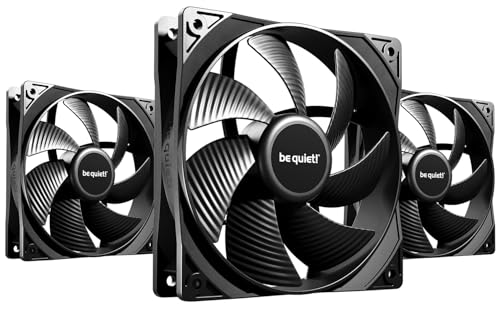
The Pure Wings 3 continues be quiet!’s legacy of near-silent operation. With a maximum noise rating of just 25.5 dBA at 1600 RPM, these fans are genuinely hard to hear inside a closed case. The newly designed fan frame outlet minimizes air leaks, improving performance on radiators by maintaining consistent pressure across the fin stack.
Seven airflow-optimized blades reduce turbulence at all speeds, and the proven rifle bearing technology promises an average lifespan of 80,000 hours — well above the sleeve-bearing competition. The included rubber vibration dampeners on all four corners further reduce noise transfer to the chassis, a detail that makes a real difference in silent builds.
Performance is respectable at 49.9 CFM, though users expecting high airflow for open-mesh cases may want higher-spec alternatives. The lack of RGB keeps the focus purely on function. For gamers who value an acoustically invisible system that still keeps temperatures under control, this triple pack delivers premium silence at a mid-range price.
Why it’s great
- Extremely quiet even at full 1600 RPM
- 80,000-hour rifle bearing for long-term reliability
- Rubber dampeners minimize chassis vibration noise
Good to know
- No RGB lighting — purely functional design
- CFM is moderate; not ideal for high-airflow open cases
3. PCCOOLER F5 R120 3 Pack

The PCCOOLER F5 R120 targets maximum airflow with an impressive 86.73 CFM and 3.2 mmH2O static pressure at 2200 RPM. The 9-blade design angled at 39 degrees is optimized for moving large volumes of air through open intakes and high-performance radiators. A tri-axial dynamic calibration process ensures balanced rotation, reducing wobble at high speeds.
Three operating modes — Silent (1800 RPM), PWM (500-2000 RPM), and OC (2200 RPM) — give flexibility to match workload. Users report excellent cooling performance, especially as front intake fans, though the 28 dBA maximum noise is noticeable at OC mode. The included daisy-chain connector supports up to five fans per header, but the manufacturer warns against exceeding that limit to avoid motherboard port overload.
Build quality is notably solid, with an industrial-grade PBT polymer frame and pre-installed anti-vibration pads. Some reviewers note short cables, so plan your case layout carefully. For builders who want high CFM without breaking the bank, this pack delivers impressive airflow numbers that rival pricier options.
Why it’s great
- Industry-leading 86.73 CFM for high-airflow builds
- Three speed modes for quiet work or full gaming power
- Fluid dynamic bearing and tri-axial calibration reduce vibration
Good to know
- Noise is noticeable at 2200 RPM OC mode
- Cables are short — requires careful routing or extensions
4. Thermalright TL-C12C-S 5 Pack

Thermalright has earned a reputation for packing value into their fan packs, and the TL-C12C-S 5-pack continues that trend. Each fan uses an S-FDB (Super Fluid Dynamic Bearing) that keeps noise at just 25.6 dBA while delivering 66.17 CFM and 1.53 mmH2O static pressure at 1550 RPM. The ARGB lighting uses high-brightness atomized LED blades that produce a soft, diffused glow rather than harsh pinpoint LEDs.
Daisy-chain cables for both PWM and ARGB mean you don’t need a separate controller — just connect each fan to the next and run a single cable to the motherboard. User reviews consistently praise the build quality and reliability, with many builders installing 20-30 units across multiple builds with only rare defects. The five-fan pack covers an entire mid-tower case for under budget-friendly price point.
Performance is solid for general case cooling, though the modest static pressure means these are less suited for high-density radiators. The white version offers a clean aesthetic for light-colored cases. For builders who want consistent ARGB synchronization with SignalRGB or other software, this pack is the sweet spot between cost and capability.
Why it’s great
- Five fans with ARGB at a very affordable price per fan
- Daisy-chain PWM and ARGB cables — no hub needed
- Low 25.6 dBA noise at maximum speed
Good to know
- Static pressure is lower — not ideal for thick radiators
- Occasional defect noted in some batches; buy a spare
5. ID-COOLING AS-120-K Trio 3 Pack

The ID-COOLING AS-120-K Trio targets entry-level builders who need three reliable PWM fans at a low cost. Running from 300 RPM to 2000 RPM, these fans push 58 CFM with 1.94 mmH2O static pressure, making them capable of handling both case intake and CPU cooler duties. The hydraulic bearing keeps noise to 27.2 dBA max, though audible noise appears at the top end of the speed range.
Daisy-chain connectors simplify cable management for tight budgets, and the rubber anti-vibration pads on each corner help reduce chassis resonance. The all-black design blends into most case interiors without visual distraction. Some users report poor threading on the included screws, making installation trickier, and the copper material mentioned in the specs seems limited to the motor housing rather than the blades themselves.
At speeds below 1000 RPM, these fans are whisper-quiet — several reviewers compare them favorably to more expensive options like Arctic P12 for everyday operation. For builders on a tight budget who need functional PWM cooling without RGB or premium bearing technology, the AS-120-K Trio covers the basics without major compromises.
Why it’s great
- Very quiet at low RPM for everyday use
- Daisy-chain design simplifies cable management
- Good price-to-performance ratio for budget builders
Good to know
- Screw threading quality can be inconsistent
- Noticeable noise at 2000 RPM full speed
FAQ
How many case fans do I need for a gaming PC?
Should I use PWM or voltage-controlled fans?
Is RGB lighting worth it for gaming fans?
Final Thoughts: The Verdict
For most users, the best computer fans for gaming winner is the ARCTIC P12 Pro PST 5 Pack because it combines premium static pressure, fluid dynamic bearing durability, and wide PWM range at a competitive per-fan price. If you want near-silent operation without RGB, grab the be quiet! Pure Wings 3 Triple Pack. And for maximum airflow at a mid-range cost, nothing beats the PCCOOLER F5 R120 3 Pack for its class-leading 86.73 CFM output.

Mo Maruf
I created WellFizz to bridge the gap between vague wellness advice and actionable solutions. My mission is simple: to decode the research and give you practical tools you can actually use.
Beyond the data, I am a passionate traveler. I believe that stepping away from the screen to explore new environments is essential for mental clarity and physical vitality.