Our readers keep the lights on and my smoothie glass nicely filled. As an Amazon Associate, I earn from qualifying purchases.
You want a gaming PC that does not stutter or lag. But sorting through the many processors, motherboards, and memory kits with all their numbers and acronyms is tough. This guide covers the three core parts that set your gaming speed, your frame rates, and your system stability — the CPU, the motherboard, and the RAM. You get real-world picks that actually perform in games, without the extra cost or confusion.
I’m Mohammad Maruf — the co-founder and writer behind WellFizz. This guide is built by comparing the manufacturers’ published specifications and the patterns across verified customer reviews, so you get each pick’s real strengths and trade-offs instead of marketing spin.
You will find seven carefully selected parts here. They range from the fastest gaming processors to the motherboards and memory that let them shine. All of them are part of a practical buying strategy for the best computer components for gaming you can choose right now.
How To Choose The Best Computer Components For Gaming
Building a gaming PC means matching the right pieces together. Your processor, motherboard, and memory must work as a team. A fast CPU on a weak motherboard with slow RAM leaves performance on the table. Here is what to look for in each part.
Processor: Cores, Threads, and Gaming Cache
For gaming, a single core’s speed and how much cache (the super-fast memory right on the chip) you have often matter more than how many cores you count. The AMD Ryzen 7 7800X3D uses a technology called 3D V-Cache — extra memory physically stacked onto the chip — to keep game data closer to the cores. That reduces lag and boosts your frame rates. Look for at least 8 cores and 16 threads (a “thread” is a virtual core that handles one task at a time) for modern gaming. Also check the generation of the processor — AM5 (AMD’s latest socket type) for AMD, or LGA 1700 or 1851 (Intel’s socket types) for Intel — so it fits your motherboard.
Motherboard: Chipset, Socket, and Connectivity
The motherboard is the backbone. The chipset (like AMD B550 or Intel B760) sets what features you get. Those include how many high-speed USB ports, how many M.2 slots (slots for fast solid-state drives, or SSDs), and whether you can overclock your CPU (run it faster than its stock speed). A B550 board supports PCIe 4.0 (a fast data lane connecting your graphics card), and a B760 board adds support for DDR5 RAM (the latest, fastest type of memory). Always make sure the motherboard’s CPU socket (the physical slot the processor plugs into) matches your processor exactly — AM5 for AMD, LGA 1700 for 12th- to 14th-Gen Intel.
Memory: Speed, Capacity, and Latency
For gaming in 2025, 32GB of DDR5 RAM running at 6000MHz (megahertz, the speed it talks to the system) with a tight latency of CL30 or CL32 (CAS latency, in clock cycles — lower is faster) is the sweet spot. Higher speed lets the processor fetch data faster, but only if your motherboard and CPU support it. A dual-channel setup (two sticks of RAM instead of one) doubles your memory bandwidth — always buy a matched kit. Features like AMD EXPO or Intel XMP (one-click overclock profiles in the BIOS, the motherboard’s settings menu) let you hit the advertised speed without manual tweaking.
Quick Comparison
On smaller screens, swipe sideways to see the full table.
| Model | Category | Best For | Key Spec | Amazon |
|---|---|---|---|---|
| AMD Ryzen 7 9800X3D | Processor | Pure gaming speed | 8 cores, 96MB L3 cache | Amazon |
| Intel Core Ultra 9 285K | Processor | Multitasking & productivity | 24 cores, 5.7 GHz boost | Amazon |
| AMD Ryzen 7 7800X3D | Processor | Best value gaming CPU | 8 cores, 96MB L3 cache | Amazon |
| G.SKILL Trident Z5 Neo RGB 64GB | RAM | High-capacity DDR5 | 64GB, CL30-40-40-96 | Amazon |
| MSI B760 Gaming Plus WiFi | Motherboard | DDR5 & Wi-Fi 6E | Intel LGA 1700, DDR5 | Amazon |
| Lexar Thor Z RGB DDR5 32GB | RAM | RGB DDR5 value | 32GB, 6000MHz, CL38 | Amazon |
| MSI MPG B550 Gaming Plus V1 | Motherboard | Budget DDR4 build | AM4, DDR4, PCIe 4.0 | Amazon |
In‑Depth Reviews
1. AMD RYZEN 7 9800X3D

With 8 cores, 16 threads, and a huge 96MB L3 cache (the super-fast memory right on the processor) using AMD’s next-gen 3D V-Cache, the AMD RYZEN 7 9800X3D is the fastest gaming processor you can buy today. Game data sits closer to the cores, which means dramatically faster access — so demanding titles like Cyberpunk 2077 or Starfield run at their highest possible frame rates. One buyer reports “insane gains in some games, especially at 1080p.” Another adds it runs cool with a decent cooler, specifically mentioning an Arctic Freezer 420. It uses Socket AM5 (AMD’s latest slot), so it is a drop-in upgrade for your existing AM5 motherboard. Compared to the previous-gen 7800X3D, this chip adds about a 16% IPC (instructions per clock, how much work it does per tick) uplift, making every task feel snappier. You are buying this for pure gaming dominance — no compromises. Expect to add an aftermarket cooler, since none is in the box, and pay a premium price.
Why it’s great
- Fastest gaming CPU on the market
- 96MB L3 cache reduces frame drops
- Drop-in compatible with AM5 motherboards
Good to know
- No cooler included
- Premium price tier
2. Intel Core Ultra 9 285K

Where the 9800X3D focuses purely on gaming, the Intel Core Ultra 9 285K takes a different route. It packs 24 cores total (8 performance cores for fast tasks plus 16 efficiency cores for background work) and 24 threads. That means it can juggle heavy multitasking, rendering, and AI work alongside gaming. Its 5.7 GHz unlocked boost clock lets it trade blows with the AMD chip in single-core tasks while blowing past it in multi-threaded work like video editing. The real difference: the 285K has 24 threads compared to the 9800X3D’s 16 — a 50% advantage in threaded workloads. Buyers report that in a Cinebench 2024 stress test (a benchmark that pushes all cores hard), the chip ran at 73-78°C with spikes to 82°C while pulling about 205W. That is hot, but owners mention it is “easier to cool than previous gen” with a 360mm liquid cooler or a top air cooler like the Noctua NH-D15. Choose the Ultra 9 over the 9800X3D if you do heavy rendering, 3D modeling, or AI work alongside gaming — its brute core count gives you productivity muscle no pure gaming chip can match. Customers note that engineers love it for SolidWorks workstations for its stability and speed.
Where it shines
- 24 cores for multitasking and productivity
- 5.7 GHz peak boost speed
- Stable compared to previous Intel generations
Worth noting
- Runs hot under heavy load
- Requires Intel 800 series motherboard
- No cooler included
3. AMD Ryzen 7 7800X3D

The AMD Ryzen 7 7800X3D delivers the magic of 3D V-Cache — 8 cores and 16 threads with the same 96MB L3 cache as the 9800X3D — but at a price that makes it the best value pick for pure gaming. That cache keeps frame rates smooth and stutter-free, giving you near-flagship gaming performance for much less. One buyer sums it up: “My frame rates are incredibly high, frame drops are non-existent, and it runs surprisingly cool and efficiently.” It draws only about 75W during gaming, which means you can cool it with a cheap air cooler and it runs at around 65-70°C under load. Based on the proven Zen 4 architecture on Socket AM5, it is a drop-in upgrade for any B650 or X670 motherboard. In head-to-head gaming benchmarks, it beats the Intel Core Ultra 9 285K in many CPU-bound games despite having 8 fewer cores, because the cache does the heavy lifting. This is for dedicated gaming rig builders who want the best performance per dollar. If you must have the absolute fastest, buy the 9800X3D; if you also do heavy workstation tasks, buy the Ultra 9. For pure gaming at a great price, this is the pick.
What stands out
- Best price-to-performance gaming CPU
- Low power draw (~75W gaming)
- Runs cool with stock cooler
The trade-offs
- Not as fast as 9800X3D in raw FPS
- Requires AM5 motherboard
- No cooler included
4. G.SKILL Trident Z5 Neo RGB 64GB

Memory speed matters for smooth gameplay. At 6000 MT/s (megatransfers per second, the data transfer rate) with a tight CL30 latency (CAS latency, in clock cycles — lower is faster), the G.SKILL Trident Z5 Neo RGB 64GB kit delivers the sweet spot for AM5 processors like the 7800X3D and 9800X3D. Lower latency means data reaches the CPU faster, reducing wait times in CPU-bound games and improving your 1% low frame rates (the worst-case frame dips) for smoother gameplay. The catch is price — 64GB is overkill for pure gaming today, but it future-proofs your build for heavy modding, streaming, or running multiple apps at once. One reviewer notes they bought the kit for their build in 2023 and it has been “rock solid, EXPO worked perfectly on ASUS board.” The kit enables AMD EXPO (a one-click overclock profile in the BIOS) to hit the rated 6000MT/s speed without manual tuning. If you want the fastest possible gaming and productivity RAM in a single kit with bright RGB lighting that pairs perfectly with AMD builds, the Trident Z5 Neo is top-tier — and at 64GB, you spend once and forget about it for years.
The upsides
- Very low CL30 latency for fast access
- 64GB capacity for heavy multitasking
- Seamless AMD EXPO compatibility
Keep in mind
- Premium price for 64GB kit
- Overkill for gaming-only builds
5. MSI B760 Gaming Plus WiFi

The MSI B760 Gaming Plus WiFi gives you features you would normally expect from a more expensive Z-series board: DDR5 memory support, PCIe 4.0 (the fast data lane for your graphics card), and built-in Wi-Fi 6E and Bluetooth 5.3. This mid-range ATX motherboard supports 12th, 13th, and 14th Gen Intel processors on the LGA 1700 socket. It has four DDR5 slots supporting up to 128GB at 6800MHz+, plus dual M.2 slots for fast NVMe solid-state drives. Buyers call it a “tank of a motherboard” that has held up well after six months of daily use, running an RTX 5070 and i7-12700k without issues. One reviewer notes it “can run 2 GPUs if you want it to,” giving you flexibility for future expansion. The 2.5G LAN port and Wi-Fi 6E deliver fast, reliable networking whether you plug in or go wireless. The downside: the B760 chipset does not support CPU overclocking. If you want to tinker with overclocks, you need a Z790 board. For most gamers who just want a reliable, feature-packed board with DDR5 and wireless connectivity at a good price, the B760 Gaming Plus WiFi is a solid foundation.
Why we’d pick it
- DDR5 support up to 6800MHz
- Built-in Wi-Fi 6E and Bluetooth 5.3
- Good thermal design with extended heatsink
A few caveats
- No CPU overclocking support
- Wiring some bottom connectors can be tricky
6. Lexar Thor Z RGB DDR5 32GB
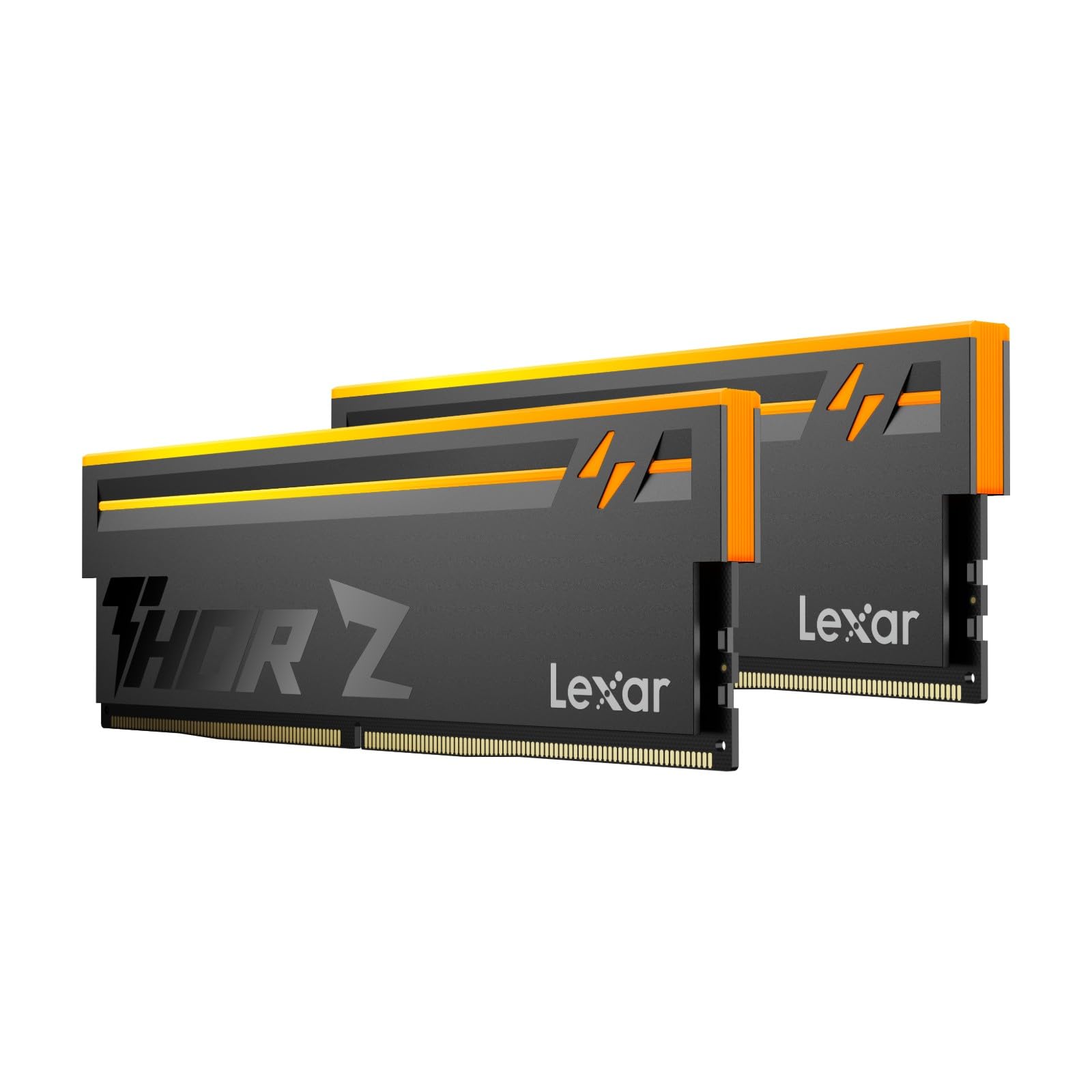
The Lexar Thor Z RGB DDR5 32GB kit gives you the speed of 6000MHz DDR5 memory at a more accessible price than premium kits, plus bright customizable RGB lighting that syncs across your build. A sandblasted aluminum heatsink keeps it cool during long gaming sessions, and it supports both Intel XMP 3.0 and AMD EXPO for one-click overclocking. Reviewers point out the kit is stable — one reviewer runs it at 6400MHz without issues. But the CAS latency (CL38) is higher than premium kits like the G.SKILL Trident Z5 Neo, meaning slightly slower data access times. One buyer warned that the listing initially omitted the CL rating, calling it “not fantastic.” The kit also includes On-die ECC (error correction built into the memory chips) and a Power Management IC for better stability and efficiency. If you want DDR5 speed and RGB looks without paying premium prices, the Lexar Thor Z gets the job done. Be aware that the higher CL38 latency means it may fall a few percentage points behind tighter-timed kits in CPU-bound games — a small trade-off for saving on the sticker price.
Strong points
- 6000MHz DDR5 speed at a good price
- Bright RGB lighting that syncs with other components
- Supports Intel XMP and AMD EXPO
Before you buy
- CL38 latency is higher than premium kits
- Some users reported stability issues
7. MSI MPG B550 Gaming Plus V1

The MSI MPG B550 Gaming Plus V1 is an ATX motherboard for the AM4 platform that supports 3rd Gen AMD Ryzen processors and uses DDR4 memory. That means you can build a very capable gaming rig using older, more affordable parts without sacrificing core gaming performance. It features PCIe 4.0 for modern graphics cards and fast NVMe drives, and includes Mystic Light RGB lighting with 16.8 million colors and 29 effects. Buyers call it a “great value” — one reviewer praised its 7 USB ports, 2 M.2 slots, USB-C, and built-in I/O shield. Another notes it offers “stable power delivery under load” and that the BIOS is straightforward. The trade-off: no built-in Wi-Fi, so you need an Ethernet cable or a separate Wi-Fi adapter. Also, the AM4 platform is end-of-life for new CPUs — you cannot upgrade to future AMD processors beyond the Ryzen 5000 series. This board is perfect for budget-conscious builders who already own DDR4 memory, or who can find a great deal on a Ryzen 5600X or 5700X3D. It gives you modern PCIe 4.0 and RGB features at the lowest entry cost in this guide, letting you spend more of your budget on the graphics card where it matters most for gaming.
What we like
- Affordable AM4 platform with PCIe 4.0
- RGB Mystic Light lighting
- 7 USB ports and USB-C
The downsides
- No built-in Wi-Fi
- AM4 platform is end-of-life for new CPUs
Understanding the Specs
Cores & Threads
The processor core count tells you how many tasks the CPU can handle at once. For gaming, 8 cores and 16 threads (each “thread” is a virtual core that can handle one task at a time) is the current standard. More cores mainly help with multitasking — like streaming while gaming — or heavy productivity work such as video rendering. A processor with 24 cores like the Intel Core Ultra 9 285K is overkill for gaming alone but excels at workstation tasks.
3D V-Cache
This is AMD’s technology that stacks extra memory (the L3 cache) directly onto the processor die. More cache means the CPU can store more game data close at hand, reducing the time it waits for information from your RAM. In CPU-heavy games, this can boost frame rates by 15-25% compared to a processor without it — it is the secret sauce behind the 7800X3D and 9800X3D.
FAQ
Do I need DDR5 RAM for gaming or is DDR4 still fine?
A note from us: real-world gaming tests vary by title, and price differences between DDR4 and DDR5 kits have narrowed. Check current pricing before deciding.
What is the difference between the AMD B550 and Intel B760 chipset?
Which socket should I build on for future upgrades?
Final Thoughts: The Verdict
For the majority of shoppers, the computer components for gaming winner is the AMD Ryzen 7 7800X3D because it delivers elite gaming performance with 96MB of 3D V-Cache at a price that leaves room in your budget for a better graphics card. If you want the absolute fastest gaming CPU on the market, grab the AMD RYZEN 7 9800X3D. And for a balanced DDR5 build that handles both gaming and heavy productivity, the MSI B760 Gaming Plus WiFi paired with a mid-range Intel processor is a rock-solid combination that will serve you well for years.

Mo Maruf
I created WellFizz to bridge the gap between vague wellness advice and actionable solutions. My mission is simple: to decode the research and give you practical tools you can actually use.
Beyond the data, I am a passionate traveler. I believe that stepping away from the screen to explore new environments is essential for mental clarity and physical vitality.