Our readers keep the lights on and my smoothie glass nicely filled. As an Amazon Associate, I earn from qualifying purchases.
Specs are compiled from manufacturer listings and verified buyer reviews and can change over time — please confirm the key details on the product page before buying.
You have your parts picked out—the motherboard, the graphics card, the power supply—but the one thing that can make or break the look of your finished PC is how you hide all those wires. A case with smart cable management means you spend your time gaming instead of wrestling with zip ties and a rat’s nest of cables. This guide covers six computer cases for cable management that do the hard work for you, from budget-friendly towers to premium showpieces.
I’m Mohammad Maruf — the founder and writer behind WellFizz. This guide is built by comparing the manufacturers’ published specifications and the patterns across verified customer reviews, so you get each pick’s real strengths and trade-offs instead of marketing spin.
You are looking for a case that makes your build look clean without a headache, and we have broken down the best options for hiding, routing, and securing every cable inside your computer cases for cable management.
Quick Picks
- FOIFKIN F600 PC Case — Best Value
- CORSAIR 3500X RS ARGB Panoramic Mid-Tower — Best Overall
- CORSAIR 4000D RS Frame Modular Mid-Tower — Top Performer
- NZXT H7 Flow 2024 Mid-Tower — Most Spacious
- Lian Li LANCOOL 217 Genuine Walnut Wood — Best Style
- HAVN HS 420 Dual-Chamber Mid Tower — Premium Pick
How To Choose The Best Computer Cases For Cable Management
Getting a clean build is about more than just having a lot of space behind the motherboard tray. You want a case that guides you—with cutouts, straps, and thoughtful design—rather than one where you have to fight every wire.
Start with the Layout
A dual-chamber layout, where the power supply and drives sit behind the motherboard tray, keeps the main compartment clutter-free. You see your components, not the cables. Some cases also support “reverse connection” motherboards (ASUS BTF, MSI Project Zero) that hide all the connector heads behind the board—giving you a nearly wire-free front view.
Check the Routing Channels and Straps
Wide channels with Velcro straps or rubber grommets make it easy to run the 24-pin motherboard power and GPU cables without them bulging the side panel. Look for cases that include built-in cable ties and routing guides—these save you from buying extras and keep everything tidy from the first build.
Fan Control Matters for Noise
If you want to set a quiet fan curve, you need 4-pin PWM fans that let the motherboard adjust speed precisely. Some budget and mid-range cases ship with 3-pin fans (voltage-controlled), which cannot be fine-tuned as easily. Check the fan type before you buy if silence matters to you.
Quick Comparison
On smaller screens, swipe sideways to see the full table.
| Model | Best For | Internal Bays | Item Weight | Dimensions (D x W x H) | Amazon |
|---|---|---|---|---|---|
| FOIFKIN F600 | Budget fish-tank style | 10 | — | 16.5″ x 11.2″ x 17.3″ | Amazon |
| CORSAIR 3500X RS | Panoramic glass value | 10 | 9.02 kg | 19.92″ x 18.11″ x 9.45″ | Amazon |
| CORSAIR 4000D RS Frame | Modular flexibility | 3 | 8.2 kg | 19.17″ x 9.41″ x 19.13″ | Amazon |
| NZXT H7 Flow 2024 | Dedicated GPU cooling | 1 | 11.35 kg | 18.43″ x 9.6″ x 21.42″ | Amazon |
| Lian Li LANCOOL 217 | Unique style with wood | 5 | 10.5 kg | 18.97″ x 9.37″ x 19.8″ | Amazon |
| HAVN HS 420 | Ultimate cooling & cable hiding | 3 | 17.83 kg | — | Amazon |
In‑Depth Reviews
1. FOIFKIN F600 PC Case

A fish-tank style case that packs seven ARGB fans and a dual-chamber layout for under the price of a game.
The FOIFKIN F600 gives you a 270-degree panoramic tempered glass view and a dual-chamber design that separates the power supply and drives from the main hardware. This layout makes cable management straightforward because you route everything behind the motherboard tray, and the 10 internal bays give you plenty of spots to stash drives and wires. Pre-installed 120mm ARGB PWM fans (six reverse-blade and one forward) mean you do not need to buy extra cooling right away.
Buyers report the F600 is a “sturdy, low-price fish tank case with 6 preinstalled fans” that stays quiet and cools well. One reviewer noted that the SSD/HDD plate has very little clearance, making it tricky to plug in cables without bending the drive—something to watch if you plan to use multiple 3.5-inch drives. The dual-chamber layout makes cable routing different from the NZXT H7 Flow, which relies on front-facing channels instead of a separated dual-chamber layout.
Compact airflow champion
- Seven pre-installed ARGB PWM fans (6 reverse) save you a lot of money
- Dual-chamber design keeps the main compartment free of cables
- Supports GPUs up to 400mm (15.75 inches)—fits massive cards like the ASUS Astral 5090 OC
Tight cable routing
- Limited storage clearance: the SSD/HDD plate is tight for plugging cables
- Pre-installed fans are decent but owners mention they are not top-tier for quiet operation
Budget builders: you want a budget-friendly dual-chamber case with lots of fans already installed and a clean panoramic view.
Premium seekers: you need easy 3.5-inch drive access—the tight plate clearance can frustrate you during the build.
2. CORSAIR 3500X RS ARGB Panoramic Mid-Tower
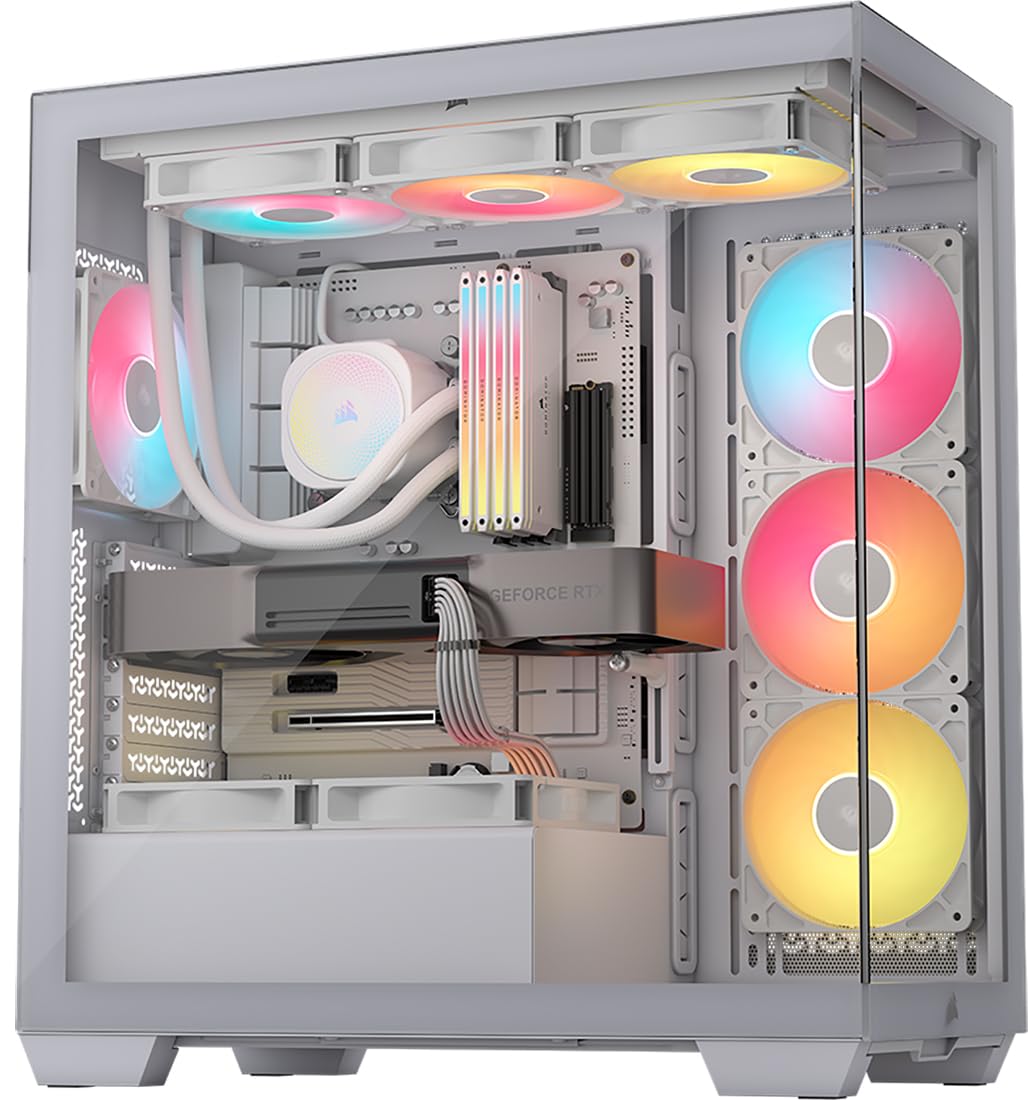
A glass showcase that hides your cables without hiding your components, supporting reverse-connection motherboards for a near-wireless front view.
The CORSAIR 3500X RS uses a panoramic tempered glass design with removable front and side panels, so you can build and access your system easily. Its 10 internal bays and included zip ties make routing the 24-pin and GPU cables straightforward behind the motherboard tray. This case is also validated for ASUS BTF, MSI Project Zero, and Gigabyte Project Stealth motherboards, which have connectors on the back—giving you a completely clean front view with zero cables visible.
Customers note this case “reduced gaming temps by 15-20°C vs M-ATX case,” thanks to the high airflow from the side, roof, and PSU fan mounting points that accommodate up to 10 fans. The three pre-installed RS120-R ARGB fans are daisy-chained and easy to control via a 5V ARGB header. The 3500X RS weighs 9.02 kg, while the FOIFKIN F600 table entry does not list a weight, and it comes with three pre-installed fans while the FOIFKIN F600 includes seven.
Panoramic glass showpiece
- Works with reverse-connection motherboards for a wire-free front view
- Removable tempered glass panels make building and accessing the interior simple
- Three pre-installed RS120-R ARGB fans with motherboard control
Heavy and bulky
- Only three fans are included—you will likely want to add more for maximum airflow
- The wraparound glass front means you need to keep cables tidy as they are more visible than in a solid-panel case
Showcase enthusiasts: who want a premium panoramic case that works with the newest back-connect motherboards and offers excellent cable-hiding potential.
Portability fans: the glass panels make every wire visible, so you need to put in the effort for a truly clean build.
3. CORSAIR 4000D RS Frame Modular Mid-Tower

A modular case that grows with your needs, letting you swap out the motherboard tray or front I/O panel later.
The CORSAIR 4000D RS Frame is built around the FRAME modular system, which means you can upgrade the motherboard tray to billet aluminum or swap the front I/O panel for more USB ports down the road. The cable management side panel near the motherboard tray works as a cover for hiding wires, or you can remove it and mount fans to the side for more cooling. It also has the InfiniRail fan mounting system—steel rails that let you slide fans up to 200mm anywhere in the front or roof, so you can position them for targeted airflow.
Reviewers point out the case “fits 12 fans or 2x 360mm radiators” and comes with Velcro straps for easy cable routing. At 8.2 kg, it weighs less than the NZXT H7 Flow at 11.35 kg, making it easier to move around during the build. Shoppers say there are no rubber grommets around the wire routes, and the front USB-C cable may arrive pinched—though CORSAIR support promptly replaced it. The side panel also requires unscrewing rather than tool-less removal, which slows access a bit.
Modular frame flexibility
- Modular FRAME system lets you swap motherboard tray, I/O, and panels later
- InfiniRail fan mounting provides class-leading flexibility in fan positioning (up to 200mm front)
- Removable internal side panel doubles as a cable cover or extra fan mount
Limited fan clearance
- No rubber grommets around cable routing cutouts—wires can look a bit messy
- Side panel requires screws to remove, which is less convenient than tool-less designs
Custom loop builders: you plan to change your build over time—the modular trays and I/O are a future-proof investment.
Air cooling purists: you want a completely tool-less panel removal experience, the H7 Flow or the 3500X RS are faster to open.
4. NZXT H7 Flow 2024 Mid-Tower

A roomy tower with an intuitive cable management system and dedicated GPU cooling via three bottom fans.
The NZXT H7 Flow 2024 is designed for airflow and cable hiding in equal measure. It comes with wide routing channels, built-in hooks, and included straps so you can run the motherboard power, GPU cables, and fan wires without them bulging the side panel. It also supports three bottom-mounted 120mm fans for direct GPU cooling, which keeps the graphics card cool without cluttering the main chamber with extra cabling.
Buyers report the case is “large for mid-tower” and “on the heavier side” at 11.35 kg, versus 8.2 kg for the CORSAIR 4000D RS Frame. Reviewers also note the fans are 3-pin (not PWM), and the instructions are “terrible.” Because the H7 Flow has only 1 internal bay compared to the FOIFKIN F600’s 10, you will have much less space for multiple drives. The mesh panels maximize airflow but do not include dust filters by design, so you will need to clean the interior more often.
Refined thermal performance
- Supports up to 420mm radiators in the front, so you can fit large custom loops
- Three bottom 120mm fan mounts provide targeted GPU cooling
- Wide cable channels with built-in hooks and straps make routing straightforward
Plain aesthetics
- Fans are 3-pin (not PWM), so you cannot set precise fan curves via the motherboard
- No dust filters by design—expect to clean the inside more frequently
Performance optimizers: you want maximum space for a large custom loop and dedicated bottom fans for your GPU.
RGB lovers: you want PWM fans from the start or prefer a case with built-in dust filters.
5. Lian Li LANCOOL 217 Genuine Walnut Wood

A mid-tower that looks like furniture, with real walnut wood accents and a dual PSU mount for easy cable routing.
The Lian Li LANCOOL 217 brings something unique to the table: genuine walnut wood accents on the front panel, giving your PC the look of a piece of furniture rather than a plain black box. Inside, it comes with five pre-installed fans—two large 170x30mm front fans, two 120mm reverse-blade fans, and a 140mm rear fan—so you have strong airflow from the start. The dual PSU mounting option lets you install the power supply facing front or rotate it sideways, which makes routing the main power cables much cleaner than in a traditional layout.
Owners mention the case has “phenomenal airflow from two 170mm front fans (inaudible with custom curves)” and that the tool-less glass panels snap on securely. The support for back-connect motherboards keeps cables hidden behind the tray. Compared to the NZXT H7 Flow at 11.35 kg, the LANCOOL 217 weighs 10.5 kg and comes with PWM fans that you can control precisely. The only real trade-off is that the fan hub requires SATA power, adding one more cable to manage in the back compartment.
Natural wood elegance
- Real walnut wood accents give it a unique, premium look that blends into a room
- Two 170mm front fans deliver massive airflow while being nearly silent at low RPM
- Dual PSU mounting options make cable routing flexible and tidy
Pricey premium
- Fan hub needs a SATA power connection, adding one more cable to the back compartment
- The tool-less panels snap on securely but require some force to remove
Aesthetic purists: anyone who wants their PC to look like a quality piece of furniture with exceptional out-of-the-box cooling.
Budget conscious: the design looks too flashy for your taste—the walnut wood is a statement piece.
6. HAVN HS 420 Dual-Chamber Mid Tower

A premium dual-chamber case that packs eleven 140mm fan slots and a dedicated cable routing system for a flawless build.
The HAVN HS 420 is built for builders who want the best possible air cooling and the cleanest cable management available. Its dual-chamber design uses a hybrid structure that directs cool air from the bottom intake onto the centrally positioned GPU, while the SimpliCable routing system features top-to-bottom grooved guides that keep every wire in its place. It supports up to 420mm radiators on the top, right, and bottom, and has vibration-isolating rubber pads on all fan brackets to avoid noise resonance.
Customers note the build quality is “top notch fit, finish and design” with a single-piece heat-formed glass panel that provides a panoramic view without visual distortion. At 17.83 kg, it is the heaviest case on this list, and the FOIFKIN F600 table entry does not list a weight, so you will need a sturdy desk. Reviewers point out the cable routing is good but gets tight near the PSU, and the magnetic back panel can pop off if cables bulge too much. The aluminum fan hub placement is also not ideal, but the overall experience is “an absolute pleasure to build in.”
Spacious dual-chamber
- Eleven 140mm fan slots and 420mm radiator support allow extreme custom cooling
- SimpliCable grooved guides make routing cables clean from top to bottom
- Heat-formed UniSheet glass panel offers a distortion-free panoramic view
Massive footprint
- Very heavy at 17.83 kg—moving this case around during a build is a two-person job
- Back panel uses magnets that can pop off if cables bulge too much
High-end builders: who wants the pinnacle of air-cooling capacity and a pristine cable management system in a showpiece case.
Small desk users: you need a lighter case for a LAN party or frequent component swaps.
Understanding the Specs
Internal Bays Quantity
This number tells you how many drive slots the case has inside. A higher number (like 10 on the FOIFKIN F600 or the CORSAIR 3500X RS) means you can install multiple SSDs and hard drives. A lower number (like 1 on the NZXT H7 Flow) means you will have fewer places to store extra drives, but the interior feels cleaner.
Item Weight
The weight of the case before any components are added. Heavier cases (like the HAVN HS 420 at 17.83 kg) usually use thicker steel and tempered glass, which reduces vibration and feels more premium. Lighter cases (like the CORSAIR 4000D RS Frame at 8.2 kg) are easier to move around during the build but may feel less solid on the desk.
FAQ
What is the best computer case for cable management for a beginner builder?
Will a case with a dual-chamber design make building easier?
How many internal bays do I need for a typical build?
What is a reverse-connection motherboard and do I need one?
Are pre-installed fans good enough for cable management?
What does the InfiniRail mounting system do for cable management?
How much does a case with good cable management weigh?
What is the SimpliCable routing system on the HAVN HS 420?
Should I get a case with a solid front panel or a mesh one for cable management?
How long does a PC case last for cable management?
Final Thoughts: The Verdict
If you want one dependable pick, the computer cases for cable management winner is the CORSAIR 3500X RS ARGB Panoramic because it combines a clean panoramic view with reverse-connection motherboard support and spacious cable routing. If you want the best value with seven pre-installed fans, grab the FOIFKIN F600. And for the ultimate premium cooling and cable-hiding system, the standout is the HAVN HS 420.
How We Picked
We do not accept paid placement, and we did not hands-on test every unit. Instead, we match each pick to a real buyer and use-case by comparing the manufacturers’ published specifications against the patterns in verified customer reviews — so you get each pick’s real strengths and trade-offs instead of marketing copy.
Sources & Methodology
Specifications: manufacturer listings and product documentation. Review insights: verified customer reviews, as of July 2026. Pricing: not shown on this page (it changes often); check the current price via the retailer link.
As an Amazon Associate, WellFizz earns from qualifying purchases. This does not affect which products we feature.

Mo Maruf
I created WellFizz to bridge the gap between vague wellness advice and actionable solutions. My mission is simple: to decode the research and give you practical tools you can actually use.
Beyond the data, I am a passionate traveler. I believe that stepping away from the screen to explore new environments is essential for mental clarity and physical vitality.