Our readers keep the lights on and my smoothie glass nicely filled. As an Amazon Associate, I earn from qualifying purchases.
A cramped, poorly ventilated chassis doesn’t just make your PC run hot — it forces your fans to scream, throttles your GPU, and shortens the lifespan of every component inside. Choosing the right enclosure is the single most impactful decision you’ll make for your build’s thermals, noise levels, and upgrade path.
I’m Mohammad Maruf — the founder and writer behind WellFizz. After analyzing the airflow metrics, radiator clearances, and build layouts of dozens of models, this guide cuts through the noise to deliver the specs that matter for a cool, stable rig.
Whether you need room for a massive GPU or whisper-quiet acoustics, the right computer case balances thermal efficiency, build quality, and expansion without locking you into a corner.
How To Choose The Best Computer Case
Picking a chassis involves more than just looks. The three pillars are thermal airflow design, component clearance, and build quality — each directly affects your system’s performance and longevity.
Airflow Path and Mesh Density
A fully mesh front panel allows unrestricted air intake, while a solid glass or metal front restricts it drastically. Look for a ventilation rate above 50% if you plan to run high-wattage components. Fine mesh also acts as a dust filter, reducing maintenance frequency.
Radiator and GPU Clearance
Every millimeter counts. A case claiming 360mm radiator support must have enough depth to avoid hitting the motherboard VRM heatsinks and top clearance to accommodate a 25mm fan sandwiched against the rad. For GPUs, look for at least 350mm of clearance to fit modern triple-fan cards without scrubbing the front fans.
Build Material and Panel Fitment
Steel frames with 0.7mm or thicker gauge resist flex during transport and installation. Tempered glass side panels should have reinforced mounting points — avoid push-pin clips that risk glass warping over time. Check that the PSU shroud has adequate cutouts for cable routing.
Quick Comparison
On smaller screens, swipe sideways to see the full table.
| Model | Category | Best For | Key Spec | Amazon |
|---|---|---|---|---|
| Corsair 4000D RS Frame | Premium Mid Tower | Ultimate thermal customization | InfiniRail mount, 360mm top/front/side | Amazon |
| Montech AIR 903 MAX | Mid Tower | Out-of-box high airflow | 4X 140mm PWM fans, 51% mesh vent | Amazon |
| Montech XR-B | Mid Tower | Panoramic glass with style | 3 ARGB fans (2 reverse), 3X 360mm rad | Amazon |
| Thermaltake View 270 Plus | Mid Tower | Pillarless glass showcase | 420mm GPU clearance, 360mm top rad | Amazon |
| NZXT H3 Flow | Micro-ATX Tower | Compact high-airflow builds | 280mm front rad, 377mm GPU support | Amazon |
| FOIFKIN F300 | Mid Tower | Budget panoramic glass build | 270° glass, 4 fans, 400mm GPU fit | Amazon |
| be quiet! Pure Base 600 | Midi Tower | Silent low-noise operation | Sound-dampened panels, 3-speed fan switch | Amazon |
In‑Depth Reviews
1. Corsair 4000D RS Frame

The Corsair 4000D RS Frame redefines case modularity with its InfiniRail fan mounting system, which lets you slide fans anywhere along the front and roof tracks instead of locking them into fixed positions. This flexibility is invaluable when optimizing airflow around a 360mm radiator or a massive triple-fan GPU. The 3D Y-pattern mesh front panel achieves high airflow with minimal restriction, and the internal side panel can serve as either a cable cover or a mounting surface for side fans — a dual-purpose design that adapts to your cooling needs.
Fitting a 360mm AIO in the top, front, or side is straightforward, and the case also supports reverse-connector motherboards from ASUS BTF and MSI Project Zero, future-proofing your build for cleaner cable routing. The included three Corsair RS PWM fans are daisy-chainable and run near-silently at low loads thanks to Zero RPM mode. Build quality is stout, with a sturdy steel frame and tempered glass side panel that uses captured thumbscrews rather than fragile push-clips.
One minor trade-off is the front USB-C cable that can arrive pinched against the chassis floor during shipping — a known but infrequent issue that Corsair support addresses promptly. Also, the side panel must be unscrewed entirely rather than hinged, which adds a step during frequent access. Overall, the 4000D RS Frame offers unmatched adjustability for builders who want total control over their thermal layout.
Why it’s great
- InfiniRail mount supports fans up to 200mm with slide-and-lock ease
- Three-way radiator support (top, front, side) for 360mm AIOs
- Reverse-connector motherboard compatible for ultra-clean builds
Good to know
- Side panel requires full screw removal — no hinges
- Front USB-C cable may arrive lightly pinched in rare cases
2. Montech AIR 903 MAX

The Montech AIR 903 MAX achieves exceptional thermal right out of the box thanks to its metal front panel with a 51% ventilation rate — among the highest in this price bracket. It ships with three HP140 ARGB PWM fans in the front and one standard HP140 PWM fan at the rear, each 140mm wide, moving substantial air at relatively low RPM. The included LED/PWM controller offers 21 lighting effects, so you can sync or customize without needing a separate RGB hub.
Maximum GPU clearance is a roomy 400mm in length and 190mm in width, easily swallowing an RTX 4090. The chassis also supports CPU coolers up to 180mm tall, meaning even the largest dual-tower air coolers fit without issue. Radiator support extends to 360mm at both the front and top, and the PSU shroud can house units up to 240mm long. Magnetic dust filters on the top, front, and bottom simplify cleaning.
The only recurring complaint is that the included rear exhaust fan can emit coil whine at speeds above 20%, which may bother sensitive ears — budgeting a replacement fan is worth considering. Cable management space behind the motherboard tray is adequate but not generous, especially if you have many SATA cables. For pure out-of-the-box cooling performance and fan count, the AIR 903 MAX delivers exceptional value.
Why it’s great
- Four 140mm PWM fans included with LED controller
- 51% mesh ventilation keeps temps low even at stock fan speeds
- 180mm CPU cooler height clearance fits top-tier air coolers
Good to know
- Rear exhaust fan may exhibit coil whine above 20% speed
- Cable management depth is tight for dense builds
3. Montech XR-B

The Montech XR-B stands out with its full-view dual tempered glass panels — both front and side — creating a panoramic showcase for your components. The wood-grain I/O interface on the top panel adds a natural texture that breaks from the typical all-metal or all-plastic look. Despite its compact dimensions (17.1″D x 9″W x 17.7″H), it accommodates a 360mm radiator in the top and supports up to nine 120mm fans in total. Three pre-installed ARGB PWM fans are included: two reverse-blade units on the side that pull air in without visible blade spokes, and one regular-blade fan at the rear for exhaust.
GPU clearance is generous enough for the RTX 40 series, and the PSU shroud has plenty of room for a full-size ATX power supply. Cable management is streamlined with rubber grommets on every routing hole, and the unified front panel connector reduces the tangle of individual header cables. Top, bottom, and side filters are all removable for quick cleaning.
A few buyers report that the glass panels arrived with light smudges or minor scratches from packaging, though performance is not affected. The side glass panel uses push-in clips rather than thumbscrews, which is convenient for access but may feel less secure during transport. If you prioritize aesthetics and want a glass-heavy build without sacrificing triple-fan radiator support, the XR-B is a compelling choice.
Why it’s great
- Dual tempered glass panels for a panoramic view
- Two reverse-blade ARGB fans included for clean intake
- Supports 360mm radiator at top without hitting motherboard
Good to know
- Glass panels may show smudges or light scratches out of box
- Push-in clips on side glass feel less secure than screws
4. Thermaltake View 270 Plus TG ARGB
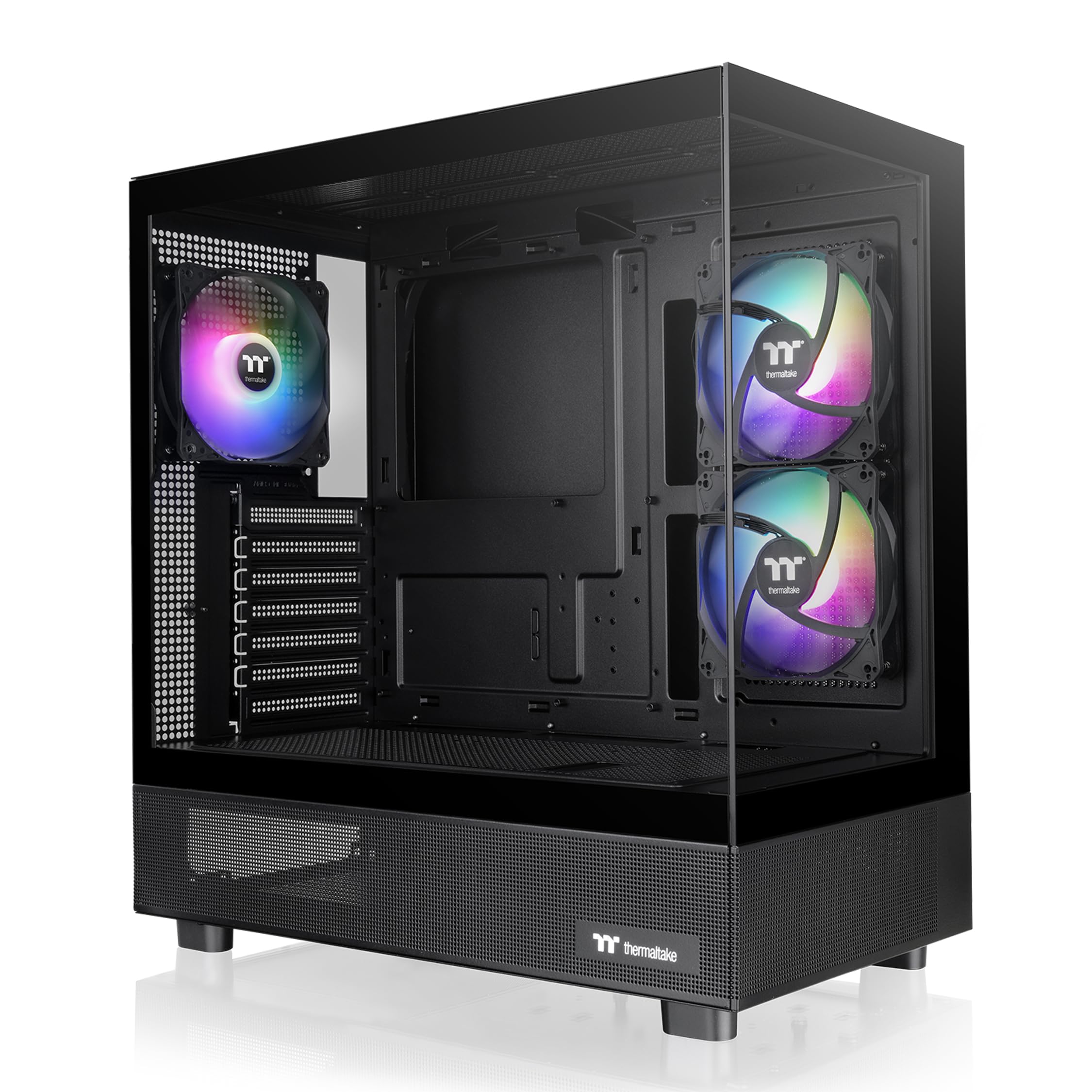
The Thermaltake View 270 Plus TG ARGB uses a pillarless front and side tempered glass design, offering an unobstructed view of your components without vertical bars breaking the sightline. GPU clearance is massive at 420mm — enough for virtually any consumer card on the market — and the case supports a 360mm radiator at the top. It ships with three 120mm ARGB fans pre-installed, all synced to the motherboard’s 5V RGB header for unified lighting control.
The interior layout is thoughtful, with a hidden PSU area that prevents heat transfer to the main chamber, plus plenty of SSD and HDD mounting points. Cable management is decent thanks to a spacious back panel, though the case lacks dedicated tie-down points along the motherboard tray edge. The included IO features a USB 3.2 Gen 2 Type-C port and dual USB 3.0 ports, covering modern connectivity needs.
Some users note that the backplates for expansion slots are breakaway punch-outs rather than screw-down individual plates — a budget cost-savings choice that makes future card swaps slightly less pristine. Also, the top IO placement can be a reach if the case sits under a desk. Still, for builders who want maximum GPU clearance and a pillarless glass showcase, the View 270 Plus delivers a premium visual experience.
Why it’s great
- Pillarless dual tempered glass for clear viewing
- 420mm GPU clearance fits the largest cards
- USB 3.2 Gen 2 Type-C included on front IO
Good to know
- Breakaway expansion slot covers limit future reusability
- Top IO placement can be awkward under a desk
5. NZXT H3 Flow

The NZXT H3 Flow is a micro-ATX mid tower that punches above its size. Despite its compact footprint, it supports full-sized graphics cards up to 377mm in length (without front fans) and fits a 280mm front radiator or a 240mm top radiator. The ultra-fine steel mesh on the front panel and PSU shroud maximizes airflow while filtering dust effectively — a setup that keeps internal temperatures surprisingly low for such a compact enclosure.
Pre-installed with a single F120Q (CV) fan at the rear, the H3 Flow gives you a starting point for exhaust, though most builders will want to add intake fans upfront. Cable management is straightforward thanks to a side panel cutout that hides cables behind the motherboard tray. The steel alloy construction feels solid, and the tempered glass side panel is held by captured thumbscrews, making access tool-free.
One design quirk is that the PSU must be installed with the fan facing upward, as there is no bottom ventilation — this means the PSU draws air from inside the case rather than from outside. For most builds with positive pressure, this is manageable, but it’s worth noting if you plan a high-wattage setup. Also, the included rear fan is adequate but not enough for a full gaming rig; plan to add at least two front fans. For a clean, compact, airflow-focused chassis, the H3 Flow is a strong contender.
Why it’s great
- Space-efficient design fits full-sized GPUs up to 377mm
- Ultra-fine steel mesh front filters dust effectively
- Supports 280mm front radiator and 240mm top radiator
Good to know
- PSU must be installed fan-up due to no bottom vent
- Only one rear fan included — buyers should add front intakes
6. FOIFKIN F300 (2025)
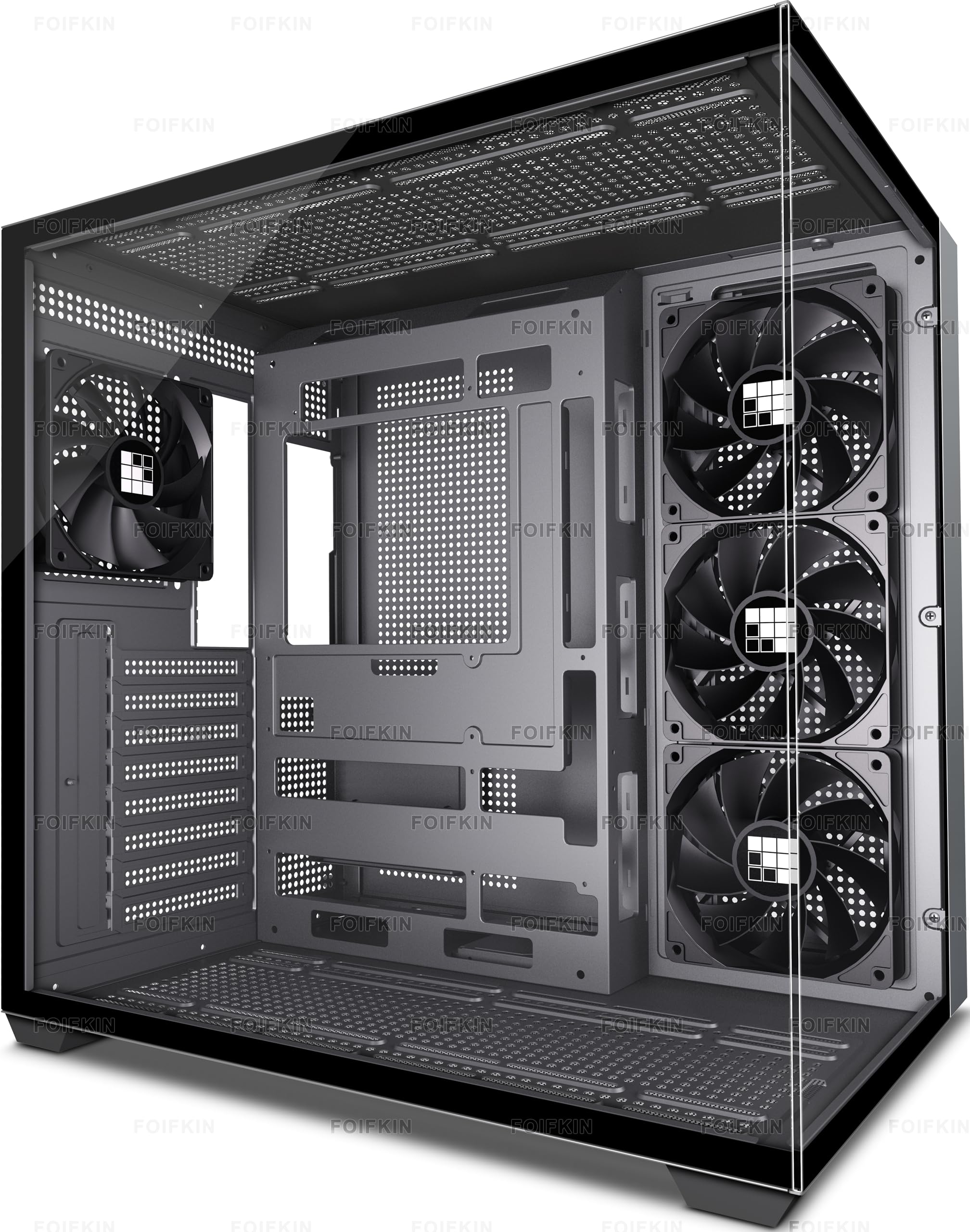
The FOIFKIN F300 delivers a 270° panoramic tempered glass design at a fraction of the cost of premium glass-heavy cases. It includes four non-LED fans pre-installed (typically three front and one rear), with support for up to ten 120mm fans and two 360mm radiators for those who want maximum cooling. GPU clearance is a generous 400mm, and the case fits ATX power supplies up to 220mm long, plus CPU coolers up to 170mm tall.
The dual-cabin layout separates the PSU and drives from the motherboard chamber, improving airflow and cable concealment. Tool-less glass panel removal makes access quick for maintenance or component swaps. The front IO includes a Type-C 3.0 port, a USB 3.0 port, a USB 2.0 port, and audio jacks — solid connectivity for a budget-tier chassis. Builders report that the metal panels are thin but not flimsy, and the wide interior easily accommodates large coolers like the Thermalright Peerless Assassin.
One trade-off is the fan wiring: the included fans use non-standard connectors, which may require an adapter to sync with motherboard PWM control or RGB headers. The cable management routing is basic, relying on zip ties rather than molded channels. Also, the glass panel can be stubborn to remove without a small prying tool. For budget-conscious builders who want a glass showcase and solid airflow, the F300 offers remarkable value.
Why it’s great
- 270° panoramic tempered glass for a showroom look
- Supports 10 fans and dual 360mm radiators
- Includes Type-C 3.0 front IO at a budget price
Good to know
- Included fans use non-standard connectors
- Glass panel removal requires firm pressure — no tool included
7. be quiet! Pure Base 600
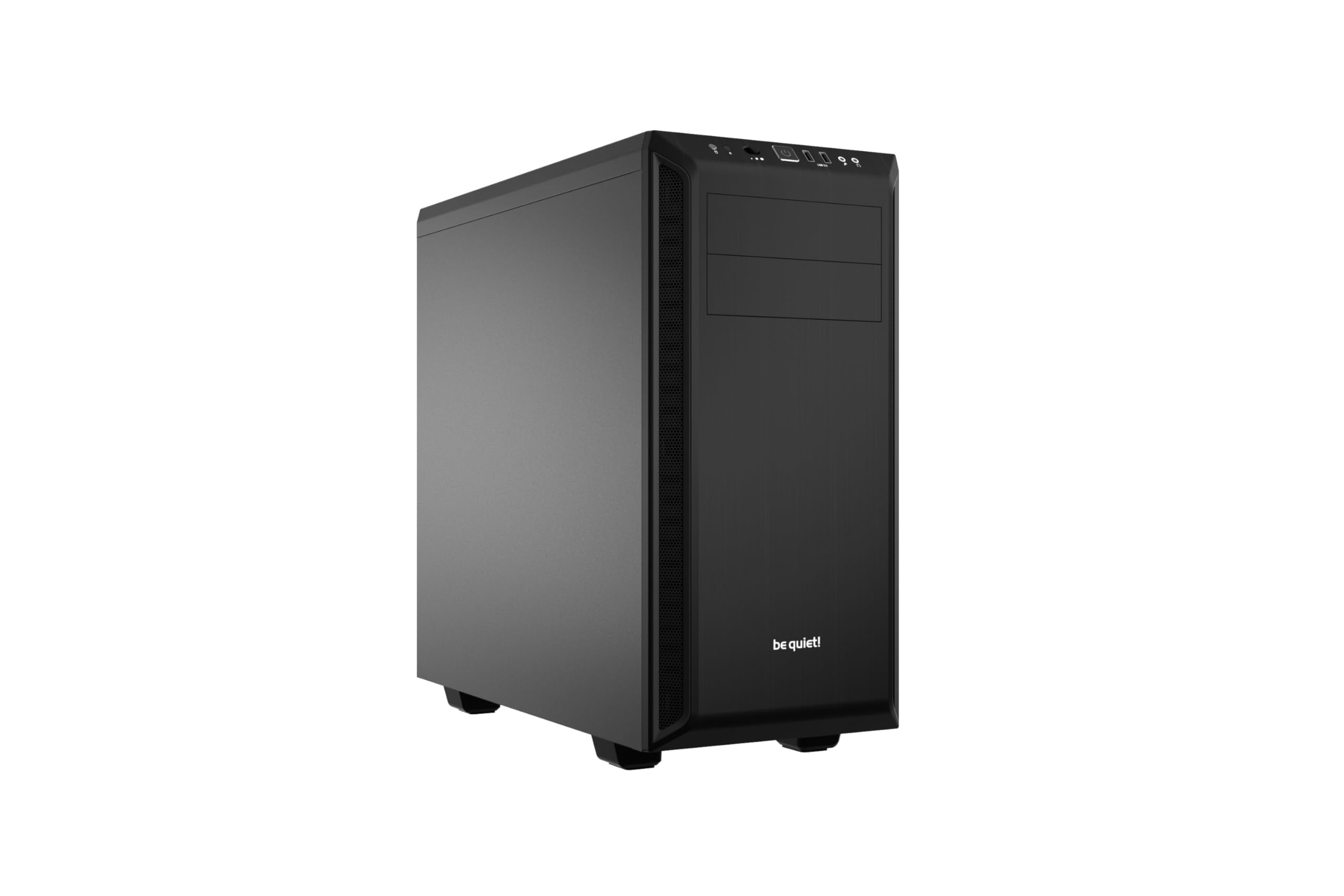
The be quiet! Pure Base 600 is engineered for acoustic performance without compromising cooling. Sound-dampening material lines the side panels, top cover, and front door, reducing fan and vibration noise significantly. The two pre-installed Pure Wings 2 fans move air efficiently at low RPM, and a built-in 3-speed fan switch lets you toggle between silent, medium, and performance modes without entering the BIOS or installing software.
Internally, the layout is flexible: the HDD cage can be repositioned or removed to accommodate longer PSUs or radiators up to 360mm at the front. The removable ODD cage is a rare but welcome feature for those still using optical drives — a niche need for media archivists or retro builders. The top cover vent is adjustable, allowing you to open it for additional exhaust or close it to lower noise. CPU cooler clearance is sufficient for mid-to-large tower coolers.
Builders should note that the Pure Base 600 lacks a USB-C front port, which may be a dealbreaker for modern motherboard integration. The included fan cables are short and require precise routing to reach the controller. Also, the top vent cover tabs are made of thin plastic and can snap if handled aggressively. For a quiet-focused chassis that runs cool on carpet and prioritizes sound isolation over glass showpieces, the Pure Base 600 remains a trusted choice for silent PC enthusiasts.
Why it’s great
- Integrated sound-dampening significantly reduces fan noise
- 3-speed fan switch allows instant noise-to-cooling adjustment
- Removable ODD cage and adjustable top vent add versatility
Good to know
- No USB-C port on front IO
- Top cover vent tabs can snap if forced
FAQ
Does a glass front panel always reduce airflow?
What is the difference between a mid tower and a full tower case?
Can I fit a 360mm radiator in a micro-ATX case?
Why would I choose a case with sound-dampening material?
Final Thoughts: The Verdict
For most users, the computer case winner is the Corsair 4000D RS Frame because its InfiniRail mounting system, triple-360mm radiator support, and reverse-connector motherboard compatibility offer unmatched thermal flexibility and future-proofing. If you want out-of-the-box high airflow without buying extra fans, grab the Montech AIR 903 MAX. And for a compact yet airy build that fits full-sized GPUs and a micro-ATX board, nothing beats the NZXT H3 Flow.

Mo Maruf
I created WellFizz to bridge the gap between vague wellness advice and actionable solutions. My mission is simple: to decode the research and give you practical tools you can actually use.
Beyond the data, I am a passionate traveler. I believe that stepping away from the screen to explore new environments is essential for mental clarity and physical vitality.