Our readers keep the lights on and my smoothie glass nicely filled. As an Amazon Associate, I earn from qualifying purchases.
Building a serious Network Attached Storage (NAS) system means rejecting flimsy desktop cases that suffocate hard drives. A proper chassis must deliver dense drive bays, direct airflow over spinning platters, and a layout that doesn’t fight you during cable management. The wrong case turns a simple drive swap into a full teardown.
I’m Mohammad Maruf — the founder and writer behind WellFizz. I’ve spent countless hours analyzing drive bay configurations, cooling layouts, and backplane specifications to understand exactly what separates a durable NAS enclosure from a temporary compromise.
This guide cuts through the noise to reveal the best computer case for NAS builds, comparing nine models from compact cube designs to full-tower hot-swap chassis so you can confidently match the right hardware to your storage goals.
How To Choose The Best Computer Case For NAS
NAS cases differ from standard PC cases in one critical way: they prioritize dense drive storage and sustained cooling over GPU clearance or tempered glass panels. Before you buy, match three variables: physical drive count, motherboard form factor, and backplane technology.
Drive Bay Count and Layout
The number of 3.5-inch bays determines your raw storage ceiling. A 4-bay case suits a basic home media server, while 8-bay or 10-bay chassis allow RAID 6 or Z2 arrays with room to grow. Also check whether the drive cage is tool-less or screw-mounted and whether each bay aligns with a fan for direct airflow.
Backplane: Hot-Swap vs. Direct Wire
A dedicated backplane with SATA or SAS pass-through simplifies drive swaps and reduces cable clutter. Hot-swap bays let you replace a failed drive without powering down the system. Cases without a backplane require individual SATA data and power cables to each drive, which becomes messy beyond four drives.
Cooling Strategy
Hard drives generate sustained heat, especially during parity calculations or rebuilds. Look for at least one 120mm or 140mm fan positioned directly in front of the drive cage. A case that cannot move air through the HDD stack will shorten drive life, especially with 7200 RPM enterprise drives.
Quick Comparison
On smaller screens, swipe sideways to see the full table.
| Model | Category | Best For | Key Spec | Amazon |
|---|---|---|---|---|
| Fractal Design Node 804 | Mid Tower | Quiet mATX server with up to 8 HDDs | 8 x 3.5″ internal bays | Amazon |
| SilverStone CS380B | Mid Tower | ATX build with 8 hot-swap SATA/SAS | 8 front hot-swap 3.5″ bays | Amazon |
| JONSBO N6 | Mid Tower | Compact mATX with 9 hot-swap bays | 9 drive bays with hot-swap backplane | Amazon |
| Rosewill THOR NAS Pro | Full Tower | E-ATX workstation with 8 hot-swap + 5.25″ bays | 8 hot-swap 3.5″ + 5 x 5.25″ bays | Amazon |
| DARKROCK Classico Storage Master | Full Tower | Massive 13-bay home server | 10 x 3.5″ + 3 x 2.5″ bays | Amazon |
| JONSBO N3 | Mini Tower | Space-saving 8-HDD ITX build | 8 x 3.5″ + 1 x 2.5″ bays | Amazon |
| JONSBO N2 | Mini Tower | Compact 5-HDD personal NAS | 5 x 3.5″ + 1 x 2.5″ bays | Amazon |
| Rosewill RSV-Z2900U | Rackmount | 2U rack chassis with 4 bays | 4 x 3.5″ internal + 2 x 2.5″ bays | Amazon |
| UGREEN DH4300 Plus | Pre-Built NAS | All-in-one 4-bay with 2.5GbE and OS | 4 x 3.5″ hot-swap bays | Amazon |
In‑Depth Reviews
1. Fractal Design Node 804

The Node 804 is the gold standard for mATX NAS builds because its dual-chamber layout isolates the motherboard from the drive cage, giving you unrestricted airflow across up to eight 3.5-inch hard drives. The brushed aluminum front panel keeps the aesthetic clean, and the included three Fractal Design Silent Series R2 120mm fans provide excellent stock cooling with room for seven more fans.
The unique hard drive mounting system uses sliding trays instead of screws, making drive swaps fast. Cable management is trivial thanks to the spacious rear chamber, and all intakes feature removable dust filters. The cube shape is wider than a typical tower, but the trade-off is worth it for the cooling and storage density.
Water-cooling support for up to four radiators is overkill for a NAS, but it means this case can double as a high-performance workstation. The only common complaint is that the stock fans are audible at full speed, but replacing them with Noctua units makes the system whisper-quiet. For a dedicated TrueNAS or Unraid server with room to grow, this is the top choice.
Why it’s great
- Dual-chamber design separates drives from motherboard heat
- Easy-drive mounting system supports up to 8 x 3.5″ HDDs
- Excellent dust filtration on all intake vents
Good to know
- Stock fans are audible on highest setting
- Wider footprint than standard mid-tower
2. SilverStone CS380B

The SilverStone CS380B is a purpose-built NAS chassis that accepts a full ATX motherboard and offers eight front-loading hot-swap drive bays. The built-in SATA/SAS backplane simplifies cabling and makes drive swaps tool-free. Three 120mm filtered intake fans keep the drive cage cool, and the lockable front door adds security for office deployments.
Two flexible 5.25-inch bays provide room for optical drives or additional storage adapters. The mid-tower footprint is relatively compact given the drive capacity, but the trade-off is cramped cable management behind the motherboard tray. The backplane uses 4-pin molex power connectors, so you may need adapters for modern modular PSUs.
The lack of a top exhaust vent means heat can pool inside the chassis, especially under sustained load. Many builders replace the stock fans with high-static-pressure units to improve airflow. For a hot-swap ATX NAS that doesn’t require a full tower, this is a solid choice that has proven reliable over years of use.
Why it’s great
- Eight front hot-swap bays with SATA/SAS backplane
- Fits full-size ATX motherboard and large CPU coolers
- Lockable front door for security
Good to know
- No top exhaust vent limits hot-air removal
- Backplane uses 4-pin molex power connectors
3. JONSBO N6
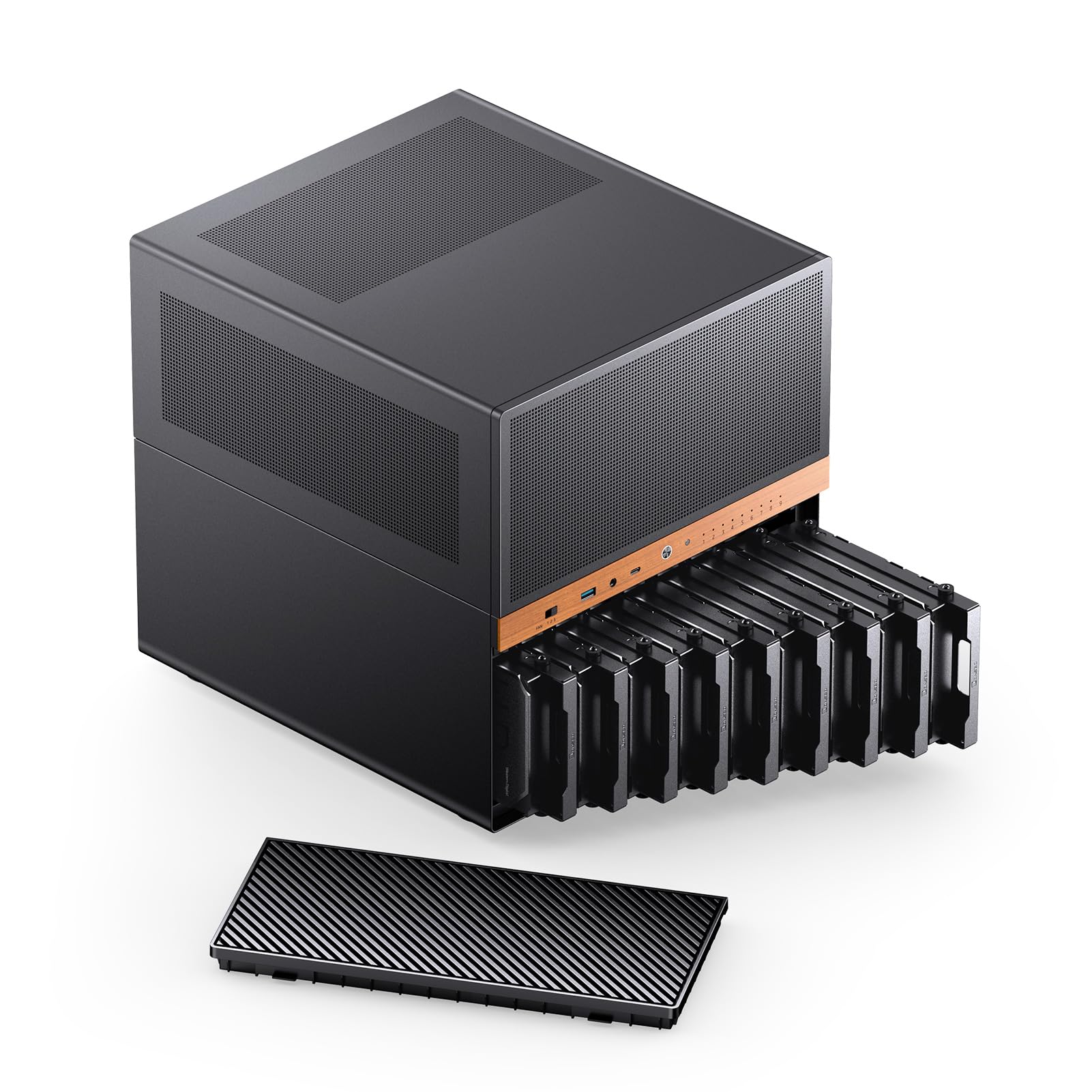
The JONSBO N6 packs nine drive bays with a hot-swap backplane into a compact mATX chassis, and the North American black walnut veneer adds a premium aesthetic rarely seen in NAS hardware. The front panel supports dual 120mm or 140mm fans, and the drive cage has its own dedicated 120mm fan mount for direct HDD cooling.
Power supply flexibility is a standout feature — the N6 supports both ATX (up to 220mm) and SFX PSUs with three different mounting positions, allowing you to prioritize cable clearance or airflow. GPU clearance up to 320mm means you can also repurpose this case for a gaming build later. The top panel is removable for easy access during assembly.
The backplane requires careful power cable planning: it has four power interfaces (two PATA, two SATA), and enterprise drives with higher startup current should use all four. Some users note that the drive mounts are not tool-less, and the lack of internal SSD mounting slots means you’ll need adapters for OS drives. Overall, this is a versatile and well-built mATX NAS case with premium materials.
Why it’s great
- Hot-swap backplane supports 9 drives in a compact mATX chassis
- Three PSU mounting positions for flexible cable management
- Classy wood veneer front panel
Good to know
- Drive mounts are screw-based, not tool-less
- Backplane power requires careful plug distribution
4. Rosewill THOR NAS Pro

The Rosewill THOR NAS Pro is a full-tower server chassis built for maximum expansion. It supports E-ATX motherboards and offers eight hot-swap 3.5-inch SATA/SAS bays plus five additional 5.25-inch external bays for optical drives or storage adapters. Two dedicated 2.5-inch SSD slots handle OS or cache drives.
A 140mm PWM fan at the rear provides adequate exhaust, and the steel body dampens vibration from multiple spinning drives. The front USB 3.2 Gen 2 Type-C port supports rapid transfers for enterprise workflows. Maximum expansion card length of 400mm means even the largest GPUs or RAID controllers fit without issue.
The hot-swap drive trays are plastic and feel less premium than metal alternatives, and the backplane uses older 4-pin molex connectors that require adapters for modern PSUs. The drive cage alignment can be slightly off, making tray insertion finicky. For builders who need E-ATX support and hot-swap capability in a single chassis, this offers strong value despite minor fitment quirks.
Why it’s great
- E-ATX motherboard support for server-class hardware
- 8 hot-swap 3.5″ bays plus 5 external 5.25″ bays
- USB 3.2 Gen 2 Type-C front port
Good to know
- Plastic drive trays feel less durable
- Backplane uses 4-pin molex, needs adapters
5. DARKROCK Classico Storage Master

The DARKROCK Classico Storage Master is a full-tower case that supports up to thirteen hard drives — ten 3.5-inch and three 2.5-inch — making it one of the highest-density ATX NAS chassis available. The mesh front panel and side panel allow unrestricted airflow, and four pre-installed 120mm fans keep drives cool. It also supports a 360mm radiator at the top or front for water cooling.
The vertical GPU mount prevents sag and keeps the graphics card away from the drive cage. Cable management is generous given the drive density, and the steel construction feels durable despite the budget-friendly price point. The internal layout is optimized for server-style builds, with plenty of space for large PSUs and full-size GPUs.
The main limitation is that the ten primary 3.5-inch bays are not hot-swap and require screw mounting. The included fans are adequate but not silent, so a fan upgrade is recommended for quiet builds. The metal panels have sharp edges in places, so handle with care during assembly. For sheer drive capacity at a low cost, this case is unmatched.
Why it’s great
- Thirteen total drive bays for massive storage density
- Mesh front and side panels for excellent airflow
- Supports 360mm radiator for liquid cooling
Good to know
- Drives screw-mounted, not hot-swap
- Sharp metal edges during assembly
6. JONSBO N3

The JONSBO N3 is a dense ITX NAS case that fits eight 3.5-inch HDDs plus a 2.5-inch SSD in a chassis roughly the size of a shoebox. The dedicated drive compartment uses a hot-swap backplane with dual 10cm fans for direct HDD cooling. A removable unified top cover simplifies initial assembly.
The split top-and-bottom compartment design separates the motherboard and PSU from the drive cage, improving cooling isolation. CPU cooler clearance is 130mm, which accommodates most low-profile air coolers. The front I/O includes a USB 3.2 Gen 2 Type-C port, making data transfers fast.
The stock fans are notoriously loud and should be replaced with 92mm Noctua units for silent operation. The manual provides minimal guidance for PSU installation, and the rubber drive grommets feel sloppy. The ITX form factor limits expansion to a single PCI-E slot, so plan for a low-profile HBA or GPU. For a compact 8-drive NAS that looks clean on a desk, this is a top contender.
Why it’s great
- 8 x 3.5″ drive capacity in a very small ITX footprint
- Dedicated drive compartment with hot-swap backplane
- USB 3.2 Gen 2 Type-C front port
Good to know
- Stock fans are very loud; replacement recommended
- ITX limits expansion to single PCI-E slot
7. JONSBO N2

The JONSBO N2 is a mini ITX NAS case with a brushed aluminum finish that looks more like a high-end audio component than a server chassis. It holds five 3.5-inch HDDs plus one 2.5-inch SSD in a cube that measures just 8.8 inches per side. A single 120mm fan is built in, and the removable upper cover provides easy access to the drive cage.
The layout is optimized for small personal servers. The integrated fan and restricted internal volume mean drive temps stay in check, but cable management is tight and must be done carefully to avoid blocking airflow. The build quality is excellent, with thick aluminum panels that dampen vibration.
The stock fan is loud at full speed, and many users swap it for a 15mm Noctua unit or connect it to the motherboard for PWM control. SFX PSU support is limited to 150mm length, so choose your power supply carefully. For a stealthy, desktop-friendly 5-bay NAS that fits in a living room shelf, the N2 is hard to beat.
Why it’s great
- Premium brushed aluminum finish blends into living spaces
- Compact cube supports 5 x 3.5″ drives
- Durable construction with vibration-dampening panels
Good to know
- Stock fan is loud; replacement recommended
- SFX PSU limited to 150mm length
8. Rosewill RSV-Z2900U

The Rosewill RSV-Z2900U is a 2U rackmount chassis with four internal 3.5-inch bays and two 2.5-inch slots, plus E-ATX motherboard support. Three pre-installed 80mm PWM fans provide airflow in a slim profile, and the front panel includes USB 3.0 ports and LED indicators for power, HDD, and LAN status.
The aluminum construction keeps weight down, and the included drive trays simplify assembly. The 2U height means this case fits standard 19-inch racks, making it suitable for home lab or small business environments where space is tight. Seven PCI expansion slots allow for RAID controllers or networking cards.
Clearances inside a 2U chassis are extremely tight. The CPU cooler height is limited to low-profile designs, and SATA cable routing near the fan housing requires careful planning. The PSU compartment is small, and a full-size ATX PSU may require wedging. For a dedicated rack-mount NAS with E-ATX compatibility, this delivers solid value despite the cramped interior.
Why it’s great
- 2U rackmount form factor fits standard 19-inch racks
- E-ATX motherboard support in a slim chassis
- Front panel USB 3.0 and status LEDs
Good to know
- Extremely tight clearances require careful component selection
- CPU cooler limited to low-profile designs
9. UGREEN DH4300 Plus

The UGREEN DH4300 Plus is a complete pre-built NAS appliance, not a DIY case. It comes with 8GB LPDDR4X RAM, a 2.5GbE port, and a user-friendly OS that includes AI photo album recognition and remote access. The four hot-swap 3.5-inch bays support up to 128TB of raw storage using RAID 0.
Setup is beginner-friendly — just install drives, connect Ethernet, and follow the app guide. SMB file sharing works seamlessly with macOS and Windows, and the HDMI output can stream 4K video directly to a TV. The magnetic top dust cover aligns easily during closing.
This is not a DIY case, so you cannot change the motherboard, CPU, or expand storage beyond four bays. The enclosure is plastic rather than metal, and drive noise is not well isolated. The software ecosystem is less mature than Synology or QNAP, lacking support for virtual machines. For a user who wants a simple, turnkey NAS without building a server from scratch, this is an excellent entry point.
Why it’s great
- Complete pre-built NAS with 2.5GbE and OS included
- AI photo recognition and remote access out of the box
- Very easy setup process for beginners
Good to know
- Not a DIY case; no motherboard or CPU upgrade options
- Plastic chassis does not isolate drive noise well
FAQ
Can I use a standard PC case for a NAS?
Do I need hot-swap bays for a home NAS?
What is the best motherboard size for a NAS case?
Why do stock fans in NAS cases often get replaced?
Final Thoughts: The Verdict
For most users, the best computer case for nas winner is the Fractal Design Node 804 because it offers dual-chamber cooling for up to eight drives in a compact mATX layout with excellent build quality. If you want hot-swap capability and full ATX support, grab the SilverStone CS380B. And for a space-saving ITX build that packs eight drives, nothing beats the JONSBO N3.

Mo Maruf
I created WellFizz to bridge the gap between vague wellness advice and actionable solutions. My mission is simple: to decode the research and give you practical tools you can actually use.
Beyond the data, I am a passionate traveler. I believe that stepping away from the screen to explore new environments is essential for mental clarity and physical vitality.