Our readers keep the lights on and my smoothie glass nicely filled. As an Amazon Associate, I earn from qualifying purchases.
Specs are compiled from manufacturer listings and verified buyer reviews and can change over time — please confirm the key details on the product page before buying.
A computer camera should make you look sharp, not like a pixelated potato. Between muddy autofocus, bad low-light handling, and confusing resolution claims, picking the right webcam is harder than it needs to be. This guide cuts through the noise to find the one that actually flatters your face on every call.
I’m Mohammad Maruf — the founder and writer behind WellFizz. This guide is built by comparing the manufacturers’ published specifications and the patterns across verified customer reviews, so you get each pick’s real strengths and trade-offs instead of marketing spin.
Below you will find honest breakdowns of seven models, from budget-friendly to premium, that make choosing your next computer camera simple and straightforward.
Our Picks at a Glance

How To Choose The Best Computer Camera
A good webcam is about more than just high resolution. You need to consider autofocus speed, low-light performance, and microphone quality to ensure you look and sound professional. Here are the key features to focus on.
Resolution and Frame Rate
The resolution determines how sharp your image looks. 1080p at 30 frames per second (fps) is the standard for most video calls. If you stream or record videos, 4K at 30fps or 1080p at 60fps gives you smoother, more detailed footage. Higher resolution is useless without a good sensor, so look for a Sony STARVIS or similar quality sensor for the best results.
Autofocus and Field of View
A fast autofocus system keeps you sharp even when you move, while a wide field of view (FOV) captures more of your background. For meetings, a 90-degree FOV is a good middle ground that shows you and your desk without distorting the image. Phase Detection Auto Focus (PDAF) is faster and more reliable than standard contrast-based autofocus.
Microphone Quality and Noise Cancellation
You should sound as good as you look. Built-in microphones vary wildly. Look for models with dual omnidirectional mics and active noise cancellation, which filter out background chatter and keyboard clicks. If your room is noisy, a webcam with AI-driven noise cancellation is a smart upgrade.
Quick Comparison
| Model | Best For | Max Resolution | Field of View | Microphones | Amazon |
|---|---|---|---|---|---|
| Logitech C920★ Best Overall | Reliable all-around 1080p | 1080p @ 30fps | Standard | Stereo | Amazon |
| Acer A640 4KAlso Great | Sharp autofocus & 60fps | 4K @ 30fps / 1080p @ 60fps | Standard | AI Noise Cancelling | Amazon |
| Elgato Facecam 4K | Studio-quality 4K60 | 4K @ 60fps | Standard | None (no mic) | Amazon |
| NexiGo N950P | Zoom-certified with remote | 4K @ 30fps | Standard | Dual Stereo Mics | Amazon |
| EMEET C60E | Dual-camera & 11x zoom | 4K @ 30fps | Wide & Telephoto | 2 Omnidirectional | Amazon |
| AOC 4K Webcam | Budget 4K entry | 4K @ 30fps | 90° | Noise-reducing | Amazon |
| RUWBY Pro HD 1080p | Basic budget with tripod | 1080p @ 30fps | Wide-angle | Dual noise-cancelling | Amazon |
In‑Depth Reviews
1. Logitech HD Pro Webcam C920
Our pick — over 4.5★ from 32,500+ verified ratings; the strongest balance of quality and price.
The 1080p legend that proved webcams could actually look good.
This is the webcam that set the standard for video calling. It delivers sharp Full HD 1080p video at up to 6000kbps/30fps (kilobits per second / frames per second) using H.264 hardware compression, which offloads the work from your computer so your calls don’t lag. It boasts an effective still resolution of 15 MP, though reviewers point out this is an interpolated figure from a lower native sensor. The dual stereo microphones capture decent sound, but customers note the lack of a mono setting can cause echo in open rooms.
The RightLight technology automatically adjusts for low-light conditions, though reviewers mention it leans a bit cool in color (giving a bluish tint). The autofocus range works between 1.4 and 14 inches, which means you need to stay within a certain distance for it to work well. Compared to the AOC 4K webcam, the C920 has a lower video resolution (1080 pixels vs 3840 pixels), but it is a much more refined and reliable experience for standard video calling.
Buyers consistently say they are very happy with the build quality, noting the image is far better than older Logitech models and that it works flawlessly on both Mac and PC. The versatile mount lets you place it on a monitor, a flat surface, or a tripod. It is a classic for a reason.
No-fuss video champion: It offers standard 1080p with H.264 compression that keeps your computer fast.
A note on audio: The stereo mics work well but may pick up reverb; a dedicated mic improves things.
Best for: Anyone wanting a proven, reliable 1080p webcam for daily Zoom, Teams, or Skype calls without needing the latest 4K tech.
Its limit: The autofocus is slower than newer PDAF models, and the stereo mics lack a mono setting for better clarity.
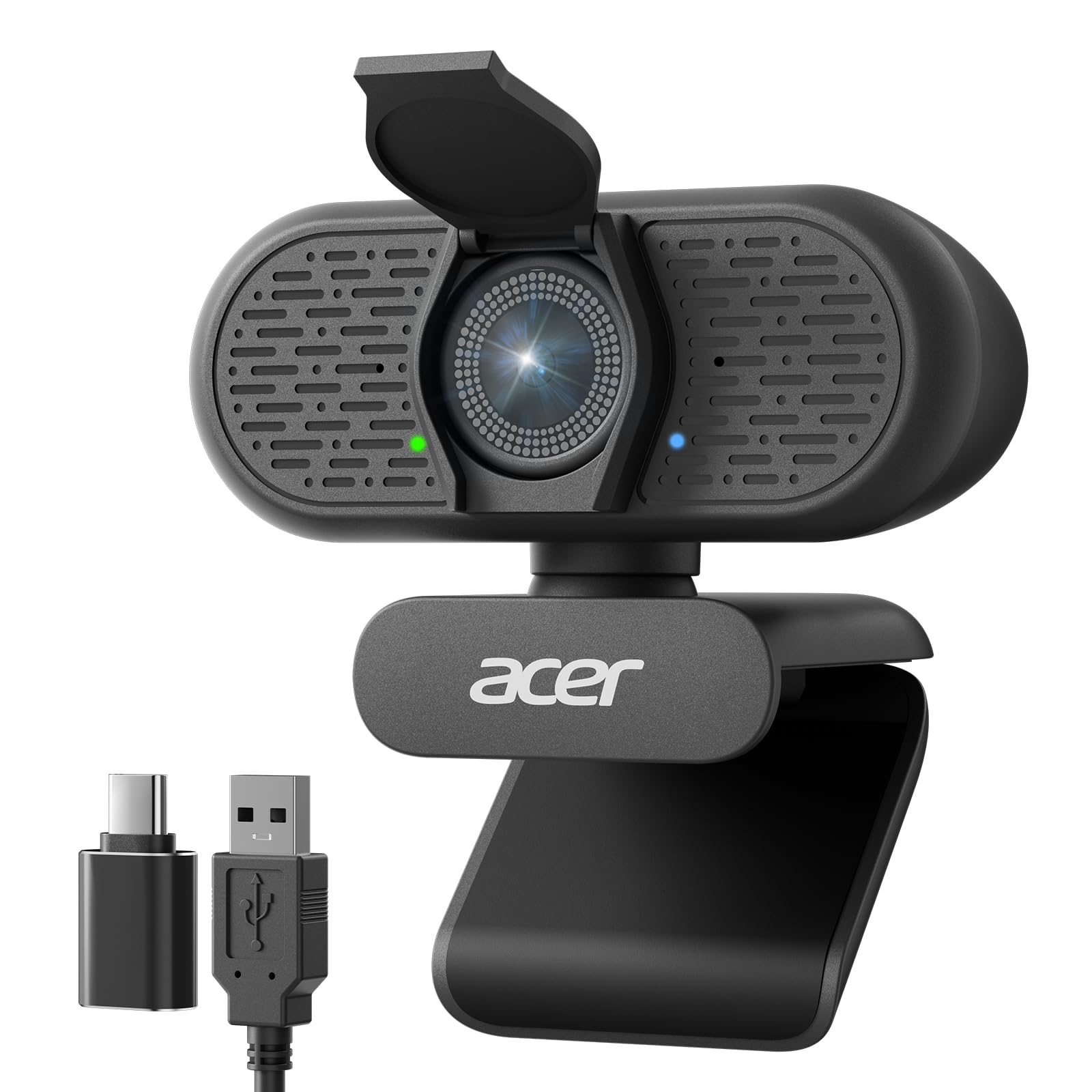
2. Acer A640 4K Webcam for PC with Sony Sensor
The autofocus that locks on instantly and never hunts for your face.
Leading the pack with a 4K effective video resolution of 3840 pixels, this webcam delivers significantly more detail than standard 1080p models (which have about 2 million pixels), meaning you get ultra-sharp detail for every call. It uses Phase Detection Auto Focus (PDAF), a type of autofocus that locks onto subjects much faster than the contrast-based system in many webcams, so you stay crisp even when you lean in or move around. Buyers report the video is clear and sharp, with the AI noise-canceling microphone doing a solid job of filtering out background noise during meetings.
You get smooth motion for recording or streaming without blur, thanks to 1080p at 60fps (frames per second). A built-in privacy shutter covers the lens when not in use, and the included USB-A to C adapter lets it plug into older and newer computers. Compared to the budget RUWBY webcam (limited to 1080p at 30fps), the Acer lets you choose between a higher resolution or a smoother frame rate depending on your task.
The low-light correction automatically brightens your image in dim rooms, helping you look professional even without a ring light. Owners mention that the wide-angle view captures everything nicely, making it a great fit for showing your workspace.
What Stands Out
- PDAF autofocus locks on instantly and keeps you sharp
- Flexible resolution options: 4K @ 30fps or 1080p @ 60fps
- AI-driven noise cancellation for clear audio
The Trade-Offs
- Requires good lighting for best 4K quality
- Software adjustments are limited via plug-and-play
Your best bet if: You want the fastest autofocus and the flexibility of 4K or 1080p at 60fps for work, streaming, or recording.
Think twice if: You need a built-in microphone with better range than desktop mics; this one works best for close-up calls.
3. Elgato Facecam 4K

DSLR-quality video from a webcam with no built-in mic.
For the streamer or professional who demands the absolute best image, the Elgato Facecam delivers 4K resolution at a fluid 60fps (frames per second), giving you smooth, lifelike motion that beats the 30fps limit of most webcams. Its Sony STARVIS 2 CMOS sensor (a high-sensitivity sensor designed for excellent low-light performance) and Elgato Prime Lens technology produce exceptionally sharp detail and vibrant color, which reviewers praise as superior to other 4K cameras. It also supports HDR (High Dynamic Range), which balances bright and dark areas of the image so you don’t look washed out by a window behind you.
The free Camera Hub software gives you DSLR-like manual control over exposure, white balance, and focus, so you can dial in the perfect look. A huge plus is the 49mm lens filter support; you can screw on a neutral density filter to control light, just like a real camera. Unlike the Logitech C920 which is purely plug-and-play with limited software, the Facecam lets you fine-tune every setting and save profiles to its internal flash memory. One key catch: it does not have a built-in microphone, as buyers have noted, so you will need a separate USB mic for audio.
The eco-friendly build uses low-waste materials, and the detachable 200cm (79-inch) USB-C cable gives you flexibility for desk setups. It is a premium tool, not a casual accessory.
Strengths
- True 4K resolution at 60fps for ultra-smooth video
- Manual controls via software give you full creative command
- 49mm lens filter support for professional light shaping
Weaknesses
- No built-in microphone; you must buy a separate one
- Requires a USB-C port and careful cable management
Reach for this if: You are a streamer or content creator who already owns a good microphone and wants the sharpest, most adjustable image available from a webcam.
Look elsewhere if: You want an all-in-one webcam with a microphone for simple conference calls.
4. NexiGo N950P 4K Zoomable Webcam with Remote Control

A 4K webcam that gives you remote control over the picture.
This is a Zoom-certified webcam (meaning it has been tested to work well with the Zoom platform) that offers true 4K quality at 30fps using an 8.5 Megapixel Sony sensor. The standout feature is the included remote control, which lets you zoom in and out (up to 5X digital zoom at 1080p), adjust volume, and even mute the camera without touching your computer. This is a standout in a boardroom or if you like to lean back and present.
You get both USB-A and USB-C cables in the box, plus a privacy cover. The built-in dual omnidirectional microphones (mics that pick up sound from all directions) with noise cancellation keep your audio clear. Reviewers point out the 4K picture is exceptional and crisp even in low light, though one reviewer noted the camera can be blurry unless you are 5 inches away, suggesting the autofocus has a minimum focus distance that requires attention. The adjustable clip and threaded base let you mount it on a monitor, laptop, or tripod.
While its zoom is digital (which crops into the image and can reduce quality), the remote makes it easy to frame your shot, unlike the Acer A640 which requires software control. It is a very capable option for professional conferencing.
Why It Impresses
- Remote control for zoom, mute, and volume
- 8.5 MP Sony sensor delivers excellent 4K detail
- Includes both USB-A and USB-C cables
Watch Out For
- 5X zoom is digital, not optical, so quality drops
- Some shoppers say autofocus issues at certain distances
A smart pick for: Professionals who lead meetings and need to zoom in on documents or their face without getting up.
A potential frustration: The autofocus may not be as reliable as the Acer’s PDAF system in all scenarios.
5. EMEET C60E Dual-Camera 4K Webcam for Streaming

Two cameras in one body for wide shots and tight close-ups.
This is the first webcam of its kind for streaming, featuring two physical cameras sharing a single 1/2.8-inch CMOS 4K sensor. The left wide-angle camera captures a panoramic view of you and your background, while the right telephoto camera offers detailed close-ups from a recommended distance of 13.8 inches. You can switch between them instantly, which is ideal for product demonstrations, teaching, or streaming where you need to show both your face and a close-up of an object.
It supports a max 11X hybrid zoom (a blend of optical and digital), and uses PDAF autofocus to keep the image stable as you zoom. Buyers report that the 1080p video is sharp, with accurate colors and fast autofocus, making it an excellent value at this price point. The RGB lighting adds a stylish, modern look and shows active status, and the remote control lets you manage zoom and camera switching without interrupting your stream. Unlike the single-lens AOC 4K webcam, this one gives you two distinct views without moving the camera.
The 2 omnidirectional microphones capture clear natural sound within a 9.8-foot radius. It is plug-and-play via USB 2.0 Type-A, but one buyer mentioned it lacks clear instructions for optimal settings in software like Zoom. It is a powerful tool for creators.
Key Strengths
- Unique dual-camera system for wide and close-up views
- Up to 11X hybrid zoom with fast PDAF autofocus
- Remote control and RGB lighting for streaming
Key Drawbacks
- Zoom not supported in 4K or 60fps modes
- Setup requires reading manual for best settings
Ideal for: Streamers, teachers, and product presenters who need to switch between a wide shot and a close-up without a second camera.
Not for: Simple conference calls; the dual cameras add complexity you won’t need.
6. AOC 4k Webcam for PC with Microphone

A budget-friendly way to get 4K on your desk, with a catch.
This webcam offers a great price for 4K Ultra HD video, with an effective video resolution of 3840 pixels. It features a wide 90° field of view, which is perfect for fitting a few people or your full desk into the frame. The built-in noise-reducing microphone and automatic light correction help you look and sound decent in less-than-ideal lighting.
Plug-and-play simplicity is a highlight—you just plug it in via the included USB-C to USB-A adapter and you are ready to go. It also has a physical sliding lens cover for privacy. However, there is a known issue: while it is listed as compatible with Windows 11, one owner reported the box says Windows 10 only, and the image had an uncorrectable green tint on Windows 11, leading to a return for refund. This is a risk to consider. The sharp video in moderate light and clear microphone make it a good pick for basic 4K use, but the compatibility concerns are real.
Compared to the more refined Logitech C920, this one offers a higher resolution (3840 vs 1080 pixels) but at the cost of potential software and OS compatibility issues. It is a solid bet if you are on a fully supported OS.
The 4K bargain: The resolution (3840 pixels) is a huge step up from 1080p models.
The real trade-off: Potential green tint issues on Windows 11 mean you should check compatibility carefully before buying.
Grab it if: You want to try 4K video calls on a tight budget and use a supported OS (check latest reviews).
Avoid it if: You rely on Windows 11 and cannot risk compatibility glitches that might tint your image green.
7. Pro HD 1080p/30fps Webcam with Tripod by RUWBY

A complete, tripod-ready kit for tiny budgets that actually works.
This is the cheapest webcam on our list, but it still delivers standard 1080p video at 30fps with a 2 MP effective still resolution. The real value here is the kit: you get an aluminum tripod with a universal 1/4-inch screw, a 5-foot USB cable, and a privacy shutter, all at a price that removes almost all financial risk. Owners mention the picture is clear with natural color and no blur or stutter, which is impressive for the price.
The dual noise-cancelling microphones capture sound up to 10 feet away, and the fast autofocus and low-light correction help you look your best. The 360° rotation and wide-angle lens give you flexible framing. However, one customer observed there is no way to turn off the autofocus feature, which can be annoying if you prefer a fixed focus. It is compatible with nearly every operating system and video platform, including Windows, Mac OS, Zoom, and Teams.
Compared to the Acer A640 which has a 4K resolution (3840 pixels wide), this one is strictly for basic, no-fuss calling. It is the perfect entry point if you need something cheap and functional. The tripod included gives it an edge over the Logitech C920, which does not ship with one.
What You Get
- Included aluminum tripod and privacy shutter
- Fast autofocus and low-light correction for its class
- Works on almost any OS and video platform
What You Give Up
- Cannot disable the autofocus feature
- Limited to 2 MP stills and standard 1080p
The bottom line: If your budget is very tight and you need a functional, all-in-one kit that includes a tripod and privacy cover, this is the one to get.
Its true limit: The autofocus that cannot be disabled may annoy users who prefer a fixed, stable frame for product demos.
Understanding the Specs
Resolution and Sensor Size
Resolution tells you how many pixels the image has (1080p = about 2 million pixels; 4K = about 8 million pixels). A higher resolution means a sharper image, but only if the sensor (the chip that captures light) is big enough to handle it. A small, poor-quality sensor in a cheap 4K webcam will look worse than a good sensor in a 1080p webcam. Look for known sensors like Sony STARVIS for the best image quality.
Field of View (FOV)
The field of view (FOV, measured in degrees) determines how much of the scene the camera sees. A 90-degree FOV is the balance for a single person: it shows you and your desk without distorting the edges. A wider FOV (like 110 degrees) will show more background but can make your face look smaller or distorted. A standard FOV (around 78-80 degrees) is best for tight shots where you want to fill the frame with just your face.
FAQ
Is 4K worth it for a webcam or is 1080p enough?
What is the difference between digital zoom and optical zoom?
How important is a privacy shutter for a webcam?
Can I use a webcam on a Mac or just Windows?
What does a dual noise-cancelling mic do for me?
Does a higher megapixel count guarantee a better image?
What is PDAF autofocus and why does it matter?
Is a 60fps webcam better than a 30fps one?
What is low-light correction in a webcam?
Will a webcam work with my Nintendo Switch or gaming console?
Final Thoughts: The Verdict
For most people, the computer camera winner is the Acer A640 4K because it combines the fastest PDAF autofocus with the flexibility of 4K or 1080p at 60fps, all at a price that beats premium rivals. If you want the absolute best image quality for streaming and do not need a microphone, grab the Elgato Facecam 4K. And for a proven, reliable 1080p workhorse at a lower price, the standout is the Logitech C920.
How We Picked
We do not accept paid placement. Every pick is matched to a real buyer and a real use-case; we do not hands-on test units.
Sources & Methodology
Specifications: manufacturer listings and product documentation. Review insights: verified customer reviews, as of July 2026. Pricing: not shown on this page (it changes often); check the current price via the retailer link.
As an Amazon Associate, WellFizz earns from qualifying purchases. This does not affect which products we feature.
Related Guides

Mo Maruf
I created WellFizz to bridge the gap between vague wellness advice and actionable solutions. My mission is simple: to decode the research and give you practical tools you can actually use.
Beyond the data, I am a passionate traveler. I believe that stepping away from the screen to explore new environments is essential for mental clarity and physical vitality.