Our readers keep the lights on and my smoothie glass nicely filled. As an Amazon Associate, I earn from qualifying purchases.
Specs are compiled from manufacturer listings and verified buyer reviews and can change over time — please confirm the key details on the product page before buying.
The keyboard you use in competitive gaming is the single biggest hardware factor controlling whether your next team fight starts with a crisp combo or a fumbled double-tap. While graphics cards and monitors get all the attention, the switch underneath your finger determines how fast that key actually registers, and different switch types, polling rates (how often the keyboard reports to your PC), and form factors change your real in-game speed. This guide breaks down seven mechanical keyboards built for the pace of ranked play, comparing the switch feel, build quality, and raw responsiveness that separate a winning peripheral from one that holds you back.
I’m Mohammad Maruf — the founder and writer behind WellFizz. This guide is built by comparing the manufacturers’ published specifications and the patterns across verified customer reviews, so you get each pick’s real strengths and trade-offs instead of marketing spin.
If you are buying a competitive keyboard, you want the fastest possible connection between your hand and the game, and this guide walks through which models deliver that speed without sacrificing the durability you need for long tournaments.
Quick Picks
- Corsair Vanguard PRO 96 Wired Hall Effect Magnetic — Best Overall
- Logitech G915 X Low-Profile Wired Mechanical Gaming Keyboard — Premium Low-Profile
- Razer BlackWidow V4 Pro Wired Mechanical Gaming Keyboard — Clicky Flagship
- Razer BlackWidow V4 X Mechanical Gaming Keyboard: Yellow — Silent Linear
- ASUS ROG Strix Scope II X Wired USB Mechanical Gaming — Hot-Swappable
- CORSAIR K70 CORE RGB Mechanical Wired Gaming Keyboard — Budget Linear
- Logitech G PRO Mechanical Gaming Keyboard (Tenkeyless) — Compact Tournament
How To Choose The Best Competitive Keyboard
The right competitive keyboard depends on three connected parts: the switch type that matches your play style, the form factor that frees up your mouse hand, and the build quality that survives daily ranked sessions. Focus on these first and everything else falls into place.
Switch Type: Linear vs Tactile vs Clicky
Linear switches (like the Razer Yellow or Logitech GL Red) have a smooth, uninterrupted press with no bump or click, making them the fastest for rapid double-taps and strafes because there is nothing slowing your finger on the way down. Tactile switches (like Logitech GX Brown) give a small bump midway so you feel exactly when the key actuates (registers the press), which some players prefer for precise, deliberate inputs. Clicky switches (like Razer Green) add an audible click on top of the bump, satisfying for typing but often too slow and loud for competitive gaming where speed and silence matter.
Form Factor: Full-Size vs Tenkeyless vs 96%
A tenkeyless keyboard (TKL — no number pad) removes the number pad entirely, shrinking the width so your mouse hand has more room to swing wide, a common choice in esports tournaments. Full-size keyboards keep the numpad, useful if you also do data entry or play MMOs (Massively Multiplayer Online games) with many keybinds, but they push your mouse farther away. The 96% layout (like the Corsair Vanguard PRO) crams arrow keys and a numpad into a frame roughly the size of a TKL, giving you both compact footprint and full function.
Polling Rate and Actuation Point
A standard keyboard reports its position to your PC every 1 millisecond, which is a 1000 Hz polling rate. Some keyboards now offer 8000 Hz polling (like the Corsair Vanguard PRO), reporting every 0.125 milliseconds, which reduces input lag further. The actuation point — how far you must press before the key registers — matters just as much; a shorter travel distance (like 1.2 mm on Razer Yellow switches) means your keystrokes land faster than traditional 2.0 mm switches.
Quick Comparison
| Model | Best For | Switch Type | Form Factor | Polling Rate | Amazon |
|---|---|---|---|---|---|
| Corsair Vanguard PRO 96 | Ultra-fast Hall Effect | Hall Effect (MGX Hyperdrive) | 96% | 8000 Hz | Amazon |
| Logitech G915 X | Low-profile linear speed | GL Red Linear | Full-size | 1000 Hz | Amazon |
| Razer BlackWidow V4 Pro | Tactile/clicky control | Green Clicky | Full-size | 1000 Hz | Amazon |
| Razer BlackWidow V4 X | Silent linear performance | Yellow Linear | Full-size | 1000 Hz | Amazon |
| ASUS ROG Strix Scope II X | Hot-swappable customization | NX Snow Linear V2 | Full-size | 1000 Hz | Amazon |
| CORSAIR K70 CORE | Value linear experience | MLX Red Linear | Full-size | 1000 Hz | Amazon |
| Logitech G PRO (TKL) | Compact tournament transport | GX Brown Tactile | Tenkeyless | 1000 Hz | Amazon |
In‑Depth Reviews
1. Corsair Vanguard PRO 96 Wired Hall Effect Magnetic Mechanical Gaming Keyboard

The speed king with magnets that let you tap without fully resetting the key.
This keyboard uses CORSAIR MGX Hyperdrive Hall Effect switches — a technology that uses magnets instead of physical metal contacts, so there is no wear-down and no wobble. The real difference for competitive play is the 8000 Hz hyper-polling, which reports your keystrokes to the PC eight times faster than a standard gaming keyboard, so your in-game actions happen the exact frame you press. On top of that, the Rapid Trigger Technology lets the actuation point reset dynamically as you lift your finger, meaning rapid taps like strafe-canceling in shooters do not require the key to travel back up fully.
The 96% layout crams arrow keys, a tenkey pad, six programmable G-keys, and a rotary dial into a frame roughly the size of a tenkeyless board — so you keep all the number keys without pushing your mouse away. A 1.9-inch IPS color screen (320 x 170 resolution) lives above the numpad for custom animations or game data. Unlike the full-size Logitech G915 X or the tenkeyless Logitech G PRO, this gives you the compact footprint of a TKL with the full key count of a wired board. Buyers report that while the iCUE software was initially web-only, it is now supported, and the adjustable actuation points make it a top-tier flagship.
The Speed Advantage
- Hall Effect switches rated for 150 million keypresses with wobble-free pre-lubed stems
- 8000 Hz hyper-polling eliminates input lag for frame-perfect reactions
- Rapid Trigger allows dynamically resetting actuation points for rapid taps
- Built-in Stream Deck functionality on the LCD screen for macros and game data
Current Limitations
- iCue support arrived later than expected, and web detection can be unreliable on some browsers
- Keycap print quality has been flagged for uneven legends on some units
- LCD screen has a narrow viewing angle that can be hard to read in normal sitting posture
Hall Effect standout: If you want the absolute fastest keystroke registration with zero physical contact wear and a compact layout that keeps every key, this is the pick that outpaces every other wired board in this list.
Consider your software tolerance: The iCue software is functional but has had an uneven rollout, so you need to be okay with occasional web-based setup quirks until the desktop app fully catches up.
2. Logitech G915 X Low-Profile Wired Mechanical Gaming Keyboard

A low-profile speed machine that feels like a race car cockpit for your fingers.
You get faster presses with less finger movement here. The G915 X uses GL Red linear switches (smooth press, no bump) with a 1.3 mm actuation point and a 3.2 mm total travel distance — shallower than most full-height mechanical switches, which means your presses land faster and with less finger movement. Measuring only 23 mm high, the whole keyboard sits low on the desk, reducing wrist angle during long sessions. The sand-blasted aluminum top plate and double-shot PBT keycaps (denser plastic that resists shine) give it a premium weight of 3.3 pounds that stays planted during intense rounds, unlike the lighter 2.1-pound ASUS ROG Strix Scope II X.
Unlike the tenkeyless Logitech G PRO, this is a full-size layout with a numpad, nine advanced G-keys, media controls, and a volume roller — so you can remap up to 15 functions per key using KEYCONTROL. LIGHTSYNC RGB lets you access about 16.8 million colors and sync with other Logitech G gear in G HUB. Owners mention that the low-profile design makes typing feel smooth and quiet, with one noting it returned the keyboard because light switches increased typing errors for long writing but calling it ideal for gaming. Another reviewer mentioned the keys are slightly closely spaced, creating a fat-fingering risk for some hand sizes.
Speed & Build
- Low-profile GL Red linear switches with 1.3 mm actuation for faster response than standard 2.0 mm switches
- Sand-blasted aluminum top plate and double-shot PBT keycaps for a durable, premium feel
- Nine G-keys and a volume roller for in-game macro control without reaching for the mouse
- LIGHTSYNC RGB syncs with other Logitech G gear for a unified lighting setup
Trade-Offs
- Key spacing is visibly tighter than a standard keyboard, which can cause fat-fingering for some users
- Lighting profiles do not save without the G HUB software running
- G-keys can be unintuitive to assign macros compared to simpler RBG software
Low-profile speed specialist: Grab this if you want a full-size keyboard with fast linear switches that sits low on the desk and feels rock-solid with its aluminum top plate — it beats the G PRO on key count and construction.
Watch the key spacing: If you have larger hands or tend to press two keys at once, the tighter layout could cause accidental presses during high-speed play.
3. Razer BlackWidow V4 Pro Wired Mechanical Gaming Keyboard

The tactile, clicky workhorse that doubles as a command center for macro-heavy players.
You get a physical and audible confirmation with every press here. The BlackWidow V4 Pro uses Razer Green mechanical switches with a tactile bump and a crisp click sound — this is not the fast, silent linear experience of the Yellow-switch BlackWidow V4 X. Instead, the tactile bump gives you a physical and audible confirmation that the key actuated, which some competitive players prefer for deliberate, precise inputs like building in battle royales or executing specific combos. The keyboard features per-key RGB with a 3-side underglow on the magnetic leatherette wrist rest, plus a programmable Command Dial that you can assign to adjust volume, zoom, or scrolling through inventory slots.
It has eight dedicated macro keys along the left side and a full-size layout with a numpad. The doubleshot ABS keycaps (standard plastic that can shine over time) are thick-walled to survive repeated use. Unlike the lighter 2.5-pound BlackWidow V4 X, this keyboard weighs significantly more and includes a magnetic wrist rest that buyers find comfortable for long play sessions. One reviewer with 12 years of mechanical keyboard experience said previous Razer keyboards lasted 2-5 years and the clicky sound is satisfying, though the Synapse software sometimes fails to auto-start.
Tactile Precision
- Green mechanical switches deliver a tactile bump and clicky sound for confident actuation feedback
- Command Dial and 8 dedicated macro keys give you extra control without reaching for the mouse
- Magnetic plush leatherette wrist rest with underglow stays secure during intense play
- Doubleshot ABS keycaps with extra-thick walls resist wear from prolonged use
The Clicky Cost
- Green switches are loud, which may disturb teammates or family members in shared spaces
- At over 3 pounds, it is heavy and not portable for tournament travel
- Side macro keys can be accidentally triggered when lifting or moving the keyboard
Tactile control pick: Reach for this if you prefer a clicky, tactile typing feel and want eight programmable macro keys plus a dial for in-game adjustments — it beats the standard BlackWidow V4 X on macro capacity and wrist rest quality.
Skip if you go quiet: If you play in a quiet room or stream without soundproofing, the loud switch noise will be a distraction, and the heavy weight makes it unsuitable for carrying to LAN events.
4. Razer BlackWidow V4 X Mechanical Gaming Keyboard: Yellow Switches

A silent linear board that survived coffee spills and still clicks the win button.
You get near-instant strafing with zero reset delay here. The Razer Yellow mechanical linear switches have zero distance between actuation and reset points — both at 1.2 mm — with only 45 grams of force required. This means each rapid press registers immediately without waiting for the key to spring back fully, which is critical for games where you need to strafe left and right in quick succession. Built-in sound dampeners keep the typing quiet, making it a better choice for shared rooms than the clicky Green-switch BlackWidow V4 Pro. Six dedicated macro keys sit on the left side, and a multi-function roller lets you adjust volume or brightness without pausing the game.
The doubleshot ABS keycaps have extra-thick walls to survive intense gaming, and a layer of special foam under the circuit board with lubricated stabilizers minimizes noise. Customers note that this keyboard is durable and well-built — one owner shared that it survived two coffee spills after an alcohol rinse and compressed air cleaning, which is a level of resilience you would not expect from a standard membrane board. The Chroma RGB per-key lighting supports over 16.8 million colors and integrates with hundreds of games for dynamic effects. At 20.5 inches long, 8 inches wide, and 2 inches high, it is wider than the tenkeyless Logitech G PRO (14.2 inches) by a noticeable margin, so make sure your desk has room.
Silent Speed
- Yellow linear switches with 1.2 mm actuation provide some of the fastest key registration in this list
- Sound dampeners and lubricated stabilizers keep typing quiet during late-night sessions
- Six macro keys and a multi-function roller for quick in-game adjustments
- Durable build survived reported coffee spills after cleaning
Size & Feel
- At 20.5 inches wide and 2.5 pounds, this is the largest full-size keyboard in the list and pushes your mouse hand farther right
- Some users mention the keys feel a little bulky compared to low-profile options like the Logitech G915 X
Silent linear workhorse: Pick this if you want fast, quiet linear switches with macro keys and a proven spill-resistant reputation — it delivers better silence than the clicky BlackWidow V4 Pro while keeping the same macro flexibility.
Check your desk space: The 20.5-inch width is the longest in this guide, so measure your gaming area before buying to ensure your mouse has enough room.
5. ASUS ROG Strix Scope II X Wired USB Mechanical Gaming Keyboard

The hot-swappable board that lets you swap switches without buying a whole new keyboard.
You can change your switch feel anytime without soldering here. The ROG Strix Scope II X comes with pre-lubed ROG NX Snow V2 linear switches that offer smooth, thocky keystrokes, but the real advantage for competitive players is that the switches are hot-swappable (you can remove and replace them without soldering). You can pull out the stock NX Snow V2 linear switches with the included 2-in-1 puller and replace them with any compatible mechanical switch — tactile or clicky — without desoldering anything. A buyer specifically mentioned the hot-swappable keys make customization easy, and the keyboard is sturdy with no flex.
The aluminum top plate and PBT double-shot keycaps give it a weighty, durable presence at 2.1 pounds. Integrated sound-dampening foam and switch-dampening pads absorb pinging noises and echoes, which makes it quieter than the clicky Razer BlackWidow V4 Pro. It has pre-programmed hotkeys (F1-F5) for Xbox Game Bar control, a multi-function wheel for media and lighting adjustments, and three angle adjustments plus a detachable wrist rest. One reviewer noted a sticky space bar and left shift key from the start, so check for that if you buy. The USB-C to USB-A connectivity is a modern convenience the older BlackWidow V4 X lacks.
Customization Freedom
- Hot-swappable NX Snow V2 switches let you swap to any feel without replacing the board
- PBT doubleshot keycaps resist shine and wear far longer than the ABS keycaps on most competitors
- Sound-dampening foam and pads make keystrokes quieter from the start
- USB-C connection is modern and detachable for cable management
Out-of-Box Risk
- Multiple buyers reported sticky space bar and left shift key on arrival, requiring additional lubrication
- The wrist rest is slightly firm, which some users may not prefer for long sessions
Switch-swapper’s choice: Grab this if you want a full-size board with the flexibility to change switch types later without buying a new keyboard — it beats the locked-in switches of the Logitech G915 X on customizability.
Inspect on arrival: Because sticky key issues have been reported on space bar and left shift, test those keys immediately after purchase rather than assuming everything is perfect from the start.
6. CORSAIR K70 CORE RGB Mechanical Wired Gaming Keyboard
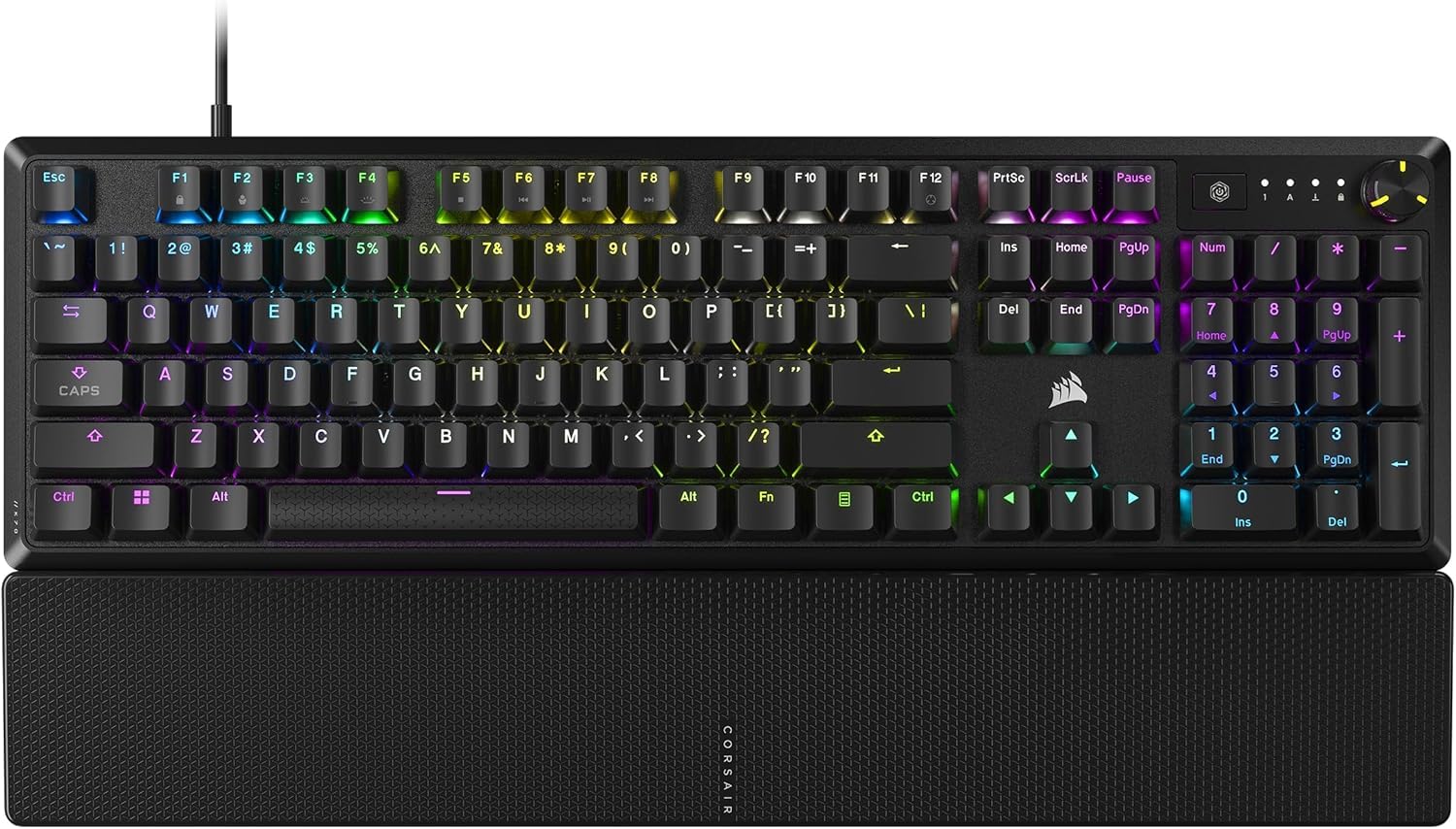
A smooth-switch board that gives you the linear feel without the top-tier price tag.
You get a comfortable wrist rest and a smooth press for less here. The K70 CORE uses pre-lubricated CORSAIR MLX Red linear switches, which deliver a smooth, responsive keystroke with two layers of sound dampening for a satisfying but not loud typing experience. This is a linear switch — no bump, no click — similar in feel to the Razer Yellow switches but with a slightly higher standard travel. The magnetic detachable soft-touch palm rest connects easily and gives you a comfortable hand position during long gaming sessions, a feature the tenkeyless Logitech G PRO does not include.
A multi-function rotary dial and programmable media button give you volume and media control via iCUE software. The aluminum top plate adds stability, and the doubleshot ABS keycaps resist cracking under pressure. At 17.64 inches long, 6.02 inches wide, and 1.39 inches tall, it is notably smaller than the 20.5-inch BlackWidow V4 X but is still a full-size keyboard. One critical buyer reported that a frequent double-typing issue persists after cleaning and software reinstall, and the iCUE software sometimes fails to recognize the keyboard, breaking lighting and macros. Another buyer found the volume knob to be the favorite feature and said large keys have minimal rattle.
Entry-Level Linear
- Pre-lubed MLX Red linear switches offer a smooth feel closer to premium switches than budget options
- Magnetic detachable palm rest is comfortable and easy to attach or remove
- Volume roller and media button give basic media control without leaving the keyboard
- Aluminum top plate adds stability and style without the high weight of full metal builds
Software & Quality
- Multiple buyers reported iCUE software failing to recognize the keyboard, breaking macros and lighting
- Frequent double-typing issue reported by more than one user, persisting after cleaning and reinstall
- RGB resets to rainbow when the PC locks, which some users find annoying
Budget linear desk companion: If you want a full-size linear switch keyboard with a comfortable wrist rest and a volume roller without spending for a premium board, this delivers the essential feel at a friendlier entry point.
Software risk is real: The iCUE software issues are not rare — be prepared for potential double-typing and recognition failures that may require troubleshooting you would not face with a simpler Logitech or Razer board.
7. Logitech G PRO Mechanical Gaming Keyboard (Tenkeyless)

The portable tenkeyless that frees up mouse room without losing essential game keys.
You get a compact board that gives your mouse hand more space to swing. The Logitech G PRO uses GX Brown tactile switches — these have a small bump in the middle of the press so you feel exactly when the key actuates, giving you tactile feedback without the loud click of a Clicky switch. It is a tenkeyless design (no number pad), which at 14.2 inches wide is 6.3 inches narrower than the Razer BlackWidow V4 X, leaving significantly more desk space for your mouse hand to move freely. The 1 ms report rate ensures your keystrokes arrive as fast as the keyboard can send them, matching the 1000 Hz polling of the full-size boards in this list.
A detachable micro USB cable with a three-pronged design makes packing for tournaments easy without risking port damage. The three-step angle adjustment and rubber feet keep the keyboard stable on any desk surface. Reviewers point out that after one year of use, only the down arrow key shows slight wear, suggesting the keycaps hold up well. One buyer mentioned the GX Brown switches have barely any tactile feel, feeling practically linear, so if you want a distinct bump, you may be disappointed. Another buyer mentioned the keyboard is compact, high-quality, and has a popular Logitech ecosystem for easy RGB customization via LIGHTSYNC.
Tournament-Ready Compactness
- Tenkeyless design frees up mouse space significantly compared to full-size options like the BlackWidow V4 X
- Detachable micro USB cable with secure three-pronged connection is easy to pack.
- Keycap wear reported as minimal after one year of use, indicating good durability.
- LIGHTSYNC RGB onboard memory keeps lighting settings even on tournament PCs without G HUB software.
Tactile Feel Disconnect
- GX Brown switches have such a faint tactile bump that many shoppers say they feel practically linear
- No hot-swappable option to change switch feel without replacing the whole keyboard.
Compact carry choice: Pick this if you frequently travel to LAN events or want maximum mouse real estate on a small desk — its tenkeyless shape is over 6 inches shorter than the largest full-size options here.
Not for tactile seekers: If you want a true tactile bump you can feel every time, the GX Brown switches here are so subtle they feel nearly linear, so you would be better off with a Razer Green switch board or a dedicated tactile switch.
Understanding the Specs
Switches
Mechanical switches are the physical mechanism under each keycap that registers a keystroke. There are three main types: linear (smooth press, fastest for rapid taps), tactile (has a bump mid-press so you feel activation, good for precision), and clicky (same bump plus a loud click sound). Some keyboards now use Hall Effect switches, which use magnets to detect key movement, allowing adjustable actuation points and faster reset without physical contact wear.
Polling Rate
This is how often the keyboard reports its state to your computer, measured in hertz (Hz). A standard gaming keyboard operates at 1000 Hz, meaning it reports once every millisecond (1/1000th of a second). Some high-end models like the Corsair Vanguard PRO use 8000 Hz, reporting eight times per millisecond, which reduces the gap between your press and the on-screen action. Higher polling rates matter most in fast-paced competitive games where every frame counts.
FAQ
Are linear or tactile switches better for competitive gaming?
Does a tenkeyless keyboard improve gaming performance?
What is Snap Tap or SOCD in a gaming keyboard?
Is 8000 Hz polling a real advantage or marketing hype?
Can I change switches on any mechanical keyboard?
How long do mechanical gaming keyboards typically last?
Does the Logitech G PRO work with Mac computers?
What is the difference between ABS and PBT keycaps?
Final Thoughts: The Verdict
For most buyers, the competitive keyboard winner is the Corsair Vanguard PRO 96 because it combines Hall Effect switches, 8000 Hz polling, Rapid Trigger technology, and a compact 96% layout in one package that outpaces every other wired board on speed and future-proofing. If you want a low-profile linear feel with premium aluminum construction, grab the Logitech G915 X. And for maximum macro control with tactile clicky feedback, the Razer BlackWidow V4 Pro is the pick for players who want a dedicated Command Dial and eight macro keys.
How We Picked
We do not accept paid placement. Every pick is matched to a real buyer and a real use-case; we do not hands-on test units.
Sources & Methodology
Specifications: manufacturer listings and product documentation. Review insights: verified customer reviews, as of July 2026. Pricing: not shown on this page (it changes often); check the current price via the retailer link.
As an Amazon Associate, WellFizz earns from qualifying purchases. This does not affect which products we feature.
Related Guides

Mo Maruf
I created WellFizz to bridge the gap between vague wellness advice and actionable solutions. My mission is simple: to decode the research and give you practical tools you can actually use.
Beyond the data, I am a passionate traveler. I believe that stepping away from the screen to explore new environments is essential for mental clarity and physical vitality.