Our readers keep the lights on and my smoothie glass nicely filled. As an Amazon Associate, I earn from qualifying purchases.
Specs are compiled from manufacturer listings and verified buyer reviews and can change over time — please confirm the key details on the product page before buying.
If your camera still uses CompactFlash cards, you know the pain: you wait forever for raw files to transfer. The reader you choose decides if that wait is a few seconds or a coffee break.
I’m Mohammad Maruf — the founder and writer behind WellFizz. This guide is built by comparing the manufacturers’ published specifications and the patterns across verified customer reviews, so you get each pick’s real strengths and trade-offs instead of marketing spin.
The best compactflash card reader for most people is the Lexar Professional 3-in-1 because it delivers the fastest top speeds (312 MB/s SD, 160 MB/s CF) with a replaceable USB-C cable. If you just need a small, reliable option for less money, get the Transcend RDF9. And if you own old Sony Memory Stick or XD cards, the Bawanfa Plus covers all three connectors (Lightning, USB-A, USB-C) so you can recover data on any device.
Our Picks at a Glance


How To Choose The Best CompactFlash Card Reader
Your CompactFlash reader sits between your camera’s card and computer. A slow or flaky one wastes time with every import; a solid one handles thousands of raw transfers without a hiccup. Here is what separates a great reader from one you will toss in a drawer.
Transfer Speed: The Real Bottleneck
A CF card reader’s transfer speed is measured in megabytes per second (MB/s) or gigabits per second (Gbps). Most modern readers hit around 5 Gbps over USB 3.0, but real-world reads depend on your card’s UDMA (Ultra Direct Memory Access) rating — the protocol that determines how fast the card can talk to the reader. A UDMA 7 card can reach up to 167 MB/s. Your reader must support UDMA 7 too, or you will leave speed on the table. Don’t get tricked: a “USB 3.0” label does not guarantee fast CF performance.
Slots and Simultaneous Use
A multi-slot reader (3-in-1, 5-in-1, 7-in-1) sounds like the dream. But simultaneous reading often splits the total bandwidth across active slots. If you dump three cards at once, each transfer may slow to a crawl. For speed, stick to one card at a time on a dedicated CF slot — even on a multi-card reader.
Build Quality and Connector
CF pins are delicate. A flimsy slot can bend a pin and ruin your card. Look for a sturdy frame (metal body is a good sign) and a USB-C connector (the reversible oval connector on modern laptops) if you own a newer laptop. An integrated or short cable reduces desk clutter and one less thing to lose.
Quick Comparison
| Model | Best For | Transfer Speed | Card Slots | Weight | Amazon |
|---|---|---|---|---|---|
| Lexar Professional 3-in-1★ Best Overall | Best Overall | 312 MB/s | 3 | 3.52 oz | Amazon |
| Transcend RDF9Compact & Stable | Compact & Stable | 260 MB/s | 3 | 2.8 oz | Amazon |
| Kxable 7-in-1 | Versatile Slot Spread | 5 Gbps | 7 | 1.59 oz | Amazon |
| llano 5-in-1 | USB-C Convenience | 4.99 Gbps | 5 | 2.82 oz | Amazon |
| MTIQHS 3-in-1 | iPhone/Android Direct | 20-30 MB/s | 3 | 1.44 oz | Amazon |
| Bawanfa Plus 5-in-1 | Legacy Card Reach | 480 MB/s | 5 | — | Amazon |
| Yeemie Pro 7-in-1 | Multi-Card Dumps | 5 Gbps | 7 | 3.53 oz | Amazon |
In‑Depth Reviews
1. Lexar Professional Multi-Card 3-in-1 USB 3.1 Reader
Our pick — over 4.5★ from 800+ verified ratings; the strongest balance of quality and price.
The workhorse reader that pairs a USB-C connector with class-leading transfer speeds for CF and SD cards.
If you own a modern laptop and value raw speed, this Lexar is your best pick. It delivers up to 312 MB/s for SD and microSD cards and up to 160 MB/s for CompactFlash cards — the Transcend RDF9 delivers 260 MB/s, which saves you minutes when you offload a full 64GB CF card from a day of shooting. The rubberized base keeps it planted on your desk, and the replaceable USB-C cable means you are not stuck with a broken cord. Buyers report it is a durable upgrade and that CF speeds near 82 MB/s and SD speeds near 255 MB/s line up close to the rated numbers. The catch: the CF slot uses delicate pins, so careless insertion can bend them — take your time sliding the card in. It weighs 3.52 ounces; the Transcend RDF9 weighs 2.8 ounces, but that extra heft comes from a solid build that feels like it will survive your gear bag.
Why It Leads the Pack
- Fastest overall transfer speeds: 312 MB/s SD, 160 MB/s CF
- Replaceable USB-C cable adds long-term durability
- Non-slip rubber base keeps the reader in place
The Only Headache
- CF slot pins are fragile — insert cards straight and slowly
- Heavier than some alternatives at 3.52 ounces
Who grabs this one: Photographers who want the fastest single-slot performance for both CF and SD, plus a cable they can replace if it wears out.
Who should skip it: Anyone who needs to read five different card types at once — this is a 3-slot reader, not a universal hub.
2. Transcend RDF9 Card Reader
A pocket-sized reader that runs cool and matches advertised speeds, perfect for photographers on a budget.
At 2.8 ounces and just 2.66 inches long, the Transcend RDF9 is smaller and lighter than the Lexar 3-in-1 (3.52 ounces) yet still delivers a strong 260 MB/s transfer rate — fast enough to dump a 64GB card in under 4 minutes if your card can handle it. It supports UHS-II SD cards (the faster standard for SD cards) alongside CF and microSD, making it a tidy companion for shooting with a two-card camera body. Owners mention that read speeds match what the card advertises, and that the reader does not overheat during long transfers. The USB 3.1 Type A interface (the rectangular port) plugs directly into a desktop or older laptop without an adapter. A USB-C variant is available if your machine only has the oval USB-C port. Three independent slots share a single USB bandwidth, so mixing two cards at once will split the speed — stick to one card for fast work.
Small Wonder
- Lightest in its mid-range: 2.8 ounces, easy to carry
- Runs cool under sustained load
- Includes RecoveRx data recovery software
The Limit
- USB Type A requires an adapter for USB-C-only laptops
- Top speed is 260 MB/s; the Lexar achieves 312 MB/s
Best match for: Budget-conscious shooters who want stable, reliable performance without paying a premium.
Consider something else if: You need USB-C from the start or you routinely offload huge batches of 4K footage and need the top-speed advantage of the Lexar above.
3. Kxable SD Card Reader 7 in 1

A 7-slot reader that reads five cards at once, bundled with both USB-A and USB-C cables.
The Kxable packs seven slots into a metal shell that measures just 2.74 inches long. It reads SD, microSD, CF, MMC, XD, and Memory Stick formats — so it handles old Sony camera cards and modern CF cards alike. The transfer speed climbs to 5 Gbps, but real-world speeds depend on the card’s own limits. The kit includes a 4-foot USB-A cable and a shorter USB-C cable, solving the port mismatch problem instantly. Customers note it is compact with a solid build, and that it accessed every memory card they threw at it, including ancient Sony Memory Sticks. The drawback: a single power light covers all slots, and every drive shows up as a generic mass storage device, which some users find messy. At 1.59 ounces, it is the lightest multi-slot reader here.
Why It Stands Out
- 7-in-1 coverage: reads XD, MS, and even MMC cards
- Two cables included (USB-A and USB-C) for broad compatibility
- Metal shell is durable and lightweight at 1.59 ounces
The Trade-Offs
- Single power/access light makes it hard to tell which slot is active
- All drives show as generic storage — no slot label in your OS
Pick this if: You own a mix of modern SD cards, old CF cards, and niche formats like XD or Memory Stick and want one reader for everything.
Skip it when: Speed is your top priority — the Lexar is faster on CF; this reader spreads bandwidth thin during simultaneous use.
4. llano 5-in-1 Micro SD Card Reader
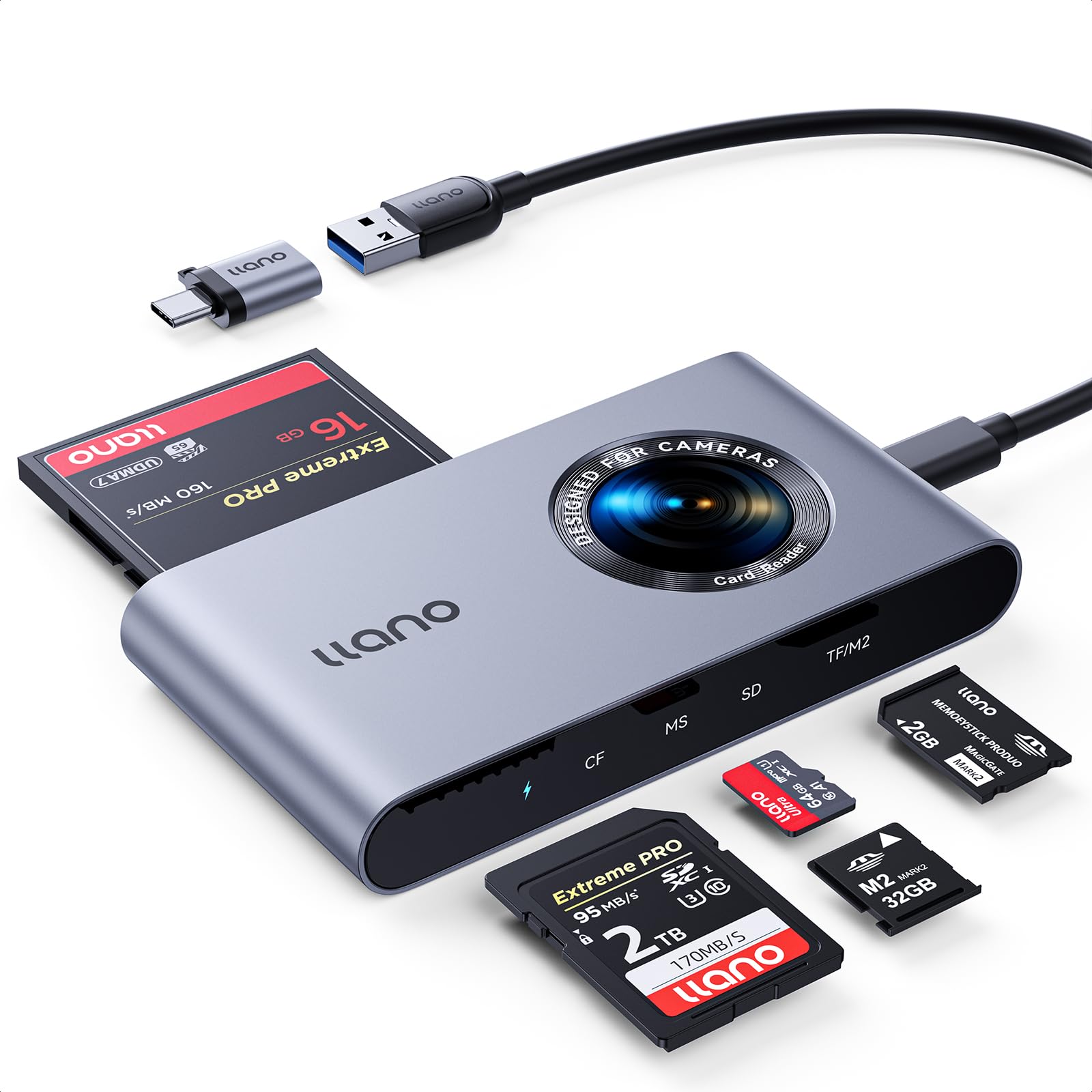
A USB-C reader with an aluminum body that reads CF, SD, microSD, MS, and M2 cards — all at once.
The llano 5-in-1 connects via USB 3.2 Gen 1 (which delivers 4.99 Gbps) and reads CF, MS (Memory Stick), SD, TF (TransFlash – same as microSD), and M2 (Memory Stick Micro) cards. It reads up to four cards at the same time, saving you from swapping cards when you have a mix of media to offload. The aluminum casing helps dissipate heat, so long transfers stay stable. It also includes a USB-C to USB-A cable and an adapter, giving you flexibility between old and new ports. Reviewers point out it is sturdy and compact, handling CF, SD, and MS cards reliably, and that plug-and-play works without drivers on Windows, Mac, Linux, and Chrome OS. One caution: the TF and M2 slots share a single interface, so you cannot use both at the same time. It supports cards up to 2TB capacity.
What Works Well
- Aluminum body feels premium and dissipates heat
- Supports cards up to 2TB capacity
- Triple-layered circuit protection against short circuits
One Limitation
- TF and M2 cards conflict — cannot use both simultaneously
- No connector cap included to protect the USB-C port when not in use
Who benefits most: Users with a USB-C laptop who need to transfer from CF, SD, MS, and M2 cards without carrying multiple adapters.
Not ideal for: Shooters who heavily use both TF and M2 cards — you will have to pick one at a time.
5. MTIQHS 3-in-1 USB C SD Card Reader for iPhone
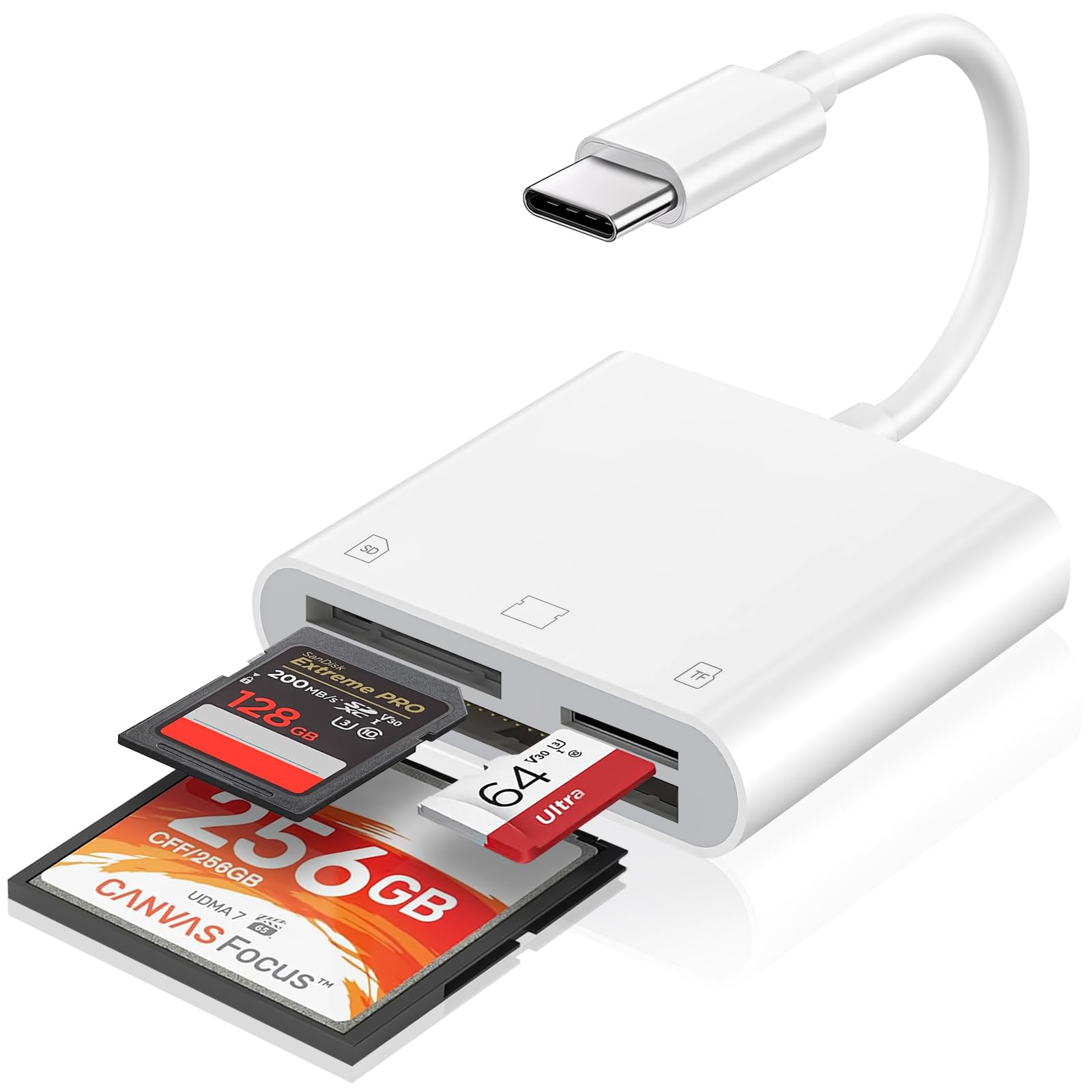
Built for iPhone and Galaxy users who want to pull photos off a CF camera card directly onto their phone.
This 3-in-1 reader supports SD, microSD, and CF cards via a USB-C connector and works with iPhones, iPads, MacBooks, and Android devices. It is the only pick on this list that lists device compatibility for iPhone 15 through 17, iPad Pro, iPad Air, and Samsung Galaxy S series. You plug it in, wait five seconds, and open the Photos app to import — no extra app needed. The data transfer speed sits at 20-30 MB/s; the Lexar achieves 312 MB/s. This speed is acceptable for browsing and sharing images on the go. Shoppers say it is perfect for transferring Fujifilm camera photos to an iPhone quickly, and that it works smoothly with Samsung Galaxy phones for trail cam footage. The short built-in USB-C cord keeps it tidy on a desk but may feel short if your phone case is thick. At 1.44 ounces, it is the lightest reader here.
Mobile-First Design
- Plug-and-play with iPhone, iPad, and Android via USB-C
- Supports RAW, JPEG, H.264, and MPEG-4 formats
- Lightweight at 1.44 ounces — easy to toss in a camera bag
Desktop Trade-Off
- Transfer speeds (20-30 MB/s) are much slower than USB 3.0 readers
- Built-in cord is short and not removable
Reach for this when: You edit or share photos on your phone while traveling and need a compact reader that works with CF cards from your main camera.
Look elsewhere if: Most of your importing happens on a desktop — a USB 3.0 reader like the Lexar will be 10 times faster.
6. Bawanfa Plus 5-in-1 Memory Stick Pro Duo Adapter

A five-slot reader with Lightning, USB-A, and USB-C connectors, built to revive data from Sony Memory Sticks and XD cards.
The Bawanfa Plus is the only reader here with a Lightning connector (the old Apple port before USB-C) for older iPhones alongside USB-A and USB-C, making it a bridging tool for vintage media. It reads TF (microSD), SD, MS, XD, and CF cards and can handle five cards at once via hot-swap. The transfer rate reaches 480 MB/s. The llano 5-in-1 has a rating of 4.99 Gbps. The aluminum body resists oxidation and high temperatures. Buyers report it works perfectly with XD cards on both a laptop and an iPhone with zero setup. One note: some Android phone users (Samsung S23 Ultra) had inconsistent results with USB debugging enabled — it worked once but not consistently, so plan to use this with a laptop or iPhone for reliable reads.
Universal Bridge
- Three connectors: Lightning, USB-A, USB-C — covers every device
- Reads XD cards, an increasingly hard-to-find slot
- Aluminum build for durability
Compatibility Catch
- Android phone support may be spotty depending on model
- No data recovery software or extras included
Best for: Anyone who stores old photos on Memory Stick Pro Duo or XD cards and wants a single reader that works with their phone and laptop.
Consider another option if: You need reliable plug-and-play with a modern Samsung phone — stick with a USB-C-only reader like the llano.
7. Yeemie Pro 7-in-1 Memory Stick Pro Duo Card Reader

A seven-port reader with individual green LEDs for each slot, designed to dump CF, SD, and XD cards simultaneously.
The Yeemie Pro matches the Kxable’s 7-in-1 slot count but adds a per-slot green LED so you know exactly which card is transferring. It reads two SD, two TF (microSD), one CF, one MS, and one XD card at once, and the USB-C interface delivers up to 5 Gbps. The heat-resistant aluminum alloy casting and tin-plated copper core in the cable are built for longevity — making it sturdier than the Kxable’s metal shell. It handles cards up to 2TB, so it future-proofs your purchase as card capacities grow. Owners mention it worked on every card they tried and easily recovered photos from old Sony Cyber-shot Memory Sticks. The plug-and-play setup requires no drivers — insert, open the files app, and transfer. At 100 grams (3.53 ounces), it is the heaviest reader here, but the sturdy construction justifies the weight. It comes with a USB-C cable only, so no USB-A is included.
What You Get
- Individual green LEDs per slot show transfer activity
- 7-in-1 format coverage: 2x SD, 2x TF, CF, MS, XD
- Heat-resistant aluminum body with reinforced cable
What to Know
- Heaviest pick at 100 grams — noticeable in a small bag
- No USB-A cable included; USB-C only
Choose this if: You routinely juggle multiple card types and want a visual cue showing which slot is active.
skip it if: Your computer lacks a USB-C port and you do not want to carry an adapter.
Understanding the Specs
Transfer Speed: MB/s vs Gbps
You will see speeds in both megabytes per second (MB/s) and gigabits per second (Gbps). 5 Gbps equals roughly 625 MB/s in raw bandwidth, but real-world speed depends on your card’s UDMA (Ultra Direct Memory Access) rating and the reader’s controller. A CF card at UDMA 7 tops out around 167 MB/s, so a reader rated at 260 MB/s or 312 MB/s will actually run at the card’s limit, not the reader’s. For everyday use, anything above 250 MB/s is fast enough; the Lexar (312 MB/s) and Transcend (260 MB/s) are both excellent.
UDMA Support
Ultra Direct Memory Access (UDMA) is the protocol that CF cards use to talk to your reader. UDMA 7 allows speeds up to 167 MB/s. If your reader only supports UDMA 6 (100 MB/s), a fast CF card will be capped at that slower speed. This matters most if you own newer or pro-level CF cards. Every reader on this list supports UDMA 7, but always check the fine print if you buy elsewhere.
Slot Count and Bandwidth Sharing
Multi-card readers (5-in-1, 7-in-1) sound convenient, but almost all of them share one USB connection. If you insert three cards and try to read them at the same time, the total bandwidth splits between them. For the fastest single-card transfer, use only one slot at a time.
Connector Type: USB-A vs USB-C vs Lightning
Your device’s port dictates the connector you need. USB-A (the rectangular one) is still common on desktops and older laptops. USB-C is the modern reversible oval connector on most new computers and phones. Lightning is exclusive to Apple devices before the iPhone 15 switched to USB-C. Some readers, like the Bawanfa Plus, include all three, making them universal. A reader with a detachable cable, like the Lexar, is more future-proof because you can swap the cable if your next laptop changes ports.
FAQ
Will a CompactFlash reader work with my CFast or CFexpress card?
Can I use a CF to SD adapter instead of a CompactFlash reader?
Why is my CompactFlash reader slower than the advertised speed?
How do I safely insert a CompactFlash card without bending the pins?
Can I leave a CF card reader plugged in all the time?
Does a USB 3.2 Gen 1 reader work on a USB 2.0 port?
Is an aluminum body better than plastic for a card reader?
How many cards can I read simultaneously on a 7-in-1 reader?
What does the green LED indicator on a card reader mean?
Final Thoughts: The Verdict
If you want one dependable pick, the best compactflash card reader is the Lexar Professional 3-in-1 because it delivers the fastest top-end speeds (312 MB/s SD, 160 MB/s CF), a replaceable USB-C cable, and a sturdy rubber base that keeps it planted on your desk. If you want a smaller, budget-friendly option that runs cool and matches advertised speeds, grab the Transcend RDF9. And for those who need to dig up data from old Sony Memory Sticks or XD cards, the standout is the universal compatibility of the Bawanfa Plus 5-in-1 with its Lightning, USB-A, and USB-C connectors.
How We Picked
We do not accept paid placement. Every pick is matched to a real buyer and a real use-case; we do not hands-on test units.
Sources & Methodology
Specifications: manufacturer listings and product documentation. Review insights: verified customer reviews, as of July 2026. Pricing: not shown on this page (it changes often); check the current price via the retailer link.
As an Amazon Associate, WellFizz earns from qualifying purchases. This does not affect which products we feature.
Related Guides

Mo Maruf
I created WellFizz to bridge the gap between vague wellness advice and actionable solutions. My mission is simple: to decode the research and give you practical tools you can actually use.
Beyond the data, I am a passionate traveler. I believe that stepping away from the screen to explore new environments is essential for mental clarity and physical vitality.