Our readers keep the lights on and my smoothie glass nicely filled. As an Amazon Associate, I earn from qualifying purchases.
Specs are compiled from manufacturer listings and verified buyer reviews and can change over time — please confirm the key details on the product page before buying.
Choosing a compact computer case means finding a tiny box that still fits a big GPU, keeps temperatures under control, and does not make you fight every cable. The challenge is that not every small case handles the same hardware, so you need to match the interior layout to your specific components rather than just picking the smallest exterior.
I’m Mohammad Maruf — the founder and writer behind WellFizz. This guide is built by comparing the manufacturers’ published specifications and the patterns across verified customer reviews, so you get each pick’s real strengths and trade-offs instead of marketing spin.
The aim is to help you pick the best compact computer case for your next build without guessing whether your GPU fits or your cooling works.
Quick Picks
- Lian Li A3-mATX-WD-26.3L Micro Form Factor Chassis — Best Overall
- Fractal Design Terra Graphite — Premium Pick
- ASUS Prime AP201 Micro ATX PC Case — Best Value
- JONSBO Z20 Black Micro-ATX Mini Tower PC Case — Compact Power
- Thermaltake View 170 TG ARGB Black Micro-ATX Case — Style Pick
- SilverStone Technology Ultra Compact Mini-ITX Computer Case SG13 — Budget Champion
How To Choose The Best Compact Computer Case
Start with your motherboard size (Mini ITX or Micro ATX), then check GPU length, CPU cooler height, and PSU type — because a case that looks small on paper might reject your biggest parts.
Motherboard Form Factor
Mini ITX boards fit into almost any compact case, but they limit you to one expansion slot. Micro ATX gives you more slots and RAM slots while still fitting in a moderately sized case. Verify that the case explicitly lists your board size in its specs.
GPU and Cooler Clearance
Long graphics cards are the most common fit problem in compact cases. Look for the max GPU length in millimeters (e.g., 338mm), and compare it to your card’s length plus any front radiator or fan thickness. CPU cooler height is equally important if you are using a tower air cooler.
PSU Compatibility
Some compact cases take a full-size ATX power supply, which saves you from buying a pricier SFX unit. Others require a smaller SFX or SFX-L PSU. Check the case’s PSU mounting location and max PSU length before buying.
Quick Comparison
On smaller screens, swipe sideways to see the full table.
| Model | Best For | Form Factor | Max GPU Length | Max CPU Cooler Height | Amazon |
|---|---|---|---|---|---|
| Fractal Design Terra | Premium Mini ITX | Mini ITX | 322 mm | — | Amazon |
| Lian Li A3-mATX | Max GPU Clearance | mATX / ITX | 415 mm | — | Amazon |
| ASUS Prime AP201 | ATX PSU + 360mm AIO | Micro ATX | 338 mm | — | Amazon |
| JONSBO Z20 | Portability / Handle | Micro ATX | 363 mm | 164 mm | Amazon |
| Thermaltake View 170 TG | Glass Aesthetic / Value | Micro ATX | 340 mm | — | Amazon |
| SilverStone SG13 | Ultra-Compact Travel | Mini ITX | — | — | Amazon |
In-Depth Reviews
1. Lian Li A3-mATX-WD-26.3L Micro Form Factor Chassis

The compact case that fits a 415mm GPU and still looks like furniture.
This case gives you a 415mm GPU clearance versus the ASUS Prime AP201 at 338mm, so you can drop in almost any high-end graphics card without measuring. It supports motherboards up to mATX or ITX size and holds a 360mm radiator or up to ten 120mm fans — a huge amount of cooling for a 26.3-liter chassis. The walnut wood front panel and steel mesh sides mean it blends into a living room or office setup rather than screaming “gaming rig.”
Buyers report that the case is sturdy, mesh-heavy, and offers excellent airflow with near-silent operation. The build is straightforward for ATX and Micro-ATX boards, though one experienced builder noted cable management can be tight and requires some planning. Dust collects on the top mesh quickly, but a monthly vacuum keeps it clean.
Compared with the SilverStone SG13 at 1 internal drive bay, the Lian Li A3 has 4 internal bays and lets you mount the PSU in front or on the side for better cable routing. It does not include fans, so budget for at least two extras.
Top Strengths
- Massive 415mm GPU clearance
- Supports 360mm AIO and up to 10 fans
- Attractive wood-and-mesh design
Things to Know
- Fans are not a highlight here
- Cable routing is tight for beginners
- Dust accumulates quickly on top mesh
Reach for this if: you want the absolute most GPU and cooling headroom in a case that still looks clean on a desk.
Look elsewhere if: you prefer to have fans ready from the start or dislike planning cable routes.
2. Fractal Design Terra Graphite

A 10.4-liter walnut-and-aluminum masterpiece for minimalist ITX builds.
The Fractal Design Terra squeezes into just 10.4 liters while accommodating a GPU up to 322mm long, something most sub-11L cases cannot touch. The front panel is cut from sustainably sourced solid walnut, and the body uses anodized aluminum panels, including an 8mm-thick aluminum front. A slidable central wall gives you 30mm of internal flexibility to balance CPU cooler and GPU space — you choose the trade-off.
Buyers confirm that the build process is easy for an ITX case, especially with the tool-less panels and sliding motherboard tray. The included PCIe 4.0 riser cable saves you an extra purchase. One owner noted the Ryzen 7 9700X and Radeon RX 9070 stayed cool inside despite the small size, though the CPU fan against the side grill can produce a whistling noise depending on alignment.
The catch is cooling: the Terra is limited to a single 120mm fan and air cooling only, so high-TDP components can run hotter. You will also pay a premium, but buyers overwhelmingly say the build quality and design justify the price.
Build Highlights
- Stunning walnut and aluminum build
- PCIe 4.0 riser included
- 30mm adjustable central wall for flexibility
Space Constraints
- Only fits one 120mm fan
- Air cooling only, no AIO support
- Premium price point
Perfect for: builders who prioritize aesthetics and a tiny footprint over extreme cooling or budget.
Not for: anyone planning to use a liquid cooler or high-TDP overclocked CPU/GPU in a quiet setup.
3. ASUS Prime AP201 Micro ATX PC Case

A value-packed mATX case that accepts a full-size ATX PSU and a 360mm AIO.
The AP201 fits a full-size ATX power supply up to 180mm long and a 360mm radiator, which is rare for a case in the 33-liter class. It supports GPUs up to 338mm long, so most modern cards slide right in. The mesh front panel has over 57,000 precision-machined 1.5mm holes for airflow, and the tool-free side panels use a simple clip mechanism that stays secure but pops off easily. Owners mention it fits a 170mm CPU cooler with the ATX PSU installed without clearance issues.
At 12.7 pounds, the AP201 is heavier than the JONSBO Z20 at 10.3 pounds, which gives it a sturdier feel on a desk. Customers note excellent cable management thanks to the 32mm gap behind the motherboard tray and strategically placed cutouts. The downsides: no front fan mount (you need to use the mesh panels for intake), and 3.5-inch HDD mounting points may not align properly — you might need a separate bracket.
Compared to the SilverStone SG13, which has only 1 internal bay, the AP201 offers 4 bays and more flexible storage options.
Why It Wins
- Accepts full-size ATX PSU and 360mm AIO
- 338mm GPU clearance
- Sturdy 12.7lb build with tool-free panels
Trade-Offs
- No front fan mount
- 3.5-inch HDD bracket alignment may be off
- Larger footprint than ITX cases
Best for: builders who want a mid-range mATX case that fits an ATX PSU and large AIO without spending premium dollars.
Consider alternatives if: you need front fan mounting or an ultra-compact footprint.
4. JONSBO Z20 Black Micro-ATX Mini Tower PC Case

A 20-liter mATX case you can carry to LAN parties with a detachable handle.
The JONSBO Z20 packs a surprising amount of hardware into about 20 liters: it supports a GPU up to 363mm, a CPU cooler up to 164mm, and a 240mm AIO at the top. It even fits an ATX power supply, though most buyers agree an SFX fully modular unit makes cable management much easier. The detachable carrying handle is a rare feature in this size class, making it genuinely portable.
Buyers praise the build quality — the steel panels are thick (up to 2mm in some areas) with large square ventilation cutouts and a powder-coated finish. One reviewer noted that CPU temperatures rarely exceed 73°C and GPU peaks at 71°C under gaming load, with quiet fan operation. The case includes a tempered glass side panel and front I/O with USB 3.2 Gen 2 Type-C. Keep in mind: no fans are included, cable routing is tight in mATX mode, and some reviewers point out the bright blue power LED is distracting in dark rooms.
At 10.3 pounds, the Z20 is lighter than the ASUS AP201 at 12.7 pounds, which makes the handle more practical for actually carrying it.
Portable Perks
- Detachable carrying handle
- 363mm GPU clearance
- USB 3.2 Gen 2 Type-C front port
Build Notes
- No fans included
- Bright blue power LED
- Tight cable routing for mATX builds
Great for: gamers who travel with their PC or need a compact case that fits inside a backpack or carry-on.
skip it if: you prefer pre-installed fans or are building a full ATX system.
5. Thermaltake View 170 TG ARGB Black Micro-ATX Case
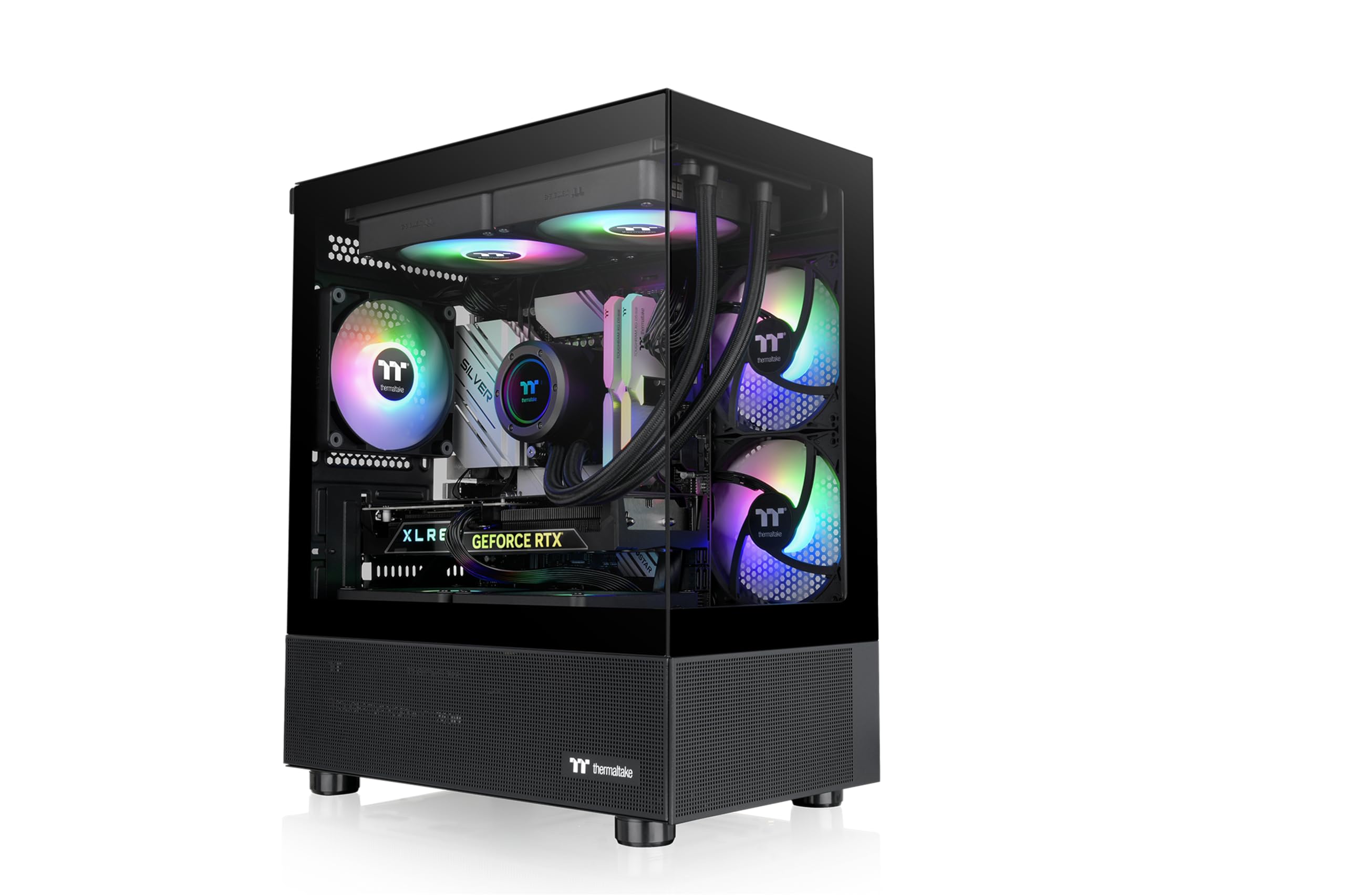
You get a glass side panel and three pre-installed ARGB fans (addressable RGB fans that let you control each LED’s color) for a price that undercuts most rivals.
The View 170 TG uses dual tempered glass panels (front and side) in a pillarless “fish tank” design that shows off your RGB build from almost every angle. It comes with three 120mm ARGB fans pre-installed, so you do not have to buy extra cooling right away. It supports a GPU up to 340mm and a 280mm radiator at the top, and shoppers say the cable management is excellent — one reviewer called it the “best SFF case on the market” for cable routing.
Buyers report the case feels lightweight (10.3 pounds) but becomes stiff and sturdy once components are installed. The clean build hides cables well, and the power button has a satisfying click. The main trade-offs: no USB-C port on the front I/O (only USB 2.0 slots), and no RGB controller included, so you need a motherboard header or aftermarket controller to control lighting. The motherboard standoffs on some B550-M boards did not align perfectly for one reviewer.
Unlike the SilverStone SG13 which uses a 140mm fan and is limited to Mini ITX, the Thermaltake supports Micro ATX and offers more expansion room and included fans right away.
What Stands Out
- Dual tempered glass panels for full RGB view
- 3 ARGB fans included
- Excellent cable management
What Is Missing
- No front USB-C port
- No RGB controller included
- Standoff alignment can be off on some boards
Go for it if: you want a flashy glass case with fans included and a low entry price.
Pass if: you need USB-C on the front panel or want full control over fan choice.
6. SilverStone Technology Ultra Compact Mini-ITX Computer Case SG13

The shoebox-sized ITX case that fits an ATX PSU and costs under retail for a fan.
The SilverStone SG13 measures just 11.5 liters — the smallest case on this list — yet it still accepts a full-size ATX power supply and standard-length GPUs up to 10.5 inches. It supports either a 120mm or 140mm front fan or a single-fan AIO liquid cooler, and owners mention that adding extra 80mm fans dropped idle temps from 63°C to 38–42°C. The mesh front panel gives decent airflow for its size, and the steel body feels solid despite its tiny footprint.
Customers note it fits in a duffel bag and the sturdy build protects components during travel. The trade-offs: it ships with zero fans (which keeps the price low), the front I/O cables feel flimsy, and the front-panel clips can snap if you do not unscrew them first. You will need a modular PSU (a power supply with detachable cables) to manage wires in the tight interior.
Compared to the Thermaltake View 170 (14.86″ deep), the SG13 is much shallower at 8.74″ deep, making it the obvious choice if desk space is measured in inches.
Why It Is Popular
- Ultra-compact 11.5L footprint
- Accepts full-size ATX PSU
- Budget-friendly entry to SFF
Budget Caveats
- No fans included
- Front panel clips are fragile
- Only 1 internal bay
For you if: you want the smallest possible case that still takes an ATX PSU, and you are comfortable adding your own cooling.
Not for you if: you want out-of-box cooling or more than one drive bay.
Understanding the Specs
GPU Clearance (mm)
This is the maximum graphics card length the case can hold, measured from the back bracket to the front of the interior. If your card is even 1mm longer, it will not fit. Always check your GPU’s official length before buying a compact case — some high-end cards exceed 340mm.
Motherboard Form Factor
Mini ITX (smaller, one slot, tighter builds) vs Micro ATX (wider, more slots, better expansion) is the main split in compact cases. Many cases say “mATX” but still fit ITX boards, but the reverse is rarely true. A smaller board inside a slightly larger case often makes cable management easier.
FAQ
Will a full-size ATX power supply fit in a compact computer case?
What is the difference between Mini ITX and Micro ATX compact cases?
How do I know if my GPU fits inside a compact case?
Do compact cases run hotter than full-size cases?
Can I use a liquid cooler (AIO) in a compact case?
What is a good CPU cooler height for a compact case?
Are compact computer cases good for gaming?
Do I need a special motherboard for a small form factor case?
Will a 3.5-inch hard drive fit in a compact case?
How many fans should I put in a compact case?
Final Thoughts: The Verdict
If you want one dependable pick, the compact computer case winner is the Lian Li A3-mATX because it fits the largest GPU (415mm) and supports 360mm AIO cooling in a size that still looks great on a desk. If you want a premium miniature build, grab the Fractal Design Terra. And for a budget-friendly entry into SFF that still takes an ATX PSU, the SilverStone SG13 is the compact champion.
How We Picked
We do not accept paid placement, and we did not hands-on test every unit. Instead, we match each pick to a real buyer and use-case by comparing the manufacturers’ published specifications against the patterns in verified customer reviews — so you get each pick’s real strengths and trade-offs instead of marketing copy.
Sources & Methodology
Specifications: manufacturer listings and product documentation. Review insights: verified customer reviews, as of July 2026. Pricing: not shown on this page (it changes often); check the current price via the retailer link.
As an Amazon Associate, WellFizz earns from qualifying purchases. This does not affect which products we feature.

Mo Maruf
I created WellFizz to bridge the gap between vague wellness advice and actionable solutions. My mission is simple: to decode the research and give you practical tools you can actually use.
Beyond the data, I am a passionate traveler. I believe that stepping away from the screen to explore new environments is essential for mental clarity and physical vitality.